
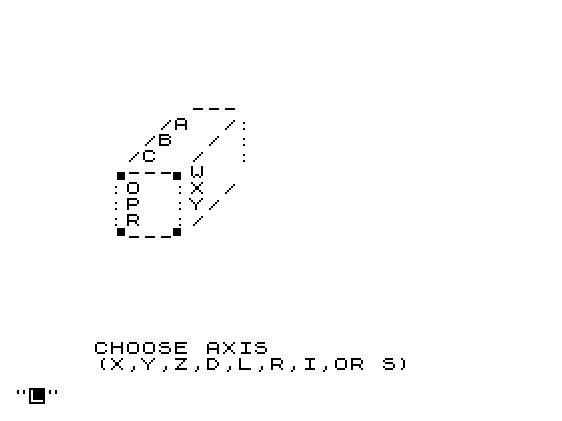
Cube Game is a Rubik’s Cube simulator that stores each face of a 3×3×3 cube as a two-dimensional string array, allowing the user to input the current state of a physical cube and then apply rotations. The program supports three display modes: a flat unfolded net, a solid cube view, and a see-through wireframe representation drawn using text graphics. Rotations are specified by axis (X, Y, or Z) and a numeric direction argument, including compound moves (±4) that chain three sequential sub-moves using GOSUB. A move history is maintained in the 500-element string array N$, and the original cube state is preserved in shadow arrays (G$ through L$) so the user can reset or inspect the starting configuration at any time.
Program Analysis
Program Structure
The program is organized into a clear sequence of phases: initialization (lines 10–89), cube face data entry (lines 100–160), display mode selection (lines 161–194), the three display rendering routines (lines 201–282, 1000–1095, and 9000–9090), the interactive command loop (lines 290–580), and the rotation subroutines (lines 1200–6660). A variable DIM stores the line number of the active display routine, and a bare GOTO DIM is used repeatedly to redraw the cube after each move — an efficient dispatch idiom.
Data Representation
Each of the six cube faces is stored as a DIM (3,3) string array, where each element holds a single character representing one cubie’s color or label. The six working arrays are A$ (top), B$ (left), C$ (front), D$ (right), E$ (back), and F$ (bottom). A parallel set of shadow arrays G$ through L$ captures the initial state on load, enabling the “I” (initial) command to snapshot the current state and the “R” (reset) command to restore it. The temporary array Z$ serves double duty as a scratchpad for face rotations and for reading single-row input.
Display Modes
Three rendering modes are offered, selected by Q and stored in DIM:
- Solid cube (
DIM=9000): A compact isometric-style ASCII view showing only the top, front, and right faces. - 2-D unfolded net (
DIM=1000): A cross-shaped layout with the top face above, four side faces in a row, and the bottom face below. - See-through cube (
DIM=250): A wireframe-style view drawn with block graphic characters showing all six faces simultaneously.
The see-through mode at line 250 is reached by the condition IF DIM=250 THEN GOTO 200 at line 870, which targets line 200 — a non-existent line — causing execution to fall through to line 201, the actual start of the see-through renderer. This is a deliberate technique rather than a bug.
Rotation Logic
Rotations are organized by axis and direction. The direction argument M encodes the slice index (1, 2, or 3), its sign encodes the rotation direction, and the special values ±4 trigger a compound move consisting of three sequential slice rotations chained with GOSUB. The flag variable T is set to 4 during compound moves so that the intermediate sub-routines RETURN rather than jumping to the display routine.
| Axis | M value | Operation |
|---|---|---|
| X | +1 | Rotate A-face CCW, shift row right (line 1200/1600) |
| X | −1 | Rotate A-face CW, shift row left (line 1800/2000) |
| X | +2 | Shift row right only (line 1600) |
| X | −2 | Shift row left only (line 2000) |
| X | +3/−3 | F-face rotation + row shift (lines 2200/2600) |
| X | ±4 | Compound: slices 1+2+3 in sequence |
| Y | ±1–±4 | Column shifts up/down with B/D face rotations |
| Z | ±1–±4 | Depth-slice rotations with C/E face rotations |
Face Rotation Algorithm
Face rotations are implemented as 90-degree matrix transpositions using the Z$ scratch array. Clockwise rotation uses the assignment A$(Y, 4-X) = Z$(X, Y), while counter-clockwise rotation uses A$(X, Y) = Z$(Y, 4-X). These are standard in-place rotation formulas applied element by element via nested FOR loops.
Move History
Every move is logged in the array N$ (dimensioned to 500 entries of 3 characters each) using the assignment N$(B) = M$ + STR$ VAL "M". The counter B is incremented at line 307. The “L” command lists all recorded moves and halts. The “R” (reset) and “I” (initial save) commands reset B to zero via lines 860–862.
Notable Techniques and Anomalies
- The use of
GOTO DIMas a computed jump (dispatching to the correct display routine based on the integer value stored inDIM) is an efficient alternative to a chain of IF statements. - Input of cube rows uses
Z$(1)(the first row of the scratch array) to accept a 3-character string, which is then assigned to the appropriate face array row — exploiting the fact that a string array row can hold a fixed-length substring. - The
N$(B) = M$ + STR$ VAL "M"expression at line 308 converts the numeric variableMto a string via theVAL "M"idiom — this is actually evaluating the string literal"M"as a number, which returns 0, making the stored move number always “0”. This appears to be a bug; the intent was likelySTR$ M. - Line 870 uses
IF DIM=250 THEN GOTO 200to reach the see-through display at line 201 via line-not-found fallthrough, which is intentional. - The Z-axis rotation correctly handles the geometric inversion required when relating front/back face coordinates to the A$ (top) and F$ (bottom) indexing, using
4-Xand4-Mexpressions to mirror indices.
Image Gallery
Source Code
   1 REM "CUBE"
   2 REM JOHN S. HEANEY
  10 DIM A$(3,3)
  20 DIM B$(3,3)
  30 DIM C$(3,3)
  40 DIM D$(3,3)
  50 DIM E$(3,3)
  60 DIM F$(3,3)
  70 DIM Z$(3,3)
  75 DIM G$(3,3)
  76 DIM H$(3,3)
  77 DIM I$(3,3)
  78 DIM J$(3,3)
  79 DIM K$(3,3)
  80 DIM L$(3,3)
  85 DIM N$(500,3)
  90 LET B=0
  92 LET T=0
 100 CLS
 101 PRINT TAB 5;"LOAD CUBE"
 102 FOR X=1 TO 3
 104 PRINT AT X+1,12;"TOP:ROW ";X;
 106 INPUT Z$(1)
 107 PRINT " ";Z$(1)
 108 LET A$(X)=Z$(1)
 109 LET G$(X)=Z$(1)
 110 NEXT X
 112 FOR X=1 TO 3
 114 PRINT TAB 6;"LEFT SIDE:ROW ";X;
 116 INPUT Z$(1)
 117 PRINT " ";Z$(1)
 118 LET B$(X)=Z$(1)
 119 LET H$(X)=Z$(1)
 120 NEXT X
 122 FOR X=1 TO 3
 124 PRINT TAB 10;"FRONT:ROW ";X;
 126 INPUT Z$(1)
 127 PRINT " ";Z$(1)
 128 LET C$(X)=Z$(1)
 129 LET I$(X)=Z$(1)
 130 NEXT X
 132 FOR X=1 TO 3
 134 PRINT TAB 5;"RIGHT SIDE:ROW ";X;
 136 INPUT Z$(1)
 137 PRINT " ";Z$(1)
 138 LET D$(X)=Z$(1)
 139 LET J$(X)=Z$(1)
 140 NEXT X
 142 FOR X=1 TO 3
 144 PRINT TAB 11;"BACK:ROW ";X;
 146 INPUT Z$(1)
 147 PRINT " ";Z$(1)
 148 LET E$(X)=Z$(1)
 149 LET K$(X)=Z$(1)
 150 NEXT X
 152 FOR X=1 TO 3
 154 PRINT TAB 9;"BOTTOM:ROW ";X;
 156 INPUT Z$(1)
 157 PRINT " ";Z$(1)
 158 LET F$(X)=Z$(1)
 159 LET L$(X)=Z$(1)
 160 NEXT X
 161 CLS
 164 PRINT "YOU HAVE A CHOICE OF 3 DISPLAYS:"
 165 PRINT
 166 PRINT "  1)SOLID CUBE"
 167 PRINT "  2)2-DIMENSIONAL(UNFOLDED CUBE)"
 168 PRINT "  3)SEE THROUGH CUBE"
 170 PRINT "   (1,2 OR 3)"
 173 INPUT Q
 174 CLS
 175 IF Q<>2 THEN GOTO 180
 177 LET DIM=1000
 179 GOTO 1000
 180 IF Q<>3 THEN GOTO 190
 182 LET DIM=250
 184 GOTO 201
 190 IF Q<>1 THEN GOTO 170
 192 LET DIM=9000
 194 GOTO 9000
 201 PRINT AT 0,8;" .-----";A$(1);"-----. "
 202 PRINT TAB 8;":    ///:     :"
 204 PRINT TAB 6;" .-----";A$(2);"-----.  :"
 206 PRINT TAB 6;": :  ///:::   : :"
 208 PRINT TAB 4;" .-----";A$(3);"-----.  : :"
 210 PRINT TAB 4;": : : ::: ::: : : :"
 212 PRINT TAB 4;": : ";B$(1,1);"-:::-";E$(1,3);E$(1,2);E$(1,1);"-:-:-";D$(1,3)
 214 PRINT TAB 4;": :/";B$(2,1);"-:::-";E$(2,3);E$(2,2);E$(2,1);"-:-:/";D$(2,3)
 216 PRINT TAB 4;": ";B$(1,2);"/";B$(3,1);"-:::-";E$(3,3);E$(3,2);E$(3,1);"-:-";D$(1,2);"/";D$(3,3)
 218 PRINT TAB 4;":/";B$(2,2);"/: ::: ::: :/";D$(2,2);"/:"
 220 PRINT TAB 4;B$(1,3);"-";B$(3,2);"---";C$(1);"-----";D$(1,1);"/";D$(3,2);" :"
 222 PRINT TAB 4;B$(2,3);"-----";C$(2);"-----";D$(2,1);"/: :"
 224 PRINT TAB 4;B$(3,3);"-----";C$(3);"-----";D$(3,1);" : :"
 226 PRINT TAB 4;": : : ::: ::: : : :"
 228 PRINT TAB 4;": :  '-:::-";F$(3);"-:-:-' "
 230 PRINT TAB 4;": :   :::///  : :"
 232 PRINT TAB 4;":  '---::";F$(2);"---:-' "
 234 PRINT TAB 4;":     :::/    :"
 236 PRINT TAB 4;" '-----";F$(1);"-----' "
 239 GOTO 290
 250 PRINT AT 0,14;A$(1)
 251 PRINT
 252 PRINT TAB 12;A$(2)
 253 PRINT
 254 PRINT TAB 10;A$(3)
 255 PRINT
 258 PRINT TAB 8;B$(1,1);TAB 14;E$(1,3);E$(1,2);E$(1,1);TAB 22;D$(1,3)
 260 PRINT TAB 8;B$(2,1);TAB 14;E$(2,3);E$(2,2);E$(2,1);TAB 22;D$(2,3)
 262 PRINT TAB 6;B$(1,2);TAB 8;B$(3,1);TAB 14;E$(3,3);E$(3,2);E$(3,1);TAB 20;D$(1,2);TAB 22;D$(3,3)
 264 PRINT TAB 6;B$(2,2);TAB 20;D$(2,2)
 266 PRINT TAB 4;B$(1,3);"-";B$(3,2);TAB 10;C$(1);"-----";D$(1,1);"/";D$(3,2)
 268 PRINT TAB 4;B$(2,3);"-----";C$(2);"-----";D$(2,1)
 270 PRINT TAB 4;B$(3,3);"-----";C$(3);"-----";D$(3,1)
 272 PRINT
 274 PRINT TAB 14;F$(3)
 276 PRINT
 278 PRINT TAB 12;F$(2)
 280 PRINT
 282 PRINT TAB 10;F$(1)
 290 PRINT AT 20,5;"CHOOSE AXIS      "
 294 PRINT TAB 5;"(X,Y,Z,D,L,R,I,OR S)      "
 295 INPUT M$
 296 IF M$="I" THEN GOTO 900
 297 IF M$="D" THEN GOTO 161
 298 IF M$="R" THEN GOTO 772
 299 IF M$="L" THEN GOTO 850
 300 IF M$="S" THEN STOP
 303 PRINT AT 20,5;"CHOOSE DIRECTION";
 304 PRINT TAB 5;"(0,1,-1,2,-2,3,-3,4,OR -4)"
 305 INPUT M
 306 IF M=0 THEN GOTO 290
 307 LET B=B+1
 308 LET N$(B)=M$+STR$ VAL "M"
 309 IF M$<>"X" THEN GOTO 400
 310 IF ABS M=1 THEN GOTO 1200
 320 IF M=2 THEN GOTO 1600
 330 IF M=-2 THEN GOTO 2000
 340 IF ABS M=3 THEN GOTO 2200
 342 IF M<>4 THEN GOTO 360
 344 LET T=4
 345 LET M=1
 346 GOSUB 1200
 347 LET M=2
 348 GOSUB 1600
 349 LET M=3
 350 LET T=0
 352 GOTO 2200
 360 IF M<>-4 THEN GOTO 303
 362 LET T=4
 363 LET M=-1
 364 GOSUB 1200
 365 LET M=-2
 366 GOSUB 2000
 367 LET M=-3
 368 LET T=0
 369 GOTO 2200
 400 IF M$<>"Y" THEN GOTO 500
 410 IF ABS M=1 THEN GOTO 3200
 420 IF M=2 THEN GOTO 3600
 430 IF M=-2 THEN GOTO 4000
 440 IF ABS M=3 THEN GOTO 4200
 450 IF M<>4 THEN GOTO 470
 452 LET T=4
 453 LET M=1
 454 GOSUB 3200
 455 LET M=2
 456 GOSUB 3600
 457 LET T=0
 458 LET M=3
 459 GOTO 4200
 470 IF M<>-4 THEN GOTO 303
 472 LET T=4
 474 LET M=-1
 475 GOSUB 3200
 476 LET M=-2
 477 GOSUB 4000
 478 LET M=-3
 479 LET T=0
 480 GOTO 4200
 500 IF M$<>"Z" THEN GOTO 290
 510 IF ABS M=1 THEN GOTO 5200
 520 IF M=2 THEN GOTO 5600
 530 IF M=-2 THEN GOTO 6000
 540 IF ABS M=3 THEN GOTO 6200
 550 IF M<>4 THEN GOTO 570
 552 LET T=4
 553 LET M=1
 554 GOSUB 5200
 555 LET M=2
 556 GOSUB 5600
 557 LET M=3
 558 LET T=0
 559 GOTO 6200
 570 IF M<>-4 THEN GOTO 303
 572 LET T=4
 574 LET M=-1
 575 GOSUB 5200
 576 LET M=-2
 577 GOSUB 6000
 578 LET M=-3
 579 LET T=0
 580 GOTO 6200
 600 REM ************************
 772 FOR X=1 TO 3
 774 LET A$(X)=G$(X)
 775 LET B$(X)=H$(X)
 776 LET C$(X)=I$(X)
 777 LET D$(X)=J$(X)
 778 LET E$(X)=K$(X)
 779 LET F$(X)=L$(X)
 780 NEXT X
 850 CLS
 851 FOR X=1 TO B
 855 PRINT "MOVE ";X,N$(X)
 857 NEXT X
 858 STOP
 860 IF M$="R" THEN LET B=0
 862 IF M$="I" THEN LET B=0
 865 CLS
 870 IF DIM=250 THEN GOTO 200
 875 GOTO DIM
 900 FOR X=1 TO 3
 905 LET G$(X)=A$(X)
 910 LET H$(X)=B$(X)
 915 LET I$(X)=C$(X)
 920 LET J$(X)=D$(X)
 925 LET K$(X)=E$(X)
 930 LET L$(X)=F$(X)
 940 NEXT X
 949 GOTO 850
 1000 REM *PRINTS CUBE***********
 1010 PRINT AT 5,13;A$(1)
 1020 PRINT TAB 13;A$(2)
 1030 PRINT TAB 13;A$(3)
 1035 PRINT
 1040 PRINT TAB 9;B$(1);" ";C$(1);" ";D$(1);" ";E$(1)
 1050 PRINT TAB 9;B$(2);" ";C$(2);" ";D$(2);" ";E$(2)
 1060 PRINT TAB 9;B$(3);" ";C$(3);" ";D$(3);" ";E$(3)
 1065 PRINT
 1070 PRINT TAB 13;F$(1)
 1080 PRINT TAB 13;F$(2)
 1090 PRINT TAB 13;F$(3)
 1095 GOTO 290
 1099 REM ***********************
 1200 REM *LOAD Z$ WITH A$*******
 1210 FOR X=1 TO 3
 1220 FOR Y=1 TO 3
 1230 LET Z$(X,Y)=A$(X,Y)
 1240 NEXT Y
 1250 NEXT X
 1260 IF M<>1 THEN GOTO 1800
 1400 REM *SHIFTS A-FACE CCW*****
 1410 FOR X=1 TO 3
 1420 FOR Y=1 TO 3
 1430 LET A$(X,Y)=Z$(Y,4-X)
 1440 NEXT Y
 1450 NEXT X
 1600 REM *SHIFT X-ROWS RIGHT****
 1610 LET Z$(M)=E$(M)
 1620 LET E$(M)=D$(M)
 1630 LET D$(M)=C$(M)
 1640 LET C$(M)=B$(M)
 1650 LET B$(M)=Z$(M)
 1660 IF T=4 THEN RETURN
 1699 GOTO DIM
 1800 REM *SHIFTS A-FACE CW******
 1810 FOR X=1 TO 3
 1820 FOR Y=1 TO 3
 1830 LET A$(Y,4-X)=Z$(X,Y)
 1840 NEXT Y
 1850 NEXT X
 2000 REM *SHIFTS ROWS LEFT******
 2005 LET M=ABS M
 2010 LET Z$(M)=B$(M)
 2020 LET B$(M)=C$(M)
 2030 LET C$(M)=D$(M)
 2040 LET D$(M)=E$(M)
 2050 LET E$(M)=Z$(M)
 2060 IF T=4 THEN RETURN
 2099 GOTO DIM
 2200 REM *LOAD Z$ WITH F$*******
 2210 FOR X=1 TO 3
 2220 FOR Y=1 TO 3
 2230 LET Z$(X,Y)=F$(X,Y)
 2240 NEXT Y
 2250 NEXT X
 2260 IF M<>3 THEN GOTO 2600
 2400 REM *SHIFT F-FACE CW*******
 2410 FOR X=1 TO 3
 2420 FOR Y=1 TO 3
 2430 LET F$(Y,4-X)=Z$(X,Y)
 2440 NEXT Y
 2450 NEXT X
 2460 GOTO 1600
 2600 REM *SHIFTS F-FACE CCW*****
 2610 FOR X=1 TO 3
 2620 FOR Y=1 TO 3
 2630 LET F$(X,Y)=Z$(Y,4-X)
 2640 NEXT Y
 2650 NEXT X
 2660 GOTO 2000
 2799 REM ***********************
 3200 REM *LOAD Z$ WITH B$*******
 3210 FOR X=1 TO 3
 3220 FOR Y=1 TO 3
 3230 LET Z$(X,Y)=B$(X,Y)
 3240 NEXT Y
 3250 NEXT X
 3260 IF M<>1 THEN GOTO 3800
 3400 REM *SHIFTS B-FACE CCW*****
 3410 FOR X=1 TO 3
 3420 FOR Y=1 TO 3
 3430 LET B$(X,Y)=Z$(Y,4-X)
 3450 NEXT Y
 3460 NEXT X
 3600 REM *SHIFT Y-ROWS UP*******
 3610 FOR X=1 TO 3
 3620 LET Z$(X,M)=A$(X,M)
 3630 LET A$(X,M)=C$(X,M)
 3640 LET C$(X,M)=F$(X,M)
 3650 LET F$(X,M)=E$(4-X,4-M)
 3660 LET E$(4-X,4-M)=Z$(X,M)
 3670 NEXT X
 3690 IF T=4 THEN RETURN
 3699 GOTO DIM
 3800 REM *SHIFT B-FACE CW*******
 3810 FOR X=1 TO 3
 3820 FOR Y=1 TO 3
 3830 LET B$(Y,4-X)=Z$(X,Y)
 3840 NEXT Y
 3850 NEXT X
 4000 REM *SHIFT Y-ROWS DOWN***
 4005 LET M=ABS M
 4010 FOR X=1 TO 3
 4020 LET Z$(X,M)=E$(4-X,4-M)
 4030 LET E$(4-X,4-M)=F$(X,M)
 4040 LET F$(X,M)=C$(X,M)
 4050 LET C$(X,M)=A$(X,M)
 4060 LET A$(X,M)=Z$(X,M)
 4070 NEXT X
 4090 IF T=4 THEN RETURN
 4099 GOTO DIM
 4200 REM *LOAD Z$ WITH D$*******
 4210 FOR X=1 TO 3
 4220 FOR Y=1 TO 3
 4230 LET Z$(X,Y)=D$(X,Y)
 4240 NEXT Y
 4250 NEXT X
 4260 IF M<>3 THEN GOTO 4600
 4400 REM *SHIFT D-FACE CW*******
 4410 FOR X=1 TO 3
 4420 FOR Y=1 TO 3
 4430 LET D$(Y,4-X)=Z$(X,Y)
 4440 NEXT Y
 4450 NEXT X
 4460 GOTO 3600
 4600 REM *SHIFT D-FACE CCW******
 4610 FOR X=1 TO 3
 4620 FOR Y=1 TO 3
 4630 LET D$(X,Y)=Z$(Y,4-X)
 4640 NEXT Y
 4650 NEXT X
 4660 GOTO 4000
 5200 REM <LOAD Z$ WITH C$*******
 5210 FOR X=1 TO 3
 5220 FOR Y=1 TO 3
 5230 LET Z$(X,Y)=C$(X,Y)
 5240 NEXT Y
 5250 NEXT X
 5260 IF M<>1 THEN GOTO 5800
 5400 REM *SHIFT C-FACE CW*******
 5410 FOR X=1 TO 3
 5420 FOR Y=1 TO 3
 5425 LET C$(Y,4-X)=Z$(X,Y)
 5430 NEXT Y
 5440 NEXT X
 5600 REM *SHIFT Z-ROWS CW*******
 5605 FOR X=1 TO 3
 5610 LET Z$(M,X)=A$(4-M,X)
 5620 LET A$(4-M,X)=B$(4-X,4-M)
 5630 LET B$(4-X,4-M)=F$(M,4-X)
 5640 LET F$(M,4-X)=D$(X,M)
 5650 LET D$(X,M)=Z$(M,X)
 5655 NEXT X
 5658 IF T=4 THEN RETURN
 5660 GOTO DIM
 5800 REM *SHIFT C-FACE CCW******
 5810 FOR X=1 TO 3
 5820 FOR Y=1 TO 3
 5830 LET C$(X,Y)=Z$(Y,4-X)
 5840 NEXT Y
 5850 NEXT X
 6000 REM *SHIFT Z-ROWS CCW******
 6010 LET M=ABS M
 6020 FOR X=1 TO 3
 6030 LET Z$(M,X)=D$(X,M)
 6040 LET D$(X,M)=F$(M,4-X)
 6050 LET F$(M,4-X)=B$(4-X,4-M)
 6060 LET B$(4-X,4-M)=A$(4-M,X)
 6070 LET A$(4-M,X)=Z$(M,X)
 6075 NEXT X
 6078 IF T=4 THEN RETURN
 6080 GOTO DIM
 6199 REM *LOAD Z$ WITH E$*******
 6200 FOR X=1 TO 3
 6210 FOR Y=1 TO 3
 6230 LET Z$(X,Y)=E$(X,Y)
 6240 NEXT Y
 6250 NEXT X
 6260 IF M<>3 THEN GOTO 6600
 6400 REM *SHIFT E-FACE CCW******
 6410 FOR X=1 TO 3
 6420 FOR Y=1 TO 3
 6430 LET E$(X,Y)=Z$(Y,4-X)
 6440 NEXT Y
 6450 NEXT X
 6460 GOTO 5600
 6600 REM *SHIFT E-FACE CW*******
 6610 FOR X=1 TO 3
 6620 FOR Y=1 TO 3
 6630 LET E$(Y,4-X)=Z$(X,Y)
 6640 NEXT Y
 6650 NEXT X
 6660 GOTO 6000
 8700 GOTO 100
 9000 PRINT AT 5,10;" ---"
 9010 PRINT TAB 9;"/";A$(1);"/:"
 9020 PRINT TAB 8;"/";A$(2);"/";D$(1,3);":"
 9030 PRINT TAB 7;"/";A$(3);"/";D$(1,2);D$(2,3);":"
 9040 PRINT TAB 6;" .---. ";D$(1,1);D$(2,2);D$(3,3)
 9050 PRINT TAB 6;":";C$(1);":";D$(2,1);D$(3,2);"/"
 9060 PRINT TAB 6;":";C$(2);":";D$(3,1);"/"
 9070 PRINT TAB 6;":";C$(3);":/"
 9080 PRINT TAB 6;" '---' "
 9090 GOTO 290
Note: Type-in program listings on this website use ZMAKEBAS notation for graphics characters.