
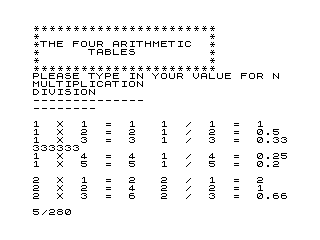
This program prints all four arithmetic operation tables (multiplication, division, addition, and subtraction) for the integers 1 through N, where N is entered by the user. It validates the input to ensure N is a positive integer before proceeding, rejecting non-integers and values ≤ 0. Each operation pair is displayed side by side in two columns using the comma separator in PRINT to align output. The tables are generated with nested FOR loops, with outer loops over I (or K) and inner loops over J (or L), printing all N×N combinations.
Program Analysis
Program Structure
The program is straightforward and linear, divided into clearly demarcated sections:
- Lines 100–150: Title banner displayed with asterisk borders.
- Lines 160–200: Input loop with validation for a positive integer N.
- Lines 210–300: Nested loops generating the multiplication and division tables.
- Lines 310–400: Nested loops generating the addition and subtraction tables.
- Line 500:
STOPto end normal execution. - Lines 510–520:
SAVEandRUN— utility lines appended after the logical end of the program.
Input Validation
Line 180 uses the expression N=INT(N) AND N>0 to ensure the entered value is both a whole number and positive. If either condition fails, an error message is printed at line 190 and control loops back to line 160 to re-prompt. This is a clean validation idiom for the platform.
Table Generation
Both table pairs use the same nested-loop structure. Variables I and J drive the multiplication/division block (lines 230–300), while K and L drive addition/subtraction (lines 330–400). The separation into distinct variable sets is a deliberate stylistic choice to keep sections independent, though reusing I and J would have been equally valid.
A PRINT with no arguments at lines 240 and 340 inserts a blank line between each outer-loop iteration, grouping the inner results for readability.
Column Layout
Each PRINT statement at lines 280 and 380 uses a comma to separate two expressions, which causes the second expression to print at the next print zone (column 32 on a standard display). This places the two operation results side by side. The headers at lines 210–220 and 310–320 use the same comma-separated technique to align column headings with the data below them.
Notable Techniques and Idioms
- Intermediate results
P,Q,A, andDare computed into variables before printing rather than inline in thePRINTstatement, improving readability at a minor memory cost. - The
STOPat line 500 cleanly terminates execution before the trailingSAVE/RUNlines, ensuring they are never reached during normal program flow.
Potential Issues
- Division by zero: When
J=1andI=0could occur in theory, but the validation at line 180 ensuresN>0, and both loops start at 1, soJis never 0. No division-by-zero risk exists. - For large values of N, output will be very long and may scroll off screen before the user can read it. There is no pause mechanism between pages.
- Negative subtraction results (when
K<L) are handled naturally by the arithmetic, soDcan be negative — this is correct behaviour but may surprise younger users expecting a “larger minus smaller” table.
Variable Summary
| Variable | Purpose |
|---|---|
N | User-supplied upper bound for all tables |
I, J | Outer and inner loop counters for multiplication/division |
P | Product I×J |
Q | Quotient I/J |
K, L | Outer and inner loop counters for addition/subtraction |
A | Sum K+L |
D | Difference K−L |
Image Gallery
Source Code
  10 REM 4 MATH TABLES
 100 PRINT "***********************"
 110 PRINT "*                     *"
 120 PRINT "*THE FOUR ARITHMETIC  *"
 130 PRINT "*      TABLES         *"
 140 PRINT "*                     *"
 150 PRINT "***********************"
 160 PRINT "PLEASE TYPE IN YOUR VALUE FOR N";
 170 INPUT N
 180 IF N=INT (N) AND N>0 THEN GOTO 210
 190 PRINT "  I WONDER IF YOU MEAN THAT. PLEASE TRY AGAIN."
 200 GOTO 160
 210 PRINT " MULTIPLICATION     ","DIVISION"
 220 PRINT "--------------     ","--------"
 230 FOR I=1 TO N
 240 PRINT
 250 FOR J=1 TO N
 260 LET P=I*J
 270 LET Q=I/J
 280 PRINT I;"  X  ";J;"  =  ";P,I;"  /  ";J;"  =  ";Q
 290 NEXT J
 300 NEXT I
 310 PRINT "ADDITION             ","SUBTRACTION"
 320 PRINT "--------             ","-----------"
 330 FOR K=1 TO N
 340 PRINT
 350 FOR L=1 TO N
 360 LET A=K+L
 370 LET D=K-L
 380 PRINT K;"  +  ";L;"  =  ";A,K;"  -  ";L;"  =  ";D
 390 NEXT L
 400 NEXT K
 500 STOP
 510 SAVE "1010%1"
 520 RUN
Note: Type-in program listings on this website use ZMAKEBAS notation for graphics characters.