
Fractal Theatre is an interactive fractal curve plotter and “movie” recorder that generates Julia set-like curves using iterated complex-number arithmetic on the TS2068. The program computes a complex square root and inverse transformation in BASIC subroutines (lines 2050–2170), iterating a lambda-parameterized mapping to produce attractor plots one pixel at a time. Completed screens are compressed into a string array f$() by scanning each character cell with ATTR and recording only ink-pixel coordinates as CHR$ pairs, allowing multiple high-resolution frames to be stored in a single 10,000-element array. Stored frames can be played back in rapid succession as a “movie,” optionally pausing between frames, and the file can be saved and loaded as a DATA array to tape with optional VERIFY. Utility options allow color customization, toggling a pause flag between frames, and saving the program itself with auto-run.
Program Analysis
Program Structure
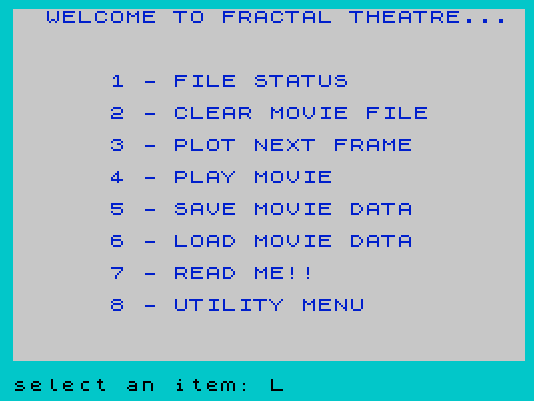
The program is organized as a menu-driven application with a computed GO TO dispatcher at line 25. The main menu (line 15) offers eight options; selecting one jumps to a block of subroutines grouped by thousands in line number. The variable rst is initialized to 10 and acts as a “restart” address, so GO TO rst returns to the main menu without retyping the line number—a common idiom for keeping variables intact across re-entries.
| Line range | Purpose |
|---|---|
| 1–25 | Initialization and main menu dispatcher |
| 100 | File status display (calls line 6000) |
| 1001–1025 | Clear/initialize movie file array |
| 1500 | Generic “press ENTER to continue” pause |
| 2001–2535 | Plot next frame: iteration, plotting, frame storage |
| 2600–2630 | Store ink pixels from one character cell |
| 2700–2720 | Movie file overflow handler |
| 3001–3045 | Play movie from array |
| 4001–4550 | Save and verify movie file to tape |
| 5001–5080 | Load movie file from tape |
| 6001–6020 | Display file status / statistics |
| 8001–8085 | Documentation / “Read Me” text |
| 9001–9998 | Utility menu: colors, save program, quit, pause flag |
Computed GO TO Dispatcher
Lines 25 and 9015 use an arithmetic expression as the argument to GO TO. Each term is of the form (line_number AND condition), where the Boolean result of the condition is 1 (true) or 0 (false), so exactly one term is non-zero. This neatly selects the target line without a chain of IF/GO TO statements and is a well-known Spectrum/TS2068 BASIC optimization:
GO TO (0100 AND i=1)+(1000 AND i=2)+...
The final term (0020 AND (i<1 OR i>8)) loops back to line 20 (re-prompt) on invalid input.
Complex Arithmetic in BASIC
The fractal iteration is implemented as three subroutines operating on real/imaginary pairs stored in plain variables:
- Lines 2050–2080: Complex square root of
x + jyusing the formula√((|z|±x)/2), with sign correction for negative imaginary part. - Lines 2100–2120: Computes
4 / (lx + j·ly)(the reciprocal scaled by 4), modifyinglxandlyin place. - Lines 2150–2170: Complex multiplication of
(x+jy)by(lx+jly).
The main iteration subroutine (lines 2200–2235) applies these in sequence: multiply by lambda, subtract from 1, take the square root, randomly negate to choose one of the two roots (the “random iteration algorithm” / chaos game approach), then compute both the positive and negative root positions simultaneously for efficiency. Ten warm-up iterations (line 2025) are performed before plotting begins.
Screen Compression into String Array
Rather than saving entire bitmapped screens, the program compresses plotted pixels into coordinate pairs. Line 1005 allocates f$() as a 10,000-element string array (each element one character). The storage process at lines 2501–2630 works as follows:
- Iterate over all 32 columns and 20 rows of character cells.
- Use
ATTR (l,c)to detect cells containing ink pixels (comparing against a computed attribute valueattest). - For each such cell, use
POINT (x,y)to test individual pixels and store lit ones as two consecutive CHR$ values (x and y coordinate). - Frame boundaries are marked with two consecutive
CHR$ 255sentinels.
The current write pointer cp is tracked throughout. On save, the value of cp is packed into the first two array elements as a little-endian 16-bit integer: f$(1)=CHR$(cp MOD 256), f$(2)=CHR$(INT(cp/256)). On load, cp is reconstructed with CODE(f$(1))+256*CODE(f$(2)).
ON ERR Usage
ON ERR GO TO is used defensively in several places:
- Lines 2300/2310: Catch out-of-screen
PLOTerrors silently and continue. - Lines 4515/4530 and 5020/5035: Catch tape verify/load errors and branch to an error message without crashing.
- Line 9235: Catch program verify errors.
Each guarded block is followed by ON ERR RESET to restore normal error handling.
Tape File Naming with “@” Prefix
Lines 4520, 9240, and 9245 check whether the filename begins with "@" and, if so, construct the actual filename as n$(1)+n$(4 TO )—stripping the middle characters. This appears to be a convention for addressing a specific tape drive or device prefix, where the @ and following characters encode a device specifier and the real name begins at position 4.
Color Prompt String k$
Line 8 initializes k$ as CHR$ 16 + CHR$ 9, which is the INK control sequence for color 9 (transparent/contrast ink on TS2068). This is prepended to all INPUT prompts via INPUT (k$);"prompt";variable, ensuring input prompts appear in a consistent color regardless of the current paper/ink settings.
Movie Playback
Playback (lines 3001–3045) iterates through f$() from index 3 to cp-4 in steps of 2, reading each coordinate pair with CODE(f$(f)) and CODE(f$(f+1)) and calling PLOT fx,fy. When a double-CHR$ 255 sentinel is encountered, the screen is cleared (and optionally paused if pflag is set) to display the next frame. The pause flag is toggled from the utility menu.
Notable Anomalies
- Line 2400 is the target of
GO TO 2400at line 2045, but the actual frame-end code starts at line 2401/2405—the program falls through correctly since line 2400 does not exist and execution continues at the next available line (2401), which is aREM, then 2405. - Line 9000 is targeted by several
GO TO 9000statements in the utility menu, but the utility menu block starts at line 9001. This is the same fall-through-to-next-line technique. - Similarly,
GO TO 9200(line 9280) andGO TO 1000(line 5080) target non-existent lines, relying on execution falling to the next present line—a deliberate space-saving technique. - Line 4015 prints variable
N$(uppercase) while line 4010 assignsn$(lowercase); on this platform these are the same variable, so there is no bug. - The
BEEPcalls in the storage loop (lines 2520 and 2620) provide audio feedback during the slow pixel-scanning process—a short low tone per column and a higher tone per stored pixel.
Image Gallery
Source Code
    1 REM         FRACTAL THEATRE7/22/85Michael Leidel
    8 LET pflag=0:LET mink=7:LET rst=10:DIM i$(1):LET cx=100:LET cy=88:LET sc=1:LET mbord=5:LET MPap=0:LET k$= CHR$ 16+ CHR$ 9
   10 BORDER 5:PAPER 7:INK 1:CLS
   15 PRINT "  WELCOME TO FRACTAL THEATRE..."'''' TAB 6;"1 - FILE STATUS"'' TAB 6;"2 - CLEAR MOVIE FILE"'' TAB 6;"3 - PLOT NEXT FRAME"'' TAB 6;"4 - PLAY MOVIE"'' TAB 6;"5 - SAVE MOVIE DATA"'' TAB 6;"6 - LOAD MOVIE DATA"'' TAB 6;"7 - READ ME!!"'' TAB 6;"8 - UTILITY MENU"
   20 INPUT (k$);"select an item: ";i
   25 GO TO (0100 AND i=1)+(1000 AND i=2)+(2000 AND i=3)+(3000 AND i=4)+(4000 AND i=5)+(5000 AND i=6)+(8000 AND i=7)+(9000 AND i=8)+(0020 AND (i<1 OR i>8))
  100 GO SUB 6000:GO TO rst
 1001 REM CLEAR movie file
 1005 LET mp=10000:DIM f$(mp)
 1010 LET f$(1)= CHR$ 255:LET f$(2)= CHR$ 255:LET cp=3
 1015 GO SUB 6000
 1020 LET overflow=0
 1025 GO TO rst
 1500 INPUT (k$);"enter to CONTINUE ";i$:RETURN
 2001 REM PLOT NEXT  frame
 2010 LET x=.50001:LET y=0
 2015 BORDER mbord:PAPER MPap:INK MPap:CLS
 2020 GO SUB 2250
 2025 FOR i=1 TO 10:GO SUB 2200:NEXT i
 2030 GO SUB 2295
 2035 GO SUB 2200
 2040 IF INKEY$ <>"s" THEN GO TO 2030
 2045 GO TO 2400
 2050 REM square root of (x+jy)
 2055 LET t=y
 2060 LET s= SQR (x*x+y*y)
 2065 LET y= SQR ((-x+s)/2)
 2070 LET x= SQR ((+x+s)/2)
 2075 IF t<0 THEN LET x=-x
 2080 RETURN
 2100 REM four over lx+jly
 2105 LET s=lx*lx+ly*ly
 2110 LET lx=+4*lx/s
 2115 LET ly=-4*ly/s
 2120 RETURN
 2150 REM x+jy times lx+jly
 2155 LET tx=x:LET ty=y
 2160 LET x=tx*lx-ty*ly
 2165 LET y=tx*ly+ty*lx
 2170 RETURN
 2200 REM function of x+jy
 2205 GO SUB 2150:REM * lambda
 2210 LET x=1-x
 2215 GO SUB 2050:REM take root
 2220 IF RND <=.5 THEN LET x=-x:LET y=-y:REM choose root to plot
 2222 LET xn=-x:LET yn=-y
 2225 LET x=1-x:LET xn=1-xn
 2230 LET x=x/2:LET y=y/2:LET xn=xn/2:LET yn=yn/2
 2235 RETURN
 2250 REM get values
 2255 CLS
 2260 INPUT (k$);"enter lambda (x,y): ";lx,ly
 2265 INPUT (k$);"change scale? ";i$:IF i$="y" THEN INPUT (k$);"enter scale:";sc
 2270 INPUT (k$);"change x offset? ";i$:IF i$="y" THEN INPUT (k$);"enter x offset:";cx
 2272 INPUT (k$);"change y offset? ";i$:IF i$="y" THEN INPUT (k$);"enter y offset:";cy
 2275 PRINT k$;"lx=";lx;" ly=";ly;" sc=";sc;" cx=";cx;" cy=";cy; AT 21,0;"press ""s"" to STOP "
 2280 GO SUB 2100
 2285 LET scale=2*cx/sc
 2290 RETURN
 2295 REM plot x,y
 2300 ON ERR GO TO 2310
 2305 PLOT INK mink;scale*(x-.05)+cx,cy-scale*y:PLOT INK mink;scale*(xn-.05)+cx,cy-scale*yn
 2310 ON ERR RESET
 2315 RETURN
 2401 REM end of frame
 2405 INPUT (k$);"request or continue: ";i$
 2410 IF i$="p" THEN COPY :GO TO 2405
 2415 IF i$="f" THEN GO SUB 2500:GO TO 2405
 2416 IF i$="s" THEN INPUT (k$);"enter file name: ";f$:SAVE f$ SCREEN$ :GO TO 2405
 2417 GO SUB 6000
 2420 GO TO rst
 2501 REM store movie frame
 2503 IF overflow THEN GO SUB 2700:GO TO 2530
 2505 LET attest=(MPap*8)+7
 2507 FOR c=0 TO 31
 2510 FOR l=1 TO 20
 2515 IF ATTR (l,c)=attest THEN GO SUB 2600:IF overflow THEN GO TO 2530
 2520 NEXT l:BEEP .1,0:NEXT c
 2525 LET f$(cp)= CHR$ 255:LET cp=cp+1:LET f$(cp)= CHR$ 255:LET cp=cp+1
 2535 RETURN
 2601 REM store points
 2605 LET cc=c*8:LET ll=175-(l*8)
 2610 FOR x=cc TO cc+7
 2615 FOR y=ll TO ll-7 STEP -1
 2620 IF POINT (x,y) THEN LET f$(cp)= CHR$ x:LET cp=cp+1:LET f$(cp)= CHR$ y:LET cp=cp+1:BEEP .05,12:IF cp >=mp-2 THEN GO SUB 2700:RETURN
 2625 NEXT y:NEXT x
 2630 RETURN
 2701 REM movie file overflow
 2705 PRINT INK 2; AT 21,0;"** MOVIE FILE OVERFLOW **"
 2710 GO SUB 1500
 2715 LET overflow= NOT overflow
 2720 RETURN
 3001 REM play movie
 3005 BORDER mbord:PAPER MPap:INK mink:CLS
 3010 FOR f=3 TO cp-4 STEP 2
 3015 LET fx= CODE (f$(f)):LET fy= CODE (f$(f+1))
 3020 IF fx=255 AND fy=255 AND pflag THEN PAUSE 60000:CLS :GO TO 3030
 3021 IF fx=255 AND fy=255 AND NOT pflag THEN CLS :GO TO 3030
 3025 PLOT fx,fy
 3030 NEXT f
 3035 INPUT (k$);"play it again? ";i$
 3040 IF i$="y" THEN GO TO 3005
 3045 GO TO rst
 4001 REM SAVE movie file
 4005 CLS
 4010 INPUT (k$);"enter file name: ";n$
 4015 CLS :PRINT AT 8,0; INK 1;"** SAVING FILE ";N$;" **    "
 4017 LET f$(1)= CHR$ (cp-256* INT (cp/256)):LET f$(2)= CHR$ (INT (cp/256))
 4020 SAVE /N$ DATA F$()
 4025 CLS :PRINT AT 8,0; INK 4;"** FILE ";n$;" IS SAVED **   "
 4030 INPUT (k$);"VERIFY file? ";i$
 4035 IF i$="y" THEN GO SUB 4500
 4040 INPUT (k$);"SAVE file again? ";i$
 4045 IF i$="y" THEN GO TO 4015
 4047 LET f$(1)= CHR$ 255:LET f$(2)= CHR$ 255
 4050 GO TO rst
 4501 REM VERIFY saved file
 4505 CLS
 4510 PRINT INK 0; AT 8,0; INK 1;"** VERIFYING FILE ";N$;" **   "
 4515 ON ERR GO TO 4540
 4520 IF n$(1)="@" THEN          VERIFY n$(1)+n$(4 TO ) DATA f$()
 4521 IF n$(1) <>"@" THEN VERIFY n$ DATA f$()
 4525 CLS :PRINT AT 8,4; INK 4;"** SAVED FILE IS O.K. **"
 4530 ON ERR RESET
 4535 RETURN
 4540 CLS :PRINT AT 8,4; INK 2;"** SAVED FILE IS BAD **"
 4545 PAUSE 5:ON ERR RESET
 4550 RETURN
 5001 REM LOAD movie file
 5005 CLS
 5010 INPUT (k$);"enter file name: ";n$
 5015 PRINT INK 0; AT 8,6; INK 1;"** LOADING FILE ";N$;" **"
 5020 ON ERR GO TO 5060
 5025 LOAD /N$ DATA F$()
 5030 CLS :PRINT AT 8,0; INK 4;"** FILE ";n$;" IS LOADED **    "
 5035 ON ERR RESET
 5040 GO SUB 1500
 5045 LET cp= CODE (f$(1))+256* CODE (f$(2))
 5050 LET f$(1)= CHR$ 255:LET f$(2)= CHR$ 255
 5055 GO SUB 6000:GO TO rst
 5060 CLS :PRINT AT 8,6; INK 2;"** FILE LOAD IS BAD **"
 5065 PAUSE 5:ON ERR RESET
 5070 INPUT (k$);"try load again? ";i$
 5075 IF i$="y" THEN GO TO 5005
 5080 GO TO 1000
 6001 REM display file size
 6005 BORDER 5:PAPER 7:INK 2:CLS
 6010 PRINT AT 8,0;"MAX MOVIE SIZE = ";mp;" POINTS"; AT 10,2;"CURRENT SIZE = ";cp-1;" POINTS"; AT 14,8;"default scale: ";sc; AT 15,5;"default x offset: ";cx; AT 16,5;"default y offset: ";cy
 6015 IF cp >=mp-2 THEN PRINT INK 2; AT 12,4;"** MOVIE FILE IS FULL **"
 6020 GO TO 1500
 8001 REM documentation
 8005 GO SUB 8500
 8010 PRINT "This program begged to be writ- ten one day after a leisurely   stroll thru FRACTAL GARDEN (withwhich you may by now be familiar).  I was in the Garden, play-  ing at one of my favorite gra-  phic pastimes; that being the   plotting of various complex     curves.  I was varying factors  in the complex equations and    watching the resultant effect   on the curve.  It occured to me that I was getting tired of     waiting so long for each curve to plot.":GO SUB 1500
 8015 GO SUB 8500
 8020 PRINT "Besides that, I had to collect  printouts of each curve in      order to compare the effects of changing various values.  I     decided that it would be nice   to be able to store each curve  in memory so that I could view aset of curves in rapid succes-  sion on-screen.  Ergo this prog-ram, which builds a ""movie""   file of plotted screens.",,"  The program essentially scans a plotted screen and converts the X-Y coordinates of each ink pixel to a CHR$.  The CHR$'s are stored in the string array f$.":GO SUB 1500
 8025 GO SUB 8500
 8030 PRINT "  Once one screen is stored, another one can be plotted and then stored in f$.  The contents of the ""movie"" file are played back by simply scanning f$ and converting the CHR$s back to integer X-Y coordinates for PLOTting.  A flag can be set via the Utility menu which will cause the program to PAUSE after each screen.","  OK, so it still takes a while to generate each original screen.  But now you just let the ol' 2068 plot each curve while you do something else (wash the car, paint the house, etc...).":GO SUB 1500
 8035 GO SUB 8500
 8040 PRINT "  When you think the curve looks good, ""snapshot"" the screen and fire off another.  After you've stored away a number of screens, you can play back the ""movie"" of your favorite curves MUCH faster than it took to plot them in the first place.  Check out the movie file which follows this program on the tape, its a demo of some of my favorites.  Just select Main Menu item #6 and load movie file ""fmdemo"".":GO SUB 1500
 8045 GO SUB 8500
 8050 PRINT "  So...maybe I'm weird and you don't get too excited by complex curves.  Check out the program anyway.  It's a halfway decent way to economically store a number of hi-res (monochrome) screens, if they happen to have a low ink-to-paper pixel ratio (especially since it's only BASIC).  You may want to use the program design for your own application.":GO SUB 1500
 8055 GO SUB 8500
 8060 PRINT "  NOTES ON PROGRAM OPERATION:",,," - if the program stops for any reason, use ""GOTO restart"" in order to keep the variables intact",," - all prompts which require a yes/no answer will interpret ""y"" as yes and all other responses as no.",,,," - When the program is first LOADed, be sure to clear the movie file before starting (menu option #2) to avoid the ""variable not found"" error condition":GO SUB 1500
 8065 GO SUB 8500
 8070 PRINT "  NOTES ON PROGRAM OPERATION:",,," - Once a sceen has been plotted, you are given the prompt: ""request or continue:"".","  Your choices are:","  f - to snapshot the screen          into f$",,"  p - to print the screen (uses the COPY command)",,,"  s - to save the screen as an individual SCREEN$ file",,,"  NOTE: Snapshot is done when the above prompt is displayed again":GO SUB 1500
 8075 GO SUB 8500
 8080 PRINT "  If you wish to increase the size of the movie file, simply change the DIM and LET statement values for f$ and mp in line 1005 to the new size",,,,"  I hope you enjoy the program.  If you have any questions or comments, I'd be glad to hear them!",,,,,"Michael Leidel",,"415 Greenwood",,"Muscatine, IA",,"         52761":GO SUB 1500
 8085 GO TO rst
 8500 CLS :PRINT "  WELCOME TO FRACTAL THEATRE..."; AT 2,9;" ** read me ** ",,,
 8505 RETURN
 9001 REM utilities menu
 9005 CLS :PRINT "  WELCOME TO FRACTAL THEATRE..."'''' TAB 6;" ** utility menu ** "'''' TAB 6;"1 - CHANGE COLORS"'' TAB 6;"2 - SAVE PROGRAM"'' TAB 6;"3 - QUIT PROGRAM"'' TAB 6;"4 - TOGGLE PAUSE FLAG"'' TAB 6;"5 - RETURN  TO MAIN MENU"
 9010 INPUT (k$);"select an item: ";i
 9015 GO TO (9100 AND i=1)+(9200 AND i=2)+(9300 AND i=3)+(9400 AND i=4)+(0010 AND i=5)+(9010 AND (i<1 OR i>5))
 9101 REM change colors
 9105 PRINT AT 8,10;"CHANGE COLORS"
 9110 INPUT (k$);"enter BORDER color: ";mbord
 9115 INPUT (k$);"enter PAPER color: ";MPap
 9120 INPUT (k$);"enter INK color: ";mink
 9125 GO TO 9000
 9201 REM SAVE program
 9205 PRINT AT 10,10;"SAVE PROGRAM"
 9210 INPUT (k$);"enter file name: ";n$
 9215 SAVE n$  LINE 1
 9220 INPUT (k$);"verify file? ";i$
 9225 IF i$ <>"y" THEN GO TO 9275
 9230 PRINT AT 18,4;" ** verifying program ** "
 9235 ON ERR GO TO 9260
 9240 IF n$(1)="@" THEN VERIFY n$(1)+n$(4 TO )
 9245 IF n$(1) <>"@" THEN VERIFY n$
 9250 PRINT AT 18,4;" ** program is verified ** "
 9255 GO TO 9265
 9260 PRINT AT 18,0;" ** program is not verified ** "
 9265 PAUSE 5
 9270 ON ERR RESET
 9275 INPUT (k$);"SAVE program again? ";i$
 9280 IF i$="y" THEN GO TO 9200
 9285 GO TO 9000
 9301 REM end of program
 9305 INK 9:STOP
 9401 REM togglePAUSE flag
 9405 IF pflag THEN PRINT AT 18,8;"pause flag reset"
 9410 IF NOT pflag THEN PRINT AT 18,9;"pause flag set"
 9415 LET pflag= NOT pflag
 9420 GO SUB 1500
 9425 GO TO 9000
 9998 SAVE "fracthe" LINE 1
Note: Type-in program listings on this website use ZMAKEBAS notation for graphics characters.