
Fractal Gardens is a three-part fractal graphics suite offering a 3D landscape generator, a stochastic rocks/terrain plotter, and a complex-plane curve explorer. The 3D landscape uses a midpoint-displacement algorithm stored in a 64×32 array, applying successive refinement passes across three subroutine sweeps to build terrain elevation data before projecting it isometrically with rotation and tilt matrices. The rocks module uses iterated function system (IFS)-style random midpoint subdivision of a triangle, with a configurable ruggedness parameter controlling displacement magnitude. The complex curves section iterates a lambda-parameterized inverse square-root map on the complex plane, randomly selecting between the two square-root branches at each step to plot the Julia-set boundary. An ON ERR / ON ERR RESET guard wraps the PLOT/DRAW calls to suppress out-of-range errors, and a utility menu allows per-mode paper, ink, and border color customization as well as optional machine-code printer driver integration via RANDOMIZE USR with addresses read from a DATA statement.
Program Structure
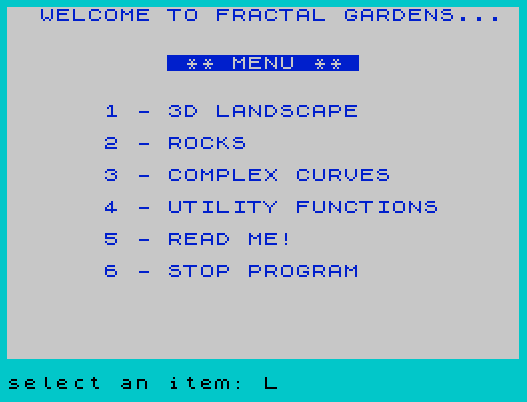
The program is organized as a menu-driven shell with three self-contained fractal modules and a utility/documentation section. Execution begins at line 9500 (initialization), then jumps to line 5 (main menu). Navigation throughout uses computed GO TO expressions of the form GO TO (target AND condition)+…, an efficient multi-branch dispatch idiom that avoids a chain of IF statements.
| Line range | Module |
|---|---|
| 5–10 | Main menu |
| 21–750 | 3D Landscape (midpoint displacement + isometric projection) |
| 3001–4999 | Rocks (IFS triangle subdivision) |
| 6001–6999 | Complex Curves (lambda inverse-root iteration) |
| 8001–8699 | Utility menu (colors, save, documentation) |
| 9000–9056 | Post-screen menu (print/save/repeat/return) |
| 9500–9599 | Initialization (variables, DIM, DATA, defaults) |
3D Landscape Module (lines 21–750)
The landscape is built using diamond-square midpoint displacement. Elevation data is stored in a DIM d(64,32) array. Three subroutines handle the three sweep directions of the algorithm: lines 150–200 (horizontal diamond pass), 220–270 (vertical diamond pass), and 290–350 (diagonal square pass). Each level n halves the step size ib and scales the random perturbation by l=10000/1.8↑n, producing increasingly fine detail.
A symmetry optimization is applied: the terrain is mirrored, so array accesses for coordinates beyond the midpoint my are remapped to their mirror counterpart (lines 370–400 for reads, 420–450 for writes). This halves the storage requirement.
After generation, the terrain is projected isometrically. Two rotation matrices are precomputed at lines 50–52: a horizontal rotation by PI/6 (rc, rs) and a vertical tilt by -PI/5 (vc, vs). The subroutine at lines 770–800 applies horizontal rotation; lines 860–890 apply vertical tilt. Sea-level clipping (lines 460–620) interpolates a crossing point when a line segment crosses z=0, switching ink color between land and sea via subroutines at lines 1070 and 1090. The sentinel value xo=-999 marks the start of each scan line.
Rocks Module (lines 3001–4999)
This module implements recursive fractal subdivision of a triangle. Starting from three user-configurable vertex coordinates stored in arrays x(561) and y(561), each iteration expands the point set by computing displaced midpoints of triangle edges. The displacement is governed by parameter s (default 0.3), controlling ruggedness. The core midpoint computation at lines 3030–3080 uses (RND-RND)*r to generate a roughly symmetric random offset around zero. Triangle edges are rendered with PLOT/DRAW at lines 3160–3180, and the loop at lines 3220–3260 repositions existing points before the subdivision at 3280–3330 adds new midpoints.
Complex Curves Module (lines 6001–6999)
This module plots the fractal boundary of a Julia-set-like object for the complex map f(z) = λz(1-z) iterated in reverse. Starting from a fixed seed point (x=0.50001, y=0), the inverse map is applied repeatedly: multiply by lambda (lines 6400–6440), subtract from 1, take the complex square root (lines 6200–6250), randomly negate to choose one of the two branches (line 6540), then scale and shift (lines 6550–6560). Both the chosen root and its negation are plotted each step, doubling point density. The lambda value is pre-transformed at line 6647 via subroutine 6300 (which computes 4/lambda), and the scale is adjusted at line 6650. Pressing “s” exits back to the main menu.
The plot subroutine at lines 6705–6720 wraps PLOT calls with ON ERR GO TO 6715 / ON ERR RESET to suppress errors when computed coordinates fall outside screen bounds.
Error Handling
Two locations use the ON ERR / ON ERR RESET pattern: the 3D landscape drawing at lines 1049–1055, and the complex curve plotting at lines 6705–6715. In both cases, an out-of-range PLOT or DRAW is silently skipped rather than aborting the program. This is cleaner than pre-checking all coordinate bounds.
Machine Code / Driver Integration
Lines 9505–9516 read five parameters from a DATA statement into array p(5). These parameters encode addresses for an optional 80-column printer driver: CLEAR ramtop, driver initialization, normal copy, 2× copy, and dual-screen copy. A value of 99999 indicates that routine is absent, causing the code to fall back to the built-in COPY command. If a driver initialization address is present, it is called once at startup via RANDOMIZE USR p(2). The commented-out line 9508 shows where a LOAD … CODE statement would load the driver from tape.
Initialization and Defaults
All module parameters are set at lines 9520–9580 during startup:
- Complex curves: seed point (0.50001, 0), offsets cx=50, cy=88, black paper, white ink
- Rocks: border 5, white paper, blue ink; vertices forming a full-screen triangle; s=0.3
- 3D landscape: border 5, white paper, green land ink, blue sea ink; uniform scale xs=ys=zs=0.015
The variable restart is set to 5 (the main menu line), allowing the user to recover from errors by typing GO TO restart without losing any configured parameter values.
Notable Bugs and Anomalies
- Line 9507 reads one value from
DATAwithREAD p(1), then line 9510 reinitializesDIM p(5)and re-reads all five values using aFOR p=1 TO 5loop — the variablepoverwrites the arrayp()dimension call is redundant and the loop variable shadows the array name momentarily, though this works in practice because the loop variablepis a numeric scalar distinct from the arrayp(). - Line 9507’s
CLEAR p(1)is called beforep()is fully populated, using only the first DATA value as the CLEAR address. This is intentional — it sets RAMTOP before any code is loaded. - The author acknowledges in the documentation (line 8620) that the 3D landscape does not render correctly and was submitted unfinished.
- Line 8425 checks
f$(1)="@"to detect a microdrive filename prefix forVERIFY, branching to strip the leading character; line 8426 handles the standard tape case. - Lines 518–519 contain commented-out
REMalternatives for the sea-level interpolation at line 520, left as developer notes. - Line 654 prints “x scale” twice instead of “y scale” for the second label — a minor display bug.
Image Gallery
Source Code
    1 REM : FRACTAL GARDENS
    2 REM : By Michael Leidel
    3 REM
    4 GO TO 9500
    5 PAPER 7:INK 0:BORDER 5:CLS :PRINT INK 1;"  WELCOME TO FRACTAL GARDENS..."''' TAB 10;" ** MENU ** "''' TAB 6;"1 - 3D LANDSCAPE"'' TAB 6;"2 - ROCKS"'' TAB 6;"3 - COMPLEX CURVES"'' TAB 6;"4 - UTILITY FUNCTIONS"'' TAB 6;"5 - READ ME!"'' TAB 6;"6 - STOP PROGRAM":INPUT "select an item: ";menu
   10 GO TO (0020 AND menu=1)+(3000 AND menu=2)+(6000 AND menu=3)+(8000 AND menu=4)+(8600 AND menu=5)+(9999 AND menu=6)+(0005 AND (menu<1 OR menu>6))
   21 REM  BEGIN 3D LAND PROGRAM
   26 DIM d(64,32)
   28 CLS
   30 INPUT INK 9;"number of levels? ";le:IF le<0 OR le>6 THEN GO TO 30
   40 LET ds=2↑le+1
   50 LET mx=ds-1:LET my=mx/2:LET rh= PI/6:LET vt=- PI/5
   51 LET rc= COS rh:LET rs= SIN rh
   52 LET vc= COS vt:LET vs= SIN vt
   60 FOR n=1 TO le:LET l=10000/1.8↑n
   70 CLS :PRINT INK 9;"working on level ";n
   80 LET ib=mx/2↑n:LET sk=ib*2
   90 GO SUB 150
  100 GO SUB 220
  110 GO SUB 290
  120 NEXT n
  130 GO TO 640
  150 FOR y=0 TO mx-1 STEP sk
  160 FOR x=ib+y TO mx STEP sk
  170 LET ax=x-ib:LET ay=y:GO SUB 370:LET d1=d:LET ax=x+ib:GO SUB 370:LET d2=d
  180 LET d=(d1+d2)/2+(RND-.5)*l/2:LET ax=x:LET ay=y:GO SUB 420
  190 NEXT x
  200 NEXT y:RETURN
  220 FOR x=mx TO 1 STEP -sk
  230 FOR y=ib TO x STEP sk
  240 LET ax=x:LET ay=y+ib:GO SUB 370:LET d1=d:LET ay=y-ib:GO SUB 370:LET d2=d
  250 LET d=(d1+d2)/2+(RND-.5)*l/2:LET ax=x:LET ay=y:GO SUB 420
  260 NEXT y
  270 NEXT x:RETURN
  290 FOR x=0 TO mx-1 STEP sk
  300 FOR y=ib TO mx-x STEP sk
  310 LET ax=x+y-ib:LET ay=y-ib:GO SUB 370:LET d1=d
  320 LET ax=x+y+ib:LET ay=y+ib:GO SUB 370:LET d2=d
  330 LET ax=x+y:LET ay=y:LET d=(d1+d2)/2+(RND-.5)*l/2:GO SUB 420
  340 NEXT y
  350 NEXT x:RETURN
  370 IF ay>my THEN GO TO 390
  380 LET by=ay:LET bx=ax:GO TO 400
  390 LET by=mx+1-ay:LET bx=mx-ax
  400 LET d=d(bx+1,by+1):RETURN
  420 IF ay>my THEN GO TO 440
  430 LET by=ay:LET bx=ax:GO TO 450
  440 LET by=mx+1-ay:LET bx=mx-ax
  450 LET d(bx+1,by+1)=d:RETURN
  460 REM ** put in sea level
  470 IF xo <>-999 THEN GO TO 500
  480 IF zz<0 THEN GO SUB 1070:LET z2=zz:LET zz=0:GO TO 620
  490 GO SUB 1090:GO TO 610
  500 IF z2>0 AND zz>0 THEN GO TO 610
  510 IF z2<0 AND zz<0 THEN LET z2=zz:LET zz=0:GO TO 620
  518 REM IF zz=0 AND z2=0 THEN LET w3=0
  519 REM IF zz<>0 OR z2<>0 THEN LET w3=zz/(zz-z2)
  520 LET w3=zz/(zz-z2):LET x3=(x2-xx)*w3+xx:LET y3=(y2-yy)*w3+yy:LET z3=0
  530 LET zt=zz:LET yt=yy:LET xt=xx
  540 IF zz>0 THEN GO TO 590
  560 LET zz=z3:LET yy=y3:LET xx=x3:GO SUB 950
  570 GO SUB 1070:LET zz=0:LET yy=yt:LET xx=xt:LET z2=zt:GO TO 620
  590 LET zz=z3:LET yy=y3:LET xx=x3:GO SUB 950
  600 GO SUB 1090:LET zz=zt:LET yy=yt:LET xx=xt
  610 LET z2=zz
  620 LET x2=xx:LET y2=yy:RETURN
  640 GO SUB 1110
  651 INPUT INK 9;"change scaling factors? ";y$
  652 IF y$="y" THEN INPUT INK 9;"input x: ";xs:INPUT INK 9;"input y: ";ys:INPUT INK 9;"input z: ";zs
  654 CLS :PRINT INK 9;"x scale: ";xs,"z scale: ";zs,"x scale: ";xs," levels: ";le
  660 FOR a=0 TO mx:LET ax=a:LET xo=-999:FOR b=0 TO ax:LET ay=b
  670 GO SUB 370:LET zz=d:LET yy=ay/mx*10000:LET xx=ax/mx*10000-yy/2
  680 GO SUB 940:NEXT b:NEXT a
  690 FOR b=0 TO mx:LET ay=b:LET xo=-999:FOR a=b TO mx:LET ax=a
  700 GO SUB 370:LET zz=d:LET yy=ay/mx*10000:LET xx=ax/mx*10000-yy/2
  710 GO SUB 940:NEXT a:NEXT b
  720 FOR f=0 TO mx:LET ex=f:LET xo=-999:FOR g=0 TO mx-ex:LET ey=g
  730 LET ax=ex+ey:LET ay=ey:GO SUB 370:LET zz=d:LET yy=ay/mx*10000
  740 LET xx=ax/mx*10000-yy/2:GO SUB 940:NEXT g:NEXT f
  750 GO TO 9000
  770 LET ox=xx
  780 LET xx=xx*rc-yy*rs
  790 LET yy=ox*rs+yy*rc
  800 RETURN
  860 LET ox=xx
  870 LET xx=vc*xx-vs*zz
  880 LET zz=vs*ox+vc*zz
  890 RETURN
  940 GO SUB 470
  950 LET xx=xx*xs:LET yy=yy*ys:LET zz=zz*zs
  960 GO SUB 770
  970 GO SUB 860
  990 LET xp= INT yy:LET yp= INT zz
 1000 GO SUB 1030
 1010 RETURN
 1020 REM ** plot line **
 1030 LET xp=xp*1.1:LET yp=80-yp
 1040 IF xo=-999 THEN LET x8=xp:LET y8=yp:LET xo=xp
 1045 IF y8>179 OR y8<0 OR yp>179 OR yp<0 THEN RETURN
 1049 ON ERR GO TO 1051
 1050 PLOT x8+50,y8:DRAW (xp-x8)+50,yp-y8
 1051 LET x8=xp:LET y8=yp
 1055 ON ERR RESET :RETURN
 1060 REM ** switch to sea color
 1070 INK seaink:RETURN
 1080 REM ** switch to land color
 1090 INK landink:RETURN
 1100 REM ** set up screen
 1110 PAPER landpaper:BORDER landbord:CLS :RETURN
 3001 REM    BEGIN ROCKS PROGRAM
 3005 INPUT INK 9;"change initial coordinates? ";a$
 3010 IF a$="y" THEN INPUT INK 9;"input x1,y1: ";rx1,ry1:INPUT INK 9;"input x2,y2: ";rx2,ry2:INPUT INK 9;"input x3,y3 ";rx3,ry3
 3015 LET x(1)=rx1:LET y(1)=ry1:LET x(2)=rx2:LET y(2)=ry2:LET x(3)=rx3:LET y(3)=ry3
 3020 GO TO 3090
 3030 LET u=(x(k)+x(j))/2:LET v=(y(k)+y(j))/2
 3040 LET r=s*(ABS (x(j)-u)+ ABS (y(j)-v))
 3050 LET x= INT ABS ((RND- RND)*r+u):LET y= INT ABS ((RND- RND)*r+v)
 3060 IF x>255 THEN LET x=255
 3070 IF y>175 THEN LET y=175
 3080 PLOT x,y:LET x(i)=x:LET y(i)=y:RETURN
 3102 INPUT INK 9;"number of levels? ";le:IF le<0 OR le>7 THEN GO TO 3102
 3105 CLS :INPUT INK 9;"change ruggedness? ";a$
 3106 IF a$="y" THEN INPUT INK 9;"input s: ";s
 3110 LET c=2:FOR t=1 TO le+1
 3120 BORDER rokbord:PAPER rokpaper:INK rokink:CLS
 3130 LET a=0:FOR m=1 TO c-1
 3140 FOR n=1 TO m
 3150 LET i=a+n:LET j=i+m
 3160 PLOT x(i),y(i):DRAW x(j)-x(i),y(j)-y(i)
 3170 LET i=j+1:DRAW x(i)-x(j),y(i)-y(j)
 3180 LET j=a+n:DRAW x(j)-x(i),y(j)-y(i)
 3190 NEXT n:LET a=a+m:NEXT m
 3200 IF t >=le THEN GO TO 4999
 3210 INK 2
 3220 FOR m=c TO 2 STEP -1
 3230 LET b=a+a-m
 3240 FOR j=a+1 TO a+m:LET i=j+j+b
 3250 LET x(i)=x(j):LET y(i)=y(j)
 3260 NEXT j:LET a=a-m+1:NEXT m
 3270 LET c=c+c-1:LET a=1
 3280 FOR m=2 TO c STEP 2
 3290 FOR l=a TO a+m-1 STEP 2
 3300 LET i=l+m-1:LET j=l:LET k=i+m:GO SUB 3030
 3310 LET i=k+1:LET j=i+1:GO SUB 3030
 3320 LET i=l+m:LET k=l:GO SUB 3030
 3330 NEXT l:LET a=j-m:NEXT m
 3340 NEXT t
 4999 GO TO 9000
 6001 REM  BEGIN COMPLEX CURVES
 6100 BORDER ccbord:PAPER ccpaper:INK ccink:CLS
 6110 GO SUB 6600
 6120 FOR i=1 TO 10:GO SUB 6500:NEXT i
 6140 GO SUB 6700
 6160 GO SUB 6500
 6180 IF INKEY$ <>"s" THEN GO TO 6140
 6185 GO TO 6999
 6200 REM ** sq root of (x+jy)
 6205 LET t=y
 6210 LET s= SQR (x*x+y*y)
 6220 LET y= SQR ((-x+s)/2)
 6230 LET x= SQR ((+x+s)/2)
 6240 IF t<0 THEN LET x=-x
 6250 RETURN
 6300 REM ** four over lx+jly
 6310 LET s=lx*lx+ly*ly
 6320 LET lx=+4*lx/s
 6330 LET ly=-4*ly/s
 6340 RETURN
 6400 REM ** x+jy times lx+jly
 6410 LET tx=x:LET ty=y
 6420 LET x=tx*lx-ty*ly
 6430 LET y=tx*ly+ty*lx
 6440 RETURN
 6500 REM ** function of x+jy
 6510 GO SUB 6400:REM ** lambda
 6520 LET x=1-x
 6530 GO SUB 6200:REM take root
 6540 IF RND <=.5 THEN LET x=-x:LET y=-y:LET xn=-x:LET yn=-y:REM choose root to plot
 6541 LET xn=-x:LET yn=-y
 6550 LET x=1-x:LET xn=1-xn
 6560 LET x=x/2:LET y=y/2:LET xn=xn/2:LET yn=yn/2
 6570 RETURN
 6600 REM ** get values
 6610 CLS
 6620 INPUT INK 9;"enter lambda (x,y): ";lx,ly
 6640 INPUT INK 9;"enter scale: ";sc
 6641 INPUT INK 9;"change x offset? ";a$:IF a$="y" THEN INPUT INK 9;"enter x offset:";cx
 6642 INPUT INK 9;"change y offset? ";a$:IF a$="y" THEN INPUT INK 9;"enter y offset:";cy
 6645 PRINT INK 9;"lx=";lx;" ly=";ly;" sc=";sc;" cx=";cx;" cy=";cy; AT 21,0;"press ""s"" to STOP "
 6647 GO SUB 6300
 6650 LET sc=2*cx/sc
 6660 RETURN
 6700 REM ** plot x,y
 6705 ON ERR GO TO 6715
 6710 PLOT sc*(x-.05)+cx,cy-sc*y:PLOT sc*(xn-.05)+cx,cy-sc*yn
 6715 ON ERR RESET
 6720 RETURN
 6799 STOP
 6800 REM rnd test
 6810 LET zx=140
 6820 LET zy=96
 6830 LET dx=20* RND
 6840 LET dy=20* RND
 6850 PLOT zx+dx,zy+dy
 6860 GO TO 6830
 6999 GO TO 9000
 8001 REM    UTILITY ROUTINES
 8005 PAPER 7:INK 0:BORDER 5:CLS :PRINT INK 1; AT 0,9;"UTILITY MENU"; AT 6,4;"1 - 3D PAPER/INK/BORDER"; AT 8,4;"2 - ROCKS PAPER/INK/BORDER"; AT 10,4;"3 - COMPLEX PAPER/INK/BORDER"; AT 12,4;"4 - SAVE PROGRAM"; AT 14,4;"5 - RETURN TO MAIN MENU":INPUT INK 9;"select an item: ";menu
 8010 GO TO (8100 AND menu=1)+(8200 AND menu=2)+(8300 AND menu=3)+(8400 AND menu=4)+(0005 AND menu=5)+(8005 AND (menu<1 OR menu>5))
 8100 REM ** change 3D colors
 8105 PRINT AT 6,8; FLASH 1;"3D PAPER/INK/BORDER"
 8110 INPUT INK 9;"enter paper color: ";landpaper
 8115 INPUT INK 9;"enter ink color for land: ";landink
 8120 INPUT INK 9;"enter ink color for sea: ";seaink
 8125 INPUT INK 9;"enter border color: ";landbord
 8199 GO TO 8005
 8200 REM ** change rocks colors
 8205 PRINT AT 8,8; FLASH 1;"ROCKS PAPER/INK/BORDER"
 8210 INPUT INK 9;"enter paper color: ";rokpaper
 8215 INPUT INK 9;"enter ink color: ";rokink
 8220 INPUT INK 9;"enter border color: ";rokbord
 8299 GO TO 8005
 8300 REM ** change complex color
 8305 PRINT AT 10,8; FLASH 1;"COMPLEX PAPER/INK/BORDER"
 8310 INPUT INK 9;"enter paper color: ";ccpaper
 8315 INPUT INK 9;"enter ink color: ";ccink
 8320 INPUT INK 9;"enter border color: ";ccbord
 8399 GO TO 8005
 8400 REM ** save program
 8405 PRINT AT 12,8; FLASH 1;"SAVE PROGRAM"
 8410 INPUT INK 9;"enter file name: ";f$
 8411 LET a$="y"
 8415 SAVE f$ LINE 1
 8420 INPUT INK 9;"verify the file? ";a$
 8425 IF a$="y" AND f$(1)="@" THEN :VERIFY f$(1)+f$(4 TO ):PRINT AT 20,7; FLASH 1;"  ** file is OK **  ":INPUT INK 9;"enter to continue: ";a$
 8426 IF a$="y" AND f$(1) <>"@" THEN :VERIFY f$:PRINT AT 20,7; FLASH 1;"  ** file is OK **  ":INPUT INK 9;"enter to continue: ";a$
 8499 GO TO 8005
 8601 REM     DOCUMENTATION
 8605 GO SUB 8700
 8610 PRINT INK 9;"This program integrates three seperate programs which demonstrate the use of fractal techniques for generating graphic designs.",,"  The first program (3D LANDSCAPE) is taken from the July '85 issue of the now-extinct Creative Computing Magazine.  The article by Michiel van de Panne is entitled '3D Fractals'.  The program included here is from the Apple II version presented by Michiel.  Modifications which were submitted in the Nov. '85 issue have also been included.":GO SUB 8800
 8615 GO SUB 8700
 8620 PRINT INK 9;"Unfortunately, even with the modifications, 3D LANDSCAPE still does not appear to work correctly.  I apologize for not having it completely debugged yet, but I wanted to contribute to the L.I.S.T. Library without any furthur delay.  I will keep working on it, tho, and will resubmit a final debugged version soon.",,,"  The second program (ROCKS) is taken from a SYNTAX article entitled 'Hall of the Fractal Hackers'.  This program is similar to 3D LANDSCAPE except it generates only a 2D picture.":GO SUB 8800
 8625 GO SUB 8700
 8630 PRINT INK 9;"The third program (COMPLEX CURVES) is also from 'Hall of the Fractal Hackers'.  This program demonstrates the fractal nature of complex equations by plotting points along the complex curve.  This one is my personal favorite.  The x and y lambda values determine the shape of the curve itself.  By manipulating the scale, x-offset, and y-offset values you can ""zoom in"" on portions of the curve in order to appreciate its infinite complexity and beauty.  Have fun with this one!":GO SUB 8800
 8635 GO SUB 8700
 8640 PRINT INK 9;"Notes on the operation of the program:",,"  If you are presented with a question which looks for a yes/no answer (ie: ""change x offset?""), hitting ENTER is equivalent to answering NO.  Enter just a ""y"" to answer YES.",,"  Once a screen has been generated, you will be presented with: ""request or continue:"".  The following are your choices:","  r = repeat this function","  p = print screen","  b = print 2x screen","  d = print dual screen","  s = save screen","  ENTER = return to main menu":GO SUB 8800
 8645 GO SUB 8700
 8650 PRINT INK 9;"  Let me explain options 'b' and 'd'...",,"  The program is currently set up to use the COPY command to print screens to the 2040 printer.  Provision has been made, however, to incorporate an 80-col printer driver into the program.  Personally, I use the A&J printer port and driver.  This driver includes routines to print screens at twice the size (2 print pixels per screen pixel) as well as printing 2 screens side-by-side (for dual screen modes).  Hence I have included the ability to call those routines, if desired.":GO SUB 8800
 8655 GO SUB 8700
 8660 PRINT INK 9;"  To incorporate your 80-col print driver (A&J or otherwise...), do the following:",,,"  - stop the program","  - enable the LOAD CODE statement in line 9508.  Insert the proper file name for your driver code",,"  - change the DATA statement in line 9515 to reflect the parameters of your driver code.","  - SAVE ""program"" LINE 1",,,"  Be sure to SAVE a copy of your driver on the tape (use the same name you used in line 9508)":GO SUB 8800
 8665 GO SUB 8700
 8670 PRINT INK 9;"The values in the DATA statement are used for the following driver parameters:",,,"value #1 = addr to CLEAR ramtop to",,"      #2 = addr of routine which initializes the driver","      #3 = addr of normal COPY routine",,"      #4 = addr of 2x COPY routine",,"      #5 = addr of dual screen COPY routine",,,,"  Any values which do not apply should be set to 99999.":GO SUB 8800
 8675 GO SUB 8700
 8680 PRINT INK 9;"OK...enough talk.  I hope you enjoy your stroll thru Fractal Garden!  If you have any suggestions for improving the program   (or for getting 3D LANDSCAPE to work correctly), I would appreciate hearing from you.",,,,"Michael Leidel",,"415 Greenwood Dr","Muscatine, Ia",,"         52761",,,"  PS.  If the program stops for any reason (such as a bad VERIFY), simply enter ""GOTO restart"" and all your parameter settings will remain intact.":GO SUB 8800
 8685 GO SUB 8700
 8699 GO TO restart
 8700 PAPER 7:INK 0:BORDER 5:CLS :PRINT INK 1; AT 0,2;"WELCOME TO FRACTAL GARDENS..."; AT 2,9;"  READ ME!!  "; AT 4,2;
 8705 RETURN
 8800 INPUT INK 9;"enter to continue: ";a$
 8805 RETURN
 9002 REM  END OF SCREEN PRINT
 9010 INPUT INK 9;"request or continue: ";a$
 9012 GO TO (0005 AND a$="")+(0020 AND a$="r" AND menu=1)+(3000 AND a$="r" AND menu=2)+(6000 AND a$="r" AND menu=3)+(8000 AND a$="r" AND menu=4)+(9020 AND a$="p")+(9030 AND a$="b")+(9040 AND a$="d")+(9050 AND a$="s")+(9010 AND (a$ <>"" AND a$ <>"r" AND a$ <>"p" AND a$ <>"b" AND a$ <>"d" AND a$ <>"s"))
 9020 REM print screen (normal)
 9022 IF p(3)=99999 THEN COPY :GO TO 9010
 9024 RANDOMIZE USR p(3)
 9026 GO TO 9010
 9030 REM print screen ( x2 )
 9031 IF p(4)=99999 THEN COPY :GO TO 9010
 9032 RANDOMIZE USR p(4)
 9034 GO TO 9010
 9040 REM print dual screen
 9041 IF p(5)=99999 THEN COPY :GO TO 9010
 9042 RANDOMIZE USR p(5)
 9044 GO TO 9010
 9050 REM save screen
 9052 INPUT INK 9;"enter file name: ";n$
 9054 SAVE n$ SCREEN$
 9056 GO TO 9010
 9500 REM
 9501 REM initialize program
 9502 REM
 9503 DIM a$(1)
 9505 DIM p(5):REM 80-col print driver parameters
 9507 READ p(1):CLEAR p(1)
 9508 REM LOAD "@prcode"CODE
 9510 DIM p(5):RESTORE 9510:FOR p=1 TO 5:READ p(p):NEXT p
 9515 DATA 65535,99999,99999,99999,99999
 9516 IF p(2) <>99999 THEN RANDOMIZE USR p(2)
 9520 REM ** complex parameters**
 9525 LET cx=50:LET cy=88
 9530 LET x=.50001:LET y=0
 9535 LET ccbord=0:LET ccpaper=0:LET ccink=7
 9540 REM ** rocks parameters **
 9545 LET rokbord=5:LET rokpaper=7:LET rokink=1
 9550 DIM x(561):DIM y(561)
 9555 LET s=.3
 9560 LET rx1=80:LET ry1=175:LET rx2=255:LET ry2=0:LET rx3=0:LET ry3=0
 9565 LET restart=5
 9570 REM ** 3D land parameters**
 9575 LET landbord=5:LET landpaper=7:LET landink=4:LET seaink=1
 9580 LET xs=.015:LET ys=.015:LET zs=.015
 9599 GO TO restart
 9997 STOP
 9998 SAVE "fractals" LINE 1
Note: Type-in program listings on this website use ZMAKEBAS notation for graphics characters.