
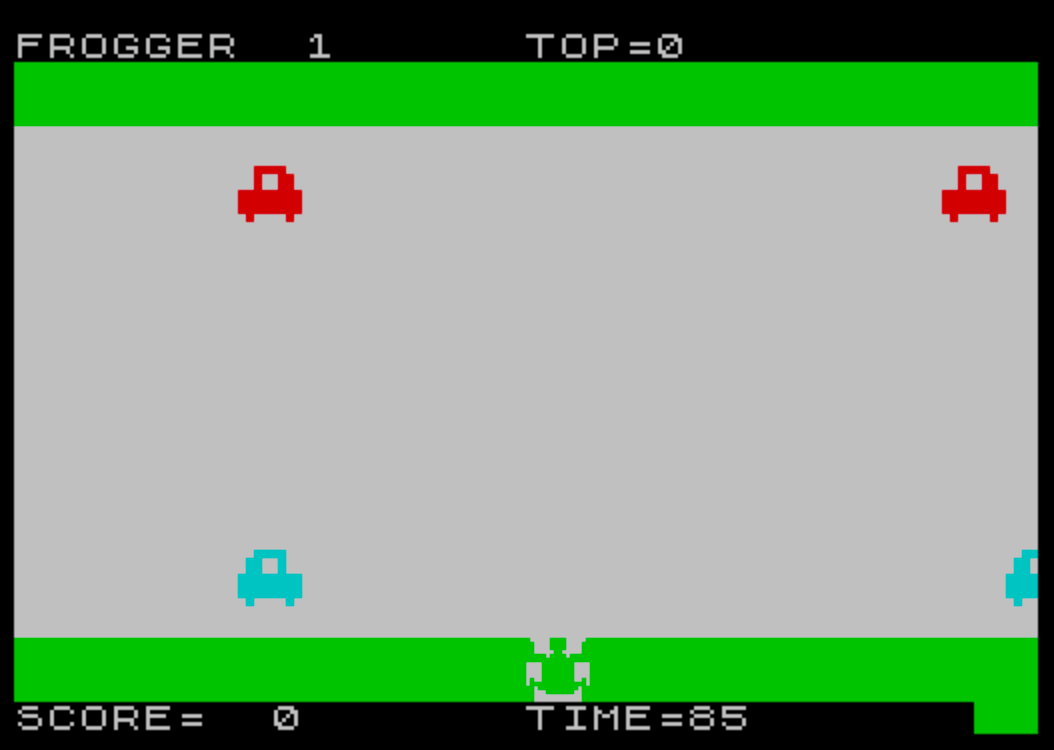
Frogger is a scrolling arcade game in which the player guides a frog across lanes of moving traffic and river hazards, closely following the gameplay of the original Frogger arcade cabinet. The program uses 18 user-defined graphics (UDGs, characters 144–161) loaded via DATA statements and POKE USR to render the frog sprite and vehicle/log tiles in four graphical variants for odd and even lanes. Two separate subroutines (lines 15 and 200) build scrolling lane data into string arrays x$ and y$ of length 128, allowing left- and right-moving rows to be displayed by slicing different offsets each frame. A timer counts down each level, and difficulty scales with the variable r, which increases the number of obstacles per lane with each successful crossing. The score, top score, remaining lives (fl), and time remaining are tracked persistently across rounds within a single play session.
Program Structure
The program is organized into several distinct functional blocks:
- Lines 1–4: Initialization, top-score reset, title screen display using block graphics.
- Lines 10–11: Level entry point; calls the lane-building subroutine and jumps to the game screen setup.
- Lines 15–76: Subroutine to build water/river lane data (logs/platforms) for odd rows moving right, even rows moving left.
- Lines 80–155: Main game loop — draws road/water background, scrolls lanes, calls the player subroutine, manages the countdown timer.
- Lines 200–265: Alternative lane-builder for road traffic (cars), used when
p=1. - Lines 1000–1140: Player subroutine — reads keypress, moves frog, checks collision with obstacles, erases and redraws frog sprite.
- Lines 3000–3025: Level/phase controller — switches between water phase (
p=7) and road phase (p=1), increments difficulty levelr. - Lines 5000–5015: Success handler — plays victory tune, increments score, advances to next phase.
- Lines 7000–7010: UDG loader — reads 144 bytes of DATA and POKEs them into UDG definitions for characters 144–161 (18 UDGs).
- Lines 8000–8020: Death handler — plays descending beep sequence, decrements lives
fl, restarts current screen. - Lines 9500–9520: Game over — displays flashing message, plays long descending glissando, updates top score, returns to title.
UDG Definitions
The subroutine at line 7000 reads 144 bytes of DATA into an outer loop over characters 144–161 and an inner loop over the 8 bytes per character, using POKE USR CHR$(a)+b,c. This defines 18 UDGs (characters \a through \r in Spectrum notation) used for the frog sprite, vehicle halves, and log tiles. The frog occupies a 2×2 UDG cell ([UDG-M][UDG-N] / [UDG-O][UDG-P]), and separate UDG pairs are assigned for odd-lane objects (rows 1 and 3, [UDG-A][UDG-B]/[UDG-C][UDG-D]) and even-lane objects (rows 2 and 4, [UDG-E][UDG-F]/[UDG-C][UDG-D]).
String-Array Scrolling Technique
Each of the four lane rows is represented by a 128-character string within the arrays x$ and y$ (top and bottom halves respectively). The lane is logically 64 cells wide; each cell is expanded to 2 characters (one UDG pair per obstacle cell). The screen is 32 characters wide, so a 32-character window is extracted from the 128-character buffer each frame.
Odd-numbered lanes scroll left-to-right by slicing x$(a, b TO b+31) where b increments from 1 to 96. Even-numbered lanes scroll right-to-left by slicing x$(a, 97-b TO 128-b), which counts backwards through the buffer. This is an elegant, branch-free scrolling approach that avoids any character shifting.
Obstacle Population
The subroutine at lines 15–76 fills the 64-element logical lane (a$) by placing "1" markers at random positions for 3*r iterations. If the random position c is less than 17, the position is also mirrored to 48+c, ensuring objects wrap symmetrically in the buffer. The road subroutine (lines 200–265) uses 60-3*r iterations instead, so roads become less dense (more cars) as the level increases, while rivers become more densely packed (more logs).
Collision Detection
Collision is resolved by inspecting the logical lane array a$(g, g1) and a$(g, g2) rather than by pixel testing. The frog’s screen column f and the current scroll offset b are used to back-calculate positions g1 and g2 in the lane array, with a rounding step (INT((g1/2)+0.5)) to convert from double-width character coordinates back to logical cell indices. Two distinct collision rules apply:
- On the road (
p=7): hitting a cell marked"1"(a vehicle) kills the frog. - On the river (
p=1): landing on a cell marked" "(not a log) kills the frog.
Player Movement and Controls
The frog is moved with four keys: m (up), n (down), z (left), x (right), each moving 4 character positions at a time. Vertical movement snaps to multiples of 4 rows. Boundary guards at lines 1120–1125 prevent the frog from moving off-screen horizontally; if a movement would take f out of range, it is reversed. Any keypress triggers a short three-note ascending beep sequence (lines 1126). Reaching row 0 triggers the success handler at line 5000.
Phase and Difficulty Progression
The game alternates between two phases per round: water (river, p=7 background paper color) and road (p=1). Completing the water phase calls GO TO 3010 to set up the road; completing the road phase increments r at line 3025 and restarts from the water phase. The variable r is capped at 17, which would make the river entirely filled with logs and the road almost clear of vehicles.
Timer Mechanism
The countdown timer t is initialized to 105 - r*5 at line 100, so harder levels have shorter time limits. It is decremented by 1 every two half-frames (once per odd-lane scroll, once per even-lane scroll) via line 147. When t reaches zero, the death routine at line 8000 is triggered. The current value is displayed each iteration at line 107.
Notable Anomalies and Observations
- Line 1200 contains only
RETURNand appears unreferenced — it is dead code, likely a leftover from an earlier revision. - The frog’s vertical position
f1starts at 19 (bottom road row). The check at line 1015 skips collision detection entirely when the frog is at row 19 (the safe starting zone), preventing a false death on spawn. - The level variable
ris not reset when a new game begins from line 3 — onlys(score) andfl(lives) are reset at line 4, so replaying after game over continues at the same difficulty. - Lines 105–155 form an inner loop over
b(scroll offset 1–96), and line 155 loops back to line 105 indefinitely, with the timer and death/win conditions providing the only exits. - The PAPER color variable
pdoubles as both the background color and a phase indicator (7 = road, 1 = water), which is a compact but implicit design choice.
Image Gallery
Source Code
    1 BORDER 0:PAPER 0:RANDOMIZE :CLS :REM FROGGER
    2 LET ts=0:GO SUB 7000
    3 PRINT INK 3; AT 3,0;"▌▀▀▀▌▀▀▞▖▀▀▞▖▀▀▞▖▀▀▞▌▀▀▀▌▀▀▞", INK 4;"▌   ▌  ▌▌  ▌▌   ▌   ▌   ▌  ▌", INK 5;"▌▄▄ ▌▄▄▚▌  ▌▌   ▌   ▌▄▄ ▌▄▄▚", INK 6;"▌   ▌▞  ▌  ▌▌   ▌   ▌   ▌▞", INK 7;"▌   ▌ ▞ ▌  ▌▌  ▛▌  ▛▌   ▌ ▞", INK 2;"▌   ▌  ▞▘▄▄▚▘▄▄▚ ▞▄▚▌▄▄▄▌  ▞"
    4 LET s=0:LET fl=3
   10 LET r=1
   11 GO TO 3000
   15 DIM a$(4,64):DIM x$(4,128):DIM y$(4,128)
   16 FOR a=1 TO 4
   20 FOR b=1 TO 3*r
   25 LET c= INT (RND*46)+1
   30 LET a$(a,c)="1"
   35 IF c<17 THEN LET a$(a,48+c)="1"
   40 NEXT b
   45 FOR b=1 TO 64
   50 IF a$(a,b)=" " THEN GO TO 70
   55 IF a/2= INT (a/2) THEN GO TO 65
   60 LET x$(a,b*2-1 TO b*2)="[UDG-A][UDG-B]":LET y$(a,b*2-1 TO b*2)="[UDG-C][UDG-D]":GO TO 70
   65 LET x$(a,b*2-1 TO b*2)="[UDG-E][UDG-F]":LET y$(a,b*2-1 TO b*2)="[UDG-C][UDG-D]"
   70 NEXT b
   75 NEXT a
   76 RETURN
   80 CLS :FOR a=1 TO 96:PRINT INK 6; PAPER 4;" ";:NEXT a
   85 FOR a=1 TO 16:PRINT PAPER p;"                                ":NEXT a
   90 FOR a=1 TO 96:PRINT PAPER 4; INK 6;" ";:NEXT a
   95 PRINT INK 7; AT 0,0;"FROGGER  ";r,"TOP=";ts,; AT 21,0;"SCORE=  ";s,"TIME=         "
  100 LET f1=19:LET f=16:LET t=105-r*5
  105 FOR b=1 TO 96
  107 PRINT INK 7; AT 21,21;t;" "
  110 FOR a=1 TO 3 STEP 2
  111 IF p=1 AND f1=a*4 THEN LET f=f-1
  115 PRINT INK a+1; PAPER p; AT a*4,0;x$(a,b TO b+31); AT a*4+1,0;y$(a,b TO b+31)
  120 NEXT a
  125 GO SUB 1000
  130 FOR a=2 TO 4 STEP 2
  131 IF p=1 AND f1=a*4 THEN LET f=f+1
  135 PRINT INK a+1; PAPER p; AT a*4,0;x$(a,97-b TO 128-b); AT a*4+1,0;y$(a,97-b TO 128-b)
  140 NEXT a
  145 GO SUB 1000
  147 LET t=t-1:IF t <=0 THEN GO TO 8000
  150 NEXT b
  155 GO TO 105
  200 DIM a$(4,64):DIM x$(4,128):DIM y$(4,128)
  201 FOR a=1 TO 4
  205 FOR b=1 TO 60-3*r
  210 LET c= INT (RND*46)+1
  215 LET a$(a,c)="1"
  220 IF c<17 THEN LET a$(a,48+c)="1"
  225 NEXT b
  230 FOR b=1 TO 64
  235 IF a$(a,b)=" " THEN GO TO 255
  240 IF a/2= INT (a/2) THEN GO TO 250
  245 LET x$(a,b*2-1 TO b*2)="[UDG-G][UDG-H]":LET y$(a,b*2-1 TO b*2)="[UDG-I][UDG-J]":GO TO 255
  250 LET x$(a,b*2-1 TO b*2)="[UDG-K][UDG-Q]":LET y$(a,b*2-1 TO b*2)="[UDG-L][UDG-R]"
  255 NEXT b
  260 NEXT a
  265 RETURN
 1000 IF f<0 THEN LET f=0:GO TO 8000
 1001 IF f>30 THEN LET f=30:GO TO 8000
 1002 PRINT PAPER p; AT f1,f;"  "; AT f1+1,f;"  "
 1005 IF f1=19 THEN PRINT PAPER 4; INK 6; AT f1,f;"  "; AT f1+1,f;"  "
 1010 LET f$= INKEY$
 1015 IF f1=19 THEN GO TO 1100
 1020 LET g=f1/4
 1025 IF g=1 OR g=3 THEN GO TO 1050
 1030 LET g1=98-b+f
 1031 LET g2=99-b+f
 1035 GO TO 1055
 1050 LET g1=b+f+1
 1051 LET g2=b+f
 1055 LET g1= INT ((g1/2)+0.5)
 1056 LET g2= INT ((g2/2)+0.5)
 1060 IF a$(g,g1)="1" AND p=7 THEN GO TO 8000
 1061 IF a$(g,g2)="1" AND p=7 THEN GO TO 8000
 1065 IF a$(g,g1)=" " AND p=1 THEN GO TO 8000
 1100 IF f$="m" THEN LET f1=f1-4:IF f1=15 THEN LET f1=16
 1105 IF f$="n" THEN LET f1=f1+4:IF f1 >=20 THEN LET f1=19
 1110 IF f$="z" THEN LET f=f-4
 1115 IF f$="x" THEN LET f=f+4
 1120 IF f<0 THEN LET f=f+4
 1125 IF f>30 THEN LET f=f-4
 1126 IF f$ <>"" THEN BEEP 0.003,1:BEEP 0.003,2:BEEP 0.003,3:BEEP 0.003,4
 1130 IF f1=0 THEN GO TO 5000
 1135 PRINT INK 4; PAPER p; AT f1,f;"[UDG-M][UDG-N]"; AT f1+1,f;"[UDG-O][UDG-P]"
 1140 RETURN
 1200 RETURN
 3000 GO SUB 15
 3001 LET p=7
 3005 GO TO 80
 3010 GO SUB 200
 3011 LET p=1
 3020 GO TO 80
 3025 LET r=r+1:IF r>17 THEN LET r=17
 3030 GO TO 3000
 5000 PRINT AT 1,f; INK 4; PAPER 0; FLASH 1;"[UDG-M][UDG-N]"; AT 2,f;"[UDG-O][UDG-P]":PRINT PAPER p; INK 2; AT 4,0;x$(1,b TO b+31); AT 5,0;y$(1,b TO b+31); INK 3; AT 8,0;x$(2,97-b TO 128-b); AT 9,0;y$(2,97-b TO 128-b)
 5001 BEEP 0.1,9:BEEP 0.1,5:BEEP 0.1,5:BEEP 0.2,5:PAUSE 5:BEEP 0.1,9:BEEP 0.1,5:BEEP 0.1,5:BEEP 0.2,5:BEEP 0.1,5:BEEP 0.2,7:BEEP 0.1,7:BEEP 0.1,12:BEEP 0.1,12:BEEP 0.1,12:BEEP 0.2,9:BEEP 0.1,5:BEEP 0.2,5
 5005 LET s=s+1
 5010 IF p=1 THEN GO TO 3025
 5015 GO TO 3010
 7000 DATA 0,0,15,15,12,12,12,12,0,0,240,240,60,60,60,60,255,255,255,255,255,255,48,48,255,255,255,255,255,255,12,12,0,0,15,15,60,60,60,60,0,0,240,240,48,48,48,48,12,12,3,3,15,15,227,243,12,12,240,240,252,252,255,255,243,227,15,15,3,3,12,12,255,255,252,252,240,240,12,12,15,31,31,63,63,127,127,127,127,127,127,63,63,31,31,15,131,195,195,193,251,255,15,15,193,195,195,131,223,255,240,240,15,15,79,127,223,199,192,192,240,240,242,254,251,243,3,3,240,248,248,252,252,254,254,254,254,254,254,252,252,248,248,240
 7005 FOR a=144 TO 161:FOR b=0 TO 7:READ c:POKE USR CHR$ (a)+b,c:NEXT b:NEXT a
 7010 RETURN
 8000 PRINT INK 7; PAPER 0; FLASH 1; AT f1,f;"[UDG-M][UDG-N]"; AT f1+1,f;"[UDG-O][UDG-P]":FOR w=0 TO -10 STEP -2.5
 8001 BEEP 0.2,w:BEEP 0.2,w:BEEP 0.2,w
 8002 NEXT w
 8003 BEEP 1.2,-15
 8005 LET fl=fl-1
 8010 IF fl=0 THEN GO TO 9500
 8020 GO TO 80
 9500 PRINT FLASH 1; INK 7; PAPER 0; AT 1,10;"GAME OVER"
 9505 FOR a=5 TO -50 STEP -0.5:BEEP 0.05,a:NEXT a
 9510 IF s>ts THEN LET ts=s
 9515 FOR w=1 TO 500:NEXT w
 9520 CLS :GO TO 3
Note: Type-in program listings on this website use ZMAKEBAS notation for graphics characters.