
This program is a three-voice composition editor that allows users to enter, edit, and play back musical notes using the TS2068’s hardware sound chip (AY-3-8910). Notes are encoded as two-byte values stored in fixed-length string arrays, with each pair of characters holding the register values needed to set pitch on one of the chip’s three tone channels. Note names (c, d, e, f, g, a, b and their sharps) are pre-mapped to numeric indices via single-letter variable assignments at line 26, and a 3D array `n` translates note/octave pairs into the corresponding AY register byte values. Playback iterates through up to 400 note slots per voice, writing directly to AY registers via consecutive `SOUND` statements with a variable speed pause between steps. An edit mode allows real-time single-step navigation through a voice using key presses, with inline note replacement via subroutines at lines 1000 and 1050.
Program Analysis
Program Structure
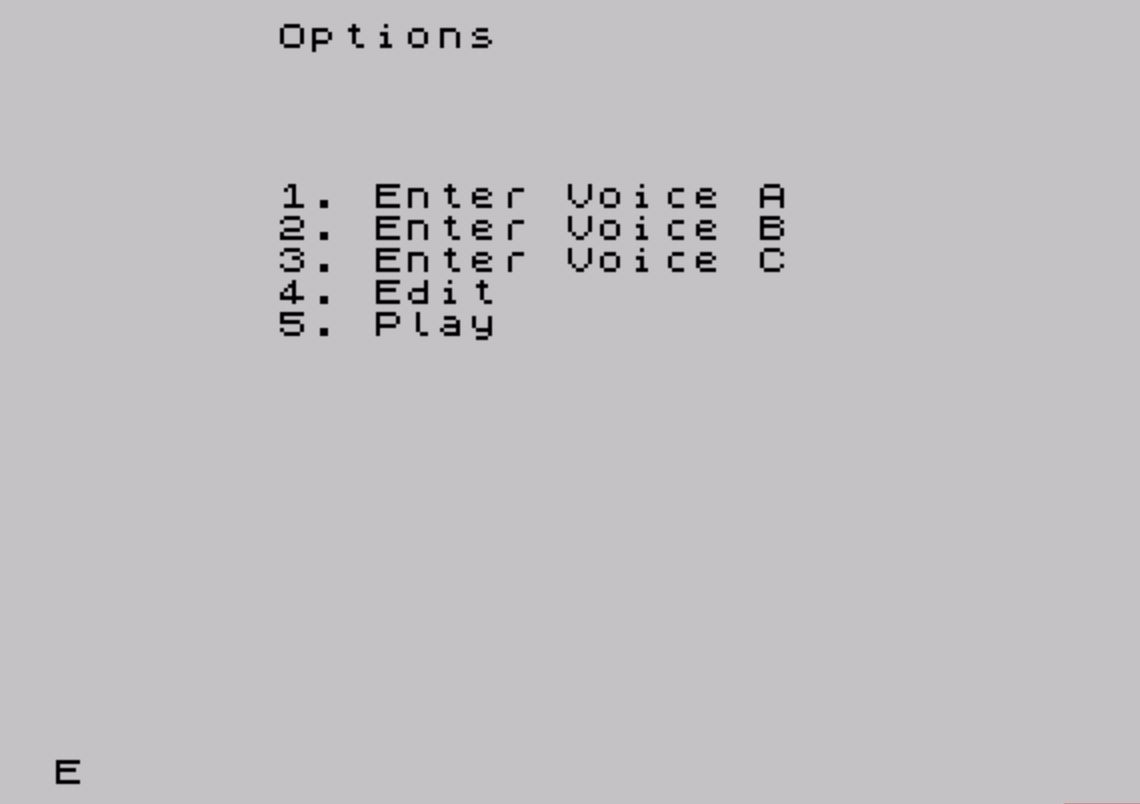
The program is organized around a main menu at line 50 that dispatches to five sections via a computed GO TO at line 55: GO TO 80+opt*20. This maps menu options 1–5 to lines 100, 120, 140, 160, and 180 respectively. The five sections cover entering notes for Voice A, Voice B, Voice C, editing, and playback.
| Option | Target Line | Function |
|---|---|---|
| 1 | 100 | Enter Voice A notes |
| 2 | 120 | Enter Voice B notes |
| 3 | 140 | Enter Voice C notes |
| 4 | 160/200 | Edit a voice |
| 5 | 180 | Play back composition |
Note Encoding and the `n` Array
A 3D numeric array n (implicitly dimensioned elsewhere or pre-populated) maps a note index and octave number to two AY-3-8910 register bytes. Line 16 seeds one entry: n(6,1,1)=228 and n(6,1,2)=4, which represents the coarse and fine pitch bytes for one note. At line 26, single-letter variables are assigned integer indices: c=1, cc=2, d=3, dd=4, e=5, f=6, ff=7, g=8, gg=9, a=10, aa=11, b=12. This allows the user to type note names like f1 or g2, from which n1 (note index, all characters except the last) and n2 (octave, last character) are extracted via VAL.
String Array Storage
Notes are stored in fixed-length two-character string arrays a$, b$, and c$, each dimensioned (1000,2) as noted in the REM at line 20. Each element pair holds the two AY register bytes as characters via CHR$, and they are retrieved during playback with CODE a$(j,1) and CODE a$(j,2). A rest is represented by storing CHR$ 0 in both elements.
Playback Mechanism
Playback at lines 190–194 uses consecutive SOUND statements to load AY registers directly. Registers 0–1 carry Voice A pitch, 2–3 carry Voice B pitch, and 4–5 carry Voice C pitch (with register 4 decremented by 1 at line 192, possibly to compensate for an off-by-one in the note table). Register 7 sets the mixer, and registers 8–10 set channel volumes. The loop runs to note 400 and restarts from the same start position, creating a loop. Pressing x during playback silences the chip and returns to the menu.
Edit Mode
Edit mode (lines 200–229) lets the user navigate through notes of a single voice in real time. A computed GO TO voice*10+200 at line 205 dispatches to the appropriate voice editor (210 for A, 220 for B). Within each editor, the current note plays continuously via SOUND, and INKEY$ polling at lines 216/226 moves forward ("7") or backward ("6") through note slots. Pressing "i" triggers a GO SUB to a note-input routine at line 1000 or 1050. There is no edit handler for Voice C — line 230 does not exist, so selecting voice 3 in edit mode would cause an error.
Key BASIC Idioms
- Computed
GO TOfor menu dispatch:GO TO 80+opt*20andGO TO voice*10+200. - Boolean arithmetic for navigation:
LET j=j+(INKEY$="7")-(INKEY$="6")increments or decrementsjbased on key state. INPUT ... LINE k$used to accept unquoted string input including note names.- The last entered note is remembered in
z$and reused when the user presses ENTER without typing a new note (lines 107, 127, 147). VAL n$used to parse a numeric start position from string input.
Notable Techniques
The note string is parsed by splitting on length: k$(1 TO (LEN k$-1)) gives the note name/index portion, and k$(LEN k$) gives the octave digit. Since note indices are assigned to variables (f=6, etc.), the user can type something like f1 or g2, and VAL "f1"(1 TO 1) would return the value of variable f — a clever use of BASIC’s VAL evaluating variable names within strings.
The dummy FOR/NEXT loop at lines 22–24 (iterating 1 to 1000 with no body) is used as a progress indicator during a “Configuring memory now” message, serving as a visible delay while appearing to perform initialization work.
Bugs and Anomalies
- Line 20 is a
REMcontaining theDIMstatements fora$,b$, andc$. These arrays are never actually dimensioned, so accessing them at runtime would produce an error unless the arrays were pre-existing in memory from a prior session. - Voice C has no edit subroutine —
GO TO voice*10+200withvoice=3targets line 230, which does not exist. - The typo “Compostion” (missing ‘i’) appears in the title at line 10, and “promt” (missing ‘p’) appears in the entry prompts at lines 100, 120, and 140.
- Line 16 pre-populates one cell of array
nbefore the array is dimensioned, which would cause an error on a fresh run; the array must be pre-loaded separately. - At line 192,
CODE c$(j,1)-1subtracts 1 from the Voice C coarse pitch register value, which may be intentional tuning compensation but is inconsistent with voices A and B. - Variable name case inconsistency:
JJGandjjgare used interchangeably (lines 101–103, 203), which in Sinclair BASIC are treated as the same variable since variable names are case-insensitive for numeric variables.
Image Gallery
Source Code
   10 BEEP .05,30: CLS : PRINT "Compostion Editor"'"V1.1 27 November 84"'"Bryan Lewis"
   16 LET n(6,1,1)=228: LET n(6,1,2)=4
   20 REM DIM a$(1000,2): DIM b$(1000,2): DIM c$(1000,2)
   21 CLS : PRINT "OK"''"Configuring memory now"
   22 FOR f=1 TO 1000
   24 NEXT f
   25 PRINT '''"OK"
   26 LET c=1: LET cc=2: LET d=3: LET dd=4: LET e=5: LET f=6: LET ff=7: LET g=8: LET gg=9: LET a=10: LET aa=11: LET b=12
   30 LET z$="stop"
   50 CLS : PRINT ;TAB 7;"Options";AT 5,0;TAB 7;"1. Enter Voice A"'TAB 7;"2. Enter Voice B"';TAB 7;"3. Enter Voice C"';TAB 7;"4. Edit";'TAB 7;"5. Play"
   51 SOUND 7,63
   52 INPUT opt
   54 CLS : IF opt>5 OR opt<1 THEN GO TO 50
   55 GO TO 80+opt*20
  100 PRINT "Enter note on promt. If no "'"change, press 'ENTER'"
  101 PRINT "Enter 'stop' to EXIT": PAUSE 600: INPUT "START NOTE#? ";n$: IF n$="" THEN LET JJG=1: GO TO 103
  102 LET jjg=VAL n$
  103 FOR j=JJG TO 1000
  104 PRINT AT 10,0;"NOTE#: ";j;"         "'''''"MEASURE: ";(j-1)/16+1;" in 4/4 (16th's)";AT 11,0;"NOTE: ";
  106 INPUT "NOTE? "; LINE k$: IF k$="r" THEN LET a$(j,1)=CHR$ 0: LET a$(j,2)=CHR$ 0: NEXT j
  107 IF k$="" THEN LET k$=z$
  108 IF k$="stop" THEN GO TO 50
  109 LET n1=VAL k$(1 TO (LEN k$-1))
  110 LET n2=VAL k$(LEN k$)
  111 LET z$=k$
  112 LET a$(j,1)=CHR$ n(n1,n2,1)
  113 LET a$(j,2)=CHR$ n(n1,n2,2)
  114 PRINT k$;" "
  115 NEXT j
  116 GO TO 50
  120 PRINT "Enter note on promt. If no "'"change, press 'ENTER'"
  121 PRINT "Enter 'stop' to EXIT": INPUT "START NOTE#? ";n$: IF n$="" THEN LET jjg=1: GO TO 123
  122 LET jjg=VAL n$
  123 FOR j=jjg TO 1000
  124 PRINT AT 10,0;"NOTE#: ";j;"     "
  125 PRINT ''''"MEASURE: ";(j-1)/16+1;" in 4/4 (16th's)";AT 11,0;"NOTE: ";
  126 INPUT "NOTE? "; LINE k$: IF k$="r" THEN LET b$(j,1)=CHR$ 0: LET b$(j,2)=CHR$ 0: NEXT j
  127 IF k$="" THEN LET k$=z$
  128 IF k$="stop" THEN GO TO 50
  129 LET n1=VAL k$(1 TO (LEN k$-1))
  130 LET n2=VAL k$(LEN k$)
  131 LET z$=k$
  132 LET b$(j,1)=CHR$ n(n1,n2,1)
  133 LET b$(j,2)=CHR$ n(n1,n2,2)
  134 PRINT k$;" "
  135 NEXT j
  136 GO TO 50
  140 PRINT "Enter note on promt. If no "'"change, press 'ENTER'"
  141 PRINT "Enter 'stop' to EXIT": INPUT "St NOTE#? ";n$: IF n$="" THEN LET jjg=1: GO TO 143
  142 LET jjg=VAL n$
  143 FOR j=jjg TO 1000
  144 PRINT AT 10,0;"NOTE#: ";j;"     "
  145 PRINT ''''"MEASURE: ";(j-1)/16+1;" in 4/4 (16th's)";AT 11,0;"NOTE: ";
  146 INPUT "NOTE? "; LINE m$: IF m$="r" THEN LET c$(j,1)=CHR$ 0: LET c$(j,2)=CHR$ 0: NEXT j
  147 IF m$="" THEN LET m$=z$
  148 IF m$="stop" THEN GO TO 50
  149 LET o1=VAL m$(1 TO (LEN m$-1))
  150 LET o2=VAL m$(LEN m$)
  151 LET z$=m$
  152 LET c$(j,1)=CHR$ n(o1,o2,1)
  153 LET c$(j,2)=CHR$ n(o1,o2,2)
  154 PRINT m$;" "
  155 NEXT j
  156 GO TO 50
  160 REM EDIT: GO TO 200
  161 GO TO 200
  180 CLS : PRINT "PLAY"
  181 INPUT "A Volume",avol: INPUT "B volume",bvol: INPUT "C Volume",cvol
  182 INPUT "Speed",sp,"START#? ";jjg
  185 SOUND 7,56;8,avol;9,bvol;10,cvol
  190 FOR j=jjg TO 400
  191 SOUND 0,CODE a$(j,1);1,CODE a$(j,2);2,CODE b$(j,1);3,CODE b$(j,2)
  192 SOUND 4,CODE c$(j,1)-1;5,CODE c$(j,2): PAUSE sp
  193 IF INKEY$="x" THEN SOUND 8,0;9,0;10,0: GO TO 50
  194 NEXT j: GO TO 190
  195 GO TO 50
  200 CLS : INPUT "What voice? (1=a, 2=b, 3=c) ";voice
  201 PRINT "Use ^ to go fwd"'"Use down arrow to go bckwd": PAUSE 480
  202 CLS
  203 INPUT "START WHERE? (#) ";JJG
  205 GO TO voice*10+200
  210 LET j=JJG
  211 SOUND 0,CODE a$(j,1);1,CODE a$(j,2);7,62;8,15
  212 PRINT AT 10,0;"NOTE#: ";j;"    "
  214 IF INKEY$="x" THEN GO TO 50
  215 IF INKEY$="i" THEN GO SUB 1000
  216 LET j=j+(INKEY$="7")-(INKEY$="6"): IF j<1 THEN LET j=1
  219 GO TO 211
  220 LET j=JJG
  221 SOUND 0,CODE b$(j,1);1,CODE b$(j,2);7,62;8,15
  222 PRINT AT 10,0;"NOTE#: ";j;"    "
  224 IF INKEY$="x" THEN GO TO 50
  225 IF INKEY$="i" THEN GO SUB 1050
  226 LET j=j+(INKEY$="7")-(INKEY$="6"): IF j<1 THEN LET j=1
  229 GO TO 221
 1000 INPUT "NOTE? "; LINE m$: IF m$="r" THEN LET a$(j,1)=CHR$ 0: LET a$(j,2)=CHR$ 0: RETURN
 1002 LET n1=VAL m$( TO (LEN m$-1)): LET n2=VAL m$(LEN m$): LET a$(j,1)=CHR$ n(n1,n2,1): LET a$(j,2)=CHR$ n(n1,n2,2)
 1004 RETURN
 1050 INPUT "NOTE? "; LINE m$: IF m$="r" THEN LET b$(j,1)=CHR$ 0: LET b$(j,2)=CHR$ 0: RETURN
 1052 LET n1=VAL m$( TO (LEN m$-1)): LET n2=VAL m$(LEN m$): LET b$(j,1)=CHR$ n(n1,n2,1): LET b$(j,2)=CHR$ n(n1,n2,2)
 1054 RETURN
 9998 SAVE "janice" LINE 50
Note: Type-in program listings on this website use ZMAKEBAS notation for graphics characters.