
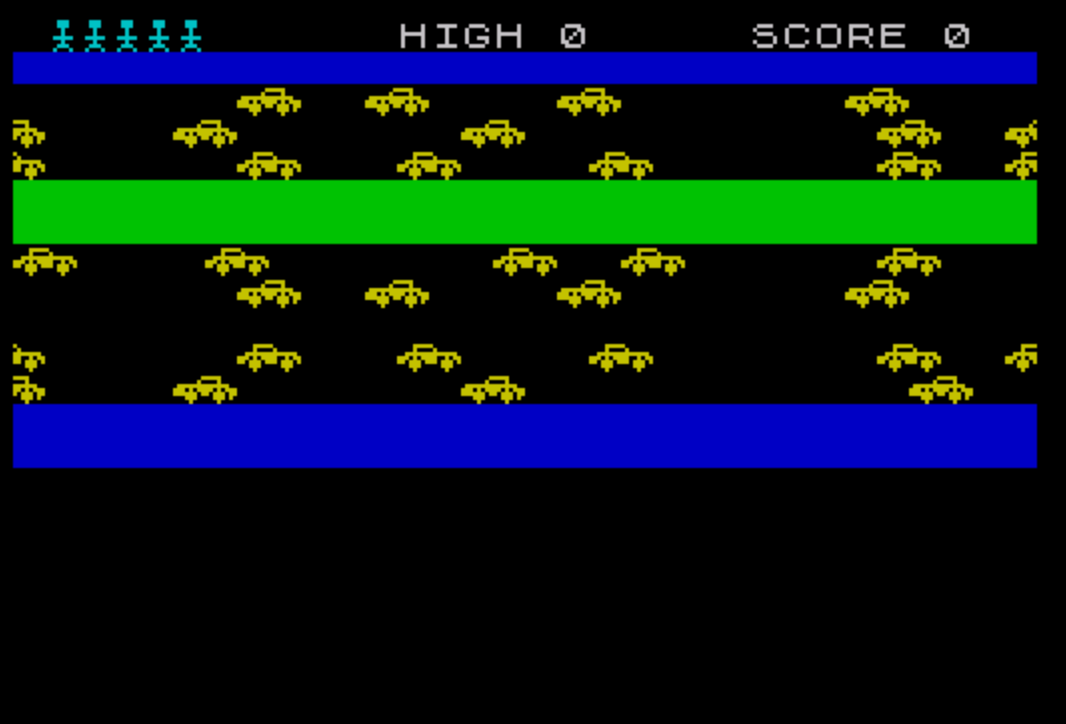
“Jumper” is a two-dimensional dodging game in which the player moves a character sprite around the screen while avoiding two scrolling rows of obstacles. The player uses keys 5–8 for movement, and reaching row 2 awards 10 points while colliding with an obstacle ends the current life. Five user-defined graphics are loaded via a DATA/POKE USR loop at startup: four form the obstacle tiles (\a–\d) and one represents the player sprite (\e). The scrolling effect is achieved by rotating string slices — b$ shifts its first character to the end, and a$ shifts in the opposite direction — giving independent leftward and rightward scroll on alternating obstacle rows. A lives counter (ml) initialized to 5 governs how many collisions the player can survive before the session ends.
Program Analysis
Program Structure
The program is organized into a main game loop, three subroutines, and a DATA block. Execution flows as follows:
- Line 360: UDG initialization subroutine — reads 40 bytes and POKEs them into five UDG definitions.
- Line 20: Calls UDG init, then zeroes the high score.
- Line 30/320: New-game setup subroutine — resets score, border/paper, and initializes scroll strings and lives.
- Line 40/240: Screen-draw subroutine — clears screen, prints HUD, obstacle rows, and the player sprite.
- Lines 50–140: Main movement and collision loop.
- Lines 150–210: Death/game-over handler.
- Lines 220–230: Score increment when the player reaches the top row.
User-Defined Graphics
Five UDGs are defined by the DATA block at lines 390–420 and the partially hand-coded line 430. The READ/POKE loop at lines 360–380 uses POKE USR "\a"+a to fill characters \a through \e (8 bytes each, 5 × 8 = 40 bytes total). The comment at line 440 names the UDGs explicitly: \a and \b pair as the left and right halves of one obstacle tile type; \c and \d form another; \e is the player sprite.
Scrolling Technique
The two obstacle rows are stored in the 32-character strings a$ and b$. Each frame, b$ is rotated left by moving its first character to the end (line 110: LET b$=b$(32)+b$( TO 31) — note this appends the 32nd character and drops the 31 after; effectively a rightward visual shift), while a$ is rotated right (line 120: LET a$=a$(2 TO )+a$(1)). This gives the two rows opposite scroll directions for visual variety, all without any array manipulation or machine code.
Movement and Collision Detection
Player position is tracked by integer variables v (row) and h (column). Movement on each axis is computed in a single expression using Boolean arithmetic (lines 60–70): pressing “6” increments v if h<21, “7” decrements it if v>0, etc. Note that lines 60 and 70 each sample INKEY$ independently, so diagonal movement is possible but diagonal key-presses are read twice per frame.
Collision is tested at line 90 using SCREEN$(v,h)="": if the cell is blank (space), the player is safe; otherwise the death sequence is triggered. The player sprite itself is printed with PAPER 8 (transparent paper) so it composites cleanly onto the obstacle characters without altering background color.
Lives System and Scoring
The lives counter ml is set to 5 at line 350 and decremented at line 180 on each death. If lives remain, the game re-enters the draw subroutine at line 40, preserving sc and the scroll state. Reaching row 2 (line 130 checks v=2) branches to line 220, which adds 10 to sc before re-entering the draw loop. The high score is updated only when a full game ends (line 190).
The subroutine at line 240 also prints the lives indicators in a FOR loop (line 310): one \e sprite per remaining life across row 1, using INK 5.
Screen Layout
| Row(s) | Content |
|---|---|
| 0 | HUD: HIGH score and SCORE values (TAB-positioned) |
| 1 | Life indicators (one \e sprite per remaining life) |
| 2 (target) | Reaching here scores +10 points |
| 4–5 | Obstacle rows (a$ and b$, PAPER 1) |
| 11–12 | Obstacle rows (b$ and a$, PAPER 4) |
| 14 | Player start row |
Notable Idioms and Techniques
PAPER 8(transparent) is used for the player sprite to avoid overwriting background colors — a TS2068/Spectrum-specific attribute trick.OVER 1at line 170 XORs a blankDIM s$(704)string over the play area during the death flash, effectively inverting displayed attributes without explicit loops.- String slice rotation for scrolling avoids any loop overhead; the entire scroll update is two assignment statements.
- The obstacle strings
a$andb$are 32 characters long — one full screen row — allowing direct printing withPRINT a$.
Potential Anomalies
- Line 110 reads
b$(32)+b$( TO 31). The sliceb$( TO 31)yields characters 1–31, andb$(32)yields character 32, so the full string is reassembled with character 32 moved to the front — this is a rightward rotation (the string content shifts right), causing a leftward visual scroll when printed. The direction is intentional but the code reads non-obviously. - Lines 60 and 70 each call
INKEY$twice per variable. SinceINKEY$is re-evaluated each time it appears, a key held between the two evaluations will work correctly, but a very brief tap could be missed in one of the two axis checks. - Line 160 dimensions
s$to 704 characters on every death. Since 704 = 22 × 32, this covers the entire text screen; the subsequentPRINT AT 0,0; OVER 1; PAPER 8; INK 2;s$uses XOR to flash the screen. Re-dimensioning inside the loop is harmless but slightly wasteful.
Image Gallery
Source Code
   10 REM PROGRAM *** "JUMPER"
   20 GO SUB 360: LET hi=0
   30 GO SUB 320
   40 LET v=14: LET h=16: GO SUB 240
   50 PRINT AT v,h; PAPER 8;" "
   60 LET v=v+(INKEY$="6" AND h<21)-(INKEY$="7" AND v>0)
   70 LET h=h+(INKEY$="8" AND h<31)-(INKEY$="5" AND h>0)
   80 PRINT AT 4,0; INK 6;a$;AT 11,0;b$;AT 5,0;b$;AT 12,0;a$
   90 IF SCREEN$ (v,h)="" THEN GO TO 150
  100 PRINT AT v,h; PAPER 8;"\e"
  110 LET b$=b$(32)+b$( TO 31)
  120 LET a$=a$(2 TO )+a$(1)
  130 IF v=2 THEN GO TO 220
  140 GO TO 50
  150 PRINT AT v,h;"\e"
  160 DIM s$(704)
  170 PRINT AT 0,0; OVER 1; PAPER 8; INK 2;s$
  180 IF ml>0 THEN LET ml=ml-1: GO TO 40
  190 IF sc>hi THEN LET hi=sc
  200 INPUT "Press ENTER to play again."; LINE b$
  210 GO TO 30
  220 LET sc=sc+10
  230 GO TO 40
  240 CLS
  250 PRINT 'TAB 12;"HIGH ";hi;TAB 23;"SCORE ";sc' PAPER 1,,
  260 PRINT INK 6'a$'b$
  270 PRINT ' PAPER 4,,,,
  280 PRINT INK 6'b$'a$
  290 PRINT ''' PAPER 1,,,,
  300 PRINT AT v,h; PAPER 8;"\e"
  310 FOR a=1 TO ml: PRINT AT 1,a; INK 5;"\e";: NEXT a: RETURN
  320 LET sc=0: BORDER sc: PAPER sc: INK 9: CLS
  330 LET a$="       \a\b  \a\b    \a\b       \a\b    "
  340 LET b$="\c\d    \c\d       \c\d  \c\d      \c\d   "
  350 LET ml=5: RETURN
  360 FOR a=0 TO 39
  370 READ u: POKE USR "\a"+a,u
  380 NEXT a: RETURN
  390 DATA 0,1,2,127,235,253,28,8
  400 DATA 0,240,16,252,215,187,58,16
  410 DATA 0,15,8,63,235,221,28,8
  420 DATA 0,128,64,254,203,221,28,8
  430 DATA 28,u,8,u,62,8,28,34
  440 REM a=\a b=\b c=\c d=\d e=\e
Note: Type-in program listings on this website use ZMAKEBAS notation for graphics characters.