
KEYWORD V5 is a loader and front-end program for a machine code utility that modifies the operating system to allow Sinclair BASIC keywords to be typed out in full as ordinary text while writing or editing programs. The program saves and loads the machine code block at address 60000 (length 1000 bytes) alongside the BASIC loader, supporting both tape and Larken disk backup paths. A decorative title subroutine at line 300 prints a centered string by expanding it symmetrically one character at a time from the middle outward, accompanied by a rising BEEP sweep. The installed utility replaces the normal keyword-entry cursor (K, L, or C) with a flashing `>` or `<` cursor, toggled via SYMBOL-SHIFT+ENTER, giving audio feedback through low or high beeps. Disk operations use stream 4 with `OPEN #4,”DD”` and a Larken-specific bootstrap at `RANDOMIZE USR 100`.
Program Analysis
Program Structure
The program is organized into clearly delimited sections, each preceded by a REM comment. Control flow is menu-driven: lines 50–90 present a series of yes/no prompts and branch accordingly, with RUN at line 90 acting as a fallback restart loop.
| Lines | Section |
|---|---|
| 1–4 | Title REMs (author, contact) |
| 10–45 | Welcome screen and rules display |
| 50–90 | Main menu (HELP / Disk / Tape / Stop / Run) |
| 100–145 | Tape backup and verify path |
| 150–180 | Tape reload and install path |
| 200–220 | Larken disk backup path |
| 250–270 | Larken disk reload path |
| 300–340 | Centered animated title subroutine |
| 500–540 | Help text |
Machine Code Usage
The core KEYWORD utility is a 1000-byte machine code block stored at address 60000. It is saved to tape with SAVE "KW5" CODE 60000,1000 and to disk as "KW5.CD". After loading, it is activated by RANDOMIZE USR 60000 (line 170). The disk reload path additionally calls RANDOMIZE USR 100 (line 250), which is a Larken disk interface bootstrap routine, before opening stream 4 with OPEN #4,"DD".
Once installed, the machine code patches the OS keyboard handler to intercept keyword-entry mode, replacing the standard K/L/C cursor with a flashing > or < cursor and accepting full keyword names as typed text. The toggle is SYMBOL-SHIFT+ENTER, with a low beep for OFF and a high beep for ON.
Tape Save and Verify Path
Line 100 saves the BASIC program itself with SAVE "KEYWORD" LINE 150, causing an auto-load to jump to line 150 (the tape reload entry point). Line 110 follows with a short BEEP before saving the code block. Lines 120–132 implement a non-blocking keypress loop using INKEY$ to decide whether to verify; this avoids INPUT so the user can respond immediately after the tape motor stops. Verification at line 140 uses VERIFY "" and VERIFY "" CODE (empty filename, matching next on tape).
Animated Title Subroutine (Lines 300–340)
The subroutine at line 300 produces a symmetrical reveal animation. It first pads m$ to an even length if necessary, then loops from 1 to half the string length. On each iteration it prints the first i characters of m$ left of center and the last i characters right of center using PRINT AT v, 16-i, so both ends grow toward the middle simultaneously. A rising pitch sweep is produced by BEEP .05, i on each step.
m$— the string to display (set by caller)v— the screen row (set by caller, here 3)m— computed length ofm$i— loop counter, also used as BEEP pitch
The slice notation m$(m-i+1 TO ) extracts the trailing i characters. Because both halves are printed in each PRINT AT call they overwrite the same row repeatedly, building the complete string from outside in (or inside out, depending on perspective) by one character per frame.
Key BASIC Idioms
PRINT #0; AT 0,0;writes to the lower screen (stream 0) for the verify prompt, keeping the main display intact.PRINT #4:(lines 200, 210, 260) directs output to the Larken disk interface stream before each disk SAVE/LOAD command.- The even-length padding check
IF m/2 <> INT(m/2)is a clean modulo-2 test without usingMOD. INPUT "..."; LINE k$at line 540 captures any ENTER keypress without parsing the input.SAVE "KEYWORD" LINE 150sets the auto-run line to the tape reload entry point rather than the program start, so a fresh tape load skips the menus and goes straight to installing the code.
Notable Anomalies
Line 130 checks INKEY$ = "Y" but the prompt at line 120 displays a capital > as the active cursor using FLASH 1; the prompt text itself says VERIFY? (Y/N) without a newline, so the flashing character appears inline. The INKEY$ loop at lines 130–132 is tight (no PAUSE), which is functional but will busy-loop on slower hardware.
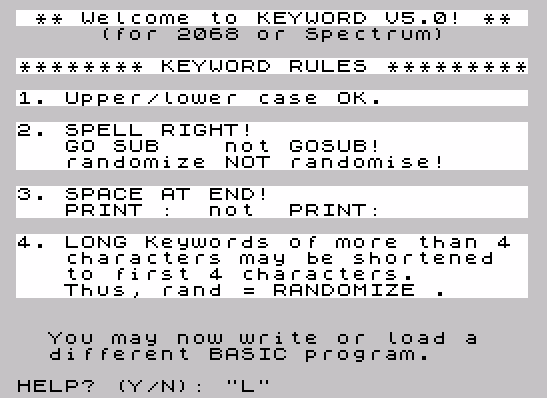
The rules text at line 41 spells “randomize” (American spelling) explicitly and calls out “randomise” as incorrect — a deliberate note for users accustomed to British Sinclair documentation, since the keyword is RANDOMIZE on both targeted machines.
Image Gallery
Source Code
    1 REM KEYWORD V5
    2 REM for 2068 or Spectrum
    3 REM by JACK DOHANY
    4 REM    (415) 367-7781
   10 CLS : PRINT BRIGHT 1;" ** Welcome to KEYWORD V5.0! ** "
   20 PRINT TAB 5;"(for 2068 or Spectrum)"
   30 BRIGHT 1
   40 LET m$="******** KEYWORD RULES *********": LET v=3: GO SUB 300
   41 PRINT '"1. Upper/lower case OK.",''"2. SPELL RIGHT!",,"   GO SUB    not GOSUB!",'"   randomize NOT randomise!",''"3. SPACE AT END!",'"   PRINT :  not  PRINT:",
   42 PRINT ''"4. LONG Keywords of more than 4",'"   characters may be shortened",'"   to first 4 characters.",
   43 PRINT "   Thus, rand = RANDOMIZE .",
   44 BRIGHT 0
   45 PRINT AT 20,0;"  You may now write or load a"'"  different BASIC program."
   50 INPUT "HELP? (Y/N): ";k$: IF k$="y" OR k$="Y" THEN GO TO 500
   60 INPUT "LARKEN DISK BACKUP? (Y/N): ";K$: IF K$="Y" OR K$="y" THEN GO TO 200
   70 INPUT "TAPE BACKUP? (Y/N): ";K$: IF K$="Y" OR K$="y" THEN GO TO 100
   80 INPUT "STOP? (Y/N): ";k$: IF k$="y" OR k$="Y" THEN STOP
   90 RUN
   99 REM  tape backup
  100 SAVE "KEYWORD" LINE 150
  110 BEEP .1,5: SAVE "KW5"CODE 60000,1000
  120 PRINT #0;AT 0,0;"VERIFY? (Y/N): "; FLASH 1;">"
  130 IF INKEY$= "Y" OR INKEY$="y" THEN GO TO 140
  131 IF INKEY$= "N" OR INKEY$= "n" THEN RUN
  132 GO TO 130
  140 CLS : PRINT AT 10,0;"VERIFYING KEYWORD": VERIFY "": VERIFY ""CODE
  145 RUN
  149 REM  tape reload
  150 CLS : PRINT AT 10,0;"LOADING KEYWORD CODE"
  160 LOAD ""CODE
  169 REM  INSTALL KEYWORD
  170 RANDOMIZE USR 60000
  180 RUN
  199 REM  disk backup
  200 PRINT #4: SAVE "KWORD.BA" LINE 250
  210 PRINT #4: SAVE "KW5.CD"CODE 60000,1000
  220 RUN
  249 REM  disk reload
  250 RANDOMIZE USR 100: OPEN #4,"DD"
  260 PRINT #4: LOAD "KW5.CD"CODE
  270 GO TO 170
  299 REM  output subroutine
  300 LET m=LEN m$: IF m/2<>INT (m/2) THEN LET m$=m$+" ": LET m=m+1
  310 FOR i=1 TO m/2: PRINT AT v,16-i;m$( TO i);m$(m-i+1 TO )
  320 BEEP .05,i
  330 NEXT i
  340 RETURN
  499 REM  help
  500 CLS : PRINT "KEYWORD is now installed."'"The computer's operating system"'"has been modified to permit"'"Sinclair keywords to be typed"'"out when you are writing BASIC"'"programs or immediate commands."
  510 PRINT '"Prior to writing or editing a"'"BASIC program line, you may"'"   PRESS SYMBOL-SHIFT + ENTER   "'"to turn KEYWORD off or on."'"A LOW BEEP says it is OFF, and"'"a HIGH BEEP says it is ON."
  520 PRINT '"A flashing '>' or '<' cursor"'"appears instead of the K, L or C"'"cursor when KEYWORD is ON."
  530 PRINT '"Please read the manual for full"'"details. You should have it on"'"disk (Mscript file KWdoc) and/or"'"on paper."
  540 INPUT "Please press ENTER. "; LINE k$: RUN
Note: Type-in program listings on this website use ZMAKEBAS notation for graphics characters.