
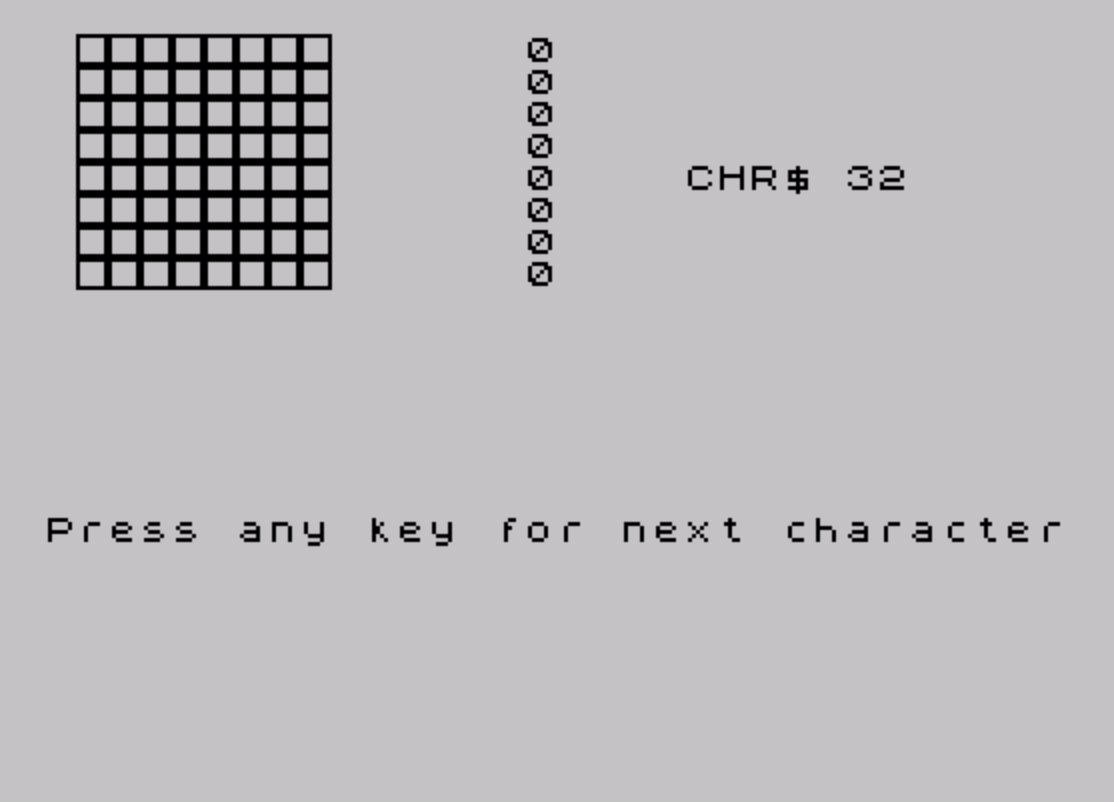
This program displays each printable ASCII character (CHR$ 32 through CHR$ 126) rendered as a large 8×8 pixel grid using a custom UDG character. It reads the ROM character set by locating the font address via system variables at 23606–23607, then uses bit-shifting arithmetic to extract each pixel bit from the font bytes. A single UDG (char 144) is defined with a border/box pattern from the DATA statement at line 100, and its inverse (CHR$ 143, i.e., 144−1) is used to represent set pixels while CHR$ 144 represents clear pixels. The program pauses for a keypress between each character display, stepping through all 96 printable characters before stopping.
Program Analysis
Program Structure
The program is organized into three functional phases:
- Initialization (lines 5–10): Defines UDG ‘A’ (char 144) from inline DATA and locates the ROM character set base address.
- Display loop (lines 15–65): Iterates over all 96 printable characters (CHR$ 32–126), rendering each as a large pixel grid.
- Data (line 100): Eight bytes defining a bordered rectangle UDG pattern (
255,129,129,129,129,129,129,255).
UDG Setup
Line 5 uses RESTORE followed by a FOR loop to POKE all 8 bytes of the DATA at line 100 into the address returned by USR CHR$ 144 (i.e., USR "\a"), defining UDG ‘A’. The pattern 255,129,129,129,129,129,129,255 creates a hollow box — a full top row, full bottom row, and only the outermost bits set in middle rows.
Font Address Lookup
Line 10 computes the character set base address using system variables:
PEEK 23606 + 256 * PEEK 23607reads the two-byte system variable CHARS (address &5C36), which points 256 bytes before the font data.- Adding 256 corrects for this offset, giving
cas the true start of the font bitmap data.
This technique works whether the font is in ROM or has been relocated to RAM.
Pixel Extraction and Rendering
For each character j and each row p (0–7), the program fetches the font byte at c + p + j*8 (line 25). The inner loop (lines 35–50) extracts bits from least-significant to most-significant using integer division:
LET x = INT(byte/2)— integer right-shift by one.LET bit = byte - 2*x— isolates the LSB (0 or 1).LET byte = x— advances to the next bit.
The extracted bit is used to select either CHR$ 143 (set pixel, 144−1) or CHR$ 144 (clear pixel, 144−0). Because bits are extracted LSB-first but printed left-to-right starting at column 8 down to column 1 (via AT p, 9-l), the pixel order is naturally reversed back to the correct left-to-right visual orientation.
Display Layout
| Screen element | Position |
|---|---|
| Large pixel grid | Rows 0–7, columns 1–8 |
| Raw byte values | Rows 0–7, column 15 |
| CHR$ label and character | Row 4, column 20 |
| “Press any key” prompt | Row 15, column 0 |
Notable Techniques
- Using
CHR$ (144 - bit)elegantly selects between two UDG states with a single expression rather than anIFbranch. - The
PAUSE 0on line 60 (conditioned onj <> 95) waits for a keypress on every character except the last, avoiding a redundant pause beforeSTOP. - The font lookup via CHARS system variable is portable and will correctly follow any relocated or custom font.
Potential Anomalies
- Line 60 uses
PAUSE 0alone without readingINKEY$;PAUSE 0on the Spectrum/TS2068 waits until any key is pressed, so this is valid and sufficient. - The UDG box pattern is defined but only its code-point relationship (
144 - bit) matters; the actual visual appearance of the box/blank pixels is a design choice and not central to correctness. - Line 10 adds 256 to the CHARS pointer. The CHARS system variable holds a value 256 less than the font start, so this addition is correct and intentional.
Image Gallery
Source Code
    1 REM LARGE CHARACTERS
    5 RESTORE : FOR j=0 TO 7: READ a: POKE USR CHR$ 144+j,a: NEXT j
   10 LET c=PEEK 23606+256*PEEK 23607+256
   15 FOR j=0 TO 95: CLS : PRINT AT 4,20;"CHR$ ";j+32;" ";CHR$ (j+32)
   20 FOR p=0 TO 7
   25 LET byte=PEEK (c+p+j*8)
   30 PRINT AT p,15;byte
   35 FOR l=1 TO 8
   40 LET x=INT (byte/2): LET bit=byte-2*x: LET byte=x
   45 PRINT AT p,9-l;CHR$ (144-bit)
   50 NEXT l
   55 NEXT p
   60 IF j<>95 THEN PRINT AT 15,0;"Press any key for next character": PAUSE 0
   65 NEXT j: STOP
  100 DATA 255,129,129,129,129,129,129,255
 9998 SAVE "LARGE CHAR" LINE 0
Note: Type-in program listings on this website use ZMAKEBAS notation for graphics characters.