
A suite of disk maintenance and repair programs for the Larken LKDOS disk system, run from a lettered menu. It needs a TS2068 with the Larken disk interface and has not been converted for tape; several of the programs expect version 3 of LKDOS, and the label programs may not work correctly without it. The centrepiece is Disk Doctor, which loads any track of a disk into memory, shows it byte by byte and lets it be changed and written back, so a damaged directory or file entry can be repaired by hand. The other programs copy, format, erase, recover and catalogue disks, and one backs a whole disk up to tape.
The Programs
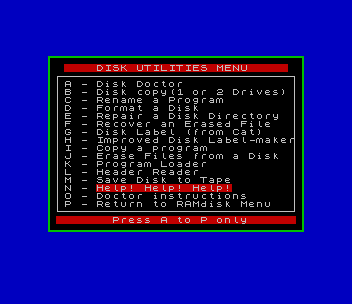
The menu.B1 “DISK UTILITIES MENU” lists sixteen entries, A to P, and loads the chosen program from disk:
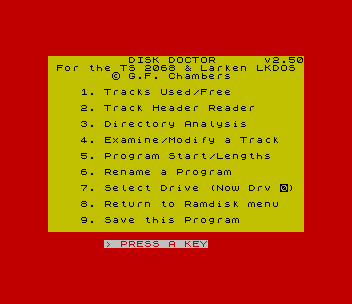
- Disk Doctor v2.50 (
doctor.B1): a main menu of Tracks Used/Free, Track Header Reader, Directory Analysis, Examine/Modify a Track, Program Start/Lengths, Rename a Program, Select Drive and Save. Examine/Modify shows a track in pages of 17 bytes with keys to step through the 34-byte name cells of the directory, alter bytes or characters, and save the buffer to the same track or another one. It uses the code fileHcode.Cl. - Disk Copy v1.25 (
copy12.B1) and Program Copy (Move.B1withMove .C1), each for one or two drives. - Disk Formatter v1.2 (
format.B1): single- or double-sided disks in single, double or quad density, head speeds of 6, 20 or 35 ms, and an optional disk name. - Directory Repair v1.2 (
repair.B1): reads every track and rebuilds a damaged directory (track 0) from what it finds. - File Recovery v1.1 (
recovr.B1): finds an erased file on the disk and restores its directory entry. - File Erase v1.0 (
erase.B1), for erasing many files at once. - Rename a Program v1.1 (
rename.B1). - Label Maker (
labels.B1), which prints the LKDOS catalogue on a large printer, and the Label-Maker v1.2 (label2.B1), which reads the directory itself and prints file names in one, two or three columns, optionally sorted, on the TS2040 or a large printer. - Program Loader v1.1 (
loader.B1): offers each file on a disk in turn and, before loading one, saves itself in its running state so that it carries on with the next file when reloaded. - Program Header Reader v2.20 (
reader.B1): lists each file’s start address, length, first track and auto-run line, on screen or on the TS2040. - Disk to Tape Back-up v2.0 (
tapsav.BT): saves a disk to tape track by track as headerless blocks, using the Spectrum ROM save routine so that it runs without the “press any key” pause, and loads such a tape back onto a disk. - Two help entries that show
help.CTanddocto1.CTin 64 columns with the TASWIDE codetaswi.Cx, and an exit to a RAMdisk menu.
Provenance
The help file is headed “LARKEN SYSTEM UTILITY PROGRAMS by George Chambers”. It says most of the programs are by Chambers, that FORMAT, Move.B1, Move .C1 and Hcode.Cl incorporate elements of the DOS programs Larry Kenny supplied with the Larken disk operating system, and that the Rename program was written by R. Mitchell; the rename.B1 on this disk, however, carries Chambers’ own public-domain REM. The REM in reader.B1 adds “Modified by Bob Mitchell”. Every program shows a 1988 copyright to Chambers, and the REMs say they were placed in the public domain. The help file explains that the suite was put on a single-sided 42-track disk so that every Larken owner could use it.
The Download
The download holds every file from the disk as a TAP in disk files, and the two Tasword documents converted to text: the overview from help.CT and the Disk Doctor manual from docto1.CT, which also describes the layout of the LKDOS directory track. Chambers’ home street address, which appears in the REM lines of eleven of the programs, has been blanked in those copies, so the image of the original disk is not included. The two screens above were taken in ZEsarUX from copies of the menu and Disk Doctor with their LKDOS calls removed; the utilities themselves need the Larken system.
Notes
- The help file names the formatter
format.BLand the copierMove.Bl; on the disk they areformat.B1andMove.B1. - Most programs have a SAVE routine at line 9000 and a return-to-menu option that the help file says each owner should edit to point at the drive holding the menu;
GO TO 8000clears the colours for listing.
NMI-Save to Tape
The download now also has George Chambers’ TTSUC disk “Larken NMI-Save to Tape” (menu v1.2), in the folder “NMI-Save to Tape (v1.2)”. nmisav.B1 loads a Larken 9-track NMI save, made in Spectrum mode, from disk and writes it to tape as a SCREEN$ followed by a headerless block, and nmilod.B1 is the loader that goes on the tape ahead of it. atrmov.B1 copies a screen’s attributes into the NMI save, using the solid-colour screens on the disk as sources; bopeep.B1 is a disk-level PEEK and POKE tool for entering game POKEs; and NMI-F.C1 makes NMI + F return to the menu. Chambers’ instructions (nmisav.CT) are included as text. Like the rest of this package it needs the Larken interface and is not converted. Two NMI snapshots and a title screen of a commercial Spectrum game that were on the disk are left out.
The download now also has Disk to Tape Back-up v4.0 (folder “Disk to Tape Back-up v4.0”), a later version of tapsav.BT from a Toronto T/S Users Club copy of this disk. Version 2.0 is in “disk files”; about 59 lines differ, with a rewritten MINIDOS control block and new jump assignments. The author’s home address is omitted.
Image Gallery
Source Code
    0 REM  George Chambers,                [address omitted]
   40 REM  For version 3 LKDOS
   50 RANDOMIZE USR 100: OPEN #4,"dd"
   60 PRINT #4: OPEN #5,"lp"
  106 PRINT #4: GO TO 0: LET dr=0
  108 RESTORE 112
  109 FOR n=44000 TO 44119: READ a: POKE n,a: NEXT n
  112 DATA 195,249,171,195,7,172,195,27,172,195
  113 DATA 56,172,195,75,172,243,205,98,0,201
  114 DATA 58,100,0,251,201,205,239,171,58,124
  115 DATA 171,50,29,32,205,126,0,24,237,205
  116 DATA 239,171,58,124,171,50,29,32,205,129
  117 DATA 0,58,29,32,50,124,171,24,217,205
  118 DATA 239,171,175,50,32,32,205,123,0,58
  119 DATA 32,32,79,6,0,33,112,32,17,80
  120 DATA 195,1,0,20,237,176,24,188,205,239
  121 DATA 171,33,80,195,17,112,32,1,0,20
  122 DATA 237,176,205,120,0,24,169,205,239,171
  123 DATA 42,144,171,78,35,70,24,158,0,0
  160 DIM a$(640)
  170 LET oo=0: LET oa=1: LET ob=2: LET oc=3: LET od=4: LET oe=5: LET of=6: LET og=7
  190 LET settrack=VAL "44000"
  195 LET name=50188
  200 LET nexttrack=VAL "44003"
  220 LET load=VAL "44006"
  230 LET save=VAL "44009"
  240 LET track=VAL "43900"
  250 LET drive=VAL "43301"
  260 LET buffer=VAL "50000": LET bufflenth=VAL "5120": LET lastcell=VAL "3571": LET diskname=4483
  265 LET menu=5000
  270 POKE drive,ob
  280 LET treg=VAL "18"
  290 LET side=ob
  300 GO TO menu
 1000 REM Track Used/Free Routine
 1005 CLS : GO SUB 8050
 1010 PAPER of: CLS : LET ge=5: LET c=oo: LET ot=c: LET ft=c
 1030 PRINT "Dir. ";
 1040 FOR n=buffer+VAL "25" TO buffer+VAL "23"+sz1-(2 AND side=1)
 1045 LET p=n: IF side=1 THEN LET n=n+1: LET p=n
 1050 LET t=PEEK n
 1060 IF t=VAL "245" THEN PRINT TAB ge; INK ob;p-50024;: LET ge=ge+od: LET ft=ft+oa: IF ge>29 THEN LET ge=oa
 1070 IF t<>VAL "245" THEN PRINT TAB ge; INK oa;p-50024;: LET ge=ge+od: LET ot=ot+oa: IF ge>29 THEN LET ge=oa
 1100 IF c=VAL "32" THEN LET c=NOT c
 1110 NEXT n
 1120 PRINT AT VAL "20",oa;"Tracks Used:";ft;
 1123 IF dr=4 THEN PRINT "     RAMDisk": GO TO 1130
 1125 PRINT " Disk type ";("SS" AND PEEK 50020=1);("DS" AND PEEK 50020=2);(" DD" AND PEEK 50021=40);(" QD" AND PEEK 50021>=80)
 1130 PRINT AT VAL "21",oa;"Tracks Open:";ot
 1150 PRINT #0;TAB od;"Press any key for Menu"
 1170 PAUSE oo
 1200 GO TO menu
 2000 REM     HEADER READER
 2010 LET m=oo
 2015 CLS : PRINT TAB 10;"DOCTOR.B1"
 2020 PRINT '" This option displays the file   information saved on each block along with the data."
 2025 PRINT TAB 9;"***************"
 2030 PRINT '" TRACK-The track number on disk"
 2040 PRINT '" NAME-The file name is saved on  each block for reference only"
 2050 PRINT '" START-The start address of the  file. Useful when saving code."
 2060 PRINT '" LENGTH-Total length of file."
 2070 PRINT '" AUTOST-The Starting address of         BASIC programs"
 2074 LET ch=ob: INPUT "S=Screen; T=TS2040; W=Wide Prntr "; LINE g$
 2077 IF g$="t" OR g$="T" THEN LET ch=oc
 2078 IF g$="w" OR g$="W" THEN LET ch=oe
 2079 INPUT "Disk Name ? "; LINE n$
 2080 GO SUB 8050
 2082 LET count=oa: INPUT "Start at which track No.? ";count
 2083 IF count>sz1 THEN CLS : PRINT AT og,ob;"Only ";sz1;" tracks on this disk"''"Press a key to re-enter track #": PAUSE 500: GO TO 2082
 2085 IF count=oo THEN LET count=oa
 2088 IF side=oa AND count=oa THEN LET count=ob
 2090 IF side=oa AND count/ob<>INT (count/ob) THEN LET count=count+oa
 2095 CLS : PRINT #ch: PRINT #ch;"     DISK ";n$;" HEADER DATA"'"================================"
 2100 PRINT #ch;"TRACK NAME   START LENGTH AUTOST"
 2110 PRINT AT VAL "21",og;"(M returns to menu)": PRINT AT oc,oo
 2125 REM RANDOMIZE USR load
 2130 POKE track,count: RANDOMIZE USR settrack
 2140 PRINT #ch;"0   Disk Directory Track"
 2150 FOR t=count TO sz1-oa
 2160 IF PEEK VAL "23689"<og THEN GO SUB VAL "2340"
 2170 REM IF IN 16=oo THEN RANDOMIZE USR settrack
 2180 RANDOMIZE USR load
 2190 PRINT #ch;PEEK (buffer+oa);TAB oc;
 2200 IF PEEK (buffer+oa)<>oo THEN : REM IF PEEK (buffer+oa)<>t THEN PRINT #ch'"Track Number Error on Track ";t
 2210 IF PEEK (buffer+oa)=oo THEN PRINT #ch: GO TO VAL "2280"
 2220 FOR a=(buffer+ob) TO (buffer+10)
 2225 IF PEEK a=oo THEN PRINT "Empty track";: LET a=a+10: GO TO 2240
 2230 PRINT #ch;CHR$ PEEK a;
 2240 NEXT a
 2245 LET start=oo: FOR a=(buffer+ob) TO (buffer+10): IF PEEK a=46 AND (PEEK (a+oa)=67 OR PEEK (a+oa)=65) THEN LET start=oa
 2246 NEXT a
 2250 PRINT #ch;TAB VAL "14";PEEK (buffer+VAL "12")+VAL "256"*PEEK (buffer+VAL "13");
 2260 PRINT #ch;TAB VAL "21";PEEK (buffer+VAL "14")+VAL "256"*PEEK (buffer+VAL "15");
 2265 LET sline=PEEK (buffer+17)+256*PEEK (buffer+18)+oa
 2271 IF sline=65535 AND NOT start THEN PRINT #ch;TAB 27;"none": GO TO 2280
 2272 IF start=oo THEN PRINT #ch;TAB 28;sline: GO TO 2280
 2275 PRINT #ch
 2280 IF side=oa THEN LET t=t+oa: POKE track,(PEEK track)+ob: RANDOMIZE USR settrack: GO TO 2300
 2290 RANDOMIZE USR nexttrack
 2300 IF INKEY$="m" OR INKEY$="M" THEN GO TO menu
 2310 NEXT t
 2320 PRINT AT 21,oo;" Last track-Press key for menu": PAUSE oo
 2330 GO TO menu
 2340 PRINT AT 19,ob;" Press any key to continue"
 2350 IF INKEY$="" THEN GO TO VAL "2350"
 2360 IF INKEY$="z" OR INKEY$="Z" THEN GO SUB 8100
 2370 IF INKEY$="m" OR INKEY$="M" THEN GO TO menu
 2380 PRINT AT VAL "4",oo;a$( TO VAL "544"): PRINT AT oc,oo
 2390 RANDOMIZE USR load
 2400 RETURN
 2500 REM Rename Program Routine
 2510 CLS : PRINT AT oa,og; INK ob;"RENAME A PROGRAM"''
 2520 PRINT #od: CAT "",
 2530 INPUT "Enter old name in full ";g$
 2540 INPUT "Enter new name in full ";h$
 2550 PRINT #od: MOVE g$,h$
 2560 CLS : PRINT AT 8,oa;"The old program name ";g$," has been changed to  ";h$
 2570 PRINT '''" Press a key to return to menu": PAUSE oo
 2580 GO TO menu
 3000 REM  Dir Analysis Routine
 3010 CLS : LET number=oo: GO SUB VAL "7500"
 3020 LET fn=oo: LET d=oo: LET n=buffer+VAL "188": IF dr=od THEN LET n=name
 3025 REM IF PEEK 50021<40 THEN LET n=buffer+VAL "148"
 3030 PRINT AT 21,oa;"z=copy  c=cont  m=menu  t=top"
 3040 PRINT AT oo,oo;"* Directory / File Data Report *": PRINT
 3050 REM IF PEEK VAL "23689"<6 THEN PAUSE 0: PRINT AT oa,oo;A$: PRINT AT 1,0: IF i$="t" THEN GO TO 3020
 3060 LET fn=fn+oa
 3070 PRINT "Filename ";fn;":";TAB 13;
 3080 LET n=n+oa
 3090 IF PEEK n=253 THEN GO TO VAL "3130"
 3100 IF PEEK n=VAL "254" THEN GO TO VAL "3220"
 3110 PRINT CHR$ PEEK n;
 3120 GO TO VAL "3080"
 3130 PRINT TAB oa;"Tracks: ";
 3140 LET ft=oo
 3150 LET c=oo
 3160 LET n=n+oa
 3170 LET ft=ft+oa
 3180 IF PEEK n=VAL "249" THEN PRINT : GO TO VAL "3240"
 3190 PRINT INK 2;(PEEK n);",";
 3200 LET c=c+oc
 3210 GO TO VAL "3160"
 3220 PRINT ;"Empty name cell"
 3230 GO TO VAL "3253"
 3250 PRINT "--------------------------------" AND (d=0)
 3252 IF PEEK VAL "23689"<of THEN PAUSE oo: IF INKEY$="c" THEN PRINT AT oa,oo;A$: PRINT AT oa,oo: IF i$="t" THEN GO TO 3020
 3253 IF INKEY$<>"" THEN GO TO 3300
 3260 LET n=n+oa
 3270 IF n=buffer+lastcell THEN PRINT '"Last name cell.Press m for menu": PAUSE oo: GO TO menu
 3280 IF PEEK n=255 THEN GO TO 3050
 3290 GO TO 3260
 3300 POKE 23658,oo: LET i$=INKEY$
 3310 IF i$="z" THEN COPY : PRINT AT oa,oo;a$;AT oa,oo: GO TO 3250
 3330 IF i$="m" THEN GO TO menu
 3340 IF i$="t" THEN CLS : GO TO 3020
 3350 GO TO 3252
 4000 REM Track Manipulation                Routines
 4010 LET m=oo: GO SUB 8050: LET os=(1 AND side=2)+(2 AND side=1)
 4020 CLS : PRINT "Examine which track? (0-";sz1-os;")"
 4025 IF side=1 THEN PRINT "Even-numbered-tracks only"
 4030 INPUT number
 4035 IF side=oa AND number/2<>INT (number/2) THEN PRINT AT 10,0;"Single sided Disk in Drive"'"Even-numbered tracks only"'"-Press a key": PAUSE 0: GO TO 4010
 4040 GO SUB VAL "7500"
 4045 IF number<>PEEK 50001 THEN IF PEEK 50001<>0 THEN PRINT AT 10,ob;"Track ";number;" has not been loaded"'"  due to a DISK ERROR"''"  Press a key to continue": PAUSE oo: GO TO VAL "4010"
 4047 LET ram=oo: IF dr=od THEN LET ram=((PEEK 50021)*ob)
 4050 GO TO VAL "4080"
 4060 BORDER of: PRINT INK oo;#oo;" alter back cont dire etc jump6  load  menu name save top zend"
 4070 RETURN
 4080 CLS
 4090 GO SUB 4060
 4100 FOR n=buffer TO buffer+bufflenth STEP 17
 4110 PRINT AT oo,of; PAPER of;"Reading track No ";PEEK 50001
 4120 PRINT AT oa,29;"  ";AT oa,oa;"addr    map     byte  chr$"
 4130 FOR x=n TO n+16
 4140 PRINT x;TAB 9;x-buffer;TAB 17;PEEK x;"  ";TAB 25;: PRINT CHR$ PEEK x AND (PEEK x>31 AND PEEK x<123);"*" AND (number=0 AND PEEK x>248 AND PEEK x<256);: PRINT "  "
 4150 NEXT x
 4160 GO TO 4180
 4170 NEXT n
 4180 POKE 23658,oo: LET i$="": LET i$=INKEY$
 4190 IF i$="c" AND n<=55111 THEN GO TO 4170
 4200 IF i$="l" THEN GO TO 4010
 4210 IF i$="a" THEN GO TO 4310
 4220 IF i$="s" THEN GO TO 4630
 4230 IF i$="m" THEN GO TO menu
 4240 IF i$="n" THEN LET n=50171-((64-ram) AND dr=od): GO TO 4170
 4250 IF i$="e" AND n<=55094 THEN LET n=n+17: GO TO 4170
 4260 IF i$="b" THEN LET n=n-34: GO TO 4170
 4270 IF i$="j" AND n<=54924 THEN LET n=n+187: GO TO 4170
 4280 IF i$="d" THEN LET n=buffer+diskname: GO TO 4170
 4285 IF i$="z" THEN LET n=53571-((1594-ram) AND dr=od): GO TO 4170
 4290 IF i$="t" THEN LET n=buffer-17: GO TO 4170
 4300 GO TO 4180
 4310 IF INKEY$<>"" THEN GO TO 4310
 4320 POKE 23658,00: LET i$="": PRINT AT 20,oo;"Change Numbers or Char's (N/C)? ": LET i$=INKEY$
 4330 IF i$<>"n" AND i$<>"c" THEN GO TO 4320
 4340 IF INKEY$<>"" THEN GO TO 4340
 4350 PRINT AT 19,oo;"    Select Start address            Use keys Q, A, and ENTER   "
 4360 LET y=x-17: LET z=ob
 4370 PRINT AT z,16; FLASH oa;">"; FLASH oo
 4385 IF INKEY$="a" AND z<18 THEN LET y=y+oa: PRINT AT z,16;" ";AT z+oa,16; FLASH oa;">"; FLASH oo: LET z=z+oa
 4390 IF INKEY$="q" AND z>ob THEN LET y=y-oa: PRINT AT z,16;" ";AT z-oa,16; FLASH oa;">"; FLASH oo: LET z=z-oa
 4400 IF INKEY$=CHR$ 13 THEN LET addr=y: GO TO 4430
 4410 GO TO 4385
 4420 IF addr<buffer OR addr>bufflenth THEN PRINT AT 20,oo;"Address out of range"'"Press any key to re-enter": PAUSE oo: GO TO 4390
 4430 IF i$="n" THEN PRINT AT 19,oo; INK ob;"                                      Enter (2068) to stop     "
 4440 IF i$="c" THEN INPUT "Enter Disk Name: ";n$: GO TO 4530
 4450 IF i$="n" THEN INPUT "Enter Track number: ";z: GO TO 4470
 4460 IF i$<>"n" AND z$<>"c" THEN GO TO 4430
 4470 IF z=2068 THEN GO TO 4580
 4480 IF PEEK addr=255 OR PEEK addr=253 THEN PRINT AT 20,oa; INK ob;"Overwriting a marker at ";addr;TAB 32'"Do you wish to continue? (y/n)": INK oo: PAUSE oo
 4485 POKE 23658,oo: IF INKEY$="n" THEN GO TO 4580
 4490 POKE addr,z
 4500 IF z=249 THEN GO TO 4580
 4510 LET addr=addr+oa
 4520 GO TO 4450
 4530 FOR a=oa TO LEN n$
 4540 IF PEEK addr=255 OR PEEK addr=253 OR PEEK addr=249 THEN PRINT AT 20,oa; INK ob;"Overwriting a marker at ";addr;TAB 32'" Do you wish to continue?(y/n)": INK oo: PAUSE oo
 4545 POKE 23658,oo: IF INKEY$="n" THEN GO TO 4580
 4550 POKE addr,CODE n$(a)
 4560 LET addr=addr+oa
 4570 NEXT a
 4575 IF addr>54500 THEN POKE addr,oo
 4580 CLS : GO SUB 4060: GO TO 4110
 4590 IF LEN p$>=oa THEN LET p$=p$( TO LEN p$-oa)
 4600 PRINT AT lin,23;p$;i$;" "
 4610 IF INKEY$<>"" THEN GO TO 4610
 4620 GO TO 4580
 4630 IF INKEY$<>"" THEN GO TO 4630
 4640 POKE 23658,oo: LET i$=INKEY$
 4650 INPUT "Save to Same or New track? ";i$
 4660 IF INKEY$<>"" THEN GO TO 4660
 4670 IF i$="s" THEN GO TO 4700
 4680 IF i$="n" THEN GO TO 4720
 4690 IF i$<>"s" OR i$<>"n" THEN GO TO 4640
 4700 GO SUB VAL "7600"
 4710 GO TO VAL "4080"
 4720 INPUT "New track number? ";number
 4750 IF INKEY$<>"" THEN GO TO VAL "4750"
 4760 IF number>sz1-oa THEN GO TO VAL "4080"
 4770 GO SUB VAL "7600"
 4780 GO TO VAL "4080"
 4790 LET p$=p$( TO LEN p$-oa)
 4800 PRINT AT VAL "18",VAL "20";p$;i$;" "; PAPER og
 4810 GO TO VAL "4730"
 4820 COPY
 4830 GO TO VAL "4180"
 5000 REM   Menu
 5010 BORDER ob: INK oo: PAPER of: CLS
 5020 PRINT "          DISK DOCTOR      v2.50"
 5030 PRINT " For the TS 2068 & Larken LKDOS         * G.F. Chambers"
 5040 PRINT AT od,od;"1. Tracks Used/Free"
 5050 PRINT '"    2. Track Header Reader"
 5060 PRINT '"    3. Directory Analysis"
 5070 PRINT '"    4. Examine/Modify a Track"
 5080 PRINT '"    5. Program Start/Lengths"
 5090 PRINT '"    6. Rename a Program"
 5100 PRINT '"    7. Select Drive (Now Drv "; FLASH oa;dr; FLASH oo;")"
 5110 PRINT '"    8. Return to Ramdisk menu"
 5115 PRINT '"    9. Save this Program"
 5120 PRINT #oa;TAB og; FLASH oa;"> PRESS A KEY": PAUSE oo
 5130 LET i$=INKEY$
 5140 IF i$<"1" OR i$>"9" THEN GO TO VAL "5130"
 5150 IF i$="1" THEN GO TO VAL "1000"
 5160 IF i$="2" THEN GO TO VAL "2000"
 5170 IF i$="3" THEN GO TO VAL "3000"
 5180 IF i$="4" THEN GO TO VAL "4000"
 5190 IF i$="5" THEN GO TO VAL "6000"
 5200 IF i$="6" THEN GO TO VAL "2500"
 5210 IF i$="7" THEN PRINT AT 21,oo;a$( TO 32): GO SUB VAL "8010": GO TO menu
 5220 IF i$="8" THEN PRINT #od: GO TO od: PRINT #od: NEW
 5230 IF i$="9" THEN GO TO 9000
 5300 STOP
 6000 DIM d$(100,9): DIM d(100): GO SUB 8050
 6010 CLS : POKE 23658,oo
 6020 INPUT "Disk Name ? "; LINE n$
 6030 LET ch=ob: INPUT "S=Screen; T=TS2040; W=Wide Prntr"; LINE g$
 6032 IF g$="t" OR g$="T" THEN LET ch=oc: PRINT #od: CLOSE #oc
 6034 IF g$="w" OR g$="W" THEN LET ch=oe
 6040 REM    Picking pgm names             from buffer(Track 0)
 6050 POKE track,oo: RANDOMIZE USR settrack: RANDOMIZE USR load
 6060 PRINT AT og,10;"Header Reader"'''TAB oe;"Scanning the Directory"
 6070 FOR n=oa TO 100
 6075 LET e=n
 6080 IF PEEK (name+oc)=oo THEN LET e=n-oa: LET n=100: GO TO 6150
 6090 IF PEEK (name+oa)=254 THEN LET name=name+34: GO TO 6080
 6100 FOR m=oa TO 9
 6110 LET d$(n,m)=CHR$ PEEK (name+m)
 6120 NEXT m
 6125 LET d(n)=PEEK (name+11)
 6130 LET name=name+34
 6140 PRINT AT 12,11;d$(n);"    "
 6150 NEXT N
 6180 CLS : PRINT #ch: PRINT #ch;"PROGRAM LISTING  DISK#:";n$
 6190 PRINT #ch;" File Name Start  Length AUTOST"
 6195 PRINT #ch;"================================"
 6200 PRINT #oo;"      Press M for menu"
 6275 IF INKEY$="m" THEN GO TO 5000
 6280 IF PEEK 23689<od THEN PRINT #1;AT oo,oo;"Continue   Menu       ": PRINT #oa;AT oa,oo;a$( TO 32): PAUSE oo: PRINT #oa;AT oo,oo;"     Press M for Menu": PRINT AT oc,oo;a$( TO 608): PRINT AT oc,oo;
 6300 FOR n=oa TO e
 6390 POKE track,d(n): RANDOMIZE USR settrack: RANDOMIZE USR load: LET start=PEEK (buffer+12)+256*PEEK (buffer+13)
 6400 LET length=PEEK (buffer+22)+256*PEEK (buffer+23)
 6410 LET sline=PEEK (buffer+17)+256*PEEK (buffer+18)+oa: IF sline=65535 THEN LET sline=-1
 6420 PRINT #ch;" ";d$(n);"  ";start;"  ";length;TAB 26;
 6425 LET start=oo: FOR m=oa TO LEN d$(n)-1: IF d$(n,m)="." AND (d$(n,m+oa)="C" OR d$(n,m+oa)="A") THEN LET start=oa
 6430 NEXT m
 6435 IF start=oo AND sline<>-1 THEN PRINT #ch;sline
 6436 IF start=oo AND sline=-1 THEN PRINT #ch;"none"
 6437 IF start=oa AND sline=-1 THEN PRINT #ch
 6438 IF start=oa AND sline<>-1 THEN PRINT #ch
 6460 IF INKEY$="n" THEN GO TO 6000
 6470 IF INKEY$="m" THEN GO TO menu
 6800 IF PEEK 23689<od THEN PRINT #1;AT oo,oo;"Continue   Menu       ": PRINT #oa;AT oa,oo;a$( TO 32): PAUSE oo: PRINT #oa;AT oo,oo;"     Press M for Menu": PRINT AT oc,oo;a$( TO 608): PRINT AT oc,oo;
 6850 NEXT n
 6860 PRINT TAB oc;"Last program on disk"
 6900 BEEP .1,10: PRINT #oa;AT oa,oo;" Next Disk      Menu  "
 6910 PAUSE oo
 6920 IF INKEY$="n" OR INKEY$="N" THEN GO TO 6000
 6930 GO TO menu
 7000 STOP
 7500 REM Load a Track
 7511 POKE track,number: RANDOMIZE USR settrack: RANDOMIZE USR load
 7550 RETURN
 7600 REM Save a Track
 7601 CLS : PRINT AT 10,of;"Writing to track ";number''"  Remove WRITE PROTECT sticker,        then press any key"
 7603 IF INKEY$<>"" THEN GO TO 7603
 7604 PAUSE oo
 7611 POKE track,number: RANDOMIZE USR settrack: RANDOMIZE USR save
 7650 RETURN
 8000 INK 0: PAPER 7: BORDER 7: CLS : LIST : STOP
 8010 INPUT "Drive 0 to 4 ? ";h
 8015 PRINT #od: GO TO h
 8020 LET dr=h
 8025 LET h=h+oa
 8030 LET h=2^h
 8040 POKE drive,h
 8045 RETURN
 8050 LET number=0: GO SUB 7500
 8060 LET name=50188: LET ram=oo: IF dr=od THEN LET name=name-(64-(PEEK 50021)*ob)
 8070 LET side=PEEK 50020
 8079 LET sz1=side*PEEK 50021: IF side=1 THEN LET sz1=sz1*2
 8080 LET side=PEEK 50020
 8090 RETURN
 8100 FOR N=od TO 17: FOR I=oo TO 31: LPRINT SCREEN$ (N,I);: NEXT I: NEXT N: RETURN
 8999 STOP
 9000 CLEAR : LET od=4: POKE 23658,0: PRINT AT 13,9;"SAVE ROUTINE"''" Press ""D"" key to save to disk,"'' "    or ""T"" key to save to tape": PAUSE 0: IF INKEY$="d" THEN INPUT "Drive #? ";dr: PRINT #od: GO TO dr
 9010 IF INKEY$="t" THEN LET od=2
 9020 PRINT #od: SAVE "doctor.B1" LINE 50: RUN
Note: Type-in program listings on this website use ZMAKEBAS notation for graphics characters.