
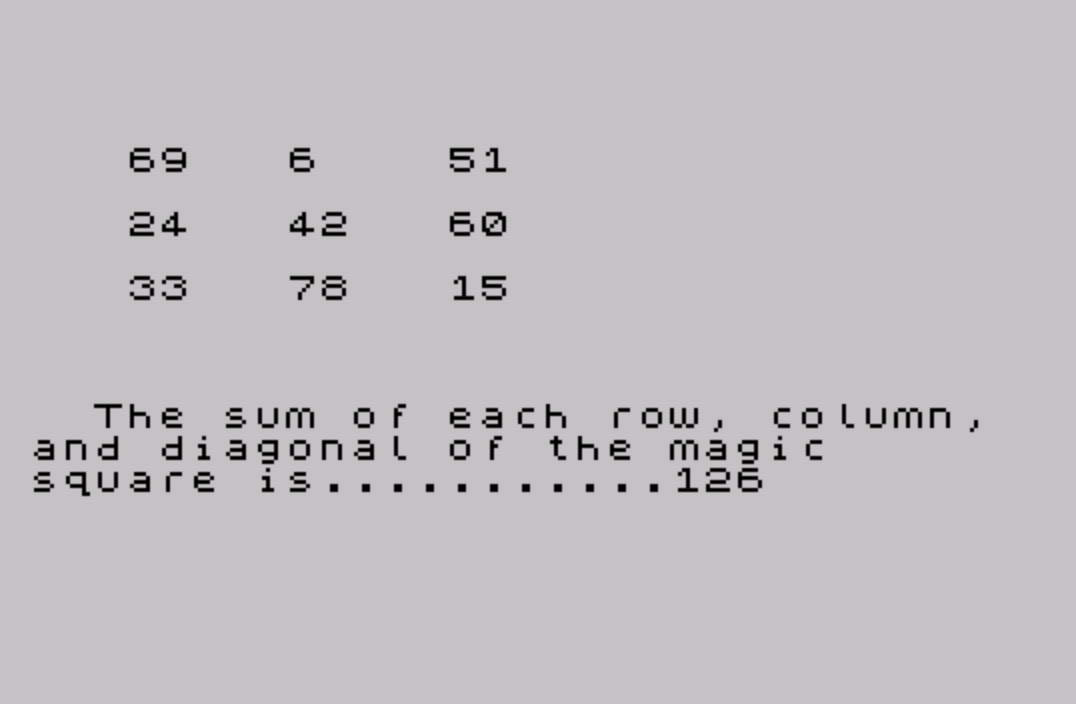
This program generates a 3×3 magic square starting from a user-supplied beginning number and a common difference between successive values. The nine values are stored in a one-dimensional array of nine elements, with each element computed as an arithmetic sequence using the starting value and step size. The square is displayed on screen with rows printed using AT coordinates, and the sum of any row, column, or diagonal is calculated and shown beneath the grid. A second, largely duplicated block of code starting at line 1200 handles printing the same square to a printer via LPRINT with TAB-aligned columns, looping continuously to allow repeated printouts.
Program Analysis
Program Structure
The program is divided into two largely independent blocks separated by a STOP at line 1190. The first block (lines 190–1190) handles screen display, while the second block (lines 1200–1450) handles printer output. Line 9990 contains the SAVE command with an auto-start directive.
| Line Range | Purpose |
|---|---|
| 190–320 | CLS and input collection with basic validation |
| 400–410 | Array initialization and arithmetic sequence computation |
| 420–450 | Screen display of the 3×3 grid and magic sum |
| 1190 | STOP — ends screen-only execution path |
| 1200–1450 | Duplicate input/compute block with LPRINT output, loops indefinitely |
| 9990 | SAVE with auto-start |
Magic Square Construction
The nine values are stored in array a(9) as an arithmetic sequence: a(1) is the base value, and each subsequent element increments by step z. The mapping from array indices to grid positions encodes the classic Lo Shu magic square arrangement:
- Top row:
a(8),a(1),a(6) - Middle row:
a(3),a(5),a(7) - Bottom row:
a(4),a(9),a(2)
This arrangement guarantees that all rows, columns, and diagonals sum to the same value, which is then displayed using the expression a(8)+a(1)+a(6) (the top row sum).
Input Validation
Validation at lines 210 and 310 uses string comparison rather than numeric comparison. The check a$<"1" OR a$>"999" is lexicographic, not numeric, meaning values like “500” would pass but so would certain edge-case strings. The lower bound check for the difference (b$<"1") only rejects strings that sort before “1” lexicographically, which would allow non-numeric strings starting with digits 1–9 or letters.
Notable Techniques
- The counter variable
yis initialized to 1 before theFORloop and incremented inside it, soa(x) = a(1) + y*zcorrectly assigns multiples 1 through 8 of the step to elements 2 through 9. - Screen layout uses
ATrow/column coordinates to position numbers in a visually aligned 3×3 grid. - The printer block uses
LPRINTwithTABstops (columns 5, 10, 20) to align columns and append the row sum inline on the middle row. - The printer block at line 1450 uses
GO TO 1200to loop indefinitely, allowing the user to print multiple copies with different parameters without restarting.
Bugs and Anomalies
The screen and printer blocks are almost entirely duplicated code rather than shared via subroutines. The screen block (lines 190–1190) is never called from the printer loop, meaning the two modes of operation are mutually exclusive and the program must be run from line 190 for screen output or from line 1200 for printer output. There is no menu to select between the two modes.
The input validation at line 1210 incorrectly branches to GO TO 200 (inside the screen block) instead of GO TO 1200, which would disrupt the printer loop’s flow by jumping into the screen-display path.
Image Gallery
Source Code
  190 CLS
  200 INPUT "Type a beginning number for       your magic square ";a$
  210 IF a$<"1" OR a$>"999" THEN GO TO 200
  300 INPUT "Type a difference between each       number on your square ";b$
  310 IF b$<"1" THEN GO TO 300
  320 CLS
  400 DIM a(9): LET a(1)=VAL a$: LET y=1: LET z=VAL b$
  410 FOR x=2 TO 9: LET a(x)=a(1)+y*z: LET y=y+1: NEXT x
  420 PRINT AT 5,3;a(8);AT 5,8;a(1);AT 5,13;a(6)
  430 PRINT AT 7,3;a(3);AT 7,8;a(5);AT 7,13;a(7)
  440 PRINT AT 9,3;a(4);AT 9,8;a(9);AT 9,13;a(2)
  450 PRINT '''"  The sum of each row, column,  and diagonal of the magic       square is...........";a(8)+a(1)+a(6)
 1190 STOP
 1200 INPUT "Type a beginning number for       your magic square ";a$
 1210 IF a$<"1" OR a$>"999" THEN GO TO 200
 1300 INPUT "Type a difference between each       number on your square ";b$
 1310 IF b$<"1" THEN GO TO 300
 1320 CLS
 1400 DIM a(9): LET a(1)=VAL a$: LET y=1: LET z=VAL b$
 1410 FOR x=2 TO 9: LET a(x)=a(1)+y*z: LET y=y+1: NEXT x
 1420 LPRINT : LPRINT a(8);TAB 5;a(1);TAB 10;a(6)
 1430 LPRINT : LPRINT a(3);TAB 5;a(5);TAB 10;a(7);TAB 20;"Sum= ";a(8)+a(1)+a(6)
 1440 LPRINT : LPRINT a(4);TAB 5;a(9);TAB 10;a(2)
 1450 LPRINT : GO TO 1200
 9990 SAVE "magic" LINE 1: BEEP .4,15
Note: Type-in program listings on this website use ZMAKEBAS notation for graphics characters.