
This program magnifies text characters to a large size by sampling each pixel of a source character using the POINT command and printing a chosen fill character in its place, effectively scaling up letters for banner-style output. It supports one or two lines of text and offers several display modes: a preset “relief” style using light or dark shading, or a user-selected pair of background and text characters drawn from a built-in set of block graphics (spaces, UDGs, and Spectrum block characters). The magnified output is sent simultaneously to the screen with PRINT AT and to a printer with LPRINT, using TAB positioning for column alignment. Characters are examined column-by-column (outer loop) and row-by-row (inner loop), with POINT reading the pixel state at coordinates derived from the character cell rendered at the bottom of the screen at rows 20–21.
Program Analysis
Program Structure
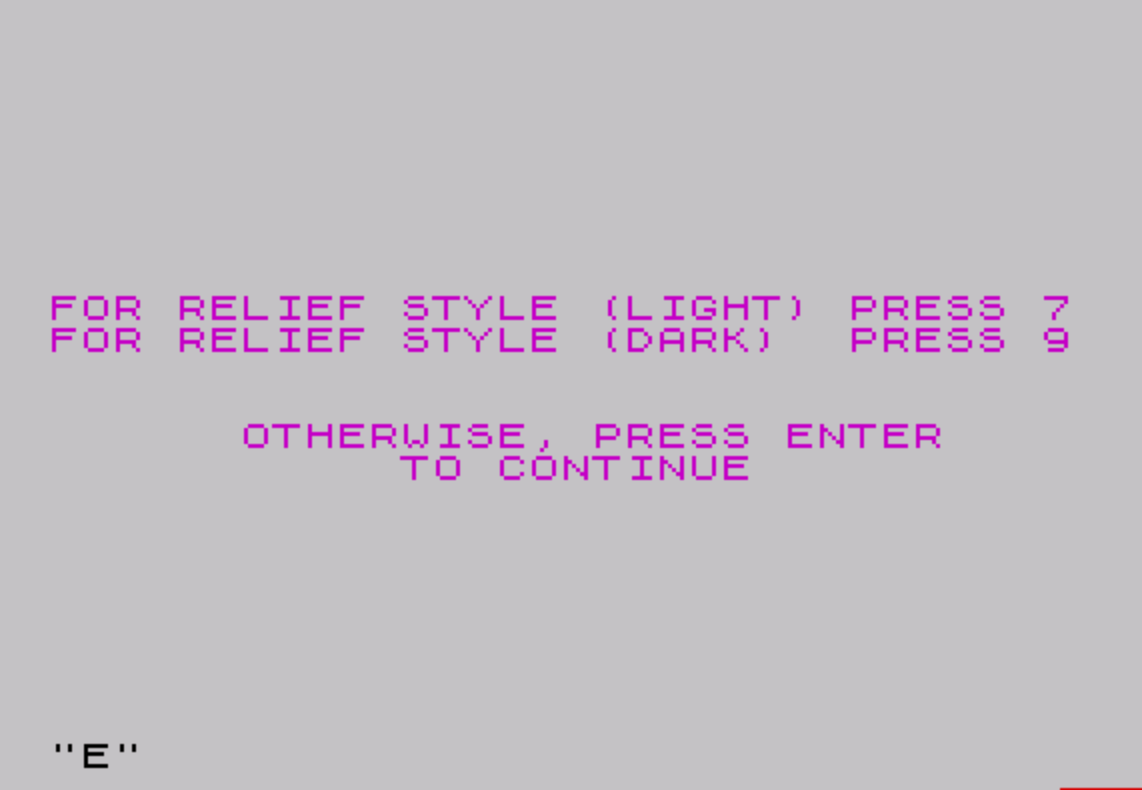
The program is divided into three broad phases: setup (lines 10–170), character selection (lines 180–400), and the main magnification loop (lines 410–800). Setup asks for the number of lines (1 or 2) and whether a “relief” style preset is desired. Character selection presents a menu of four block-graphic options for background and text fill, with an option to supply a custom character. The magnification phase iterates over each character of the input text, renders it in small form at the bottom of the screen, samples it with POINT, and prints a magnified version using the chosen fill characters.
Key Data Structures
A$(2,255)— stores up to two lines of input text, each up to 255 characters.L$(10)— a 10-element string array used as a character lookup table; positions 1–4 hold space and three block graphics, position 5 is a user-supplied background character, position 6 a user-supplied text character, and positions 7–10 hold additional half-block graphics set at line 510.D(2)— two-element array indexingL$:D(1)selects the background fill character,D(2)selects the text fill character.C(2)— stores the column center coordinates for each of the two possible lines of text.
Magnification Technique
The core of the program is the subroutine at line 680. Each source character is printed invisibly at the bottom of the screen (rows 20–21 via lines 600–620) so that its pixel bitmap is available for sampling. The subroutine then uses five nested loops to walk every pixel in the 8×8 character grid (columns C 0–7, rows R 0–7), reading each pixel with POINT (C, R+B*8). A non-zero POINT result sets SWITCH=2 (text character); zero sets SWITCH=1 (background character). Each source pixel is then reproduced as a block of M×M fill characters on screen, where M=4/LINES (4 for one line, 2 for two lines).
Coordinate Calculation
The screen position for each magnified pixel block is computed as follows:
- Row:
RCOOR = ROW - (M/2*8) + (C*M) + N—ROWis fixed at 11 (center of screen); column indexCof the source character maps to the vertical axis of the magnified output (characters are rendered column-first), andNiterates within theM-high block. - Column:
CCOOR = C(B+1) - (M/2*8) + (R*M) + L—C(B+1)is the horizontal center for lineB; source rowRdrives the horizontal axis of the output.
This column-major traversal of source pixels (outer loop on C, inner on R) means the character is effectively rotated 90°; the coordinate formula compensates so the output appears correctly oriented.
Dual Output
Line 780 uses PRINT AT RCOOR,CCOOR for screen display (skipped for single-line mode at line 770), while line 790 always executes LPRINT TAB CCOOR to send output to a printer. The single-line mode bypasses the screen PRINT entirely (relying solely on LPRINT), which appears to be intentional given the variable is named LINES.
Character Set Initialization
Lines 500–510 populate the L$ lookup table using a mix of a space character, UDG characters a and b, and Spectrum block graphics ::, ', . , ':, :.:
| Index | Content | Typical appearance |
|---|---|---|
| 1 | space | blank |
| 2 | UDG a | user-defined graphic A |
| 3 | UDG b | user-defined graphic B |
| 4 | :: (█) | full block |
| 5 | user input | custom background |
| 6 | user input | custom text |
| 7 | ‘ (▝) | top-right quarter block |
| 8 | . (▖) | bottom-left quarter block |
| 9 | ‘:(▛) | three-quarter block |
| 10 | :. (▙) | three-quarter block (alt) |
Relief Style Mode
When the user presses 7 (light relief) at line 140, D(2) is set to 8 (the ▖ block graphic); pressing 9 (dark relief) at line 150 sets D(2) to 10 (▙). In both cases D(1) is set from VAL D$ at line 160, yielding 7 or 9 respectively, selecting the complementary quarter-block character. This creates a subtle raised or embossed appearance in the magnified output.
Notable Idioms and Anomalies
- Line 340 uses
PIas a column argument toPRINT AT; PI evaluates to approximately 3.14159, which truncates to 3, placing the prompt at column 3. This is an unusual use of a floating-point constant in place of an integer literal. - Line 270’s
PRINT AT 11,0,,:uses the comma-comma syntax to reset attributes without printing text, followed by a colon to continue on the same logical line — a compact attribute-clearing trick. - The duplicate check at line 300 (
IF D(1)=D(2) AND D(1)<>5) prevents choosing the same built-in character for both background and text, but allows both to be 5 (custom input), which would result in identical fill and no visible output. - Line 160 is reached only in the relief branch (lines 140–150 fall through); if neither
7nor9was pressed andD$is not a digit,VAL D$will return 0, causingD(1)=0and a subscript error whenL$(0,1)is accessed. INK 9at line 630 selects “transparent” ink on the TS2068, making the small source characters at the bottom of the screen invisible to the user while still being readable by POINT.
The download is the MAGNIFY12 copy from a SNUG Oliger disk. As found it stops with “C Nonsense in BASIC” at line 780: L$ is a simple 10-character string (DIM L$(10)), but lines 350, 390, 780 and 790 index it as L$(n,1). The TAP has those four lines changed to L$(n), the form Magnify uses, and was then tested in ZEsarUX. With one line of text the output goes to the printer only; with two lines it is also drawn on screen. Magnify12 defines no UDGs, so choices 2 and 3 show the letters A and B unless UDGs are already set.
Image Gallery
Source Code
   10 REM *** PROGRAM "MAGNIFY12"
   20 REM *** UPDATED 1/15/84 PM
   30 DIM L$(10): DIM C(2)
   40 DIM A$(2,255): DIM D(2)
   50 CLS : INK 3
   60 PRINT AT 11,4;"NUMBER OF LINES (1 OR 2)?"
   70 INPUT LINES: CLS
   80 PRINT AT 9,0;"FOR RELIEF STYLE (LIGHT) PRESS 7"
   90 PRINT "FOR RELIEF STYLE (DARK)  PRESS 9"
  100 PRINT AT 13,6;"OTHERWISE, PRESS ENTER"
  110 PRINT TAB 11;" TO CONTINUE "
  120 INPUT D$
  130 IF D$<" " THEN GO TO 180
  140 IF D$="7" THEN LET D(2)=8
  150 IF D$="9" THEN LET D(2)=10
  160 LET D(1)=VAL D$
  170 GO TO 410
  180 CLS
  190 PRINT AT 5,12;"\a\a    \b\b    \::\::"
  200 PRINT TAB 12;"\a\a    \b\b    \::\::"
  210 PRINT AT 8,6;"1     2     3     4"
  220 BORDER 6
  230 PRINT '''"   SELECT BACKGROUND CHARACTER"
  240 PRINT 'TAB 8;"ENTER 1, 2, 3 OR 4"
  250 PRINT TAB 7;" OR ENTER 5 FOR OTHER"
  260 INPUT D(1)
  270 PRINT AT 11,0,,: BORDER 5
  280 PRINT AT 11,6;"SELECT TEXT CHARACTER"
  290 INPUT D(2)
  300 IF D(1)=D(2) AND D(1)<>5 THEN GO TO 290
  310 CLS
  320 IF D(1)<5 AND D(2)<5 THEN GO TO 410
  330 IF D(1)<5 THEN GO TO 380
  340 PRINT AT 11,PI;"ENTER BACKGROUND CHARACTER"
  350 INPUT L$(5,1)
  360 CLS
  370 IF D(2)<5 THEN GO TO 410
  380 PRINT AT 11,6;"ENTER TEXT CHARACTER"
  390 INPUT L$(6,1)
  400 LET D(2)=6
  410 CLS
  420 LET LENGTH=0
  430 FOR G=1 TO LINES
  440 PRINT AT 11,7;"ENTER TEXT - LINE ";G
  450 INPUT Y$
  460 IF LEN Y$>LENGTH THEN LET LENGTH=LEN Y$
  470 CLS
  480 LET A$(G)=Y$
  490 NEXT G
  500 LET L$( TO 4)=" \a\b\::"
  510 LET L$(7 TO )="\ '\. \':\:."
  520 LET M=4/LINES
  530 LET C(1)=7
  540 IF LINES=1 THEN LET C(1)=15
  550 LET C(2)=23
  560 LET ROW=11
  570 CLS
  580 FOR X=1 TO LENGTH
  590 INK 7
  600 PRINT AT 20,0;A$(1,X)
  610 PRINT AT 21,0;A$(2,X)
  620 IF LINES=1 THEN PRINT AT 21,0;A$(1,X)
  630 INK 9
  640 GO SUB 680
  650 CLS
  660 NEXT X
  670 STOP
  680 FOR C=0 TO 7
  690 FOR N=1 TO M
  700 FOR B=0 TO LINES-1
  710 FOR R=0 TO 7
  720 LET SWITCH=2
  730 IF POINT (C,R+B*8)=0 THEN LET SWITCH=1
  740 LET RCOOR=ROW-(M/2*8)+(C*M)+N
  750 FOR L=1 TO M
  760 LET CCOOR=C(B+1)-(M/2*8)+(R*M)+L
  770 IF LINES=1 THEN GO TO 790
  780 PRINT AT RCOOR,CCOOR;L$(D(SWITCH),1)
  790 LPRINT TAB CCOOR;L$(D(SWITCH),1);
  800 NEXT L: NEXT R: NEXT B: NEXT N: NEXT C: RETURN
Note: Type-in program listings on this website use ZMAKEBAS notation for graphics characters.