
This program is a User-Defined Graphic (UDG) character generator that allows the user to design, edit, compile, save, and load custom UDG characters (slots \a through \u) on a grid-based interface. The editing grid is drawn using PLOT and DRAW commands to create an 8×8 pixel matrix, and individual pixel states are stored in a two-dimensional array `u(8,8)`. Compilation converts the binary matrix rows into byte values using the “BIN ” string prefix trick with `VAL`, then POKEs them directly into UDG memory via `POKE USR a$+j`. The SAVE and LOAD routines operate on a fixed 168-byte block starting at address 65368, which corresponds to the UDG character table. An EDIT function reverse-engineers existing UDG data from memory by reading bytes at the UDG base address (derived from system variables 23675–23676) and decomposing each byte into bits using repeated halving.
Program Analysis
Program Structure
The program is organized as a menu-driven application with a persistent display loop. After initialization, it presents a grid interface and repeatedly prompts the user for a UDG letter and then a command letter or coordinate. Control is dispatched via a series of IF … GO TO branches rather than a structured menu loop.
| Line(s) | Purpose |
|---|---|
| 10–30 | Initialization: DIM array, set display attributes, call grid subroutine |
| 40–130 | Draw the UI: UDG key listing, sample graphics, coordinate labels |
| 140–150 | Print function menu and title/credits |
| 160–310 | Main input loop: select UDG, select command or set pixel |
| 320–450 | Compile routine: convert array to BIN bytes and POKE into UDG RAM |
| 460–560 | Delete routine: clear a single pixel in the array and on screen |
| 570–640 | Subroutine: draw the 8×8 PLOT/DRAW grid |
| 650–790 | Edit routine: read existing UDG bytes from memory and decompose into array |
| 800–850 | Load routine: tape LOAD of 168-byte UDG block |
| 860–880 | Save routine: tape SAVE of 168-byte UDG block |
| 900 | SAVE the program itself with autostart |
Grid Drawing Subroutine
Lines 570–640 draw a 9×9 line grid (forming an 8×8 cell matrix) using PLOT and DRAW. Two FOR loops, each stepping by 8 pixels over the range 0–64, draw vertical and horizontal lines respectively. This creates a clean pixel-editing workspace in the lower-left portion of the screen coordinate space.
BIN String Trick for Compilation
The compile routine (lines 360–430) constructs a string of the form "BIN 01101010" by concatenating the literal prefix "BIN " with the eight values from row j+1 of the u() array using STR$. VAL b$ then evaluates this string as a BASIC expression, causing the interpreter to parse the BIN keyword and return the numeric byte value. This is then POKEd directly to USR a$+j, writing into the UDG definition area.
Edit / Reverse-Engineering UDG Data
The edit routine at lines 650–790 reads back existing UDG bytes from memory. It first reconstructs the base address of the UDG table by reading system variables at addresses 23675 and 23676 (the UDG system variable, stored little-endian): LET c=PEEK 23675+256*PEEK 23676. For each of the 8 rows of the selected character, it reads one byte and decomposes it into 8 bits using repeated integer halving: LET x=INT(b/2): LET d=b-2*x: LET b=x. Bits are extracted least-significant-first (right-to-left), so the loop variable l runs from 8 down to 1, correctly mapping bits to columns.
Save/Load of UDG Block
Lines 800–880 save and load the entire 21-character UDG block (21 characters × 8 bytes = 168 bytes) as a CODE block at address 65368. This address is the standard location of the UDG area at the top of a 48K RAM configuration. After a load or save completes, the program calls RUN to reinitialize, which is a clean way to reset the display and array state.
UDG Reference Display
Lines 40–60 iterate over UDGs \a through \u (indices 0–20), printing the lowercase letter name, an equals sign, and then CHR$(144+i) — the actual UDG character — so the user can see both the label and the current rendered glyph side by side. Lines 80–130 show a pre-arranged sample layout of the UDGs in pairs and a numeric row label, providing a visual reference panel.
Notable Techniques
- The
"BIN " + STR$(bit)concatenation trick avoids manual bit-shifting arithmetic entirely, delegating binary-to-decimal conversion to the BASIC interpreter itself. - The EDIT routine uses the UDG base pointer from system variables rather than a hardcoded address, making it resilient to RAM configurations where the UDG table could theoretically be relocated.
- Pixel setting (line 300) prints the block graphic
\::(a solid block) directly at the calculated screen positionAT 13+N, L-1, keeping the display in sync with the array without redrawing the whole grid. - Delete (line 540) uses a space character to erase the corresponding cell, again without grid redraw.
- Line 130 uses an inline
FOR … NEXTon a single line to print row numbers 1–8 along the grid’s right edge efficiently.
Bugs and Anomalies
- Line 170 restricts UDG selection to codes 97–117 (letters a–u, 21 UDGs), which is correct. However, line 250 restricts column coordinates to 97–104 (a–h, 8 columns), also correct for 8-pixel width.
- Line 650 uses the variable name
A$(uppercase) while elsewhere the selected UDG letter is stored ina$(lowercase). In Sinclair BASIC, variable names are case-sensitive only for single-letter numeric variables; string variable names likea$andA$are treated as distinct. This means the EDIT routine at line 670 usesCODE A$rather thanCODE a$, which would be uninitialized unless the user happened to useINPUTwith uppercase. This is a likely bug — the intent was almost certainlya$. - Lines 850 and 880: line 850 appears between the Load and Save routines but contains the Save banner print; the Save routine actually begins at line 860. This means the “
SAVING DATA” flash message (line 850) is never reached from the Save dispatch at line 240 (GO TO 860), so the visual feedback is skipped for saves. - The optional printer output at line 410 uses
LPRINT VAL b$;" "with a trailing space for separation, but there is noLPRINTnewline between rows, relying on the printer’s line width to wrap — this may produce garbled output on some printer interfaces.
Image Gallery
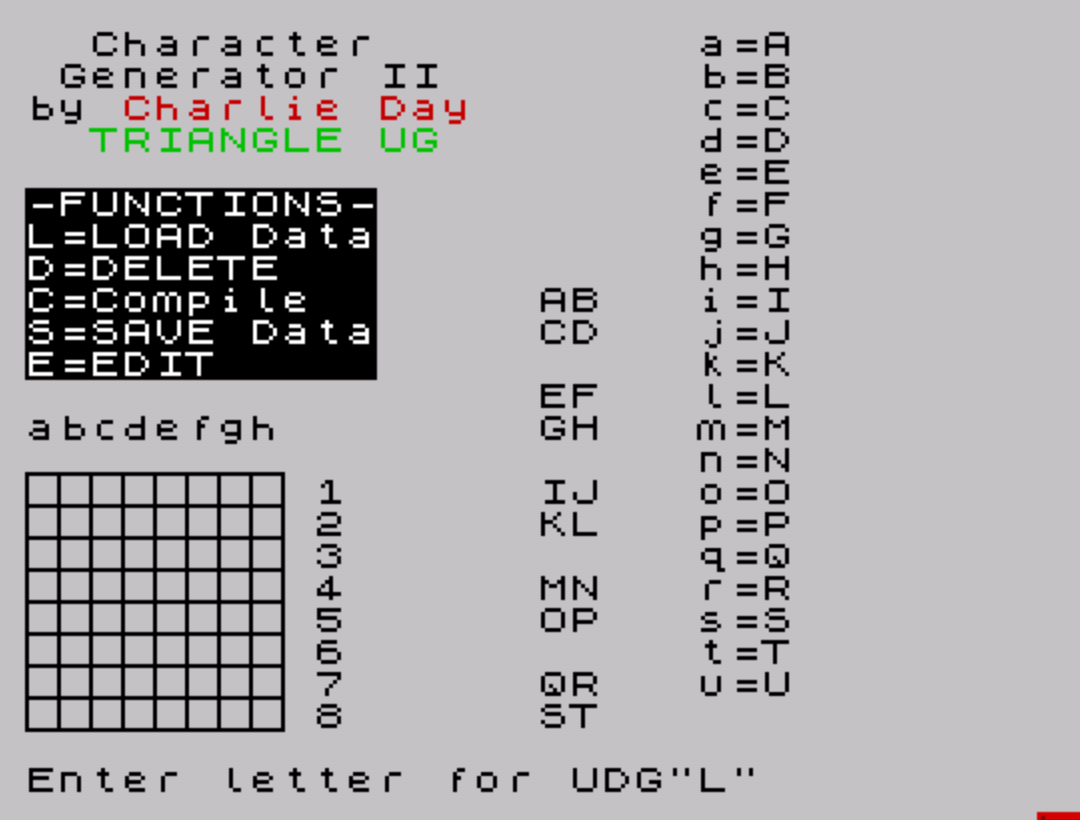
Source Code
   10 DIM u(8,8)
   20 POKE 23609,12: BORDER 7: PAPER 7: INK 0: CLS
   30 GO SUB 570
   40 FOR i=0 TO 20
   50 PRINT AT i,21;CHR$ (97+i);"=";CHR$ (144+i)
   60 NEXT i
   70 PRINT AT 12,0;"abcdefgh"
   80 PRINT AT 8,16;"\a\b";AT 9,16;"\c\d"
   90 PRINT AT 11,16;"\e\f";AT 12,16;"\g\h"
  100 PRINT AT 14,16;"\i\j";AT 15,16;"\k\l"
  110 PRINT AT 17,16;"\m\n";AT 18,16;"\o\p"
  120 PRINT AT 20,16;"\q\r";AT 21,16;"\s\t"
  130 FOR i=0 TO 7: PRINT AT (14+i),9;i+1: NEXT i
  140 PRINT BRIGHT 1; INK 7; PAPER 0;AT 5,0;"-FUNCTIONS-"'"L=LOAD Data"'"D=DELETE   "'"C=Compile  "'"S=SAVE Data"'"E=EDIT     "
  150 PRINT AT 0,2;"Character"'" Generator II"'"by"; INK 2;" Charlie Day"' INK 4;"  TRIANGLE UG"
  160 INPUT "Enter letter for UDG";a$
  170 IF CODE a$<97 OR CODE a$>117 THEN GO TO 160
  180 PRINT AT (CODE a$-97),19; FLASH 1; INK 2;">"
  190 INPUT "Enter Letter coordinate ";L$
  200 IF L$="L" THEN GO TO 800
  210 IF L$="E" THEN GO TO 650
  220 IF L$="C" THEN GO TO 320
  230 IF L$="D" THEN GO TO 460
  240 IF L$="S" THEN GO TO 860
  250 IF CODE L$<97 OR CODE L$>104 THEN GO TO 190
  260 INPUT "Enter Number coordinate ";N
  270 IF N<1 OR N>8 THEN GO TO 260
  280 LET L=((CODE L$)-96)
  290 LET u(N,L)=1
  300 PRINT AT 13+N,L-1;"\::"
  310 GO TO 190
  320 PRINT AT 8,0; FLASH 1;"Compiling"
  330 INPUT "Print out code y/n?";p$
  340 LET p=0: IF p$="y" OR p$="Y" THEN LET p=1
  350 IF p=1 THEN PRINT #1;"Turn on PRINTER"
  360 FOR j=0 TO 7
  370 LET b$="BIN "
  380 FOR h=1 TO 8
  390 LET b$=b$+STR$ u(j+1,h)
  400 NEXT h
  410 IF p=1 THEN LPRINT VAL b$;" ";
  420 POKE USR a$+j,VAL b$
  430 NEXT j
  440 IF p=1 THEN LPRINT a$;"=";CHR$ (144+CODE a$-97)
  450 GO TO 10
  460 PRINT AT 7,0; FLASH 1;"Deleting"
  470 INPUT "Enter letter coordinate ";L$
  480 IF CODE L$<97 OR CODE L$>104 THEN GO TO 470
  490 INPUT "Enter number coordinate ";N$
  500 IF CODE N$<49 OR CODE N$>56 THEN GO TO 490
  510 LET N=VAL N$
  520 LET L=((CODE L$)-96)
  530 LET u(N,L)=0
  540 PRINT AT 13+n,l-1;" "
  550 PRINT AT 7,0; FLASH 0; INK 7; PAPER 0;"D=DELETE"
  560 GO TO 190
  570 REM display grid
  580 FOR g=0 TO 64 STEP 8
  590 PLOT g,0: DRAW 0,64
  600 NEXT g
  610 FOR g=0 TO 64 STEP 8
  620 PLOT 0,g: DRAW 64,0
  630 NEXT g
  640 RETURN
  650 PRINT FLASH 1;AT 10,0;"EDITING";: FOR x=14 TO 21: PRINT AT x,0;"        ";: NEXT x: GO SUB 570
  660 LET c=PEEK 23675+256*PEEK 23676
  670 LET j=((CODE A$)-96)
  680 FOR p=1 TO 8
  690 LET b=PEEK ((c+p-1)+8*(j-1))
  700 FOR l=8 TO 1 STEP -1
  710 LET x=INT (b/2): LET d=b-2*x: LET b=x
  720 LET u(p,l)=d
  730 IF d=0 THEN LET c$=""
  740 IF d=1 THEN LET c$="\::"
  750 PRINT AT 13+p,l-1;c$
  760 NEXT l
  770 NEXT p
  780 PRINT AT 10,0; FLASH 0; INK 7; PAPER 0;"E=EDIT     "
  790 GO TO 190
  800 PRINT FLASH 1;AT 6,0;"  LOADING  "
  810 INPUT "Enter file name for character   set";n$
  820 PRINT #1;"Start tape"
  830 LOAD n$CODE 65368,168
  840 CLS : PRINT "Load complete"'"Press any key to return"'"to Generator": PAUSE 0: RUN
  850 PRINT FLASH 1;AT 9,0;"SAVING DATA"
  860 INPUT "Enter file name for character set";n$
  870 SAVE n$CODE 65368,168
  880 CLS : PRINT "Save Complete"'"Press any key to return to"'"Generator": PAUSE 0: RUN
  890 STOP
  900 SAVE "Make UDGs" LINE 1
Note: Type-in program listings on this website use ZMAKEBAS notation for graphics characters.