
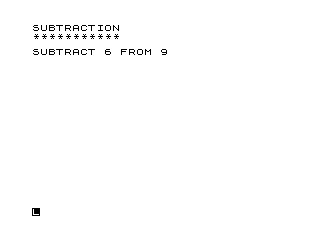
This program is a subtraction drill for children, generating random single-digit subtraction problems and checking the user’s answers. It uses RND to produce two integers in the range 0–9, then rejects any pair where the result would be negative, ensuring only non-negative differences are presented. Correct and incorrect responses are displayed in inverse video using the ZX81/TS1000 inverse-character encoding for the words “CORRECT” and “WRONG.” After showing the correct answer, the program loops back indefinitely to present a new problem.
Program Analysis
Program Structure
The program is divided into clearly numbered functional blocks, a common organisational idiom in hobbyist BASIC of the era:
- Lines 5–60: Title banner and decorative separator (eleven asterisks).
- Lines 100–110: Random number generation for the two operands.
- Line 120: Validation — reject and retry if the difference would be negative.
- Lines 200–220: Display the problem and accept user input.
- Lines 300–410: Answer checking and feedback display.
- Lines 500–520: Spacing and loop back to line 10 for the next problem.
- Lines 600–700: SAVE and RUN stubs, never reached during normal execution.
Random Number Generation and Validation
LET P=INT (10*RND) and LET Q=INT (10*RND) at lines 100–110 each produce a pseudo-random integer in the closed range 0–9. Line 120 tests whether P-Q<0 and, if so, jumps back to line 100 to regenerate both operands. This is a simple rejection-sampling approach; it is slightly inefficient because both numbers are redrawn when only swapping them would suffice, but it is correct and straightforward. A consequence is that problems with P=0 and Q=0 (giving 0−0=0) can appear, which is mathematically valid but pedagogically borderline.
Inverse Video Feedback
The response words at lines 310 and 400 use inverse-video characters for emphasis:
- Line 310:
PRINT "%W%R%O%N%G"— the word WRONG displayed in inverse video. - Line 400:
PRINT "%C%O%R%R%E%C%T"— the word CORRECT displayed in inverse video.
This is a purely visual technique, using the machine’s built-in inverse character set (characters 128–255 on the ZX81/TS1000) without any POKE or machine code, making the feedback stand out clearly on the display.
Program Flow and Loop
The main loop is implemented with an unconditional GOTO 10 at line 520, which restarts the banner and separator print each cycle rather than jumping directly to the problem-generation block. This means the header “SUBTRACTION” and the row of asterisks are reprinted before every new problem, giving a consistent screen layout after the CLS at line 220.
Control flow through the answer-checking block is noteworthy: line 300 branches to 400 on a correct answer, while line 310 prints “WRONG” and falls through via GOTO 410 at line 320, skipping the “CORRECT” print at 400. Both paths converge at line 410, which always prints the canonical answer.
Notable Techniques and Idioms
- The separator loop (lines 20–40) uses a
FOR/NEXTwith aPRINT "*";(semicolon suppresses newline) to print eleven asterisks on one line — a tidy alternative to a hard-coded string literal. - Two blank
PRINTstatements (lines 50–60 and 500–510) are used for vertical spacing, a standard ZX81/TS1000 idiom since the machine has no direct cursor-positioning in SLOW mode without POKEs. - The
REMat line 5 encodes the program title “MATH FLASHER 2 SUBT” entirely in inverse video characters, serving as a visible on-screen label when the listing is viewed.
Bugs and Anomalies
| Line | Issue | Effect |
|---|---|---|
| 100–120 | Both operands regenerated on rejection, not just the smaller one | Minor inefficiency; no incorrect results produced |
| 10–40 | Header reprinted on every loop iteration | Redundant output before each new problem; cosmetically noisy but harmless |
| 700 | RUN at line 700 is unreachable | Dead code; the program never reaches this line during execution |
Image Gallery
Source Code
   5 REM %M%A%T%H% %F%L%A%S%H%E%R% %2% %S%U%B%T
  10 PRINT "SUBTRACTION"
  20 FOR L=1 TO 11
  30 PRINT "*";
  40 NEXT L
  50 PRINT
  60 PRINT
 100 LET P=INT (10*RND)
 110 LET Q=INT (10*RND)
 120 IF P-Q<0 THEN GOTO 100
 200 PRINT "SUBTRACT ";Q;" FROM ";P
 210 INPUT R
 220 CLS
 300 IF R=P-Q THEN GOTO 400
 310 PRINT "%W%R%O%N%G"
 320 GOTO 410
 400 PRINT "%C%O%R%R%E%C%T"
 410 PRINT P;" MINUS ";Q;" = ";P-Q
 500 PRINT
 510 PRINT
 520 GOTO 10
 600 SAVE "1005%9"
 700 RUN
Note: Type-in program listings on this website use ZMAKEBAS notation for graphics characters.