
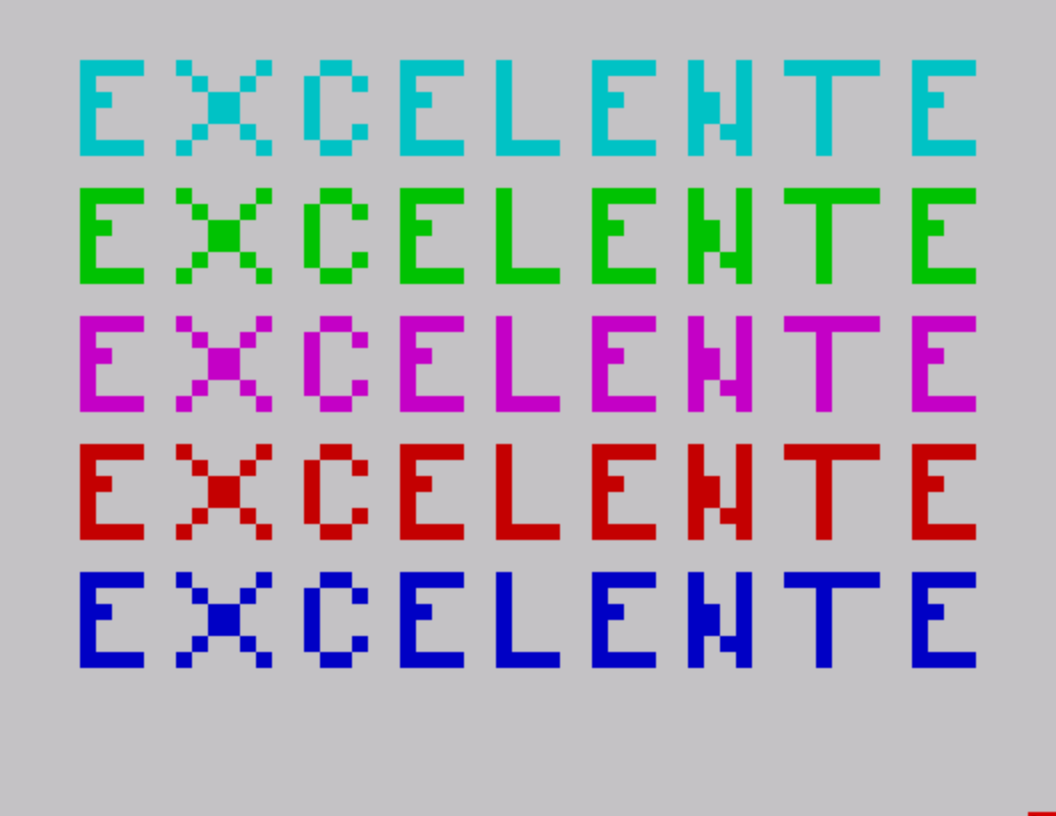
This subroutine, authored by Dave Franson in 1984, displays a multi-line text banner using block graphic characters (CHR$ 128–143) printed five times in a loop, each iteration in a different INK color cycling from INK 5 down to INK 1 via the expression INK 6-p. The BORDER color also changes with each pass through the loop. Each of the five iterations triggers a distinct sequence of AY sound chip commands via the SOUND keyword, programming oscillator frequencies, mixer settings, and envelope registers to produce musical phrases. The graphic characters are drawn using the TS2068’s built-in block graphics set, with CHR$ 128 serving as a space separator between the graphic elements that form letters. The subroutine is designed to be called as a standalone introductory display, ending with a two-second PAUSE after resetting the BORDER to white.
Program Analysis
Program Structure
The program is a self-contained subroutine spanning lines 4000–4130. A FOR loop from p=1 to 5 at line 4020 drives all visual and audio output. After the loop, line 4125 resets the border to white and line 4130 pauses for approximately two seconds before the routine ends. The REM at line 4000 identifies the author (Dave Franson) and the year of composition (1984).
Visual Output
Lines 4080–4100 print three rows of block graphic characters on each of the five loop iterations. The INK attribute is computed as INK 6-p, cycling through colors 5, 4, 3, 2, and 1 (cyan, green, yellow, red, blue on a TS2068) as the loop progresses. CHR$ 128 (the all-dark block graphic space) is used between graphic elements as a separator. The characters used span the block graphics range 128–143, which map directly to the eight two-by-two pixel block combinations available in that range.
| Loop iteration (p) | INK color | BORDER color |
|---|---|---|
| 1 | 5 (cyan) | 1 (blue) |
| 2 | 4 (green) | 2 (red) |
| 3 | 3 (yellow) | 3 (yellow) |
| 4 | 2 (red) | 4 (green) |
| 5 | 1 (blue) | 5 (cyan) |
AY Sound Chip Usage
Lines 4030, 4050, and 4060 each contain multiple chained SOUND statements separated by colons, programming the AY-3-8912 registers directly. Register pairs are specified as semicolon-separated register,value pairs within a single SOUND call. The key registers used are:
- Registers 0–1: Channel A fine/coarse pitch
- Registers 2–3: Channel B fine/coarse pitch
- Registers 4–5: Channel C fine/coarse pitch
- Register 7: Mixer control (tone/noise enable per channel)
- Registers 8–10: Channel volume levels
SOUND 7,63 is used repeatedly as a “silence all channels” command (all bits set in the mixer register, disabling tone and noise output on every channel). This acts as a clean note-off between phrases. PAUSE statements of varying lengths (1, 10, 20, 50, 60 frames) control note duration.
Conditional Branching Pattern
Instead of a SELECT CASE-style construct, each iteration’s unique behavior is implemented through a series of IF p=n THEN guards at lines 4030, 4040, 4050, and 4060. Lines 4030 and 4050 each cover two values using OR (e.g., IF p=1 OR p=2 THEN), so iterations 1 and 2 share one musical phrase and iterations 3 and 4 share another. Iteration 5 gets its own unique, more complex phrase at line 4060. Every iteration still executes the three PRINT lines at 4080–4100 unconditionally.
Notable Techniques
- The
SOUNDkeyword’s ability to set multiple registers in one statement is exploited heavily; each call programs up to seven registers simultaneously, minimizing the number of BASIC statements needed. - The use of
: SOUND ...afterIF ... THENon a single line allows multiple actions to follow a condition without additional line numbers, keeping the subroutine compact. CHR$values for block graphics are used rather than embedded characters, which is more portable across different editing environments and avoids issues with non-printing character entry.- The extra
PRINTat line4010and4110adds a blank line before the banner starts and between each printed banner pass, creating vertical spacing on screen. - Line
4115adds an extraPAUSE 20only on the first iteration (p=1), giving slightly more dwell time on the first color before the loop continues.
Potential Anomalies
Because the loop runs five times and each iteration appends three new PRINT lines plus spacing to the screen, the display will scroll after the second or third pass on a standard 22-line display area. This may be intentional, creating a scrolling animated effect, but could also cause the earlier banner passes to disappear from view before the routine completes. No CLS is issued inside the loop, suggesting scrolling output is an accepted part of the visual design.
Image Gallery
Source Code
 4000 REM one of my favorite     subroutines.  I wrote it in '84...Dave Franson
 4005 CLS
 4010 PRINT
 4020 FOR p=1 TO 5
 4025 BORDER p
 4030 IF p=1 OR p=2 THEN : SOUND 0,93;1,0;2,248;3,0;4,147;5,0;7,56;8,12;9,12;10,12: PAUSE 60: SOUND 7,63: PAUSE 1: SOUND 0,124;1,0;2,248;3,0;4,186;5,0;7,56: PAUSE 20: SOUND 7,63: PAUSE 1: SOUND 0,110;1,0;2,23;3,1;4,186;5,0;7,56: PAUSE 20: SOUND 7,63: PAUSE 1: SOUND 0,124;1,0;2,39;3,1;4,186;5,0;7,56: PAUSE 20: SOUND 7,63: PAUSE 1
 4040 IF p=2 THEN PAUSE 1
 4050 IF p=3 OR p=4 THEN : SOUND 0,93;1,0;2,248;3,0;4,186;5,0;7,56: PAUSE 10: SOUND 7,63: PAUSE 1: SOUND 7,56: PAUSE 10: SOUND 7,63: PAUSE 1: SOUND 0,93;1,0;2,221;3,0;4,139;5,0;7,56: PAUSE 20: SOUND 7,63: PAUSE 1: SOUND 0,93;1,0;2,248;3,0;4,147;5,0;7,56: PAUSE 20: SOUND 7,63
 4060 IF p=5 THEN : SOUND 0,93;1,0;2,248;3,0;4,186;5,0;7,56: PAUSE 20: SOUND 7,63: PAUSE 1: SOUND 0,98;1,0;2,23;3,1;4,165;5,0;7,56: PAUSE 20: SOUND 0,93;1,0;2,39;3,1;4,248;5,0: PAUSE 20: SOUND 2,75;3,1: PAUSE 20: SOUND 7,63: PAUSE 1: SOUND 0,98;1,0;2,75;3,1;4,248;5,0;7,56: PAUSE 20: SOUND 7,63: PAUSE 1: SOUND 0,93;1,0;2,39;3,1;4,248;5,0;7,56: PAUSE 50: SOUND 7,63
 4080 PRINT TAB 2; INK 6-p;CHR$ 139;CHR$ 131;CHR$ 128;CHR$ 134;CHR$ 128;CHR$ 137;CHR$ 128;CHR$ 137;CHR$ 134;CHR$ 128;CHR$ 139;CHR$ 131;CHR$ 128;CHR$ 138;CHR$ 128;CHR$ 128;CHR$ 139;CHR$ 131;CHR$ 128;CHR$ 138;CHR$ 133;CHR$ 128;CHR$ 131;CHR$ 139;CHR$ 131;CHR$ 128;CHR$ 139;CHR$ 131
 4090 PRINT TAB 2; INK 6-p;CHR$ 139;CHR$ 128;CHR$ 128;CHR$ 128;CHR$ 143;CHR$ 128;CHR$ 128;CHR$ 138;CHR$ 128;CHR$ 128;CHR$ 139;CHR$ 128;CHR$ 128;CHR$ 138;CHR$ 128;CHR$ 128;CHR$ 139;CHR$ 128;CHR$ 128;CHR$ 143;CHR$ 133;CHR$ 128;CHR$ 128;CHR$ 138;CHR$ 128;CHR$ 128;CHR$ 139
 4100 PRINT TAB 2; INK 6-p;CHR$ 142;CHR$ 140;CHR$ 128;CHR$ 137;CHR$ 128;CHR$ 134;CHR$ 128;CHR$ 134;CHR$ 137;CHR$ 128;CHR$ 142;CHR$ 140;CHR$ 128;CHR$ 142;CHR$ 140;CHR$ 128;CHR$ 142;CHR$ 140;CHR$ 128;CHR$ 138;CHR$ 135;CHR$ 128;CHR$ 128;CHR$ 138;CHR$ 128;CHR$ 128;CHR$ 142;CHR$ 140
 4110 PRINT
 4115 IF p=1 THEN PAUSE 20
 4120 NEXT p
 4125 BORDER 7
 4130 PAUSE 60
Note: Type-in program listings on this website use ZMAKEBAS notation for graphics characters.