
Metagraphics is an interactive freehand drawing program that lets the user place and move a cursor character around a 24×32 text display, leaving graphical characters as “paint” on the screen. The program uses a short machine code routine embedded in REM line 1 (bytes `3E 1E ED 47 C9`) to control display speed via POKE/USR calls at lines 910–999. Cursor movement is handled by subroutines at lines 401–489, covering all eight cardinal and diagonal directions with key-held repeat loops. An inverse-video toggle (line 1050), a random-pattern fill function (line 1100), a stamp/flood fill using string concatenation (lines 310–350), and a cycle-through-characters mechanism (lines 810–870) round out the feature set.
Program Analysis
Program Structure
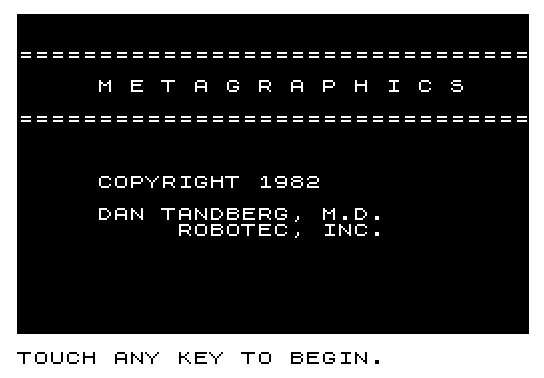
The program is divided into two main phases. Lines 9000–9330 form the initialization and title-screen section, which displays a splash screen in inverse video, waits for a keypress, saves the program, then jumps to RUN to restart from line 1. Lines 1–199 form the main loop: setup (lines 35–95), key scanning and dispatch (lines 110–195), cursor display (lines 197–198), and loop-back (line 199 — note the loop target is line 100, which does not exist; execution falls through to line 110, a common ZX81 technique). Subroutines are grouped in the 200s–1100s ranges by function.
Machine Code Usage
Line 1 contains a REM statement whose body is a five-byte machine code routine: 3E 1E (LD A,1E), ED 47 (LD I,A), C9 (RET). This loads the value from address 16515 (the byte following the REM opcode byte, accessed via POKE 16515,I) into the Z80 I register before returning. The routine is invoked with LET ZZZ=USR 16514, where 16514 points to the first byte of the REM data. This is used by the speed-control subroutines (lines 910–999 and 1000–1049) to adjust display timing by varying I in steps of 2 between 0 and 30.
Key Dispatch Table
The main loop scans INKEY$ and dispatches via computed GOSUB or direct comparison:
| Key Code | Key | Action | Subroutine |
|---|---|---|---|
| 33–36 | Cursor keys | Cardinal movement | 400+(K-33)*10 |
| 112–116 | Diagonal keys | Diagonal movement | 450+(K-112)*10 |
| 46 | . | Inverse toggle | 1050 |
| 28 | Shift+4 (£?) | Stamp fill | 315 |
| 119 | W | Wipe/reset cursor char | 250 |
| 42 | * | Swap A$/B$ | 700 |
| 40 | ( | Advance character | 800 |
| 15 | Enter | Decrement character | 850 |
| 50 | 2 | Increase speed | 900 |
| 18 | R | Decrease speed | 950 |
| 53 | 5 | Reset speed/exit | 200 |
| 41 | ) | Show palette | 500 |
| 56 | 8 | Save program | (inline SAVE) |
| 43 | + | Random fill | 1100 |
| 61 | = | Reset speed | 1000 |
| 39 | ‘ | Stamp screen | 300 |
Movement Subroutines
Eight subroutines handle cursor movement (lines 401–489). Each subroutine updates row R and/or column C using a bounded Boolean expression (e.g., LET C=C-(C>0)), prints the cursor graphic C$ at the new position, immediately overwrites it with the drawing character A$ — effectively “painting” — and then loops on INKEY$<>"" for key-held autorepeat. The boundary checks using Boolean arithmetic prevent the cursor from leaving the 24×32 screen.
Character Cycling
Subroutine 800 (advance) and 850 (decrement) step through the character set stored in A$. The advance routine at line 810 increments the character code, wrapping from code 64 (which would be @) back to a space (code 32), and from code 192 (inverse space) to "% " (an inverse-video space), bridging the normal and inverse video halves of the character set. This allows the user to cycle through all drawable characters including inverse graphics.
Inverse Video Toggle
Subroutine 1050 toggles between a normal and inverse version of the current drawing character. Line 1055 checks if CODE A$>65; if so, it assumes the character is already inverse and strips 128 from its code (line 1080), reverting to normal. Otherwise it adds 128 to the code (line 1065) and sets the cursor indicator C$ to "%I" (inverse I) to show inverse mode is active. Returning to normal mode resets C$ to "\@@" (the default cursor glyph, a block graphic).
Screen Fill and Stamp
Subroutine 300/315 (lines 310–399) fills the screen by building a string X$ that starts as a copy of B$ (the saved character), then doubles itself eight times in a loop (FOR A=1 TO 8), producing a 256-character string. Three copies are printed at row 0 column 0, flooding the screen. Subroutine 500 (line 510) similarly constructs D$ as three copies of A$ and displays it in rows 20–22 as a palette preview strip, then waits for a keypress and restores using B$.
Random Pattern Fill
Subroutine 1100 (lines 1100–1230) generates five random characters (A$ through E$), each with a code in the range 0–9 optionally offset by 128 for inverse video (using RND>.5 as a Boolean 0/1 multiplier). These are concatenated into X$ and doubled seven times to produce a 640-character string, which is then printed repeatedly in a loop until a key is pressed, creating an animated random texture.
Notable Techniques
- Boolean arithmetic for boundary clamping:
R=R+(R<23),C=C-(C>0) - Computed
GOSUBfor movement dispatch:GOSUB 400+(K-33)*10 - String doubling loop to fill screen efficiently without a character-by-character loop
- Dual-print cursor technique: print cursor graphic
C$, then immediately overprint withA$to leave paint while showing position - Machine code in REM for I-register manipulation affecting display timing
LET ZZZ=USRdiscards the USR return value without error, a common ZX81 idiom
Anomalies and Notes
Line 199 executes GOTO 100, but line 100 does not exist; the interpreter falls through to line 110, which is the intended start of the key-scan loop. Line 35 POKEs address 16418 (FRAMES low byte on a ZX81) to zero, likely to reset the frame counter at startup. The subroutine at lines 210–249 (called from line 170 as GOSUB 200) waits for a key-up then key-down event and loops 18 times — its purpose appears to be a keypress synchronization delay. The REM at line 9000 and decorative REM lines serve as a title block within the code rather than documentation.
Image Gallery
Source Code
   1 REM 3E1EED47C9
  35 POKE 16418,0
  40 SLOW
  50 LET A$=" "
  55 LET B$=A$
  60 LET C$="@@"
  70 LET S$=A$
  80 LET R=11
  85 LET K=0
  90 LET C=13
  95 LET I=30
 110 LET K=CODE INKEY$
 120 IF K>=33 AND K<=36 THEN GOSUB 400+(K-33)*10
 125 IF K>=112 AND K<=116 THEN GOSUB 450+(K-112)*10
 130 IF K=46 THEN GOSUB 1050
 135 IF K=28 THEN GOSUB 315
 140 IF K=119 THEN GOSUB 250
 145 IF K=42 THEN GOSUB 700
 150 IF K=40 THEN GOSUB 800
 155 IF K=15 THEN GOSUB 850
 160 IF K=50 THEN GOSUB 900
 165 IF K=18 THEN GOSUB 950
 170 IF K=53 THEN GOSUB 200
 175 IF K=41 THEN GOSUB 500
 180 IF K=56 THEN SAVE "METAGRAPHIC%S"
 185 IF K=43 THEN GOSUB 1100
 190 IF K=61 THEN GOSUB 1000
 195 IF K=39 THEN GOSUB 300
 197 PRINT AT R,C;C$
 198 PRINT AT R,C;A$
 199 GOTO 100
 210 IF INKEY$<>"" THEN GOTO 210
 220 IF INKEY$="" THEN GOTO 220
 230 FOR P=1 TO 18
 240 NEXT P
 249 RETURN
 260 LET A$=" "
 270 GOSUB 300
 280 GOSUB 1000
 290 LET C$="@@"
 299 RETURN
 310 LET B$=A$
 315 LET X$=B$
 320 FOR A=1 TO 8
 330 LET X$=X$+X$
 340 NEXT A
 350 PRINT AT 0,0;X$;X$;X$
 399 RETURN
 401 LET C=C-(C>0)
 403 PRINT AT R,C;C$
 404 PRINT AT R,C;A$
 405 IF INKEY$<>"" THEN GOTO 401
 409 RETURN
 411 LET R=R+(R<23)
 413 PRINT AT R,C;C$
 414 PRINT AT R,C;A$
 415 IF INKEY$<>"" THEN GOTO 411
 419 RETURN
 421 LET R=R-(R>0)
 423 PRINT AT R,C;C$
 424 PRINT AT R,C;A$
 425 IF INKEY$<>"" THEN GOTO 421
 429 RETURN
 431 LET C=C+(C<31)
 433 PRINT AT R,C;C$
 434 PRINT AT R,C;A$
 435 IF INKEY$<>"" THEN GOTO 431
 439 RETURN
 451 LET R=R-(R>0)
 452 LET C=C+(C<31)
 453 PRINT AT R,C;C$
 454 PRINT AT R,C;A$
 455 IF INKEY$<>"" THEN GOTO 451
 459 RETURN
 461 LET R=R+(R<23)
 462 LET C=C-(C>0)
 463 PRINT AT R,C;C$
 464 PRINT AT R,C;A$
 465 IF INKEY$<>"" THEN GOTO 461
 469 RETURN
 471 LET R=R-(R>0)
 472 LET C=C-(C>0)
 473 PRINT AT R,C;C$
 474 PRINT AT R,C;A$
 475 IF INKEY$<>"" THEN GOTO 471
 479 RETURN
 481 LET R=R+(R<23)
 482 LET C=C+(C<31)
 483 PRINT AT R,C;C$
 484 PRINT AT R,C;A$
 485 IF INKEY$<>"" THEN GOTO 481
 489 RETURN
 510 LET D$=A$+A$+A$
 520 GOSUB 570
 530 IF INKEY$="" THEN GOTO 530
 540 LET D$=B$+B$+B$
 570 FOR Y=20 TO 22
 580 PRINT AT Y,1;D$
 590 NEXT Y
 595 IF INKEY$<>"" THEN GOTO 595
 599 RETURN
 705 IF A$=B$ THEN GOTO 750
 710 LET S$=A$
 720 LET A$=B$
 730 IF INKEY$<>"" THEN GOTO 730
 740 RETURN
 750 LET A$=S$
 760 IF INKEY$<>"" THEN GOTO 760
 779 RETURN
 810 LET A$=CHR$ (CODE A$+1)
 820 IF CODE A$=64 THEN LET A$=" "
 830 IF CODE A$=192 THEN LET A$="% "
 849 RETURN
 860 IF A$=" " THEN LET A$=CHR$ 64
 865 IF A$="% " THEN LET A$=CHR$ 192
 870 LET A$=CHR$ (CODE A$-1)
 899 RETURN
 910 LET I=I+2
 920 IF I>30 THEN LET I=0
 930 POKE 16515,I
 940 LET ZZZ=USR 16514
 949 RETURN
 960 IF I<=0 THEN LET I=32
 970 LET I=I-2
 980 POKE 16515,I
 990 LET ZZZ=USR 16514
 999 RETURN
 1000 REM % % % %E%X%I%T% % %
 1010 LET I=30
 1020 POKE 16515,I
 1030 LET ZZZ=USR 16514
 1049 RETURN
 1055 IF CODE A$>65 THEN GOTO 1075
 1060 LET C$="%I"
 1065 LET A$=CHR$ (CODE A$+128)
 1067 IF INKEY$<>"" THEN GOTO 1067
 1069 RETURN
 1075 LET C$="@@"
 1080 LET A$=CHR$ (CODE A$-128)
 1085 IF INKEY$<>"" THEN GOTO 1085
 1099 RETURN
 1100 REM % % % %F%U%N%C%T%I%O%N% % %
 1110 LET A$=CHR$ ((RND*10)+128*(RND>.5))
 1120 LET B$=CHR$ ((RND*10)+128*(RND>.5))
 1130 LET C$=CHR$ ((RND*10)+128*(RND>.5))
 1140 LET D$=CHR$ ((RND*10)+128*(RND>.5))
 1150 LET E$=CHR$ ((RND*10)+128*(RND>.5))
 1160 LET X$=A$+B$+C$+D$+E$
 1170 FOR A=1 TO 7
 1180 LET X$=X$+X$
 1190 NEXT A
 1200 PRINT AT 0,0;
 1210 IF INKEY$<>"" THEN RETURN
 1220 PRINT X$;X$( TO 128)
 1230 GOTO 1100
 8999 REM % % % % % % % % % % % % % %
 9000 REM "METAGRAPHICS"
 9001 REM % % % % % % % % % % % % % %
 9002 REM -----------------------
 9010 LET A$="% "
 9020 FOR I=1 TO 7
 9030 LET A$=A$+A$
 9040 NEXT I
 9050 CLS
 9060 PRINT A$;A$;A$;A$;A$
 9100 PRINT AT 2,0;"%=%=%=%=%=%=%=%=%=%=%=%=%=%=%=%=%=%=%=%=%=%=%=%=%=%=%=%=%=%=%=%="
 9110 PRINT AT 4,0;"% % % % % %M% %E% %T% %A% %G% %R% %A% %P% %H% %I% %C% %S% % % % "
 9120 PRINT AT 6,0;"%=%=%=%=%=%=%=%=%=%=%=%=%=%=%=%=%=%=%=%=%=%=%=%=%=%=%=%=%=%=%=%="
 9200 PRINT AT 10,5;"%C%O%P%Y%R%I%G%H%T% %1%9%8%2"
 9210 PRINT AT 12,5;"%D%A%N% %T%A%N%D%B%E%R%G%,% %M%.%D%."
 9220 PRINT AT 13,10;"%R%O%B%O%T%E%C%,% %I%N%C%."
 9250 PRINT AT 21,0;"TOUCH ANY KEY TO BEGIN."
 9260 PAUSE 400
 9290 LET A$=""
 9300 SAVE "METAGRAPHIC%S"
 9310 IF INKEY$="" THEN GOTO 9310
 9320 CLS
 9330 RUN
Note: Type-in program listings on this website use ZMAKEBAS notation for graphics characters.