
This program calculates vehicle fuel efficiency and related statistics based on odometer readings, fill-up cost, and price per gallon. It prompts the user for the current and previous odometer readings, tank capacity, fill-up cost, and cost per gallon, then computes miles driven, gallons used, miles per gallon, cost per mile, and projected range on a full tank. The expression CF/CG (cost of fill-up divided by cost per gallon) is used repeatedly to derive actual gallons consumed rather than accepting gallons directly as input. After displaying results, the program waits for any input via INPUT A$ before clearing the screen and restarting with RUN.
Program Analysis
Program Structure
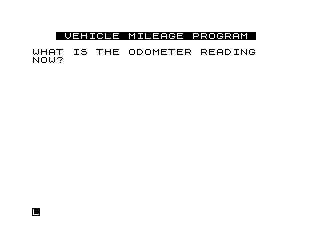
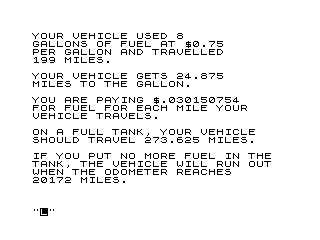
The program is divided into two broad phases: data collection (lines 5–110) and results display (lines 125–220), followed by a simple loop mechanism (lines 230–250). Line 5 displays a title banner using inverse-video characters. Lines 10–110 prompt for five input values in sequence. After a CLS at line 125, the results are printed across multiple PRINT statements. Lines 230–250 wait for a keypress via INPUT A$, clear the screen, and restart the entire program with RUN.
Input Variables
| Variable | Meaning |
|---|---|
OD | Current odometer reading |
OR | Previous odometer reading (last fill-up) |
A | Miles driven (OD - OR) |
GAL | Tank capacity in gallons |
CF | Cost of this fill-up in dollars |
CG | Price per gallon in dollars |
TG | Gallons used (CF/CG), computed but not used in output |
Notable Techniques
Rather than asking the user directly how many gallons were purchased, the program derives this value by dividing fill-up cost (CF) by price per gallon (CG), giving CF/CG. This expression is computed inline four separate times in the output section (lines 130, 160, 200, 220) rather than using the stored TG variable, which is assigned at line 120 but never referenced again — a minor inefficiency and potential source of confusion.
The PRINT ,,"..." idiom (double comma) advances to the third print zone before outputting text, providing a consistent left-indent effect across the results display without using PRINT AT.
Line 220 applies INT to the estimated full-tank range before adding it to the current odometer, ensuring the predicted odometer limit is displayed as a whole number rather than a decimal, which is appropriate for an odometer context.
Bugs and Anomalies
TGis assigned at line 120 (LET TG=CF/CG) but never used; all subsequent references recomputeCF/CGinline, making the assignment redundant.- The variable name
ORshadows the BASIC keywordORon some Sinclair variants; while valid as a numeric variable on the ZX81/TS1000, it is an unusual choice that could cause confusion. - If
CGis entered as zero, a division-by-zero error will occur at line 120 and throughout the output section; there is no input validation. - Line 230 uses
INPUT A$as a pause mechanism (waiting for the user to press Enter), rather than the more idiomaticPAUSE 0orINKEY$loop; this requires the user to press Enter explicitly to continue.
Image Gallery
Source Code
   5 PRINT AT 1,3;"% %V%E%H%I%C%L%E% %M%I%L%E%A%G%E% %P%R%O%G%R%A%M% "
  10 PRINT ,,"WHAT IS THE ODOMETER READING    NOW?";
  20 INPUT OD
  25 PRINT " - ";OD
  30 PRINT ,,"WHAT WAS THE READING THE LAST   TIME THE TANK WAS FILLED?"
  40 INPUT OR
  50 LET A=OD-OR
  55 PRINT "- ";OR;"  MILES DRIVEN - ";A
  60 PRINT ,,"HOW MANY GALLONS DOES YOUR TANK HOLD?"
  70 INPUT GAL
  80 PRINT ,,"HOW MUCH DID IT COST FOR THE    FILL-UP?"
  90 INPUT CF
 100 PRINT ,,"WHAT IS THE PRICE PER GALLON?"
 110 INPUT CG
 120 LET TG=CF/CG
 125 CLS
 130 PRINT ,,"YOUR VEHICLE USED ";CF/CG
 140 PRINT "GALLONS OF FUEL AT $";CG,"PER GALLON AND TRAVELLED"
 150 PRINT A;" MILES."
 160 PRINT ,,"YOUR VEHICLE GETS ";A/(CF/CG)
 170 PRINT "MILES TO THE GALLON."
 180 PRINT ,,"YOU ARE PAYING $";CF/A
 190 PRINT "FOR FUEL FOR EACH MILE YOUR     VEHICLE TRAVELS."
 200 PRINT ,,"ON A FULL TANK, YOUR VEHICLE    SHOULD TRAVEL ";GAL*(A/(CF/CG));" MILES."
 210 PRINT ,,"IF YOU PUT NO MORE FUEL IN THE  TANK, THE VEHICLE WILL RUN OUT  WHEN THE ODOMETER REACHES"
 220 PRINT OD+INT (GAL*(A/(CF/CG)));" MILES."
 230 INPUT A$
 240 CLS
 250 RUN
 9998 SAVE "MILEAG%E"
 9999 RUN
Note: Type-in program listings on this website use ZMAKEBAS notation for graphics characters.