
Spreadsheet program that provides a 7-row by 3-column grid of cells, each capable of holding either a formula (F type) or a numeric value (V type). Cells are navigated using cursor keys (mapped to codes 112–115) and can contain arithmetic expressions that reference other cells using column letters A, B, C followed by a row digit. The program uses a 7×3×32 three-dimensional string array A$ to store cell contents, with the first character acting as a type tag (“%F” for formula, “%V” for value). Formula evaluation (subroutine at line 5000) performs a text-substitution pass, replacing cell references like “A1” with VAL A$(row,col,2 TO) subexpressions before calling VAL on the expanded string. A POKE to address 16418 temporarily suppresses the ZX81 scroll prompt when displaying cell contents in the status line.
Program Analysis
Program Structure
The program is organized into several distinct functional blocks:
- Initialization (lines 0–100): Title screen display and setup of the 3-D string array, cursor position variables
A(row, 1–7) andB(column, 1–3). - Main loop (lines 110–400): Reads a keypress via
INKEY$, animates a cursor at the current cell position, and dispatches to the appropriate handler. - Cursor movement (lines 500–830): Four routines handle up/down/left/right movement with boundary checking.
- Screen draw subroutine (lines 1000–1060): Redraws the grid using block graphics, labels columns A–C, and numbers rows 1–7.
- Cell entry: Formula (lines 2000–2060): Accepts a string formula via
INPUT, prefixes it with%F, and stores it inA$(A,B). - Formula evaluation (lines 3000–3100 + 5000–5230): Expands cell references and evaluates the formula using
VAL. - Cell entry: Value (lines 4000–4060): Accepts a numeric value via
INPUT, prefixes with%V, and displays it immediately. - Cell reference substitution (lines 5000–5230): Iterates through the formula string replacing symbolic cell references with
VAL A$(...)sub-expressions. - Redisplay / recalculate (lines 6000–6240): Redraws all cells, triggered by pressing
R. - Formula text display (lines 7000–7060): Displays the raw formula text of the current cell in the bottom status line.
- Home/End navigation (lines 8000–8120): Jump cursor to top-left (B) or bottom-right (N).
- Save (lines 9000–9060): Prompts for filename and saves the program+variables to tape.
Data Storage
All cell data is stored in A$(7,3,32), a three-dimensional string array with dimensions row × column × 32 characters. The first character of each cell string acts as a type tag: %F (inverse F) denotes a formula cell, %V (inverse V) denotes a numeric value cell. A blank first character means the cell is empty. The formula or numeric text occupies characters 2–32. This tag scheme allows a single array to serve both purposes without separate arrays.
Cursor Animation
The main loop at lines 120–130 uses a busy-wait on INKEY$ combined with a three-step PRINT AT sequence to animate a flashing cursor. The sequence prints \.' (▖), then \'. (▘), then a space, all at the same screen position before checking for a keypress. This rapid overwrite creates a simple flicker effect at the current cell position. Line 140 loops back if no key is pressed, keeping the animation running.
Key Dispatch
Key codes 112–115 correspond to the ZX81 cursor keys (shifted 5/6/7/8). These are checked via CODE B$ comparisons. Function keys F, C, V, D, R, S, B, N are checked as plain character comparisons.
| Key | Action | Target line |
|---|---|---|
| Code 112 (↑) | Cursor up | 500 |
| Code 113 (↓) | Cursor down | 600 |
| Code 114 (←) | Cursor left | 700 |
| Code 115 (→) | Cursor right | 800 |
| F | Enter formula | 2000 |
| C | Calculate/display formula result | 3000 |
| V | Enter numeric value | 4000 |
| D | Display raw formula text | 7000 |
| R | Redraw/recalculate all cells | 6000 |
| S | Save to tape | 9000 |
| B | Home (A1) | 8000 |
| N | End (G3, bottom-right) | 8100 |
Formula Evaluation via String Substitution
The most technically notable aspect of this program is how it evaluates formulas. When a formula cell is calculated (lines 3000–3100), the raw formula text is copied into B$. The substitution routine at line 5000 then iterates character by character through B$. When it encounters the letters A, B, or C (lines 5100–5120), it treats the following character as a row digit and replaces the two-character cell reference (e.g., A3) with a full BASIC expression VAL A$(3,1,2 TO ). After substitution, the string is longer, so N is adjusted by the length difference (line 5130) and the remaining formula length R is updated (line 5220) to correctly bound the iteration. Finally, the expanded string is passed to VAL at line 3070 for evaluation.
This means formulas are essentially BASIC arithmetic expressions with cell references as operands. For example, entering A1+B2 as a formula would be expanded to VAL A$(1,1,2 TO )+VAL A$(2,2,2 TO ) before evaluation.
Notable Techniques
- POKE 16418: Lines 7010 and 7050 POKE system variable CDFLAG (address 16418) to 0 and back to 2. On the ZX81, this suppresses the automatic scroll/pause behaviour when printing to the bottom of the screen, allowing line 23 to be used as a status bar without triggering a scroll prompt.
- FAST/SLOW toggling: The program switches between
FAST(no display) andSLOWmodes strategically — screen drawing and computation useFAST, while the interactive keypress loop usesSLOWfor visible output. - Grid drawing with block graphics: Line 1030 uses a long
PRINT ATstatement containing ZX81 block graphic characters (▌, ▘, ▀, ▖, ▄ etc.) to draw the cell borders in a single print call per row, repeating for rows 1, 4, 7, 10, 13, 16, 19. - Self-referential SAVE: Line 9998
SAVE "MINICAL%C"(with inverse C) saves the program itself, and line 9050 in the user-invoked save path usesINPUT Y$for a user-chosen filename — line 9998 is only reached if execution falls through from line 9997STOP, which would not happen in normal use; it exists as a developer convenience for saving the program source.
Image Gallery
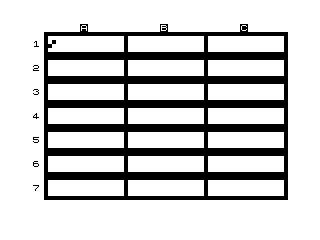
Source Code
   0  % % %M%I%N%I%C%A%L%C% %                     % %W%R%I%T%T%E%N% %B%Y%                     % % %G%E%N%E% %B%U%Z%A%
  10 FAST
  20 DIM A$(7,3,32)
  30 LET A=1
  40 LET B=1
 100 GOSUB 1000
 110 SLOW
 120 LET B$=INKEY$
 130 PRINT AT A*3-1,10*B-8;".'";AT A*3-1,10*B-8;"'.";AT A*3-1,10*B-8;" "
 140 IF B$="" THEN GOTO 120
 150 IF CODE B$=112 THEN GOTO 500
 160 IF CODE B$=113 THEN GOTO 600
 170 IF CODE B$=114 THEN GOTO 700
 180 IF CODE B$=115 THEN GOTO 800
 200 IF B$="F" THEN GOTO 2000
 210 IF B$="C" THEN GOTO 3000
 220 IF B$="V" THEN GOTO 4000
 230 IF B$="D" THEN GOTO 7000
 240 IF B$="R" THEN GOTO 6000
 250 IF B$="S" THEN GOTO 9000
 260 IF B$="B" THEN GOTO 8000
 270 IF B$="N" THEN GOTO 8100
 400 GOTO 120
 500 REM %C%U%R%S%O%R% %U%P
 510 IF A=1 THEN GOTO 120
 520 LET A=A-1
 530 GOTO 120
 600 REM %C%U%R%S%O%R% %D%O%W%N
 610 IF A=7 THEN GOTO 120
 620 LET A=A+1
 630 GOTO 120
 700 REM %C%U%R%S%O%R% %L%E%F%T
 710 IF B=1 THEN GOTO 120
 720 LET B=B-1
 730 GOTO 120
 800 REM %C%U%R%S%O%R% %R%I%G%H%T
 810 IF B=3 THEN GOTO 120
 820 LET B=B+1
 830 GOTO 120
 1000 FAST
 1010 CLS
 1020 FOR N=1 TO 19 STEP 3
 1030 PRINT AT N,1;" :''''''''''''''''''':''''''''''''''''''':''''''''''''''''''':  :          :          :          :  :...................:...................:...................:";AT N+1,0;(N-1)/3+1
 1040 NEXT N
 1050 PRINT AT 0,6;"%A         %B         %C"
 1060 RETURN
 2000 PRINT AT 0,0;"%F"
 2010 INPUT B$
 2020 IF LEN B$>31 THEN GOTO 2020
 2030 LET A$(A,B)="%F"+B$
 2040 PRINT AT A*3-1,10*B-7;"%F"
 2050 PRINT AT 0,0;" "
 2060 GOTO 120
 3000 IF A$(A,B,1)<>"%F" THEN GOTO 120
 3010 PRINT AT 0,0;"%C"
 3020 LET B$=A$(A,B,2 TO )
 3025 LET R=LEN B$
 3030 LET N=1
 3040 GOTO 5000
 3050 LET N=N+1
 3055 IF N<LEN B$ THEN GOTO 3040
 3060 SLOW
 3070 PRINT AT A*3-1,10*B-7;VAL B$
 3080 PAUSE 40000
 3090 PRINT AT A*3-1,10*B-7;"%F        :";AT 0,0;" "
 3100 GOTO 120
 4000 PRINT AT 0,0;"%V"
 4010 INPUT V
 4020 LET B$=STR$ V
 4030 LET A$(A,B)="%V"+B$
 4040 PRINT AT A*3-1,10*B-7;VAL A$(A,B,2 TO 9)
 4050 PRINT AT 0,0;" "
 4060 GOTO 120
 5000 FAST
 5010 LET L=LEN B$
 5100 IF B$(N)="A" THEN LET B$=B$( TO N-1)+"VAL A$("+B$(N+1)+",1,2 TO )"+B$(N+2 TO )
 5110 IF B$(N)="B" THEN LET B$=B$( TO N-1)+"VAL A$("+B$(N+1)+",2,2 TO )"+B$(N+2 TO )
 5120 IF B$(N)="C" THEN LET B$=B$( TO N-1)+"VAL A$("+B$(N+1)+",3,2 TO )"+B$(N+2 TO )
 5130 LET N=N+LEN B$-L
 5220 LET R=R+LEN B$-L
 5230 GOTO 3050
 6000 GOSUB 1000
 6010 FOR A=1 TO 7
 6020 FOR B=1 TO 3
 6100 IF A$(A,B,1)="%V" THEN PRINT AT A*3-1,10*B-7;VAL A$(A,B,2 TO 9)
 6110 IF A$(A,B,1)="%F" THEN PRINT AT A*3-1,10*B-7;"%F"
 6200 NEXT B
 6210 NEXT A
 6220 LET A=1
 6230 LET B=1
 6240 GOTO 110
 7000 IF A$(A,B,1)<>"%F" THEN GOTO 120
 7010 POKE 16418,0
 7020 PRINT AT 23,0;A$(A,B,2 TO 32);
 7030 PAUSE 40000
 7040 PRINT AT 23,0;"                               ";
 7050 POKE 16418,2
 7060 GOTO 120
 8000 LET A=1
 8010 LET B=1
 8020 GOTO 120
 8100 LET A=7
 8110 LET B=3
 8120 GOTO 120
 9000 FAST
 9010 CLS
 9020 PRINT AT 10,0;"ENTER NAME OF FILE, SET UP      RECORDER AND PRESS %E%N%T%E%R :::"
 9030 SLOW
 9040 INPUT Y$
 9050 SAVE Y$
 9060 GOTO 6000
 9997 STOP
 9998 SAVE "MINICAL%C"
 9999 GOTO 1
Note: Type-in program listings on this website use ZMAKEBAS notation for graphics characters.