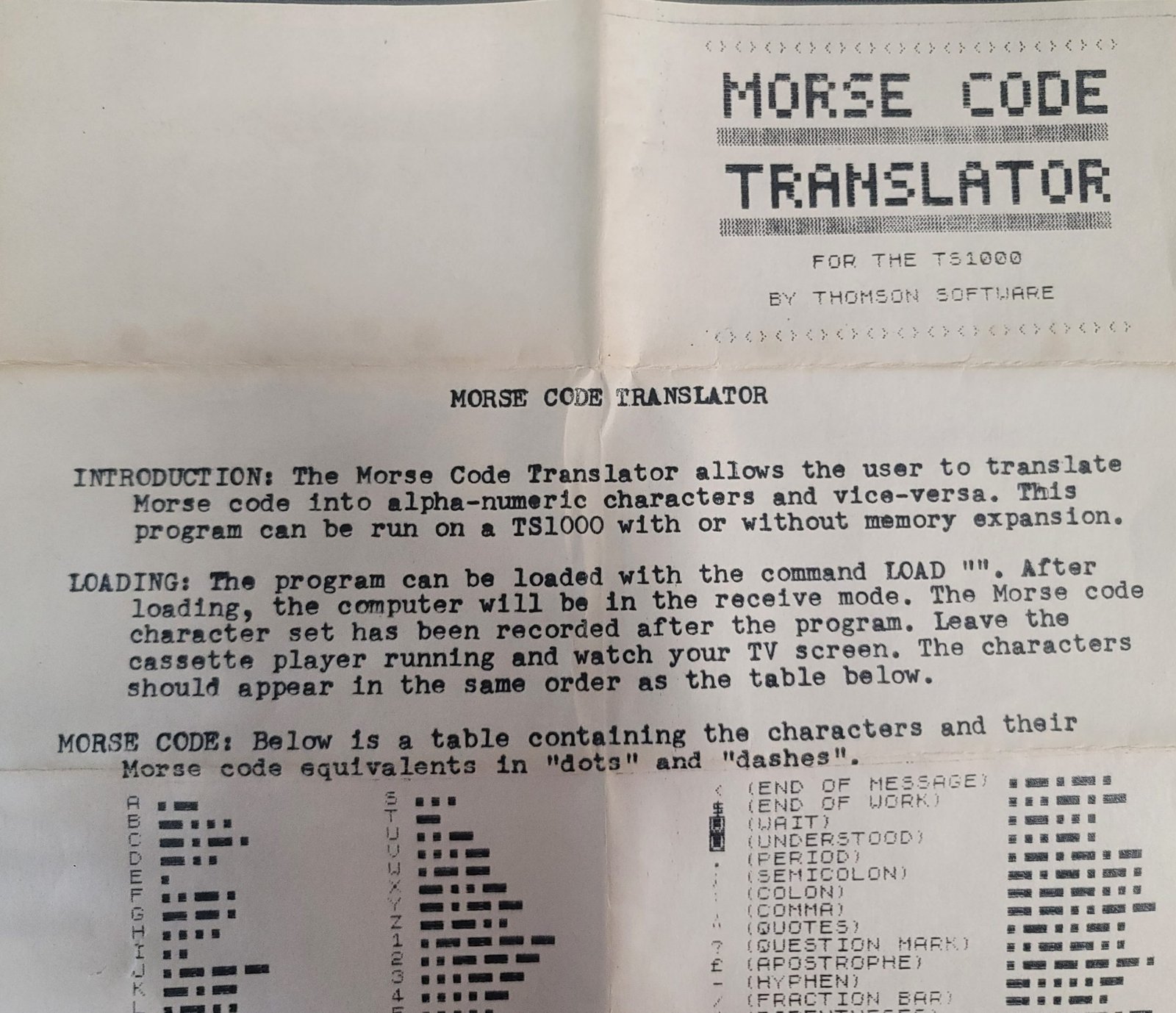
Morse Code Translator

Developer(s): Paul Thomson
Date: 1984
Type: Program
Platform(s): TS 1000
Tags: Ham Radio

This program decodes Morse code signals received through the EAR jack and displays the translated characters on screen. The machine code routine, stored in a REM statement at line 1, handles the real-time signal timing and decoding; timing parameters for dot, dash, inter-element, and inter-character gaps are written directly into the machine code via POKE statements at lines 40–70, scaling the values by dividing constants (720, 2160, 1461, and 360) by the user-supplied words-per-minute setting. The program supports speeds from 9 to 100 WPM, and the decoded text accumulates in response to INPUT A$ at line 80, which triggers the machine code decoder via RAND USR 16516. A secondary routine at RAND USR 16640 fills the screen with inverse-video characters as a visual effect before resetting.


Program Analysis

Program Structure

The program is organized into several functional phases controlled by line number groupings:

  1. Initialization (lines 10–35): Sets FAST mode, prompts for WPM speed, and validates the input range of 9–100 WPM.
  2. Timing calibration (lines 40–75): POKEs four timing constants derived from the WPM value into specific addresses within the machine code.
  3. Decode loop (lines 80–110): Uses INPUT A$ to trigger the machine code decoder; loops continuously until the user enters an empty string.
  4. Screen wipe and demo (lines 120–190): Fills the display with inverse-video space characters, then invokes a second machine code entry point.
  5. Save and title display (lines 200–240): Saves the program and displays a title/credits screen before looping back to the CLS at line 120.

Machine Code in the REM Statement

Line 1 holds the entire machine code payload as a REM statement. The ZX81 REM trick places executable Z80 code at a known address (here, 16516 is the address of the first byte after the REM token in line 1). Two entry points are used:

  • RAND USR 16516 — the main Morse decode routine, called once per character.
  • RAND USR 16640 — a secondary routine that appears to perform the full-screen inverse-video fill effect seen at lines 130–150 (duplicating what the BASIC also does).

The machine code reads the EAR port (IN A,(0FEh)) to sample the audio signal and uses internal timing loops to distinguish dots from dashes and gaps between elements and characters.

Timing Calibration via POKE

Four POKE statements write scaled timing values directly into the machine code’s internal delay constants. The divisor is the user’s WPM value, making all timing inversely proportional to speed:

LineAddressFormulaPurpose
4016558720 / QDot duration threshold
50165672160 / QDash duration threshold (3× dot)
60165851461 / QInter-character gap threshold
7016591360 / QInter-element gap threshold

The ratio 720:2160 is exactly 1:3, consistent with standard Morse timing where a dash is three times the length of a dot. Integer division is used implicitly, so at high WPM values the granularity becomes coarse; at 100 WPM the dot threshold reduces to just 7, leaving little headroom.

Input Loop Idiom

Lines 80–110 form a notable idiom: INPUT A$ suspends execution and waits for the user to press ENTER. Since the Morse signal is sampled by machine code rather than by BASIC, the INPUT here acts purely as a trigger mechanism — once ENTER is pressed, RAND USR 16516 is called to decode one character and print it, then the loop repeats. An empty string (just pressing ENTER) breaks out to the CLS routine at line 120.

Screen Fill Effect

Lines 130–150 loop three times printing a string of 32 inverse-video space characters (% tokens represent inverse spaces in the listing), effectively painting the screen solid inverse to create a visual wipe effect. This is done in BASIC before calling the machine code at line 180, suggesting the machine code entry at 16640 may perform additional display manipulation or simply re-enters the decode setup.

CLEAR Before Decode

CLEAR at line 75 resets the BASIC stack and clears variables. This is placed after the POKEs to ensure the timing values are written before any stack manipulation, and before the INPUT loop to give the machine code a clean memory environment.

SLOW Mode

Line 170 switches to SLOW mode before calling the second machine code entry point at line 180. This restores the normal display driver interrupt, which is necessary for the screen to be visible and refreshed correctly during any interactive or display-oriented machine code operation.

Potential Anomalies

  • Lines 210–230 (title, credits, PAUSE) appear after the SAVE at line 200 and before GOTO 120 at line 240. This means the title screen is only shown after the program saves itself, which is an unconventional program flow — the title display is essentially a post-save splash screen.
  • The FAST at line 10 disables the display driver, which is appropriate for the POKEs but means the prompt at line 20 may not be visible until SLOW is called or the display briefly refreshes. However, on real hardware the PRINT and INPUT statements in FAST mode still work; the display simply does not update dynamically.
  • Integer division truncation at high WPM values (e.g., 360/100 = 3) could cause unreliable decoding near the upper speed limit.

Content

Appears On

Related Products

Reads Morse code through cassette port and scrolls translated message across screen. Translates code off the air through earphone jack....

Related Articles

Related Content

Image Gallery

Source Code

   1 REM 


Morse Code Translator

Developer(s): Paul Thomson
Date: 1984
Type: Program
Platform(s): TS 1000
Tags: Ham Radio

This program decodes Morse code signals received through the EAR jack and displays the translated characters on screen. The machine code routine, stored in a REM statement at line 1, handles the real-time signal timing and decoding; timing parameters for dot, dash, inter-element, and inter-character gaps are written directly into the machine code via POKE statements at lines 40–70, scaling the values by dividing constants (720, 2160, 1461, and 360) by the user-supplied words-per-minute setting. The program supports speeds from 9 to 100 WPM, and the decoded text accumulates in response to INPUT A$ at line 80, which triggers the machine code decoder via RAND USR 16516. A secondary routine at RAND USR 16640 fills the screen with inverse-video characters as a visual effect before resetting.


Program Analysis

Program Structure

The program is organized into several functional phases controlled by line number groupings:

  1. Initialization (lines 10–35): Sets FAST mode, prompts for WPM speed, and validates the input range of 9–100 WPM.
  2. Timing calibration (lines 40–75): POKEs four timing constants derived from the WPM value into specific addresses within the machine code.
  3. Decode loop (lines 80–110): Uses INPUT A$ to trigger the machine code decoder; loops continuously until the user enters an empty string.
  4. Screen wipe and demo (lines 120–190): Fills the display with inverse-video space characters, then invokes a second machine code entry point.
  5. Save and title display (lines 200–240): Saves the program and displays a title/credits screen before looping back to the CLS at line 120.

Machine Code in the REM Statement

Line 1 holds the entire machine code payload as a REM statement. The ZX81 REM trick places executable Z80 code at a known address (here, 16516 is the address of the first byte after the REM token in line 1). Two entry points are used:

  • RAND USR 16516 — the main Morse decode routine, called once per character.
  • RAND USR 16640 — a secondary routine that appears to perform the full-screen inverse-video fill effect seen at lines 130–150 (duplicating what the BASIC also does).

The machine code reads the EAR port (IN A,(0FEh)) to sample the audio signal and uses internal timing loops to distinguish dots from dashes and gaps between elements and characters.

Timing Calibration via POKE

Four POKE statements write scaled timing values directly into the machine code’s internal delay constants. The divisor is the user’s WPM value, making all timing inversely proportional to speed:

LineAddressFormulaPurpose
4016558720 / QDot duration threshold
50165672160 / QDash duration threshold (3× dot)
60165851461 / QInter-character gap threshold
7016591360 / QInter-element gap threshold

The ratio 720:2160 is exactly 1:3, consistent with standard Morse timing where a dash is three times the length of a dot. Integer division is used implicitly, so at high WPM values the granularity becomes coarse; at 100 WPM the dot threshold reduces to just 7, leaving little headroom.

Input Loop Idiom

Lines 80–110 form a notable idiom: INPUT A$ suspends execution and waits for the user to press ENTER. Since the Morse signal is sampled by machine code rather than by BASIC, the INPUT here acts purely as a trigger mechanism — once ENTER is pressed, RAND USR 16516 is called to decode one character and print it, then the loop repeats. An empty string (just pressing ENTER) breaks out to the CLS routine at line 120.

Screen Fill Effect

Lines 130–150 loop three times printing a string of 32 inverse-video space characters (% tokens represent inverse spaces in the listing), effectively painting the screen solid inverse to create a visual wipe effect. This is done in BASIC before calling the machine code at line 180, suggesting the machine code entry at 16640 may perform additional display manipulation or simply re-enters the decode setup.

CLEAR Before Decode

CLEAR at line 75 resets the BASIC stack and clears variables. This is placed after the POKEs to ensure the timing values are written before any stack manipulation, and before the INPUT loop to give the machine code a clean memory environment.

SLOW Mode

Line 170 switches to SLOW mode before calling the second machine code entry point at line 180. This restores the normal display driver interrupt, which is necessary for the screen to be visible and refreshed correctly during any interactive or display-oriented machine code operation.

Potential Anomalies

  • Lines 210–230 (title, credits, PAUSE) appear after the SAVE at line 200 and before GOTO 120 at line 240. This means the title screen is only shown after the program saves itself, which is an unconventional program flow — the title display is essentially a post-save splash screen.
  • The FAST at line 10 disables the display driver, which is appropriate for the POKEs but means the prompt at line 20 may not be visible until SLOW is called or the display briefly refreshes. However, on real hardware the PRINT and INPUT statements in FAST mode still work; the display simply does not update dynamically.
  • Integer division truncation at high WPM values (e.g., 360/100 = 3) could cause unreliable decoding near the upper speed limit.

Content

Appears On

Related Products

Reads Morse code through cassette port and scrolls translated message across screen. Translates code off the air through earphone jack....

Related Articles

Related Content

Image Gallery

Source Code

   1 REM \76\76\2A\10\40\23\23\23\3E\7F\DB\FE\1F\D0\7E\FE\80\C8\23\E5\B7\28\1C\21\B8\41\BE\28\08\34\35\28\12\23\23\18\F5\23\4E\CD\BE\40\21\01\50\CD\E7\40\E1\18\D5\21\01\F0\CD\E7\40\E1\18\CC\AF\CB\19\C8\CB\17\CB\17\3C\5F\2E\A2\CD\D5\40\21\01\28\CD\E7\40\18\E9\53\D3\FF\CD\F1\40\DB\FE\CD\F1\40\15\20\F3\2D\20\EF\C9\2B\00\00\00\00\7C\B5\20\F7\C9\3E\50\3D\20\FD\C9\00\21\24\00\11\00\12\0E\80\CD\9A\41\38\FB\CD\2E\41\26\00\CD\9A\41\30\F6\B7\7C\17\BD\38\F5\CD\4E\41\0E\80\CD\69\41\CD\9A\41\30\E3\B7\7D\1F\85\BC\30\F4\CD\81\41\18\D2\7C\17\BA\30\07\54\1E\00\A7\CB\19\C9\7A\CB\17\BC\30\08\54\6C\1E\01\37\CB\19\C9\7B\1F\30\E7\18\F0\37\CB\19\30\FC\E5\21\B8\41\23\79\BE\28\09\23\7E\B7\20\F6\3E\17\E1\C9\2B\7E\E1\C9\E5\C5\D5\2A\0C\40\11\22\00\19\54\5D\23\01\1F\00\ED\B0\2B\77\D1\C1\E1\C9\3E\00\CD\69\41\C9\C5\06\50\0E\00\24\DB\FE\B1\4F\10\FA\79\CB\17\38\F0\C1\C9\3E\7F\DB\FE\1F\1F\38\02\E1\C9\E5\26\00\CD\87\41\7C\FE\06\38\03\33\33\C9\7C\E1\84\67\37\C9\26\06\27\11\28\15\29\09\2A\02\2B\14\2C\0B\2D\10\2E\04\2F\1E\30\0D\31\12\32\07\33\05\34\0F\35\16\36\1B\37\0A\38\08\39\03\3A\0C\3B\18\3C\0E\3D\19\3E\1D\3F\13\1C\3F\1D\3E\1E\3C\1F\38\20\30\21\20\22\21\23\23\24\27\25\2F\13\2A\0D\68\BC\22\BA\28\1B\6A\19\55\0E\47\1A\73\0B\52\C0\52\0F\4C\0C\5E\16\61\18\29\10\6D\11\6D\83\6C\14\31\08\32\12\35\00\00\00\00\00
  10 FAST 
  15 CLS 
  20 PRINT "ENTER SPEED IN WPM (9 TO 100)";
  25 INPUT Q
  30 IF Q<9 OR Q>100 THEN GOTO 15
  35 CLS 
  37 PRINT "SPEED=";Q;" WPM",""""" TO RECEIVE"
  40 POKE 16558,720/Q
  50 POKE 16567,2160/Q
  60 POKE 16585,1461/Q
  70 POKE 16591,360/Q
  75 CLEAR 
  80 INPUT A$
  90 IF A$="" THEN GOTO 120
 100 RAND USR 16516
 110 GOTO 80
 120 CLS 
 130 FOR F=0 TO 2
 140 PRINT "% % % % % % % % % % % % % % % % % % % % % % % % % % % % % % % % "
 150 NEXT F
 160 PRINT "PRESS . TO GENERATE"
 170 SLOW 
 180 RAND USR 16640
 190 RUN 
 200 SAVE "MC%T"
 210 PRINT TAB 5;"MORSE CODE TRANSLATOR"
 220 PRINT TAB 5;"(C) 1984 PAUL THOMSON"
 230 PAUSE 200
 240 GOTO 120

Note: Type-in program listings on this website use ZMAKEBAS notation for graphics characters.

Scroll to Top
AEF\DB\FE itemtype='https://schema.org/Blog' itemscope='itemscope' class="wp-singular computer_media-template-default single single-computer_media postid-58437 wp-custom-logo wp-embed-responsive wp-theme-astra wp-child-theme-astra-child ast-desktop ast-separate-container ast-left-sidebar astra-4.12.7 group-blog ast-blog-single-style-1 ast-custom-post-type ast-single-post ast-inherit-site-logo-transparent ast-hfb-header ast-full-width-primary-header ast-box-layout ast-normal-title-enabled astra-addon-4.12.5"F\D0E\FE\C8\E5\B7 itemtype='https://schema.org/Blog' itemscope='itemscope' class="wp-singular computer_media-template-default single single-computer_media postid-58437 wp-custom-logo wp-embed-responsive wp-theme-astra wp-child-theme-astra-child ast-desktop ast-separate-container ast-left-sidebar astra-4.12.7 group-blog ast-blog-single-style-1 ast-custom-post-type ast-single-post ast-inherit-site-logo-transparent ast-hfb-header ast-full-width-primary-header ast-box-layout ast-normal-title-enabled astra-addon-4.12.5"C\B8\BE\F5E\CD\BE itemtype='https://schema.org/Blog' itemscope='itemscope' class="wp-singular computer_media-template-default single single-computer_media postid-58437 wp-custom-logo wp-embed-responsive wp-theme-astra wp-child-theme-astra-child ast-desktop ast-separate-container ast-left-sidebar astra-4.12.7 group-blog ast-blog-single-style-1 ast-custom-post-type ast-single-post ast-inherit-site-logo-transparent ast-hfb-header ast-full-width-primary-header ast-box-layout ast-normal-title-enabled astra-addon-4.12.5"\CD\E7\E1\D5 itemtype='https://schema.org/Blog' itemscope='itemscope' class="wp-singular computer_media-template-default single single-computer_media postid-58437 wp-custom-logo wp-embed-responsive wp-theme-astra wp-child-theme-astra-child ast-desktop ast-separate-container ast-left-sidebar astra-4.12.7 group-blog ast-blog-single-style-1 ast-custom-post-type ast-single-post ast-inherit-site-logo-transparent ast-hfb-header ast-full-width-primary-header ast-box-layout ast-normal-title-enabled astra-addon-4.12.5"\F0\CD\E7\E1\CC\AF\CB\C8\CB\CBCF

Morse Code Translator

Developer(s): Paul Thomson
Date: 1984
Type: Program
Platform(s): TS 1000
Tags: Ham Radio

This program decodes Morse code signals received through the EAR jack and displays the translated characters on screen. The machine code routine, stored in a REM statement at line 1, handles the real-time signal timing and decoding; timing parameters for dot, dash, inter-element, and inter-character gaps are written directly into the machine code via POKE statements at lines 40–70, scaling the values by dividing constants (720, 2160, 1461, and 360) by the user-supplied words-per-minute setting. The program supports speeds from 9 to 100 WPM, and the decoded text accumulates in response to INPUT A$ at line 80, which triggers the machine code decoder via RAND USR 16516. A secondary routine at RAND USR 16640 fills the screen with inverse-video characters as a visual effect before resetting.


Program Analysis

Program Structure

The program is organized into several functional phases controlled by line number groupings:

  1. Initialization (lines 10–35): Sets FAST mode, prompts for WPM speed, and validates the input range of 9–100 WPM.
  2. Timing calibration (lines 40–75): POKEs four timing constants derived from the WPM value into specific addresses within the machine code.
  3. Decode loop (lines 80–110): Uses INPUT A$ to trigger the machine code decoder; loops continuously until the user enters an empty string.
  4. Screen wipe and demo (lines 120–190): Fills the display with inverse-video space characters, then invokes a second machine code entry point.
  5. Save and title display (lines 200–240): Saves the program and displays a title/credits screen before looping back to the CLS at line 120.

Machine Code in the REM Statement

Line 1 holds the entire machine code payload as a REM statement. The ZX81 REM trick places executable Z80 code at a known address (here, 16516 is the address of the first byte after the REM token in line 1). Two entry points are used:

  • RAND USR 16516 — the main Morse decode routine, called once per character.
  • RAND USR 16640 — a secondary routine that appears to perform the full-screen inverse-video fill effect seen at lines 130–150 (duplicating what the BASIC also does).

The machine code reads the EAR port (IN A,(0FEh)) to sample the audio signal and uses internal timing loops to distinguish dots from dashes and gaps between elements and characters.

Timing Calibration via POKE

Four POKE statements write scaled timing values directly into the machine code’s internal delay constants. The divisor is the user’s WPM value, making all timing inversely proportional to speed:

LineAddressFormulaPurpose
4016558720 / QDot duration threshold
50165672160 / QDash duration threshold (3× dot)
60165851461 / QInter-character gap threshold
7016591360 / QInter-element gap threshold

The ratio 720:2160 is exactly 1:3, consistent with standard Morse timing where a dash is three times the length of a dot. Integer division is used implicitly, so at high WPM values the granularity becomes coarse; at 100 WPM the dot threshold reduces to just 7, leaving little headroom.

Input Loop Idiom

Lines 80–110 form a notable idiom: INPUT A$ suspends execution and waits for the user to press ENTER. Since the Morse signal is sampled by machine code rather than by BASIC, the INPUT here acts purely as a trigger mechanism — once ENTER is pressed, RAND USR 16516 is called to decode one character and print it, then the loop repeats. An empty string (just pressing ENTER) breaks out to the CLS routine at line 120.

Screen Fill Effect

Lines 130–150 loop three times printing a string of 32 inverse-video space characters (% tokens represent inverse spaces in the listing), effectively painting the screen solid inverse to create a visual wipe effect. This is done in BASIC before calling the machine code at line 180, suggesting the machine code entry at 16640 may perform additional display manipulation or simply re-enters the decode setup.

CLEAR Before Decode

CLEAR at line 75 resets the BASIC stack and clears variables. This is placed after the POKEs to ensure the timing values are written before any stack manipulation, and before the INPUT loop to give the machine code a clean memory environment.

SLOW Mode

Line 170 switches to SLOW mode before calling the second machine code entry point at line 180. This restores the normal display driver interrupt, which is necessary for the screen to be visible and refreshed correctly during any interactive or display-oriented machine code operation.

Potential Anomalies

  • Lines 210–230 (title, credits, PAUSE) appear after the SAVE at line 200 and before GOTO 120 at line 240. This means the title screen is only shown after the program saves itself, which is an unconventional program flow — the title display is essentially a post-save splash screen.
  • The FAST at line 10 disables the display driver, which is appropriate for the POKEs but means the prompt at line 20 may not be visible until SLOW is called or the display briefly refreshes. However, on real hardware the PRINT and INPUT statements in FAST mode still work; the display simply does not update dynamically.
  • Integer division truncation at high WPM values (e.g., 360/100 = 3) could cause unreliable decoding near the upper speed limit.

Content

Appears On

Related Products

Reads Morse code through cassette port and scrolls translated message across screen. Translates code off the air through earphone jack....

Related Articles

Related Content

Image Gallery

Source Code

   1 REM \76\76\2A\10\40\23\23\23\3E\7F\DB\FE\1F\D0\7E\FE\80\C8\23\E5\B7\28\1C\21\B8\41\BE\28\08\34\35\28\12\23\23\18\F5\23\4E\CD\BE\40\21\01\50\CD\E7\40\E1\18\D5\21\01\F0\CD\E7\40\E1\18\CC\AF\CB\19\C8\CB\17\CB\17\3C\5F\2E\A2\CD\D5\40\21\01\28\CD\E7\40\18\E9\53\D3\FF\CD\F1\40\DB\FE\CD\F1\40\15\20\F3\2D\20\EF\C9\2B\00\00\00\00\7C\B5\20\F7\C9\3E\50\3D\20\FD\C9\00\21\24\00\11\00\12\0E\80\CD\9A\41\38\FB\CD\2E\41\26\00\CD\9A\41\30\F6\B7\7C\17\BD\38\F5\CD\4E\41\0E\80\CD\69\41\CD\9A\41\30\E3\B7\7D\1F\85\BC\30\F4\CD\81\41\18\D2\7C\17\BA\30\07\54\1E\00\A7\CB\19\C9\7A\CB\17\BC\30\08\54\6C\1E\01\37\CB\19\C9\7B\1F\30\E7\18\F0\37\CB\19\30\FC\E5\21\B8\41\23\79\BE\28\09\23\7E\B7\20\F6\3E\17\E1\C9\2B\7E\E1\C9\E5\C5\D5\2A\0C\40\11\22\00\19\54\5D\23\01\1F\00\ED\B0\2B\77\D1\C1\E1\C9\3E\00\CD\69\41\C9\C5\06\50\0E\00\24\DB\FE\B1\4F\10\FA\79\CB\17\38\F0\C1\C9\3E\7F\DB\FE\1F\1F\38\02\E1\C9\E5\26\00\CD\87\41\7C\FE\06\38\03\33\33\C9\7C\E1\84\67\37\C9\26\06\27\11\28\15\29\09\2A\02\2B\14\2C\0B\2D\10\2E\04\2F\1E\30\0D\31\12\32\07\33\05\34\0F\35\16\36\1B\37\0A\38\08\39\03\3A\0C\3B\18\3C\0E\3D\19\3E\1D\3F\13\1C\3F\1D\3E\1E\3C\1F\38\20\30\21\20\22\21\23\23\24\27\25\2F\13\2A\0D\68\BC\22\BA\28\1B\6A\19\55\0E\47\1A\73\0B\52\C0\52\0F\4C\0C\5E\16\61\18\29\10\6D\11\6D\83\6C\14\31\08\32\12\35\00\00\00\00\00
  10 FAST 
  15 CLS 
  20 PRINT "ENTER SPEED IN WPM (9 TO 100)";
  25 INPUT Q
  30 IF Q<9 OR Q>100 THEN GOTO 15
  35 CLS 
  37 PRINT "SPEED=";Q;" WPM",""""" TO RECEIVE"
  40 POKE 16558,720/Q
  50 POKE 16567,2160/Q
  60 POKE 16585,1461/Q
  70 POKE 16591,360/Q
  75 CLEAR 
  80 INPUT A$
  90 IF A$="" THEN GOTO 120
 100 RAND USR 16516
 110 GOTO 80
 120 CLS 
 130 FOR F=0 TO 2
 140 PRINT "% % % % % % % % % % % % % % % % % % % % % % % % % % % % % % % % "
 150 NEXT F
 160 PRINT "PRESS . TO GENERATE"
 170 SLOW 
 180 RAND USR 16640
 190 RUN 
 200 SAVE "MC%T"
 210 PRINT TAB 5;"MORSE CODE TRANSLATOR"
 220 PRINT TAB 5;"(C) 1984 PAUL THOMSON"
 230 PAUSE 200
 240 GOTO 120

Note: Type-in program listings on this website use ZMAKEBAS notation for graphics characters.

Scroll to Top
E\A2\CD\D5 itemtype='https://schema.org/Blog' itemscope='itemscope' class="wp-singular computer_media-template-default single single-computer_media postid-58437 wp-custom-logo wp-embed-responsive wp-theme-astra wp-child-theme-astra-child ast-desktop ast-separate-container ast-left-sidebar astra-4.12.7 group-blog ast-blog-single-style-1 ast-custom-post-type ast-single-post ast-inherit-site-logo-transparent ast-hfb-header ast-full-width-primary-header ast-box-layout ast-normal-title-enabled astra-addon-4.12.5"\CD\E7\E9\D3\FF\CD\F1\DB\FE\CD\F1\F3

Morse Code Translator

Developer(s): Paul Thomson
Date: 1984
Type: Program
Platform(s): TS 1000
Tags: Ham Radio

This program decodes Morse code signals received through the EAR jack and displays the translated characters on screen. The machine code routine, stored in a REM statement at line 1, handles the real-time signal timing and decoding; timing parameters for dot, dash, inter-element, and inter-character gaps are written directly into the machine code via POKE statements at lines 40–70, scaling the values by dividing constants (720, 2160, 1461, and 360) by the user-supplied words-per-minute setting. The program supports speeds from 9 to 100 WPM, and the decoded text accumulates in response to INPUT A$ at line 80, which triggers the machine code decoder via RAND USR 16516. A secondary routine at RAND USR 16640 fills the screen with inverse-video characters as a visual effect before resetting.


Program Analysis

Program Structure

The program is organized into several functional phases controlled by line number groupings:

  1. Initialization (lines 10–35): Sets FAST mode, prompts for WPM speed, and validates the input range of 9–100 WPM.
  2. Timing calibration (lines 40–75): POKEs four timing constants derived from the WPM value into specific addresses within the machine code.
  3. Decode loop (lines 80–110): Uses INPUT A$ to trigger the machine code decoder; loops continuously until the user enters an empty string.
  4. Screen wipe and demo (lines 120–190): Fills the display with inverse-video space characters, then invokes a second machine code entry point.
  5. Save and title display (lines 200–240): Saves the program and displays a title/credits screen before looping back to the CLS at line 120.

Machine Code in the REM Statement

Line 1 holds the entire machine code payload as a REM statement. The ZX81 REM trick places executable Z80 code at a known address (here, 16516 is the address of the first byte after the REM token in line 1). Two entry points are used:

  • RAND USR 16516 — the main Morse decode routine, called once per character.
  • RAND USR 16640 — a secondary routine that appears to perform the full-screen inverse-video fill effect seen at lines 130–150 (duplicating what the BASIC also does).

The machine code reads the EAR port (IN A,(0FEh)) to sample the audio signal and uses internal timing loops to distinguish dots from dashes and gaps between elements and characters.

Timing Calibration via POKE

Four POKE statements write scaled timing values directly into the machine code’s internal delay constants. The divisor is the user’s WPM value, making all timing inversely proportional to speed:

LineAddressFormulaPurpose
4016558720 / QDot duration threshold
50165672160 / QDash duration threshold (3× dot)
60165851461 / QInter-character gap threshold
7016591360 / QInter-element gap threshold

The ratio 720:2160 is exactly 1:3, consistent with standard Morse timing where a dash is three times the length of a dot. Integer division is used implicitly, so at high WPM values the granularity becomes coarse; at 100 WPM the dot threshold reduces to just 7, leaving little headroom.

Input Loop Idiom

Lines 80–110 form a notable idiom: INPUT A$ suspends execution and waits for the user to press ENTER. Since the Morse signal is sampled by machine code rather than by BASIC, the INPUT here acts purely as a trigger mechanism — once ENTER is pressed, RAND USR 16516 is called to decode one character and print it, then the loop repeats. An empty string (just pressing ENTER) breaks out to the CLS routine at line 120.

Screen Fill Effect

Lines 130–150 loop three times printing a string of 32 inverse-video space characters (% tokens represent inverse spaces in the listing), effectively painting the screen solid inverse to create a visual wipe effect. This is done in BASIC before calling the machine code at line 180, suggesting the machine code entry at 16640 may perform additional display manipulation or simply re-enters the decode setup.

CLEAR Before Decode

CLEAR at line 75 resets the BASIC stack and clears variables. This is placed after the POKEs to ensure the timing values are written before any stack manipulation, and before the INPUT loop to give the machine code a clean memory environment.

SLOW Mode

Line 170 switches to SLOW mode before calling the second machine code entry point at line 180. This restores the normal display driver interrupt, which is necessary for the screen to be visible and refreshed correctly during any interactive or display-oriented machine code operation.

Potential Anomalies

  • Lines 210–230 (title, credits, PAUSE) appear after the SAVE at line 200 and before GOTO 120 at line 240. This means the title screen is only shown after the program saves itself, which is an unconventional program flow — the title display is essentially a post-save splash screen.
  • The FAST at line 10 disables the display driver, which is appropriate for the POKEs but means the prompt at line 20 may not be visible until SLOW is called or the display briefly refreshes. However, on real hardware the PRINT and INPUT statements in FAST mode still work; the display simply does not update dynamically.
  • Integer division truncation at high WPM values (e.g., 360/100 = 3) could cause unreliable decoding near the upper speed limit.

Content

Appears On

Related Products

Reads Morse code through cassette port and scrolls translated message across screen. Translates code off the air through earphone jack....

Related Articles

Related Content

Image Gallery

Source Code

   1 REM \76\76\2A\10\40\23\23\23\3E\7F\DB\FE\1F\D0\7E\FE\80\C8\23\E5\B7\28\1C\21\B8\41\BE\28\08\34\35\28\12\23\23\18\F5\23\4E\CD\BE\40\21\01\50\CD\E7\40\E1\18\D5\21\01\F0\CD\E7\40\E1\18\CC\AF\CB\19\C8\CB\17\CB\17\3C\5F\2E\A2\CD\D5\40\21\01\28\CD\E7\40\18\E9\53\D3\FF\CD\F1\40\DB\FE\CD\F1\40\15\20\F3\2D\20\EF\C9\2B\00\00\00\00\7C\B5\20\F7\C9\3E\50\3D\20\FD\C9\00\21\24\00\11\00\12\0E\80\CD\9A\41\38\FB\CD\2E\41\26\00\CD\9A\41\30\F6\B7\7C\17\BD\38\F5\CD\4E\41\0E\80\CD\69\41\CD\9A\41\30\E3\B7\7D\1F\85\BC\30\F4\CD\81\41\18\D2\7C\17\BA\30\07\54\1E\00\A7\CB\19\C9\7A\CB\17\BC\30\08\54\6C\1E\01\37\CB\19\C9\7B\1F\30\E7\18\F0\37\CB\19\30\FC\E5\21\B8\41\23\79\BE\28\09\23\7E\B7\20\F6\3E\17\E1\C9\2B\7E\E1\C9\E5\C5\D5\2A\0C\40\11\22\00\19\54\5D\23\01\1F\00\ED\B0\2B\77\D1\C1\E1\C9\3E\00\CD\69\41\C9\C5\06\50\0E\00\24\DB\FE\B1\4F\10\FA\79\CB\17\38\F0\C1\C9\3E\7F\DB\FE\1F\1F\38\02\E1\C9\E5\26\00\CD\87\41\7C\FE\06\38\03\33\33\C9\7C\E1\84\67\37\C9\26\06\27\11\28\15\29\09\2A\02\2B\14\2C\0B\2D\10\2E\04\2F\1E\30\0D\31\12\32\07\33\05\34\0F\35\16\36\1B\37\0A\38\08\39\03\3A\0C\3B\18\3C\0E\3D\19\3E\1D\3F\13\1C\3F\1D\3E\1E\3C\1F\38\20\30\21\20\22\21\23\23\24\27\25\2F\13\2A\0D\68\BC\22\BA\28\1B\6A\19\55\0E\47\1A\73\0B\52\C0\52\0F\4C\0C\5E\16\61\18\29\10\6D\11\6D\83\6C\14\31\08\32\12\35\00\00\00\00\00
  10 FAST 
  15 CLS 
  20 PRINT "ENTER SPEED IN WPM (9 TO 100)";
  25 INPUT Q
  30 IF Q<9 OR Q>100 THEN GOTO 15
  35 CLS 
  37 PRINT "SPEED=";Q;" WPM",""""" TO RECEIVE"
  40 POKE 16558,720/Q
  50 POKE 16567,2160/Q
  60 POKE 16585,1461/Q
  70 POKE 16591,360/Q
  75 CLEAR 
  80 INPUT A$
  90 IF A$="" THEN GOTO 120
 100 RAND USR 16516
 110 GOTO 80
 120 CLS 
 130 FOR F=0 TO 2
 140 PRINT "% % % % % % % % % % % % % % % % % % % % % % % % % % % % % % % % "
 150 NEXT F
 160 PRINT "PRESS . TO GENERATE"
 170 SLOW 
 180 RAND USR 16640
 190 RUN 
 200 SAVE "MC%T"
 210 PRINT TAB 5;"MORSE CODE TRANSLATOR"
 220 PRINT TAB 5;"(C) 1984 PAUL THOMSON"
 230 PAUSE 200
 240 GOTO 120

Note: Type-in program listings on this website use ZMAKEBAS notation for graphics characters.

Scroll to Top
D\EF\C9

Morse Code Translator

Developer(s): Paul Thomson
Date: 1984
Type: Program
Platform(s): TS 1000
Tags: Ham Radio

This program decodes Morse code signals received through the EAR jack and displays the translated characters on screen. The machine code routine, stored in a REM statement at line 1, handles the real-time signal timing and decoding; timing parameters for dot, dash, inter-element, and inter-character gaps are written directly into the machine code via POKE statements at lines 40–70, scaling the values by dividing constants (720, 2160, 1461, and 360) by the user-supplied words-per-minute setting. The program supports speeds from 9 to 100 WPM, and the decoded text accumulates in response to INPUT A$ at line 80, which triggers the machine code decoder via RAND USR 16516. A secondary routine at RAND USR 16640 fills the screen with inverse-video characters as a visual effect before resetting.


Program Analysis

Program Structure

The program is organized into several functional phases controlled by line number groupings:

  1. Initialization (lines 10–35): Sets FAST mode, prompts for WPM speed, and validates the input range of 9–100 WPM.
  2. Timing calibration (lines 40–75): POKEs four timing constants derived from the WPM value into specific addresses within the machine code.
  3. Decode loop (lines 80–110): Uses INPUT A$ to trigger the machine code decoder; loops continuously until the user enters an empty string.
  4. Screen wipe and demo (lines 120–190): Fills the display with inverse-video space characters, then invokes a second machine code entry point.
  5. Save and title display (lines 200–240): Saves the program and displays a title/credits screen before looping back to the CLS at line 120.

Machine Code in the REM Statement

Line 1 holds the entire machine code payload as a REM statement. The ZX81 REM trick places executable Z80 code at a known address (here, 16516 is the address of the first byte after the REM token in line 1). Two entry points are used:

  • RAND USR 16516 — the main Morse decode routine, called once per character.
  • RAND USR 16640 — a secondary routine that appears to perform the full-screen inverse-video fill effect seen at lines 130–150 (duplicating what the BASIC also does).

The machine code reads the EAR port (IN A,(0FEh)) to sample the audio signal and uses internal timing loops to distinguish dots from dashes and gaps between elements and characters.

Timing Calibration via POKE

Four POKE statements write scaled timing values directly into the machine code’s internal delay constants. The divisor is the user’s WPM value, making all timing inversely proportional to speed:

LineAddressFormulaPurpose
4016558720 / QDot duration threshold
50165672160 / QDash duration threshold (3× dot)
60165851461 / QInter-character gap threshold
7016591360 / QInter-element gap threshold

The ratio 720:2160 is exactly 1:3, consistent with standard Morse timing where a dash is three times the length of a dot. Integer division is used implicitly, so at high WPM values the granularity becomes coarse; at 100 WPM the dot threshold reduces to just 7, leaving little headroom.

Input Loop Idiom

Lines 80–110 form a notable idiom: INPUT A$ suspends execution and waits for the user to press ENTER. Since the Morse signal is sampled by machine code rather than by BASIC, the INPUT here acts purely as a trigger mechanism — once ENTER is pressed, RAND USR 16516 is called to decode one character and print it, then the loop repeats. An empty string (just pressing ENTER) breaks out to the CLS routine at line 120.

Screen Fill Effect

Lines 130–150 loop three times printing a string of 32 inverse-video space characters (% tokens represent inverse spaces in the listing), effectively painting the screen solid inverse to create a visual wipe effect. This is done in BASIC before calling the machine code at line 180, suggesting the machine code entry at 16640 may perform additional display manipulation or simply re-enters the decode setup.

CLEAR Before Decode

CLEAR at line 75 resets the BASIC stack and clears variables. This is placed after the POKEs to ensure the timing values are written before any stack manipulation, and before the INPUT loop to give the machine code a clean memory environment.

SLOW Mode

Line 170 switches to SLOW mode before calling the second machine code entry point at line 180. This restores the normal display driver interrupt, which is necessary for the screen to be visible and refreshed correctly during any interactive or display-oriented machine code operation.

Potential Anomalies

  • Lines 210–230 (title, credits, PAUSE) appear after the SAVE at line 200 and before GOTO 120 at line 240. This means the title screen is only shown after the program saves itself, which is an unconventional program flow — the title display is essentially a post-save splash screen.
  • The FAST at line 10 disables the display driver, which is appropriate for the POKEs but means the prompt at line 20 may not be visible until SLOW is called or the display briefly refreshes. However, on real hardware the PRINT and INPUT statements in FAST mode still work; the display simply does not update dynamically.
  • Integer division truncation at high WPM values (e.g., 360/100 = 3) could cause unreliable decoding near the upper speed limit.

Content

Appears On

Related Products

Reads Morse code through cassette port and scrolls translated message across screen. Translates code off the air through earphone jack....

Related Articles

Related Content

Image Gallery

Source Code

   1 REM \76\76\2A\10\40\23\23\23\3E\7F\DB\FE\1F\D0\7E\FE\80\C8\23\E5\B7\28\1C\21\B8\41\BE\28\08\34\35\28\12\23\23\18\F5\23\4E\CD\BE\40\21\01\50\CD\E7\40\E1\18\D5\21\01\F0\CD\E7\40\E1\18\CC\AF\CB\19\C8\CB\17\CB\17\3C\5F\2E\A2\CD\D5\40\21\01\28\CD\E7\40\18\E9\53\D3\FF\CD\F1\40\DB\FE\CD\F1\40\15\20\F3\2D\20\EF\C9\2B\00\00\00\00\7C\B5\20\F7\C9\3E\50\3D\20\FD\C9\00\21\24\00\11\00\12\0E\80\CD\9A\41\38\FB\CD\2E\41\26\00\CD\9A\41\30\F6\B7\7C\17\BD\38\F5\CD\4E\41\0E\80\CD\69\41\CD\9A\41\30\E3\B7\7D\1F\85\BC\30\F4\CD\81\41\18\D2\7C\17\BA\30\07\54\1E\00\A7\CB\19\C9\7A\CB\17\BC\30\08\54\6C\1E\01\37\CB\19\C9\7B\1F\30\E7\18\F0\37\CB\19\30\FC\E5\21\B8\41\23\79\BE\28\09\23\7E\B7\20\F6\3E\17\E1\C9\2B\7E\E1\C9\E5\C5\D5\2A\0C\40\11\22\00\19\54\5D\23\01\1F\00\ED\B0\2B\77\D1\C1\E1\C9\3E\00\CD\69\41\C9\C5\06\50\0E\00\24\DB\FE\B1\4F\10\FA\79\CB\17\38\F0\C1\C9\3E\7F\DB\FE\1F\1F\38\02\E1\C9\E5\26\00\CD\87\41\7C\FE\06\38\03\33\33\C9\7C\E1\84\67\37\C9\26\06\27\11\28\15\29\09\2A\02\2B\14\2C\0B\2D\10\2E\04\2F\1E\30\0D\31\12\32\07\33\05\34\0F\35\16\36\1B\37\0A\38\08\39\03\3A\0C\3B\18\3C\0E\3D\19\3E\1D\3F\13\1C\3F\1D\3E\1E\3C\1F\38\20\30\21\20\22\21\23\23\24\27\25\2F\13\2A\0D\68\BC\22\BA\28\1B\6A\19\55\0E\47\1A\73\0B\52\C0\52\0F\4C\0C\5E\16\61\18\29\10\6D\11\6D\83\6C\14\31\08\32\12\35\00\00\00\00\00
  10 FAST 
  15 CLS 
  20 PRINT "ENTER SPEED IN WPM (9 TO 100)";
  25 INPUT Q
  30 IF Q<9 OR Q>100 THEN GOTO 15
  35 CLS 
  37 PRINT "SPEED=";Q;" WPM",""""" TO RECEIVE"
  40 POKE 16558,720/Q
  50 POKE 16567,2160/Q
  60 POKE 16585,1461/Q
  70 POKE 16591,360/Q
  75 CLEAR 
  80 INPUT A$
  90 IF A$="" THEN GOTO 120
 100 RAND USR 16516
 110 GOTO 80
 120 CLS 
 130 FOR F=0 TO 2
 140 PRINT "% % % % % % % % % % % % % % % % % % % % % % % % % % % % % % % % "
 150 NEXT F
 160 PRINT "PRESS . TO GENERATE"
 170 SLOW 
 180 RAND USR 16640
 190 RUN 
 200 SAVE "MC%T"
 210 PRINT TAB 5;"MORSE CODE TRANSLATOR"
 220 PRINT TAB 5;"(C) 1984 PAUL THOMSON"
 230 PAUSE 200
 240 GOTO 120

Note: Type-in program listings on this website use ZMAKEBAS notation for graphics characters.

Scroll to Top
B

Morse Code Translator

Developer(s): Paul Thomson
Date: 1984
Type: Program
Platform(s): TS 1000
Tags: Ham Radio

This program decodes Morse code signals received through the EAR jack and displays the translated characters on screen. The machine code routine, stored in a REM statement at line 1, handles the real-time signal timing and decoding; timing parameters for dot, dash, inter-element, and inter-character gaps are written directly into the machine code via POKE statements at lines 40–70, scaling the values by dividing constants (720, 2160, 1461, and 360) by the user-supplied words-per-minute setting. The program supports speeds from 9 to 100 WPM, and the decoded text accumulates in response to INPUT A$ at line 80, which triggers the machine code decoder via RAND USR 16516. A secondary routine at RAND USR 16640 fills the screen with inverse-video characters as a visual effect before resetting.


Program Analysis

Program Structure

The program is organized into several functional phases controlled by line number groupings:

  1. Initialization (lines 10–35): Sets FAST mode, prompts for WPM speed, and validates the input range of 9–100 WPM.
  2. Timing calibration (lines 40–75): POKEs four timing constants derived from the WPM value into specific addresses within the machine code.
  3. Decode loop (lines 80–110): Uses INPUT A$ to trigger the machine code decoder; loops continuously until the user enters an empty string.
  4. Screen wipe and demo (lines 120–190): Fills the display with inverse-video space characters, then invokes a second machine code entry point.
  5. Save and title display (lines 200–240): Saves the program and displays a title/credits screen before looping back to the CLS at line 120.

Machine Code in the REM Statement

Line 1 holds the entire machine code payload as a REM statement. The ZX81 REM trick places executable Z80 code at a known address (here, 16516 is the address of the first byte after the REM token in line 1). Two entry points are used:

  • RAND USR 16516 — the main Morse decode routine, called once per character.
  • RAND USR 16640 — a secondary routine that appears to perform the full-screen inverse-video fill effect seen at lines 130–150 (duplicating what the BASIC also does).

The machine code reads the EAR port (IN A,(0FEh)) to sample the audio signal and uses internal timing loops to distinguish dots from dashes and gaps between elements and characters.

Timing Calibration via POKE

Four POKE statements write scaled timing values directly into the machine code’s internal delay constants. The divisor is the user’s WPM value, making all timing inversely proportional to speed:

LineAddressFormulaPurpose
4016558720 / QDot duration threshold
50165672160 / QDash duration threshold (3× dot)
60165851461 / QInter-character gap threshold
7016591360 / QInter-element gap threshold

The ratio 720:2160 is exactly 1:3, consistent with standard Morse timing where a dash is three times the length of a dot. Integer division is used implicitly, so at high WPM values the granularity becomes coarse; at 100 WPM the dot threshold reduces to just 7, leaving little headroom.

Input Loop Idiom

Lines 80–110 form a notable idiom: INPUT A$ suspends execution and waits for the user to press ENTER. Since the Morse signal is sampled by machine code rather than by BASIC, the INPUT here acts purely as a trigger mechanism — once ENTER is pressed, RAND USR 16516 is called to decode one character and print it, then the loop repeats. An empty string (just pressing ENTER) breaks out to the CLS routine at line 120.

Screen Fill Effect

Lines 130–150 loop three times printing a string of 32 inverse-video space characters (% tokens represent inverse spaces in the listing), effectively painting the screen solid inverse to create a visual wipe effect. This is done in BASIC before calling the machine code at line 180, suggesting the machine code entry at 16640 may perform additional display manipulation or simply re-enters the decode setup.

CLEAR Before Decode

CLEAR at line 75 resets the BASIC stack and clears variables. This is placed after the POKEs to ensure the timing values are written before any stack manipulation, and before the INPUT loop to give the machine code a clean memory environment.

SLOW Mode

Line 170 switches to SLOW mode before calling the second machine code entry point at line 180. This restores the normal display driver interrupt, which is necessary for the screen to be visible and refreshed correctly during any interactive or display-oriented machine code operation.

Potential Anomalies

  • Lines 210–230 (title, credits, PAUSE) appear after the SAVE at line 200 and before GOTO 120 at line 240. This means the title screen is only shown after the program saves itself, which is an unconventional program flow — the title display is essentially a post-save splash screen.
  • The FAST at line 10 disables the display driver, which is appropriate for the POKEs but means the prompt at line 20 may not be visible until SLOW is called or the display briefly refreshes. However, on real hardware the PRINT and INPUT statements in FAST mode still work; the display simply does not update dynamically.
  • Integer division truncation at high WPM values (e.g., 360/100 = 3) could cause unreliable decoding near the upper speed limit.

Content

Appears On

Related Products

Reads Morse code through cassette port and scrolls translated message across screen. Translates code off the air through earphone jack....

Related Articles

Related Content

Image Gallery

Source Code

   1 REM \76\76\2A\10\40\23\23\23\3E\7F\DB\FE\1F\D0\7E\FE\80\C8\23\E5\B7\28\1C\21\B8\41\BE\28\08\34\35\28\12\23\23\18\F5\23\4E\CD\BE\40\21\01\50\CD\E7\40\E1\18\D5\21\01\F0\CD\E7\40\E1\18\CC\AF\CB\19\C8\CB\17\CB\17\3C\5F\2E\A2\CD\D5\40\21\01\28\CD\E7\40\18\E9\53\D3\FF\CD\F1\40\DB\FE\CD\F1\40\15\20\F3\2D\20\EF\C9\2B\00\00\00\00\7C\B5\20\F7\C9\3E\50\3D\20\FD\C9\00\21\24\00\11\00\12\0E\80\CD\9A\41\38\FB\CD\2E\41\26\00\CD\9A\41\30\F6\B7\7C\17\BD\38\F5\CD\4E\41\0E\80\CD\69\41\CD\9A\41\30\E3\B7\7D\1F\85\BC\30\F4\CD\81\41\18\D2\7C\17\BA\30\07\54\1E\00\A7\CB\19\C9\7A\CB\17\BC\30\08\54\6C\1E\01\37\CB\19\C9\7B\1F\30\E7\18\F0\37\CB\19\30\FC\E5\21\B8\41\23\79\BE\28\09\23\7E\B7\20\F6\3E\17\E1\C9\2B\7E\E1\C9\E5\C5\D5\2A\0C\40\11\22\00\19\54\5D\23\01\1F\00\ED\B0\2B\77\D1\C1\E1\C9\3E\00\CD\69\41\C9\C5\06\50\0E\00\24\DB\FE\B1\4F\10\FA\79\CB\17\38\F0\C1\C9\3E\7F\DB\FE\1F\1F\38\02\E1\C9\E5\26\00\CD\87\41\7C\FE\06\38\03\33\33\C9\7C\E1\84\67\37\C9\26\06\27\11\28\15\29\09\2A\02\2B\14\2C\0B\2D\10\2E\04\2F\1E\30\0D\31\12\32\07\33\05\34\0F\35\16\36\1B\37\0A\38\08\39\03\3A\0C\3B\18\3C\0E\3D\19\3E\1D\3F\13\1C\3F\1D\3E\1E\3C\1F\38\20\30\21\20\22\21\23\23\24\27\25\2F\13\2A\0D\68\BC\22\BA\28\1B\6A\19\55\0E\47\1A\73\0B\52\C0\52\0F\4C\0C\5E\16\61\18\29\10\6D\11\6D\83\6C\14\31\08\32\12\35\00\00\00\00\00
  10 FAST 
  15 CLS 
  20 PRINT "ENTER SPEED IN WPM (9 TO 100)";
  25 INPUT Q
  30 IF Q<9 OR Q>100 THEN GOTO 15
  35 CLS 
  37 PRINT "SPEED=";Q;" WPM",""""" TO RECEIVE"
  40 POKE 16558,720/Q
  50 POKE 16567,2160/Q
  60 POKE 16585,1461/Q
  70 POKE 16591,360/Q
  75 CLEAR 
  80 INPUT A$
  90 IF A$="" THEN GOTO 120
 100 RAND USR 16516
 110 GOTO 80
 120 CLS 
 130 FOR F=0 TO 2
 140 PRINT "% % % % % % % % % % % % % % % % % % % % % % % % % % % % % % % % "
 150 NEXT F
 160 PRINT "PRESS . TO GENERATE"
 170 SLOW 
 180 RAND USR 16640
 190 RUN 
 200 SAVE "MC%T"
 210 PRINT TAB 5;"MORSE CODE TRANSLATOR"
 220 PRINT TAB 5;"(C) 1984 PAUL THOMSON"
 230 PAUSE 200
 240 GOTO 120

Note: Type-in program listings on this website use ZMAKEBAS notation for graphics characters.

Scroll to Top

Morse Code Translator

Developer(s): Paul Thomson
Date: 1984
Type: Program
Platform(s): TS 1000
Tags: Ham Radio

This program decodes Morse code signals received through the EAR jack and displays the translated characters on screen. The machine code routine, stored in a REM statement at line 1, handles the real-time signal timing and decoding; timing parameters for dot, dash, inter-element, and inter-character gaps are written directly into the machine code via POKE statements at lines 40–70, scaling the values by dividing constants (720, 2160, 1461, and 360) by the user-supplied words-per-minute setting. The program supports speeds from 9 to 100 WPM, and the decoded text accumulates in response to INPUT A$ at line 80, which triggers the machine code decoder via RAND USR 16516. A secondary routine at RAND USR 16640 fills the screen with inverse-video characters as a visual effect before resetting.


Program Analysis

Program Structure

The program is organized into several functional phases controlled by line number groupings:

  1. Initialization (lines 10–35): Sets FAST mode, prompts for WPM speed, and validates the input range of 9–100 WPM.
  2. Timing calibration (lines 40–75): POKEs four timing constants derived from the WPM value into specific addresses within the machine code.
  3. Decode loop (lines 80–110): Uses INPUT A$ to trigger the machine code decoder; loops continuously until the user enters an empty string.
  4. Screen wipe and demo (lines 120–190): Fills the display with inverse-video space characters, then invokes a second machine code entry point.
  5. Save and title display (lines 200–240): Saves the program and displays a title/credits screen before looping back to the CLS at line 120.

Machine Code in the REM Statement

Line 1 holds the entire machine code payload as a REM statement. The ZX81 REM trick places executable Z80 code at a known address (here, 16516 is the address of the first byte after the REM token in line 1). Two entry points are used:

  • RAND USR 16516 — the main Morse decode routine, called once per character.
  • RAND USR 16640 — a secondary routine that appears to perform the full-screen inverse-video fill effect seen at lines 130–150 (duplicating what the BASIC also does).

The machine code reads the EAR port (IN A,(0FEh)) to sample the audio signal and uses internal timing loops to distinguish dots from dashes and gaps between elements and characters.

Timing Calibration via POKE

Four POKE statements write scaled timing values directly into the machine code’s internal delay constants. The divisor is the user’s WPM value, making all timing inversely proportional to speed:

LineAddressFormulaPurpose
4016558720 / QDot duration threshold
50165672160 / QDash duration threshold (3× dot)
60165851461 / QInter-character gap threshold
7016591360 / QInter-element gap threshold

The ratio 720:2160 is exactly 1:3, consistent with standard Morse timing where a dash is three times the length of a dot. Integer division is used implicitly, so at high WPM values the granularity becomes coarse; at 100 WPM the dot threshold reduces to just 7, leaving little headroom.

Input Loop Idiom

Lines 80–110 form a notable idiom: INPUT A$ suspends execution and waits for the user to press ENTER. Since the Morse signal is sampled by machine code rather than by BASIC, the INPUT here acts purely as a trigger mechanism — once ENTER is pressed, RAND USR 16516 is called to decode one character and print it, then the loop repeats. An empty string (just pressing ENTER) breaks out to the CLS routine at line 120.

Screen Fill Effect

Lines 130–150 loop three times printing a string of 32 inverse-video space characters (% tokens represent inverse spaces in the listing), effectively painting the screen solid inverse to create a visual wipe effect. This is done in BASIC before calling the machine code at line 180, suggesting the machine code entry at 16640 may perform additional display manipulation or simply re-enters the decode setup.

CLEAR Before Decode

CLEAR at line 75 resets the BASIC stack and clears variables. This is placed after the POKEs to ensure the timing values are written before any stack manipulation, and before the INPUT loop to give the machine code a clean memory environment.

SLOW Mode

Line 170 switches to SLOW mode before calling the second machine code entry point at line 180. This restores the normal display driver interrupt, which is necessary for the screen to be visible and refreshed correctly during any interactive or display-oriented machine code operation.

Potential Anomalies

  • Lines 210–230 (title, credits, PAUSE) appear after the SAVE at line 200 and before GOTO 120 at line 240. This means the title screen is only shown after the program saves itself, which is an unconventional program flow — the title display is essentially a post-save splash screen.
  • The FAST at line 10 disables the display driver, which is appropriate for the POKEs but means the prompt at line 20 may not be visible until SLOW is called or the display briefly refreshes. However, on real hardware the PRINT and INPUT statements in FAST mode still work; the display simply does not update dynamically.
  • Integer division truncation at high WPM values (e.g., 360/100 = 3) could cause unreliable decoding near the upper speed limit.

Content

Appears On

Related Products

Reads Morse code through cassette port and scrolls translated message across screen. Translates code off the air through earphone jack....

Related Articles

Related Content

Image Gallery

Source Code

   1 REM \76\76\2A\10\40\23\23\23\3E\7F\DB\FE\1F\D0\7E\FE\80\C8\23\E5\B7\28\1C\21\B8\41\BE\28\08\34\35\28\12\23\23\18\F5\23\4E\CD\BE\40\21\01\50\CD\E7\40\E1\18\D5\21\01\F0\CD\E7\40\E1\18\CC\AF\CB\19\C8\CB\17\CB\17\3C\5F\2E\A2\CD\D5\40\21\01\28\CD\E7\40\18\E9\53\D3\FF\CD\F1\40\DB\FE\CD\F1\40\15\20\F3\2D\20\EF\C9\2B\00\00\00\00\7C\B5\20\F7\C9\3E\50\3D\20\FD\C9\00\21\24\00\11\00\12\0E\80\CD\9A\41\38\FB\CD\2E\41\26\00\CD\9A\41\30\F6\B7\7C\17\BD\38\F5\CD\4E\41\0E\80\CD\69\41\CD\9A\41\30\E3\B7\7D\1F\85\BC\30\F4\CD\81\41\18\D2\7C\17\BA\30\07\54\1E\00\A7\CB\19\C9\7A\CB\17\BC\30\08\54\6C\1E\01\37\CB\19\C9\7B\1F\30\E7\18\F0\37\CB\19\30\FC\E5\21\B8\41\23\79\BE\28\09\23\7E\B7\20\F6\3E\17\E1\C9\2B\7E\E1\C9\E5\C5\D5\2A\0C\40\11\22\00\19\54\5D\23\01\1F\00\ED\B0\2B\77\D1\C1\E1\C9\3E\00\CD\69\41\C9\C5\06\50\0E\00\24\DB\FE\B1\4F\10\FA\79\CB\17\38\F0\C1\C9\3E\7F\DB\FE\1F\1F\38\02\E1\C9\E5\26\00\CD\87\41\7C\FE\06\38\03\33\33\C9\7C\E1\84\67\37\C9\26\06\27\11\28\15\29\09\2A\02\2B\14\2C\0B\2D\10\2E\04\2F\1E\30\0D\31\12\32\07\33\05\34\0F\35\16\36\1B\37\0A\38\08\39\03\3A\0C\3B\18\3C\0E\3D\19\3E\1D\3F\13\1C\3F\1D\3E\1E\3C\1F\38\20\30\21\20\22\21\23\23\24\27\25\2F\13\2A\0D\68\BC\22\BA\28\1B\6A\19\55\0E\47\1A\73\0B\52\C0\52\0F\4C\0C\5E\16\61\18\29\10\6D\11\6D\83\6C\14\31\08\32\12\35\00\00\00\00\00
  10 FAST 
  15 CLS 
  20 PRINT "ENTER SPEED IN WPM (9 TO 100)";
  25 INPUT Q
  30 IF Q<9 OR Q>100 THEN GOTO 15
  35 CLS 
  37 PRINT "SPEED=";Q;" WPM",""""" TO RECEIVE"
  40 POKE 16558,720/Q
  50 POKE 16567,2160/Q
  60 POKE 16585,1461/Q
  70 POKE 16591,360/Q
  75 CLEAR 
  80 INPUT A$
  90 IF A$="" THEN GOTO 120
 100 RAND USR 16516
 110 GOTO 80
 120 CLS 
 130 FOR F=0 TO 2
 140 PRINT "% % % % % % % % % % % % % % % % % % % % % % % % % % % % % % % % "
 150 NEXT F
 160 PRINT "PRESS . TO GENERATE"
 170 SLOW 
 180 RAND USR 16640
 190 RUN 
 200 SAVE "MC%T"
 210 PRINT TAB 5;"MORSE CODE TRANSLATOR"
 220 PRINT TAB 5;"(C) 1984 PAUL THOMSON"
 230 PAUSE 200
 240 GOTO 120

Note: Type-in program listings on this website use ZMAKEBAS notation for graphics characters.

Scroll to Top

Morse Code Translator

Developer(s): Paul Thomson
Date: 1984
Type: Program
Platform(s): TS 1000
Tags: Ham Radio

This program decodes Morse code signals received through the EAR jack and displays the translated characters on screen. The machine code routine, stored in a REM statement at line 1, handles the real-time signal timing and decoding; timing parameters for dot, dash, inter-element, and inter-character gaps are written directly into the machine code via POKE statements at lines 40–70, scaling the values by dividing constants (720, 2160, 1461, and 360) by the user-supplied words-per-minute setting. The program supports speeds from 9 to 100 WPM, and the decoded text accumulates in response to INPUT A$ at line 80, which triggers the machine code decoder via RAND USR 16516. A secondary routine at RAND USR 16640 fills the screen with inverse-video characters as a visual effect before resetting.


Program Analysis

Program Structure

The program is organized into several functional phases controlled by line number groupings:

  1. Initialization (lines 10–35): Sets FAST mode, prompts for WPM speed, and validates the input range of 9–100 WPM.
  2. Timing calibration (lines 40–75): POKEs four timing constants derived from the WPM value into specific addresses within the machine code.
  3. Decode loop (lines 80–110): Uses INPUT A$ to trigger the machine code decoder; loops continuously until the user enters an empty string.
  4. Screen wipe and demo (lines 120–190): Fills the display with inverse-video space characters, then invokes a second machine code entry point.
  5. Save and title display (lines 200–240): Saves the program and displays a title/credits screen before looping back to the CLS at line 120.

Machine Code in the REM Statement

Line 1 holds the entire machine code payload as a REM statement. The ZX81 REM trick places executable Z80 code at a known address (here, 16516 is the address of the first byte after the REM token in line 1). Two entry points are used:

  • RAND USR 16516 — the main Morse decode routine, called once per character.
  • RAND USR 16640 — a secondary routine that appears to perform the full-screen inverse-video fill effect seen at lines 130–150 (duplicating what the BASIC also does).

The machine code reads the EAR port (IN A,(0FEh)) to sample the audio signal and uses internal timing loops to distinguish dots from dashes and gaps between elements and characters.

Timing Calibration via POKE

Four POKE statements write scaled timing values directly into the machine code’s internal delay constants. The divisor is the user’s WPM value, making all timing inversely proportional to speed:

LineAddressFormulaPurpose
4016558720 / QDot duration threshold
50165672160 / QDash duration threshold (3× dot)
60165851461 / QInter-character gap threshold
7016591360 / QInter-element gap threshold

The ratio 720:2160 is exactly 1:3, consistent with standard Morse timing where a dash is three times the length of a dot. Integer division is used implicitly, so at high WPM values the granularity becomes coarse; at 100 WPM the dot threshold reduces to just 7, leaving little headroom.

Input Loop Idiom

Lines 80–110 form a notable idiom: INPUT A$ suspends execution and waits for the user to press ENTER. Since the Morse signal is sampled by machine code rather than by BASIC, the INPUT here acts purely as a trigger mechanism — once ENTER is pressed, RAND USR 16516 is called to decode one character and print it, then the loop repeats. An empty string (just pressing ENTER) breaks out to the CLS routine at line 120.

Screen Fill Effect

Lines 130–150 loop three times printing a string of 32 inverse-video space characters (% tokens represent inverse spaces in the listing), effectively painting the screen solid inverse to create a visual wipe effect. This is done in BASIC before calling the machine code at line 180, suggesting the machine code entry at 16640 may perform additional display manipulation or simply re-enters the decode setup.

CLEAR Before Decode

CLEAR at line 75 resets the BASIC stack and clears variables. This is placed after the POKEs to ensure the timing values are written before any stack manipulation, and before the INPUT loop to give the machine code a clean memory environment.

SLOW Mode

Line 170 switches to SLOW mode before calling the second machine code entry point at line 180. This restores the normal display driver interrupt, which is necessary for the screen to be visible and refreshed correctly during any interactive or display-oriented machine code operation.

Potential Anomalies

  • Lines 210–230 (title, credits, PAUSE) appear after the SAVE at line 200 and before GOTO 120 at line 240. This means the title screen is only shown after the program saves itself, which is an unconventional program flow — the title display is essentially a post-save splash screen.
  • The FAST at line 10 disables the display driver, which is appropriate for the POKEs but means the prompt at line 20 may not be visible until SLOW is called or the display briefly refreshes. However, on real hardware the PRINT and INPUT statements in FAST mode still work; the display simply does not update dynamically.
  • Integer division truncation at high WPM values (e.g., 360/100 = 3) could cause unreliable decoding near the upper speed limit.

Content

Appears On

Related Products

Reads Morse code through cassette port and scrolls translated message across screen. Translates code off the air through earphone jack....

Related Articles

Related Content

Image Gallery

Source Code

   1 REM \76\76\2A\10\40\23\23\23\3E\7F\DB\FE\1F\D0\7E\FE\80\C8\23\E5\B7\28\1C\21\B8\41\BE\28\08\34\35\28\12\23\23\18\F5\23\4E\CD\BE\40\21\01\50\CD\E7\40\E1\18\D5\21\01\F0\CD\E7\40\E1\18\CC\AF\CB\19\C8\CB\17\CB\17\3C\5F\2E\A2\CD\D5\40\21\01\28\CD\E7\40\18\E9\53\D3\FF\CD\F1\40\DB\FE\CD\F1\40\15\20\F3\2D\20\EF\C9\2B\00\00\00\00\7C\B5\20\F7\C9\3E\50\3D\20\FD\C9\00\21\24\00\11\00\12\0E\80\CD\9A\41\38\FB\CD\2E\41\26\00\CD\9A\41\30\F6\B7\7C\17\BD\38\F5\CD\4E\41\0E\80\CD\69\41\CD\9A\41\30\E3\B7\7D\1F\85\BC\30\F4\CD\81\41\18\D2\7C\17\BA\30\07\54\1E\00\A7\CB\19\C9\7A\CB\17\BC\30\08\54\6C\1E\01\37\CB\19\C9\7B\1F\30\E7\18\F0\37\CB\19\30\FC\E5\21\B8\41\23\79\BE\28\09\23\7E\B7\20\F6\3E\17\E1\C9\2B\7E\E1\C9\E5\C5\D5\2A\0C\40\11\22\00\19\54\5D\23\01\1F\00\ED\B0\2B\77\D1\C1\E1\C9\3E\00\CD\69\41\C9\C5\06\50\0E\00\24\DB\FE\B1\4F\10\FA\79\CB\17\38\F0\C1\C9\3E\7F\DB\FE\1F\1F\38\02\E1\C9\E5\26\00\CD\87\41\7C\FE\06\38\03\33\33\C9\7C\E1\84\67\37\C9\26\06\27\11\28\15\29\09\2A\02\2B\14\2C\0B\2D\10\2E\04\2F\1E\30\0D\31\12\32\07\33\05\34\0F\35\16\36\1B\37\0A\38\08\39\03\3A\0C\3B\18\3C\0E\3D\19\3E\1D\3F\13\1C\3F\1D\3E\1E\3C\1F\38\20\30\21\20\22\21\23\23\24\27\25\2F\13\2A\0D\68\BC\22\BA\28\1B\6A\19\55\0E\47\1A\73\0B\52\C0\52\0F\4C\0C\5E\16\61\18\29\10\6D\11\6D\83\6C\14\31\08\32\12\35\00\00\00\00\00
  10 FAST 
  15 CLS 
  20 PRINT "ENTER SPEED IN WPM (9 TO 100)";
  25 INPUT Q
  30 IF Q<9 OR Q>100 THEN GOTO 15
  35 CLS 
  37 PRINT "SPEED=";Q;" WPM",""""" TO RECEIVE"
  40 POKE 16558,720/Q
  50 POKE 16567,2160/Q
  60 POKE 16585,1461/Q
  70 POKE 16591,360/Q
  75 CLEAR 
  80 INPUT A$
  90 IF A$="" THEN GOTO 120
 100 RAND USR 16516
 110 GOTO 80
 120 CLS 
 130 FOR F=0 TO 2
 140 PRINT "% % % % % % % % % % % % % % % % % % % % % % % % % % % % % % % % "
 150 NEXT F
 160 PRINT "PRESS . TO GENERATE"
 170 SLOW 
 180 RAND USR 16640
 190 RUN 
 200 SAVE "MC%T"
 210 PRINT TAB 5;"MORSE CODE TRANSLATOR"
 220 PRINT TAB 5;"(C) 1984 PAUL THOMSON"
 230 PAUSE 200
 240 GOTO 120

Note: Type-in program listings on this website use ZMAKEBAS notation for graphics characters.

Scroll to Top

Morse Code Translator

Developer(s): Paul Thomson
Date: 1984
Type: Program
Platform(s): TS 1000
Tags: Ham Radio

This program decodes Morse code signals received through the EAR jack and displays the translated characters on screen. The machine code routine, stored in a REM statement at line 1, handles the real-time signal timing and decoding; timing parameters for dot, dash, inter-element, and inter-character gaps are written directly into the machine code via POKE statements at lines 40–70, scaling the values by dividing constants (720, 2160, 1461, and 360) by the user-supplied words-per-minute setting. The program supports speeds from 9 to 100 WPM, and the decoded text accumulates in response to INPUT A$ at line 80, which triggers the machine code decoder via RAND USR 16516. A secondary routine at RAND USR 16640 fills the screen with inverse-video characters as a visual effect before resetting.


Program Analysis

Program Structure

The program is organized into several functional phases controlled by line number groupings:

  1. Initialization (lines 10–35): Sets FAST mode, prompts for WPM speed, and validates the input range of 9–100 WPM.
  2. Timing calibration (lines 40–75): POKEs four timing constants derived from the WPM value into specific addresses within the machine code.
  3. Decode loop (lines 80–110): Uses INPUT A$ to trigger the machine code decoder; loops continuously until the user enters an empty string.
  4. Screen wipe and demo (lines 120–190): Fills the display with inverse-video space characters, then invokes a second machine code entry point.
  5. Save and title display (lines 200–240): Saves the program and displays a title/credits screen before looping back to the CLS at line 120.

Machine Code in the REM Statement

Line 1 holds the entire machine code payload as a REM statement. The ZX81 REM trick places executable Z80 code at a known address (here, 16516 is the address of the first byte after the REM token in line 1). Two entry points are used:

  • RAND USR 16516 — the main Morse decode routine, called once per character.
  • RAND USR 16640 — a secondary routine that appears to perform the full-screen inverse-video fill effect seen at lines 130–150 (duplicating what the BASIC also does).

The machine code reads the EAR port (IN A,(0FEh)) to sample the audio signal and uses internal timing loops to distinguish dots from dashes and gaps between elements and characters.

Timing Calibration via POKE

Four POKE statements write scaled timing values directly into the machine code’s internal delay constants. The divisor is the user’s WPM value, making all timing inversely proportional to speed:

LineAddressFormulaPurpose
4016558720 / QDot duration threshold
50165672160 / QDash duration threshold (3× dot)
60165851461 / QInter-character gap threshold
7016591360 / QInter-element gap threshold

The ratio 720:2160 is exactly 1:3, consistent with standard Morse timing where a dash is three times the length of a dot. Integer division is used implicitly, so at high WPM values the granularity becomes coarse; at 100 WPM the dot threshold reduces to just 7, leaving little headroom.

Input Loop Idiom

Lines 80–110 form a notable idiom: INPUT A$ suspends execution and waits for the user to press ENTER. Since the Morse signal is sampled by machine code rather than by BASIC, the INPUT here acts purely as a trigger mechanism — once ENTER is pressed, RAND USR 16516 is called to decode one character and print it, then the loop repeats. An empty string (just pressing ENTER) breaks out to the CLS routine at line 120.

Screen Fill Effect

Lines 130–150 loop three times printing a string of 32 inverse-video space characters (% tokens represent inverse spaces in the listing), effectively painting the screen solid inverse to create a visual wipe effect. This is done in BASIC before calling the machine code at line 180, suggesting the machine code entry at 16640 may perform additional display manipulation or simply re-enters the decode setup.

CLEAR Before Decode

CLEAR at line 75 resets the BASIC stack and clears variables. This is placed after the POKEs to ensure the timing values are written before any stack manipulation, and before the INPUT loop to give the machine code a clean memory environment.

SLOW Mode

Line 170 switches to SLOW mode before calling the second machine code entry point at line 180. This restores the normal display driver interrupt, which is necessary for the screen to be visible and refreshed correctly during any interactive or display-oriented machine code operation.

Potential Anomalies

  • Lines 210–230 (title, credits, PAUSE) appear after the SAVE at line 200 and before GOTO 120 at line 240. This means the title screen is only shown after the program saves itself, which is an unconventional program flow — the title display is essentially a post-save splash screen.
  • The FAST at line 10 disables the display driver, which is appropriate for the POKEs but means the prompt at line 20 may not be visible until SLOW is called or the display briefly refreshes. However, on real hardware the PRINT and INPUT statements in FAST mode still work; the display simply does not update dynamically.
  • Integer division truncation at high WPM values (e.g., 360/100 = 3) could cause unreliable decoding near the upper speed limit.

Content

Appears On

Related Products

Reads Morse code through cassette port and scrolls translated message across screen. Translates code off the air through earphone jack....

Related Articles

Related Content

Image Gallery

Source Code

   1 REM \76\76\2A\10\40\23\23\23\3E\7F\DB\FE\1F\D0\7E\FE\80\C8\23\E5\B7\28\1C\21\B8\41\BE\28\08\34\35\28\12\23\23\18\F5\23\4E\CD\BE\40\21\01\50\CD\E7\40\E1\18\D5\21\01\F0\CD\E7\40\E1\18\CC\AF\CB\19\C8\CB\17\CB\17\3C\5F\2E\A2\CD\D5\40\21\01\28\CD\E7\40\18\E9\53\D3\FF\CD\F1\40\DB\FE\CD\F1\40\15\20\F3\2D\20\EF\C9\2B\00\00\00\00\7C\B5\20\F7\C9\3E\50\3D\20\FD\C9\00\21\24\00\11\00\12\0E\80\CD\9A\41\38\FB\CD\2E\41\26\00\CD\9A\41\30\F6\B7\7C\17\BD\38\F5\CD\4E\41\0E\80\CD\69\41\CD\9A\41\30\E3\B7\7D\1F\85\BC\30\F4\CD\81\41\18\D2\7C\17\BA\30\07\54\1E\00\A7\CB\19\C9\7A\CB\17\BC\30\08\54\6C\1E\01\37\CB\19\C9\7B\1F\30\E7\18\F0\37\CB\19\30\FC\E5\21\B8\41\23\79\BE\28\09\23\7E\B7\20\F6\3E\17\E1\C9\2B\7E\E1\C9\E5\C5\D5\2A\0C\40\11\22\00\19\54\5D\23\01\1F\00\ED\B0\2B\77\D1\C1\E1\C9\3E\00\CD\69\41\C9\C5\06\50\0E\00\24\DB\FE\B1\4F\10\FA\79\CB\17\38\F0\C1\C9\3E\7F\DB\FE\1F\1F\38\02\E1\C9\E5\26\00\CD\87\41\7C\FE\06\38\03\33\33\C9\7C\E1\84\67\37\C9\26\06\27\11\28\15\29\09\2A\02\2B\14\2C\0B\2D\10\2E\04\2F\1E\30\0D\31\12\32\07\33\05\34\0F\35\16\36\1B\37\0A\38\08\39\03\3A\0C\3B\18\3C\0E\3D\19\3E\1D\3F\13\1C\3F\1D\3E\1E\3C\1F\38\20\30\21\20\22\21\23\23\24\27\25\2F\13\2A\0D\68\BC\22\BA\28\1B\6A\19\55\0E\47\1A\73\0B\52\C0\52\0F\4C\0C\5E\16\61\18\29\10\6D\11\6D\83\6C\14\31\08\32\12\35\00\00\00\00\00
  10 FAST 
  15 CLS 
  20 PRINT "ENTER SPEED IN WPM (9 TO 100)";
  25 INPUT Q
  30 IF Q<9 OR Q>100 THEN GOTO 15
  35 CLS 
  37 PRINT "SPEED=";Q;" WPM",""""" TO RECEIVE"
  40 POKE 16558,720/Q
  50 POKE 16567,2160/Q
  60 POKE 16585,1461/Q
  70 POKE 16591,360/Q
  75 CLEAR 
  80 INPUT A$
  90 IF A$="" THEN GOTO 120
 100 RAND USR 16516
 110 GOTO 80
 120 CLS 
 130 FOR F=0 TO 2
 140 PRINT "% % % % % % % % % % % % % % % % % % % % % % % % % % % % % % % % "
 150 NEXT F
 160 PRINT "PRESS . TO GENERATE"
 170 SLOW 
 180 RAND USR 16640
 190 RUN 
 200 SAVE "MC%T"
 210 PRINT TAB 5;"MORSE CODE TRANSLATOR"
 220 PRINT TAB 5;"(C) 1984 PAUL THOMSON"
 230 PAUSE 200
 240 GOTO 120

Note: Type-in program listings on this website use ZMAKEBAS notation for graphics characters.

Scroll to Top
C\B5\F7\C9ED\FD\C9

Morse Code Translator

Developer(s): Paul Thomson
Date: 1984
Type: Program
Platform(s): TS 1000
Tags: Ham Radio

This program decodes Morse code signals received through the EAR jack and displays the translated characters on screen. The machine code routine, stored in a REM statement at line 1, handles the real-time signal timing and decoding; timing parameters for dot, dash, inter-element, and inter-character gaps are written directly into the machine code via POKE statements at lines 40–70, scaling the values by dividing constants (720, 2160, 1461, and 360) by the user-supplied words-per-minute setting. The program supports speeds from 9 to 100 WPM, and the decoded text accumulates in response to INPUT A$ at line 80, which triggers the machine code decoder via RAND USR 16516. A secondary routine at RAND USR 16640 fills the screen with inverse-video characters as a visual effect before resetting.


Program Analysis

Program Structure

The program is organized into several functional phases controlled by line number groupings:

  1. Initialization (lines 10–35): Sets FAST mode, prompts for WPM speed, and validates the input range of 9–100 WPM.
  2. Timing calibration (lines 40–75): POKEs four timing constants derived from the WPM value into specific addresses within the machine code.
  3. Decode loop (lines 80–110): Uses INPUT A$ to trigger the machine code decoder; loops continuously until the user enters an empty string.
  4. Screen wipe and demo (lines 120–190): Fills the display with inverse-video space characters, then invokes a second machine code entry point.
  5. Save and title display (lines 200–240): Saves the program and displays a title/credits screen before looping back to the CLS at line 120.

Machine Code in the REM Statement

Line 1 holds the entire machine code payload as a REM statement. The ZX81 REM trick places executable Z80 code at a known address (here, 16516 is the address of the first byte after the REM token in line 1). Two entry points are used:

  • RAND USR 16516 — the main Morse decode routine, called once per character.
  • RAND USR 16640 — a secondary routine that appears to perform the full-screen inverse-video fill effect seen at lines 130–150 (duplicating what the BASIC also does).

The machine code reads the EAR port (IN A,(0FEh)) to sample the audio signal and uses internal timing loops to distinguish dots from dashes and gaps between elements and characters.

Timing Calibration via POKE

Four POKE statements write scaled timing values directly into the machine code’s internal delay constants. The divisor is the user’s WPM value, making all timing inversely proportional to speed:

LineAddressFormulaPurpose
4016558720 / QDot duration threshold
50165672160 / QDash duration threshold (3× dot)
60165851461 / QInter-character gap threshold
7016591360 / QInter-element gap threshold

The ratio 720:2160 is exactly 1:3, consistent with standard Morse timing where a dash is three times the length of a dot. Integer division is used implicitly, so at high WPM values the granularity becomes coarse; at 100 WPM the dot threshold reduces to just 7, leaving little headroom.

Input Loop Idiom

Lines 80–110 form a notable idiom: INPUT A$ suspends execution and waits for the user to press ENTER. Since the Morse signal is sampled by machine code rather than by BASIC, the INPUT here acts purely as a trigger mechanism — once ENTER is pressed, RAND USR 16516 is called to decode one character and print it, then the loop repeats. An empty string (just pressing ENTER) breaks out to the CLS routine at line 120.

Screen Fill Effect

Lines 130–150 loop three times printing a string of 32 inverse-video space characters (% tokens represent inverse spaces in the listing), effectively painting the screen solid inverse to create a visual wipe effect. This is done in BASIC before calling the machine code at line 180, suggesting the machine code entry at 16640 may perform additional display manipulation or simply re-enters the decode setup.

CLEAR Before Decode

CLEAR at line 75 resets the BASIC stack and clears variables. This is placed after the POKEs to ensure the timing values are written before any stack manipulation, and before the INPUT loop to give the machine code a clean memory environment.

SLOW Mode

Line 170 switches to SLOW mode before calling the second machine code entry point at line 180. This restores the normal display driver interrupt, which is necessary for the screen to be visible and refreshed correctly during any interactive or display-oriented machine code operation.

Potential Anomalies

  • Lines 210–230 (title, credits, PAUSE) appear after the SAVE at line 200 and before GOTO 120 at line 240. This means the title screen is only shown after the program saves itself, which is an unconventional program flow — the title display is essentially a post-save splash screen.
  • The FAST at line 10 disables the display driver, which is appropriate for the POKEs but means the prompt at line 20 may not be visible until SLOW is called or the display briefly refreshes. However, on real hardware the PRINT and INPUT statements in FAST mode still work; the display simply does not update dynamically.
  • Integer division truncation at high WPM values (e.g., 360/100 = 3) could cause unreliable decoding near the upper speed limit.

Content

Appears On

Related Products

Reads Morse code through cassette port and scrolls translated message across screen. Translates code off the air through earphone jack....

Related Articles

Related Content

Image Gallery

Source Code

   1 REM \76\76\2A\10\40\23\23\23\3E\7F\DB\FE\1F\D0\7E\FE\80\C8\23\E5\B7\28\1C\21\B8\41\BE\28\08\34\35\28\12\23\23\18\F5\23\4E\CD\BE\40\21\01\50\CD\E7\40\E1\18\D5\21\01\F0\CD\E7\40\E1\18\CC\AF\CB\19\C8\CB\17\CB\17\3C\5F\2E\A2\CD\D5\40\21\01\28\CD\E7\40\18\E9\53\D3\FF\CD\F1\40\DB\FE\CD\F1\40\15\20\F3\2D\20\EF\C9\2B\00\00\00\00\7C\B5\20\F7\C9\3E\50\3D\20\FD\C9\00\21\24\00\11\00\12\0E\80\CD\9A\41\38\FB\CD\2E\41\26\00\CD\9A\41\30\F6\B7\7C\17\BD\38\F5\CD\4E\41\0E\80\CD\69\41\CD\9A\41\30\E3\B7\7D\1F\85\BC\30\F4\CD\81\41\18\D2\7C\17\BA\30\07\54\1E\00\A7\CB\19\C9\7A\CB\17\BC\30\08\54\6C\1E\01\37\CB\19\C9\7B\1F\30\E7\18\F0\37\CB\19\30\FC\E5\21\B8\41\23\79\BE\28\09\23\7E\B7\20\F6\3E\17\E1\C9\2B\7E\E1\C9\E5\C5\D5\2A\0C\40\11\22\00\19\54\5D\23\01\1F\00\ED\B0\2B\77\D1\C1\E1\C9\3E\00\CD\69\41\C9\C5\06\50\0E\00\24\DB\FE\B1\4F\10\FA\79\CB\17\38\F0\C1\C9\3E\7F\DB\FE\1F\1F\38\02\E1\C9\E5\26\00\CD\87\41\7C\FE\06\38\03\33\33\C9\7C\E1\84\67\37\C9\26\06\27\11\28\15\29\09\2A\02\2B\14\2C\0B\2D\10\2E\04\2F\1E\30\0D\31\12\32\07\33\05\34\0F\35\16\36\1B\37\0A\38\08\39\03\3A\0C\3B\18\3C\0E\3D\19\3E\1D\3F\13\1C\3F\1D\3E\1E\3C\1F\38\20\30\21\20\22\21\23\23\24\27\25\2F\13\2A\0D\68\BC\22\BA\28\1B\6A\19\55\0E\47\1A\73\0B\52\C0\52\0F\4C\0C\5E\16\61\18\29\10\6D\11\6D\83\6C\14\31\08\32\12\35\00\00\00\00\00
  10 FAST 
  15 CLS 
  20 PRINT "ENTER SPEED IN WPM (9 TO 100)";
  25 INPUT Q
  30 IF Q<9 OR Q>100 THEN GOTO 15
  35 CLS 
  37 PRINT "SPEED=";Q;" WPM",""""" TO RECEIVE"
  40 POKE 16558,720/Q
  50 POKE 16567,2160/Q
  60 POKE 16585,1461/Q
  70 POKE 16591,360/Q
  75 CLEAR 
  80 INPUT A$
  90 IF A$="" THEN GOTO 120
 100 RAND USR 16516
 110 GOTO 80
 120 CLS 
 130 FOR F=0 TO 2
 140 PRINT "% % % % % % % % % % % % % % % % % % % % % % % % % % % % % % % % "
 150 NEXT F
 160 PRINT "PRESS . TO GENERATE"
 170 SLOW 
 180 RAND USR 16640
 190 RUN 
 200 SAVE "MC%T"
 210 PRINT TAB 5;"MORSE CODE TRANSLATOR"
 220 PRINT TAB 5;"(C) 1984 PAUL THOMSON"
 230 PAUSE 200
 240 GOTO 120

Note: Type-in program listings on this website use ZMAKEBAS notation for graphics characters.

Scroll to Top

Morse Code Translator

Developer(s): Paul Thomson
Date: 1984
Type: Program
Platform(s): TS 1000
Tags: Ham Radio

This program decodes Morse code signals received through the EAR jack and displays the translated characters on screen. The machine code routine, stored in a REM statement at line 1, handles the real-time signal timing and decoding; timing parameters for dot, dash, inter-element, and inter-character gaps are written directly into the machine code via POKE statements at lines 40–70, scaling the values by dividing constants (720, 2160, 1461, and 360) by the user-supplied words-per-minute setting. The program supports speeds from 9 to 100 WPM, and the decoded text accumulates in response to INPUT A$ at line 80, which triggers the machine code decoder via RAND USR 16516. A secondary routine at RAND USR 16640 fills the screen with inverse-video characters as a visual effect before resetting.


Program Analysis

Program Structure

The program is organized into several functional phases controlled by line number groupings:

  1. Initialization (lines 10–35): Sets FAST mode, prompts for WPM speed, and validates the input range of 9–100 WPM.
  2. Timing calibration (lines 40–75): POKEs four timing constants derived from the WPM value into specific addresses within the machine code.
  3. Decode loop (lines 80–110): Uses INPUT A$ to trigger the machine code decoder; loops continuously until the user enters an empty string.
  4. Screen wipe and demo (lines 120–190): Fills the display with inverse-video space characters, then invokes a second machine code entry point.
  5. Save and title display (lines 200–240): Saves the program and displays a title/credits screen before looping back to the CLS at line 120.

Machine Code in the REM Statement

Line 1 holds the entire machine code payload as a REM statement. The ZX81 REM trick places executable Z80 code at a known address (here, 16516 is the address of the first byte after the REM token in line 1). Two entry points are used:

  • RAND USR 16516 — the main Morse decode routine, called once per character.
  • RAND USR 16640 — a secondary routine that appears to perform the full-screen inverse-video fill effect seen at lines 130–150 (duplicating what the BASIC also does).

The machine code reads the EAR port (IN A,(0FEh)) to sample the audio signal and uses internal timing loops to distinguish dots from dashes and gaps between elements and characters.

Timing Calibration via POKE

Four POKE statements write scaled timing values directly into the machine code’s internal delay constants. The divisor is the user’s WPM value, making all timing inversely proportional to speed:

LineAddressFormulaPurpose
4016558720 / QDot duration threshold
50165672160 / QDash duration threshold (3× dot)
60165851461 / QInter-character gap threshold
7016591360 / QInter-element gap threshold

The ratio 720:2160 is exactly 1:3, consistent with standard Morse timing where a dash is three times the length of a dot. Integer division is used implicitly, so at high WPM values the granularity becomes coarse; at 100 WPM the dot threshold reduces to just 7, leaving little headroom.

Input Loop Idiom

Lines 80–110 form a notable idiom: INPUT A$ suspends execution and waits for the user to press ENTER. Since the Morse signal is sampled by machine code rather than by BASIC, the INPUT here acts purely as a trigger mechanism — once ENTER is pressed, RAND USR 16516 is called to decode one character and print it, then the loop repeats. An empty string (just pressing ENTER) breaks out to the CLS routine at line 120.

Screen Fill Effect

Lines 130–150 loop three times printing a string of 32 inverse-video space characters (% tokens represent inverse spaces in the listing), effectively painting the screen solid inverse to create a visual wipe effect. This is done in BASIC before calling the machine code at line 180, suggesting the machine code entry at 16640 may perform additional display manipulation or simply re-enters the decode setup.

CLEAR Before Decode

CLEAR at line 75 resets the BASIC stack and clears variables. This is placed after the POKEs to ensure the timing values are written before any stack manipulation, and before the INPUT loop to give the machine code a clean memory environment.

SLOW Mode

Line 170 switches to SLOW mode before calling the second machine code entry point at line 180. This restores the normal display driver interrupt, which is necessary for the screen to be visible and refreshed correctly during any interactive or display-oriented machine code operation.

Potential Anomalies

  • Lines 210–230 (title, credits, PAUSE) appear after the SAVE at line 200 and before GOTO 120 at line 240. This means the title screen is only shown after the program saves itself, which is an unconventional program flow — the title display is essentially a post-save splash screen.
  • The FAST at line 10 disables the display driver, which is appropriate for the POKEs but means the prompt at line 20 may not be visible until SLOW is called or the display briefly refreshes. However, on real hardware the PRINT and INPUT statements in FAST mode still work; the display simply does not update dynamically.
  • Integer division truncation at high WPM values (e.g., 360/100 = 3) could cause unreliable decoding near the upper speed limit.

Content

Appears On

Related Products

Reads Morse code through cassette port and scrolls translated message across screen. Translates code off the air through earphone jack....

Related Articles

Related Content

Image Gallery

Source Code

   1 REM \76\76\2A\10\40\23\23\23\3E\7F\DB\FE\1F\D0\7E\FE\80\C8\23\E5\B7\28\1C\21\B8\41\BE\28\08\34\35\28\12\23\23\18\F5\23\4E\CD\BE\40\21\01\50\CD\E7\40\E1\18\D5\21\01\F0\CD\E7\40\E1\18\CC\AF\CB\19\C8\CB\17\CB\17\3C\5F\2E\A2\CD\D5\40\21\01\28\CD\E7\40\18\E9\53\D3\FF\CD\F1\40\DB\FE\CD\F1\40\15\20\F3\2D\20\EF\C9\2B\00\00\00\00\7C\B5\20\F7\C9\3E\50\3D\20\FD\C9\00\21\24\00\11\00\12\0E\80\CD\9A\41\38\FB\CD\2E\41\26\00\CD\9A\41\30\F6\B7\7C\17\BD\38\F5\CD\4E\41\0E\80\CD\69\41\CD\9A\41\30\E3\B7\7D\1F\85\BC\30\F4\CD\81\41\18\D2\7C\17\BA\30\07\54\1E\00\A7\CB\19\C9\7A\CB\17\BC\30\08\54\6C\1E\01\37\CB\19\C9\7B\1F\30\E7\18\F0\37\CB\19\30\FC\E5\21\B8\41\23\79\BE\28\09\23\7E\B7\20\F6\3E\17\E1\C9\2B\7E\E1\C9\E5\C5\D5\2A\0C\40\11\22\00\19\54\5D\23\01\1F\00\ED\B0\2B\77\D1\C1\E1\C9\3E\00\CD\69\41\C9\C5\06\50\0E\00\24\DB\FE\B1\4F\10\FA\79\CB\17\38\F0\C1\C9\3E\7F\DB\FE\1F\1F\38\02\E1\C9\E5\26\00\CD\87\41\7C\FE\06\38\03\33\33\C9\7C\E1\84\67\37\C9\26\06\27\11\28\15\29\09\2A\02\2B\14\2C\0B\2D\10\2E\04\2F\1E\30\0D\31\12\32\07\33\05\34\0F\35\16\36\1B\37\0A\38\08\39\03\3A\0C\3B\18\3C\0E\3D\19\3E\1D\3F\13\1C\3F\1D\3E\1E\3C\1F\38\20\30\21\20\22\21\23\23\24\27\25\2F\13\2A\0D\68\BC\22\BA\28\1B\6A\19\55\0E\47\1A\73\0B\52\C0\52\0F\4C\0C\5E\16\61\18\29\10\6D\11\6D\83\6C\14\31\08\32\12\35\00\00\00\00\00
  10 FAST 
  15 CLS 
  20 PRINT "ENTER SPEED IN WPM (9 TO 100)";
  25 INPUT Q
  30 IF Q<9 OR Q>100 THEN GOTO 15
  35 CLS 
  37 PRINT "SPEED=";Q;" WPM",""""" TO RECEIVE"
  40 POKE 16558,720/Q
  50 POKE 16567,2160/Q
  60 POKE 16585,1461/Q
  70 POKE 16591,360/Q
  75 CLEAR 
  80 INPUT A$
  90 IF A$="" THEN GOTO 120
 100 RAND USR 16516
 110 GOTO 80
 120 CLS 
 130 FOR F=0 TO 2
 140 PRINT "% % % % % % % % % % % % % % % % % % % % % % % % % % % % % % % % "
 150 NEXT F
 160 PRINT "PRESS . TO GENERATE"
 170 SLOW 
 180 RAND USR 16640
 190 RUN 
 200 SAVE "MC%T"
 210 PRINT TAB 5;"MORSE CODE TRANSLATOR"
 220 PRINT TAB 5;"(C) 1984 PAUL THOMSON"
 230 PAUSE 200
 240 GOTO 120

Note: Type-in program listings on this website use ZMAKEBAS notation for graphics characters.

Scroll to Top

Morse Code Translator

Developer(s): Paul Thomson
Date: 1984
Type: Program
Platform(s): TS 1000
Tags: Ham Radio

This program decodes Morse code signals received through the EAR jack and displays the translated characters on screen. The machine code routine, stored in a REM statement at line 1, handles the real-time signal timing and decoding; timing parameters for dot, dash, inter-element, and inter-character gaps are written directly into the machine code via POKE statements at lines 40–70, scaling the values by dividing constants (720, 2160, 1461, and 360) by the user-supplied words-per-minute setting. The program supports speeds from 9 to 100 WPM, and the decoded text accumulates in response to INPUT A$ at line 80, which triggers the machine code decoder via RAND USR 16516. A secondary routine at RAND USR 16640 fills the screen with inverse-video characters as a visual effect before resetting.


Program Analysis

Program Structure

The program is organized into several functional phases controlled by line number groupings:

  1. Initialization (lines 10–35): Sets FAST mode, prompts for WPM speed, and validates the input range of 9–100 WPM.
  2. Timing calibration (lines 40–75): POKEs four timing constants derived from the WPM value into specific addresses within the machine code.
  3. Decode loop (lines 80–110): Uses INPUT A$ to trigger the machine code decoder; loops continuously until the user enters an empty string.
  4. Screen wipe and demo (lines 120–190): Fills the display with inverse-video space characters, then invokes a second machine code entry point.
  5. Save and title display (lines 200–240): Saves the program and displays a title/credits screen before looping back to the CLS at line 120.

Machine Code in the REM Statement

Line 1 holds the entire machine code payload as a REM statement. The ZX81 REM trick places executable Z80 code at a known address (here, 16516 is the address of the first byte after the REM token in line 1). Two entry points are used:

  • RAND USR 16516 — the main Morse decode routine, called once per character.
  • RAND USR 16640 — a secondary routine that appears to perform the full-screen inverse-video fill effect seen at lines 130–150 (duplicating what the BASIC also does).

The machine code reads the EAR port (IN A,(0FEh)) to sample the audio signal and uses internal timing loops to distinguish dots from dashes and gaps between elements and characters.

Timing Calibration via POKE

Four POKE statements write scaled timing values directly into the machine code’s internal delay constants. The divisor is the user’s WPM value, making all timing inversely proportional to speed:

LineAddressFormulaPurpose
4016558720 / QDot duration threshold
50165672160 / QDash duration threshold (3× dot)
60165851461 / QInter-character gap threshold
7016591360 / QInter-element gap threshold

The ratio 720:2160 is exactly 1:3, consistent with standard Morse timing where a dash is three times the length of a dot. Integer division is used implicitly, so at high WPM values the granularity becomes coarse; at 100 WPM the dot threshold reduces to just 7, leaving little headroom.

Input Loop Idiom

Lines 80–110 form a notable idiom: INPUT A$ suspends execution and waits for the user to press ENTER. Since the Morse signal is sampled by machine code rather than by BASIC, the INPUT here acts purely as a trigger mechanism — once ENTER is pressed, RAND USR 16516 is called to decode one character and print it, then the loop repeats. An empty string (just pressing ENTER) breaks out to the CLS routine at line 120.

Screen Fill Effect

Lines 130–150 loop three times printing a string of 32 inverse-video space characters (% tokens represent inverse spaces in the listing), effectively painting the screen solid inverse to create a visual wipe effect. This is done in BASIC before calling the machine code at line 180, suggesting the machine code entry at 16640 may perform additional display manipulation or simply re-enters the decode setup.

CLEAR Before Decode

CLEAR at line 75 resets the BASIC stack and clears variables. This is placed after the POKEs to ensure the timing values are written before any stack manipulation, and before the INPUT loop to give the machine code a clean memory environment.

SLOW Mode

Line 170 switches to SLOW mode before calling the second machine code entry point at line 180. This restores the normal display driver interrupt, which is necessary for the screen to be visible and refreshed correctly during any interactive or display-oriented machine code operation.

Potential Anomalies

  • Lines 210–230 (title, credits, PAUSE) appear after the SAVE at line 200 and before GOTO 120 at line 240. This means the title screen is only shown after the program saves itself, which is an unconventional program flow — the title display is essentially a post-save splash screen.
  • The FAST at line 10 disables the display driver, which is appropriate for the POKEs but means the prompt at line 20 may not be visible until SLOW is called or the display briefly refreshes. However, on real hardware the PRINT and INPUT statements in FAST mode still work; the display simply does not update dynamically.
  • Integer division truncation at high WPM values (e.g., 360/100 = 3) could cause unreliable decoding near the upper speed limit.

Content

Appears On

Related Products

Reads Morse code through cassette port and scrolls translated message across screen. Translates code off the air through earphone jack....

Related Articles

Related Content

Image Gallery

Source Code

   1 REM \76\76\2A\10\40\23\23\23\3E\7F\DB\FE\1F\D0\7E\FE\80\C8\23\E5\B7\28\1C\21\B8\41\BE\28\08\34\35\28\12\23\23\18\F5\23\4E\CD\BE\40\21\01\50\CD\E7\40\E1\18\D5\21\01\F0\CD\E7\40\E1\18\CC\AF\CB\19\C8\CB\17\CB\17\3C\5F\2E\A2\CD\D5\40\21\01\28\CD\E7\40\18\E9\53\D3\FF\CD\F1\40\DB\FE\CD\F1\40\15\20\F3\2D\20\EF\C9\2B\00\00\00\00\7C\B5\20\F7\C9\3E\50\3D\20\FD\C9\00\21\24\00\11\00\12\0E\80\CD\9A\41\38\FB\CD\2E\41\26\00\CD\9A\41\30\F6\B7\7C\17\BD\38\F5\CD\4E\41\0E\80\CD\69\41\CD\9A\41\30\E3\B7\7D\1F\85\BC\30\F4\CD\81\41\18\D2\7C\17\BA\30\07\54\1E\00\A7\CB\19\C9\7A\CB\17\BC\30\08\54\6C\1E\01\37\CB\19\C9\7B\1F\30\E7\18\F0\37\CB\19\30\FC\E5\21\B8\41\23\79\BE\28\09\23\7E\B7\20\F6\3E\17\E1\C9\2B\7E\E1\C9\E5\C5\D5\2A\0C\40\11\22\00\19\54\5D\23\01\1F\00\ED\B0\2B\77\D1\C1\E1\C9\3E\00\CD\69\41\C9\C5\06\50\0E\00\24\DB\FE\B1\4F\10\FA\79\CB\17\38\F0\C1\C9\3E\7F\DB\FE\1F\1F\38\02\E1\C9\E5\26\00\CD\87\41\7C\FE\06\38\03\33\33\C9\7C\E1\84\67\37\C9\26\06\27\11\28\15\29\09\2A\02\2B\14\2C\0B\2D\10\2E\04\2F\1E\30\0D\31\12\32\07\33\05\34\0F\35\16\36\1B\37\0A\38\08\39\03\3A\0C\3B\18\3C\0E\3D\19\3E\1D\3F\13\1C\3F\1D\3E\1E\3C\1F\38\20\30\21\20\22\21\23\23\24\27\25\2F\13\2A\0D\68\BC\22\BA\28\1B\6A\19\55\0E\47\1A\73\0B\52\C0\52\0F\4C\0C\5E\16\61\18\29\10\6D\11\6D\83\6C\14\31\08\32\12\35\00\00\00\00\00
  10 FAST 
  15 CLS 
  20 PRINT "ENTER SPEED IN WPM (9 TO 100)";
  25 INPUT Q
  30 IF Q<9 OR Q>100 THEN GOTO 15
  35 CLS 
  37 PRINT "SPEED=";Q;" WPM",""""" TO RECEIVE"
  40 POKE 16558,720/Q
  50 POKE 16567,2160/Q
  60 POKE 16585,1461/Q
  70 POKE 16591,360/Q
  75 CLEAR 
  80 INPUT A$
  90 IF A$="" THEN GOTO 120
 100 RAND USR 16516
 110 GOTO 80
 120 CLS 
 130 FOR F=0 TO 2
 140 PRINT "% % % % % % % % % % % % % % % % % % % % % % % % % % % % % % % % "
 150 NEXT F
 160 PRINT "PRESS . TO GENERATE"
 170 SLOW 
 180 RAND USR 16640
 190 RUN 
 200 SAVE "MC%T"
 210 PRINT TAB 5;"MORSE CODE TRANSLATOR"
 220 PRINT TAB 5;"(C) 1984 PAUL THOMSON"
 230 PAUSE 200
 240 GOTO 120

Note: Type-in program listings on this website use ZMAKEBAS notation for graphics characters.

Scroll to Top

Morse Code Translator

Developer(s): Paul Thomson
Date: 1984
Type: Program
Platform(s): TS 1000
Tags: Ham Radio

This program decodes Morse code signals received through the EAR jack and displays the translated characters on screen. The machine code routine, stored in a REM statement at line 1, handles the real-time signal timing and decoding; timing parameters for dot, dash, inter-element, and inter-character gaps are written directly into the machine code via POKE statements at lines 40–70, scaling the values by dividing constants (720, 2160, 1461, and 360) by the user-supplied words-per-minute setting. The program supports speeds from 9 to 100 WPM, and the decoded text accumulates in response to INPUT A$ at line 80, which triggers the machine code decoder via RAND USR 16516. A secondary routine at RAND USR 16640 fills the screen with inverse-video characters as a visual effect before resetting.


Program Analysis

Program Structure

The program is organized into several functional phases controlled by line number groupings:

  1. Initialization (lines 10–35): Sets FAST mode, prompts for WPM speed, and validates the input range of 9–100 WPM.
  2. Timing calibration (lines 40–75): POKEs four timing constants derived from the WPM value into specific addresses within the machine code.
  3. Decode loop (lines 80–110): Uses INPUT A$ to trigger the machine code decoder; loops continuously until the user enters an empty string.
  4. Screen wipe and demo (lines 120–190): Fills the display with inverse-video space characters, then invokes a second machine code entry point.
  5. Save and title display (lines 200–240): Saves the program and displays a title/credits screen before looping back to the CLS at line 120.

Machine Code in the REM Statement

Line 1 holds the entire machine code payload as a REM statement. The ZX81 REM trick places executable Z80 code at a known address (here, 16516 is the address of the first byte after the REM token in line 1). Two entry points are used:

  • RAND USR 16516 — the main Morse decode routine, called once per character.
  • RAND USR 16640 — a secondary routine that appears to perform the full-screen inverse-video fill effect seen at lines 130–150 (duplicating what the BASIC also does).

The machine code reads the EAR port (IN A,(0FEh)) to sample the audio signal and uses internal timing loops to distinguish dots from dashes and gaps between elements and characters.

Timing Calibration via POKE

Four POKE statements write scaled timing values directly into the machine code’s internal delay constants. The divisor is the user’s WPM value, making all timing inversely proportional to speed:

LineAddressFormulaPurpose
4016558720 / QDot duration threshold
50165672160 / QDash duration threshold (3× dot)
60165851461 / QInter-character gap threshold
7016591360 / QInter-element gap threshold

The ratio 720:2160 is exactly 1:3, consistent with standard Morse timing where a dash is three times the length of a dot. Integer division is used implicitly, so at high WPM values the granularity becomes coarse; at 100 WPM the dot threshold reduces to just 7, leaving little headroom.

Input Loop Idiom

Lines 80–110 form a notable idiom: INPUT A$ suspends execution and waits for the user to press ENTER. Since the Morse signal is sampled by machine code rather than by BASIC, the INPUT here acts purely as a trigger mechanism — once ENTER is pressed, RAND USR 16516 is called to decode one character and print it, then the loop repeats. An empty string (just pressing ENTER) breaks out to the CLS routine at line 120.

Screen Fill Effect

Lines 130–150 loop three times printing a string of 32 inverse-video space characters (% tokens represent inverse spaces in the listing), effectively painting the screen solid inverse to create a visual wipe effect. This is done in BASIC before calling the machine code at line 180, suggesting the machine code entry at 16640 may perform additional display manipulation or simply re-enters the decode setup.

CLEAR Before Decode

CLEAR at line 75 resets the BASIC stack and clears variables. This is placed after the POKEs to ensure the timing values are written before any stack manipulation, and before the INPUT loop to give the machine code a clean memory environment.

SLOW Mode

Line 170 switches to SLOW mode before calling the second machine code entry point at line 180. This restores the normal display driver interrupt, which is necessary for the screen to be visible and refreshed correctly during any interactive or display-oriented machine code operation.

Potential Anomalies

  • Lines 210–230 (title, credits, PAUSE) appear after the SAVE at line 200 and before GOTO 120 at line 240. This means the title screen is only shown after the program saves itself, which is an unconventional program flow — the title display is essentially a post-save splash screen.
  • The FAST at line 10 disables the display driver, which is appropriate for the POKEs but means the prompt at line 20 may not be visible until SLOW is called or the display briefly refreshes. However, on real hardware the PRINT and INPUT statements in FAST mode still work; the display simply does not update dynamically.
  • Integer division truncation at high WPM values (e.g., 360/100 = 3) could cause unreliable decoding near the upper speed limit.

Content

Appears On

Related Products

Reads Morse code through cassette port and scrolls translated message across screen. Translates code off the air through earphone jack....

Related Articles

Related Content

Image Gallery

Source Code

   1 REM \76\76\2A\10\40\23\23\23\3E\7F\DB\FE\1F\D0\7E\FE\80\C8\23\E5\B7\28\1C\21\B8\41\BE\28\08\34\35\28\12\23\23\18\F5\23\4E\CD\BE\40\21\01\50\CD\E7\40\E1\18\D5\21\01\F0\CD\E7\40\E1\18\CC\AF\CB\19\C8\CB\17\CB\17\3C\5F\2E\A2\CD\D5\40\21\01\28\CD\E7\40\18\E9\53\D3\FF\CD\F1\40\DB\FE\CD\F1\40\15\20\F3\2D\20\EF\C9\2B\00\00\00\00\7C\B5\20\F7\C9\3E\50\3D\20\FD\C9\00\21\24\00\11\00\12\0E\80\CD\9A\41\38\FB\CD\2E\41\26\00\CD\9A\41\30\F6\B7\7C\17\BD\38\F5\CD\4E\41\0E\80\CD\69\41\CD\9A\41\30\E3\B7\7D\1F\85\BC\30\F4\CD\81\41\18\D2\7C\17\BA\30\07\54\1E\00\A7\CB\19\C9\7A\CB\17\BC\30\08\54\6C\1E\01\37\CB\19\C9\7B\1F\30\E7\18\F0\37\CB\19\30\FC\E5\21\B8\41\23\79\BE\28\09\23\7E\B7\20\F6\3E\17\E1\C9\2B\7E\E1\C9\E5\C5\D5\2A\0C\40\11\22\00\19\54\5D\23\01\1F\00\ED\B0\2B\77\D1\C1\E1\C9\3E\00\CD\69\41\C9\C5\06\50\0E\00\24\DB\FE\B1\4F\10\FA\79\CB\17\38\F0\C1\C9\3E\7F\DB\FE\1F\1F\38\02\E1\C9\E5\26\00\CD\87\41\7C\FE\06\38\03\33\33\C9\7C\E1\84\67\37\C9\26\06\27\11\28\15\29\09\2A\02\2B\14\2C\0B\2D\10\2E\04\2F\1E\30\0D\31\12\32\07\33\05\34\0F\35\16\36\1B\37\0A\38\08\39\03\3A\0C\3B\18\3C\0E\3D\19\3E\1D\3F\13\1C\3F\1D\3E\1E\3C\1F\38\20\30\21\20\22\21\23\23\24\27\25\2F\13\2A\0D\68\BC\22\BA\28\1B\6A\19\55\0E\47\1A\73\0B\52\C0\52\0F\4C\0C\5E\16\61\18\29\10\6D\11\6D\83\6C\14\31\08\32\12\35\00\00\00\00\00
  10 FAST 
  15 CLS 
  20 PRINT "ENTER SPEED IN WPM (9 TO 100)";
  25 INPUT Q
  30 IF Q<9 OR Q>100 THEN GOTO 15
  35 CLS 
  37 PRINT "SPEED=";Q;" WPM",""""" TO RECEIVE"
  40 POKE 16558,720/Q
  50 POKE 16567,2160/Q
  60 POKE 16585,1461/Q
  70 POKE 16591,360/Q
  75 CLEAR 
  80 INPUT A$
  90 IF A$="" THEN GOTO 120
 100 RAND USR 16516
 110 GOTO 80
 120 CLS 
 130 FOR F=0 TO 2
 140 PRINT "% % % % % % % % % % % % % % % % % % % % % % % % % % % % % % % % "
 150 NEXT F
 160 PRINT "PRESS . TO GENERATE"
 170 SLOW 
 180 RAND USR 16640
 190 RUN 
 200 SAVE "MC%T"
 210 PRINT TAB 5;"MORSE CODE TRANSLATOR"
 220 PRINT TAB 5;"(C) 1984 PAUL THOMSON"
 230 PAUSE 200
 240 GOTO 120

Note: Type-in program listings on this website use ZMAKEBAS notation for graphics characters.

Scroll to Top
E\CDA\FB\CD

Morse Code Translator

Developer(s): Paul Thomson
Date: 1984
Type: Program
Platform(s): TS 1000
Tags: Ham Radio

This program decodes Morse code signals received through the EAR jack and displays the translated characters on screen. The machine code routine, stored in a REM statement at line 1, handles the real-time signal timing and decoding; timing parameters for dot, dash, inter-element, and inter-character gaps are written directly into the machine code via POKE statements at lines 40–70, scaling the values by dividing constants (720, 2160, 1461, and 360) by the user-supplied words-per-minute setting. The program supports speeds from 9 to 100 WPM, and the decoded text accumulates in response to INPUT A$ at line 80, which triggers the machine code decoder via RAND USR 16516. A secondary routine at RAND USR 16640 fills the screen with inverse-video characters as a visual effect before resetting.


Program Analysis

Program Structure

The program is organized into several functional phases controlled by line number groupings:

  1. Initialization (lines 10–35): Sets FAST mode, prompts for WPM speed, and validates the input range of 9–100 WPM.
  2. Timing calibration (lines 40–75): POKEs four timing constants derived from the WPM value into specific addresses within the machine code.
  3. Decode loop (lines 80–110): Uses INPUT A$ to trigger the machine code decoder; loops continuously until the user enters an empty string.
  4. Screen wipe and demo (lines 120–190): Fills the display with inverse-video space characters, then invokes a second machine code entry point.
  5. Save and title display (lines 200–240): Saves the program and displays a title/credits screen before looping back to the CLS at line 120.

Machine Code in the REM Statement

Line 1 holds the entire machine code payload as a REM statement. The ZX81 REM trick places executable Z80 code at a known address (here, 16516 is the address of the first byte after the REM token in line 1). Two entry points are used:

  • RAND USR 16516 — the main Morse decode routine, called once per character.
  • RAND USR 16640 — a secondary routine that appears to perform the full-screen inverse-video fill effect seen at lines 130–150 (duplicating what the BASIC also does).

The machine code reads the EAR port (IN A,(0FEh)) to sample the audio signal and uses internal timing loops to distinguish dots from dashes and gaps between elements and characters.

Timing Calibration via POKE

Four POKE statements write scaled timing values directly into the machine code’s internal delay constants. The divisor is the user’s WPM value, making all timing inversely proportional to speed:

LineAddressFormulaPurpose
4016558720 / QDot duration threshold
50165672160 / QDash duration threshold (3× dot)
60165851461 / QInter-character gap threshold
7016591360 / QInter-element gap threshold

The ratio 720:2160 is exactly 1:3, consistent with standard Morse timing where a dash is three times the length of a dot. Integer division is used implicitly, so at high WPM values the granularity becomes coarse; at 100 WPM the dot threshold reduces to just 7, leaving little headroom.

Input Loop Idiom

Lines 80–110 form a notable idiom: INPUT A$ suspends execution and waits for the user to press ENTER. Since the Morse signal is sampled by machine code rather than by BASIC, the INPUT here acts purely as a trigger mechanism — once ENTER is pressed, RAND USR 16516 is called to decode one character and print it, then the loop repeats. An empty string (just pressing ENTER) breaks out to the CLS routine at line 120.

Screen Fill Effect

Lines 130–150 loop three times printing a string of 32 inverse-video space characters (% tokens represent inverse spaces in the listing), effectively painting the screen solid inverse to create a visual wipe effect. This is done in BASIC before calling the machine code at line 180, suggesting the machine code entry at 16640 may perform additional display manipulation or simply re-enters the decode setup.

CLEAR Before Decode

CLEAR at line 75 resets the BASIC stack and clears variables. This is placed after the POKEs to ensure the timing values are written before any stack manipulation, and before the INPUT loop to give the machine code a clean memory environment.

SLOW Mode

Line 170 switches to SLOW mode before calling the second machine code entry point at line 180. This restores the normal display driver interrupt, which is necessary for the screen to be visible and refreshed correctly during any interactive or display-oriented machine code operation.

Potential Anomalies

  • Lines 210–230 (title, credits, PAUSE) appear after the SAVE at line 200 and before GOTO 120 at line 240. This means the title screen is only shown after the program saves itself, which is an unconventional program flow — the title display is essentially a post-save splash screen.
  • The FAST at line 10 disables the display driver, which is appropriate for the POKEs but means the prompt at line 20 may not be visible until SLOW is called or the display briefly refreshes. However, on real hardware the PRINT and INPUT statements in FAST mode still work; the display simply does not update dynamically.
  • Integer division truncation at high WPM values (e.g., 360/100 = 3) could cause unreliable decoding near the upper speed limit.

Content

Appears On

Related Products

Reads Morse code through cassette port and scrolls translated message across screen. Translates code off the air through earphone jack....

Related Articles

Related Content

Image Gallery

Source Code

   1 REM \76\76\2A\10\40\23\23\23\3E\7F\DB\FE\1F\D0\7E\FE\80\C8\23\E5\B7\28\1C\21\B8\41\BE\28\08\34\35\28\12\23\23\18\F5\23\4E\CD\BE\40\21\01\50\CD\E7\40\E1\18\D5\21\01\F0\CD\E7\40\E1\18\CC\AF\CB\19\C8\CB\17\CB\17\3C\5F\2E\A2\CD\D5\40\21\01\28\CD\E7\40\18\E9\53\D3\FF\CD\F1\40\DB\FE\CD\F1\40\15\20\F3\2D\20\EF\C9\2B\00\00\00\00\7C\B5\20\F7\C9\3E\50\3D\20\FD\C9\00\21\24\00\11\00\12\0E\80\CD\9A\41\38\FB\CD\2E\41\26\00\CD\9A\41\30\F6\B7\7C\17\BD\38\F5\CD\4E\41\0E\80\CD\69\41\CD\9A\41\30\E3\B7\7D\1F\85\BC\30\F4\CD\81\41\18\D2\7C\17\BA\30\07\54\1E\00\A7\CB\19\C9\7A\CB\17\BC\30\08\54\6C\1E\01\37\CB\19\C9\7B\1F\30\E7\18\F0\37\CB\19\30\FC\E5\21\B8\41\23\79\BE\28\09\23\7E\B7\20\F6\3E\17\E1\C9\2B\7E\E1\C9\E5\C5\D5\2A\0C\40\11\22\00\19\54\5D\23\01\1F\00\ED\B0\2B\77\D1\C1\E1\C9\3E\00\CD\69\41\C9\C5\06\50\0E\00\24\DB\FE\B1\4F\10\FA\79\CB\17\38\F0\C1\C9\3E\7F\DB\FE\1F\1F\38\02\E1\C9\E5\26\00\CD\87\41\7C\FE\06\38\03\33\33\C9\7C\E1\84\67\37\C9\26\06\27\11\28\15\29\09\2A\02\2B\14\2C\0B\2D\10\2E\04\2F\1E\30\0D\31\12\32\07\33\05\34\0F\35\16\36\1B\37\0A\38\08\39\03\3A\0C\3B\18\3C\0E\3D\19\3E\1D\3F\13\1C\3F\1D\3E\1E\3C\1F\38\20\30\21\20\22\21\23\23\24\27\25\2F\13\2A\0D\68\BC\22\BA\28\1B\6A\19\55\0E\47\1A\73\0B\52\C0\52\0F\4C\0C\5E\16\61\18\29\10\6D\11\6D\83\6C\14\31\08\32\12\35\00\00\00\00\00
  10 FAST 
  15 CLS 
  20 PRINT "ENTER SPEED IN WPM (9 TO 100)";
  25 INPUT Q
  30 IF Q<9 OR Q>100 THEN GOTO 15
  35 CLS 
  37 PRINT "SPEED=";Q;" WPM",""""" TO RECEIVE"
  40 POKE 16558,720/Q
  50 POKE 16567,2160/Q
  60 POKE 16585,1461/Q
  70 POKE 16591,360/Q
  75 CLEAR 
  80 INPUT A$
  90 IF A$="" THEN GOTO 120
 100 RAND USR 16516
 110 GOTO 80
 120 CLS 
 130 FOR F=0 TO 2
 140 PRINT "% % % % % % % % % % % % % % % % % % % % % % % % % % % % % % % % "
 150 NEXT F
 160 PRINT "PRESS . TO GENERATE"
 170 SLOW 
 180 RAND USR 16640
 190 RUN 
 200 SAVE "MC%T"
 210 PRINT TAB 5;"MORSE CODE TRANSLATOR"
 220 PRINT TAB 5;"(C) 1984 PAUL THOMSON"
 230 PAUSE 200
 240 GOTO 120

Note: Type-in program listings on this website use ZMAKEBAS notation for graphics characters.

Scroll to Top
E

Morse Code Translator

Developer(s): Paul Thomson
Date: 1984
Type: Program
Platform(s): TS 1000
Tags: Ham Radio

This program decodes Morse code signals received through the EAR jack and displays the translated characters on screen. The machine code routine, stored in a REM statement at line 1, handles the real-time signal timing and decoding; timing parameters for dot, dash, inter-element, and inter-character gaps are written directly into the machine code via POKE statements at lines 40–70, scaling the values by dividing constants (720, 2160, 1461, and 360) by the user-supplied words-per-minute setting. The program supports speeds from 9 to 100 WPM, and the decoded text accumulates in response to INPUT A$ at line 80, which triggers the machine code decoder via RAND USR 16516. A secondary routine at RAND USR 16640 fills the screen with inverse-video characters as a visual effect before resetting.


Program Analysis

Program Structure

The program is organized into several functional phases controlled by line number groupings:

  1. Initialization (lines 10–35): Sets FAST mode, prompts for WPM speed, and validates the input range of 9–100 WPM.
  2. Timing calibration (lines 40–75): POKEs four timing constants derived from the WPM value into specific addresses within the machine code.
  3. Decode loop (lines 80–110): Uses INPUT A$ to trigger the machine code decoder; loops continuously until the user enters an empty string.
  4. Screen wipe and demo (lines 120–190): Fills the display with inverse-video space characters, then invokes a second machine code entry point.
  5. Save and title display (lines 200–240): Saves the program and displays a title/credits screen before looping back to the CLS at line 120.

Machine Code in the REM Statement

Line 1 holds the entire machine code payload as a REM statement. The ZX81 REM trick places executable Z80 code at a known address (here, 16516 is the address of the first byte after the REM token in line 1). Two entry points are used:

  • RAND USR 16516 — the main Morse decode routine, called once per character.
  • RAND USR 16640 — a secondary routine that appears to perform the full-screen inverse-video fill effect seen at lines 130–150 (duplicating what the BASIC also does).

The machine code reads the EAR port (IN A,(0FEh)) to sample the audio signal and uses internal timing loops to distinguish dots from dashes and gaps between elements and characters.

Timing Calibration via POKE

Four POKE statements write scaled timing values directly into the machine code’s internal delay constants. The divisor is the user’s WPM value, making all timing inversely proportional to speed:

LineAddressFormulaPurpose
4016558720 / QDot duration threshold
50165672160 / QDash duration threshold (3× dot)
60165851461 / QInter-character gap threshold
7016591360 / QInter-element gap threshold

The ratio 720:2160 is exactly 1:3, consistent with standard Morse timing where a dash is three times the length of a dot. Integer division is used implicitly, so at high WPM values the granularity becomes coarse; at 100 WPM the dot threshold reduces to just 7, leaving little headroom.

Input Loop Idiom

Lines 80–110 form a notable idiom: INPUT A$ suspends execution and waits for the user to press ENTER. Since the Morse signal is sampled by machine code rather than by BASIC, the INPUT here acts purely as a trigger mechanism — once ENTER is pressed, RAND USR 16516 is called to decode one character and print it, then the loop repeats. An empty string (just pressing ENTER) breaks out to the CLS routine at line 120.

Screen Fill Effect

Lines 130–150 loop three times printing a string of 32 inverse-video space characters (% tokens represent inverse spaces in the listing), effectively painting the screen solid inverse to create a visual wipe effect. This is done in BASIC before calling the machine code at line 180, suggesting the machine code entry at 16640 may perform additional display manipulation or simply re-enters the decode setup.

CLEAR Before Decode

CLEAR at line 75 resets the BASIC stack and clears variables. This is placed after the POKEs to ensure the timing values are written before any stack manipulation, and before the INPUT loop to give the machine code a clean memory environment.

SLOW Mode

Line 170 switches to SLOW mode before calling the second machine code entry point at line 180. This restores the normal display driver interrupt, which is necessary for the screen to be visible and refreshed correctly during any interactive or display-oriented machine code operation.

Potential Anomalies

  • Lines 210–230 (title, credits, PAUSE) appear after the SAVE at line 200 and before GOTO 120 at line 240. This means the title screen is only shown after the program saves itself, which is an unconventional program flow — the title display is essentially a post-save splash screen.
  • The FAST at line 10 disables the display driver, which is appropriate for the POKEs but means the prompt at line 20 may not be visible until SLOW is called or the display briefly refreshes. However, on real hardware the PRINT and INPUT statements in FAST mode still work; the display simply does not update dynamically.
  • Integer division truncation at high WPM values (e.g., 360/100 = 3) could cause unreliable decoding near the upper speed limit.

Content

Appears On

Related Products

Reads Morse code through cassette port and scrolls translated message across screen. Translates code off the air through earphone jack....

Related Articles

Related Content

Image Gallery

Source Code

   1 REM \76\76\2A\10\40\23\23\23\3E\7F\DB\FE\1F\D0\7E\FE\80\C8\23\E5\B7\28\1C\21\B8\41\BE\28\08\34\35\28\12\23\23\18\F5\23\4E\CD\BE\40\21\01\50\CD\E7\40\E1\18\D5\21\01\F0\CD\E7\40\E1\18\CC\AF\CB\19\C8\CB\17\CB\17\3C\5F\2E\A2\CD\D5\40\21\01\28\CD\E7\40\18\E9\53\D3\FF\CD\F1\40\DB\FE\CD\F1\40\15\20\F3\2D\20\EF\C9\2B\00\00\00\00\7C\B5\20\F7\C9\3E\50\3D\20\FD\C9\00\21\24\00\11\00\12\0E\80\CD\9A\41\38\FB\CD\2E\41\26\00\CD\9A\41\30\F6\B7\7C\17\BD\38\F5\CD\4E\41\0E\80\CD\69\41\CD\9A\41\30\E3\B7\7D\1F\85\BC\30\F4\CD\81\41\18\D2\7C\17\BA\30\07\54\1E\00\A7\CB\19\C9\7A\CB\17\BC\30\08\54\6C\1E\01\37\CB\19\C9\7B\1F\30\E7\18\F0\37\CB\19\30\FC\E5\21\B8\41\23\79\BE\28\09\23\7E\B7\20\F6\3E\17\E1\C9\2B\7E\E1\C9\E5\C5\D5\2A\0C\40\11\22\00\19\54\5D\23\01\1F\00\ED\B0\2B\77\D1\C1\E1\C9\3E\00\CD\69\41\C9\C5\06\50\0E\00\24\DB\FE\B1\4F\10\FA\79\CB\17\38\F0\C1\C9\3E\7F\DB\FE\1F\1F\38\02\E1\C9\E5\26\00\CD\87\41\7C\FE\06\38\03\33\33\C9\7C\E1\84\67\37\C9\26\06\27\11\28\15\29\09\2A\02\2B\14\2C\0B\2D\10\2E\04\2F\1E\30\0D\31\12\32\07\33\05\34\0F\35\16\36\1B\37\0A\38\08\39\03\3A\0C\3B\18\3C\0E\3D\19\3E\1D\3F\13\1C\3F\1D\3E\1E\3C\1F\38\20\30\21\20\22\21\23\23\24\27\25\2F\13\2A\0D\68\BC\22\BA\28\1B\6A\19\55\0E\47\1A\73\0B\52\C0\52\0F\4C\0C\5E\16\61\18\29\10\6D\11\6D\83\6C\14\31\08\32\12\35\00\00\00\00\00
  10 FAST 
  15 CLS 
  20 PRINT "ENTER SPEED IN WPM (9 TO 100)";
  25 INPUT Q
  30 IF Q<9 OR Q>100 THEN GOTO 15
  35 CLS 
  37 PRINT "SPEED=";Q;" WPM",""""" TO RECEIVE"
  40 POKE 16558,720/Q
  50 POKE 16567,2160/Q
  60 POKE 16585,1461/Q
  70 POKE 16591,360/Q
  75 CLEAR 
  80 INPUT A$
  90 IF A$="" THEN GOTO 120
 100 RAND USR 16516
 110 GOTO 80
 120 CLS 
 130 FOR F=0 TO 2
 140 PRINT "% % % % % % % % % % % % % % % % % % % % % % % % % % % % % % % % "
 150 NEXT F
 160 PRINT "PRESS . TO GENERATE"
 170 SLOW 
 180 RAND USR 16640
 190 RUN 
 200 SAVE "MC%T"
 210 PRINT TAB 5;"MORSE CODE TRANSLATOR"
 220 PRINT TAB 5;"(C) 1984 PAUL THOMSON"
 230 PAUSE 200
 240 GOTO 120

Note: Type-in program listings on this website use ZMAKEBAS notation for graphics characters.

Scroll to Top
\CDA\F6\B7C\BD\F5\CDE

Morse Code Translator

Developer(s): Paul Thomson
Date: 1984
Type: Program
Platform(s): TS 1000
Tags: Ham Radio

This program decodes Morse code signals received through the EAR jack and displays the translated characters on screen. The machine code routine, stored in a REM statement at line 1, handles the real-time signal timing and decoding; timing parameters for dot, dash, inter-element, and inter-character gaps are written directly into the machine code via POKE statements at lines 40–70, scaling the values by dividing constants (720, 2160, 1461, and 360) by the user-supplied words-per-minute setting. The program supports speeds from 9 to 100 WPM, and the decoded text accumulates in response to INPUT A$ at line 80, which triggers the machine code decoder via RAND USR 16516. A secondary routine at RAND USR 16640 fills the screen with inverse-video characters as a visual effect before resetting.


Program Analysis

Program Structure

The program is organized into several functional phases controlled by line number groupings:

  1. Initialization (lines 10–35): Sets FAST mode, prompts for WPM speed, and validates the input range of 9–100 WPM.
  2. Timing calibration (lines 40–75): POKEs four timing constants derived from the WPM value into specific addresses within the machine code.
  3. Decode loop (lines 80–110): Uses INPUT A$ to trigger the machine code decoder; loops continuously until the user enters an empty string.
  4. Screen wipe and demo (lines 120–190): Fills the display with inverse-video space characters, then invokes a second machine code entry point.
  5. Save and title display (lines 200–240): Saves the program and displays a title/credits screen before looping back to the CLS at line 120.

Machine Code in the REM Statement

Line 1 holds the entire machine code payload as a REM statement. The ZX81 REM trick places executable Z80 code at a known address (here, 16516 is the address of the first byte after the REM token in line 1). Two entry points are used:

  • RAND USR 16516 — the main Morse decode routine, called once per character.
  • RAND USR 16640 — a secondary routine that appears to perform the full-screen inverse-video fill effect seen at lines 130–150 (duplicating what the BASIC also does).

The machine code reads the EAR port (IN A,(0FEh)) to sample the audio signal and uses internal timing loops to distinguish dots from dashes and gaps between elements and characters.

Timing Calibration via POKE

Four POKE statements write scaled timing values directly into the machine code’s internal delay constants. The divisor is the user’s WPM value, making all timing inversely proportional to speed:

LineAddressFormulaPurpose
4016558720 / QDot duration threshold
50165672160 / QDash duration threshold (3× dot)
60165851461 / QInter-character gap threshold
7016591360 / QInter-element gap threshold

The ratio 720:2160 is exactly 1:3, consistent with standard Morse timing where a dash is three times the length of a dot. Integer division is used implicitly, so at high WPM values the granularity becomes coarse; at 100 WPM the dot threshold reduces to just 7, leaving little headroom.

Input Loop Idiom

Lines 80–110 form a notable idiom: INPUT A$ suspends execution and waits for the user to press ENTER. Since the Morse signal is sampled by machine code rather than by BASIC, the INPUT here acts purely as a trigger mechanism — once ENTER is pressed, RAND USR 16516 is called to decode one character and print it, then the loop repeats. An empty string (just pressing ENTER) breaks out to the CLS routine at line 120.

Screen Fill Effect

Lines 130–150 loop three times printing a string of 32 inverse-video space characters (% tokens represent inverse spaces in the listing), effectively painting the screen solid inverse to create a visual wipe effect. This is done in BASIC before calling the machine code at line 180, suggesting the machine code entry at 16640 may perform additional display manipulation or simply re-enters the decode setup.

CLEAR Before Decode

CLEAR at line 75 resets the BASIC stack and clears variables. This is placed after the POKEs to ensure the timing values are written before any stack manipulation, and before the INPUT loop to give the machine code a clean memory environment.

SLOW Mode

Line 170 switches to SLOW mode before calling the second machine code entry point at line 180. This restores the normal display driver interrupt, which is necessary for the screen to be visible and refreshed correctly during any interactive or display-oriented machine code operation.

Potential Anomalies

  • Lines 210–230 (title, credits, PAUSE) appear after the SAVE at line 200 and before GOTO 120 at line 240. This means the title screen is only shown after the program saves itself, which is an unconventional program flow — the title display is essentially a post-save splash screen.
  • The FAST at line 10 disables the display driver, which is appropriate for the POKEs but means the prompt at line 20 may not be visible until SLOW is called or the display briefly refreshes. However, on real hardware the PRINT and INPUT statements in FAST mode still work; the display simply does not update dynamically.
  • Integer division truncation at high WPM values (e.g., 360/100 = 3) could cause unreliable decoding near the upper speed limit.

Content

Appears On

Related Products

Reads Morse code through cassette port and scrolls translated message across screen. Translates code off the air through earphone jack....

Related Articles

Related Content

Image Gallery

Source Code

   1 REM \76\76\2A\10\40\23\23\23\3E\7F\DB\FE\1F\D0\7E\FE\80\C8\23\E5\B7\28\1C\21\B8\41\BE\28\08\34\35\28\12\23\23\18\F5\23\4E\CD\BE\40\21\01\50\CD\E7\40\E1\18\D5\21\01\F0\CD\E7\40\E1\18\CC\AF\CB\19\C8\CB\17\CB\17\3C\5F\2E\A2\CD\D5\40\21\01\28\CD\E7\40\18\E9\53\D3\FF\CD\F1\40\DB\FE\CD\F1\40\15\20\F3\2D\20\EF\C9\2B\00\00\00\00\7C\B5\20\F7\C9\3E\50\3D\20\FD\C9\00\21\24\00\11\00\12\0E\80\CD\9A\41\38\FB\CD\2E\41\26\00\CD\9A\41\30\F6\B7\7C\17\BD\38\F5\CD\4E\41\0E\80\CD\69\41\CD\9A\41\30\E3\B7\7D\1F\85\BC\30\F4\CD\81\41\18\D2\7C\17\BA\30\07\54\1E\00\A7\CB\19\C9\7A\CB\17\BC\30\08\54\6C\1E\01\37\CB\19\C9\7B\1F\30\E7\18\F0\37\CB\19\30\FC\E5\21\B8\41\23\79\BE\28\09\23\7E\B7\20\F6\3E\17\E1\C9\2B\7E\E1\C9\E5\C5\D5\2A\0C\40\11\22\00\19\54\5D\23\01\1F\00\ED\B0\2B\77\D1\C1\E1\C9\3E\00\CD\69\41\C9\C5\06\50\0E\00\24\DB\FE\B1\4F\10\FA\79\CB\17\38\F0\C1\C9\3E\7F\DB\FE\1F\1F\38\02\E1\C9\E5\26\00\CD\87\41\7C\FE\06\38\03\33\33\C9\7C\E1\84\67\37\C9\26\06\27\11\28\15\29\09\2A\02\2B\14\2C\0B\2D\10\2E\04\2F\1E\30\0D\31\12\32\07\33\05\34\0F\35\16\36\1B\37\0A\38\08\39\03\3A\0C\3B\18\3C\0E\3D\19\3E\1D\3F\13\1C\3F\1D\3E\1E\3C\1F\38\20\30\21\20\22\21\23\23\24\27\25\2F\13\2A\0D\68\BC\22\BA\28\1B\6A\19\55\0E\47\1A\73\0B\52\C0\52\0F\4C\0C\5E\16\61\18\29\10\6D\11\6D\83\6C\14\31\08\32\12\35\00\00\00\00\00
  10 FAST 
  15 CLS 
  20 PRINT "ENTER SPEED IN WPM (9 TO 100)";
  25 INPUT Q
  30 IF Q<9 OR Q>100 THEN GOTO 15
  35 CLS 
  37 PRINT "SPEED=";Q;" WPM",""""" TO RECEIVE"
  40 POKE 16558,720/Q
  50 POKE 16567,2160/Q
  60 POKE 16585,1461/Q
  70 POKE 16591,360/Q
  75 CLEAR 
  80 INPUT A$
  90 IF A$="" THEN GOTO 120
 100 RAND USR 16516
 110 GOTO 80
 120 CLS 
 130 FOR F=0 TO 2
 140 PRINT "% % % % % % % % % % % % % % % % % % % % % % % % % % % % % % % % "
 150 NEXT F
 160 PRINT "PRESS . TO GENERATE"
 170 SLOW 
 180 RAND USR 16640
 190 RUN 
 200 SAVE "MC%T"
 210 PRINT TAB 5;"MORSE CODE TRANSLATOR"
 220 PRINT TAB 5;"(C) 1984 PAUL THOMSON"
 230 PAUSE 200
 240 GOTO 120

Note: Type-in program listings on this website use ZMAKEBAS notation for graphics characters.

Scroll to Top
E\CD\CDA\E3\B7D itemtype='https://schema.org/Blog' itemscope='itemscope' class="wp-singular computer_media-template-default single single-computer_media postid-58437 wp-custom-logo wp-embed-responsive wp-theme-astra wp-child-theme-astra-child ast-desktop ast-separate-container ast-left-sidebar astra-4.12.7 group-blog ast-blog-single-style-1 ast-custom-post-type ast-single-post ast-inherit-site-logo-transparent ast-hfb-header ast-full-width-primary-header ast-box-layout ast-normal-title-enabled astra-addon-4.12.5"F\BC\F4\CD\D2C\BA itemtype='https://schema.org/Blog' itemscope='itemscope' class="wp-singular computer_media-template-default single single-computer_media postid-58437 wp-custom-logo wp-embed-responsive wp-theme-astra wp-child-theme-astra-child ast-desktop ast-separate-container ast-left-sidebar astra-4.12.7 group-blog ast-blog-single-style-1 ast-custom-post-type ast-single-post ast-inherit-site-logo-transparent ast-hfb-header ast-full-width-primary-header ast-box-layout ast-normal-title-enabled astra-addon-4.12.5"E

Morse Code Translator

Developer(s): Paul Thomson
Date: 1984
Type: Program
Platform(s): TS 1000
Tags: Ham Radio

This program decodes Morse code signals received through the EAR jack and displays the translated characters on screen. The machine code routine, stored in a REM statement at line 1, handles the real-time signal timing and decoding; timing parameters for dot, dash, inter-element, and inter-character gaps are written directly into the machine code via POKE statements at lines 40–70, scaling the values by dividing constants (720, 2160, 1461, and 360) by the user-supplied words-per-minute setting. The program supports speeds from 9 to 100 WPM, and the decoded text accumulates in response to INPUT A$ at line 80, which triggers the machine code decoder via RAND USR 16516. A secondary routine at RAND USR 16640 fills the screen with inverse-video characters as a visual effect before resetting.


Program Analysis

Program Structure

The program is organized into several functional phases controlled by line number groupings:

  1. Initialization (lines 10–35): Sets FAST mode, prompts for WPM speed, and validates the input range of 9–100 WPM.
  2. Timing calibration (lines 40–75): POKEs four timing constants derived from the WPM value into specific addresses within the machine code.
  3. Decode loop (lines 80–110): Uses INPUT A$ to trigger the machine code decoder; loops continuously until the user enters an empty string.
  4. Screen wipe and demo (lines 120–190): Fills the display with inverse-video space characters, then invokes a second machine code entry point.
  5. Save and title display (lines 200–240): Saves the program and displays a title/credits screen before looping back to the CLS at line 120.

Machine Code in the REM Statement

Line 1 holds the entire machine code payload as a REM statement. The ZX81 REM trick places executable Z80 code at a known address (here, 16516 is the address of the first byte after the REM token in line 1). Two entry points are used:

  • RAND USR 16516 — the main Morse decode routine, called once per character.
  • RAND USR 16640 — a secondary routine that appears to perform the full-screen inverse-video fill effect seen at lines 130–150 (duplicating what the BASIC also does).

The machine code reads the EAR port (IN A,(0FEh)) to sample the audio signal and uses internal timing loops to distinguish dots from dashes and gaps between elements and characters.

Timing Calibration via POKE

Four POKE statements write scaled timing values directly into the machine code’s internal delay constants. The divisor is the user’s WPM value, making all timing inversely proportional to speed:

LineAddressFormulaPurpose
4016558720 / QDot duration threshold
50165672160 / QDash duration threshold (3× dot)
60165851461 / QInter-character gap threshold
7016591360 / QInter-element gap threshold

The ratio 720:2160 is exactly 1:3, consistent with standard Morse timing where a dash is three times the length of a dot. Integer division is used implicitly, so at high WPM values the granularity becomes coarse; at 100 WPM the dot threshold reduces to just 7, leaving little headroom.

Input Loop Idiom

Lines 80–110 form a notable idiom: INPUT A$ suspends execution and waits for the user to press ENTER. Since the Morse signal is sampled by machine code rather than by BASIC, the INPUT here acts purely as a trigger mechanism — once ENTER is pressed, RAND USR 16516 is called to decode one character and print it, then the loop repeats. An empty string (just pressing ENTER) breaks out to the CLS routine at line 120.

Screen Fill Effect

Lines 130–150 loop three times printing a string of 32 inverse-video space characters (% tokens represent inverse spaces in the listing), effectively painting the screen solid inverse to create a visual wipe effect. This is done in BASIC before calling the machine code at line 180, suggesting the machine code entry at 16640 may perform additional display manipulation or simply re-enters the decode setup.

CLEAR Before Decode

CLEAR at line 75 resets the BASIC stack and clears variables. This is placed after the POKEs to ensure the timing values are written before any stack manipulation, and before the INPUT loop to give the machine code a clean memory environment.

SLOW Mode

Line 170 switches to SLOW mode before calling the second machine code entry point at line 180. This restores the normal display driver interrupt, which is necessary for the screen to be visible and refreshed correctly during any interactive or display-oriented machine code operation.

Potential Anomalies

  • Lines 210–230 (title, credits, PAUSE) appear after the SAVE at line 200 and before GOTO 120 at line 240. This means the title screen is only shown after the program saves itself, which is an unconventional program flow — the title display is essentially a post-save splash screen.
  • The FAST at line 10 disables the display driver, which is appropriate for the POKEs but means the prompt at line 20 may not be visible until SLOW is called or the display briefly refreshes. However, on real hardware the PRINT and INPUT statements in FAST mode still work; the display simply does not update dynamically.
  • Integer division truncation at high WPM values (e.g., 360/100 = 3) could cause unreliable decoding near the upper speed limit.

Content

Appears On

Related Products

Reads Morse code through cassette port and scrolls translated message across screen. Translates code off the air through earphone jack....

Related Articles

Related Content

Image Gallery

Source Code

   1 REM \76\76\2A\10\40\23\23\23\3E\7F\DB\FE\1F\D0\7E\FE\80\C8\23\E5\B7\28\1C\21\B8\41\BE\28\08\34\35\28\12\23\23\18\F5\23\4E\CD\BE\40\21\01\50\CD\E7\40\E1\18\D5\21\01\F0\CD\E7\40\E1\18\CC\AF\CB\19\C8\CB\17\CB\17\3C\5F\2E\A2\CD\D5\40\21\01\28\CD\E7\40\18\E9\53\D3\FF\CD\F1\40\DB\FE\CD\F1\40\15\20\F3\2D\20\EF\C9\2B\00\00\00\00\7C\B5\20\F7\C9\3E\50\3D\20\FD\C9\00\21\24\00\11\00\12\0E\80\CD\9A\41\38\FB\CD\2E\41\26\00\CD\9A\41\30\F6\B7\7C\17\BD\38\F5\CD\4E\41\0E\80\CD\69\41\CD\9A\41\30\E3\B7\7D\1F\85\BC\30\F4\CD\81\41\18\D2\7C\17\BA\30\07\54\1E\00\A7\CB\19\C9\7A\CB\17\BC\30\08\54\6C\1E\01\37\CB\19\C9\7B\1F\30\E7\18\F0\37\CB\19\30\FC\E5\21\B8\41\23\79\BE\28\09\23\7E\B7\20\F6\3E\17\E1\C9\2B\7E\E1\C9\E5\C5\D5\2A\0C\40\11\22\00\19\54\5D\23\01\1F\00\ED\B0\2B\77\D1\C1\E1\C9\3E\00\CD\69\41\C9\C5\06\50\0E\00\24\DB\FE\B1\4F\10\FA\79\CB\17\38\F0\C1\C9\3E\7F\DB\FE\1F\1F\38\02\E1\C9\E5\26\00\CD\87\41\7C\FE\06\38\03\33\33\C9\7C\E1\84\67\37\C9\26\06\27\11\28\15\29\09\2A\02\2B\14\2C\0B\2D\10\2E\04\2F\1E\30\0D\31\12\32\07\33\05\34\0F\35\16\36\1B\37\0A\38\08\39\03\3A\0C\3B\18\3C\0E\3D\19\3E\1D\3F\13\1C\3F\1D\3E\1E\3C\1F\38\20\30\21\20\22\21\23\23\24\27\25\2F\13\2A\0D\68\BC\22\BA\28\1B\6A\19\55\0E\47\1A\73\0B\52\C0\52\0F\4C\0C\5E\16\61\18\29\10\6D\11\6D\83\6C\14\31\08\32\12\35\00\00\00\00\00
  10 FAST 
  15 CLS 
  20 PRINT "ENTER SPEED IN WPM (9 TO 100)";
  25 INPUT Q
  30 IF Q<9 OR Q>100 THEN GOTO 15
  35 CLS 
  37 PRINT "SPEED=";Q;" WPM",""""" TO RECEIVE"
  40 POKE 16558,720/Q
  50 POKE 16567,2160/Q
  60 POKE 16585,1461/Q
  70 POKE 16591,360/Q
  75 CLEAR 
  80 INPUT A$
  90 IF A$="" THEN GOTO 120
 100 RAND USR 16516
 110 GOTO 80
 120 CLS 
 130 FOR F=0 TO 2
 140 PRINT "% % % % % % % % % % % % % % % % % % % % % % % % % % % % % % % % "
 150 NEXT F
 160 PRINT "PRESS . TO GENERATE"
 170 SLOW 
 180 RAND USR 16640
 190 RUN 
 200 SAVE "MC%T"
 210 PRINT TAB 5;"MORSE CODE TRANSLATOR"
 220 PRINT TAB 5;"(C) 1984 PAUL THOMSON"
 230 PAUSE 200
 240 GOTO 120

Note: Type-in program listings on this website use ZMAKEBAS notation for graphics characters.

Scroll to Top
\A7\CB\C9A\CB\BCC itemtype='https://schema.org/Blog' itemscope='itemscope' class="wp-singular computer_media-template-default single single-computer_media postid-58437 wp-custom-logo wp-embed-responsive wp-theme-astra wp-child-theme-astra-child ast-desktop ast-separate-container ast-left-sidebar astra-4.12.7 group-blog ast-blog-single-style-1 ast-custom-post-type ast-single-post ast-inherit-site-logo-transparent ast-hfb-header ast-full-width-primary-header ast-box-layout ast-normal-title-enabled astra-addon-4.12.5"E itemtype='https://schema.org/Blog' itemscope='itemscope' class="wp-singular computer_media-template-default single single-computer_media postid-58437 wp-custom-logo wp-embed-responsive wp-theme-astra wp-child-theme-astra-child ast-desktop ast-separate-container ast-left-sidebar astra-4.12.7 group-blog ast-blog-single-style-1 ast-custom-post-type ast-single-post ast-inherit-site-logo-transparent ast-hfb-header ast-full-width-primary-header ast-box-layout ast-normal-title-enabled astra-addon-4.12.5"\CB\C9B itemtype='https://schema.org/Blog' itemscope='itemscope' class="wp-singular computer_media-template-default single single-computer_media postid-58437 wp-custom-logo wp-embed-responsive wp-theme-astra wp-child-theme-astra-child ast-desktop ast-separate-container ast-left-sidebar astra-4.12.7 group-blog ast-blog-single-style-1 ast-custom-post-type ast-single-post ast-inherit-site-logo-transparent ast-hfb-header ast-full-width-primary-header ast-box-layout ast-normal-title-enabled astra-addon-4.12.5"F\E7\F0\CB\FC\E5\B8\BEE\B7\F6E\E1\C9

Morse Code Translator

Developer(s): Paul Thomson
Date: 1984
Type: Program
Platform(s): TS 1000
Tags: Ham Radio

This program decodes Morse code signals received through the EAR jack and displays the translated characters on screen. The machine code routine, stored in a REM statement at line 1, handles the real-time signal timing and decoding; timing parameters for dot, dash, inter-element, and inter-character gaps are written directly into the machine code via POKE statements at lines 40–70, scaling the values by dividing constants (720, 2160, 1461, and 360) by the user-supplied words-per-minute setting. The program supports speeds from 9 to 100 WPM, and the decoded text accumulates in response to INPUT A$ at line 80, which triggers the machine code decoder via RAND USR 16516. A secondary routine at RAND USR 16640 fills the screen with inverse-video characters as a visual effect before resetting.


Program Analysis

Program Structure

The program is organized into several functional phases controlled by line number groupings:

  1. Initialization (lines 10–35): Sets FAST mode, prompts for WPM speed, and validates the input range of 9–100 WPM.
  2. Timing calibration (lines 40–75): POKEs four timing constants derived from the WPM value into specific addresses within the machine code.
  3. Decode loop (lines 80–110): Uses INPUT A$ to trigger the machine code decoder; loops continuously until the user enters an empty string.
  4. Screen wipe and demo (lines 120–190): Fills the display with inverse-video space characters, then invokes a second machine code entry point.
  5. Save and title display (lines 200–240): Saves the program and displays a title/credits screen before looping back to the CLS at line 120.

Machine Code in the REM Statement

Line 1 holds the entire machine code payload as a REM statement. The ZX81 REM trick places executable Z80 code at a known address (here, 16516 is the address of the first byte after the REM token in line 1). Two entry points are used:

  • RAND USR 16516 — the main Morse decode routine, called once per character.
  • RAND USR 16640 — a secondary routine that appears to perform the full-screen inverse-video fill effect seen at lines 130–150 (duplicating what the BASIC also does).

The machine code reads the EAR port (IN A,(0FEh)) to sample the audio signal and uses internal timing loops to distinguish dots from dashes and gaps between elements and characters.

Timing Calibration via POKE

Four POKE statements write scaled timing values directly into the machine code’s internal delay constants. The divisor is the user’s WPM value, making all timing inversely proportional to speed:

LineAddressFormulaPurpose
4016558720 / QDot duration threshold
50165672160 / QDash duration threshold (3× dot)
60165851461 / QInter-character gap threshold
7016591360 / QInter-element gap threshold

The ratio 720:2160 is exactly 1:3, consistent with standard Morse timing where a dash is three times the length of a dot. Integer division is used implicitly, so at high WPM values the granularity becomes coarse; at 100 WPM the dot threshold reduces to just 7, leaving little headroom.

Input Loop Idiom

Lines 80–110 form a notable idiom: INPUT A$ suspends execution and waits for the user to press ENTER. Since the Morse signal is sampled by machine code rather than by BASIC, the INPUT here acts purely as a trigger mechanism — once ENTER is pressed, RAND USR 16516 is called to decode one character and print it, then the loop repeats. An empty string (just pressing ENTER) breaks out to the CLS routine at line 120.

Screen Fill Effect

Lines 130–150 loop three times printing a string of 32 inverse-video space characters (% tokens represent inverse spaces in the listing), effectively painting the screen solid inverse to create a visual wipe effect. This is done in BASIC before calling the machine code at line 180, suggesting the machine code entry at 16640 may perform additional display manipulation or simply re-enters the decode setup.

CLEAR Before Decode

CLEAR at line 75 resets the BASIC stack and clears variables. This is placed after the POKEs to ensure the timing values are written before any stack manipulation, and before the INPUT loop to give the machine code a clean memory environment.

SLOW Mode

Line 170 switches to SLOW mode before calling the second machine code entry point at line 180. This restores the normal display driver interrupt, which is necessary for the screen to be visible and refreshed correctly during any interactive or display-oriented machine code operation.

Potential Anomalies

  • Lines 210–230 (title, credits, PAUSE) appear after the SAVE at line 200 and before GOTO 120 at line 240. This means the title screen is only shown after the program saves itself, which is an unconventional program flow — the title display is essentially a post-save splash screen.
  • The FAST at line 10 disables the display driver, which is appropriate for the POKEs but means the prompt at line 20 may not be visible until SLOW is called or the display briefly refreshes. However, on real hardware the PRINT and INPUT statements in FAST mode still work; the display simply does not update dynamically.
  • Integer division truncation at high WPM values (e.g., 360/100 = 3) could cause unreliable decoding near the upper speed limit.

Content

Appears On

Related Products

Reads Morse code through cassette port and scrolls translated message across screen. Translates code off the air through earphone jack....

Related Articles

Related Content

Image Gallery

Source Code

   1 REM \76\76\2A\10\40\23\23\23\3E\7F\DB\FE\1F\D0\7E\FE\80\C8\23\E5\B7\28\1C\21\B8\41\BE\28\08\34\35\28\12\23\23\18\F5\23\4E\CD\BE\40\21\01\50\CD\E7\40\E1\18\D5\21\01\F0\CD\E7\40\E1\18\CC\AF\CB\19\C8\CB\17\CB\17\3C\5F\2E\A2\CD\D5\40\21\01\28\CD\E7\40\18\E9\53\D3\FF\CD\F1\40\DB\FE\CD\F1\40\15\20\F3\2D\20\EF\C9\2B\00\00\00\00\7C\B5\20\F7\C9\3E\50\3D\20\FD\C9\00\21\24\00\11\00\12\0E\80\CD\9A\41\38\FB\CD\2E\41\26\00\CD\9A\41\30\F6\B7\7C\17\BD\38\F5\CD\4E\41\0E\80\CD\69\41\CD\9A\41\30\E3\B7\7D\1F\85\BC\30\F4\CD\81\41\18\D2\7C\17\BA\30\07\54\1E\00\A7\CB\19\C9\7A\CB\17\BC\30\08\54\6C\1E\01\37\CB\19\C9\7B\1F\30\E7\18\F0\37\CB\19\30\FC\E5\21\B8\41\23\79\BE\28\09\23\7E\B7\20\F6\3E\17\E1\C9\2B\7E\E1\C9\E5\C5\D5\2A\0C\40\11\22\00\19\54\5D\23\01\1F\00\ED\B0\2B\77\D1\C1\E1\C9\3E\00\CD\69\41\C9\C5\06\50\0E\00\24\DB\FE\B1\4F\10\FA\79\CB\17\38\F0\C1\C9\3E\7F\DB\FE\1F\1F\38\02\E1\C9\E5\26\00\CD\87\41\7C\FE\06\38\03\33\33\C9\7C\E1\84\67\37\C9\26\06\27\11\28\15\29\09\2A\02\2B\14\2C\0B\2D\10\2E\04\2F\1E\30\0D\31\12\32\07\33\05\34\0F\35\16\36\1B\37\0A\38\08\39\03\3A\0C\3B\18\3C\0E\3D\19\3E\1D\3F\13\1C\3F\1D\3E\1E\3C\1F\38\20\30\21\20\22\21\23\23\24\27\25\2F\13\2A\0D\68\BC\22\BA\28\1B\6A\19\55\0E\47\1A\73\0B\52\C0\52\0F\4C\0C\5E\16\61\18\29\10\6D\11\6D\83\6C\14\31\08\32\12\35\00\00\00\00\00
  10 FAST 
  15 CLS 
  20 PRINT "ENTER SPEED IN WPM (9 TO 100)";
  25 INPUT Q
  30 IF Q<9 OR Q>100 THEN GOTO 15
  35 CLS 
  37 PRINT "SPEED=";Q;" WPM",""""" TO RECEIVE"
  40 POKE 16558,720/Q
  50 POKE 16567,2160/Q
  60 POKE 16585,1461/Q
  70 POKE 16591,360/Q
  75 CLEAR 
  80 INPUT A$
  90 IF A$="" THEN GOTO 120
 100 RAND USR 16516
 110 GOTO 80
 120 CLS 
 130 FOR F=0 TO 2
 140 PRINT "% % % % % % % % % % % % % % % % % % % % % % % % % % % % % % % % "
 150 NEXT F
 160 PRINT "PRESS . TO GENERATE"
 170 SLOW 
 180 RAND USR 16640
 190 RUN 
 200 SAVE "MC%T"
 210 PRINT TAB 5;"MORSE CODE TRANSLATOR"
 220 PRINT TAB 5;"(C) 1984 PAUL THOMSON"
 230 PAUSE 200
 240 GOTO 120

Note: Type-in program listings on this website use ZMAKEBAS notation for graphics characters.

Scroll to Top
BE\E1\C9\E5\C5\D5

Morse Code Translator

Developer(s): Paul Thomson
Date: 1984
Type: Program
Platform(s): TS 1000
Tags: Ham Radio

This program decodes Morse code signals received through the EAR jack and displays the translated characters on screen. The machine code routine, stored in a REM statement at line 1, handles the real-time signal timing and decoding; timing parameters for dot, dash, inter-element, and inter-character gaps are written directly into the machine code via POKE statements at lines 40–70, scaling the values by dividing constants (720, 2160, 1461, and 360) by the user-supplied words-per-minute setting. The program supports speeds from 9 to 100 WPM, and the decoded text accumulates in response to INPUT A$ at line 80, which triggers the machine code decoder via RAND USR 16516. A secondary routine at RAND USR 16640 fills the screen with inverse-video characters as a visual effect before resetting.


Program Analysis

Program Structure

The program is organized into several functional phases controlled by line number groupings:

  1. Initialization (lines 10–35): Sets FAST mode, prompts for WPM speed, and validates the input range of 9–100 WPM.
  2. Timing calibration (lines 40–75): POKEs four timing constants derived from the WPM value into specific addresses within the machine code.
  3. Decode loop (lines 80–110): Uses INPUT A$ to trigger the machine code decoder; loops continuously until the user enters an empty string.
  4. Screen wipe and demo (lines 120–190): Fills the display with inverse-video space characters, then invokes a second machine code entry point.
  5. Save and title display (lines 200–240): Saves the program and displays a title/credits screen before looping back to the CLS at line 120.

Machine Code in the REM Statement

Line 1 holds the entire machine code payload as a REM statement. The ZX81 REM trick places executable Z80 code at a known address (here, 16516 is the address of the first byte after the REM token in line 1). Two entry points are used:

  • RAND USR 16516 — the main Morse decode routine, called once per character.
  • RAND USR 16640 — a secondary routine that appears to perform the full-screen inverse-video fill effect seen at lines 130–150 (duplicating what the BASIC also does).

The machine code reads the EAR port (IN A,(0FEh)) to sample the audio signal and uses internal timing loops to distinguish dots from dashes and gaps between elements and characters.

Timing Calibration via POKE

Four POKE statements write scaled timing values directly into the machine code’s internal delay constants. The divisor is the user’s WPM value, making all timing inversely proportional to speed:

LineAddressFormulaPurpose
4016558720 / QDot duration threshold
50165672160 / QDash duration threshold (3× dot)
60165851461 / QInter-character gap threshold
7016591360 / QInter-element gap threshold

The ratio 720:2160 is exactly 1:3, consistent with standard Morse timing where a dash is three times the length of a dot. Integer division is used implicitly, so at high WPM values the granularity becomes coarse; at 100 WPM the dot threshold reduces to just 7, leaving little headroom.

Input Loop Idiom

Lines 80–110 form a notable idiom: INPUT A$ suspends execution and waits for the user to press ENTER. Since the Morse signal is sampled by machine code rather than by BASIC, the INPUT here acts purely as a trigger mechanism — once ENTER is pressed, RAND USR 16516 is called to decode one character and print it, then the loop repeats. An empty string (just pressing ENTER) breaks out to the CLS routine at line 120.

Screen Fill Effect

Lines 130–150 loop three times printing a string of 32 inverse-video space characters (% tokens represent inverse spaces in the listing), effectively painting the screen solid inverse to create a visual wipe effect. This is done in BASIC before calling the machine code at line 180, suggesting the machine code entry at 16640 may perform additional display manipulation or simply re-enters the decode setup.

CLEAR Before Decode

CLEAR at line 75 resets the BASIC stack and clears variables. This is placed after the POKEs to ensure the timing values are written before any stack manipulation, and before the INPUT loop to give the machine code a clean memory environment.

SLOW Mode

Line 170 switches to SLOW mode before calling the second machine code entry point at line 180. This restores the normal display driver interrupt, which is necessary for the screen to be visible and refreshed correctly during any interactive or display-oriented machine code operation.

Potential Anomalies

  • Lines 210–230 (title, credits, PAUSE) appear after the SAVE at line 200 and before GOTO 120 at line 240. This means the title screen is only shown after the program saves itself, which is an unconventional program flow — the title display is essentially a post-save splash screen.
  • The FAST at line 10 disables the display driver, which is appropriate for the POKEs but means the prompt at line 20 may not be visible until SLOW is called or the display briefly refreshes. However, on real hardware the PRINT and INPUT statements in FAST mode still work; the display simply does not update dynamically.
  • Integer division truncation at high WPM values (e.g., 360/100 = 3) could cause unreliable decoding near the upper speed limit.

Content

Appears On

Related Products

Reads Morse code through cassette port and scrolls translated message across screen. Translates code off the air through earphone jack....

Related Articles

Related Content

Image Gallery

Source Code

   1 REM \76\76\2A\10\40\23\23\23\3E\7F\DB\FE\1F\D0\7E\FE\80\C8\23\E5\B7\28\1C\21\B8\41\BE\28\08\34\35\28\12\23\23\18\F5\23\4E\CD\BE\40\21\01\50\CD\E7\40\E1\18\D5\21\01\F0\CD\E7\40\E1\18\CC\AF\CB\19\C8\CB\17\CB\17\3C\5F\2E\A2\CD\D5\40\21\01\28\CD\E7\40\18\E9\53\D3\FF\CD\F1\40\DB\FE\CD\F1\40\15\20\F3\2D\20\EF\C9\2B\00\00\00\00\7C\B5\20\F7\C9\3E\50\3D\20\FD\C9\00\21\24\00\11\00\12\0E\80\CD\9A\41\38\FB\CD\2E\41\26\00\CD\9A\41\30\F6\B7\7C\17\BD\38\F5\CD\4E\41\0E\80\CD\69\41\CD\9A\41\30\E3\B7\7D\1F\85\BC\30\F4\CD\81\41\18\D2\7C\17\BA\30\07\54\1E\00\A7\CB\19\C9\7A\CB\17\BC\30\08\54\6C\1E\01\37\CB\19\C9\7B\1F\30\E7\18\F0\37\CB\19\30\FC\E5\21\B8\41\23\79\BE\28\09\23\7E\B7\20\F6\3E\17\E1\C9\2B\7E\E1\C9\E5\C5\D5\2A\0C\40\11\22\00\19\54\5D\23\01\1F\00\ED\B0\2B\77\D1\C1\E1\C9\3E\00\CD\69\41\C9\C5\06\50\0E\00\24\DB\FE\B1\4F\10\FA\79\CB\17\38\F0\C1\C9\3E\7F\DB\FE\1F\1F\38\02\E1\C9\E5\26\00\CD\87\41\7C\FE\06\38\03\33\33\C9\7C\E1\84\67\37\C9\26\06\27\11\28\15\29\09\2A\02\2B\14\2C\0B\2D\10\2E\04\2F\1E\30\0D\31\12\32\07\33\05\34\0F\35\16\36\1B\37\0A\38\08\39\03\3A\0C\3B\18\3C\0E\3D\19\3E\1D\3F\13\1C\3F\1D\3E\1E\3C\1F\38\20\30\21\20\22\21\23\23\24\27\25\2F\13\2A\0D\68\BC\22\BA\28\1B\6A\19\55\0E\47\1A\73\0B\52\C0\52\0F\4C\0C\5E\16\61\18\29\10\6D\11\6D\83\6C\14\31\08\32\12\35\00\00\00\00\00
  10 FAST 
  15 CLS 
  20 PRINT "ENTER SPEED IN WPM (9 TO 100)";
  25 INPUT Q
  30 IF Q<9 OR Q>100 THEN GOTO 15
  35 CLS 
  37 PRINT "SPEED=";Q;" WPM",""""" TO RECEIVE"
  40 POKE 16558,720/Q
  50 POKE 16567,2160/Q
  60 POKE 16585,1461/Q
  70 POKE 16591,360/Q
  75 CLEAR 
  80 INPUT A$
  90 IF A$="" THEN GOTO 120
 100 RAND USR 16516
 110 GOTO 80
 120 CLS 
 130 FOR F=0 TO 2
 140 PRINT "% % % % % % % % % % % % % % % % % % % % % % % % % % % % % % % % "
 150 NEXT F
 160 PRINT "PRESS . TO GENERATE"
 170 SLOW 
 180 RAND USR 16640
 190 RUN 
 200 SAVE "MC%T"
 210 PRINT TAB 5;"MORSE CODE TRANSLATOR"
 220 PRINT TAB 5;"(C) 1984 PAUL THOMSON"
 230 PAUSE 200
 240 GOTO 120

Note: Type-in program listings on this website use ZMAKEBAS notation for graphics characters.

Scroll to Top
A

Morse Code Translator

Developer(s): Paul Thomson
Date: 1984
Type: Program
Platform(s): TS 1000
Tags: Ham Radio

This program decodes Morse code signals received through the EAR jack and displays the translated characters on screen. The machine code routine, stored in a REM statement at line 1, handles the real-time signal timing and decoding; timing parameters for dot, dash, inter-element, and inter-character gaps are written directly into the machine code via POKE statements at lines 40–70, scaling the values by dividing constants (720, 2160, 1461, and 360) by the user-supplied words-per-minute setting. The program supports speeds from 9 to 100 WPM, and the decoded text accumulates in response to INPUT A$ at line 80, which triggers the machine code decoder via RAND USR 16516. A secondary routine at RAND USR 16640 fills the screen with inverse-video characters as a visual effect before resetting.


Program Analysis

Program Structure

The program is organized into several functional phases controlled by line number groupings:

  1. Initialization (lines 10–35): Sets FAST mode, prompts for WPM speed, and validates the input range of 9–100 WPM.
  2. Timing calibration (lines 40–75): POKEs four timing constants derived from the WPM value into specific addresses within the machine code.
  3. Decode loop (lines 80–110): Uses INPUT A$ to trigger the machine code decoder; loops continuously until the user enters an empty string.
  4. Screen wipe and demo (lines 120–190): Fills the display with inverse-video space characters, then invokes a second machine code entry point.
  5. Save and title display (lines 200–240): Saves the program and displays a title/credits screen before looping back to the CLS at line 120.

Machine Code in the REM Statement

Line 1 holds the entire machine code payload as a REM statement. The ZX81 REM trick places executable Z80 code at a known address (here, 16516 is the address of the first byte after the REM token in line 1). Two entry points are used:

  • RAND USR 16516 — the main Morse decode routine, called once per character.
  • RAND USR 16640 — a secondary routine that appears to perform the full-screen inverse-video fill effect seen at lines 130–150 (duplicating what the BASIC also does).

The machine code reads the EAR port (IN A,(0FEh)) to sample the audio signal and uses internal timing loops to distinguish dots from dashes and gaps between elements and characters.

Timing Calibration via POKE

Four POKE statements write scaled timing values directly into the machine code’s internal delay constants. The divisor is the user’s WPM value, making all timing inversely proportional to speed:

LineAddressFormulaPurpose
4016558720 / QDot duration threshold
50165672160 / QDash duration threshold (3× dot)
60165851461 / QInter-character gap threshold
7016591360 / QInter-element gap threshold

The ratio 720:2160 is exactly 1:3, consistent with standard Morse timing where a dash is three times the length of a dot. Integer division is used implicitly, so at high WPM values the granularity becomes coarse; at 100 WPM the dot threshold reduces to just 7, leaving little headroom.

Input Loop Idiom

Lines 80–110 form a notable idiom: INPUT A$ suspends execution and waits for the user to press ENTER. Since the Morse signal is sampled by machine code rather than by BASIC, the INPUT here acts purely as a trigger mechanism — once ENTER is pressed, RAND USR 16516 is called to decode one character and print it, then the loop repeats. An empty string (just pressing ENTER) breaks out to the CLS routine at line 120.

Screen Fill Effect

Lines 130–150 loop three times printing a string of 32 inverse-video space characters (% tokens represent inverse spaces in the listing), effectively painting the screen solid inverse to create a visual wipe effect. This is done in BASIC before calling the machine code at line 180, suggesting the machine code entry at 16640 may perform additional display manipulation or simply re-enters the decode setup.

CLEAR Before Decode

CLEAR at line 75 resets the BASIC stack and clears variables. This is placed after the POKEs to ensure the timing values are written before any stack manipulation, and before the INPUT loop to give the machine code a clean memory environment.

SLOW Mode

Line 170 switches to SLOW mode before calling the second machine code entry point at line 180. This restores the normal display driver interrupt, which is necessary for the screen to be visible and refreshed correctly during any interactive or display-oriented machine code operation.

Potential Anomalies

  • Lines 210–230 (title, credits, PAUSE) appear after the SAVE at line 200 and before GOTO 120 at line 240. This means the title screen is only shown after the program saves itself, which is an unconventional program flow — the title display is essentially a post-save splash screen.
  • The FAST at line 10 disables the display driver, which is appropriate for the POKEs but means the prompt at line 20 may not be visible until SLOW is called or the display briefly refreshes. However, on real hardware the PRINT and INPUT statements in FAST mode still work; the display simply does not update dynamically.
  • Integer division truncation at high WPM values (e.g., 360/100 = 3) could cause unreliable decoding near the upper speed limit.

Content

Appears On

Related Products

Reads Morse code through cassette port and scrolls translated message across screen. Translates code off the air through earphone jack....

Related Articles

Related Content

Image Gallery

Source Code

   1 REM \76\76\2A\10\40\23\23\23\3E\7F\DB\FE\1F\D0\7E\FE\80\C8\23\E5\B7\28\1C\21\B8\41\BE\28\08\34\35\28\12\23\23\18\F5\23\4E\CD\BE\40\21\01\50\CD\E7\40\E1\18\D5\21\01\F0\CD\E7\40\E1\18\CC\AF\CB\19\C8\CB\17\CB\17\3C\5F\2E\A2\CD\D5\40\21\01\28\CD\E7\40\18\E9\53\D3\FF\CD\F1\40\DB\FE\CD\F1\40\15\20\F3\2D\20\EF\C9\2B\00\00\00\00\7C\B5\20\F7\C9\3E\50\3D\20\FD\C9\00\21\24\00\11\00\12\0E\80\CD\9A\41\38\FB\CD\2E\41\26\00\CD\9A\41\30\F6\B7\7C\17\BD\38\F5\CD\4E\41\0E\80\CD\69\41\CD\9A\41\30\E3\B7\7D\1F\85\BC\30\F4\CD\81\41\18\D2\7C\17\BA\30\07\54\1E\00\A7\CB\19\C9\7A\CB\17\BC\30\08\54\6C\1E\01\37\CB\19\C9\7B\1F\30\E7\18\F0\37\CB\19\30\FC\E5\21\B8\41\23\79\BE\28\09\23\7E\B7\20\F6\3E\17\E1\C9\2B\7E\E1\C9\E5\C5\D5\2A\0C\40\11\22\00\19\54\5D\23\01\1F\00\ED\B0\2B\77\D1\C1\E1\C9\3E\00\CD\69\41\C9\C5\06\50\0E\00\24\DB\FE\B1\4F\10\FA\79\CB\17\38\F0\C1\C9\3E\7F\DB\FE\1F\1F\38\02\E1\C9\E5\26\00\CD\87\41\7C\FE\06\38\03\33\33\C9\7C\E1\84\67\37\C9\26\06\27\11\28\15\29\09\2A\02\2B\14\2C\0B\2D\10\2E\04\2F\1E\30\0D\31\12\32\07\33\05\34\0F\35\16\36\1B\37\0A\38\08\39\03\3A\0C\3B\18\3C\0E\3D\19\3E\1D\3F\13\1C\3F\1D\3E\1E\3C\1F\38\20\30\21\20\22\21\23\23\24\27\25\2F\13\2A\0D\68\BC\22\BA\28\1B\6A\19\55\0E\47\1A\73\0B\52\C0\52\0F\4C\0C\5E\16\61\18\29\10\6D\11\6D\83\6C\14\31\08\32\12\35\00\00\00\00\00
  10 FAST 
  15 CLS 
  20 PRINT "ENTER SPEED IN WPM (9 TO 100)";
  25 INPUT Q
  30 IF Q<9 OR Q>100 THEN GOTO 15
  35 CLS 
  37 PRINT "SPEED=";Q;" WPM",""""" TO RECEIVE"
  40 POKE 16558,720/Q
  50 POKE 16567,2160/Q
  60 POKE 16585,1461/Q
  70 POKE 16591,360/Q
  75 CLEAR 
  80 INPUT A$
  90 IF A$="" THEN GOTO 120
 100 RAND USR 16516
 110 GOTO 80
 120 CLS 
 130 FOR F=0 TO 2
 140 PRINT "% % % % % % % % % % % % % % % % % % % % % % % % % % % % % % % % "
 150 NEXT F
 160 PRINT "PRESS . TO GENERATE"
 170 SLOW 
 180 RAND USR 16640
 190 RUN 
 200 SAVE "MC%T"
 210 PRINT TAB 5;"MORSE CODE TRANSLATOR"
 220 PRINT TAB 5;"(C) 1984 PAUL THOMSON"
 230 PAUSE 200
 240 GOTO 120

Note: Type-in program listings on this website use ZMAKEBAS notation for graphics characters.

Scroll to Top
C

Morse Code Translator

Developer(s): Paul Thomson
Date: 1984
Type: Program
Platform(s): TS 1000
Tags: Ham Radio

This program decodes Morse code signals received through the EAR jack and displays the translated characters on screen. The machine code routine, stored in a REM statement at line 1, handles the real-time signal timing and decoding; timing parameters for dot, dash, inter-element, and inter-character gaps are written directly into the machine code via POKE statements at lines 40–70, scaling the values by dividing constants (720, 2160, 1461, and 360) by the user-supplied words-per-minute setting. The program supports speeds from 9 to 100 WPM, and the decoded text accumulates in response to INPUT A$ at line 80, which triggers the machine code decoder via RAND USR 16516. A secondary routine at RAND USR 16640 fills the screen with inverse-video characters as a visual effect before resetting.


Program Analysis

Program Structure

The program is organized into several functional phases controlled by line number groupings:

  1. Initialization (lines 10–35): Sets FAST mode, prompts for WPM speed, and validates the input range of 9–100 WPM.
  2. Timing calibration (lines 40–75): POKEs four timing constants derived from the WPM value into specific addresses within the machine code.
  3. Decode loop (lines 80–110): Uses INPUT A$ to trigger the machine code decoder; loops continuously until the user enters an empty string.
  4. Screen wipe and demo (lines 120–190): Fills the display with inverse-video space characters, then invokes a second machine code entry point.
  5. Save and title display (lines 200–240): Saves the program and displays a title/credits screen before looping back to the CLS at line 120.

Machine Code in the REM Statement

Line 1 holds the entire machine code payload as a REM statement. The ZX81 REM trick places executable Z80 code at a known address (here, 16516 is the address of the first byte after the REM token in line 1). Two entry points are used:

  • RAND USR 16516 — the main Morse decode routine, called once per character.
  • RAND USR 16640 — a secondary routine that appears to perform the full-screen inverse-video fill effect seen at lines 130–150 (duplicating what the BASIC also does).

The machine code reads the EAR port (IN A,(0FEh)) to sample the audio signal and uses internal timing loops to distinguish dots from dashes and gaps between elements and characters.

Timing Calibration via POKE

Four POKE statements write scaled timing values directly into the machine code’s internal delay constants. The divisor is the user’s WPM value, making all timing inversely proportional to speed:

LineAddressFormulaPurpose
4016558720 / QDot duration threshold
50165672160 / QDash duration threshold (3× dot)
60165851461 / QInter-character gap threshold
7016591360 / QInter-element gap threshold

The ratio 720:2160 is exactly 1:3, consistent with standard Morse timing where a dash is three times the length of a dot. Integer division is used implicitly, so at high WPM values the granularity becomes coarse; at 100 WPM the dot threshold reduces to just 7, leaving little headroom.

Input Loop Idiom

Lines 80–110 form a notable idiom: INPUT A$ suspends execution and waits for the user to press ENTER. Since the Morse signal is sampled by machine code rather than by BASIC, the INPUT here acts purely as a trigger mechanism — once ENTER is pressed, RAND USR 16516 is called to decode one character and print it, then the loop repeats. An empty string (just pressing ENTER) breaks out to the CLS routine at line 120.

Screen Fill Effect

Lines 130–150 loop three times printing a string of 32 inverse-video space characters (% tokens represent inverse spaces in the listing), effectively painting the screen solid inverse to create a visual wipe effect. This is done in BASIC before calling the machine code at line 180, suggesting the machine code entry at 16640 may perform additional display manipulation or simply re-enters the decode setup.

CLEAR Before Decode

CLEAR at line 75 resets the BASIC stack and clears variables. This is placed after the POKEs to ensure the timing values are written before any stack manipulation, and before the INPUT loop to give the machine code a clean memory environment.

SLOW Mode

Line 170 switches to SLOW mode before calling the second machine code entry point at line 180. This restores the normal display driver interrupt, which is necessary for the screen to be visible and refreshed correctly during any interactive or display-oriented machine code operation.

Potential Anomalies

  • Lines 210–230 (title, credits, PAUSE) appear after the SAVE at line 200 and before GOTO 120 at line 240. This means the title screen is only shown after the program saves itself, which is an unconventional program flow — the title display is essentially a post-save splash screen.
  • The FAST at line 10 disables the display driver, which is appropriate for the POKEs but means the prompt at line 20 may not be visible until SLOW is called or the display briefly refreshes. However, on real hardware the PRINT and INPUT statements in FAST mode still work; the display simply does not update dynamically.
  • Integer division truncation at high WPM values (e.g., 360/100 = 3) could cause unreliable decoding near the upper speed limit.

Content

Appears On

Related Products

Reads Morse code through cassette port and scrolls translated message across screen. Translates code off the air through earphone jack....

Related Articles

Related Content

Image Gallery

Source Code

   1 REM \76\76\2A\10\40\23\23\23\3E\7F\DB\FE\1F\D0\7E\FE\80\C8\23\E5\B7\28\1C\21\B8\41\BE\28\08\34\35\28\12\23\23\18\F5\23\4E\CD\BE\40\21\01\50\CD\E7\40\E1\18\D5\21\01\F0\CD\E7\40\E1\18\CC\AF\CB\19\C8\CB\17\CB\17\3C\5F\2E\A2\CD\D5\40\21\01\28\CD\E7\40\18\E9\53\D3\FF\CD\F1\40\DB\FE\CD\F1\40\15\20\F3\2D\20\EF\C9\2B\00\00\00\00\7C\B5\20\F7\C9\3E\50\3D\20\FD\C9\00\21\24\00\11\00\12\0E\80\CD\9A\41\38\FB\CD\2E\41\26\00\CD\9A\41\30\F6\B7\7C\17\BD\38\F5\CD\4E\41\0E\80\CD\69\41\CD\9A\41\30\E3\B7\7D\1F\85\BC\30\F4\CD\81\41\18\D2\7C\17\BA\30\07\54\1E\00\A7\CB\19\C9\7A\CB\17\BC\30\08\54\6C\1E\01\37\CB\19\C9\7B\1F\30\E7\18\F0\37\CB\19\30\FC\E5\21\B8\41\23\79\BE\28\09\23\7E\B7\20\F6\3E\17\E1\C9\2B\7E\E1\C9\E5\C5\D5\2A\0C\40\11\22\00\19\54\5D\23\01\1F\00\ED\B0\2B\77\D1\C1\E1\C9\3E\00\CD\69\41\C9\C5\06\50\0E\00\24\DB\FE\B1\4F\10\FA\79\CB\17\38\F0\C1\C9\3E\7F\DB\FE\1F\1F\38\02\E1\C9\E5\26\00\CD\87\41\7C\FE\06\38\03\33\33\C9\7C\E1\84\67\37\C9\26\06\27\11\28\15\29\09\2A\02\2B\14\2C\0B\2D\10\2E\04\2F\1E\30\0D\31\12\32\07\33\05\34\0F\35\16\36\1B\37\0A\38\08\39\03\3A\0C\3B\18\3C\0E\3D\19\3E\1D\3F\13\1C\3F\1D\3E\1E\3C\1F\38\20\30\21\20\22\21\23\23\24\27\25\2F\13\2A\0D\68\BC\22\BA\28\1B\6A\19\55\0E\47\1A\73\0B\52\C0\52\0F\4C\0C\5E\16\61\18\29\10\6D\11\6D\83\6C\14\31\08\32\12\35\00\00\00\00\00
  10 FAST 
  15 CLS 
  20 PRINT "ENTER SPEED IN WPM (9 TO 100)";
  25 INPUT Q
  30 IF Q<9 OR Q>100 THEN GOTO 15
  35 CLS 
  37 PRINT "SPEED=";Q;" WPM",""""" TO RECEIVE"
  40 POKE 16558,720/Q
  50 POKE 16567,2160/Q
  60 POKE 16585,1461/Q
  70 POKE 16591,360/Q
  75 CLEAR 
  80 INPUT A$
  90 IF A$="" THEN GOTO 120
 100 RAND USR 16516
 110 GOTO 80
 120 CLS 
 130 FOR F=0 TO 2
 140 PRINT "% % % % % % % % % % % % % % % % % % % % % % % % % % % % % % % % "
 150 NEXT F
 160 PRINT "PRESS . TO GENERATE"
 170 SLOW 
 180 RAND USR 16640
 190 RUN 
 200 SAVE "MC%T"
 210 PRINT TAB 5;"MORSE CODE TRANSLATOR"
 220 PRINT TAB 5;"(C) 1984 PAUL THOMSON"
 230 PAUSE 200
 240 GOTO 120

Note: Type-in program listings on this website use ZMAKEBAS notation for graphics characters.

Scroll to Top
D itemtype='https://schema.org/Blog' itemscope='itemscope' class="wp-singular computer_media-template-default single single-computer_media postid-58437 wp-custom-logo wp-embed-responsive wp-theme-astra wp-child-theme-astra-child ast-desktop ast-separate-container ast-left-sidebar astra-4.12.7 group-blog ast-blog-single-style-1 ast-custom-post-type ast-single-post ast-inherit-site-logo-transparent ast-hfb-header ast-full-width-primary-header ast-box-layout ast-normal-title-enabled astra-addon-4.12.5" itemtype='https://schema.org/Blog' itemscope='itemscope' class="wp-singular computer_media-template-default single single-computer_media postid-58437 wp-custom-logo wp-embed-responsive wp-theme-astra wp-child-theme-astra-child ast-desktop ast-separate-container ast-left-sidebar astra-4.12.7 group-blog ast-blog-single-style-1 ast-custom-post-type ast-single-post ast-inherit-site-logo-transparent ast-hfb-header ast-full-width-primary-header ast-box-layout ast-normal-title-enabled astra-addon-4.12.5"F

Morse Code Translator

Developer(s): Paul Thomson
Date: 1984
Type: Program
Platform(s): TS 1000
Tags: Ham Radio

This program decodes Morse code signals received through the EAR jack and displays the translated characters on screen. The machine code routine, stored in a REM statement at line 1, handles the real-time signal timing and decoding; timing parameters for dot, dash, inter-element, and inter-character gaps are written directly into the machine code via POKE statements at lines 40–70, scaling the values by dividing constants (720, 2160, 1461, and 360) by the user-supplied words-per-minute setting. The program supports speeds from 9 to 100 WPM, and the decoded text accumulates in response to INPUT A$ at line 80, which triggers the machine code decoder via RAND USR 16516. A secondary routine at RAND USR 16640 fills the screen with inverse-video characters as a visual effect before resetting.


Program Analysis

Program Structure

The program is organized into several functional phases controlled by line number groupings:

  1. Initialization (lines 10–35): Sets FAST mode, prompts for WPM speed, and validates the input range of 9–100 WPM.
  2. Timing calibration (lines 40–75): POKEs four timing constants derived from the WPM value into specific addresses within the machine code.
  3. Decode loop (lines 80–110): Uses INPUT A$ to trigger the machine code decoder; loops continuously until the user enters an empty string.
  4. Screen wipe and demo (lines 120–190): Fills the display with inverse-video space characters, then invokes a second machine code entry point.
  5. Save and title display (lines 200–240): Saves the program and displays a title/credits screen before looping back to the CLS at line 120.

Machine Code in the REM Statement

Line 1 holds the entire machine code payload as a REM statement. The ZX81 REM trick places executable Z80 code at a known address (here, 16516 is the address of the first byte after the REM token in line 1). Two entry points are used:

  • RAND USR 16516 — the main Morse decode routine, called once per character.
  • RAND USR 16640 — a secondary routine that appears to perform the full-screen inverse-video fill effect seen at lines 130–150 (duplicating what the BASIC also does).

The machine code reads the EAR port (IN A,(0FEh)) to sample the audio signal and uses internal timing loops to distinguish dots from dashes and gaps between elements and characters.

Timing Calibration via POKE

Four POKE statements write scaled timing values directly into the machine code’s internal delay constants. The divisor is the user’s WPM value, making all timing inversely proportional to speed:

LineAddressFormulaPurpose
4016558720 / QDot duration threshold
50165672160 / QDash duration threshold (3× dot)
60165851461 / QInter-character gap threshold
7016591360 / QInter-element gap threshold

The ratio 720:2160 is exactly 1:3, consistent with standard Morse timing where a dash is three times the length of a dot. Integer division is used implicitly, so at high WPM values the granularity becomes coarse; at 100 WPM the dot threshold reduces to just 7, leaving little headroom.

Input Loop Idiom

Lines 80–110 form a notable idiom: INPUT A$ suspends execution and waits for the user to press ENTER. Since the Morse signal is sampled by machine code rather than by BASIC, the INPUT here acts purely as a trigger mechanism — once ENTER is pressed, RAND USR 16516 is called to decode one character and print it, then the loop repeats. An empty string (just pressing ENTER) breaks out to the CLS routine at line 120.

Screen Fill Effect

Lines 130–150 loop three times printing a string of 32 inverse-video space characters (% tokens represent inverse spaces in the listing), effectively painting the screen solid inverse to create a visual wipe effect. This is done in BASIC before calling the machine code at line 180, suggesting the machine code entry at 16640 may perform additional display manipulation or simply re-enters the decode setup.

CLEAR Before Decode

CLEAR at line 75 resets the BASIC stack and clears variables. This is placed after the POKEs to ensure the timing values are written before any stack manipulation, and before the INPUT loop to give the machine code a clean memory environment.

SLOW Mode

Line 170 switches to SLOW mode before calling the second machine code entry point at line 180. This restores the normal display driver interrupt, which is necessary for the screen to be visible and refreshed correctly during any interactive or display-oriented machine code operation.

Potential Anomalies

  • Lines 210–230 (title, credits, PAUSE) appear after the SAVE at line 200 and before GOTO 120 at line 240. This means the title screen is only shown after the program saves itself, which is an unconventional program flow — the title display is essentially a post-save splash screen.
  • The FAST at line 10 disables the display driver, which is appropriate for the POKEs but means the prompt at line 20 may not be visible until SLOW is called or the display briefly refreshes. However, on real hardware the PRINT and INPUT statements in FAST mode still work; the display simply does not update dynamically.
  • Integer division truncation at high WPM values (e.g., 360/100 = 3) could cause unreliable decoding near the upper speed limit.

Content

Appears On

Related Products

Reads Morse code through cassette port and scrolls translated message across screen. Translates code off the air through earphone jack....

Related Articles

Related Content

Image Gallery

Source Code

   1 REM \76\76\2A\10\40\23\23\23\3E\7F\DB\FE\1F\D0\7E\FE\80\C8\23\E5\B7\28\1C\21\B8\41\BE\28\08\34\35\28\12\23\23\18\F5\23\4E\CD\BE\40\21\01\50\CD\E7\40\E1\18\D5\21\01\F0\CD\E7\40\E1\18\CC\AF\CB\19\C8\CB\17\CB\17\3C\5F\2E\A2\CD\D5\40\21\01\28\CD\E7\40\18\E9\53\D3\FF\CD\F1\40\DB\FE\CD\F1\40\15\20\F3\2D\20\EF\C9\2B\00\00\00\00\7C\B5\20\F7\C9\3E\50\3D\20\FD\C9\00\21\24\00\11\00\12\0E\80\CD\9A\41\38\FB\CD\2E\41\26\00\CD\9A\41\30\F6\B7\7C\17\BD\38\F5\CD\4E\41\0E\80\CD\69\41\CD\9A\41\30\E3\B7\7D\1F\85\BC\30\F4\CD\81\41\18\D2\7C\17\BA\30\07\54\1E\00\A7\CB\19\C9\7A\CB\17\BC\30\08\54\6C\1E\01\37\CB\19\C9\7B\1F\30\E7\18\F0\37\CB\19\30\FC\E5\21\B8\41\23\79\BE\28\09\23\7E\B7\20\F6\3E\17\E1\C9\2B\7E\E1\C9\E5\C5\D5\2A\0C\40\11\22\00\19\54\5D\23\01\1F\00\ED\B0\2B\77\D1\C1\E1\C9\3E\00\CD\69\41\C9\C5\06\50\0E\00\24\DB\FE\B1\4F\10\FA\79\CB\17\38\F0\C1\C9\3E\7F\DB\FE\1F\1F\38\02\E1\C9\E5\26\00\CD\87\41\7C\FE\06\38\03\33\33\C9\7C\E1\84\67\37\C9\26\06\27\11\28\15\29\09\2A\02\2B\14\2C\0B\2D\10\2E\04\2F\1E\30\0D\31\12\32\07\33\05\34\0F\35\16\36\1B\37\0A\38\08\39\03\3A\0C\3B\18\3C\0E\3D\19\3E\1D\3F\13\1C\3F\1D\3E\1E\3C\1F\38\20\30\21\20\22\21\23\23\24\27\25\2F\13\2A\0D\68\BC\22\BA\28\1B\6A\19\55\0E\47\1A\73\0B\52\C0\52\0F\4C\0C\5E\16\61\18\29\10\6D\11\6D\83\6C\14\31\08\32\12\35\00\00\00\00\00
  10 FAST 
  15 CLS 
  20 PRINT "ENTER SPEED IN WPM (9 TO 100)";
  25 INPUT Q
  30 IF Q<9 OR Q>100 THEN GOTO 15
  35 CLS 
  37 PRINT "SPEED=";Q;" WPM",""""" TO RECEIVE"
  40 POKE 16558,720/Q
  50 POKE 16567,2160/Q
  60 POKE 16585,1461/Q
  70 POKE 16591,360/Q
  75 CLEAR 
  80 INPUT A$
  90 IF A$="" THEN GOTO 120
 100 RAND USR 16516
 110 GOTO 80
 120 CLS 
 130 FOR F=0 TO 2
 140 PRINT "% % % % % % % % % % % % % % % % % % % % % % % % % % % % % % % % "
 150 NEXT F
 160 PRINT "PRESS . TO GENERATE"
 170 SLOW 
 180 RAND USR 16640
 190 RUN 
 200 SAVE "MC%T"
 210 PRINT TAB 5;"MORSE CODE TRANSLATOR"
 220 PRINT TAB 5;"(C) 1984 PAUL THOMSON"
 230 PAUSE 200
 240 GOTO 120

Note: Type-in program listings on this website use ZMAKEBAS notation for graphics characters.

Scroll to Top
\ED\B0

Morse Code Translator

Developer(s): Paul Thomson
Date: 1984
Type: Program
Platform(s): TS 1000
Tags: Ham Radio

This program decodes Morse code signals received through the EAR jack and displays the translated characters on screen. The machine code routine, stored in a REM statement at line 1, handles the real-time signal timing and decoding; timing parameters for dot, dash, inter-element, and inter-character gaps are written directly into the machine code via POKE statements at lines 40–70, scaling the values by dividing constants (720, 2160, 1461, and 360) by the user-supplied words-per-minute setting. The program supports speeds from 9 to 100 WPM, and the decoded text accumulates in response to INPUT A$ at line 80, which triggers the machine code decoder via RAND USR 16516. A secondary routine at RAND USR 16640 fills the screen with inverse-video characters as a visual effect before resetting.


Program Analysis

Program Structure

The program is organized into several functional phases controlled by line number groupings:

  1. Initialization (lines 10–35): Sets FAST mode, prompts for WPM speed, and validates the input range of 9–100 WPM.
  2. Timing calibration (lines 40–75): POKEs four timing constants derived from the WPM value into specific addresses within the machine code.
  3. Decode loop (lines 80–110): Uses INPUT A$ to trigger the machine code decoder; loops continuously until the user enters an empty string.
  4. Screen wipe and demo (lines 120–190): Fills the display with inverse-video space characters, then invokes a second machine code entry point.
  5. Save and title display (lines 200–240): Saves the program and displays a title/credits screen before looping back to the CLS at line 120.

Machine Code in the REM Statement

Line 1 holds the entire machine code payload as a REM statement. The ZX81 REM trick places executable Z80 code at a known address (here, 16516 is the address of the first byte after the REM token in line 1). Two entry points are used:

  • RAND USR 16516 — the main Morse decode routine, called once per character.
  • RAND USR 16640 — a secondary routine that appears to perform the full-screen inverse-video fill effect seen at lines 130–150 (duplicating what the BASIC also does).

The machine code reads the EAR port (IN A,(0FEh)) to sample the audio signal and uses internal timing loops to distinguish dots from dashes and gaps between elements and characters.

Timing Calibration via POKE

Four POKE statements write scaled timing values directly into the machine code’s internal delay constants. The divisor is the user’s WPM value, making all timing inversely proportional to speed:

LineAddressFormulaPurpose
4016558720 / QDot duration threshold
50165672160 / QDash duration threshold (3× dot)
60165851461 / QInter-character gap threshold
7016591360 / QInter-element gap threshold

The ratio 720:2160 is exactly 1:3, consistent with standard Morse timing where a dash is three times the length of a dot. Integer division is used implicitly, so at high WPM values the granularity becomes coarse; at 100 WPM the dot threshold reduces to just 7, leaving little headroom.

Input Loop Idiom

Lines 80–110 form a notable idiom: INPUT A$ suspends execution and waits for the user to press ENTER. Since the Morse signal is sampled by machine code rather than by BASIC, the INPUT here acts purely as a trigger mechanism — once ENTER is pressed, RAND USR 16516 is called to decode one character and print it, then the loop repeats. An empty string (just pressing ENTER) breaks out to the CLS routine at line 120.

Screen Fill Effect

Lines 130–150 loop three times printing a string of 32 inverse-video space characters (% tokens represent inverse spaces in the listing), effectively painting the screen solid inverse to create a visual wipe effect. This is done in BASIC before calling the machine code at line 180, suggesting the machine code entry at 16640 may perform additional display manipulation or simply re-enters the decode setup.

CLEAR Before Decode

CLEAR at line 75 resets the BASIC stack and clears variables. This is placed after the POKEs to ensure the timing values are written before any stack manipulation, and before the INPUT loop to give the machine code a clean memory environment.

SLOW Mode

Line 170 switches to SLOW mode before calling the second machine code entry point at line 180. This restores the normal display driver interrupt, which is necessary for the screen to be visible and refreshed correctly during any interactive or display-oriented machine code operation.

Potential Anomalies

  • Lines 210–230 (title, credits, PAUSE) appear after the SAVE at line 200 and before GOTO 120 at line 240. This means the title screen is only shown after the program saves itself, which is an unconventional program flow — the title display is essentially a post-save splash screen.
  • The FAST at line 10 disables the display driver, which is appropriate for the POKEs but means the prompt at line 20 may not be visible until SLOW is called or the display briefly refreshes. However, on real hardware the PRINT and INPUT statements in FAST mode still work; the display simply does not update dynamically.
  • Integer division truncation at high WPM values (e.g., 360/100 = 3) could cause unreliable decoding near the upper speed limit.

Content

Appears On

Related Products

Reads Morse code through cassette port and scrolls translated message across screen. Translates code off the air through earphone jack....

Related Articles

Related Content

Image Gallery

Source Code

   1 REM \76\76\2A\10\40\23\23\23\3E\7F\DB\FE\1F\D0\7E\FE\80\C8\23\E5\B7\28\1C\21\B8\41\BE\28\08\34\35\28\12\23\23\18\F5\23\4E\CD\BE\40\21\01\50\CD\E7\40\E1\18\D5\21\01\F0\CD\E7\40\E1\18\CC\AF\CB\19\C8\CB\17\CB\17\3C\5F\2E\A2\CD\D5\40\21\01\28\CD\E7\40\18\E9\53\D3\FF\CD\F1\40\DB\FE\CD\F1\40\15\20\F3\2D\20\EF\C9\2B\00\00\00\00\7C\B5\20\F7\C9\3E\50\3D\20\FD\C9\00\21\24\00\11\00\12\0E\80\CD\9A\41\38\FB\CD\2E\41\26\00\CD\9A\41\30\F6\B7\7C\17\BD\38\F5\CD\4E\41\0E\80\CD\69\41\CD\9A\41\30\E3\B7\7D\1F\85\BC\30\F4\CD\81\41\18\D2\7C\17\BA\30\07\54\1E\00\A7\CB\19\C9\7A\CB\17\BC\30\08\54\6C\1E\01\37\CB\19\C9\7B\1F\30\E7\18\F0\37\CB\19\30\FC\E5\21\B8\41\23\79\BE\28\09\23\7E\B7\20\F6\3E\17\E1\C9\2B\7E\E1\C9\E5\C5\D5\2A\0C\40\11\22\00\19\54\5D\23\01\1F\00\ED\B0\2B\77\D1\C1\E1\C9\3E\00\CD\69\41\C9\C5\06\50\0E\00\24\DB\FE\B1\4F\10\FA\79\CB\17\38\F0\C1\C9\3E\7F\DB\FE\1F\1F\38\02\E1\C9\E5\26\00\CD\87\41\7C\FE\06\38\03\33\33\C9\7C\E1\84\67\37\C9\26\06\27\11\28\15\29\09\2A\02\2B\14\2C\0B\2D\10\2E\04\2F\1E\30\0D\31\12\32\07\33\05\34\0F\35\16\36\1B\37\0A\38\08\39\03\3A\0C\3B\18\3C\0E\3D\19\3E\1D\3F\13\1C\3F\1D\3E\1E\3C\1F\38\20\30\21\20\22\21\23\23\24\27\25\2F\13\2A\0D\68\BC\22\BA\28\1B\6A\19\55\0E\47\1A\73\0B\52\C0\52\0F\4C\0C\5E\16\61\18\29\10\6D\11\6D\83\6C\14\31\08\32\12\35\00\00\00\00\00
  10 FAST 
  15 CLS 
  20 PRINT "ENTER SPEED IN WPM (9 TO 100)";
  25 INPUT Q
  30 IF Q<9 OR Q>100 THEN GOTO 15
  35 CLS 
  37 PRINT "SPEED=";Q;" WPM",""""" TO RECEIVE"
  40 POKE 16558,720/Q
  50 POKE 16567,2160/Q
  60 POKE 16585,1461/Q
  70 POKE 16591,360/Q
  75 CLEAR 
  80 INPUT A$
  90 IF A$="" THEN GOTO 120
 100 RAND USR 16516
 110 GOTO 80
 120 CLS 
 130 FOR F=0 TO 2
 140 PRINT "% % % % % % % % % % % % % % % % % % % % % % % % % % % % % % % % "
 150 NEXT F
 160 PRINT "PRESS . TO GENERATE"
 170 SLOW 
 180 RAND USR 16640
 190 RUN 
 200 SAVE "MC%T"
 210 PRINT TAB 5;"MORSE CODE TRANSLATOR"
 220 PRINT TAB 5;"(C) 1984 PAUL THOMSON"
 230 PAUSE 200
 240 GOTO 120

Note: Type-in program listings on this website use ZMAKEBAS notation for graphics characters.

Scroll to Top
B\D1\C1\E1\C9E

Morse Code Translator

Developer(s): Paul Thomson
Date: 1984
Type: Program
Platform(s): TS 1000
Tags: Ham Radio

This program decodes Morse code signals received through the EAR jack and displays the translated characters on screen. The machine code routine, stored in a REM statement at line 1, handles the real-time signal timing and decoding; timing parameters for dot, dash, inter-element, and inter-character gaps are written directly into the machine code via POKE statements at lines 40–70, scaling the values by dividing constants (720, 2160, 1461, and 360) by the user-supplied words-per-minute setting. The program supports speeds from 9 to 100 WPM, and the decoded text accumulates in response to INPUT A$ at line 80, which triggers the machine code decoder via RAND USR 16516. A secondary routine at RAND USR 16640 fills the screen with inverse-video characters as a visual effect before resetting.


Program Analysis

Program Structure

The program is organized into several functional phases controlled by line number groupings:

  1. Initialization (lines 10–35): Sets FAST mode, prompts for WPM speed, and validates the input range of 9–100 WPM.
  2. Timing calibration (lines 40–75): POKEs four timing constants derived from the WPM value into specific addresses within the machine code.
  3. Decode loop (lines 80–110): Uses INPUT A$ to trigger the machine code decoder; loops continuously until the user enters an empty string.
  4. Screen wipe and demo (lines 120–190): Fills the display with inverse-video space characters, then invokes a second machine code entry point.
  5. Save and title display (lines 200–240): Saves the program and displays a title/credits screen before looping back to the CLS at line 120.

Machine Code in the REM Statement

Line 1 holds the entire machine code payload as a REM statement. The ZX81 REM trick places executable Z80 code at a known address (here, 16516 is the address of the first byte after the REM token in line 1). Two entry points are used:

  • RAND USR 16516 — the main Morse decode routine, called once per character.
  • RAND USR 16640 — a secondary routine that appears to perform the full-screen inverse-video fill effect seen at lines 130–150 (duplicating what the BASIC also does).

The machine code reads the EAR port (IN A,(0FEh)) to sample the audio signal and uses internal timing loops to distinguish dots from dashes and gaps between elements and characters.

Timing Calibration via POKE

Four POKE statements write scaled timing values directly into the machine code’s internal delay constants. The divisor is the user’s WPM value, making all timing inversely proportional to speed:

LineAddressFormulaPurpose
4016558720 / QDot duration threshold
50165672160 / QDash duration threshold (3× dot)
60165851461 / QInter-character gap threshold
7016591360 / QInter-element gap threshold

The ratio 720:2160 is exactly 1:3, consistent with standard Morse timing where a dash is three times the length of a dot. Integer division is used implicitly, so at high WPM values the granularity becomes coarse; at 100 WPM the dot threshold reduces to just 7, leaving little headroom.

Input Loop Idiom

Lines 80–110 form a notable idiom: INPUT A$ suspends execution and waits for the user to press ENTER. Since the Morse signal is sampled by machine code rather than by BASIC, the INPUT here acts purely as a trigger mechanism — once ENTER is pressed, RAND USR 16516 is called to decode one character and print it, then the loop repeats. An empty string (just pressing ENTER) breaks out to the CLS routine at line 120.

Screen Fill Effect

Lines 130–150 loop three times printing a string of 32 inverse-video space characters (% tokens represent inverse spaces in the listing), effectively painting the screen solid inverse to create a visual wipe effect. This is done in BASIC before calling the machine code at line 180, suggesting the machine code entry at 16640 may perform additional display manipulation or simply re-enters the decode setup.

CLEAR Before Decode

CLEAR at line 75 resets the BASIC stack and clears variables. This is placed after the POKEs to ensure the timing values are written before any stack manipulation, and before the INPUT loop to give the machine code a clean memory environment.

SLOW Mode

Line 170 switches to SLOW mode before calling the second machine code entry point at line 180. This restores the normal display driver interrupt, which is necessary for the screen to be visible and refreshed correctly during any interactive or display-oriented machine code operation.

Potential Anomalies

  • Lines 210–230 (title, credits, PAUSE) appear after the SAVE at line 200 and before GOTO 120 at line 240. This means the title screen is only shown after the program saves itself, which is an unconventional program flow — the title display is essentially a post-save splash screen.
  • The FAST at line 10 disables the display driver, which is appropriate for the POKEs but means the prompt at line 20 may not be visible until SLOW is called or the display briefly refreshes. However, on real hardware the PRINT and INPUT statements in FAST mode still work; the display simply does not update dynamically.
  • Integer division truncation at high WPM values (e.g., 360/100 = 3) could cause unreliable decoding near the upper speed limit.

Content

Appears On

Related Products

Reads Morse code through cassette port and scrolls translated message across screen. Translates code off the air through earphone jack....

Related Articles

Related Content

Image Gallery

Source Code

   1 REM \76\76\2A\10\40\23\23\23\3E\7F\DB\FE\1F\D0\7E\FE\80\C8\23\E5\B7\28\1C\21\B8\41\BE\28\08\34\35\28\12\23\23\18\F5\23\4E\CD\BE\40\21\01\50\CD\E7\40\E1\18\D5\21\01\F0\CD\E7\40\E1\18\CC\AF\CB\19\C8\CB\17\CB\17\3C\5F\2E\A2\CD\D5\40\21\01\28\CD\E7\40\18\E9\53\D3\FF\CD\F1\40\DB\FE\CD\F1\40\15\20\F3\2D\20\EF\C9\2B\00\00\00\00\7C\B5\20\F7\C9\3E\50\3D\20\FD\C9\00\21\24\00\11\00\12\0E\80\CD\9A\41\38\FB\CD\2E\41\26\00\CD\9A\41\30\F6\B7\7C\17\BD\38\F5\CD\4E\41\0E\80\CD\69\41\CD\9A\41\30\E3\B7\7D\1F\85\BC\30\F4\CD\81\41\18\D2\7C\17\BA\30\07\54\1E\00\A7\CB\19\C9\7A\CB\17\BC\30\08\54\6C\1E\01\37\CB\19\C9\7B\1F\30\E7\18\F0\37\CB\19\30\FC\E5\21\B8\41\23\79\BE\28\09\23\7E\B7\20\F6\3E\17\E1\C9\2B\7E\E1\C9\E5\C5\D5\2A\0C\40\11\22\00\19\54\5D\23\01\1F\00\ED\B0\2B\77\D1\C1\E1\C9\3E\00\CD\69\41\C9\C5\06\50\0E\00\24\DB\FE\B1\4F\10\FA\79\CB\17\38\F0\C1\C9\3E\7F\DB\FE\1F\1F\38\02\E1\C9\E5\26\00\CD\87\41\7C\FE\06\38\03\33\33\C9\7C\E1\84\67\37\C9\26\06\27\11\28\15\29\09\2A\02\2B\14\2C\0B\2D\10\2E\04\2F\1E\30\0D\31\12\32\07\33\05\34\0F\35\16\36\1B\37\0A\38\08\39\03\3A\0C\3B\18\3C\0E\3D\19\3E\1D\3F\13\1C\3F\1D\3E\1E\3C\1F\38\20\30\21\20\22\21\23\23\24\27\25\2F\13\2A\0D\68\BC\22\BA\28\1B\6A\19\55\0E\47\1A\73\0B\52\C0\52\0F\4C\0C\5E\16\61\18\29\10\6D\11\6D\83\6C\14\31\08\32\12\35\00\00\00\00\00
  10 FAST 
  15 CLS 
  20 PRINT "ENTER SPEED IN WPM (9 TO 100)";
  25 INPUT Q
  30 IF Q<9 OR Q>100 THEN GOTO 15
  35 CLS 
  37 PRINT "SPEED=";Q;" WPM",""""" TO RECEIVE"
  40 POKE 16558,720/Q
  50 POKE 16567,2160/Q
  60 POKE 16585,1461/Q
  70 POKE 16591,360/Q
  75 CLEAR 
  80 INPUT A$
  90 IF A$="" THEN GOTO 120
 100 RAND USR 16516
 110 GOTO 80
 120 CLS 
 130 FOR F=0 TO 2
 140 PRINT "% % % % % % % % % % % % % % % % % % % % % % % % % % % % % % % % "
 150 NEXT F
 160 PRINT "PRESS . TO GENERATE"
 170 SLOW 
 180 RAND USR 16640
 190 RUN 
 200 SAVE "MC%T"
 210 PRINT TAB 5;"MORSE CODE TRANSLATOR"
 220 PRINT TAB 5;"(C) 1984 PAUL THOMSON"
 230 PAUSE 200
 240 GOTO 120

Note: Type-in program listings on this website use ZMAKEBAS notation for graphics characters.

Scroll to Top
\CD\C9\C5

Morse Code Translator

Developer(s): Paul Thomson
Date: 1984
Type: Program
Platform(s): TS 1000
Tags: Ham Radio

This program decodes Morse code signals received through the EAR jack and displays the translated characters on screen. The machine code routine, stored in a REM statement at line 1, handles the real-time signal timing and decoding; timing parameters for dot, dash, inter-element, and inter-character gaps are written directly into the machine code via POKE statements at lines 40–70, scaling the values by dividing constants (720, 2160, 1461, and 360) by the user-supplied words-per-minute setting. The program supports speeds from 9 to 100 WPM, and the decoded text accumulates in response to INPUT A$ at line 80, which triggers the machine code decoder via RAND USR 16516. A secondary routine at RAND USR 16640 fills the screen with inverse-video characters as a visual effect before resetting.


Program Analysis

Program Structure

The program is organized into several functional phases controlled by line number groupings:

  1. Initialization (lines 10–35): Sets FAST mode, prompts for WPM speed, and validates the input range of 9–100 WPM.
  2. Timing calibration (lines 40–75): POKEs four timing constants derived from the WPM value into specific addresses within the machine code.
  3. Decode loop (lines 80–110): Uses INPUT A$ to trigger the machine code decoder; loops continuously until the user enters an empty string.
  4. Screen wipe and demo (lines 120–190): Fills the display with inverse-video space characters, then invokes a second machine code entry point.
  5. Save and title display (lines 200–240): Saves the program and displays a title/credits screen before looping back to the CLS at line 120.

Machine Code in the REM Statement

Line 1 holds the entire machine code payload as a REM statement. The ZX81 REM trick places executable Z80 code at a known address (here, 16516 is the address of the first byte after the REM token in line 1). Two entry points are used:

  • RAND USR 16516 — the main Morse decode routine, called once per character.
  • RAND USR 16640 — a secondary routine that appears to perform the full-screen inverse-video fill effect seen at lines 130–150 (duplicating what the BASIC also does).

The machine code reads the EAR port (IN A,(0FEh)) to sample the audio signal and uses internal timing loops to distinguish dots from dashes and gaps between elements and characters.

Timing Calibration via POKE

Four POKE statements write scaled timing values directly into the machine code’s internal delay constants. The divisor is the user’s WPM value, making all timing inversely proportional to speed:

LineAddressFormulaPurpose
4016558720 / QDot duration threshold
50165672160 / QDash duration threshold (3× dot)
60165851461 / QInter-character gap threshold
7016591360 / QInter-element gap threshold

The ratio 720:2160 is exactly 1:3, consistent with standard Morse timing where a dash is three times the length of a dot. Integer division is used implicitly, so at high WPM values the granularity becomes coarse; at 100 WPM the dot threshold reduces to just 7, leaving little headroom.

Input Loop Idiom

Lines 80–110 form a notable idiom: INPUT A$ suspends execution and waits for the user to press ENTER. Since the Morse signal is sampled by machine code rather than by BASIC, the INPUT here acts purely as a trigger mechanism — once ENTER is pressed, RAND USR 16516 is called to decode one character and print it, then the loop repeats. An empty string (just pressing ENTER) breaks out to the CLS routine at line 120.

Screen Fill Effect

Lines 130–150 loop three times printing a string of 32 inverse-video space characters (% tokens represent inverse spaces in the listing), effectively painting the screen solid inverse to create a visual wipe effect. This is done in BASIC before calling the machine code at line 180, suggesting the machine code entry at 16640 may perform additional display manipulation or simply re-enters the decode setup.

CLEAR Before Decode

CLEAR at line 75 resets the BASIC stack and clears variables. This is placed after the POKEs to ensure the timing values are written before any stack manipulation, and before the INPUT loop to give the machine code a clean memory environment.

SLOW Mode

Line 170 switches to SLOW mode before calling the second machine code entry point at line 180. This restores the normal display driver interrupt, which is necessary for the screen to be visible and refreshed correctly during any interactive or display-oriented machine code operation.

Potential Anomalies

  • Lines 210–230 (title, credits, PAUSE) appear after the SAVE at line 200 and before GOTO 120 at line 240. This means the title screen is only shown after the program saves itself, which is an unconventional program flow — the title display is essentially a post-save splash screen.
  • The FAST at line 10 disables the display driver, which is appropriate for the POKEs but means the prompt at line 20 may not be visible until SLOW is called or the display briefly refreshes. However, on real hardware the PRINT and INPUT statements in FAST mode still work; the display simply does not update dynamically.
  • Integer division truncation at high WPM values (e.g., 360/100 = 3) could cause unreliable decoding near the upper speed limit.

Content

Appears On

Related Products

Reads Morse code through cassette port and scrolls translated message across screen. Translates code off the air through earphone jack....

Related Articles

Related Content

Image Gallery

Source Code

   1 REM \76\76\2A\10\40\23\23\23\3E\7F\DB\FE\1F\D0\7E\FE\80\C8\23\E5\B7\28\1C\21\B8\41\BE\28\08\34\35\28\12\23\23\18\F5\23\4E\CD\BE\40\21\01\50\CD\E7\40\E1\18\D5\21\01\F0\CD\E7\40\E1\18\CC\AF\CB\19\C8\CB\17\CB\17\3C\5F\2E\A2\CD\D5\40\21\01\28\CD\E7\40\18\E9\53\D3\FF\CD\F1\40\DB\FE\CD\F1\40\15\20\F3\2D\20\EF\C9\2B\00\00\00\00\7C\B5\20\F7\C9\3E\50\3D\20\FD\C9\00\21\24\00\11\00\12\0E\80\CD\9A\41\38\FB\CD\2E\41\26\00\CD\9A\41\30\F6\B7\7C\17\BD\38\F5\CD\4E\41\0E\80\CD\69\41\CD\9A\41\30\E3\B7\7D\1F\85\BC\30\F4\CD\81\41\18\D2\7C\17\BA\30\07\54\1E\00\A7\CB\19\C9\7A\CB\17\BC\30\08\54\6C\1E\01\37\CB\19\C9\7B\1F\30\E7\18\F0\37\CB\19\30\FC\E5\21\B8\41\23\79\BE\28\09\23\7E\B7\20\F6\3E\17\E1\C9\2B\7E\E1\C9\E5\C5\D5\2A\0C\40\11\22\00\19\54\5D\23\01\1F\00\ED\B0\2B\77\D1\C1\E1\C9\3E\00\CD\69\41\C9\C5\06\50\0E\00\24\DB\FE\B1\4F\10\FA\79\CB\17\38\F0\C1\C9\3E\7F\DB\FE\1F\1F\38\02\E1\C9\E5\26\00\CD\87\41\7C\FE\06\38\03\33\33\C9\7C\E1\84\67\37\C9\26\06\27\11\28\15\29\09\2A\02\2B\14\2C\0B\2D\10\2E\04\2F\1E\30\0D\31\12\32\07\33\05\34\0F\35\16\36\1B\37\0A\38\08\39\03\3A\0C\3B\18\3C\0E\3D\19\3E\1D\3F\13\1C\3F\1D\3E\1E\3C\1F\38\20\30\21\20\22\21\23\23\24\27\25\2F\13\2A\0D\68\BC\22\BA\28\1B\6A\19\55\0E\47\1A\73\0B\52\C0\52\0F\4C\0C\5E\16\61\18\29\10\6D\11\6D\83\6C\14\31\08\32\12\35\00\00\00\00\00
  10 FAST 
  15 CLS 
  20 PRINT "ENTER SPEED IN WPM (9 TO 100)";
  25 INPUT Q
  30 IF Q<9 OR Q>100 THEN GOTO 15
  35 CLS 
  37 PRINT "SPEED=";Q;" WPM",""""" TO RECEIVE"
  40 POKE 16558,720/Q
  50 POKE 16567,2160/Q
  60 POKE 16585,1461/Q
  70 POKE 16591,360/Q
  75 CLEAR 
  80 INPUT A$
  90 IF A$="" THEN GOTO 120
 100 RAND USR 16516
 110 GOTO 80
 120 CLS 
 130 FOR F=0 TO 2
 140 PRINT "% % % % % % % % % % % % % % % % % % % % % % % % % % % % % % % % "
 150 NEXT F
 160 PRINT "PRESS . TO GENERATE"
 170 SLOW 
 180 RAND USR 16640
 190 RUN 
 200 SAVE "MC%T"
 210 PRINT TAB 5;"MORSE CODE TRANSLATOR"
 220 PRINT TAB 5;"(C) 1984 PAUL THOMSON"
 230 PAUSE 200
 240 GOTO 120

Note: Type-in program listings on this website use ZMAKEBAS notation for graphics characters.

Scroll to Top
E

Morse Code Translator

Developer(s): Paul Thomson
Date: 1984
Type: Program
Platform(s): TS 1000
Tags: Ham Radio

This program decodes Morse code signals received through the EAR jack and displays the translated characters on screen. The machine code routine, stored in a REM statement at line 1, handles the real-time signal timing and decoding; timing parameters for dot, dash, inter-element, and inter-character gaps are written directly into the machine code via POKE statements at lines 40–70, scaling the values by dividing constants (720, 2160, 1461, and 360) by the user-supplied words-per-minute setting. The program supports speeds from 9 to 100 WPM, and the decoded text accumulates in response to INPUT A$ at line 80, which triggers the machine code decoder via RAND USR 16516. A secondary routine at RAND USR 16640 fills the screen with inverse-video characters as a visual effect before resetting.


Program Analysis

Program Structure

The program is organized into several functional phases controlled by line number groupings:

  1. Initialization (lines 10–35): Sets FAST mode, prompts for WPM speed, and validates the input range of 9–100 WPM.
  2. Timing calibration (lines 40–75): POKEs four timing constants derived from the WPM value into specific addresses within the machine code.
  3. Decode loop (lines 80–110): Uses INPUT A$ to trigger the machine code decoder; loops continuously until the user enters an empty string.
  4. Screen wipe and demo (lines 120–190): Fills the display with inverse-video space characters, then invokes a second machine code entry point.
  5. Save and title display (lines 200–240): Saves the program and displays a title/credits screen before looping back to the CLS at line 120.

Machine Code in the REM Statement

Line 1 holds the entire machine code payload as a REM statement. The ZX81 REM trick places executable Z80 code at a known address (here, 16516 is the address of the first byte after the REM token in line 1). Two entry points are used:

  • RAND USR 16516 — the main Morse decode routine, called once per character.
  • RAND USR 16640 — a secondary routine that appears to perform the full-screen inverse-video fill effect seen at lines 130–150 (duplicating what the BASIC also does).

The machine code reads the EAR port (IN A,(0FEh)) to sample the audio signal and uses internal timing loops to distinguish dots from dashes and gaps between elements and characters.

Timing Calibration via POKE

Four POKE statements write scaled timing values directly into the machine code’s internal delay constants. The divisor is the user’s WPM value, making all timing inversely proportional to speed:

LineAddressFormulaPurpose
4016558720 / QDot duration threshold
50165672160 / QDash duration threshold (3× dot)
60165851461 / QInter-character gap threshold
7016591360 / QInter-element gap threshold

The ratio 720:2160 is exactly 1:3, consistent with standard Morse timing where a dash is three times the length of a dot. Integer division is used implicitly, so at high WPM values the granularity becomes coarse; at 100 WPM the dot threshold reduces to just 7, leaving little headroom.

Input Loop Idiom

Lines 80–110 form a notable idiom: INPUT A$ suspends execution and waits for the user to press ENTER. Since the Morse signal is sampled by machine code rather than by BASIC, the INPUT here acts purely as a trigger mechanism — once ENTER is pressed, RAND USR 16516 is called to decode one character and print it, then the loop repeats. An empty string (just pressing ENTER) breaks out to the CLS routine at line 120.

Screen Fill Effect

Lines 130–150 loop three times printing a string of 32 inverse-video space characters (% tokens represent inverse spaces in the listing), effectively painting the screen solid inverse to create a visual wipe effect. This is done in BASIC before calling the machine code at line 180, suggesting the machine code entry at 16640 may perform additional display manipulation or simply re-enters the decode setup.

CLEAR Before Decode

CLEAR at line 75 resets the BASIC stack and clears variables. This is placed after the POKEs to ensure the timing values are written before any stack manipulation, and before the INPUT loop to give the machine code a clean memory environment.

SLOW Mode

Line 170 switches to SLOW mode before calling the second machine code entry point at line 180. This restores the normal display driver interrupt, which is necessary for the screen to be visible and refreshed correctly during any interactive or display-oriented machine code operation.

Potential Anomalies

  • Lines 210–230 (title, credits, PAUSE) appear after the SAVE at line 200 and before GOTO 120 at line 240. This means the title screen is only shown after the program saves itself, which is an unconventional program flow — the title display is essentially a post-save splash screen.
  • The FAST at line 10 disables the display driver, which is appropriate for the POKEs but means the prompt at line 20 may not be visible until SLOW is called or the display briefly refreshes. However, on real hardware the PRINT and INPUT statements in FAST mode still work; the display simply does not update dynamically.
  • Integer division truncation at high WPM values (e.g., 360/100 = 3) could cause unreliable decoding near the upper speed limit.

Content

Appears On

Related Products

Reads Morse code through cassette port and scrolls translated message across screen. Translates code off the air through earphone jack....

Related Articles

Related Content

Image Gallery

Source Code

   1 REM \76\76\2A\10\40\23\23\23\3E\7F\DB\FE\1F\D0\7E\FE\80\C8\23\E5\B7\28\1C\21\B8\41\BE\28\08\34\35\28\12\23\23\18\F5\23\4E\CD\BE\40\21\01\50\CD\E7\40\E1\18\D5\21\01\F0\CD\E7\40\E1\18\CC\AF\CB\19\C8\CB\17\CB\17\3C\5F\2E\A2\CD\D5\40\21\01\28\CD\E7\40\18\E9\53\D3\FF\CD\F1\40\DB\FE\CD\F1\40\15\20\F3\2D\20\EF\C9\2B\00\00\00\00\7C\B5\20\F7\C9\3E\50\3D\20\FD\C9\00\21\24\00\11\00\12\0E\80\CD\9A\41\38\FB\CD\2E\41\26\00\CD\9A\41\30\F6\B7\7C\17\BD\38\F5\CD\4E\41\0E\80\CD\69\41\CD\9A\41\30\E3\B7\7D\1F\85\BC\30\F4\CD\81\41\18\D2\7C\17\BA\30\07\54\1E\00\A7\CB\19\C9\7A\CB\17\BC\30\08\54\6C\1E\01\37\CB\19\C9\7B\1F\30\E7\18\F0\37\CB\19\30\FC\E5\21\B8\41\23\79\BE\28\09\23\7E\B7\20\F6\3E\17\E1\C9\2B\7E\E1\C9\E5\C5\D5\2A\0C\40\11\22\00\19\54\5D\23\01\1F\00\ED\B0\2B\77\D1\C1\E1\C9\3E\00\CD\69\41\C9\C5\06\50\0E\00\24\DB\FE\B1\4F\10\FA\79\CB\17\38\F0\C1\C9\3E\7F\DB\FE\1F\1F\38\02\E1\C9\E5\26\00\CD\87\41\7C\FE\06\38\03\33\33\C9\7C\E1\84\67\37\C9\26\06\27\11\28\15\29\09\2A\02\2B\14\2C\0B\2D\10\2E\04\2F\1E\30\0D\31\12\32\07\33\05\34\0F\35\16\36\1B\37\0A\38\08\39\03\3A\0C\3B\18\3C\0E\3D\19\3E\1D\3F\13\1C\3F\1D\3E\1E\3C\1F\38\20\30\21\20\22\21\23\23\24\27\25\2F\13\2A\0D\68\BC\22\BA\28\1B\6A\19\55\0E\47\1A\73\0B\52\C0\52\0F\4C\0C\5E\16\61\18\29\10\6D\11\6D\83\6C\14\31\08\32\12\35\00\00\00\00\00
  10 FAST 
  15 CLS 
  20 PRINT "ENTER SPEED IN WPM (9 TO 100)";
  25 INPUT Q
  30 IF Q<9 OR Q>100 THEN GOTO 15
  35 CLS 
  37 PRINT "SPEED=";Q;" WPM",""""" TO RECEIVE"
  40 POKE 16558,720/Q
  50 POKE 16567,2160/Q
  60 POKE 16585,1461/Q
  70 POKE 16591,360/Q
  75 CLEAR 
  80 INPUT A$
  90 IF A$="" THEN GOTO 120
 100 RAND USR 16516
 110 GOTO 80
 120 CLS 
 130 FOR F=0 TO 2
 140 PRINT "% % % % % % % % % % % % % % % % % % % % % % % % % % % % % % % % "
 150 NEXT F
 160 PRINT "PRESS . TO GENERATE"
 170 SLOW 
 180 RAND USR 16640
 190 RUN 
 200 SAVE "MC%T"
 210 PRINT TAB 5;"MORSE CODE TRANSLATOR"
 220 PRINT TAB 5;"(C) 1984 PAUL THOMSON"
 230 PAUSE 200
 240 GOTO 120

Note: Type-in program listings on this website use ZMAKEBAS notation for graphics characters.

Scroll to Top
\DB\FE\B1F\FA\CB\F0\C1\C9EF\DB\FE itemtype='https://schema.org/Blog' itemscope='itemscope' class="wp-singular computer_media-template-default single single-computer_media postid-58437 wp-custom-logo wp-embed-responsive wp-theme-astra wp-child-theme-astra-child ast-desktop ast-separate-container ast-left-sidebar astra-4.12.7 group-blog ast-blog-single-style-1 ast-custom-post-type ast-single-post ast-inherit-site-logo-transparent ast-hfb-header ast-full-width-primary-header ast-box-layout ast-normal-title-enabled astra-addon-4.12.5"F itemtype='https://schema.org/Blog' itemscope='itemscope' class="wp-singular computer_media-template-default single single-computer_media postid-58437 wp-custom-logo wp-embed-responsive wp-theme-astra wp-child-theme-astra-child ast-desktop ast-separate-container ast-left-sidebar astra-4.12.7 group-blog ast-blog-single-style-1 ast-custom-post-type ast-single-post ast-inherit-site-logo-transparent ast-hfb-header ast-full-width-primary-header ast-box-layout ast-normal-title-enabled astra-addon-4.12.5"F

Morse Code Translator

Developer(s): Paul Thomson
Date: 1984
Type: Program
Platform(s): TS 1000
Tags: Ham Radio

This program decodes Morse code signals received through the EAR jack and displays the translated characters on screen. The machine code routine, stored in a REM statement at line 1, handles the real-time signal timing and decoding; timing parameters for dot, dash, inter-element, and inter-character gaps are written directly into the machine code via POKE statements at lines 40–70, scaling the values by dividing constants (720, 2160, 1461, and 360) by the user-supplied words-per-minute setting. The program supports speeds from 9 to 100 WPM, and the decoded text accumulates in response to INPUT A$ at line 80, which triggers the machine code decoder via RAND USR 16516. A secondary routine at RAND USR 16640 fills the screen with inverse-video characters as a visual effect before resetting.


Program Analysis

Program Structure

The program is organized into several functional phases controlled by line number groupings:

  1. Initialization (lines 10–35): Sets FAST mode, prompts for WPM speed, and validates the input range of 9–100 WPM.
  2. Timing calibration (lines 40–75): POKEs four timing constants derived from the WPM value into specific addresses within the machine code.
  3. Decode loop (lines 80–110): Uses INPUT A$ to trigger the machine code decoder; loops continuously until the user enters an empty string.
  4. Screen wipe and demo (lines 120–190): Fills the display with inverse-video space characters, then invokes a second machine code entry point.
  5. Save and title display (lines 200–240): Saves the program and displays a title/credits screen before looping back to the CLS at line 120.

Machine Code in the REM Statement

Line 1 holds the entire machine code payload as a REM statement. The ZX81 REM trick places executable Z80 code at a known address (here, 16516 is the address of the first byte after the REM token in line 1). Two entry points are used:

  • RAND USR 16516 — the main Morse decode routine, called once per character.
  • RAND USR 16640 — a secondary routine that appears to perform the full-screen inverse-video fill effect seen at lines 130–150 (duplicating what the BASIC also does).

The machine code reads the EAR port (IN A,(0FEh)) to sample the audio signal and uses internal timing loops to distinguish dots from dashes and gaps between elements and characters.

Timing Calibration via POKE

Four POKE statements write scaled timing values directly into the machine code’s internal delay constants. The divisor is the user’s WPM value, making all timing inversely proportional to speed:

LineAddressFormulaPurpose
4016558720 / QDot duration threshold
50165672160 / QDash duration threshold (3× dot)
60165851461 / QInter-character gap threshold
7016591360 / QInter-element gap threshold

The ratio 720:2160 is exactly 1:3, consistent with standard Morse timing where a dash is three times the length of a dot. Integer division is used implicitly, so at high WPM values the granularity becomes coarse; at 100 WPM the dot threshold reduces to just 7, leaving little headroom.

Input Loop Idiom

Lines 80–110 form a notable idiom: INPUT A$ suspends execution and waits for the user to press ENTER. Since the Morse signal is sampled by machine code rather than by BASIC, the INPUT here acts purely as a trigger mechanism — once ENTER is pressed, RAND USR 16516 is called to decode one character and print it, then the loop repeats. An empty string (just pressing ENTER) breaks out to the CLS routine at line 120.

Screen Fill Effect

Lines 130–150 loop three times printing a string of 32 inverse-video space characters (% tokens represent inverse spaces in the listing), effectively painting the screen solid inverse to create a visual wipe effect. This is done in BASIC before calling the machine code at line 180, suggesting the machine code entry at 16640 may perform additional display manipulation or simply re-enters the decode setup.

CLEAR Before Decode

CLEAR at line 75 resets the BASIC stack and clears variables. This is placed after the POKEs to ensure the timing values are written before any stack manipulation, and before the INPUT loop to give the machine code a clean memory environment.

SLOW Mode

Line 170 switches to SLOW mode before calling the second machine code entry point at line 180. This restores the normal display driver interrupt, which is necessary for the screen to be visible and refreshed correctly during any interactive or display-oriented machine code operation.

Potential Anomalies

  • Lines 210–230 (title, credits, PAUSE) appear after the SAVE at line 200 and before GOTO 120 at line 240. This means the title screen is only shown after the program saves itself, which is an unconventional program flow — the title display is essentially a post-save splash screen.
  • The FAST at line 10 disables the display driver, which is appropriate for the POKEs but means the prompt at line 20 may not be visible until SLOW is called or the display briefly refreshes. However, on real hardware the PRINT and INPUT statements in FAST mode still work; the display simply does not update dynamically.
  • Integer division truncation at high WPM values (e.g., 360/100 = 3) could cause unreliable decoding near the upper speed limit.

Content

Appears On

Related Products

Reads Morse code through cassette port and scrolls translated message across screen. Translates code off the air through earphone jack....

Related Articles

Related Content

Image Gallery

Source Code

   1 REM \76\76\2A\10\40\23\23\23\3E\7F\DB\FE\1F\D0\7E\FE\80\C8\23\E5\B7\28\1C\21\B8\41\BE\28\08\34\35\28\12\23\23\18\F5\23\4E\CD\BE\40\21\01\50\CD\E7\40\E1\18\D5\21\01\F0\CD\E7\40\E1\18\CC\AF\CB\19\C8\CB\17\CB\17\3C\5F\2E\A2\CD\D5\40\21\01\28\CD\E7\40\18\E9\53\D3\FF\CD\F1\40\DB\FE\CD\F1\40\15\20\F3\2D\20\EF\C9\2B\00\00\00\00\7C\B5\20\F7\C9\3E\50\3D\20\FD\C9\00\21\24\00\11\00\12\0E\80\CD\9A\41\38\FB\CD\2E\41\26\00\CD\9A\41\30\F6\B7\7C\17\BD\38\F5\CD\4E\41\0E\80\CD\69\41\CD\9A\41\30\E3\B7\7D\1F\85\BC\30\F4\CD\81\41\18\D2\7C\17\BA\30\07\54\1E\00\A7\CB\19\C9\7A\CB\17\BC\30\08\54\6C\1E\01\37\CB\19\C9\7B\1F\30\E7\18\F0\37\CB\19\30\FC\E5\21\B8\41\23\79\BE\28\09\23\7E\B7\20\F6\3E\17\E1\C9\2B\7E\E1\C9\E5\C5\D5\2A\0C\40\11\22\00\19\54\5D\23\01\1F\00\ED\B0\2B\77\D1\C1\E1\C9\3E\00\CD\69\41\C9\C5\06\50\0E\00\24\DB\FE\B1\4F\10\FA\79\CB\17\38\F0\C1\C9\3E\7F\DB\FE\1F\1F\38\02\E1\C9\E5\26\00\CD\87\41\7C\FE\06\38\03\33\33\C9\7C\E1\84\67\37\C9\26\06\27\11\28\15\29\09\2A\02\2B\14\2C\0B\2D\10\2E\04\2F\1E\30\0D\31\12\32\07\33\05\34\0F\35\16\36\1B\37\0A\38\08\39\03\3A\0C\3B\18\3C\0E\3D\19\3E\1D\3F\13\1C\3F\1D\3E\1E\3C\1F\38\20\30\21\20\22\21\23\23\24\27\25\2F\13\2A\0D\68\BC\22\BA\28\1B\6A\19\55\0E\47\1A\73\0B\52\C0\52\0F\4C\0C\5E\16\61\18\29\10\6D\11\6D\83\6C\14\31\08\32\12\35\00\00\00\00\00
  10 FAST 
  15 CLS 
  20 PRINT "ENTER SPEED IN WPM (9 TO 100)";
  25 INPUT Q
  30 IF Q<9 OR Q>100 THEN GOTO 15
  35 CLS 
  37 PRINT "SPEED=";Q;" WPM",""""" TO RECEIVE"
  40 POKE 16558,720/Q
  50 POKE 16567,2160/Q
  60 POKE 16585,1461/Q
  70 POKE 16591,360/Q
  75 CLEAR 
  80 INPUT A$
  90 IF A$="" THEN GOTO 120
 100 RAND USR 16516
 110 GOTO 80
 120 CLS 
 130 FOR F=0 TO 2
 140 PRINT "% % % % % % % % % % % % % % % % % % % % % % % % % % % % % % % % "
 150 NEXT F
 160 PRINT "PRESS . TO GENERATE"
 170 SLOW 
 180 RAND USR 16640
 190 RUN 
 200 SAVE "MC%T"
 210 PRINT TAB 5;"MORSE CODE TRANSLATOR"
 220 PRINT TAB 5;"(C) 1984 PAUL THOMSON"
 230 PAUSE 200
 240 GOTO 120

Note: Type-in program listings on this website use ZMAKEBAS notation for graphics characters.

Scroll to Top
\E1\C9\E5

Morse Code Translator

Developer(s): Paul Thomson
Date: 1984
Type: Program
Platform(s): TS 1000
Tags: Ham Radio

This program decodes Morse code signals received through the EAR jack and displays the translated characters on screen. The machine code routine, stored in a REM statement at line 1, handles the real-time signal timing and decoding; timing parameters for dot, dash, inter-element, and inter-character gaps are written directly into the machine code via POKE statements at lines 40–70, scaling the values by dividing constants (720, 2160, 1461, and 360) by the user-supplied words-per-minute setting. The program supports speeds from 9 to 100 WPM, and the decoded text accumulates in response to INPUT A$ at line 80, which triggers the machine code decoder via RAND USR 16516. A secondary routine at RAND USR 16640 fills the screen with inverse-video characters as a visual effect before resetting.


Program Analysis

Program Structure

The program is organized into several functional phases controlled by line number groupings:

  1. Initialization (lines 10–35): Sets FAST mode, prompts for WPM speed, and validates the input range of 9–100 WPM.
  2. Timing calibration (lines 40–75): POKEs four timing constants derived from the WPM value into specific addresses within the machine code.
  3. Decode loop (lines 80–110): Uses INPUT A$ to trigger the machine code decoder; loops continuously until the user enters an empty string.
  4. Screen wipe and demo (lines 120–190): Fills the display with inverse-video space characters, then invokes a second machine code entry point.
  5. Save and title display (lines 200–240): Saves the program and displays a title/credits screen before looping back to the CLS at line 120.

Machine Code in the REM Statement

Line 1 holds the entire machine code payload as a REM statement. The ZX81 REM trick places executable Z80 code at a known address (here, 16516 is the address of the first byte after the REM token in line 1). Two entry points are used:

  • RAND USR 16516 — the main Morse decode routine, called once per character.
  • RAND USR 16640 — a secondary routine that appears to perform the full-screen inverse-video fill effect seen at lines 130–150 (duplicating what the BASIC also does).

The machine code reads the EAR port (IN A,(0FEh)) to sample the audio signal and uses internal timing loops to distinguish dots from dashes and gaps between elements and characters.

Timing Calibration via POKE

Four POKE statements write scaled timing values directly into the machine code’s internal delay constants. The divisor is the user’s WPM value, making all timing inversely proportional to speed:

LineAddressFormulaPurpose
4016558720 / QDot duration threshold
50165672160 / QDash duration threshold (3× dot)
60165851461 / QInter-character gap threshold
7016591360 / QInter-element gap threshold

The ratio 720:2160 is exactly 1:3, consistent with standard Morse timing where a dash is three times the length of a dot. Integer division is used implicitly, so at high WPM values the granularity becomes coarse; at 100 WPM the dot threshold reduces to just 7, leaving little headroom.

Input Loop Idiom

Lines 80–110 form a notable idiom: INPUT A$ suspends execution and waits for the user to press ENTER. Since the Morse signal is sampled by machine code rather than by BASIC, the INPUT here acts purely as a trigger mechanism — once ENTER is pressed, RAND USR 16516 is called to decode one character and print it, then the loop repeats. An empty string (just pressing ENTER) breaks out to the CLS routine at line 120.

Screen Fill Effect

Lines 130–150 loop three times printing a string of 32 inverse-video space characters (% tokens represent inverse spaces in the listing), effectively painting the screen solid inverse to create a visual wipe effect. This is done in BASIC before calling the machine code at line 180, suggesting the machine code entry at 16640 may perform additional display manipulation or simply re-enters the decode setup.

CLEAR Before Decode

CLEAR at line 75 resets the BASIC stack and clears variables. This is placed after the POKEs to ensure the timing values are written before any stack manipulation, and before the INPUT loop to give the machine code a clean memory environment.

SLOW Mode

Line 170 switches to SLOW mode before calling the second machine code entry point at line 180. This restores the normal display driver interrupt, which is necessary for the screen to be visible and refreshed correctly during any interactive or display-oriented machine code operation.

Potential Anomalies

  • Lines 210–230 (title, credits, PAUSE) appear after the SAVE at line 200 and before GOTO 120 at line 240. This means the title screen is only shown after the program saves itself, which is an unconventional program flow — the title display is essentially a post-save splash screen.
  • The FAST at line 10 disables the display driver, which is appropriate for the POKEs but means the prompt at line 20 may not be visible until SLOW is called or the display briefly refreshes. However, on real hardware the PRINT and INPUT statements in FAST mode still work; the display simply does not update dynamically.
  • Integer division truncation at high WPM values (e.g., 360/100 = 3) could cause unreliable decoding near the upper speed limit.

Content

Appears On

Related Products

Reads Morse code through cassette port and scrolls translated message across screen. Translates code off the air through earphone jack....

Related Articles

Related Content

Image Gallery

Source Code

   1 REM \76\76\2A\10\40\23\23\23\3E\7F\DB\FE\1F\D0\7E\FE\80\C8\23\E5\B7\28\1C\21\B8\41\BE\28\08\34\35\28\12\23\23\18\F5\23\4E\CD\BE\40\21\01\50\CD\E7\40\E1\18\D5\21\01\F0\CD\E7\40\E1\18\CC\AF\CB\19\C8\CB\17\CB\17\3C\5F\2E\A2\CD\D5\40\21\01\28\CD\E7\40\18\E9\53\D3\FF\CD\F1\40\DB\FE\CD\F1\40\15\20\F3\2D\20\EF\C9\2B\00\00\00\00\7C\B5\20\F7\C9\3E\50\3D\20\FD\C9\00\21\24\00\11\00\12\0E\80\CD\9A\41\38\FB\CD\2E\41\26\00\CD\9A\41\30\F6\B7\7C\17\BD\38\F5\CD\4E\41\0E\80\CD\69\41\CD\9A\41\30\E3\B7\7D\1F\85\BC\30\F4\CD\81\41\18\D2\7C\17\BA\30\07\54\1E\00\A7\CB\19\C9\7A\CB\17\BC\30\08\54\6C\1E\01\37\CB\19\C9\7B\1F\30\E7\18\F0\37\CB\19\30\FC\E5\21\B8\41\23\79\BE\28\09\23\7E\B7\20\F6\3E\17\E1\C9\2B\7E\E1\C9\E5\C5\D5\2A\0C\40\11\22\00\19\54\5D\23\01\1F\00\ED\B0\2B\77\D1\C1\E1\C9\3E\00\CD\69\41\C9\C5\06\50\0E\00\24\DB\FE\B1\4F\10\FA\79\CB\17\38\F0\C1\C9\3E\7F\DB\FE\1F\1F\38\02\E1\C9\E5\26\00\CD\87\41\7C\FE\06\38\03\33\33\C9\7C\E1\84\67\37\C9\26\06\27\11\28\15\29\09\2A\02\2B\14\2C\0B\2D\10\2E\04\2F\1E\30\0D\31\12\32\07\33\05\34\0F\35\16\36\1B\37\0A\38\08\39\03\3A\0C\3B\18\3C\0E\3D\19\3E\1D\3F\13\1C\3F\1D\3E\1E\3C\1F\38\20\30\21\20\22\21\23\23\24\27\25\2F\13\2A\0D\68\BC\22\BA\28\1B\6A\19\55\0E\47\1A\73\0B\52\C0\52\0F\4C\0C\5E\16\61\18\29\10\6D\11\6D\83\6C\14\31\08\32\12\35\00\00\00\00\00
  10 FAST 
  15 CLS 
  20 PRINT "ENTER SPEED IN WPM (9 TO 100)";
  25 INPUT Q
  30 IF Q<9 OR Q>100 THEN GOTO 15
  35 CLS 
  37 PRINT "SPEED=";Q;" WPM",""""" TO RECEIVE"
  40 POKE 16558,720/Q
  50 POKE 16567,2160/Q
  60 POKE 16585,1461/Q
  70 POKE 16591,360/Q
  75 CLEAR 
  80 INPUT A$
  90 IF A$="" THEN GOTO 120
 100 RAND USR 16516
 110 GOTO 80
 120 CLS 
 130 FOR F=0 TO 2
 140 PRINT "% % % % % % % % % % % % % % % % % % % % % % % % % % % % % % % % "
 150 NEXT F
 160 PRINT "PRESS . TO GENERATE"
 170 SLOW 
 180 RAND USR 16640
 190 RUN 
 200 SAVE "MC%T"
 210 PRINT TAB 5;"MORSE CODE TRANSLATOR"
 220 PRINT TAB 5;"(C) 1984 PAUL THOMSON"
 230 PAUSE 200
 240 GOTO 120

Note: Type-in program listings on this website use ZMAKEBAS notation for graphics characters.

Scroll to Top
\CDC\FE\C9C\E1\C9

Morse Code Translator

Developer(s): Paul Thomson
Date: 1984
Type: Program
Platform(s): TS 1000
Tags: Ham Radio

This program decodes Morse code signals received through the EAR jack and displays the translated characters on screen. The machine code routine, stored in a REM statement at line 1, handles the real-time signal timing and decoding; timing parameters for dot, dash, inter-element, and inter-character gaps are written directly into the machine code via POKE statements at lines 40–70, scaling the values by dividing constants (720, 2160, 1461, and 360) by the user-supplied words-per-minute setting. The program supports speeds from 9 to 100 WPM, and the decoded text accumulates in response to INPUT A$ at line 80, which triggers the machine code decoder via RAND USR 16516. A secondary routine at RAND USR 16640 fills the screen with inverse-video characters as a visual effect before resetting.


Program Analysis

Program Structure

The program is organized into several functional phases controlled by line number groupings:

  1. Initialization (lines 10–35): Sets FAST mode, prompts for WPM speed, and validates the input range of 9–100 WPM.
  2. Timing calibration (lines 40–75): POKEs four timing constants derived from the WPM value into specific addresses within the machine code.
  3. Decode loop (lines 80–110): Uses INPUT A$ to trigger the machine code decoder; loops continuously until the user enters an empty string.
  4. Screen wipe and demo (lines 120–190): Fills the display with inverse-video space characters, then invokes a second machine code entry point.
  5. Save and title display (lines 200–240): Saves the program and displays a title/credits screen before looping back to the CLS at line 120.

Machine Code in the REM Statement

Line 1 holds the entire machine code payload as a REM statement. The ZX81 REM trick places executable Z80 code at a known address (here, 16516 is the address of the first byte after the REM token in line 1). Two entry points are used:

  • RAND USR 16516 — the main Morse decode routine, called once per character.
  • RAND USR 16640 — a secondary routine that appears to perform the full-screen inverse-video fill effect seen at lines 130–150 (duplicating what the BASIC also does).

The machine code reads the EAR port (IN A,(0FEh)) to sample the audio signal and uses internal timing loops to distinguish dots from dashes and gaps between elements and characters.

Timing Calibration via POKE

Four POKE statements write scaled timing values directly into the machine code’s internal delay constants. The divisor is the user’s WPM value, making all timing inversely proportional to speed:

LineAddressFormulaPurpose
4016558720 / QDot duration threshold
50165672160 / QDash duration threshold (3× dot)
60165851461 / QInter-character gap threshold
7016591360 / QInter-element gap threshold

The ratio 720:2160 is exactly 1:3, consistent with standard Morse timing where a dash is three times the length of a dot. Integer division is used implicitly, so at high WPM values the granularity becomes coarse; at 100 WPM the dot threshold reduces to just 7, leaving little headroom.

Input Loop Idiom

Lines 80–110 form a notable idiom: INPUT A$ suspends execution and waits for the user to press ENTER. Since the Morse signal is sampled by machine code rather than by BASIC, the INPUT here acts purely as a trigger mechanism — once ENTER is pressed, RAND USR 16516 is called to decode one character and print it, then the loop repeats. An empty string (just pressing ENTER) breaks out to the CLS routine at line 120.

Screen Fill Effect

Lines 130–150 loop three times printing a string of 32 inverse-video space characters (% tokens represent inverse spaces in the listing), effectively painting the screen solid inverse to create a visual wipe effect. This is done in BASIC before calling the machine code at line 180, suggesting the machine code entry at 16640 may perform additional display manipulation or simply re-enters the decode setup.

CLEAR Before Decode

CLEAR at line 75 resets the BASIC stack and clears variables. This is placed after the POKEs to ensure the timing values are written before any stack manipulation, and before the INPUT loop to give the machine code a clean memory environment.

SLOW Mode

Line 170 switches to SLOW mode before calling the second machine code entry point at line 180. This restores the normal display driver interrupt, which is necessary for the screen to be visible and refreshed correctly during any interactive or display-oriented machine code operation.

Potential Anomalies

  • Lines 210–230 (title, credits, PAUSE) appear after the SAVE at line 200 and before GOTO 120 at line 240. This means the title screen is only shown after the program saves itself, which is an unconventional program flow — the title display is essentially a post-save splash screen.
  • The FAST at line 10 disables the display driver, which is appropriate for the POKEs but means the prompt at line 20 may not be visible until SLOW is called or the display briefly refreshes. However, on real hardware the PRINT and INPUT statements in FAST mode still work; the display simply does not update dynamically.
  • Integer division truncation at high WPM values (e.g., 360/100 = 3) could cause unreliable decoding near the upper speed limit.

Content

Appears On

Related Products

Reads Morse code through cassette port and scrolls translated message across screen. Translates code off the air through earphone jack....

Related Articles

Related Content

Image Gallery

Source Code

   1 REM \76\76\2A\10\40\23\23\23\3E\7F\DB\FE\1F\D0\7E\FE\80\C8\23\E5\B7\28\1C\21\B8\41\BE\28\08\34\35\28\12\23\23\18\F5\23\4E\CD\BE\40\21\01\50\CD\E7\40\E1\18\D5\21\01\F0\CD\E7\40\E1\18\CC\AF\CB\19\C8\CB\17\CB\17\3C\5F\2E\A2\CD\D5\40\21\01\28\CD\E7\40\18\E9\53\D3\FF\CD\F1\40\DB\FE\CD\F1\40\15\20\F3\2D\20\EF\C9\2B\00\00\00\00\7C\B5\20\F7\C9\3E\50\3D\20\FD\C9\00\21\24\00\11\00\12\0E\80\CD\9A\41\38\FB\CD\2E\41\26\00\CD\9A\41\30\F6\B7\7C\17\BD\38\F5\CD\4E\41\0E\80\CD\69\41\CD\9A\41\30\E3\B7\7D\1F\85\BC\30\F4\CD\81\41\18\D2\7C\17\BA\30\07\54\1E\00\A7\CB\19\C9\7A\CB\17\BC\30\08\54\6C\1E\01\37\CB\19\C9\7B\1F\30\E7\18\F0\37\CB\19\30\FC\E5\21\B8\41\23\79\BE\28\09\23\7E\B7\20\F6\3E\17\E1\C9\2B\7E\E1\C9\E5\C5\D5\2A\0C\40\11\22\00\19\54\5D\23\01\1F\00\ED\B0\2B\77\D1\C1\E1\C9\3E\00\CD\69\41\C9\C5\06\50\0E\00\24\DB\FE\B1\4F\10\FA\79\CB\17\38\F0\C1\C9\3E\7F\DB\FE\1F\1F\38\02\E1\C9\E5\26\00\CD\87\41\7C\FE\06\38\03\33\33\C9\7C\E1\84\67\37\C9\26\06\27\11\28\15\29\09\2A\02\2B\14\2C\0B\2D\10\2E\04\2F\1E\30\0D\31\12\32\07\33\05\34\0F\35\16\36\1B\37\0A\38\08\39\03\3A\0C\3B\18\3C\0E\3D\19\3E\1D\3F\13\1C\3F\1D\3E\1E\3C\1F\38\20\30\21\20\22\21\23\23\24\27\25\2F\13\2A\0D\68\BC\22\BA\28\1B\6A\19\55\0E\47\1A\73\0B\52\C0\52\0F\4C\0C\5E\16\61\18\29\10\6D\11\6D\83\6C\14\31\08\32\12\35\00\00\00\00\00
  10 FAST 
  15 CLS 
  20 PRINT "ENTER SPEED IN WPM (9 TO 100)";
  25 INPUT Q
  30 IF Q<9 OR Q>100 THEN GOTO 15
  35 CLS 
  37 PRINT "SPEED=";Q;" WPM",""""" TO RECEIVE"
  40 POKE 16558,720/Q
  50 POKE 16567,2160/Q
  60 POKE 16585,1461/Q
  70 POKE 16591,360/Q
  75 CLEAR 
  80 INPUT A$
  90 IF A$="" THEN GOTO 120
 100 RAND USR 16516
 110 GOTO 80
 120 CLS 
 130 FOR F=0 TO 2
 140 PRINT "% % % % % % % % % % % % % % % % % % % % % % % % % % % % % % % % "
 150 NEXT F
 160 PRINT "PRESS . TO GENERATE"
 170 SLOW 
 180 RAND USR 16640
 190 RUN 
 200 SAVE "MC%T"
 210 PRINT TAB 5;"MORSE CODE TRANSLATOR"
 220 PRINT TAB 5;"(C) 1984 PAUL THOMSON"
 230 PAUSE 200
 240 GOTO 120

Note: Type-in program listings on this website use ZMAKEBAS notation for graphics characters.

Scroll to Top
A

Morse Code Translator

Developer(s): Paul Thomson
Date: 1984
Type: Program
Platform(s): TS 1000
Tags: Ham Radio

This program decodes Morse code signals received through the EAR jack and displays the translated characters on screen. The machine code routine, stored in a REM statement at line 1, handles the real-time signal timing and decoding; timing parameters for dot, dash, inter-element, and inter-character gaps are written directly into the machine code via POKE statements at lines 40–70, scaling the values by dividing constants (720, 2160, 1461, and 360) by the user-supplied words-per-minute setting. The program supports speeds from 9 to 100 WPM, and the decoded text accumulates in response to INPUT A$ at line 80, which triggers the machine code decoder via RAND USR 16516. A secondary routine at RAND USR 16640 fills the screen with inverse-video characters as a visual effect before resetting.


Program Analysis

Program Structure

The program is organized into several functional phases controlled by line number groupings:

  1. Initialization (lines 10–35): Sets FAST mode, prompts for WPM speed, and validates the input range of 9–100 WPM.
  2. Timing calibration (lines 40–75): POKEs four timing constants derived from the WPM value into specific addresses within the machine code.
  3. Decode loop (lines 80–110): Uses INPUT A$ to trigger the machine code decoder; loops continuously until the user enters an empty string.
  4. Screen wipe and demo (lines 120–190): Fills the display with inverse-video space characters, then invokes a second machine code entry point.
  5. Save and title display (lines 200–240): Saves the program and displays a title/credits screen before looping back to the CLS at line 120.

Machine Code in the REM Statement

Line 1 holds the entire machine code payload as a REM statement. The ZX81 REM trick places executable Z80 code at a known address (here, 16516 is the address of the first byte after the REM token in line 1). Two entry points are used:

  • RAND USR 16516 — the main Morse decode routine, called once per character.
  • RAND USR 16640 — a secondary routine that appears to perform the full-screen inverse-video fill effect seen at lines 130–150 (duplicating what the BASIC also does).

The machine code reads the EAR port (IN A,(0FEh)) to sample the audio signal and uses internal timing loops to distinguish dots from dashes and gaps between elements and characters.

Timing Calibration via POKE

Four POKE statements write scaled timing values directly into the machine code’s internal delay constants. The divisor is the user’s WPM value, making all timing inversely proportional to speed:

LineAddressFormulaPurpose
4016558720 / QDot duration threshold
50165672160 / QDash duration threshold (3× dot)
60165851461 / QInter-character gap threshold
7016591360 / QInter-element gap threshold

The ratio 720:2160 is exactly 1:3, consistent with standard Morse timing where a dash is three times the length of a dot. Integer division is used implicitly, so at high WPM values the granularity becomes coarse; at 100 WPM the dot threshold reduces to just 7, leaving little headroom.

Input Loop Idiom

Lines 80–110 form a notable idiom: INPUT A$ suspends execution and waits for the user to press ENTER. Since the Morse signal is sampled by machine code rather than by BASIC, the INPUT here acts purely as a trigger mechanism — once ENTER is pressed, RAND USR 16516 is called to decode one character and print it, then the loop repeats. An empty string (just pressing ENTER) breaks out to the CLS routine at line 120.

Screen Fill Effect

Lines 130–150 loop three times printing a string of 32 inverse-video space characters (% tokens represent inverse spaces in the listing), effectively painting the screen solid inverse to create a visual wipe effect. This is done in BASIC before calling the machine code at line 180, suggesting the machine code entry at 16640 may perform additional display manipulation or simply re-enters the decode setup.

CLEAR Before Decode

CLEAR at line 75 resets the BASIC stack and clears variables. This is placed after the POKEs to ensure the timing values are written before any stack manipulation, and before the INPUT loop to give the machine code a clean memory environment.

SLOW Mode

Line 170 switches to SLOW mode before calling the second machine code entry point at line 180. This restores the normal display driver interrupt, which is necessary for the screen to be visible and refreshed correctly during any interactive or display-oriented machine code operation.

Potential Anomalies

  • Lines 210–230 (title, credits, PAUSE) appear after the SAVE at line 200 and before GOTO 120 at line 240. This means the title screen is only shown after the program saves itself, which is an unconventional program flow — the title display is essentially a post-save splash screen.
  • The FAST at line 10 disables the display driver, which is appropriate for the POKEs but means the prompt at line 20 may not be visible until SLOW is called or the display briefly refreshes. However, on real hardware the PRINT and INPUT statements in FAST mode still work; the display simply does not update dynamically.
  • Integer division truncation at high WPM values (e.g., 360/100 = 3) could cause unreliable decoding near the upper speed limit.

Content

Appears On

Related Products

Reads Morse code through cassette port and scrolls translated message across screen. Translates code off the air through earphone jack....

Related Articles

Related Content

Image Gallery

Source Code

   1 REM \76\76\2A\10\40\23\23\23\3E\7F\DB\FE\1F\D0\7E\FE\80\C8\23\E5\B7\28\1C\21\B8\41\BE\28\08\34\35\28\12\23\23\18\F5\23\4E\CD\BE\40\21\01\50\CD\E7\40\E1\18\D5\21\01\F0\CD\E7\40\E1\18\CC\AF\CB\19\C8\CB\17\CB\17\3C\5F\2E\A2\CD\D5\40\21\01\28\CD\E7\40\18\E9\53\D3\FF\CD\F1\40\DB\FE\CD\F1\40\15\20\F3\2D\20\EF\C9\2B\00\00\00\00\7C\B5\20\F7\C9\3E\50\3D\20\FD\C9\00\21\24\00\11\00\12\0E\80\CD\9A\41\38\FB\CD\2E\41\26\00\CD\9A\41\30\F6\B7\7C\17\BD\38\F5\CD\4E\41\0E\80\CD\69\41\CD\9A\41\30\E3\B7\7D\1F\85\BC\30\F4\CD\81\41\18\D2\7C\17\BA\30\07\54\1E\00\A7\CB\19\C9\7A\CB\17\BC\30\08\54\6C\1E\01\37\CB\19\C9\7B\1F\30\E7\18\F0\37\CB\19\30\FC\E5\21\B8\41\23\79\BE\28\09\23\7E\B7\20\F6\3E\17\E1\C9\2B\7E\E1\C9\E5\C5\D5\2A\0C\40\11\22\00\19\54\5D\23\01\1F\00\ED\B0\2B\77\D1\C1\E1\C9\3E\00\CD\69\41\C9\C5\06\50\0E\00\24\DB\FE\B1\4F\10\FA\79\CB\17\38\F0\C1\C9\3E\7F\DB\FE\1F\1F\38\02\E1\C9\E5\26\00\CD\87\41\7C\FE\06\38\03\33\33\C9\7C\E1\84\67\37\C9\26\06\27\11\28\15\29\09\2A\02\2B\14\2C\0B\2D\10\2E\04\2F\1E\30\0D\31\12\32\07\33\05\34\0F\35\16\36\1B\37\0A\38\08\39\03\3A\0C\3B\18\3C\0E\3D\19\3E\1D\3F\13\1C\3F\1D\3E\1E\3C\1F\38\20\30\21\20\22\21\23\23\24\27\25\2F\13\2A\0D\68\BC\22\BA\28\1B\6A\19\55\0E\47\1A\73\0B\52\C0\52\0F\4C\0C\5E\16\61\18\29\10\6D\11\6D\83\6C\14\31\08\32\12\35\00\00\00\00\00
  10 FAST 
  15 CLS 
  20 PRINT "ENTER SPEED IN WPM (9 TO 100)";
  25 INPUT Q
  30 IF Q<9 OR Q>100 THEN GOTO 15
  35 CLS 
  37 PRINT "SPEED=";Q;" WPM",""""" TO RECEIVE"
  40 POKE 16558,720/Q
  50 POKE 16567,2160/Q
  60 POKE 16585,1461/Q
  70 POKE 16591,360/Q
  75 CLEAR 
  80 INPUT A$
  90 IF A$="" THEN GOTO 120
 100 RAND USR 16516
 110 GOTO 80
 120 CLS 
 130 FOR F=0 TO 2
 140 PRINT "% % % % % % % % % % % % % % % % % % % % % % % % % % % % % % % % "
 150 NEXT F
 160 PRINT "PRESS . TO GENERATE"
 170 SLOW 
 180 RAND USR 16640
 190 RUN 
 200 SAVE "MC%T"
 210 PRINT TAB 5;"MORSE CODE TRANSLATOR"
 220 PRINT TAB 5;"(C) 1984 PAUL THOMSON"
 230 PAUSE 200
 240 GOTO 120

Note: Type-in program listings on this website use ZMAKEBAS notation for graphics characters.

Scroll to Top

Morse Code Translator

Developer(s): Paul Thomson
Date: 1984
Type: Program
Platform(s): TS 1000
Tags: Ham Radio

This program decodes Morse code signals received through the EAR jack and displays the translated characters on screen. The machine code routine, stored in a REM statement at line 1, handles the real-time signal timing and decoding; timing parameters for dot, dash, inter-element, and inter-character gaps are written directly into the machine code via POKE statements at lines 40–70, scaling the values by dividing constants (720, 2160, 1461, and 360) by the user-supplied words-per-minute setting. The program supports speeds from 9 to 100 WPM, and the decoded text accumulates in response to INPUT A$ at line 80, which triggers the machine code decoder via RAND USR 16516. A secondary routine at RAND USR 16640 fills the screen with inverse-video characters as a visual effect before resetting.


Program Analysis

Program Structure

The program is organized into several functional phases controlled by line number groupings:

  1. Initialization (lines 10–35): Sets FAST mode, prompts for WPM speed, and validates the input range of 9–100 WPM.
  2. Timing calibration (lines 40–75): POKEs four timing constants derived from the WPM value into specific addresses within the machine code.
  3. Decode loop (lines 80–110): Uses INPUT A$ to trigger the machine code decoder; loops continuously until the user enters an empty string.
  4. Screen wipe and demo (lines 120–190): Fills the display with inverse-video space characters, then invokes a second machine code entry point.
  5. Save and title display (lines 200–240): Saves the program and displays a title/credits screen before looping back to the CLS at line 120.

Machine Code in the REM Statement

Line 1 holds the entire machine code payload as a REM statement. The ZX81 REM trick places executable Z80 code at a known address (here, 16516 is the address of the first byte after the REM token in line 1). Two entry points are used:

  • RAND USR 16516 — the main Morse decode routine, called once per character.
  • RAND USR 16640 — a secondary routine that appears to perform the full-screen inverse-video fill effect seen at lines 130–150 (duplicating what the BASIC also does).

The machine code reads the EAR port (IN A,(0FEh)) to sample the audio signal and uses internal timing loops to distinguish dots from dashes and gaps between elements and characters.

Timing Calibration via POKE

Four POKE statements write scaled timing values directly into the machine code’s internal delay constants. The divisor is the user’s WPM value, making all timing inversely proportional to speed:

LineAddressFormulaPurpose
4016558720 / QDot duration threshold
50165672160 / QDash duration threshold (3× dot)
60165851461 / QInter-character gap threshold
7016591360 / QInter-element gap threshold

The ratio 720:2160 is exactly 1:3, consistent with standard Morse timing where a dash is three times the length of a dot. Integer division is used implicitly, so at high WPM values the granularity becomes coarse; at 100 WPM the dot threshold reduces to just 7, leaving little headroom.

Input Loop Idiom

Lines 80–110 form a notable idiom: INPUT A$ suspends execution and waits for the user to press ENTER. Since the Morse signal is sampled by machine code rather than by BASIC, the INPUT here acts purely as a trigger mechanism — once ENTER is pressed, RAND USR 16516 is called to decode one character and print it, then the loop repeats. An empty string (just pressing ENTER) breaks out to the CLS routine at line 120.

Screen Fill Effect

Lines 130–150 loop three times printing a string of 32 inverse-video space characters (% tokens represent inverse spaces in the listing), effectively painting the screen solid inverse to create a visual wipe effect. This is done in BASIC before calling the machine code at line 180, suggesting the machine code entry at 16640 may perform additional display manipulation or simply re-enters the decode setup.

CLEAR Before Decode

CLEAR at line 75 resets the BASIC stack and clears variables. This is placed after the POKEs to ensure the timing values are written before any stack manipulation, and before the INPUT loop to give the machine code a clean memory environment.

SLOW Mode

Line 170 switches to SLOW mode before calling the second machine code entry point at line 180. This restores the normal display driver interrupt, which is necessary for the screen to be visible and refreshed correctly during any interactive or display-oriented machine code operation.

Potential Anomalies

  • Lines 210–230 (title, credits, PAUSE) appear after the SAVE at line 200 and before GOTO 120 at line 240. This means the title screen is only shown after the program saves itself, which is an unconventional program flow — the title display is essentially a post-save splash screen.
  • The FAST at line 10 disables the display driver, which is appropriate for the POKEs but means the prompt at line 20 may not be visible until SLOW is called or the display briefly refreshes. However, on real hardware the PRINT and INPUT statements in FAST mode still work; the display simply does not update dynamically.
  • Integer division truncation at high WPM values (e.g., 360/100 = 3) could cause unreliable decoding near the upper speed limit.

Content

Appears On

Related Products

Reads Morse code through cassette port and scrolls translated message across screen. Translates code off the air through earphone jack....

Related Articles

Related Content

Image Gallery

Source Code

   1 REM \76\76\2A\10\40\23\23\23\3E\7F\DB\FE\1F\D0\7E\FE\80\C8\23\E5\B7\28\1C\21\B8\41\BE\28\08\34\35\28\12\23\23\18\F5\23\4E\CD\BE\40\21\01\50\CD\E7\40\E1\18\D5\21\01\F0\CD\E7\40\E1\18\CC\AF\CB\19\C8\CB\17\CB\17\3C\5F\2E\A2\CD\D5\40\21\01\28\CD\E7\40\18\E9\53\D3\FF\CD\F1\40\DB\FE\CD\F1\40\15\20\F3\2D\20\EF\C9\2B\00\00\00\00\7C\B5\20\F7\C9\3E\50\3D\20\FD\C9\00\21\24\00\11\00\12\0E\80\CD\9A\41\38\FB\CD\2E\41\26\00\CD\9A\41\30\F6\B7\7C\17\BD\38\F5\CD\4E\41\0E\80\CD\69\41\CD\9A\41\30\E3\B7\7D\1F\85\BC\30\F4\CD\81\41\18\D2\7C\17\BA\30\07\54\1E\00\A7\CB\19\C9\7A\CB\17\BC\30\08\54\6C\1E\01\37\CB\19\C9\7B\1F\30\E7\18\F0\37\CB\19\30\FC\E5\21\B8\41\23\79\BE\28\09\23\7E\B7\20\F6\3E\17\E1\C9\2B\7E\E1\C9\E5\C5\D5\2A\0C\40\11\22\00\19\54\5D\23\01\1F\00\ED\B0\2B\77\D1\C1\E1\C9\3E\00\CD\69\41\C9\C5\06\50\0E\00\24\DB\FE\B1\4F\10\FA\79\CB\17\38\F0\C1\C9\3E\7F\DB\FE\1F\1F\38\02\E1\C9\E5\26\00\CD\87\41\7C\FE\06\38\03\33\33\C9\7C\E1\84\67\37\C9\26\06\27\11\28\15\29\09\2A\02\2B\14\2C\0B\2D\10\2E\04\2F\1E\30\0D\31\12\32\07\33\05\34\0F\35\16\36\1B\37\0A\38\08\39\03\3A\0C\3B\18\3C\0E\3D\19\3E\1D\3F\13\1C\3F\1D\3E\1E\3C\1F\38\20\30\21\20\22\21\23\23\24\27\25\2F\13\2A\0D\68\BC\22\BA\28\1B\6A\19\55\0E\47\1A\73\0B\52\C0\52\0F\4C\0C\5E\16\61\18\29\10\6D\11\6D\83\6C\14\31\08\32\12\35\00\00\00\00\00
  10 FAST 
  15 CLS 
  20 PRINT "ENTER SPEED IN WPM (9 TO 100)";
  25 INPUT Q
  30 IF Q<9 OR Q>100 THEN GOTO 15
  35 CLS 
  37 PRINT "SPEED=";Q;" WPM",""""" TO RECEIVE"
  40 POKE 16558,720/Q
  50 POKE 16567,2160/Q
  60 POKE 16585,1461/Q
  70 POKE 16591,360/Q
  75 CLEAR 
  80 INPUT A$
  90 IF A$="" THEN GOTO 120
 100 RAND USR 16516
 110 GOTO 80
 120 CLS 
 130 FOR F=0 TO 2
 140 PRINT "% % % % % % % % % % % % % % % % % % % % % % % % % % % % % % % % "
 150 NEXT F
 160 PRINT "PRESS . TO GENERATE"
 170 SLOW 
 180 RAND USR 16640
 190 RUN 
 200 SAVE "MC%T"
 210 PRINT TAB 5;"MORSE CODE TRANSLATOR"
 220 PRINT TAB 5;"(C) 1984 PAUL THOMSON"
 230 PAUSE 200
 240 GOTO 120

Note: Type-in program listings on this website use ZMAKEBAS notation for graphics characters.

Scroll to Top
B

Morse Code Translator

Developer(s): Paul Thomson
Date: 1984
Type: Program
Platform(s): TS 1000
Tags: Ham Radio

This program decodes Morse code signals received through the EAR jack and displays the translated characters on screen. The machine code routine, stored in a REM statement at line 1, handles the real-time signal timing and decoding; timing parameters for dot, dash, inter-element, and inter-character gaps are written directly into the machine code via POKE statements at lines 40–70, scaling the values by dividing constants (720, 2160, 1461, and 360) by the user-supplied words-per-minute setting. The program supports speeds from 9 to 100 WPM, and the decoded text accumulates in response to INPUT A$ at line 80, which triggers the machine code decoder via RAND USR 16516. A secondary routine at RAND USR 16640 fills the screen with inverse-video characters as a visual effect before resetting.


Program Analysis

Program Structure

The program is organized into several functional phases controlled by line number groupings:

  1. Initialization (lines 10–35): Sets FAST mode, prompts for WPM speed, and validates the input range of 9–100 WPM.
  2. Timing calibration (lines 40–75): POKEs four timing constants derived from the WPM value into specific addresses within the machine code.
  3. Decode loop (lines 80–110): Uses INPUT A$ to trigger the machine code decoder; loops continuously until the user enters an empty string.
  4. Screen wipe and demo (lines 120–190): Fills the display with inverse-video space characters, then invokes a second machine code entry point.
  5. Save and title display (lines 200–240): Saves the program and displays a title/credits screen before looping back to the CLS at line 120.

Machine Code in the REM Statement

Line 1 holds the entire machine code payload as a REM statement. The ZX81 REM trick places executable Z80 code at a known address (here, 16516 is the address of the first byte after the REM token in line 1). Two entry points are used:

  • RAND USR 16516 — the main Morse decode routine, called once per character.
  • RAND USR 16640 — a secondary routine that appears to perform the full-screen inverse-video fill effect seen at lines 130–150 (duplicating what the BASIC also does).

The machine code reads the EAR port (IN A,(0FEh)) to sample the audio signal and uses internal timing loops to distinguish dots from dashes and gaps between elements and characters.

Timing Calibration via POKE

Four POKE statements write scaled timing values directly into the machine code’s internal delay constants. The divisor is the user’s WPM value, making all timing inversely proportional to speed:

LineAddressFormulaPurpose
4016558720 / QDot duration threshold
50165672160 / QDash duration threshold (3× dot)
60165851461 / QInter-character gap threshold
7016591360 / QInter-element gap threshold

The ratio 720:2160 is exactly 1:3, consistent with standard Morse timing where a dash is three times the length of a dot. Integer division is used implicitly, so at high WPM values the granularity becomes coarse; at 100 WPM the dot threshold reduces to just 7, leaving little headroom.

Input Loop Idiom

Lines 80–110 form a notable idiom: INPUT A$ suspends execution and waits for the user to press ENTER. Since the Morse signal is sampled by machine code rather than by BASIC, the INPUT here acts purely as a trigger mechanism — once ENTER is pressed, RAND USR 16516 is called to decode one character and print it, then the loop repeats. An empty string (just pressing ENTER) breaks out to the CLS routine at line 120.

Screen Fill Effect

Lines 130–150 loop three times printing a string of 32 inverse-video space characters (% tokens represent inverse spaces in the listing), effectively painting the screen solid inverse to create a visual wipe effect. This is done in BASIC before calling the machine code at line 180, suggesting the machine code entry at 16640 may perform additional display manipulation or simply re-enters the decode setup.

CLEAR Before Decode

CLEAR at line 75 resets the BASIC stack and clears variables. This is placed after the POKEs to ensure the timing values are written before any stack manipulation, and before the INPUT loop to give the machine code a clean memory environment.

SLOW Mode

Line 170 switches to SLOW mode before calling the second machine code entry point at line 180. This restores the normal display driver interrupt, which is necessary for the screen to be visible and refreshed correctly during any interactive or display-oriented machine code operation.

Potential Anomalies

  • Lines 210–230 (title, credits, PAUSE) appear after the SAVE at line 200 and before GOTO 120 at line 240. This means the title screen is only shown after the program saves itself, which is an unconventional program flow — the title display is essentially a post-save splash screen.
  • The FAST at line 10 disables the display driver, which is appropriate for the POKEs but means the prompt at line 20 may not be visible until SLOW is called or the display briefly refreshes. However, on real hardware the PRINT and INPUT statements in FAST mode still work; the display simply does not update dynamically.
  • Integer division truncation at high WPM values (e.g., 360/100 = 3) could cause unreliable decoding near the upper speed limit.

Content

Appears On

Related Products

Reads Morse code through cassette port and scrolls translated message across screen. Translates code off the air through earphone jack....

Related Articles

Related Content

Image Gallery

Source Code

   1 REM \76\76\2A\10\40\23\23\23\3E\7F\DB\FE\1F\D0\7E\FE\80\C8\23\E5\B7\28\1C\21\B8\41\BE\28\08\34\35\28\12\23\23\18\F5\23\4E\CD\BE\40\21\01\50\CD\E7\40\E1\18\D5\21\01\F0\CD\E7\40\E1\18\CC\AF\CB\19\C8\CB\17\CB\17\3C\5F\2E\A2\CD\D5\40\21\01\28\CD\E7\40\18\E9\53\D3\FF\CD\F1\40\DB\FE\CD\F1\40\15\20\F3\2D\20\EF\C9\2B\00\00\00\00\7C\B5\20\F7\C9\3E\50\3D\20\FD\C9\00\21\24\00\11\00\12\0E\80\CD\9A\41\38\FB\CD\2E\41\26\00\CD\9A\41\30\F6\B7\7C\17\BD\38\F5\CD\4E\41\0E\80\CD\69\41\CD\9A\41\30\E3\B7\7D\1F\85\BC\30\F4\CD\81\41\18\D2\7C\17\BA\30\07\54\1E\00\A7\CB\19\C9\7A\CB\17\BC\30\08\54\6C\1E\01\37\CB\19\C9\7B\1F\30\E7\18\F0\37\CB\19\30\FC\E5\21\B8\41\23\79\BE\28\09\23\7E\B7\20\F6\3E\17\E1\C9\2B\7E\E1\C9\E5\C5\D5\2A\0C\40\11\22\00\19\54\5D\23\01\1F\00\ED\B0\2B\77\D1\C1\E1\C9\3E\00\CD\69\41\C9\C5\06\50\0E\00\24\DB\FE\B1\4F\10\FA\79\CB\17\38\F0\C1\C9\3E\7F\DB\FE\1F\1F\38\02\E1\C9\E5\26\00\CD\87\41\7C\FE\06\38\03\33\33\C9\7C\E1\84\67\37\C9\26\06\27\11\28\15\29\09\2A\02\2B\14\2C\0B\2D\10\2E\04\2F\1E\30\0D\31\12\32\07\33\05\34\0F\35\16\36\1B\37\0A\38\08\39\03\3A\0C\3B\18\3C\0E\3D\19\3E\1D\3F\13\1C\3F\1D\3E\1E\3C\1F\38\20\30\21\20\22\21\23\23\24\27\25\2F\13\2A\0D\68\BC\22\BA\28\1B\6A\19\55\0E\47\1A\73\0B\52\C0\52\0F\4C\0C\5E\16\61\18\29\10\6D\11\6D\83\6C\14\31\08\32\12\35\00\00\00\00\00
  10 FAST 
  15 CLS 
  20 PRINT "ENTER SPEED IN WPM (9 TO 100)";
  25 INPUT Q
  30 IF Q<9 OR Q>100 THEN GOTO 15
  35 CLS 
  37 PRINT "SPEED=";Q;" WPM",""""" TO RECEIVE"
  40 POKE 16558,720/Q
  50 POKE 16567,2160/Q
  60 POKE 16585,1461/Q
  70 POKE 16591,360/Q
  75 CLEAR 
  80 INPUT A$
  90 IF A$="" THEN GOTO 120
 100 RAND USR 16516
 110 GOTO 80
 120 CLS 
 130 FOR F=0 TO 2
 140 PRINT "% % % % % % % % % % % % % % % % % % % % % % % % % % % % % % % % "
 150 NEXT F
 160 PRINT "PRESS . TO GENERATE"
 170 SLOW 
 180 RAND USR 16640
 190 RUN 
 200 SAVE "MC%T"
 210 PRINT TAB 5;"MORSE CODE TRANSLATOR"
 220 PRINT TAB 5;"(C) 1984 PAUL THOMSON"
 230 PAUSE 200
 240 GOTO 120

Note: Type-in program listings on this website use ZMAKEBAS notation for graphics characters.

Scroll to Top
C

Morse Code Translator

Developer(s): Paul Thomson
Date: 1984
Type: Program
Platform(s): TS 1000
Tags: Ham Radio

This program decodes Morse code signals received through the EAR jack and displays the translated characters on screen. The machine code routine, stored in a REM statement at line 1, handles the real-time signal timing and decoding; timing parameters for dot, dash, inter-element, and inter-character gaps are written directly into the machine code via POKE statements at lines 40–70, scaling the values by dividing constants (720, 2160, 1461, and 360) by the user-supplied words-per-minute setting. The program supports speeds from 9 to 100 WPM, and the decoded text accumulates in response to INPUT A$ at line 80, which triggers the machine code decoder via RAND USR 16516. A secondary routine at RAND USR 16640 fills the screen with inverse-video characters as a visual effect before resetting.


Program Analysis

Program Structure

The program is organized into several functional phases controlled by line number groupings:

  1. Initialization (lines 10–35): Sets FAST mode, prompts for WPM speed, and validates the input range of 9–100 WPM.
  2. Timing calibration (lines 40–75): POKEs four timing constants derived from the WPM value into specific addresses within the machine code.
  3. Decode loop (lines 80–110): Uses INPUT A$ to trigger the machine code decoder; loops continuously until the user enters an empty string.
  4. Screen wipe and demo (lines 120–190): Fills the display with inverse-video space characters, then invokes a second machine code entry point.
  5. Save and title display (lines 200–240): Saves the program and displays a title/credits screen before looping back to the CLS at line 120.

Machine Code in the REM Statement

Line 1 holds the entire machine code payload as a REM statement. The ZX81 REM trick places executable Z80 code at a known address (here, 16516 is the address of the first byte after the REM token in line 1). Two entry points are used:

  • RAND USR 16516 — the main Morse decode routine, called once per character.
  • RAND USR 16640 — a secondary routine that appears to perform the full-screen inverse-video fill effect seen at lines 130–150 (duplicating what the BASIC also does).

The machine code reads the EAR port (IN A,(0FEh)) to sample the audio signal and uses internal timing loops to distinguish dots from dashes and gaps between elements and characters.

Timing Calibration via POKE

Four POKE statements write scaled timing values directly into the machine code’s internal delay constants. The divisor is the user’s WPM value, making all timing inversely proportional to speed:

LineAddressFormulaPurpose
4016558720 / QDot duration threshold
50165672160 / QDash duration threshold (3× dot)
60165851461 / QInter-character gap threshold
7016591360 / QInter-element gap threshold

The ratio 720:2160 is exactly 1:3, consistent with standard Morse timing where a dash is three times the length of a dot. Integer division is used implicitly, so at high WPM values the granularity becomes coarse; at 100 WPM the dot threshold reduces to just 7, leaving little headroom.

Input Loop Idiom

Lines 80–110 form a notable idiom: INPUT A$ suspends execution and waits for the user to press ENTER. Since the Morse signal is sampled by machine code rather than by BASIC, the INPUT here acts purely as a trigger mechanism — once ENTER is pressed, RAND USR 16516 is called to decode one character and print it, then the loop repeats. An empty string (just pressing ENTER) breaks out to the CLS routine at line 120.

Screen Fill Effect

Lines 130–150 loop three times printing a string of 32 inverse-video space characters (% tokens represent inverse spaces in the listing), effectively painting the screen solid inverse to create a visual wipe effect. This is done in BASIC before calling the machine code at line 180, suggesting the machine code entry at 16640 may perform additional display manipulation or simply re-enters the decode setup.

CLEAR Before Decode

CLEAR at line 75 resets the BASIC stack and clears variables. This is placed after the POKEs to ensure the timing values are written before any stack manipulation, and before the INPUT loop to give the machine code a clean memory environment.

SLOW Mode

Line 170 switches to SLOW mode before calling the second machine code entry point at line 180. This restores the normal display driver interrupt, which is necessary for the screen to be visible and refreshed correctly during any interactive or display-oriented machine code operation.

Potential Anomalies

  • Lines 210–230 (title, credits, PAUSE) appear after the SAVE at line 200 and before GOTO 120 at line 240. This means the title screen is only shown after the program saves itself, which is an unconventional program flow — the title display is essentially a post-save splash screen.
  • The FAST at line 10 disables the display driver, which is appropriate for the POKEs but means the prompt at line 20 may not be visible until SLOW is called or the display briefly refreshes. However, on real hardware the PRINT and INPUT statements in FAST mode still work; the display simply does not update dynamically.
  • Integer division truncation at high WPM values (e.g., 360/100 = 3) could cause unreliable decoding near the upper speed limit.

Content

Appears On

Related Products

Reads Morse code through cassette port and scrolls translated message across screen. Translates code off the air through earphone jack....

Related Articles

Related Content

Image Gallery

Source Code

   1 REM \76\76\2A\10\40\23\23\23\3E\7F\DB\FE\1F\D0\7E\FE\80\C8\23\E5\B7\28\1C\21\B8\41\BE\28\08\34\35\28\12\23\23\18\F5\23\4E\CD\BE\40\21\01\50\CD\E7\40\E1\18\D5\21\01\F0\CD\E7\40\E1\18\CC\AF\CB\19\C8\CB\17\CB\17\3C\5F\2E\A2\CD\D5\40\21\01\28\CD\E7\40\18\E9\53\D3\FF\CD\F1\40\DB\FE\CD\F1\40\15\20\F3\2D\20\EF\C9\2B\00\00\00\00\7C\B5\20\F7\C9\3E\50\3D\20\FD\C9\00\21\24\00\11\00\12\0E\80\CD\9A\41\38\FB\CD\2E\41\26\00\CD\9A\41\30\F6\B7\7C\17\BD\38\F5\CD\4E\41\0E\80\CD\69\41\CD\9A\41\30\E3\B7\7D\1F\85\BC\30\F4\CD\81\41\18\D2\7C\17\BA\30\07\54\1E\00\A7\CB\19\C9\7A\CB\17\BC\30\08\54\6C\1E\01\37\CB\19\C9\7B\1F\30\E7\18\F0\37\CB\19\30\FC\E5\21\B8\41\23\79\BE\28\09\23\7E\B7\20\F6\3E\17\E1\C9\2B\7E\E1\C9\E5\C5\D5\2A\0C\40\11\22\00\19\54\5D\23\01\1F\00\ED\B0\2B\77\D1\C1\E1\C9\3E\00\CD\69\41\C9\C5\06\50\0E\00\24\DB\FE\B1\4F\10\FA\79\CB\17\38\F0\C1\C9\3E\7F\DB\FE\1F\1F\38\02\E1\C9\E5\26\00\CD\87\41\7C\FE\06\38\03\33\33\C9\7C\E1\84\67\37\C9\26\06\27\11\28\15\29\09\2A\02\2B\14\2C\0B\2D\10\2E\04\2F\1E\30\0D\31\12\32\07\33\05\34\0F\35\16\36\1B\37\0A\38\08\39\03\3A\0C\3B\18\3C\0E\3D\19\3E\1D\3F\13\1C\3F\1D\3E\1E\3C\1F\38\20\30\21\20\22\21\23\23\24\27\25\2F\13\2A\0D\68\BC\22\BA\28\1B\6A\19\55\0E\47\1A\73\0B\52\C0\52\0F\4C\0C\5E\16\61\18\29\10\6D\11\6D\83\6C\14\31\08\32\12\35\00\00\00\00\00
  10 FAST 
  15 CLS 
  20 PRINT "ENTER SPEED IN WPM (9 TO 100)";
  25 INPUT Q
  30 IF Q<9 OR Q>100 THEN GOTO 15
  35 CLS 
  37 PRINT "SPEED=";Q;" WPM",""""" TO RECEIVE"
  40 POKE 16558,720/Q
  50 POKE 16567,2160/Q
  60 POKE 16585,1461/Q
  70 POKE 16591,360/Q
  75 CLEAR 
  80 INPUT A$
  90 IF A$="" THEN GOTO 120
 100 RAND USR 16516
 110 GOTO 80
 120 CLS 
 130 FOR F=0 TO 2
 140 PRINT "% % % % % % % % % % % % % % % % % % % % % % % % % % % % % % % % "
 150 NEXT F
 160 PRINT "PRESS . TO GENERATE"
 170 SLOW 
 180 RAND USR 16640
 190 RUN 
 200 SAVE "MC%T"
 210 PRINT TAB 5;"MORSE CODE TRANSLATOR"
 220 PRINT TAB 5;"(C) 1984 PAUL THOMSON"
 230 PAUSE 200
 240 GOTO 120

Note: Type-in program listings on this website use ZMAKEBAS notation for graphics characters.

Scroll to Top
B

Morse Code Translator

Developer(s): Paul Thomson
Date: 1984
Type: Program
Platform(s): TS 1000
Tags: Ham Radio

This program decodes Morse code signals received through the EAR jack and displays the translated characters on screen. The machine code routine, stored in a REM statement at line 1, handles the real-time signal timing and decoding; timing parameters for dot, dash, inter-element, and inter-character gaps are written directly into the machine code via POKE statements at lines 40–70, scaling the values by dividing constants (720, 2160, 1461, and 360) by the user-supplied words-per-minute setting. The program supports speeds from 9 to 100 WPM, and the decoded text accumulates in response to INPUT A$ at line 80, which triggers the machine code decoder via RAND USR 16516. A secondary routine at RAND USR 16640 fills the screen with inverse-video characters as a visual effect before resetting.


Program Analysis

Program Structure

The program is organized into several functional phases controlled by line number groupings:

  1. Initialization (lines 10–35): Sets FAST mode, prompts for WPM speed, and validates the input range of 9–100 WPM.
  2. Timing calibration (lines 40–75): POKEs four timing constants derived from the WPM value into specific addresses within the machine code.
  3. Decode loop (lines 80–110): Uses INPUT A$ to trigger the machine code decoder; loops continuously until the user enters an empty string.
  4. Screen wipe and demo (lines 120–190): Fills the display with inverse-video space characters, then invokes a second machine code entry point.
  5. Save and title display (lines 200–240): Saves the program and displays a title/credits screen before looping back to the CLS at line 120.

Machine Code in the REM Statement

Line 1 holds the entire machine code payload as a REM statement. The ZX81 REM trick places executable Z80 code at a known address (here, 16516 is the address of the first byte after the REM token in line 1). Two entry points are used:

  • RAND USR 16516 — the main Morse decode routine, called once per character.
  • RAND USR 16640 — a secondary routine that appears to perform the full-screen inverse-video fill effect seen at lines 130–150 (duplicating what the BASIC also does).

The machine code reads the EAR port (IN A,(0FEh)) to sample the audio signal and uses internal timing loops to distinguish dots from dashes and gaps between elements and characters.

Timing Calibration via POKE

Four POKE statements write scaled timing values directly into the machine code’s internal delay constants. The divisor is the user’s WPM value, making all timing inversely proportional to speed:

LineAddressFormulaPurpose
4016558720 / QDot duration threshold
50165672160 / QDash duration threshold (3× dot)
60165851461 / QInter-character gap threshold
7016591360 / QInter-element gap threshold

The ratio 720:2160 is exactly 1:3, consistent with standard Morse timing where a dash is three times the length of a dot. Integer division is used implicitly, so at high WPM values the granularity becomes coarse; at 100 WPM the dot threshold reduces to just 7, leaving little headroom.

Input Loop Idiom

Lines 80–110 form a notable idiom: INPUT A$ suspends execution and waits for the user to press ENTER. Since the Morse signal is sampled by machine code rather than by BASIC, the INPUT here acts purely as a trigger mechanism — once ENTER is pressed, RAND USR 16516 is called to decode one character and print it, then the loop repeats. An empty string (just pressing ENTER) breaks out to the CLS routine at line 120.

Screen Fill Effect

Lines 130–150 loop three times printing a string of 32 inverse-video space characters (% tokens represent inverse spaces in the listing), effectively painting the screen solid inverse to create a visual wipe effect. This is done in BASIC before calling the machine code at line 180, suggesting the machine code entry at 16640 may perform additional display manipulation or simply re-enters the decode setup.

CLEAR Before Decode

CLEAR at line 75 resets the BASIC stack and clears variables. This is placed after the POKEs to ensure the timing values are written before any stack manipulation, and before the INPUT loop to give the machine code a clean memory environment.

SLOW Mode

Line 170 switches to SLOW mode before calling the second machine code entry point at line 180. This restores the normal display driver interrupt, which is necessary for the screen to be visible and refreshed correctly during any interactive or display-oriented machine code operation.

Potential Anomalies

  • Lines 210–230 (title, credits, PAUSE) appear after the SAVE at line 200 and before GOTO 120 at line 240. This means the title screen is only shown after the program saves itself, which is an unconventional program flow — the title display is essentially a post-save splash screen.
  • The FAST at line 10 disables the display driver, which is appropriate for the POKEs but means the prompt at line 20 may not be visible until SLOW is called or the display briefly refreshes. However, on real hardware the PRINT and INPUT statements in FAST mode still work; the display simply does not update dynamically.
  • Integer division truncation at high WPM values (e.g., 360/100 = 3) could cause unreliable decoding near the upper speed limit.

Content

Appears On

Related Products

Reads Morse code through cassette port and scrolls translated message across screen. Translates code off the air through earphone jack....

Related Articles

Related Content

Image Gallery

Source Code

   1 REM \76\76\2A\10\40\23\23\23\3E\7F\DB\FE\1F\D0\7E\FE\80\C8\23\E5\B7\28\1C\21\B8\41\BE\28\08\34\35\28\12\23\23\18\F5\23\4E\CD\BE\40\21\01\50\CD\E7\40\E1\18\D5\21\01\F0\CD\E7\40\E1\18\CC\AF\CB\19\C8\CB\17\CB\17\3C\5F\2E\A2\CD\D5\40\21\01\28\CD\E7\40\18\E9\53\D3\FF\CD\F1\40\DB\FE\CD\F1\40\15\20\F3\2D\20\EF\C9\2B\00\00\00\00\7C\B5\20\F7\C9\3E\50\3D\20\FD\C9\00\21\24\00\11\00\12\0E\80\CD\9A\41\38\FB\CD\2E\41\26\00\CD\9A\41\30\F6\B7\7C\17\BD\38\F5\CD\4E\41\0E\80\CD\69\41\CD\9A\41\30\E3\B7\7D\1F\85\BC\30\F4\CD\81\41\18\D2\7C\17\BA\30\07\54\1E\00\A7\CB\19\C9\7A\CB\17\BC\30\08\54\6C\1E\01\37\CB\19\C9\7B\1F\30\E7\18\F0\37\CB\19\30\FC\E5\21\B8\41\23\79\BE\28\09\23\7E\B7\20\F6\3E\17\E1\C9\2B\7E\E1\C9\E5\C5\D5\2A\0C\40\11\22\00\19\54\5D\23\01\1F\00\ED\B0\2B\77\D1\C1\E1\C9\3E\00\CD\69\41\C9\C5\06\50\0E\00\24\DB\FE\B1\4F\10\FA\79\CB\17\38\F0\C1\C9\3E\7F\DB\FE\1F\1F\38\02\E1\C9\E5\26\00\CD\87\41\7C\FE\06\38\03\33\33\C9\7C\E1\84\67\37\C9\26\06\27\11\28\15\29\09\2A\02\2B\14\2C\0B\2D\10\2E\04\2F\1E\30\0D\31\12\32\07\33\05\34\0F\35\16\36\1B\37\0A\38\08\39\03\3A\0C\3B\18\3C\0E\3D\19\3E\1D\3F\13\1C\3F\1D\3E\1E\3C\1F\38\20\30\21\20\22\21\23\23\24\27\25\2F\13\2A\0D\68\BC\22\BA\28\1B\6A\19\55\0E\47\1A\73\0B\52\C0\52\0F\4C\0C\5E\16\61\18\29\10\6D\11\6D\83\6C\14\31\08\32\12\35\00\00\00\00\00
  10 FAST 
  15 CLS 
  20 PRINT "ENTER SPEED IN WPM (9 TO 100)";
  25 INPUT Q
  30 IF Q<9 OR Q>100 THEN GOTO 15
  35 CLS 
  37 PRINT "SPEED=";Q;" WPM",""""" TO RECEIVE"
  40 POKE 16558,720/Q
  50 POKE 16567,2160/Q
  60 POKE 16585,1461/Q
  70 POKE 16591,360/Q
  75 CLEAR 
  80 INPUT A$
  90 IF A$="" THEN GOTO 120
 100 RAND USR 16516
 110 GOTO 80
 120 CLS 
 130 FOR F=0 TO 2
 140 PRINT "% % % % % % % % % % % % % % % % % % % % % % % % % % % % % % % % "
 150 NEXT F
 160 PRINT "PRESS . TO GENERATE"
 170 SLOW 
 180 RAND USR 16640
 190 RUN 
 200 SAVE "MC%T"
 210 PRINT TAB 5;"MORSE CODE TRANSLATOR"
 220 PRINT TAB 5;"(C) 1984 PAUL THOMSON"
 230 PAUSE 200
 240 GOTO 120

Note: Type-in program listings on this website use ZMAKEBAS notation for graphics characters.

Scroll to Top
D

Morse Code Translator

Developer(s): Paul Thomson
Date: 1984
Type: Program
Platform(s): TS 1000
Tags: Ham Radio

This program decodes Morse code signals received through the EAR jack and displays the translated characters on screen. The machine code routine, stored in a REM statement at line 1, handles the real-time signal timing and decoding; timing parameters for dot, dash, inter-element, and inter-character gaps are written directly into the machine code via POKE statements at lines 40–70, scaling the values by dividing constants (720, 2160, 1461, and 360) by the user-supplied words-per-minute setting. The program supports speeds from 9 to 100 WPM, and the decoded text accumulates in response to INPUT A$ at line 80, which triggers the machine code decoder via RAND USR 16516. A secondary routine at RAND USR 16640 fills the screen with inverse-video characters as a visual effect before resetting.


Program Analysis

Program Structure

The program is organized into several functional phases controlled by line number groupings:

  1. Initialization (lines 10–35): Sets FAST mode, prompts for WPM speed, and validates the input range of 9–100 WPM.
  2. Timing calibration (lines 40–75): POKEs four timing constants derived from the WPM value into specific addresses within the machine code.
  3. Decode loop (lines 80–110): Uses INPUT A$ to trigger the machine code decoder; loops continuously until the user enters an empty string.
  4. Screen wipe and demo (lines 120–190): Fills the display with inverse-video space characters, then invokes a second machine code entry point.
  5. Save and title display (lines 200–240): Saves the program and displays a title/credits screen before looping back to the CLS at line 120.

Machine Code in the REM Statement

Line 1 holds the entire machine code payload as a REM statement. The ZX81 REM trick places executable Z80 code at a known address (here, 16516 is the address of the first byte after the REM token in line 1). Two entry points are used:

  • RAND USR 16516 — the main Morse decode routine, called once per character.
  • RAND USR 16640 — a secondary routine that appears to perform the full-screen inverse-video fill effect seen at lines 130–150 (duplicating what the BASIC also does).

The machine code reads the EAR port (IN A,(0FEh)) to sample the audio signal and uses internal timing loops to distinguish dots from dashes and gaps between elements and characters.

Timing Calibration via POKE

Four POKE statements write scaled timing values directly into the machine code’s internal delay constants. The divisor is the user’s WPM value, making all timing inversely proportional to speed:

LineAddressFormulaPurpose
4016558720 / QDot duration threshold
50165672160 / QDash duration threshold (3× dot)
60165851461 / QInter-character gap threshold
7016591360 / QInter-element gap threshold

The ratio 720:2160 is exactly 1:3, consistent with standard Morse timing where a dash is three times the length of a dot. Integer division is used implicitly, so at high WPM values the granularity becomes coarse; at 100 WPM the dot threshold reduces to just 7, leaving little headroom.

Input Loop Idiom

Lines 80–110 form a notable idiom: INPUT A$ suspends execution and waits for the user to press ENTER. Since the Morse signal is sampled by machine code rather than by BASIC, the INPUT here acts purely as a trigger mechanism — once ENTER is pressed, RAND USR 16516 is called to decode one character and print it, then the loop repeats. An empty string (just pressing ENTER) breaks out to the CLS routine at line 120.

Screen Fill Effect

Lines 130–150 loop three times printing a string of 32 inverse-video space characters (% tokens represent inverse spaces in the listing), effectively painting the screen solid inverse to create a visual wipe effect. This is done in BASIC before calling the machine code at line 180, suggesting the machine code entry at 16640 may perform additional display manipulation or simply re-enters the decode setup.

CLEAR Before Decode

CLEAR at line 75 resets the BASIC stack and clears variables. This is placed after the POKEs to ensure the timing values are written before any stack manipulation, and before the INPUT loop to give the machine code a clean memory environment.

SLOW Mode

Line 170 switches to SLOW mode before calling the second machine code entry point at line 180. This restores the normal display driver interrupt, which is necessary for the screen to be visible and refreshed correctly during any interactive or display-oriented machine code operation.

Potential Anomalies

  • Lines 210–230 (title, credits, PAUSE) appear after the SAVE at line 200 and before GOTO 120 at line 240. This means the title screen is only shown after the program saves itself, which is an unconventional program flow — the title display is essentially a post-save splash screen.
  • The FAST at line 10 disables the display driver, which is appropriate for the POKEs but means the prompt at line 20 may not be visible until SLOW is called or the display briefly refreshes. However, on real hardware the PRINT and INPUT statements in FAST mode still work; the display simply does not update dynamically.
  • Integer division truncation at high WPM values (e.g., 360/100 = 3) could cause unreliable decoding near the upper speed limit.

Content

Appears On

Related Products

Reads Morse code through cassette port and scrolls translated message across screen. Translates code off the air through earphone jack....

Related Articles

Related Content

Image Gallery

Source Code

   1 REM \76\76\2A\10\40\23\23\23\3E\7F\DB\FE\1F\D0\7E\FE\80\C8\23\E5\B7\28\1C\21\B8\41\BE\28\08\34\35\28\12\23\23\18\F5\23\4E\CD\BE\40\21\01\50\CD\E7\40\E1\18\D5\21\01\F0\CD\E7\40\E1\18\CC\AF\CB\19\C8\CB\17\CB\17\3C\5F\2E\A2\CD\D5\40\21\01\28\CD\E7\40\18\E9\53\D3\FF\CD\F1\40\DB\FE\CD\F1\40\15\20\F3\2D\20\EF\C9\2B\00\00\00\00\7C\B5\20\F7\C9\3E\50\3D\20\FD\C9\00\21\24\00\11\00\12\0E\80\CD\9A\41\38\FB\CD\2E\41\26\00\CD\9A\41\30\F6\B7\7C\17\BD\38\F5\CD\4E\41\0E\80\CD\69\41\CD\9A\41\30\E3\B7\7D\1F\85\BC\30\F4\CD\81\41\18\D2\7C\17\BA\30\07\54\1E\00\A7\CB\19\C9\7A\CB\17\BC\30\08\54\6C\1E\01\37\CB\19\C9\7B\1F\30\E7\18\F0\37\CB\19\30\FC\E5\21\B8\41\23\79\BE\28\09\23\7E\B7\20\F6\3E\17\E1\C9\2B\7E\E1\C9\E5\C5\D5\2A\0C\40\11\22\00\19\54\5D\23\01\1F\00\ED\B0\2B\77\D1\C1\E1\C9\3E\00\CD\69\41\C9\C5\06\50\0E\00\24\DB\FE\B1\4F\10\FA\79\CB\17\38\F0\C1\C9\3E\7F\DB\FE\1F\1F\38\02\E1\C9\E5\26\00\CD\87\41\7C\FE\06\38\03\33\33\C9\7C\E1\84\67\37\C9\26\06\27\11\28\15\29\09\2A\02\2B\14\2C\0B\2D\10\2E\04\2F\1E\30\0D\31\12\32\07\33\05\34\0F\35\16\36\1B\37\0A\38\08\39\03\3A\0C\3B\18\3C\0E\3D\19\3E\1D\3F\13\1C\3F\1D\3E\1E\3C\1F\38\20\30\21\20\22\21\23\23\24\27\25\2F\13\2A\0D\68\BC\22\BA\28\1B\6A\19\55\0E\47\1A\73\0B\52\C0\52\0F\4C\0C\5E\16\61\18\29\10\6D\11\6D\83\6C\14\31\08\32\12\35\00\00\00\00\00
  10 FAST 
  15 CLS 
  20 PRINT "ENTER SPEED IN WPM (9 TO 100)";
  25 INPUT Q
  30 IF Q<9 OR Q>100 THEN GOTO 15
  35 CLS 
  37 PRINT "SPEED=";Q;" WPM",""""" TO RECEIVE"
  40 POKE 16558,720/Q
  50 POKE 16567,2160/Q
  60 POKE 16585,1461/Q
  70 POKE 16591,360/Q
  75 CLEAR 
  80 INPUT A$
  90 IF A$="" THEN GOTO 120
 100 RAND USR 16516
 110 GOTO 80
 120 CLS 
 130 FOR F=0 TO 2
 140 PRINT "% % % % % % % % % % % % % % % % % % % % % % % % % % % % % % % % "
 150 NEXT F
 160 PRINT "PRESS . TO GENERATE"
 170 SLOW 
 180 RAND USR 16640
 190 RUN 
 200 SAVE "MC%T"
 210 PRINT TAB 5;"MORSE CODE TRANSLATOR"
 220 PRINT TAB 5;"(C) 1984 PAUL THOMSON"
 230 PAUSE 200
 240 GOTO 120

Note: Type-in program listings on this website use ZMAKEBAS notation for graphics characters.

Scroll to Top
E

Morse Code Translator

Developer(s): Paul Thomson
Date: 1984
Type: Program
Platform(s): TS 1000
Tags: Ham Radio

This program decodes Morse code signals received through the EAR jack and displays the translated characters on screen. The machine code routine, stored in a REM statement at line 1, handles the real-time signal timing and decoding; timing parameters for dot, dash, inter-element, and inter-character gaps are written directly into the machine code via POKE statements at lines 40–70, scaling the values by dividing constants (720, 2160, 1461, and 360) by the user-supplied words-per-minute setting. The program supports speeds from 9 to 100 WPM, and the decoded text accumulates in response to INPUT A$ at line 80, which triggers the machine code decoder via RAND USR 16516. A secondary routine at RAND USR 16640 fills the screen with inverse-video characters as a visual effect before resetting.


Program Analysis

Program Structure

The program is organized into several functional phases controlled by line number groupings:

  1. Initialization (lines 10–35): Sets FAST mode, prompts for WPM speed, and validates the input range of 9–100 WPM.
  2. Timing calibration (lines 40–75): POKEs four timing constants derived from the WPM value into specific addresses within the machine code.
  3. Decode loop (lines 80–110): Uses INPUT A$ to trigger the machine code decoder; loops continuously until the user enters an empty string.
  4. Screen wipe and demo (lines 120–190): Fills the display with inverse-video space characters, then invokes a second machine code entry point.
  5. Save and title display (lines 200–240): Saves the program and displays a title/credits screen before looping back to the CLS at line 120.

Machine Code in the REM Statement

Line 1 holds the entire machine code payload as a REM statement. The ZX81 REM trick places executable Z80 code at a known address (here, 16516 is the address of the first byte after the REM token in line 1). Two entry points are used:

  • RAND USR 16516 — the main Morse decode routine, called once per character.
  • RAND USR 16640 — a secondary routine that appears to perform the full-screen inverse-video fill effect seen at lines 130–150 (duplicating what the BASIC also does).

The machine code reads the EAR port (IN A,(0FEh)) to sample the audio signal and uses internal timing loops to distinguish dots from dashes and gaps between elements and characters.

Timing Calibration via POKE

Four POKE statements write scaled timing values directly into the machine code’s internal delay constants. The divisor is the user’s WPM value, making all timing inversely proportional to speed:

LineAddressFormulaPurpose
4016558720 / QDot duration threshold
50165672160 / QDash duration threshold (3× dot)
60165851461 / QInter-character gap threshold
7016591360 / QInter-element gap threshold

The ratio 720:2160 is exactly 1:3, consistent with standard Morse timing where a dash is three times the length of a dot. Integer division is used implicitly, so at high WPM values the granularity becomes coarse; at 100 WPM the dot threshold reduces to just 7, leaving little headroom.

Input Loop Idiom

Lines 80–110 form a notable idiom: INPUT A$ suspends execution and waits for the user to press ENTER. Since the Morse signal is sampled by machine code rather than by BASIC, the INPUT here acts purely as a trigger mechanism — once ENTER is pressed, RAND USR 16516 is called to decode one character and print it, then the loop repeats. An empty string (just pressing ENTER) breaks out to the CLS routine at line 120.

Screen Fill Effect

Lines 130–150 loop three times printing a string of 32 inverse-video space characters (% tokens represent inverse spaces in the listing), effectively painting the screen solid inverse to create a visual wipe effect. This is done in BASIC before calling the machine code at line 180, suggesting the machine code entry at 16640 may perform additional display manipulation or simply re-enters the decode setup.

CLEAR Before Decode

CLEAR at line 75 resets the BASIC stack and clears variables. This is placed after the POKEs to ensure the timing values are written before any stack manipulation, and before the INPUT loop to give the machine code a clean memory environment.

SLOW Mode

Line 170 switches to SLOW mode before calling the second machine code entry point at line 180. This restores the normal display driver interrupt, which is necessary for the screen to be visible and refreshed correctly during any interactive or display-oriented machine code operation.

Potential Anomalies

  • Lines 210–230 (title, credits, PAUSE) appear after the SAVE at line 200 and before GOTO 120 at line 240. This means the title screen is only shown after the program saves itself, which is an unconventional program flow — the title display is essentially a post-save splash screen.
  • The FAST at line 10 disables the display driver, which is appropriate for the POKEs but means the prompt at line 20 may not be visible until SLOW is called or the display briefly refreshes. However, on real hardware the PRINT and INPUT statements in FAST mode still work; the display simply does not update dynamically.
  • Integer division truncation at high WPM values (e.g., 360/100 = 3) could cause unreliable decoding near the upper speed limit.

Content

Appears On

Related Products

Reads Morse code through cassette port and scrolls translated message across screen. Translates code off the air through earphone jack....

Related Articles

Related Content

Image Gallery

Source Code

   1 REM \76\76\2A\10\40\23\23\23\3E\7F\DB\FE\1F\D0\7E\FE\80\C8\23\E5\B7\28\1C\21\B8\41\BE\28\08\34\35\28\12\23\23\18\F5\23\4E\CD\BE\40\21\01\50\CD\E7\40\E1\18\D5\21\01\F0\CD\E7\40\E1\18\CC\AF\CB\19\C8\CB\17\CB\17\3C\5F\2E\A2\CD\D5\40\21\01\28\CD\E7\40\18\E9\53\D3\FF\CD\F1\40\DB\FE\CD\F1\40\15\20\F3\2D\20\EF\C9\2B\00\00\00\00\7C\B5\20\F7\C9\3E\50\3D\20\FD\C9\00\21\24\00\11\00\12\0E\80\CD\9A\41\38\FB\CD\2E\41\26\00\CD\9A\41\30\F6\B7\7C\17\BD\38\F5\CD\4E\41\0E\80\CD\69\41\CD\9A\41\30\E3\B7\7D\1F\85\BC\30\F4\CD\81\41\18\D2\7C\17\BA\30\07\54\1E\00\A7\CB\19\C9\7A\CB\17\BC\30\08\54\6C\1E\01\37\CB\19\C9\7B\1F\30\E7\18\F0\37\CB\19\30\FC\E5\21\B8\41\23\79\BE\28\09\23\7E\B7\20\F6\3E\17\E1\C9\2B\7E\E1\C9\E5\C5\D5\2A\0C\40\11\22\00\19\54\5D\23\01\1F\00\ED\B0\2B\77\D1\C1\E1\C9\3E\00\CD\69\41\C9\C5\06\50\0E\00\24\DB\FE\B1\4F\10\FA\79\CB\17\38\F0\C1\C9\3E\7F\DB\FE\1F\1F\38\02\E1\C9\E5\26\00\CD\87\41\7C\FE\06\38\03\33\33\C9\7C\E1\84\67\37\C9\26\06\27\11\28\15\29\09\2A\02\2B\14\2C\0B\2D\10\2E\04\2F\1E\30\0D\31\12\32\07\33\05\34\0F\35\16\36\1B\37\0A\38\08\39\03\3A\0C\3B\18\3C\0E\3D\19\3E\1D\3F\13\1C\3F\1D\3E\1E\3C\1F\38\20\30\21\20\22\21\23\23\24\27\25\2F\13\2A\0D\68\BC\22\BA\28\1B\6A\19\55\0E\47\1A\73\0B\52\C0\52\0F\4C\0C\5E\16\61\18\29\10\6D\11\6D\83\6C\14\31\08\32\12\35\00\00\00\00\00
  10 FAST 
  15 CLS 
  20 PRINT "ENTER SPEED IN WPM (9 TO 100)";
  25 INPUT Q
  30 IF Q<9 OR Q>100 THEN GOTO 15
  35 CLS 
  37 PRINT "SPEED=";Q;" WPM",""""" TO RECEIVE"
  40 POKE 16558,720/Q
  50 POKE 16567,2160/Q
  60 POKE 16585,1461/Q
  70 POKE 16591,360/Q
  75 CLEAR 
  80 INPUT A$
  90 IF A$="" THEN GOTO 120
 100 RAND USR 16516
 110 GOTO 80
 120 CLS 
 130 FOR F=0 TO 2
 140 PRINT "% % % % % % % % % % % % % % % % % % % % % % % % % % % % % % % % "
 150 NEXT F
 160 PRINT "PRESS . TO GENERATE"
 170 SLOW 
 180 RAND USR 16640
 190 RUN 
 200 SAVE "MC%T"
 210 PRINT TAB 5;"MORSE CODE TRANSLATOR"
 220 PRINT TAB 5;"(C) 1984 PAUL THOMSON"
 230 PAUSE 200
 240 GOTO 120

Note: Type-in program listings on this website use ZMAKEBAS notation for graphics characters.

Scroll to Top
F itemtype='https://schema.org/Blog' itemscope='itemscope' class="wp-singular computer_media-template-default single single-computer_media postid-58437 wp-custom-logo wp-embed-responsive wp-theme-astra wp-child-theme-astra-child ast-desktop ast-separate-container ast-left-sidebar astra-4.12.7 group-blog ast-blog-single-style-1 ast-custom-post-type ast-single-post ast-inherit-site-logo-transparent ast-hfb-header ast-full-width-primary-header ast-box-layout ast-normal-title-enabled astra-addon-4.12.5"E

Morse Code Translator

Developer(s): Paul Thomson
Date: 1984
Type: Program
Platform(s): TS 1000
Tags: Ham Radio

This program decodes Morse code signals received through the EAR jack and displays the translated characters on screen. The machine code routine, stored in a REM statement at line 1, handles the real-time signal timing and decoding; timing parameters for dot, dash, inter-element, and inter-character gaps are written directly into the machine code via POKE statements at lines 40–70, scaling the values by dividing constants (720, 2160, 1461, and 360) by the user-supplied words-per-minute setting. The program supports speeds from 9 to 100 WPM, and the decoded text accumulates in response to INPUT A$ at line 80, which triggers the machine code decoder via RAND USR 16516. A secondary routine at RAND USR 16640 fills the screen with inverse-video characters as a visual effect before resetting.


Program Analysis

Program Structure

The program is organized into several functional phases controlled by line number groupings:

  1. Initialization (lines 10–35): Sets FAST mode, prompts for WPM speed, and validates the input range of 9–100 WPM.
  2. Timing calibration (lines 40–75): POKEs four timing constants derived from the WPM value into specific addresses within the machine code.
  3. Decode loop (lines 80–110): Uses INPUT A$ to trigger the machine code decoder; loops continuously until the user enters an empty string.
  4. Screen wipe and demo (lines 120–190): Fills the display with inverse-video space characters, then invokes a second machine code entry point.
  5. Save and title display (lines 200–240): Saves the program and displays a title/credits screen before looping back to the CLS at line 120.

Machine Code in the REM Statement

Line 1 holds the entire machine code payload as a REM statement. The ZX81 REM trick places executable Z80 code at a known address (here, 16516 is the address of the first byte after the REM token in line 1). Two entry points are used:

  • RAND USR 16516 — the main Morse decode routine, called once per character.
  • RAND USR 16640 — a secondary routine that appears to perform the full-screen inverse-video fill effect seen at lines 130–150 (duplicating what the BASIC also does).

The machine code reads the EAR port (IN A,(0FEh)) to sample the audio signal and uses internal timing loops to distinguish dots from dashes and gaps between elements and characters.

Timing Calibration via POKE

Four POKE statements write scaled timing values directly into the machine code’s internal delay constants. The divisor is the user’s WPM value, making all timing inversely proportional to speed:

LineAddressFormulaPurpose
4016558720 / QDot duration threshold
50165672160 / QDash duration threshold (3× dot)
60165851461 / QInter-character gap threshold
7016591360 / QInter-element gap threshold

The ratio 720:2160 is exactly 1:3, consistent with standard Morse timing where a dash is three times the length of a dot. Integer division is used implicitly, so at high WPM values the granularity becomes coarse; at 100 WPM the dot threshold reduces to just 7, leaving little headroom.

Input Loop Idiom

Lines 80–110 form a notable idiom: INPUT A$ suspends execution and waits for the user to press ENTER. Since the Morse signal is sampled by machine code rather than by BASIC, the INPUT here acts purely as a trigger mechanism — once ENTER is pressed, RAND USR 16516 is called to decode one character and print it, then the loop repeats. An empty string (just pressing ENTER) breaks out to the CLS routine at line 120.

Screen Fill Effect

Lines 130–150 loop three times printing a string of 32 inverse-video space characters (% tokens represent inverse spaces in the listing), effectively painting the screen solid inverse to create a visual wipe effect. This is done in BASIC before calling the machine code at line 180, suggesting the machine code entry at 16640 may perform additional display manipulation or simply re-enters the decode setup.

CLEAR Before Decode

CLEAR at line 75 resets the BASIC stack and clears variables. This is placed after the POKEs to ensure the timing values are written before any stack manipulation, and before the INPUT loop to give the machine code a clean memory environment.

SLOW Mode

Line 170 switches to SLOW mode before calling the second machine code entry point at line 180. This restores the normal display driver interrupt, which is necessary for the screen to be visible and refreshed correctly during any interactive or display-oriented machine code operation.

Potential Anomalies

  • Lines 210–230 (title, credits, PAUSE) appear after the SAVE at line 200 and before GOTO 120 at line 240. This means the title screen is only shown after the program saves itself, which is an unconventional program flow — the title display is essentially a post-save splash screen.
  • The FAST at line 10 disables the display driver, which is appropriate for the POKEs but means the prompt at line 20 may not be visible until SLOW is called or the display briefly refreshes. However, on real hardware the PRINT and INPUT statements in FAST mode still work; the display simply does not update dynamically.
  • Integer division truncation at high WPM values (e.g., 360/100 = 3) could cause unreliable decoding near the upper speed limit.

Content

Appears On

Related Products

Reads Morse code through cassette port and scrolls translated message across screen. Translates code off the air through earphone jack....

Related Articles

Related Content

Image Gallery

Source Code

   1 REM \76\76\2A\10\40\23\23\23\3E\7F\DB\FE\1F\D0\7E\FE\80\C8\23\E5\B7\28\1C\21\B8\41\BE\28\08\34\35\28\12\23\23\18\F5\23\4E\CD\BE\40\21\01\50\CD\E7\40\E1\18\D5\21\01\F0\CD\E7\40\E1\18\CC\AF\CB\19\C8\CB\17\CB\17\3C\5F\2E\A2\CD\D5\40\21\01\28\CD\E7\40\18\E9\53\D3\FF\CD\F1\40\DB\FE\CD\F1\40\15\20\F3\2D\20\EF\C9\2B\00\00\00\00\7C\B5\20\F7\C9\3E\50\3D\20\FD\C9\00\21\24\00\11\00\12\0E\80\CD\9A\41\38\FB\CD\2E\41\26\00\CD\9A\41\30\F6\B7\7C\17\BD\38\F5\CD\4E\41\0E\80\CD\69\41\CD\9A\41\30\E3\B7\7D\1F\85\BC\30\F4\CD\81\41\18\D2\7C\17\BA\30\07\54\1E\00\A7\CB\19\C9\7A\CB\17\BC\30\08\54\6C\1E\01\37\CB\19\C9\7B\1F\30\E7\18\F0\37\CB\19\30\FC\E5\21\B8\41\23\79\BE\28\09\23\7E\B7\20\F6\3E\17\E1\C9\2B\7E\E1\C9\E5\C5\D5\2A\0C\40\11\22\00\19\54\5D\23\01\1F\00\ED\B0\2B\77\D1\C1\E1\C9\3E\00\CD\69\41\C9\C5\06\50\0E\00\24\DB\FE\B1\4F\10\FA\79\CB\17\38\F0\C1\C9\3E\7F\DB\FE\1F\1F\38\02\E1\C9\E5\26\00\CD\87\41\7C\FE\06\38\03\33\33\C9\7C\E1\84\67\37\C9\26\06\27\11\28\15\29\09\2A\02\2B\14\2C\0B\2D\10\2E\04\2F\1E\30\0D\31\12\32\07\33\05\34\0F\35\16\36\1B\37\0A\38\08\39\03\3A\0C\3B\18\3C\0E\3D\19\3E\1D\3F\13\1C\3F\1D\3E\1E\3C\1F\38\20\30\21\20\22\21\23\23\24\27\25\2F\13\2A\0D\68\BC\22\BA\28\1B\6A\19\55\0E\47\1A\73\0B\52\C0\52\0F\4C\0C\5E\16\61\18\29\10\6D\11\6D\83\6C\14\31\08\32\12\35\00\00\00\00\00
  10 FAST 
  15 CLS 
  20 PRINT "ENTER SPEED IN WPM (9 TO 100)";
  25 INPUT Q
  30 IF Q<9 OR Q>100 THEN GOTO 15
  35 CLS 
  37 PRINT "SPEED=";Q;" WPM",""""" TO RECEIVE"
  40 POKE 16558,720/Q
  50 POKE 16567,2160/Q
  60 POKE 16585,1461/Q
  70 POKE 16591,360/Q
  75 CLEAR 
  80 INPUT A$
  90 IF A$="" THEN GOTO 120
 100 RAND USR 16516
 110 GOTO 80
 120 CLS 
 130 FOR F=0 TO 2
 140 PRINT "% % % % % % % % % % % % % % % % % % % % % % % % % % % % % % % % "
 150 NEXT F
 160 PRINT "PRESS . TO GENERATE"
 170 SLOW 
 180 RAND USR 16640
 190 RUN 
 200 SAVE "MC%T"
 210 PRINT TAB 5;"MORSE CODE TRANSLATOR"
 220 PRINT TAB 5;"(C) 1984 PAUL THOMSON"
 230 PAUSE 200
 240 GOTO 120

Note: Type-in program listings on this website use ZMAKEBAS notation for graphics characters.

Scroll to Top
D

Morse Code Translator

Developer(s): Paul Thomson
Date: 1984
Type: Program
Platform(s): TS 1000
Tags: Ham Radio

This program decodes Morse code signals received through the EAR jack and displays the translated characters on screen. The machine code routine, stored in a REM statement at line 1, handles the real-time signal timing and decoding; timing parameters for dot, dash, inter-element, and inter-character gaps are written directly into the machine code via POKE statements at lines 40–70, scaling the values by dividing constants (720, 2160, 1461, and 360) by the user-supplied words-per-minute setting. The program supports speeds from 9 to 100 WPM, and the decoded text accumulates in response to INPUT A$ at line 80, which triggers the machine code decoder via RAND USR 16516. A secondary routine at RAND USR 16640 fills the screen with inverse-video characters as a visual effect before resetting.


Program Analysis

Program Structure

The program is organized into several functional phases controlled by line number groupings:

  1. Initialization (lines 10–35): Sets FAST mode, prompts for WPM speed, and validates the input range of 9–100 WPM.
  2. Timing calibration (lines 40–75): POKEs four timing constants derived from the WPM value into specific addresses within the machine code.
  3. Decode loop (lines 80–110): Uses INPUT A$ to trigger the machine code decoder; loops continuously until the user enters an empty string.
  4. Screen wipe and demo (lines 120–190): Fills the display with inverse-video space characters, then invokes a second machine code entry point.
  5. Save and title display (lines 200–240): Saves the program and displays a title/credits screen before looping back to the CLS at line 120.

Machine Code in the REM Statement

Line 1 holds the entire machine code payload as a REM statement. The ZX81 REM trick places executable Z80 code at a known address (here, 16516 is the address of the first byte after the REM token in line 1). Two entry points are used:

  • RAND USR 16516 — the main Morse decode routine, called once per character.
  • RAND USR 16640 — a secondary routine that appears to perform the full-screen inverse-video fill effect seen at lines 130–150 (duplicating what the BASIC also does).

The machine code reads the EAR port (IN A,(0FEh)) to sample the audio signal and uses internal timing loops to distinguish dots from dashes and gaps between elements and characters.

Timing Calibration via POKE

Four POKE statements write scaled timing values directly into the machine code’s internal delay constants. The divisor is the user’s WPM value, making all timing inversely proportional to speed:

LineAddressFormulaPurpose
4016558720 / QDot duration threshold
50165672160 / QDash duration threshold (3× dot)
60165851461 / QInter-character gap threshold
7016591360 / QInter-element gap threshold

The ratio 720:2160 is exactly 1:3, consistent with standard Morse timing where a dash is three times the length of a dot. Integer division is used implicitly, so at high WPM values the granularity becomes coarse; at 100 WPM the dot threshold reduces to just 7, leaving little headroom.

Input Loop Idiom

Lines 80–110 form a notable idiom: INPUT A$ suspends execution and waits for the user to press ENTER. Since the Morse signal is sampled by machine code rather than by BASIC, the INPUT here acts purely as a trigger mechanism — once ENTER is pressed, RAND USR 16516 is called to decode one character and print it, then the loop repeats. An empty string (just pressing ENTER) breaks out to the CLS routine at line 120.

Screen Fill Effect

Lines 130–150 loop three times printing a string of 32 inverse-video space characters (% tokens represent inverse spaces in the listing), effectively painting the screen solid inverse to create a visual wipe effect. This is done in BASIC before calling the machine code at line 180, suggesting the machine code entry at 16640 may perform additional display manipulation or simply re-enters the decode setup.

CLEAR Before Decode

CLEAR at line 75 resets the BASIC stack and clears variables. This is placed after the POKEs to ensure the timing values are written before any stack manipulation, and before the INPUT loop to give the machine code a clean memory environment.

SLOW Mode

Line 170 switches to SLOW mode before calling the second machine code entry point at line 180. This restores the normal display driver interrupt, which is necessary for the screen to be visible and refreshed correctly during any interactive or display-oriented machine code operation.

Potential Anomalies

  • Lines 210–230 (title, credits, PAUSE) appear after the SAVE at line 200 and before GOTO 120 at line 240. This means the title screen is only shown after the program saves itself, which is an unconventional program flow — the title display is essentially a post-save splash screen.
  • The FAST at line 10 disables the display driver, which is appropriate for the POKEs but means the prompt at line 20 may not be visible until SLOW is called or the display briefly refreshes. However, on real hardware the PRINT and INPUT statements in FAST mode still work; the display simply does not update dynamically.
  • Integer division truncation at high WPM values (e.g., 360/100 = 3) could cause unreliable decoding near the upper speed limit.

Content

Appears On

Related Products

Reads Morse code through cassette port and scrolls translated message across screen. Translates code off the air through earphone jack....

Related Articles

Related Content

Image Gallery

Source Code

   1 REM \76\76\2A\10\40\23\23\23\3E\7F\DB\FE\1F\D0\7E\FE\80\C8\23\E5\B7\28\1C\21\B8\41\BE\28\08\34\35\28\12\23\23\18\F5\23\4E\CD\BE\40\21\01\50\CD\E7\40\E1\18\D5\21\01\F0\CD\E7\40\E1\18\CC\AF\CB\19\C8\CB\17\CB\17\3C\5F\2E\A2\CD\D5\40\21\01\28\CD\E7\40\18\E9\53\D3\FF\CD\F1\40\DB\FE\CD\F1\40\15\20\F3\2D\20\EF\C9\2B\00\00\00\00\7C\B5\20\F7\C9\3E\50\3D\20\FD\C9\00\21\24\00\11\00\12\0E\80\CD\9A\41\38\FB\CD\2E\41\26\00\CD\9A\41\30\F6\B7\7C\17\BD\38\F5\CD\4E\41\0E\80\CD\69\41\CD\9A\41\30\E3\B7\7D\1F\85\BC\30\F4\CD\81\41\18\D2\7C\17\BA\30\07\54\1E\00\A7\CB\19\C9\7A\CB\17\BC\30\08\54\6C\1E\01\37\CB\19\C9\7B\1F\30\E7\18\F0\37\CB\19\30\FC\E5\21\B8\41\23\79\BE\28\09\23\7E\B7\20\F6\3E\17\E1\C9\2B\7E\E1\C9\E5\C5\D5\2A\0C\40\11\22\00\19\54\5D\23\01\1F\00\ED\B0\2B\77\D1\C1\E1\C9\3E\00\CD\69\41\C9\C5\06\50\0E\00\24\DB\FE\B1\4F\10\FA\79\CB\17\38\F0\C1\C9\3E\7F\DB\FE\1F\1F\38\02\E1\C9\E5\26\00\CD\87\41\7C\FE\06\38\03\33\33\C9\7C\E1\84\67\37\C9\26\06\27\11\28\15\29\09\2A\02\2B\14\2C\0B\2D\10\2E\04\2F\1E\30\0D\31\12\32\07\33\05\34\0F\35\16\36\1B\37\0A\38\08\39\03\3A\0C\3B\18\3C\0E\3D\19\3E\1D\3F\13\1C\3F\1D\3E\1E\3C\1F\38\20\30\21\20\22\21\23\23\24\27\25\2F\13\2A\0D\68\BC\22\BA\28\1B\6A\19\55\0E\47\1A\73\0B\52\C0\52\0F\4C\0C\5E\16\61\18\29\10\6D\11\6D\83\6C\14\31\08\32\12\35\00\00\00\00\00
  10 FAST 
  15 CLS 
  20 PRINT "ENTER SPEED IN WPM (9 TO 100)";
  25 INPUT Q
  30 IF Q<9 OR Q>100 THEN GOTO 15
  35 CLS 
  37 PRINT "SPEED=";Q;" WPM",""""" TO RECEIVE"
  40 POKE 16558,720/Q
  50 POKE 16567,2160/Q
  60 POKE 16585,1461/Q
  70 POKE 16591,360/Q
  75 CLEAR 
  80 INPUT A$
  90 IF A$="" THEN GOTO 120
 100 RAND USR 16516
 110 GOTO 80
 120 CLS 
 130 FOR F=0 TO 2
 140 PRINT "% % % % % % % % % % % % % % % % % % % % % % % % % % % % % % % % "
 150 NEXT F
 160 PRINT "PRESS . TO GENERATE"
 170 SLOW 
 180 RAND USR 16640
 190 RUN 
 200 SAVE "MC%T"
 210 PRINT TAB 5;"MORSE CODE TRANSLATOR"
 220 PRINT TAB 5;"(C) 1984 PAUL THOMSON"
 230 PAUSE 200
 240 GOTO 120

Note: Type-in program listings on this website use ZMAKEBAS notation for graphics characters.

Scroll to Top
F itemtype='https://schema.org/Blog' itemscope='itemscope' class="wp-singular computer_media-template-default single single-computer_media postid-58437 wp-custom-logo wp-embed-responsive wp-theme-astra wp-child-theme-astra-child ast-desktop ast-separate-container ast-left-sidebar astra-4.12.7 group-blog ast-blog-single-style-1 ast-custom-post-type ast-single-post ast-inherit-site-logo-transparent ast-hfb-header ast-full-width-primary-header ast-box-layout ast-normal-title-enabled astra-addon-4.12.5"B

Morse Code Translator

Developer(s): Paul Thomson
Date: 1984
Type: Program
Platform(s): TS 1000
Tags: Ham Radio

This program decodes Morse code signals received through the EAR jack and displays the translated characters on screen. The machine code routine, stored in a REM statement at line 1, handles the real-time signal timing and decoding; timing parameters for dot, dash, inter-element, and inter-character gaps are written directly into the machine code via POKE statements at lines 40–70, scaling the values by dividing constants (720, 2160, 1461, and 360) by the user-supplied words-per-minute setting. The program supports speeds from 9 to 100 WPM, and the decoded text accumulates in response to INPUT A$ at line 80, which triggers the machine code decoder via RAND USR 16516. A secondary routine at RAND USR 16640 fills the screen with inverse-video characters as a visual effect before resetting.


Program Analysis

Program Structure

The program is organized into several functional phases controlled by line number groupings:

  1. Initialization (lines 10–35): Sets FAST mode, prompts for WPM speed, and validates the input range of 9–100 WPM.
  2. Timing calibration (lines 40–75): POKEs four timing constants derived from the WPM value into specific addresses within the machine code.
  3. Decode loop (lines 80–110): Uses INPUT A$ to trigger the machine code decoder; loops continuously until the user enters an empty string.
  4. Screen wipe and demo (lines 120–190): Fills the display with inverse-video space characters, then invokes a second machine code entry point.
  5. Save and title display (lines 200–240): Saves the program and displays a title/credits screen before looping back to the CLS at line 120.

Machine Code in the REM Statement

Line 1 holds the entire machine code payload as a REM statement. The ZX81 REM trick places executable Z80 code at a known address (here, 16516 is the address of the first byte after the REM token in line 1). Two entry points are used:

  • RAND USR 16516 — the main Morse decode routine, called once per character.
  • RAND USR 16640 — a secondary routine that appears to perform the full-screen inverse-video fill effect seen at lines 130–150 (duplicating what the BASIC also does).

The machine code reads the EAR port (IN A,(0FEh)) to sample the audio signal and uses internal timing loops to distinguish dots from dashes and gaps between elements and characters.

Timing Calibration via POKE

Four POKE statements write scaled timing values directly into the machine code’s internal delay constants. The divisor is the user’s WPM value, making all timing inversely proportional to speed:

LineAddressFormulaPurpose
4016558720 / QDot duration threshold
50165672160 / QDash duration threshold (3× dot)
60165851461 / QInter-character gap threshold
7016591360 / QInter-element gap threshold

The ratio 720:2160 is exactly 1:3, consistent with standard Morse timing where a dash is three times the length of a dot. Integer division is used implicitly, so at high WPM values the granularity becomes coarse; at 100 WPM the dot threshold reduces to just 7, leaving little headroom.

Input Loop Idiom

Lines 80–110 form a notable idiom: INPUT A$ suspends execution and waits for the user to press ENTER. Since the Morse signal is sampled by machine code rather than by BASIC, the INPUT here acts purely as a trigger mechanism — once ENTER is pressed, RAND USR 16516 is called to decode one character and print it, then the loop repeats. An empty string (just pressing ENTER) breaks out to the CLS routine at line 120.

Screen Fill Effect

Lines 130–150 loop three times printing a string of 32 inverse-video space characters (% tokens represent inverse spaces in the listing), effectively painting the screen solid inverse to create a visual wipe effect. This is done in BASIC before calling the machine code at line 180, suggesting the machine code entry at 16640 may perform additional display manipulation or simply re-enters the decode setup.

CLEAR Before Decode

CLEAR at line 75 resets the BASIC stack and clears variables. This is placed after the POKEs to ensure the timing values are written before any stack manipulation, and before the INPUT loop to give the machine code a clean memory environment.

SLOW Mode

Line 170 switches to SLOW mode before calling the second machine code entry point at line 180. This restores the normal display driver interrupt, which is necessary for the screen to be visible and refreshed correctly during any interactive or display-oriented machine code operation.

Potential Anomalies

  • Lines 210–230 (title, credits, PAUSE) appear after the SAVE at line 200 and before GOTO 120 at line 240. This means the title screen is only shown after the program saves itself, which is an unconventional program flow — the title display is essentially a post-save splash screen.
  • The FAST at line 10 disables the display driver, which is appropriate for the POKEs but means the prompt at line 20 may not be visible until SLOW is called or the display briefly refreshes. However, on real hardware the PRINT and INPUT statements in FAST mode still work; the display simply does not update dynamically.
  • Integer division truncation at high WPM values (e.g., 360/100 = 3) could cause unreliable decoding near the upper speed limit.

Content

Appears On

Related Products

Reads Morse code through cassette port and scrolls translated message across screen. Translates code off the air through earphone jack....

Related Articles

Related Content

Image Gallery

Source Code

   1 REM \76\76\2A\10\40\23\23\23\3E\7F\DB\FE\1F\D0\7E\FE\80\C8\23\E5\B7\28\1C\21\B8\41\BE\28\08\34\35\28\12\23\23\18\F5\23\4E\CD\BE\40\21\01\50\CD\E7\40\E1\18\D5\21\01\F0\CD\E7\40\E1\18\CC\AF\CB\19\C8\CB\17\CB\17\3C\5F\2E\A2\CD\D5\40\21\01\28\CD\E7\40\18\E9\53\D3\FF\CD\F1\40\DB\FE\CD\F1\40\15\20\F3\2D\20\EF\C9\2B\00\00\00\00\7C\B5\20\F7\C9\3E\50\3D\20\FD\C9\00\21\24\00\11\00\12\0E\80\CD\9A\41\38\FB\CD\2E\41\26\00\CD\9A\41\30\F6\B7\7C\17\BD\38\F5\CD\4E\41\0E\80\CD\69\41\CD\9A\41\30\E3\B7\7D\1F\85\BC\30\F4\CD\81\41\18\D2\7C\17\BA\30\07\54\1E\00\A7\CB\19\C9\7A\CB\17\BC\30\08\54\6C\1E\01\37\CB\19\C9\7B\1F\30\E7\18\F0\37\CB\19\30\FC\E5\21\B8\41\23\79\BE\28\09\23\7E\B7\20\F6\3E\17\E1\C9\2B\7E\E1\C9\E5\C5\D5\2A\0C\40\11\22\00\19\54\5D\23\01\1F\00\ED\B0\2B\77\D1\C1\E1\C9\3E\00\CD\69\41\C9\C5\06\50\0E\00\24\DB\FE\B1\4F\10\FA\79\CB\17\38\F0\C1\C9\3E\7F\DB\FE\1F\1F\38\02\E1\C9\E5\26\00\CD\87\41\7C\FE\06\38\03\33\33\C9\7C\E1\84\67\37\C9\26\06\27\11\28\15\29\09\2A\02\2B\14\2C\0B\2D\10\2E\04\2F\1E\30\0D\31\12\32\07\33\05\34\0F\35\16\36\1B\37\0A\38\08\39\03\3A\0C\3B\18\3C\0E\3D\19\3E\1D\3F\13\1C\3F\1D\3E\1E\3C\1F\38\20\30\21\20\22\21\23\23\24\27\25\2F\13\2A\0D\68\BC\22\BA\28\1B\6A\19\55\0E\47\1A\73\0B\52\C0\52\0F\4C\0C\5E\16\61\18\29\10\6D\11\6D\83\6C\14\31\08\32\12\35\00\00\00\00\00
  10 FAST 
  15 CLS 
  20 PRINT "ENTER SPEED IN WPM (9 TO 100)";
  25 INPUT Q
  30 IF Q<9 OR Q>100 THEN GOTO 15
  35 CLS 
  37 PRINT "SPEED=";Q;" WPM",""""" TO RECEIVE"
  40 POKE 16558,720/Q
  50 POKE 16567,2160/Q
  60 POKE 16585,1461/Q
  70 POKE 16591,360/Q
  75 CLEAR 
  80 INPUT A$
  90 IF A$="" THEN GOTO 120
 100 RAND USR 16516
 110 GOTO 80
 120 CLS 
 130 FOR F=0 TO 2
 140 PRINT "% % % % % % % % % % % % % % % % % % % % % % % % % % % % % % % % "
 150 NEXT F
 160 PRINT "PRESS . TO GENERATE"
 170 SLOW 
 180 RAND USR 16640
 190 RUN 
 200 SAVE "MC%T"
 210 PRINT TAB 5;"MORSE CODE TRANSLATOR"
 220 PRINT TAB 5;"(C) 1984 PAUL THOMSON"
 230 PAUSE 200
 240 GOTO 120

Note: Type-in program listings on this website use ZMAKEBAS notation for graphics characters.

Scroll to Top
AA

Morse Code Translator

Developer(s): Paul Thomson
Date: 1984
Type: Program
Platform(s): TS 1000
Tags: Ham Radio

This program decodes Morse code signals received through the EAR jack and displays the translated characters on screen. The machine code routine, stored in a REM statement at line 1, handles the real-time signal timing and decoding; timing parameters for dot, dash, inter-element, and inter-character gaps are written directly into the machine code via POKE statements at lines 40–70, scaling the values by dividing constants (720, 2160, 1461, and 360) by the user-supplied words-per-minute setting. The program supports speeds from 9 to 100 WPM, and the decoded text accumulates in response to INPUT A$ at line 80, which triggers the machine code decoder via RAND USR 16516. A secondary routine at RAND USR 16640 fills the screen with inverse-video characters as a visual effect before resetting.


Program Analysis

Program Structure

The program is organized into several functional phases controlled by line number groupings:

  1. Initialization (lines 10–35): Sets FAST mode, prompts for WPM speed, and validates the input range of 9–100 WPM.
  2. Timing calibration (lines 40–75): POKEs four timing constants derived from the WPM value into specific addresses within the machine code.
  3. Decode loop (lines 80–110): Uses INPUT A$ to trigger the machine code decoder; loops continuously until the user enters an empty string.
  4. Screen wipe and demo (lines 120–190): Fills the display with inverse-video space characters, then invokes a second machine code entry point.
  5. Save and title display (lines 200–240): Saves the program and displays a title/credits screen before looping back to the CLS at line 120.

Machine Code in the REM Statement

Line 1 holds the entire machine code payload as a REM statement. The ZX81 REM trick places executable Z80 code at a known address (here, 16516 is the address of the first byte after the REM token in line 1). Two entry points are used:

  • RAND USR 16516 — the main Morse decode routine, called once per character.
  • RAND USR 16640 — a secondary routine that appears to perform the full-screen inverse-video fill effect seen at lines 130–150 (duplicating what the BASIC also does).

The machine code reads the EAR port (IN A,(0FEh)) to sample the audio signal and uses internal timing loops to distinguish dots from dashes and gaps between elements and characters.

Timing Calibration via POKE

Four POKE statements write scaled timing values directly into the machine code’s internal delay constants. The divisor is the user’s WPM value, making all timing inversely proportional to speed:

LineAddressFormulaPurpose
4016558720 / QDot duration threshold
50165672160 / QDash duration threshold (3× dot)
60165851461 / QInter-character gap threshold
7016591360 / QInter-element gap threshold

The ratio 720:2160 is exactly 1:3, consistent with standard Morse timing where a dash is three times the length of a dot. Integer division is used implicitly, so at high WPM values the granularity becomes coarse; at 100 WPM the dot threshold reduces to just 7, leaving little headroom.

Input Loop Idiom

Lines 80–110 form a notable idiom: INPUT A$ suspends execution and waits for the user to press ENTER. Since the Morse signal is sampled by machine code rather than by BASIC, the INPUT here acts purely as a trigger mechanism — once ENTER is pressed, RAND USR 16516 is called to decode one character and print it, then the loop repeats. An empty string (just pressing ENTER) breaks out to the CLS routine at line 120.

Screen Fill Effect

Lines 130–150 loop three times printing a string of 32 inverse-video space characters (% tokens represent inverse spaces in the listing), effectively painting the screen solid inverse to create a visual wipe effect. This is done in BASIC before calling the machine code at line 180, suggesting the machine code entry at 16640 may perform additional display manipulation or simply re-enters the decode setup.

CLEAR Before Decode

CLEAR at line 75 resets the BASIC stack and clears variables. This is placed after the POKEs to ensure the timing values are written before any stack manipulation, and before the INPUT loop to give the machine code a clean memory environment.

SLOW Mode

Line 170 switches to SLOW mode before calling the second machine code entry point at line 180. This restores the normal display driver interrupt, which is necessary for the screen to be visible and refreshed correctly during any interactive or display-oriented machine code operation.

Potential Anomalies

  • Lines 210–230 (title, credits, PAUSE) appear after the SAVE at line 200 and before GOTO 120 at line 240. This means the title screen is only shown after the program saves itself, which is an unconventional program flow — the title display is essentially a post-save splash screen.
  • The FAST at line 10 disables the display driver, which is appropriate for the POKEs but means the prompt at line 20 may not be visible until SLOW is called or the display briefly refreshes. However, on real hardware the PRINT and INPUT statements in FAST mode still work; the display simply does not update dynamically.
  • Integer division truncation at high WPM values (e.g., 360/100 = 3) could cause unreliable decoding near the upper speed limit.

Content

Appears On

Related Products

Reads Morse code through cassette port and scrolls translated message across screen. Translates code off the air through earphone jack....

Related Articles

Related Content

Image Gallery

Source Code

   1 REM \76\76\2A\10\40\23\23\23\3E\7F\DB\FE\1F\D0\7E\FE\80\C8\23\E5\B7\28\1C\21\B8\41\BE\28\08\34\35\28\12\23\23\18\F5\23\4E\CD\BE\40\21\01\50\CD\E7\40\E1\18\D5\21\01\F0\CD\E7\40\E1\18\CC\AF\CB\19\C8\CB\17\CB\17\3C\5F\2E\A2\CD\D5\40\21\01\28\CD\E7\40\18\E9\53\D3\FF\CD\F1\40\DB\FE\CD\F1\40\15\20\F3\2D\20\EF\C9\2B\00\00\00\00\7C\B5\20\F7\C9\3E\50\3D\20\FD\C9\00\21\24\00\11\00\12\0E\80\CD\9A\41\38\FB\CD\2E\41\26\00\CD\9A\41\30\F6\B7\7C\17\BD\38\F5\CD\4E\41\0E\80\CD\69\41\CD\9A\41\30\E3\B7\7D\1F\85\BC\30\F4\CD\81\41\18\D2\7C\17\BA\30\07\54\1E\00\A7\CB\19\C9\7A\CB\17\BC\30\08\54\6C\1E\01\37\CB\19\C9\7B\1F\30\E7\18\F0\37\CB\19\30\FC\E5\21\B8\41\23\79\BE\28\09\23\7E\B7\20\F6\3E\17\E1\C9\2B\7E\E1\C9\E5\C5\D5\2A\0C\40\11\22\00\19\54\5D\23\01\1F\00\ED\B0\2B\77\D1\C1\E1\C9\3E\00\CD\69\41\C9\C5\06\50\0E\00\24\DB\FE\B1\4F\10\FA\79\CB\17\38\F0\C1\C9\3E\7F\DB\FE\1F\1F\38\02\E1\C9\E5\26\00\CD\87\41\7C\FE\06\38\03\33\33\C9\7C\E1\84\67\37\C9\26\06\27\11\28\15\29\09\2A\02\2B\14\2C\0B\2D\10\2E\04\2F\1E\30\0D\31\12\32\07\33\05\34\0F\35\16\36\1B\37\0A\38\08\39\03\3A\0C\3B\18\3C\0E\3D\19\3E\1D\3F\13\1C\3F\1D\3E\1E\3C\1F\38\20\30\21\20\22\21\23\23\24\27\25\2F\13\2A\0D\68\BC\22\BA\28\1B\6A\19\55\0E\47\1A\73\0B\52\C0\52\0F\4C\0C\5E\16\61\18\29\10\6D\11\6D\83\6C\14\31\08\32\12\35\00\00\00\00\00
  10 FAST 
  15 CLS 
  20 PRINT "ENTER SPEED IN WPM (9 TO 100)";
  25 INPUT Q
  30 IF Q<9 OR Q>100 THEN GOTO 15
  35 CLS 
  37 PRINT "SPEED=";Q;" WPM",""""" TO RECEIVE"
  40 POKE 16558,720/Q
  50 POKE 16567,2160/Q
  60 POKE 16585,1461/Q
  70 POKE 16591,360/Q
  75 CLEAR 
  80 INPUT A$
  90 IF A$="" THEN GOTO 120
 100 RAND USR 16516
 110 GOTO 80
 120 CLS 
 130 FOR F=0 TO 2
 140 PRINT "% % % % % % % % % % % % % % % % % % % % % % % % % % % % % % % % "
 150 NEXT F
 160 PRINT "PRESS . TO GENERATE"
 170 SLOW 
 180 RAND USR 16640
 190 RUN 
 200 SAVE "MC%T"
 210 PRINT TAB 5;"MORSE CODE TRANSLATOR"
 220 PRINT TAB 5;"(C) 1984 PAUL THOMSON"
 230 PAUSE 200
 240 GOTO 120

Note: Type-in program listings on this website use ZMAKEBAS notation for graphics characters.

Scroll to Top
CBC

Morse Code Translator

Developer(s): Paul Thomson
Date: 1984
Type: Program
Platform(s): TS 1000
Tags: Ham Radio

This program decodes Morse code signals received through the EAR jack and displays the translated characters on screen. The machine code routine, stored in a REM statement at line 1, handles the real-time signal timing and decoding; timing parameters for dot, dash, inter-element, and inter-character gaps are written directly into the machine code via POKE statements at lines 40–70, scaling the values by dividing constants (720, 2160, 1461, and 360) by the user-supplied words-per-minute setting. The program supports speeds from 9 to 100 WPM, and the decoded text accumulates in response to INPUT A$ at line 80, which triggers the machine code decoder via RAND USR 16516. A secondary routine at RAND USR 16640 fills the screen with inverse-video characters as a visual effect before resetting.


Program Analysis

Program Structure

The program is organized into several functional phases controlled by line number groupings:

  1. Initialization (lines 10–35): Sets FAST mode, prompts for WPM speed, and validates the input range of 9–100 WPM.
  2. Timing calibration (lines 40–75): POKEs four timing constants derived from the WPM value into specific addresses within the machine code.
  3. Decode loop (lines 80–110): Uses INPUT A$ to trigger the machine code decoder; loops continuously until the user enters an empty string.
  4. Screen wipe and demo (lines 120–190): Fills the display with inverse-video space characters, then invokes a second machine code entry point.
  5. Save and title display (lines 200–240): Saves the program and displays a title/credits screen before looping back to the CLS at line 120.

Machine Code in the REM Statement

Line 1 holds the entire machine code payload as a REM statement. The ZX81 REM trick places executable Z80 code at a known address (here, 16516 is the address of the first byte after the REM token in line 1). Two entry points are used:

  • RAND USR 16516 — the main Morse decode routine, called once per character.
  • RAND USR 16640 — a secondary routine that appears to perform the full-screen inverse-video fill effect seen at lines 130–150 (duplicating what the BASIC also does).

The machine code reads the EAR port (IN A,(0FEh)) to sample the audio signal and uses internal timing loops to distinguish dots from dashes and gaps between elements and characters.

Timing Calibration via POKE

Four POKE statements write scaled timing values directly into the machine code’s internal delay constants. The divisor is the user’s WPM value, making all timing inversely proportional to speed:

LineAddressFormulaPurpose
4016558720 / QDot duration threshold
50165672160 / QDash duration threshold (3× dot)
60165851461 / QInter-character gap threshold
7016591360 / QInter-element gap threshold

The ratio 720:2160 is exactly 1:3, consistent with standard Morse timing where a dash is three times the length of a dot. Integer division is used implicitly, so at high WPM values the granularity becomes coarse; at 100 WPM the dot threshold reduces to just 7, leaving little headroom.

Input Loop Idiom

Lines 80–110 form a notable idiom: INPUT A$ suspends execution and waits for the user to press ENTER. Since the Morse signal is sampled by machine code rather than by BASIC, the INPUT here acts purely as a trigger mechanism — once ENTER is pressed, RAND USR 16516 is called to decode one character and print it, then the loop repeats. An empty string (just pressing ENTER) breaks out to the CLS routine at line 120.

Screen Fill Effect

Lines 130–150 loop three times printing a string of 32 inverse-video space characters (% tokens represent inverse spaces in the listing), effectively painting the screen solid inverse to create a visual wipe effect. This is done in BASIC before calling the machine code at line 180, suggesting the machine code entry at 16640 may perform additional display manipulation or simply re-enters the decode setup.

CLEAR Before Decode

CLEAR at line 75 resets the BASIC stack and clears variables. This is placed after the POKEs to ensure the timing values are written before any stack manipulation, and before the INPUT loop to give the machine code a clean memory environment.

SLOW Mode

Line 170 switches to SLOW mode before calling the second machine code entry point at line 180. This restores the normal display driver interrupt, which is necessary for the screen to be visible and refreshed correctly during any interactive or display-oriented machine code operation.

Potential Anomalies

  • Lines 210–230 (title, credits, PAUSE) appear after the SAVE at line 200 and before GOTO 120 at line 240. This means the title screen is only shown after the program saves itself, which is an unconventional program flow — the title display is essentially a post-save splash screen.
  • The FAST at line 10 disables the display driver, which is appropriate for the POKEs but means the prompt at line 20 may not be visible until SLOW is called or the display briefly refreshes. However, on real hardware the PRINT and INPUT statements in FAST mode still work; the display simply does not update dynamically.
  • Integer division truncation at high WPM values (e.g., 360/100 = 3) could cause unreliable decoding near the upper speed limit.

Content

Appears On

Related Products

Reads Morse code through cassette port and scrolls translated message across screen. Translates code off the air through earphone jack....

Related Articles

Related Content

Image Gallery

Source Code

   1 REM \76\76\2A\10\40\23\23\23\3E\7F\DB\FE\1F\D0\7E\FE\80\C8\23\E5\B7\28\1C\21\B8\41\BE\28\08\34\35\28\12\23\23\18\F5\23\4E\CD\BE\40\21\01\50\CD\E7\40\E1\18\D5\21\01\F0\CD\E7\40\E1\18\CC\AF\CB\19\C8\CB\17\CB\17\3C\5F\2E\A2\CD\D5\40\21\01\28\CD\E7\40\18\E9\53\D3\FF\CD\F1\40\DB\FE\CD\F1\40\15\20\F3\2D\20\EF\C9\2B\00\00\00\00\7C\B5\20\F7\C9\3E\50\3D\20\FD\C9\00\21\24\00\11\00\12\0E\80\CD\9A\41\38\FB\CD\2E\41\26\00\CD\9A\41\30\F6\B7\7C\17\BD\38\F5\CD\4E\41\0E\80\CD\69\41\CD\9A\41\30\E3\B7\7D\1F\85\BC\30\F4\CD\81\41\18\D2\7C\17\BA\30\07\54\1E\00\A7\CB\19\C9\7A\CB\17\BC\30\08\54\6C\1E\01\37\CB\19\C9\7B\1F\30\E7\18\F0\37\CB\19\30\FC\E5\21\B8\41\23\79\BE\28\09\23\7E\B7\20\F6\3E\17\E1\C9\2B\7E\E1\C9\E5\C5\D5\2A\0C\40\11\22\00\19\54\5D\23\01\1F\00\ED\B0\2B\77\D1\C1\E1\C9\3E\00\CD\69\41\C9\C5\06\50\0E\00\24\DB\FE\B1\4F\10\FA\79\CB\17\38\F0\C1\C9\3E\7F\DB\FE\1F\1F\38\02\E1\C9\E5\26\00\CD\87\41\7C\FE\06\38\03\33\33\C9\7C\E1\84\67\37\C9\26\06\27\11\28\15\29\09\2A\02\2B\14\2C\0B\2D\10\2E\04\2F\1E\30\0D\31\12\32\07\33\05\34\0F\35\16\36\1B\37\0A\38\08\39\03\3A\0C\3B\18\3C\0E\3D\19\3E\1D\3F\13\1C\3F\1D\3E\1E\3C\1F\38\20\30\21\20\22\21\23\23\24\27\25\2F\13\2A\0D\68\BC\22\BA\28\1B\6A\19\55\0E\47\1A\73\0B\52\C0\52\0F\4C\0C\5E\16\61\18\29\10\6D\11\6D\83\6C\14\31\08\32\12\35\00\00\00\00\00
  10 FAST 
  15 CLS 
  20 PRINT "ENTER SPEED IN WPM (9 TO 100)";
  25 INPUT Q
  30 IF Q<9 OR Q>100 THEN GOTO 15
  35 CLS 
  37 PRINT "SPEED=";Q;" WPM",""""" TO RECEIVE"
  40 POKE 16558,720/Q
  50 POKE 16567,2160/Q
  60 POKE 16585,1461/Q
  70 POKE 16591,360/Q
  75 CLEAR 
  80 INPUT A$
  90 IF A$="" THEN GOTO 120
 100 RAND USR 16516
 110 GOTO 80
 120 CLS 
 130 FOR F=0 TO 2
 140 PRINT "% % % % % % % % % % % % % % % % % % % % % % % % % % % % % % % % "
 150 NEXT F
 160 PRINT "PRESS . TO GENERATE"
 170 SLOW 
 180 RAND USR 16640
 190 RUN 
 200 SAVE "MC%T"
 210 PRINT TAB 5;"MORSE CODE TRANSLATOR"
 220 PRINT TAB 5;"(C) 1984 PAUL THOMSON"
 230 PAUSE 200
 240 GOTO 120

Note: Type-in program listings on this website use ZMAKEBAS notation for graphics characters.

Scroll to Top
EDE itemtype='https://schema.org/Blog' itemscope='itemscope' class="wp-singular computer_media-template-default single single-computer_media postid-58437 wp-custom-logo wp-embed-responsive wp-theme-astra wp-child-theme-astra-child ast-desktop ast-separate-container ast-left-sidebar astra-4.12.7 group-blog ast-blog-single-style-1 ast-custom-post-type ast-single-post ast-inherit-site-logo-transparent ast-hfb-header ast-full-width-primary-header ast-box-layout ast-normal-title-enabled astra-addon-4.12.5"DF itemtype='https://schema.org/Blog' itemscope='itemscope' class="wp-singular computer_media-template-default single single-computer_media postid-58437 wp-custom-logo wp-embed-responsive wp-theme-astra wp-child-theme-astra-child ast-desktop ast-separate-container ast-left-sidebar astra-4.12.7 group-blog ast-blog-single-style-1 ast-custom-post-type ast-single-post ast-inherit-site-logo-transparent ast-hfb-header ast-full-width-primary-header ast-box-layout ast-normal-title-enabled astra-addon-4.12.5"CF itemtype='https://schema.org/Blog' itemscope='itemscope' class="wp-singular computer_media-template-default single single-computer_media postid-58437 wp-custom-logo wp-embed-responsive wp-theme-astra wp-child-theme-astra-child ast-desktop ast-separate-container ast-left-sidebar astra-4.12.7 group-blog ast-blog-single-style-1 ast-custom-post-type ast-single-post ast-inherit-site-logo-transparent ast-hfb-header ast-full-width-primary-header ast-box-layout ast-normal-title-enabled astra-addon-4.12.5"DE itemtype='https://schema.org/Blog' itemscope='itemscope' class="wp-singular computer_media-template-default single single-computer_media postid-58437 wp-custom-logo wp-embed-responsive wp-theme-astra wp-child-theme-astra-child ast-desktop ast-separate-container ast-left-sidebar astra-4.12.7 group-blog ast-blog-single-style-1 ast-custom-post-type ast-single-post ast-inherit-site-logo-transparent ast-hfb-header ast-full-width-primary-header ast-box-layout ast-normal-title-enabled astra-addon-4.12.5"EC itemtype='https://schema.org/Blog' itemscope='itemscope' class="wp-singular computer_media-template-default single single-computer_media postid-58437 wp-custom-logo wp-embed-responsive wp-theme-astra wp-child-theme-astra-child ast-desktop ast-separate-container ast-left-sidebar astra-4.12.7 group-blog ast-blog-single-style-1 ast-custom-post-type ast-single-post ast-inherit-site-logo-transparent ast-hfb-header ast-full-width-primary-header ast-box-layout ast-normal-title-enabled astra-addon-4.12.5"F

Morse Code Translator

Developer(s): Paul Thomson
Date: 1984
Type: Program
Platform(s): TS 1000
Tags: Ham Radio

This program decodes Morse code signals received through the EAR jack and displays the translated characters on screen. The machine code routine, stored in a REM statement at line 1, handles the real-time signal timing and decoding; timing parameters for dot, dash, inter-element, and inter-character gaps are written directly into the machine code via POKE statements at lines 40–70, scaling the values by dividing constants (720, 2160, 1461, and 360) by the user-supplied words-per-minute setting. The program supports speeds from 9 to 100 WPM, and the decoded text accumulates in response to INPUT A$ at line 80, which triggers the machine code decoder via RAND USR 16516. A secondary routine at RAND USR 16640 fills the screen with inverse-video characters as a visual effect before resetting.


Program Analysis

Program Structure

The program is organized into several functional phases controlled by line number groupings:

  1. Initialization (lines 10–35): Sets FAST mode, prompts for WPM speed, and validates the input range of 9–100 WPM.
  2. Timing calibration (lines 40–75): POKEs four timing constants derived from the WPM value into specific addresses within the machine code.
  3. Decode loop (lines 80–110): Uses INPUT A$ to trigger the machine code decoder; loops continuously until the user enters an empty string.
  4. Screen wipe and demo (lines 120–190): Fills the display with inverse-video space characters, then invokes a second machine code entry point.
  5. Save and title display (lines 200–240): Saves the program and displays a title/credits screen before looping back to the CLS at line 120.

Machine Code in the REM Statement

Line 1 holds the entire machine code payload as a REM statement. The ZX81 REM trick places executable Z80 code at a known address (here, 16516 is the address of the first byte after the REM token in line 1). Two entry points are used:

  • RAND USR 16516 — the main Morse decode routine, called once per character.
  • RAND USR 16640 — a secondary routine that appears to perform the full-screen inverse-video fill effect seen at lines 130–150 (duplicating what the BASIC also does).

The machine code reads the EAR port (IN A,(0FEh)) to sample the audio signal and uses internal timing loops to distinguish dots from dashes and gaps between elements and characters.

Timing Calibration via POKE

Four POKE statements write scaled timing values directly into the machine code’s internal delay constants. The divisor is the user’s WPM value, making all timing inversely proportional to speed:

LineAddressFormulaPurpose
4016558720 / QDot duration threshold
50165672160 / QDash duration threshold (3× dot)
60165851461 / QInter-character gap threshold
7016591360 / QInter-element gap threshold

The ratio 720:2160 is exactly 1:3, consistent with standard Morse timing where a dash is three times the length of a dot. Integer division is used implicitly, so at high WPM values the granularity becomes coarse; at 100 WPM the dot threshold reduces to just 7, leaving little headroom.

Input Loop Idiom

Lines 80–110 form a notable idiom: INPUT A$ suspends execution and waits for the user to press ENTER. Since the Morse signal is sampled by machine code rather than by BASIC, the INPUT here acts purely as a trigger mechanism — once ENTER is pressed, RAND USR 16516 is called to decode one character and print it, then the loop repeats. An empty string (just pressing ENTER) breaks out to the CLS routine at line 120.

Screen Fill Effect

Lines 130–150 loop three times printing a string of 32 inverse-video space characters (% tokens represent inverse spaces in the listing), effectively painting the screen solid inverse to create a visual wipe effect. This is done in BASIC before calling the machine code at line 180, suggesting the machine code entry at 16640 may perform additional display manipulation or simply re-enters the decode setup.

CLEAR Before Decode

CLEAR at line 75 resets the BASIC stack and clears variables. This is placed after the POKEs to ensure the timing values are written before any stack manipulation, and before the INPUT loop to give the machine code a clean memory environment.

SLOW Mode

Line 170 switches to SLOW mode before calling the second machine code entry point at line 180. This restores the normal display driver interrupt, which is necessary for the screen to be visible and refreshed correctly during any interactive or display-oriented machine code operation.

Potential Anomalies

  • Lines 210–230 (title, credits, PAUSE) appear after the SAVE at line 200 and before GOTO 120 at line 240. This means the title screen is only shown after the program saves itself, which is an unconventional program flow — the title display is essentially a post-save splash screen.
  • The FAST at line 10 disables the display driver, which is appropriate for the POKEs but means the prompt at line 20 may not be visible until SLOW is called or the display briefly refreshes. However, on real hardware the PRINT and INPUT statements in FAST mode still work; the display simply does not update dynamically.
  • Integer division truncation at high WPM values (e.g., 360/100 = 3) could cause unreliable decoding near the upper speed limit.

Content

Appears On

Related Products

Reads Morse code through cassette port and scrolls translated message across screen. Translates code off the air through earphone jack....

Related Articles

Related Content

Image Gallery

Source Code

   1 REM \76\76\2A\10\40\23\23\23\3E\7F\DB\FE\1F\D0\7E\FE\80\C8\23\E5\B7\28\1C\21\B8\41\BE\28\08\34\35\28\12\23\23\18\F5\23\4E\CD\BE\40\21\01\50\CD\E7\40\E1\18\D5\21\01\F0\CD\E7\40\E1\18\CC\AF\CB\19\C8\CB\17\CB\17\3C\5F\2E\A2\CD\D5\40\21\01\28\CD\E7\40\18\E9\53\D3\FF\CD\F1\40\DB\FE\CD\F1\40\15\20\F3\2D\20\EF\C9\2B\00\00\00\00\7C\B5\20\F7\C9\3E\50\3D\20\FD\C9\00\21\24\00\11\00\12\0E\80\CD\9A\41\38\FB\CD\2E\41\26\00\CD\9A\41\30\F6\B7\7C\17\BD\38\F5\CD\4E\41\0E\80\CD\69\41\CD\9A\41\30\E3\B7\7D\1F\85\BC\30\F4\CD\81\41\18\D2\7C\17\BA\30\07\54\1E\00\A7\CB\19\C9\7A\CB\17\BC\30\08\54\6C\1E\01\37\CB\19\C9\7B\1F\30\E7\18\F0\37\CB\19\30\FC\E5\21\B8\41\23\79\BE\28\09\23\7E\B7\20\F6\3E\17\E1\C9\2B\7E\E1\C9\E5\C5\D5\2A\0C\40\11\22\00\19\54\5D\23\01\1F\00\ED\B0\2B\77\D1\C1\E1\C9\3E\00\CD\69\41\C9\C5\06\50\0E\00\24\DB\FE\B1\4F\10\FA\79\CB\17\38\F0\C1\C9\3E\7F\DB\FE\1F\1F\38\02\E1\C9\E5\26\00\CD\87\41\7C\FE\06\38\03\33\33\C9\7C\E1\84\67\37\C9\26\06\27\11\28\15\29\09\2A\02\2B\14\2C\0B\2D\10\2E\04\2F\1E\30\0D\31\12\32\07\33\05\34\0F\35\16\36\1B\37\0A\38\08\39\03\3A\0C\3B\18\3C\0E\3D\19\3E\1D\3F\13\1C\3F\1D\3E\1E\3C\1F\38\20\30\21\20\22\21\23\23\24\27\25\2F\13\2A\0D\68\BC\22\BA\28\1B\6A\19\55\0E\47\1A\73\0B\52\C0\52\0F\4C\0C\5E\16\61\18\29\10\6D\11\6D\83\6C\14\31\08\32\12\35\00\00\00\00\00
  10 FAST 
  15 CLS 
  20 PRINT "ENTER SPEED IN WPM (9 TO 100)";
  25 INPUT Q
  30 IF Q<9 OR Q>100 THEN GOTO 15
  35 CLS 
  37 PRINT "SPEED=";Q;" WPM",""""" TO RECEIVE"
  40 POKE 16558,720/Q
  50 POKE 16567,2160/Q
  60 POKE 16585,1461/Q
  70 POKE 16591,360/Q
  75 CLEAR 
  80 INPUT A$
  90 IF A$="" THEN GOTO 120
 100 RAND USR 16516
 110 GOTO 80
 120 CLS 
 130 FOR F=0 TO 2
 140 PRINT "% % % % % % % % % % % % % % % % % % % % % % % % % % % % % % % % "
 150 NEXT F
 160 PRINT "PRESS . TO GENERATE"
 170 SLOW 
 180 RAND USR 16640
 190 RUN 
 200 SAVE "MC%T"
 210 PRINT TAB 5;"MORSE CODE TRANSLATOR"
 220 PRINT TAB 5;"(C) 1984 PAUL THOMSON"
 230 PAUSE 200
 240 GOTO 120

Note: Type-in program listings on this website use ZMAKEBAS notation for graphics characters.

Scroll to Top
F

Morse Code Translator

Developer(s): Paul Thomson
Date: 1984
Type: Program
Platform(s): TS 1000
Tags: Ham Radio

This program decodes Morse code signals received through the EAR jack and displays the translated characters on screen. The machine code routine, stored in a REM statement at line 1, handles the real-time signal timing and decoding; timing parameters for dot, dash, inter-element, and inter-character gaps are written directly into the machine code via POKE statements at lines 40–70, scaling the values by dividing constants (720, 2160, 1461, and 360) by the user-supplied words-per-minute setting. The program supports speeds from 9 to 100 WPM, and the decoded text accumulates in response to INPUT A$ at line 80, which triggers the machine code decoder via RAND USR 16516. A secondary routine at RAND USR 16640 fills the screen with inverse-video characters as a visual effect before resetting.


Program Analysis

Program Structure

The program is organized into several functional phases controlled by line number groupings:

  1. Initialization (lines 10–35): Sets FAST mode, prompts for WPM speed, and validates the input range of 9–100 WPM.
  2. Timing calibration (lines 40–75): POKEs four timing constants derived from the WPM value into specific addresses within the machine code.
  3. Decode loop (lines 80–110): Uses INPUT A$ to trigger the machine code decoder; loops continuously until the user enters an empty string.
  4. Screen wipe and demo (lines 120–190): Fills the display with inverse-video space characters, then invokes a second machine code entry point.
  5. Save and title display (lines 200–240): Saves the program and displays a title/credits screen before looping back to the CLS at line 120.

Machine Code in the REM Statement

Line 1 holds the entire machine code payload as a REM statement. The ZX81 REM trick places executable Z80 code at a known address (here, 16516 is the address of the first byte after the REM token in line 1). Two entry points are used:

  • RAND USR 16516 — the main Morse decode routine, called once per character.
  • RAND USR 16640 — a secondary routine that appears to perform the full-screen inverse-video fill effect seen at lines 130–150 (duplicating what the BASIC also does).

The machine code reads the EAR port (IN A,(0FEh)) to sample the audio signal and uses internal timing loops to distinguish dots from dashes and gaps between elements and characters.

Timing Calibration via POKE

Four POKE statements write scaled timing values directly into the machine code’s internal delay constants. The divisor is the user’s WPM value, making all timing inversely proportional to speed:

LineAddressFormulaPurpose
4016558720 / QDot duration threshold
50165672160 / QDash duration threshold (3× dot)
60165851461 / QInter-character gap threshold
7016591360 / QInter-element gap threshold

The ratio 720:2160 is exactly 1:3, consistent with standard Morse timing where a dash is three times the length of a dot. Integer division is used implicitly, so at high WPM values the granularity becomes coarse; at 100 WPM the dot threshold reduces to just 7, leaving little headroom.

Input Loop Idiom

Lines 80–110 form a notable idiom: INPUT A$ suspends execution and waits for the user to press ENTER. Since the Morse signal is sampled by machine code rather than by BASIC, the INPUT here acts purely as a trigger mechanism — once ENTER is pressed, RAND USR 16516 is called to decode one character and print it, then the loop repeats. An empty string (just pressing ENTER) breaks out to the CLS routine at line 120.

Screen Fill Effect

Lines 130–150 loop three times printing a string of 32 inverse-video space characters (% tokens represent inverse spaces in the listing), effectively painting the screen solid inverse to create a visual wipe effect. This is done in BASIC before calling the machine code at line 180, suggesting the machine code entry at 16640 may perform additional display manipulation or simply re-enters the decode setup.

CLEAR Before Decode

CLEAR at line 75 resets the BASIC stack and clears variables. This is placed after the POKEs to ensure the timing values are written before any stack manipulation, and before the INPUT loop to give the machine code a clean memory environment.

SLOW Mode

Line 170 switches to SLOW mode before calling the second machine code entry point at line 180. This restores the normal display driver interrupt, which is necessary for the screen to be visible and refreshed correctly during any interactive or display-oriented machine code operation.

Potential Anomalies

  • Lines 210–230 (title, credits, PAUSE) appear after the SAVE at line 200 and before GOTO 120 at line 240. This means the title screen is only shown after the program saves itself, which is an unconventional program flow — the title display is essentially a post-save splash screen.
  • The FAST at line 10 disables the display driver, which is appropriate for the POKEs but means the prompt at line 20 may not be visible until SLOW is called or the display briefly refreshes. However, on real hardware the PRINT and INPUT statements in FAST mode still work; the display simply does not update dynamically.
  • Integer division truncation at high WPM values (e.g., 360/100 = 3) could cause unreliable decoding near the upper speed limit.

Content

Appears On

Related Products

Reads Morse code through cassette port and scrolls translated message across screen. Translates code off the air through earphone jack....

Related Articles

Related Content

Image Gallery

Source Code

   1 REM \76\76\2A\10\40\23\23\23\3E\7F\DB\FE\1F\D0\7E\FE\80\C8\23\E5\B7\28\1C\21\B8\41\BE\28\08\34\35\28\12\23\23\18\F5\23\4E\CD\BE\40\21\01\50\CD\E7\40\E1\18\D5\21\01\F0\CD\E7\40\E1\18\CC\AF\CB\19\C8\CB\17\CB\17\3C\5F\2E\A2\CD\D5\40\21\01\28\CD\E7\40\18\E9\53\D3\FF\CD\F1\40\DB\FE\CD\F1\40\15\20\F3\2D\20\EF\C9\2B\00\00\00\00\7C\B5\20\F7\C9\3E\50\3D\20\FD\C9\00\21\24\00\11\00\12\0E\80\CD\9A\41\38\FB\CD\2E\41\26\00\CD\9A\41\30\F6\B7\7C\17\BD\38\F5\CD\4E\41\0E\80\CD\69\41\CD\9A\41\30\E3\B7\7D\1F\85\BC\30\F4\CD\81\41\18\D2\7C\17\BA\30\07\54\1E\00\A7\CB\19\C9\7A\CB\17\BC\30\08\54\6C\1E\01\37\CB\19\C9\7B\1F\30\E7\18\F0\37\CB\19\30\FC\E5\21\B8\41\23\79\BE\28\09\23\7E\B7\20\F6\3E\17\E1\C9\2B\7E\E1\C9\E5\C5\D5\2A\0C\40\11\22\00\19\54\5D\23\01\1F\00\ED\B0\2B\77\D1\C1\E1\C9\3E\00\CD\69\41\C9\C5\06\50\0E\00\24\DB\FE\B1\4F\10\FA\79\CB\17\38\F0\C1\C9\3E\7F\DB\FE\1F\1F\38\02\E1\C9\E5\26\00\CD\87\41\7C\FE\06\38\03\33\33\C9\7C\E1\84\67\37\C9\26\06\27\11\28\15\29\09\2A\02\2B\14\2C\0B\2D\10\2E\04\2F\1E\30\0D\31\12\32\07\33\05\34\0F\35\16\36\1B\37\0A\38\08\39\03\3A\0C\3B\18\3C\0E\3D\19\3E\1D\3F\13\1C\3F\1D\3E\1E\3C\1F\38\20\30\21\20\22\21\23\23\24\27\25\2F\13\2A\0D\68\BC\22\BA\28\1B\6A\19\55\0E\47\1A\73\0B\52\C0\52\0F\4C\0C\5E\16\61\18\29\10\6D\11\6D\83\6C\14\31\08\32\12\35\00\00\00\00\00
  10 FAST 
  15 CLS 
  20 PRINT "ENTER SPEED IN WPM (9 TO 100)";
  25 INPUT Q
  30 IF Q<9 OR Q>100 THEN GOTO 15
  35 CLS 
  37 PRINT "SPEED=";Q;" WPM",""""" TO RECEIVE"
  40 POKE 16558,720/Q
  50 POKE 16567,2160/Q
  60 POKE 16585,1461/Q
  70 POKE 16591,360/Q
  75 CLEAR 
  80 INPUT A$
  90 IF A$="" THEN GOTO 120
 100 RAND USR 16516
 110 GOTO 80
 120 CLS 
 130 FOR F=0 TO 2
 140 PRINT "% % % % % % % % % % % % % % % % % % % % % % % % % % % % % % % % "
 150 NEXT F
 160 PRINT "PRESS . TO GENERATE"
 170 SLOW 
 180 RAND USR 16640
 190 RUN 
 200 SAVE "MC%T"
 210 PRINT TAB 5;"MORSE CODE TRANSLATOR"
 220 PRINT TAB 5;"(C) 1984 PAUL THOMSON"
 230 PAUSE 200
 240 GOTO 120

Note: Type-in program listings on this website use ZMAKEBAS notation for graphics characters.

Scroll to Top
A

Morse Code Translator

Developer(s): Paul Thomson
Date: 1984
Type: Program
Platform(s): TS 1000
Tags: Ham Radio

This program decodes Morse code signals received through the EAR jack and displays the translated characters on screen. The machine code routine, stored in a REM statement at line 1, handles the real-time signal timing and decoding; timing parameters for dot, dash, inter-element, and inter-character gaps are written directly into the machine code via POKE statements at lines 40–70, scaling the values by dividing constants (720, 2160, 1461, and 360) by the user-supplied words-per-minute setting. The program supports speeds from 9 to 100 WPM, and the decoded text accumulates in response to INPUT A$ at line 80, which triggers the machine code decoder via RAND USR 16516. A secondary routine at RAND USR 16640 fills the screen with inverse-video characters as a visual effect before resetting.


Program Analysis

Program Structure

The program is organized into several functional phases controlled by line number groupings:

  1. Initialization (lines 10–35): Sets FAST mode, prompts for WPM speed, and validates the input range of 9–100 WPM.
  2. Timing calibration (lines 40–75): POKEs four timing constants derived from the WPM value into specific addresses within the machine code.
  3. Decode loop (lines 80–110): Uses INPUT A$ to trigger the machine code decoder; loops continuously until the user enters an empty string.
  4. Screen wipe and demo (lines 120–190): Fills the display with inverse-video space characters, then invokes a second machine code entry point.
  5. Save and title display (lines 200–240): Saves the program and displays a title/credits screen before looping back to the CLS at line 120.

Machine Code in the REM Statement

Line 1 holds the entire machine code payload as a REM statement. The ZX81 REM trick places executable Z80 code at a known address (here, 16516 is the address of the first byte after the REM token in line 1). Two entry points are used:

  • RAND USR 16516 — the main Morse decode routine, called once per character.
  • RAND USR 16640 — a secondary routine that appears to perform the full-screen inverse-video fill effect seen at lines 130–150 (duplicating what the BASIC also does).

The machine code reads the EAR port (IN A,(0FEh)) to sample the audio signal and uses internal timing loops to distinguish dots from dashes and gaps between elements and characters.

Timing Calibration via POKE

Four POKE statements write scaled timing values directly into the machine code’s internal delay constants. The divisor is the user’s WPM value, making all timing inversely proportional to speed:

LineAddressFormulaPurpose
4016558720 / QDot duration threshold
50165672160 / QDash duration threshold (3× dot)
60165851461 / QInter-character gap threshold
7016591360 / QInter-element gap threshold

The ratio 720:2160 is exactly 1:3, consistent with standard Morse timing where a dash is three times the length of a dot. Integer division is used implicitly, so at high WPM values the granularity becomes coarse; at 100 WPM the dot threshold reduces to just 7, leaving little headroom.

Input Loop Idiom

Lines 80–110 form a notable idiom: INPUT A$ suspends execution and waits for the user to press ENTER. Since the Morse signal is sampled by machine code rather than by BASIC, the INPUT here acts purely as a trigger mechanism — once ENTER is pressed, RAND USR 16516 is called to decode one character and print it, then the loop repeats. An empty string (just pressing ENTER) breaks out to the CLS routine at line 120.

Screen Fill Effect

Lines 130–150 loop three times printing a string of 32 inverse-video space characters (% tokens represent inverse spaces in the listing), effectively painting the screen solid inverse to create a visual wipe effect. This is done in BASIC before calling the machine code at line 180, suggesting the machine code entry at 16640 may perform additional display manipulation or simply re-enters the decode setup.

CLEAR Before Decode

CLEAR at line 75 resets the BASIC stack and clears variables. This is placed after the POKEs to ensure the timing values are written before any stack manipulation, and before the INPUT loop to give the machine code a clean memory environment.

SLOW Mode

Line 170 switches to SLOW mode before calling the second machine code entry point at line 180. This restores the normal display driver interrupt, which is necessary for the screen to be visible and refreshed correctly during any interactive or display-oriented machine code operation.

Potential Anomalies

  • Lines 210–230 (title, credits, PAUSE) appear after the SAVE at line 200 and before GOTO 120 at line 240. This means the title screen is only shown after the program saves itself, which is an unconventional program flow — the title display is essentially a post-save splash screen.
  • The FAST at line 10 disables the display driver, which is appropriate for the POKEs but means the prompt at line 20 may not be visible until SLOW is called or the display briefly refreshes. However, on real hardware the PRINT and INPUT statements in FAST mode still work; the display simply does not update dynamically.
  • Integer division truncation at high WPM values (e.g., 360/100 = 3) could cause unreliable decoding near the upper speed limit.

Content

Appears On

Related Products

Reads Morse code through cassette port and scrolls translated message across screen. Translates code off the air through earphone jack....

Related Articles

Related Content

Image Gallery

Source Code

   1 REM \76\76\2A\10\40\23\23\23\3E\7F\DB\FE\1F\D0\7E\FE\80\C8\23\E5\B7\28\1C\21\B8\41\BE\28\08\34\35\28\12\23\23\18\F5\23\4E\CD\BE\40\21\01\50\CD\E7\40\E1\18\D5\21\01\F0\CD\E7\40\E1\18\CC\AF\CB\19\C8\CB\17\CB\17\3C\5F\2E\A2\CD\D5\40\21\01\28\CD\E7\40\18\E9\53\D3\FF\CD\F1\40\DB\FE\CD\F1\40\15\20\F3\2D\20\EF\C9\2B\00\00\00\00\7C\B5\20\F7\C9\3E\50\3D\20\FD\C9\00\21\24\00\11\00\12\0E\80\CD\9A\41\38\FB\CD\2E\41\26\00\CD\9A\41\30\F6\B7\7C\17\BD\38\F5\CD\4E\41\0E\80\CD\69\41\CD\9A\41\30\E3\B7\7D\1F\85\BC\30\F4\CD\81\41\18\D2\7C\17\BA\30\07\54\1E\00\A7\CB\19\C9\7A\CB\17\BC\30\08\54\6C\1E\01\37\CB\19\C9\7B\1F\30\E7\18\F0\37\CB\19\30\FC\E5\21\B8\41\23\79\BE\28\09\23\7E\B7\20\F6\3E\17\E1\C9\2B\7E\E1\C9\E5\C5\D5\2A\0C\40\11\22\00\19\54\5D\23\01\1F\00\ED\B0\2B\77\D1\C1\E1\C9\3E\00\CD\69\41\C9\C5\06\50\0E\00\24\DB\FE\B1\4F\10\FA\79\CB\17\38\F0\C1\C9\3E\7F\DB\FE\1F\1F\38\02\E1\C9\E5\26\00\CD\87\41\7C\FE\06\38\03\33\33\C9\7C\E1\84\67\37\C9\26\06\27\11\28\15\29\09\2A\02\2B\14\2C\0B\2D\10\2E\04\2F\1E\30\0D\31\12\32\07\33\05\34\0F\35\16\36\1B\37\0A\38\08\39\03\3A\0C\3B\18\3C\0E\3D\19\3E\1D\3F\13\1C\3F\1D\3E\1E\3C\1F\38\20\30\21\20\22\21\23\23\24\27\25\2F\13\2A\0D\68\BC\22\BA\28\1B\6A\19\55\0E\47\1A\73\0B\52\C0\52\0F\4C\0C\5E\16\61\18\29\10\6D\11\6D\83\6C\14\31\08\32\12\35\00\00\00\00\00
  10 FAST 
  15 CLS 
  20 PRINT "ENTER SPEED IN WPM (9 TO 100)";
  25 INPUT Q
  30 IF Q<9 OR Q>100 THEN GOTO 15
  35 CLS 
  37 PRINT "SPEED=";Q;" WPM",""""" TO RECEIVE"
  40 POKE 16558,720/Q
  50 POKE 16567,2160/Q
  60 POKE 16585,1461/Q
  70 POKE 16591,360/Q
  75 CLEAR 
  80 INPUT A$
  90 IF A$="" THEN GOTO 120
 100 RAND USR 16516
 110 GOTO 80
 120 CLS 
 130 FOR F=0 TO 2
 140 PRINT "% % % % % % % % % % % % % % % % % % % % % % % % % % % % % % % % "
 150 NEXT F
 160 PRINT "PRESS . TO GENERATE"
 170 SLOW 
 180 RAND USR 16640
 190 RUN 
 200 SAVE "MC%T"
 210 PRINT TAB 5;"MORSE CODE TRANSLATOR"
 220 PRINT TAB 5;"(C) 1984 PAUL THOMSON"
 230 PAUSE 200
 240 GOTO 120

Note: Type-in program listings on this website use ZMAKEBAS notation for graphics characters.

Scroll to Top
D\BC\BA itemtype='https://schema.org/Blog' itemscope='itemscope' class="wp-singular computer_media-template-default single single-computer_media postid-58437 wp-custom-logo wp-embed-responsive wp-theme-astra wp-child-theme-astra-child ast-desktop ast-separate-container ast-left-sidebar astra-4.12.7 group-blog ast-blog-single-style-1 ast-custom-post-type ast-single-post ast-inherit-site-logo-transparent ast-hfb-header ast-full-width-primary-header ast-box-layout ast-normal-title-enabled astra-addon-4.12.5"BA

Morse Code Translator

Developer(s): Paul Thomson
Date: 1984
Type: Program
Platform(s): TS 1000
Tags: Ham Radio

This program decodes Morse code signals received through the EAR jack and displays the translated characters on screen. The machine code routine, stored in a REM statement at line 1, handles the real-time signal timing and decoding; timing parameters for dot, dash, inter-element, and inter-character gaps are written directly into the machine code via POKE statements at lines 40–70, scaling the values by dividing constants (720, 2160, 1461, and 360) by the user-supplied words-per-minute setting. The program supports speeds from 9 to 100 WPM, and the decoded text accumulates in response to INPUT A$ at line 80, which triggers the machine code decoder via RAND USR 16516. A secondary routine at RAND USR 16640 fills the screen with inverse-video characters as a visual effect before resetting.


Program Analysis

Program Structure

The program is organized into several functional phases controlled by line number groupings:

  1. Initialization (lines 10–35): Sets FAST mode, prompts for WPM speed, and validates the input range of 9–100 WPM.
  2. Timing calibration (lines 40–75): POKEs four timing constants derived from the WPM value into specific addresses within the machine code.
  3. Decode loop (lines 80–110): Uses INPUT A$ to trigger the machine code decoder; loops continuously until the user enters an empty string.
  4. Screen wipe and demo (lines 120–190): Fills the display with inverse-video space characters, then invokes a second machine code entry point.
  5. Save and title display (lines 200–240): Saves the program and displays a title/credits screen before looping back to the CLS at line 120.

Machine Code in the REM Statement

Line 1 holds the entire machine code payload as a REM statement. The ZX81 REM trick places executable Z80 code at a known address (here, 16516 is the address of the first byte after the REM token in line 1). Two entry points are used:

  • RAND USR 16516 — the main Morse decode routine, called once per character.
  • RAND USR 16640 — a secondary routine that appears to perform the full-screen inverse-video fill effect seen at lines 130–150 (duplicating what the BASIC also does).

The machine code reads the EAR port (IN A,(0FEh)) to sample the audio signal and uses internal timing loops to distinguish dots from dashes and gaps between elements and characters.

Timing Calibration via POKE

Four POKE statements write scaled timing values directly into the machine code’s internal delay constants. The divisor is the user’s WPM value, making all timing inversely proportional to speed:

LineAddressFormulaPurpose
4016558720 / QDot duration threshold
50165672160 / QDash duration threshold (3× dot)
60165851461 / QInter-character gap threshold
7016591360 / QInter-element gap threshold

The ratio 720:2160 is exactly 1:3, consistent with standard Morse timing where a dash is three times the length of a dot. Integer division is used implicitly, so at high WPM values the granularity becomes coarse; at 100 WPM the dot threshold reduces to just 7, leaving little headroom.

Input Loop Idiom

Lines 80–110 form a notable idiom: INPUT A$ suspends execution and waits for the user to press ENTER. Since the Morse signal is sampled by machine code rather than by BASIC, the INPUT here acts purely as a trigger mechanism — once ENTER is pressed, RAND USR 16516 is called to decode one character and print it, then the loop repeats. An empty string (just pressing ENTER) breaks out to the CLS routine at line 120.

Screen Fill Effect

Lines 130–150 loop three times printing a string of 32 inverse-video space characters (% tokens represent inverse spaces in the listing), effectively painting the screen solid inverse to create a visual wipe effect. This is done in BASIC before calling the machine code at line 180, suggesting the machine code entry at 16640 may perform additional display manipulation or simply re-enters the decode setup.

CLEAR Before Decode

CLEAR at line 75 resets the BASIC stack and clears variables. This is placed after the POKEs to ensure the timing values are written before any stack manipulation, and before the INPUT loop to give the machine code a clean memory environment.

SLOW Mode

Line 170 switches to SLOW mode before calling the second machine code entry point at line 180. This restores the normal display driver interrupt, which is necessary for the screen to be visible and refreshed correctly during any interactive or display-oriented machine code operation.

Potential Anomalies

  • Lines 210–230 (title, credits, PAUSE) appear after the SAVE at line 200 and before GOTO 120 at line 240. This means the title screen is only shown after the program saves itself, which is an unconventional program flow — the title display is essentially a post-save splash screen.
  • The FAST at line 10 disables the display driver, which is appropriate for the POKEs but means the prompt at line 20 may not be visible until SLOW is called or the display briefly refreshes. However, on real hardware the PRINT and INPUT statements in FAST mode still work; the display simply does not update dynamically.
  • Integer division truncation at high WPM values (e.g., 360/100 = 3) could cause unreliable decoding near the upper speed limit.

Content

Appears On

Related Products

Reads Morse code through cassette port and scrolls translated message across screen. Translates code off the air through earphone jack....

Related Articles

Related Content

Image Gallery

Source Code

   1 REM \76\76\2A\10\40\23\23\23\3E\7F\DB\FE\1F\D0\7E\FE\80\C8\23\E5\B7\28\1C\21\B8\41\BE\28\08\34\35\28\12\23\23\18\F5\23\4E\CD\BE\40\21\01\50\CD\E7\40\E1\18\D5\21\01\F0\CD\E7\40\E1\18\CC\AF\CB\19\C8\CB\17\CB\17\3C\5F\2E\A2\CD\D5\40\21\01\28\CD\E7\40\18\E9\53\D3\FF\CD\F1\40\DB\FE\CD\F1\40\15\20\F3\2D\20\EF\C9\2B\00\00\00\00\7C\B5\20\F7\C9\3E\50\3D\20\FD\C9\00\21\24\00\11\00\12\0E\80\CD\9A\41\38\FB\CD\2E\41\26\00\CD\9A\41\30\F6\B7\7C\17\BD\38\F5\CD\4E\41\0E\80\CD\69\41\CD\9A\41\30\E3\B7\7D\1F\85\BC\30\F4\CD\81\41\18\D2\7C\17\BA\30\07\54\1E\00\A7\CB\19\C9\7A\CB\17\BC\30\08\54\6C\1E\01\37\CB\19\C9\7B\1F\30\E7\18\F0\37\CB\19\30\FC\E5\21\B8\41\23\79\BE\28\09\23\7E\B7\20\F6\3E\17\E1\C9\2B\7E\E1\C9\E5\C5\D5\2A\0C\40\11\22\00\19\54\5D\23\01\1F\00\ED\B0\2B\77\D1\C1\E1\C9\3E\00\CD\69\41\C9\C5\06\50\0E\00\24\DB\FE\B1\4F\10\FA\79\CB\17\38\F0\C1\C9\3E\7F\DB\FE\1F\1F\38\02\E1\C9\E5\26\00\CD\87\41\7C\FE\06\38\03\33\33\C9\7C\E1\84\67\37\C9\26\06\27\11\28\15\29\09\2A\02\2B\14\2C\0B\2D\10\2E\04\2F\1E\30\0D\31\12\32\07\33\05\34\0F\35\16\36\1B\37\0A\38\08\39\03\3A\0C\3B\18\3C\0E\3D\19\3E\1D\3F\13\1C\3F\1D\3E\1E\3C\1F\38\20\30\21\20\22\21\23\23\24\27\25\2F\13\2A\0D\68\BC\22\BA\28\1B\6A\19\55\0E\47\1A\73\0B\52\C0\52\0F\4C\0C\5E\16\61\18\29\10\6D\11\6D\83\6C\14\31\08\32\12\35\00\00\00\00\00
  10 FAST 
  15 CLS 
  20 PRINT "ENTER SPEED IN WPM (9 TO 100)";
  25 INPUT Q
  30 IF Q<9 OR Q>100 THEN GOTO 15
  35 CLS 
  37 PRINT "SPEED=";Q;" WPM",""""" TO RECEIVE"
  40 POKE 16558,720/Q
  50 POKE 16567,2160/Q
  60 POKE 16585,1461/Q
  70 POKE 16591,360/Q
  75 CLEAR 
  80 INPUT A$
  90 IF A$="" THEN GOTO 120
 100 RAND USR 16516
 110 GOTO 80
 120 CLS 
 130 FOR F=0 TO 2
 140 PRINT "% % % % % % % % % % % % % % % % % % % % % % % % % % % % % % % % "
 150 NEXT F
 160 PRINT "PRESS . TO GENERATE"
 170 SLOW 
 180 RAND USR 16640
 190 RUN 
 200 SAVE "MC%T"
 210 PRINT TAB 5;"MORSE CODE TRANSLATOR"
 220 PRINT TAB 5;"(C) 1984 PAUL THOMSON"
 230 PAUSE 200
 240 GOTO 120

Note: Type-in program listings on this website use ZMAKEBAS notation for graphics characters.

Scroll to Top
E itemtype='https://schema.org/Blog' itemscope='itemscope' class="wp-singular computer_media-template-default single single-computer_media postid-58437 wp-custom-logo wp-embed-responsive wp-theme-astra wp-child-theme-astra-child ast-desktop ast-separate-container ast-left-sidebar astra-4.12.7 group-blog ast-blog-single-style-1 ast-custom-post-type ast-single-post ast-inherit-site-logo-transparent ast-hfb-header ast-full-width-primary-header ast-box-layout ast-normal-title-enabled astra-addon-4.12.5"A

Morse Code Translator

Developer(s): Paul Thomson
Date: 1984
Type: Program
Platform(s): TS 1000
Tags: Ham Radio

This program decodes Morse code signals received through the EAR jack and displays the translated characters on screen. The machine code routine, stored in a REM statement at line 1, handles the real-time signal timing and decoding; timing parameters for dot, dash, inter-element, and inter-character gaps are written directly into the machine code via POKE statements at lines 40–70, scaling the values by dividing constants (720, 2160, 1461, and 360) by the user-supplied words-per-minute setting. The program supports speeds from 9 to 100 WPM, and the decoded text accumulates in response to INPUT A$ at line 80, which triggers the machine code decoder via RAND USR 16516. A secondary routine at RAND USR 16640 fills the screen with inverse-video characters as a visual effect before resetting.


Program Analysis

Program Structure

The program is organized into several functional phases controlled by line number groupings:

  1. Initialization (lines 10–35): Sets FAST mode, prompts for WPM speed, and validates the input range of 9–100 WPM.
  2. Timing calibration (lines 40–75): POKEs four timing constants derived from the WPM value into specific addresses within the machine code.
  3. Decode loop (lines 80–110): Uses INPUT A$ to trigger the machine code decoder; loops continuously until the user enters an empty string.
  4. Screen wipe and demo (lines 120–190): Fills the display with inverse-video space characters, then invokes a second machine code entry point.
  5. Save and title display (lines 200–240): Saves the program and displays a title/credits screen before looping back to the CLS at line 120.

Machine Code in the REM Statement

Line 1 holds the entire machine code payload as a REM statement. The ZX81 REM trick places executable Z80 code at a known address (here, 16516 is the address of the first byte after the REM token in line 1). Two entry points are used:

  • RAND USR 16516 — the main Morse decode routine, called once per character.
  • RAND USR 16640 — a secondary routine that appears to perform the full-screen inverse-video fill effect seen at lines 130–150 (duplicating what the BASIC also does).

The machine code reads the EAR port (IN A,(0FEh)) to sample the audio signal and uses internal timing loops to distinguish dots from dashes and gaps between elements and characters.

Timing Calibration via POKE

Four POKE statements write scaled timing values directly into the machine code’s internal delay constants. The divisor is the user’s WPM value, making all timing inversely proportional to speed:

LineAddressFormulaPurpose
4016558720 / QDot duration threshold
50165672160 / QDash duration threshold (3× dot)
60165851461 / QInter-character gap threshold
7016591360 / QInter-element gap threshold

The ratio 720:2160 is exactly 1:3, consistent with standard Morse timing where a dash is three times the length of a dot. Integer division is used implicitly, so at high WPM values the granularity becomes coarse; at 100 WPM the dot threshold reduces to just 7, leaving little headroom.

Input Loop Idiom

Lines 80–110 form a notable idiom: INPUT A$ suspends execution and waits for the user to press ENTER. Since the Morse signal is sampled by machine code rather than by BASIC, the INPUT here acts purely as a trigger mechanism — once ENTER is pressed, RAND USR 16516 is called to decode one character and print it, then the loop repeats. An empty string (just pressing ENTER) breaks out to the CLS routine at line 120.

Screen Fill Effect

Lines 130–150 loop three times printing a string of 32 inverse-video space characters (% tokens represent inverse spaces in the listing), effectively painting the screen solid inverse to create a visual wipe effect. This is done in BASIC before calling the machine code at line 180, suggesting the machine code entry at 16640 may perform additional display manipulation or simply re-enters the decode setup.

CLEAR Before Decode

CLEAR at line 75 resets the BASIC stack and clears variables. This is placed after the POKEs to ensure the timing values are written before any stack manipulation, and before the INPUT loop to give the machine code a clean memory environment.

SLOW Mode

Line 170 switches to SLOW mode before calling the second machine code entry point at line 180. This restores the normal display driver interrupt, which is necessary for the screen to be visible and refreshed correctly during any interactive or display-oriented machine code operation.

Potential Anomalies

  • Lines 210–230 (title, credits, PAUSE) appear after the SAVE at line 200 and before GOTO 120 at line 240. This means the title screen is only shown after the program saves itself, which is an unconventional program flow — the title display is essentially a post-save splash screen.
  • The FAST at line 10 disables the display driver, which is appropriate for the POKEs but means the prompt at line 20 may not be visible until SLOW is called or the display briefly refreshes. However, on real hardware the PRINT and INPUT statements in FAST mode still work; the display simply does not update dynamically.
  • Integer division truncation at high WPM values (e.g., 360/100 = 3) could cause unreliable decoding near the upper speed limit.

Content

Appears On

Related Products

Reads Morse code through cassette port and scrolls translated message across screen. Translates code off the air through earphone jack....

Related Articles

Related Content

Image Gallery

Source Code

   1 REM \76\76\2A\10\40\23\23\23\3E\7F\DB\FE\1F\D0\7E\FE\80\C8\23\E5\B7\28\1C\21\B8\41\BE\28\08\34\35\28\12\23\23\18\F5\23\4E\CD\BE\40\21\01\50\CD\E7\40\E1\18\D5\21\01\F0\CD\E7\40\E1\18\CC\AF\CB\19\C8\CB\17\CB\17\3C\5F\2E\A2\CD\D5\40\21\01\28\CD\E7\40\18\E9\53\D3\FF\CD\F1\40\DB\FE\CD\F1\40\15\20\F3\2D\20\EF\C9\2B\00\00\00\00\7C\B5\20\F7\C9\3E\50\3D\20\FD\C9\00\21\24\00\11\00\12\0E\80\CD\9A\41\38\FB\CD\2E\41\26\00\CD\9A\41\30\F6\B7\7C\17\BD\38\F5\CD\4E\41\0E\80\CD\69\41\CD\9A\41\30\E3\B7\7D\1F\85\BC\30\F4\CD\81\41\18\D2\7C\17\BA\30\07\54\1E\00\A7\CB\19\C9\7A\CB\17\BC\30\08\54\6C\1E\01\37\CB\19\C9\7B\1F\30\E7\18\F0\37\CB\19\30\FC\E5\21\B8\41\23\79\BE\28\09\23\7E\B7\20\F6\3E\17\E1\C9\2B\7E\E1\C9\E5\C5\D5\2A\0C\40\11\22\00\19\54\5D\23\01\1F\00\ED\B0\2B\77\D1\C1\E1\C9\3E\00\CD\69\41\C9\C5\06\50\0E\00\24\DB\FE\B1\4F\10\FA\79\CB\17\38\F0\C1\C9\3E\7F\DB\FE\1F\1F\38\02\E1\C9\E5\26\00\CD\87\41\7C\FE\06\38\03\33\33\C9\7C\E1\84\67\37\C9\26\06\27\11\28\15\29\09\2A\02\2B\14\2C\0B\2D\10\2E\04\2F\1E\30\0D\31\12\32\07\33\05\34\0F\35\16\36\1B\37\0A\38\08\39\03\3A\0C\3B\18\3C\0E\3D\19\3E\1D\3F\13\1C\3F\1D\3E\1E\3C\1F\38\20\30\21\20\22\21\23\23\24\27\25\2F\13\2A\0D\68\BC\22\BA\28\1B\6A\19\55\0E\47\1A\73\0B\52\C0\52\0F\4C\0C\5E\16\61\18\29\10\6D\11\6D\83\6C\14\31\08\32\12\35\00\00\00\00\00
  10 FAST 
  15 CLS 
  20 PRINT "ENTER SPEED IN WPM (9 TO 100)";
  25 INPUT Q
  30 IF Q<9 OR Q>100 THEN GOTO 15
  35 CLS 
  37 PRINT "SPEED=";Q;" WPM",""""" TO RECEIVE"
  40 POKE 16558,720/Q
  50 POKE 16567,2160/Q
  60 POKE 16585,1461/Q
  70 POKE 16591,360/Q
  75 CLEAR 
  80 INPUT A$
  90 IF A$="" THEN GOTO 120
 100 RAND USR 16516
 110 GOTO 80
 120 CLS 
 130 FOR F=0 TO 2
 140 PRINT "% % % % % % % % % % % % % % % % % % % % % % % % % % % % % % % % "
 150 NEXT F
 160 PRINT "PRESS . TO GENERATE"
 170 SLOW 
 180 RAND USR 16640
 190 RUN 
 200 SAVE "MC%T"
 210 PRINT TAB 5;"MORSE CODE TRANSLATOR"
 220 PRINT TAB 5;"(C) 1984 PAUL THOMSON"
 230 PAUSE 200
 240 GOTO 120

Note: Type-in program listings on this website use ZMAKEBAS notation for graphics characters.

Scroll to Top
B\C0

Morse Code Translator

Developer(s): Paul Thomson
Date: 1984
Type: Program
Platform(s): TS 1000
Tags: Ham Radio

This program decodes Morse code signals received through the EAR jack and displays the translated characters on screen. The machine code routine, stored in a REM statement at line 1, handles the real-time signal timing and decoding; timing parameters for dot, dash, inter-element, and inter-character gaps are written directly into the machine code via POKE statements at lines 40–70, scaling the values by dividing constants (720, 2160, 1461, and 360) by the user-supplied words-per-minute setting. The program supports speeds from 9 to 100 WPM, and the decoded text accumulates in response to INPUT A$ at line 80, which triggers the machine code decoder via RAND USR 16516. A secondary routine at RAND USR 16640 fills the screen with inverse-video characters as a visual effect before resetting.


Program Analysis

Program Structure

The program is organized into several functional phases controlled by line number groupings:

  1. Initialization (lines 10–35): Sets FAST mode, prompts for WPM speed, and validates the input range of 9–100 WPM.
  2. Timing calibration (lines 40–75): POKEs four timing constants derived from the WPM value into specific addresses within the machine code.
  3. Decode loop (lines 80–110): Uses INPUT A$ to trigger the machine code decoder; loops continuously until the user enters an empty string.
  4. Screen wipe and demo (lines 120–190): Fills the display with inverse-video space characters, then invokes a second machine code entry point.
  5. Save and title display (lines 200–240): Saves the program and displays a title/credits screen before looping back to the CLS at line 120.

Machine Code in the REM Statement

Line 1 holds the entire machine code payload as a REM statement. The ZX81 REM trick places executable Z80 code at a known address (here, 16516 is the address of the first byte after the REM token in line 1). Two entry points are used:

  • RAND USR 16516 — the main Morse decode routine, called once per character.
  • RAND USR 16640 — a secondary routine that appears to perform the full-screen inverse-video fill effect seen at lines 130–150 (duplicating what the BASIC also does).

The machine code reads the EAR port (IN A,(0FEh)) to sample the audio signal and uses internal timing loops to distinguish dots from dashes and gaps between elements and characters.

Timing Calibration via POKE

Four POKE statements write scaled timing values directly into the machine code’s internal delay constants. The divisor is the user’s WPM value, making all timing inversely proportional to speed:

LineAddressFormulaPurpose
4016558720 / QDot duration threshold
50165672160 / QDash duration threshold (3× dot)
60165851461 / QInter-character gap threshold
7016591360 / QInter-element gap threshold

The ratio 720:2160 is exactly 1:3, consistent with standard Morse timing where a dash is three times the length of a dot. Integer division is used implicitly, so at high WPM values the granularity becomes coarse; at 100 WPM the dot threshold reduces to just 7, leaving little headroom.

Input Loop Idiom

Lines 80–110 form a notable idiom: INPUT A$ suspends execution and waits for the user to press ENTER. Since the Morse signal is sampled by machine code rather than by BASIC, the INPUT here acts purely as a trigger mechanism — once ENTER is pressed, RAND USR 16516 is called to decode one character and print it, then the loop repeats. An empty string (just pressing ENTER) breaks out to the CLS routine at line 120.

Screen Fill Effect

Lines 130–150 loop three times printing a string of 32 inverse-video space characters (% tokens represent inverse spaces in the listing), effectively painting the screen solid inverse to create a visual wipe effect. This is done in BASIC before calling the machine code at line 180, suggesting the machine code entry at 16640 may perform additional display manipulation or simply re-enters the decode setup.

CLEAR Before Decode

CLEAR at line 75 resets the BASIC stack and clears variables. This is placed after the POKEs to ensure the timing values are written before any stack manipulation, and before the INPUT loop to give the machine code a clean memory environment.

SLOW Mode

Line 170 switches to SLOW mode before calling the second machine code entry point at line 180. This restores the normal display driver interrupt, which is necessary for the screen to be visible and refreshed correctly during any interactive or display-oriented machine code operation.

Potential Anomalies

  • Lines 210–230 (title, credits, PAUSE) appear after the SAVE at line 200 and before GOTO 120 at line 240. This means the title screen is only shown after the program saves itself, which is an unconventional program flow — the title display is essentially a post-save splash screen.
  • The FAST at line 10 disables the display driver, which is appropriate for the POKEs but means the prompt at line 20 may not be visible until SLOW is called or the display briefly refreshes. However, on real hardware the PRINT and INPUT statements in FAST mode still work; the display simply does not update dynamically.
  • Integer division truncation at high WPM values (e.g., 360/100 = 3) could cause unreliable decoding near the upper speed limit.

Content

Appears On

Related Products

Reads Morse code through cassette port and scrolls translated message across screen. Translates code off the air through earphone jack....

Related Articles

Related Content

Image Gallery

Source Code

   1 REM \76\76\2A\10\40\23\23\23\3E\7F\DB\FE\1F\D0\7E\FE\80\C8\23\E5\B7\28\1C\21\B8\41\BE\28\08\34\35\28\12\23\23\18\F5\23\4E\CD\BE\40\21\01\50\CD\E7\40\E1\18\D5\21\01\F0\CD\E7\40\E1\18\CC\AF\CB\19\C8\CB\17\CB\17\3C\5F\2E\A2\CD\D5\40\21\01\28\CD\E7\40\18\E9\53\D3\FF\CD\F1\40\DB\FE\CD\F1\40\15\20\F3\2D\20\EF\C9\2B\00\00\00\00\7C\B5\20\F7\C9\3E\50\3D\20\FD\C9\00\21\24\00\11\00\12\0E\80\CD\9A\41\38\FB\CD\2E\41\26\00\CD\9A\41\30\F6\B7\7C\17\BD\38\F5\CD\4E\41\0E\80\CD\69\41\CD\9A\41\30\E3\B7\7D\1F\85\BC\30\F4\CD\81\41\18\D2\7C\17\BA\30\07\54\1E\00\A7\CB\19\C9\7A\CB\17\BC\30\08\54\6C\1E\01\37\CB\19\C9\7B\1F\30\E7\18\F0\37\CB\19\30\FC\E5\21\B8\41\23\79\BE\28\09\23\7E\B7\20\F6\3E\17\E1\C9\2B\7E\E1\C9\E5\C5\D5\2A\0C\40\11\22\00\19\54\5D\23\01\1F\00\ED\B0\2B\77\D1\C1\E1\C9\3E\00\CD\69\41\C9\C5\06\50\0E\00\24\DB\FE\B1\4F\10\FA\79\CB\17\38\F0\C1\C9\3E\7F\DB\FE\1F\1F\38\02\E1\C9\E5\26\00\CD\87\41\7C\FE\06\38\03\33\33\C9\7C\E1\84\67\37\C9\26\06\27\11\28\15\29\09\2A\02\2B\14\2C\0B\2D\10\2E\04\2F\1E\30\0D\31\12\32\07\33\05\34\0F\35\16\36\1B\37\0A\38\08\39\03\3A\0C\3B\18\3C\0E\3D\19\3E\1D\3F\13\1C\3F\1D\3E\1E\3C\1F\38\20\30\21\20\22\21\23\23\24\27\25\2F\13\2A\0D\68\BC\22\BA\28\1B\6A\19\55\0E\47\1A\73\0B\52\C0\52\0F\4C\0C\5E\16\61\18\29\10\6D\11\6D\83\6C\14\31\08\32\12\35\00\00\00\00\00
  10 FAST 
  15 CLS 
  20 PRINT "ENTER SPEED IN WPM (9 TO 100)";
  25 INPUT Q
  30 IF Q<9 OR Q>100 THEN GOTO 15
  35 CLS 
  37 PRINT "SPEED=";Q;" WPM",""""" TO RECEIVE"
  40 POKE 16558,720/Q
  50 POKE 16567,2160/Q
  60 POKE 16585,1461/Q
  70 POKE 16591,360/Q
  75 CLEAR 
  80 INPUT A$
  90 IF A$="" THEN GOTO 120
 100 RAND USR 16516
 110 GOTO 80
 120 CLS 
 130 FOR F=0 TO 2
 140 PRINT "% % % % % % % % % % % % % % % % % % % % % % % % % % % % % % % % "
 150 NEXT F
 160 PRINT "PRESS . TO GENERATE"
 170 SLOW 
 180 RAND USR 16640
 190 RUN 
 200 SAVE "MC%T"
 210 PRINT TAB 5;"MORSE CODE TRANSLATOR"
 220 PRINT TAB 5;"(C) 1984 PAUL THOMSON"
 230 PAUSE 200
 240 GOTO 120

Note: Type-in program listings on this website use ZMAKEBAS notation for graphics characters.

Scroll to Top
FC

Morse Code Translator

Developer(s): Paul Thomson
Date: 1984
Type: Program
Platform(s): TS 1000
Tags: Ham Radio

This program decodes Morse code signals received through the EAR jack and displays the translated characters on screen. The machine code routine, stored in a REM statement at line 1, handles the real-time signal timing and decoding; timing parameters for dot, dash, inter-element, and inter-character gaps are written directly into the machine code via POKE statements at lines 40–70, scaling the values by dividing constants (720, 2160, 1461, and 360) by the user-supplied words-per-minute setting. The program supports speeds from 9 to 100 WPM, and the decoded text accumulates in response to INPUT A$ at line 80, which triggers the machine code decoder via RAND USR 16516. A secondary routine at RAND USR 16640 fills the screen with inverse-video characters as a visual effect before resetting.


Program Analysis

Program Structure

The program is organized into several functional phases controlled by line number groupings:

  1. Initialization (lines 10–35): Sets FAST mode, prompts for WPM speed, and validates the input range of 9–100 WPM.
  2. Timing calibration (lines 40–75): POKEs four timing constants derived from the WPM value into specific addresses within the machine code.
  3. Decode loop (lines 80–110): Uses INPUT A$ to trigger the machine code decoder; loops continuously until the user enters an empty string.
  4. Screen wipe and demo (lines 120–190): Fills the display with inverse-video space characters, then invokes a second machine code entry point.
  5. Save and title display (lines 200–240): Saves the program and displays a title/credits screen before looping back to the CLS at line 120.

Machine Code in the REM Statement

Line 1 holds the entire machine code payload as a REM statement. The ZX81 REM trick places executable Z80 code at a known address (here, 16516 is the address of the first byte after the REM token in line 1). Two entry points are used:

  • RAND USR 16516 — the main Morse decode routine, called once per character.
  • RAND USR 16640 — a secondary routine that appears to perform the full-screen inverse-video fill effect seen at lines 130–150 (duplicating what the BASIC also does).

The machine code reads the EAR port (IN A,(0FEh)) to sample the audio signal and uses internal timing loops to distinguish dots from dashes and gaps between elements and characters.

Timing Calibration via POKE

Four POKE statements write scaled timing values directly into the machine code’s internal delay constants. The divisor is the user’s WPM value, making all timing inversely proportional to speed:

LineAddressFormulaPurpose
4016558720 / QDot duration threshold
50165672160 / QDash duration threshold (3× dot)
60165851461 / QInter-character gap threshold
7016591360 / QInter-element gap threshold

The ratio 720:2160 is exactly 1:3, consistent with standard Morse timing where a dash is three times the length of a dot. Integer division is used implicitly, so at high WPM values the granularity becomes coarse; at 100 WPM the dot threshold reduces to just 7, leaving little headroom.

Input Loop Idiom

Lines 80–110 form a notable idiom: INPUT A$ suspends execution and waits for the user to press ENTER. Since the Morse signal is sampled by machine code rather than by BASIC, the INPUT here acts purely as a trigger mechanism — once ENTER is pressed, RAND USR 16516 is called to decode one character and print it, then the loop repeats. An empty string (just pressing ENTER) breaks out to the CLS routine at line 120.

Screen Fill Effect

Lines 130–150 loop three times printing a string of 32 inverse-video space characters (% tokens represent inverse spaces in the listing), effectively painting the screen solid inverse to create a visual wipe effect. This is done in BASIC before calling the machine code at line 180, suggesting the machine code entry at 16640 may perform additional display manipulation or simply re-enters the decode setup.

CLEAR Before Decode

CLEAR at line 75 resets the BASIC stack and clears variables. This is placed after the POKEs to ensure the timing values are written before any stack manipulation, and before the INPUT loop to give the machine code a clean memory environment.

SLOW Mode

Line 170 switches to SLOW mode before calling the second machine code entry point at line 180. This restores the normal display driver interrupt, which is necessary for the screen to be visible and refreshed correctly during any interactive or display-oriented machine code operation.

Potential Anomalies

  • Lines 210–230 (title, credits, PAUSE) appear after the SAVE at line 200 and before GOTO 120 at line 240. This means the title screen is only shown after the program saves itself, which is an unconventional program flow — the title display is essentially a post-save splash screen.
  • The FAST at line 10 disables the display driver, which is appropriate for the POKEs but means the prompt at line 20 may not be visible until SLOW is called or the display briefly refreshes. However, on real hardware the PRINT and INPUT statements in FAST mode still work; the display simply does not update dynamically.
  • Integer division truncation at high WPM values (e.g., 360/100 = 3) could cause unreliable decoding near the upper speed limit.

Content

Appears On

Related Products

Reads Morse code through cassette port and scrolls translated message across screen. Translates code off the air through earphone jack....

Related Articles

Related Content

Image Gallery

Source Code

   1 REM \76\76\2A\10\40\23\23\23\3E\7F\DB\FE\1F\D0\7E\FE\80\C8\23\E5\B7\28\1C\21\B8\41\BE\28\08\34\35\28\12\23\23\18\F5\23\4E\CD\BE\40\21\01\50\CD\E7\40\E1\18\D5\21\01\F0\CD\E7\40\E1\18\CC\AF\CB\19\C8\CB\17\CB\17\3C\5F\2E\A2\CD\D5\40\21\01\28\CD\E7\40\18\E9\53\D3\FF\CD\F1\40\DB\FE\CD\F1\40\15\20\F3\2D\20\EF\C9\2B\00\00\00\00\7C\B5\20\F7\C9\3E\50\3D\20\FD\C9\00\21\24\00\11\00\12\0E\80\CD\9A\41\38\FB\CD\2E\41\26\00\CD\9A\41\30\F6\B7\7C\17\BD\38\F5\CD\4E\41\0E\80\CD\69\41\CD\9A\41\30\E3\B7\7D\1F\85\BC\30\F4\CD\81\41\18\D2\7C\17\BA\30\07\54\1E\00\A7\CB\19\C9\7A\CB\17\BC\30\08\54\6C\1E\01\37\CB\19\C9\7B\1F\30\E7\18\F0\37\CB\19\30\FC\E5\21\B8\41\23\79\BE\28\09\23\7E\B7\20\F6\3E\17\E1\C9\2B\7E\E1\C9\E5\C5\D5\2A\0C\40\11\22\00\19\54\5D\23\01\1F\00\ED\B0\2B\77\D1\C1\E1\C9\3E\00\CD\69\41\C9\C5\06\50\0E\00\24\DB\FE\B1\4F\10\FA\79\CB\17\38\F0\C1\C9\3E\7F\DB\FE\1F\1F\38\02\E1\C9\E5\26\00\CD\87\41\7C\FE\06\38\03\33\33\C9\7C\E1\84\67\37\C9\26\06\27\11\28\15\29\09\2A\02\2B\14\2C\0B\2D\10\2E\04\2F\1E\30\0D\31\12\32\07\33\05\34\0F\35\16\36\1B\37\0A\38\08\39\03\3A\0C\3B\18\3C\0E\3D\19\3E\1D\3F\13\1C\3F\1D\3E\1E\3C\1F\38\20\30\21\20\22\21\23\23\24\27\25\2F\13\2A\0D\68\BC\22\BA\28\1B\6A\19\55\0E\47\1A\73\0B\52\C0\52\0F\4C\0C\5E\16\61\18\29\10\6D\11\6D\83\6C\14\31\08\32\12\35\00\00\00\00\00
  10 FAST 
  15 CLS 
  20 PRINT "ENTER SPEED IN WPM (9 TO 100)";
  25 INPUT Q
  30 IF Q<9 OR Q>100 THEN GOTO 15
  35 CLS 
  37 PRINT "SPEED=";Q;" WPM",""""" TO RECEIVE"
  40 POKE 16558,720/Q
  50 POKE 16567,2160/Q
  60 POKE 16585,1461/Q
  70 POKE 16591,360/Q
  75 CLEAR 
  80 INPUT A$
  90 IF A$="" THEN GOTO 120
 100 RAND USR 16516
 110 GOTO 80
 120 CLS 
 130 FOR F=0 TO 2
 140 PRINT "% % % % % % % % % % % % % % % % % % % % % % % % % % % % % % % % "
 150 NEXT F
 160 PRINT "PRESS . TO GENERATE"
 170 SLOW 
 180 RAND USR 16640
 190 RUN 
 200 SAVE "MC%T"
 210 PRINT TAB 5;"MORSE CODE TRANSLATOR"
 220 PRINT TAB 5;"(C) 1984 PAUL THOMSON"
 230 PAUSE 200
 240 GOTO 120

Note: Type-in program listings on this website use ZMAKEBAS notation for graphics characters.

Scroll to Top
CEDDC

Morse Code Translator

Developer(s): Paul Thomson
Date: 1984
Type: Program
Platform(s): TS 1000
Tags: Ham Radio

This program decodes Morse code signals received through the EAR jack and displays the translated characters on screen. The machine code routine, stored in a REM statement at line 1, handles the real-time signal timing and decoding; timing parameters for dot, dash, inter-element, and inter-character gaps are written directly into the machine code via POKE statements at lines 40–70, scaling the values by dividing constants (720, 2160, 1461, and 360) by the user-supplied words-per-minute setting. The program supports speeds from 9 to 100 WPM, and the decoded text accumulates in response to INPUT A$ at line 80, which triggers the machine code decoder via RAND USR 16516. A secondary routine at RAND USR 16640 fills the screen with inverse-video characters as a visual effect before resetting.


Program Analysis

Program Structure

The program is organized into several functional phases controlled by line number groupings:

  1. Initialization (lines 10–35): Sets FAST mode, prompts for WPM speed, and validates the input range of 9–100 WPM.
  2. Timing calibration (lines 40–75): POKEs four timing constants derived from the WPM value into specific addresses within the machine code.
  3. Decode loop (lines 80–110): Uses INPUT A$ to trigger the machine code decoder; loops continuously until the user enters an empty string.
  4. Screen wipe and demo (lines 120–190): Fills the display with inverse-video space characters, then invokes a second machine code entry point.
  5. Save and title display (lines 200–240): Saves the program and displays a title/credits screen before looping back to the CLS at line 120.

Machine Code in the REM Statement

Line 1 holds the entire machine code payload as a REM statement. The ZX81 REM trick places executable Z80 code at a known address (here, 16516 is the address of the first byte after the REM token in line 1). Two entry points are used:

  • RAND USR 16516 — the main Morse decode routine, called once per character.
  • RAND USR 16640 — a secondary routine that appears to perform the full-screen inverse-video fill effect seen at lines 130–150 (duplicating what the BASIC also does).

The machine code reads the EAR port (IN A,(0FEh)) to sample the audio signal and uses internal timing loops to distinguish dots from dashes and gaps between elements and characters.

Timing Calibration via POKE

Four POKE statements write scaled timing values directly into the machine code’s internal delay constants. The divisor is the user’s WPM value, making all timing inversely proportional to speed:

LineAddressFormulaPurpose
4016558720 / QDot duration threshold
50165672160 / QDash duration threshold (3× dot)
60165851461 / QInter-character gap threshold
7016591360 / QInter-element gap threshold

The ratio 720:2160 is exactly 1:3, consistent with standard Morse timing where a dash is three times the length of a dot. Integer division is used implicitly, so at high WPM values the granularity becomes coarse; at 100 WPM the dot threshold reduces to just 7, leaving little headroom.

Input Loop Idiom

Lines 80–110 form a notable idiom: INPUT A$ suspends execution and waits for the user to press ENTER. Since the Morse signal is sampled by machine code rather than by BASIC, the INPUT here acts purely as a trigger mechanism — once ENTER is pressed, RAND USR 16516 is called to decode one character and print it, then the loop repeats. An empty string (just pressing ENTER) breaks out to the CLS routine at line 120.

Screen Fill Effect

Lines 130–150 loop three times printing a string of 32 inverse-video space characters (% tokens represent inverse spaces in the listing), effectively painting the screen solid inverse to create a visual wipe effect. This is done in BASIC before calling the machine code at line 180, suggesting the machine code entry at 16640 may perform additional display manipulation or simply re-enters the decode setup.

CLEAR Before Decode

CLEAR at line 75 resets the BASIC stack and clears variables. This is placed after the POKEs to ensure the timing values are written before any stack manipulation, and before the INPUT loop to give the machine code a clean memory environment.

SLOW Mode

Line 170 switches to SLOW mode before calling the second machine code entry point at line 180. This restores the normal display driver interrupt, which is necessary for the screen to be visible and refreshed correctly during any interactive or display-oriented machine code operation.

Potential Anomalies

  • Lines 210–230 (title, credits, PAUSE) appear after the SAVE at line 200 and before GOTO 120 at line 240. This means the title screen is only shown after the program saves itself, which is an unconventional program flow — the title display is essentially a post-save splash screen.
  • The FAST at line 10 disables the display driver, which is appropriate for the POKEs but means the prompt at line 20 may not be visible until SLOW is called or the display briefly refreshes. However, on real hardware the PRINT and INPUT statements in FAST mode still work; the display simply does not update dynamically.
  • Integer division truncation at high WPM values (e.g., 360/100 = 3) could cause unreliable decoding near the upper speed limit.

Content

Appears On

Related Products

Reads Morse code through cassette port and scrolls translated message across screen. Translates code off the air through earphone jack....

Related Articles

Related Content

Image Gallery

Source Code

   1 REM \76\76\2A\10\40\23\23\23\3E\7F\DB\FE\1F\D0\7E\FE\80\C8\23\E5\B7\28\1C\21\B8\41\BE\28\08\34\35\28\12\23\23\18\F5\23\4E\CD\BE\40\21\01\50\CD\E7\40\E1\18\D5\21\01\F0\CD\E7\40\E1\18\CC\AF\CB\19\C8\CB\17\CB\17\3C\5F\2E\A2\CD\D5\40\21\01\28\CD\E7\40\18\E9\53\D3\FF\CD\F1\40\DB\FE\CD\F1\40\15\20\F3\2D\20\EF\C9\2B\00\00\00\00\7C\B5\20\F7\C9\3E\50\3D\20\FD\C9\00\21\24\00\11\00\12\0E\80\CD\9A\41\38\FB\CD\2E\41\26\00\CD\9A\41\30\F6\B7\7C\17\BD\38\F5\CD\4E\41\0E\80\CD\69\41\CD\9A\41\30\E3\B7\7D\1F\85\BC\30\F4\CD\81\41\18\D2\7C\17\BA\30\07\54\1E\00\A7\CB\19\C9\7A\CB\17\BC\30\08\54\6C\1E\01\37\CB\19\C9\7B\1F\30\E7\18\F0\37\CB\19\30\FC\E5\21\B8\41\23\79\BE\28\09\23\7E\B7\20\F6\3E\17\E1\C9\2B\7E\E1\C9\E5\C5\D5\2A\0C\40\11\22\00\19\54\5D\23\01\1F\00\ED\B0\2B\77\D1\C1\E1\C9\3E\00\CD\69\41\C9\C5\06\50\0E\00\24\DB\FE\B1\4F\10\FA\79\CB\17\38\F0\C1\C9\3E\7F\DB\FE\1F\1F\38\02\E1\C9\E5\26\00\CD\87\41\7C\FE\06\38\03\33\33\C9\7C\E1\84\67\37\C9\26\06\27\11\28\15\29\09\2A\02\2B\14\2C\0B\2D\10\2E\04\2F\1E\30\0D\31\12\32\07\33\05\34\0F\35\16\36\1B\37\0A\38\08\39\03\3A\0C\3B\18\3C\0E\3D\19\3E\1D\3F\13\1C\3F\1D\3E\1E\3C\1F\38\20\30\21\20\22\21\23\23\24\27\25\2F\13\2A\0D\68\BC\22\BA\28\1B\6A\19\55\0E\47\1A\73\0B\52\C0\52\0F\4C\0C\5E\16\61\18\29\10\6D\11\6D\83\6C\14\31\08\32\12\35\00\00\00\00\00
  10 FAST 
  15 CLS 
  20 PRINT "ENTER SPEED IN WPM (9 TO 100)";
  25 INPUT Q
  30 IF Q<9 OR Q>100 THEN GOTO 15
  35 CLS 
  37 PRINT "SPEED=";Q;" WPM",""""" TO RECEIVE"
  40 POKE 16558,720/Q
  50 POKE 16567,2160/Q
  60 POKE 16585,1461/Q
  70 POKE 16591,360/Q
  75 CLEAR 
  80 INPUT A$
  90 IF A$="" THEN GOTO 120
 100 RAND USR 16516
 110 GOTO 80
 120 CLS 
 130 FOR F=0 TO 2
 140 PRINT "% % % % % % % % % % % % % % % % % % % % % % % % % % % % % % % % "
 150 NEXT F
 160 PRINT "PRESS . TO GENERATE"
 170 SLOW 
 180 RAND USR 16640
 190 RUN 
 200 SAVE "MC%T"
 210 PRINT TAB 5;"MORSE CODE TRANSLATOR"
 220 PRINT TAB 5;"(C) 1984 PAUL THOMSON"
 230 PAUSE 200
 240 GOTO 120

Note: Type-in program listings on this website use ZMAKEBAS notation for graphics characters.

Scroll to Top

Morse Code Translator

Developer(s): Paul Thomson
Date: 1984
Type: Program
Platform(s): TS 1000
Tags: Ham Radio

This program decodes Morse code signals received through the EAR jack and displays the translated characters on screen. The machine code routine, stored in a REM statement at line 1, handles the real-time signal timing and decoding; timing parameters for dot, dash, inter-element, and inter-character gaps are written directly into the machine code via POKE statements at lines 40–70, scaling the values by dividing constants (720, 2160, 1461, and 360) by the user-supplied words-per-minute setting. The program supports speeds from 9 to 100 WPM, and the decoded text accumulates in response to INPUT A$ at line 80, which triggers the machine code decoder via RAND USR 16516. A secondary routine at RAND USR 16640 fills the screen with inverse-video characters as a visual effect before resetting.


Program Analysis

Program Structure

The program is organized into several functional phases controlled by line number groupings:

  1. Initialization (lines 10–35): Sets FAST mode, prompts for WPM speed, and validates the input range of 9–100 WPM.
  2. Timing calibration (lines 40–75): POKEs four timing constants derived from the WPM value into specific addresses within the machine code.
  3. Decode loop (lines 80–110): Uses INPUT A$ to trigger the machine code decoder; loops continuously until the user enters an empty string.
  4. Screen wipe and demo (lines 120–190): Fills the display with inverse-video space characters, then invokes a second machine code entry point.
  5. Save and title display (lines 200–240): Saves the program and displays a title/credits screen before looping back to the CLS at line 120.

Machine Code in the REM Statement

Line 1 holds the entire machine code payload as a REM statement. The ZX81 REM trick places executable Z80 code at a known address (here, 16516 is the address of the first byte after the REM token in line 1). Two entry points are used:

  • RAND USR 16516 — the main Morse decode routine, called once per character.
  • RAND USR 16640 — a secondary routine that appears to perform the full-screen inverse-video fill effect seen at lines 130–150 (duplicating what the BASIC also does).

The machine code reads the EAR port (IN A,(0FEh)) to sample the audio signal and uses internal timing loops to distinguish dots from dashes and gaps between elements and characters.

Timing Calibration via POKE

Four POKE statements write scaled timing values directly into the machine code’s internal delay constants. The divisor is the user’s WPM value, making all timing inversely proportional to speed:

LineAddressFormulaPurpose
4016558720 / QDot duration threshold
50165672160 / QDash duration threshold (3× dot)
60165851461 / QInter-character gap threshold
7016591360 / QInter-element gap threshold

The ratio 720:2160 is exactly 1:3, consistent with standard Morse timing where a dash is three times the length of a dot. Integer division is used implicitly, so at high WPM values the granularity becomes coarse; at 100 WPM the dot threshold reduces to just 7, leaving little headroom.

Input Loop Idiom

Lines 80–110 form a notable idiom: INPUT A$ suspends execution and waits for the user to press ENTER. Since the Morse signal is sampled by machine code rather than by BASIC, the INPUT here acts purely as a trigger mechanism — once ENTER is pressed, RAND USR 16516 is called to decode one character and print it, then the loop repeats. An empty string (just pressing ENTER) breaks out to the CLS routine at line 120.

Screen Fill Effect

Lines 130–150 loop three times printing a string of 32 inverse-video space characters (% tokens represent inverse spaces in the listing), effectively painting the screen solid inverse to create a visual wipe effect. This is done in BASIC before calling the machine code at line 180, suggesting the machine code entry at 16640 may perform additional display manipulation or simply re-enters the decode setup.

CLEAR Before Decode

CLEAR at line 75 resets the BASIC stack and clears variables. This is placed after the POKEs to ensure the timing values are written before any stack manipulation, and before the INPUT loop to give the machine code a clean memory environment.

SLOW Mode

Line 170 switches to SLOW mode before calling the second machine code entry point at line 180. This restores the normal display driver interrupt, which is necessary for the screen to be visible and refreshed correctly during any interactive or display-oriented machine code operation.

Potential Anomalies

  • Lines 210–230 (title, credits, PAUSE) appear after the SAVE at line 200 and before GOTO 120 at line 240. This means the title screen is only shown after the program saves itself, which is an unconventional program flow — the title display is essentially a post-save splash screen.
  • The FAST at line 10 disables the display driver, which is appropriate for the POKEs but means the prompt at line 20 may not be visible until SLOW is called or the display briefly refreshes. However, on real hardware the PRINT and INPUT statements in FAST mode still work; the display simply does not update dynamically.
  • Integer division truncation at high WPM values (e.g., 360/100 = 3) could cause unreliable decoding near the upper speed limit.

Content

Appears On

Related Products

Reads Morse code through cassette port and scrolls translated message across screen. Translates code off the air through earphone jack....

Related Articles

Related Content

Image Gallery

Source Code

   1 REM \76\76\2A\10\40\23\23\23\3E\7F\DB\FE\1F\D0\7E\FE\80\C8\23\E5\B7\28\1C\21\B8\41\BE\28\08\34\35\28\12\23\23\18\F5\23\4E\CD\BE\40\21\01\50\CD\E7\40\E1\18\D5\21\01\F0\CD\E7\40\E1\18\CC\AF\CB\19\C8\CB\17\CB\17\3C\5F\2E\A2\CD\D5\40\21\01\28\CD\E7\40\18\E9\53\D3\FF\CD\F1\40\DB\FE\CD\F1\40\15\20\F3\2D\20\EF\C9\2B\00\00\00\00\7C\B5\20\F7\C9\3E\50\3D\20\FD\C9\00\21\24\00\11\00\12\0E\80\CD\9A\41\38\FB\CD\2E\41\26\00\CD\9A\41\30\F6\B7\7C\17\BD\38\F5\CD\4E\41\0E\80\CD\69\41\CD\9A\41\30\E3\B7\7D\1F\85\BC\30\F4\CD\81\41\18\D2\7C\17\BA\30\07\54\1E\00\A7\CB\19\C9\7A\CB\17\BC\30\08\54\6C\1E\01\37\CB\19\C9\7B\1F\30\E7\18\F0\37\CB\19\30\FC\E5\21\B8\41\23\79\BE\28\09\23\7E\B7\20\F6\3E\17\E1\C9\2B\7E\E1\C9\E5\C5\D5\2A\0C\40\11\22\00\19\54\5D\23\01\1F\00\ED\B0\2B\77\D1\C1\E1\C9\3E\00\CD\69\41\C9\C5\06\50\0E\00\24\DB\FE\B1\4F\10\FA\79\CB\17\38\F0\C1\C9\3E\7F\DB\FE\1F\1F\38\02\E1\C9\E5\26\00\CD\87\41\7C\FE\06\38\03\33\33\C9\7C\E1\84\67\37\C9\26\06\27\11\28\15\29\09\2A\02\2B\14\2C\0B\2D\10\2E\04\2F\1E\30\0D\31\12\32\07\33\05\34\0F\35\16\36\1B\37\0A\38\08\39\03\3A\0C\3B\18\3C\0E\3D\19\3E\1D\3F\13\1C\3F\1D\3E\1E\3C\1F\38\20\30\21\20\22\21\23\23\24\27\25\2F\13\2A\0D\68\BC\22\BA\28\1B\6A\19\55\0E\47\1A\73\0B\52\C0\52\0F\4C\0C\5E\16\61\18\29\10\6D\11\6D\83\6C\14\31\08\32\12\35\00\00\00\00\00
  10 FAST 
  15 CLS 
  20 PRINT "ENTER SPEED IN WPM (9 TO 100)";
  25 INPUT Q
  30 IF Q<9 OR Q>100 THEN GOTO 15
  35 CLS 
  37 PRINT "SPEED=";Q;" WPM",""""" TO RECEIVE"
  40 POKE 16558,720/Q
  50 POKE 16567,2160/Q
  60 POKE 16585,1461/Q
  70 POKE 16591,360/Q
  75 CLEAR 
  80 INPUT A$
  90 IF A$="" THEN GOTO 120
 100 RAND USR 16516
 110 GOTO 80
 120 CLS 
 130 FOR F=0 TO 2
 140 PRINT "% % % % % % % % % % % % % % % % % % % % % % % % % % % % % % % % "
 150 NEXT F
 160 PRINT "PRESS . TO GENERATE"
 170 SLOW 
 180 RAND USR 16640
 190 RUN 
 200 SAVE "MC%T"
 210 PRINT TAB 5;"MORSE CODE TRANSLATOR"
 220 PRINT TAB 5;"(C) 1984 PAUL THOMSON"
 230 PAUSE 200
 240 GOTO 120

Note: Type-in program listings on this website use ZMAKEBAS notation for graphics characters.

Scroll to Top

Morse Code Translator

Developer(s): Paul Thomson
Date: 1984
Type: Program
Platform(s): TS 1000
Tags: Ham Radio

This program decodes Morse code signals received through the EAR jack and displays the translated characters on screen. The machine code routine, stored in a REM statement at line 1, handles the real-time signal timing and decoding; timing parameters for dot, dash, inter-element, and inter-character gaps are written directly into the machine code via POKE statements at lines 40–70, scaling the values by dividing constants (720, 2160, 1461, and 360) by the user-supplied words-per-minute setting. The program supports speeds from 9 to 100 WPM, and the decoded text accumulates in response to INPUT A$ at line 80, which triggers the machine code decoder via RAND USR 16516. A secondary routine at RAND USR 16640 fills the screen with inverse-video characters as a visual effect before resetting.


Program Analysis

Program Structure

The program is organized into several functional phases controlled by line number groupings:

  1. Initialization (lines 10–35): Sets FAST mode, prompts for WPM speed, and validates the input range of 9–100 WPM.
  2. Timing calibration (lines 40–75): POKEs four timing constants derived from the WPM value into specific addresses within the machine code.
  3. Decode loop (lines 80–110): Uses INPUT A$ to trigger the machine code decoder; loops continuously until the user enters an empty string.
  4. Screen wipe and demo (lines 120–190): Fills the display with inverse-video space characters, then invokes a second machine code entry point.
  5. Save and title display (lines 200–240): Saves the program and displays a title/credits screen before looping back to the CLS at line 120.

Machine Code in the REM Statement

Line 1 holds the entire machine code payload as a REM statement. The ZX81 REM trick places executable Z80 code at a known address (here, 16516 is the address of the first byte after the REM token in line 1). Two entry points are used:

  • RAND USR 16516 — the main Morse decode routine, called once per character.
  • RAND USR 16640 — a secondary routine that appears to perform the full-screen inverse-video fill effect seen at lines 130–150 (duplicating what the BASIC also does).

The machine code reads the EAR port (IN A,(0FEh)) to sample the audio signal and uses internal timing loops to distinguish dots from dashes and gaps between elements and characters.

Timing Calibration via POKE

Four POKE statements write scaled timing values directly into the machine code’s internal delay constants. The divisor is the user’s WPM value, making all timing inversely proportional to speed:

LineAddressFormulaPurpose
4016558720 / QDot duration threshold
50165672160 / QDash duration threshold (3× dot)
60165851461 / QInter-character gap threshold
7016591360 / QInter-element gap threshold

The ratio 720:2160 is exactly 1:3, consistent with standard Morse timing where a dash is three times the length of a dot. Integer division is used implicitly, so at high WPM values the granularity becomes coarse; at 100 WPM the dot threshold reduces to just 7, leaving little headroom.

Input Loop Idiom

Lines 80–110 form a notable idiom: INPUT A$ suspends execution and waits for the user to press ENTER. Since the Morse signal is sampled by machine code rather than by BASIC, the INPUT here acts purely as a trigger mechanism — once ENTER is pressed, RAND USR 16516 is called to decode one character and print it, then the loop repeats. An empty string (just pressing ENTER) breaks out to the CLS routine at line 120.

Screen Fill Effect

Lines 130–150 loop three times printing a string of 32 inverse-video space characters (% tokens represent inverse spaces in the listing), effectively painting the screen solid inverse to create a visual wipe effect. This is done in BASIC before calling the machine code at line 180, suggesting the machine code entry at 16640 may perform additional display manipulation or simply re-enters the decode setup.

CLEAR Before Decode

CLEAR at line 75 resets the BASIC stack and clears variables. This is placed after the POKEs to ensure the timing values are written before any stack manipulation, and before the INPUT loop to give the machine code a clean memory environment.

SLOW Mode

Line 170 switches to SLOW mode before calling the second machine code entry point at line 180. This restores the normal display driver interrupt, which is necessary for the screen to be visible and refreshed correctly during any interactive or display-oriented machine code operation.

Potential Anomalies

  • Lines 210–230 (title, credits, PAUSE) appear after the SAVE at line 200 and before GOTO 120 at line 240. This means the title screen is only shown after the program saves itself, which is an unconventional program flow — the title display is essentially a post-save splash screen.
  • The FAST at line 10 disables the display driver, which is appropriate for the POKEs but means the prompt at line 20 may not be visible until SLOW is called or the display briefly refreshes. However, on real hardware the PRINT and INPUT statements in FAST mode still work; the display simply does not update dynamically.
  • Integer division truncation at high WPM values (e.g., 360/100 = 3) could cause unreliable decoding near the upper speed limit.

Content

Appears On

Related Products

Reads Morse code through cassette port and scrolls translated message across screen. Translates code off the air through earphone jack....

Related Articles

Related Content

Image Gallery

Source Code

   1 REM \76\76\2A\10\40\23\23\23\3E\7F\DB\FE\1F\D0\7E\FE\80\C8\23\E5\B7\28\1C\21\B8\41\BE\28\08\34\35\28\12\23\23\18\F5\23\4E\CD\BE\40\21\01\50\CD\E7\40\E1\18\D5\21\01\F0\CD\E7\40\E1\18\CC\AF\CB\19\C8\CB\17\CB\17\3C\5F\2E\A2\CD\D5\40\21\01\28\CD\E7\40\18\E9\53\D3\FF\CD\F1\40\DB\FE\CD\F1\40\15\20\F3\2D\20\EF\C9\2B\00\00\00\00\7C\B5\20\F7\C9\3E\50\3D\20\FD\C9\00\21\24\00\11\00\12\0E\80\CD\9A\41\38\FB\CD\2E\41\26\00\CD\9A\41\30\F6\B7\7C\17\BD\38\F5\CD\4E\41\0E\80\CD\69\41\CD\9A\41\30\E3\B7\7D\1F\85\BC\30\F4\CD\81\41\18\D2\7C\17\BA\30\07\54\1E\00\A7\CB\19\C9\7A\CB\17\BC\30\08\54\6C\1E\01\37\CB\19\C9\7B\1F\30\E7\18\F0\37\CB\19\30\FC\E5\21\B8\41\23\79\BE\28\09\23\7E\B7\20\F6\3E\17\E1\C9\2B\7E\E1\C9\E5\C5\D5\2A\0C\40\11\22\00\19\54\5D\23\01\1F\00\ED\B0\2B\77\D1\C1\E1\C9\3E\00\CD\69\41\C9\C5\06\50\0E\00\24\DB\FE\B1\4F\10\FA\79\CB\17\38\F0\C1\C9\3E\7F\DB\FE\1F\1F\38\02\E1\C9\E5\26\00\CD\87\41\7C\FE\06\38\03\33\33\C9\7C\E1\84\67\37\C9\26\06\27\11\28\15\29\09\2A\02\2B\14\2C\0B\2D\10\2E\04\2F\1E\30\0D\31\12\32\07\33\05\34\0F\35\16\36\1B\37\0A\38\08\39\03\3A\0C\3B\18\3C\0E\3D\19\3E\1D\3F\13\1C\3F\1D\3E\1E\3C\1F\38\20\30\21\20\22\21\23\23\24\27\25\2F\13\2A\0D\68\BC\22\BA\28\1B\6A\19\55\0E\47\1A\73\0B\52\C0\52\0F\4C\0C\5E\16\61\18\29\10\6D\11\6D\83\6C\14\31\08\32\12\35\00\00\00\00\00
  10 FAST 
  15 CLS 
  20 PRINT "ENTER SPEED IN WPM (9 TO 100)";
  25 INPUT Q
  30 IF Q<9 OR Q>100 THEN GOTO 15
  35 CLS 
  37 PRINT "SPEED=";Q;" WPM",""""" TO RECEIVE"
  40 POKE 16558,720/Q
  50 POKE 16567,2160/Q
  60 POKE 16585,1461/Q
  70 POKE 16591,360/Q
  75 CLEAR 
  80 INPUT A$
  90 IF A$="" THEN GOTO 120
 100 RAND USR 16516
 110 GOTO 80
 120 CLS 
 130 FOR F=0 TO 2
 140 PRINT "% % % % % % % % % % % % % % % % % % % % % % % % % % % % % % % % "
 150 NEXT F
 160 PRINT "PRESS . TO GENERATE"
 170 SLOW 
 180 RAND USR 16640
 190 RUN 
 200 SAVE "MC%T"
 210 PRINT TAB 5;"MORSE CODE TRANSLATOR"
 220 PRINT TAB 5;"(C) 1984 PAUL THOMSON"
 230 PAUSE 200
 240 GOTO 120

Note: Type-in program listings on this website use ZMAKEBAS notation for graphics characters.

Scroll to Top

Morse Code Translator

Developer(s): Paul Thomson
Date: 1984
Type: Program
Platform(s): TS 1000
Tags: Ham Radio

This program decodes Morse code signals received through the EAR jack and displays the translated characters on screen. The machine code routine, stored in a REM statement at line 1, handles the real-time signal timing and decoding; timing parameters for dot, dash, inter-element, and inter-character gaps are written directly into the machine code via POKE statements at lines 40–70, scaling the values by dividing constants (720, 2160, 1461, and 360) by the user-supplied words-per-minute setting. The program supports speeds from 9 to 100 WPM, and the decoded text accumulates in response to INPUT A$ at line 80, which triggers the machine code decoder via RAND USR 16516. A secondary routine at RAND USR 16640 fills the screen with inverse-video characters as a visual effect before resetting.


Program Analysis

Program Structure

The program is organized into several functional phases controlled by line number groupings:

  1. Initialization (lines 10–35): Sets FAST mode, prompts for WPM speed, and validates the input range of 9–100 WPM.
  2. Timing calibration (lines 40–75): POKEs four timing constants derived from the WPM value into specific addresses within the machine code.
  3. Decode loop (lines 80–110): Uses INPUT A$ to trigger the machine code decoder; loops continuously until the user enters an empty string.
  4. Screen wipe and demo (lines 120–190): Fills the display with inverse-video space characters, then invokes a second machine code entry point.
  5. Save and title display (lines 200–240): Saves the program and displays a title/credits screen before looping back to the CLS at line 120.

Machine Code in the REM Statement

Line 1 holds the entire machine code payload as a REM statement. The ZX81 REM trick places executable Z80 code at a known address (here, 16516 is the address of the first byte after the REM token in line 1). Two entry points are used:

  • RAND USR 16516 — the main Morse decode routine, called once per character.
  • RAND USR 16640 — a secondary routine that appears to perform the full-screen inverse-video fill effect seen at lines 130–150 (duplicating what the BASIC also does).

The machine code reads the EAR port (IN A,(0FEh)) to sample the audio signal and uses internal timing loops to distinguish dots from dashes and gaps between elements and characters.

Timing Calibration via POKE

Four POKE statements write scaled timing values directly into the machine code’s internal delay constants. The divisor is the user’s WPM value, making all timing inversely proportional to speed:

LineAddressFormulaPurpose
4016558720 / QDot duration threshold
50165672160 / QDash duration threshold (3× dot)
60165851461 / QInter-character gap threshold
7016591360 / QInter-element gap threshold

The ratio 720:2160 is exactly 1:3, consistent with standard Morse timing where a dash is three times the length of a dot. Integer division is used implicitly, so at high WPM values the granularity becomes coarse; at 100 WPM the dot threshold reduces to just 7, leaving little headroom.

Input Loop Idiom

Lines 80–110 form a notable idiom: INPUT A$ suspends execution and waits for the user to press ENTER. Since the Morse signal is sampled by machine code rather than by BASIC, the INPUT here acts purely as a trigger mechanism — once ENTER is pressed, RAND USR 16516 is called to decode one character and print it, then the loop repeats. An empty string (just pressing ENTER) breaks out to the CLS routine at line 120.

Screen Fill Effect

Lines 130–150 loop three times printing a string of 32 inverse-video space characters (% tokens represent inverse spaces in the listing), effectively painting the screen solid inverse to create a visual wipe effect. This is done in BASIC before calling the machine code at line 180, suggesting the machine code entry at 16640 may perform additional display manipulation or simply re-enters the decode setup.

CLEAR Before Decode

CLEAR at line 75 resets the BASIC stack and clears variables. This is placed after the POKEs to ensure the timing values are written before any stack manipulation, and before the INPUT loop to give the machine code a clean memory environment.

SLOW Mode

Line 170 switches to SLOW mode before calling the second machine code entry point at line 180. This restores the normal display driver interrupt, which is necessary for the screen to be visible and refreshed correctly during any interactive or display-oriented machine code operation.

Potential Anomalies

  • Lines 210–230 (title, credits, PAUSE) appear after the SAVE at line 200 and before GOTO 120 at line 240. This means the title screen is only shown after the program saves itself, which is an unconventional program flow — the title display is essentially a post-save splash screen.
  • The FAST at line 10 disables the display driver, which is appropriate for the POKEs but means the prompt at line 20 may not be visible until SLOW is called or the display briefly refreshes. However, on real hardware the PRINT and INPUT statements in FAST mode still work; the display simply does not update dynamically.
  • Integer division truncation at high WPM values (e.g., 360/100 = 3) could cause unreliable decoding near the upper speed limit.

Content

Appears On

Related Products

Reads Morse code through cassette port and scrolls translated message across screen. Translates code off the air through earphone jack....

Related Articles

Related Content

Image Gallery

Source Code

   1 REM \76\76\2A\10\40\23\23\23\3E\7F\DB\FE\1F\D0\7E\FE\80\C8\23\E5\B7\28\1C\21\B8\41\BE\28\08\34\35\28\12\23\23\18\F5\23\4E\CD\BE\40\21\01\50\CD\E7\40\E1\18\D5\21\01\F0\CD\E7\40\E1\18\CC\AF\CB\19\C8\CB\17\CB\17\3C\5F\2E\A2\CD\D5\40\21\01\28\CD\E7\40\18\E9\53\D3\FF\CD\F1\40\DB\FE\CD\F1\40\15\20\F3\2D\20\EF\C9\2B\00\00\00\00\7C\B5\20\F7\C9\3E\50\3D\20\FD\C9\00\21\24\00\11\00\12\0E\80\CD\9A\41\38\FB\CD\2E\41\26\00\CD\9A\41\30\F6\B7\7C\17\BD\38\F5\CD\4E\41\0E\80\CD\69\41\CD\9A\41\30\E3\B7\7D\1F\85\BC\30\F4\CD\81\41\18\D2\7C\17\BA\30\07\54\1E\00\A7\CB\19\C9\7A\CB\17\BC\30\08\54\6C\1E\01\37\CB\19\C9\7B\1F\30\E7\18\F0\37\CB\19\30\FC\E5\21\B8\41\23\79\BE\28\09\23\7E\B7\20\F6\3E\17\E1\C9\2B\7E\E1\C9\E5\C5\D5\2A\0C\40\11\22\00\19\54\5D\23\01\1F\00\ED\B0\2B\77\D1\C1\E1\C9\3E\00\CD\69\41\C9\C5\06\50\0E\00\24\DB\FE\B1\4F\10\FA\79\CB\17\38\F0\C1\C9\3E\7F\DB\FE\1F\1F\38\02\E1\C9\E5\26\00\CD\87\41\7C\FE\06\38\03\33\33\C9\7C\E1\84\67\37\C9\26\06\27\11\28\15\29\09\2A\02\2B\14\2C\0B\2D\10\2E\04\2F\1E\30\0D\31\12\32\07\33\05\34\0F\35\16\36\1B\37\0A\38\08\39\03\3A\0C\3B\18\3C\0E\3D\19\3E\1D\3F\13\1C\3F\1D\3E\1E\3C\1F\38\20\30\21\20\22\21\23\23\24\27\25\2F\13\2A\0D\68\BC\22\BA\28\1B\6A\19\55\0E\47\1A\73\0B\52\C0\52\0F\4C\0C\5E\16\61\18\29\10\6D\11\6D\83\6C\14\31\08\32\12\35\00\00\00\00\00
  10 FAST 
  15 CLS 
  20 PRINT "ENTER SPEED IN WPM (9 TO 100)";
  25 INPUT Q
  30 IF Q<9 OR Q>100 THEN GOTO 15
  35 CLS 
  37 PRINT "SPEED=";Q;" WPM",""""" TO RECEIVE"
  40 POKE 16558,720/Q
  50 POKE 16567,2160/Q
  60 POKE 16585,1461/Q
  70 POKE 16591,360/Q
  75 CLEAR 
  80 INPUT A$
  90 IF A$="" THEN GOTO 120
 100 RAND USR 16516
 110 GOTO 80
 120 CLS 
 130 FOR F=0 TO 2
 140 PRINT "% % % % % % % % % % % % % % % % % % % % % % % % % % % % % % % % "
 150 NEXT F
 160 PRINT "PRESS . TO GENERATE"
 170 SLOW 
 180 RAND USR 16640
 190 RUN 
 200 SAVE "MC%T"
 210 PRINT TAB 5;"MORSE CODE TRANSLATOR"
 220 PRINT TAB 5;"(C) 1984 PAUL THOMSON"
 230 PAUSE 200
 240 GOTO 120

Note: Type-in program listings on this website use ZMAKEBAS notation for graphics characters.

Scroll to Top

Morse Code Translator

Developer(s): Paul Thomson
Date: 1984
Type: Program
Platform(s): TS 1000
Tags: Ham Radio

This program decodes Morse code signals received through the EAR jack and displays the translated characters on screen. The machine code routine, stored in a REM statement at line 1, handles the real-time signal timing and decoding; timing parameters for dot, dash, inter-element, and inter-character gaps are written directly into the machine code via POKE statements at lines 40–70, scaling the values by dividing constants (720, 2160, 1461, and 360) by the user-supplied words-per-minute setting. The program supports speeds from 9 to 100 WPM, and the decoded text accumulates in response to INPUT A$ at line 80, which triggers the machine code decoder via RAND USR 16516. A secondary routine at RAND USR 16640 fills the screen with inverse-video characters as a visual effect before resetting.


Program Analysis

Program Structure

The program is organized into several functional phases controlled by line number groupings:

  1. Initialization (lines 10–35): Sets FAST mode, prompts for WPM speed, and validates the input range of 9–100 WPM.
  2. Timing calibration (lines 40–75): POKEs four timing constants derived from the WPM value into specific addresses within the machine code.
  3. Decode loop (lines 80–110): Uses INPUT A$ to trigger the machine code decoder; loops continuously until the user enters an empty string.
  4. Screen wipe and demo (lines 120–190): Fills the display with inverse-video space characters, then invokes a second machine code entry point.
  5. Save and title display (lines 200–240): Saves the program and displays a title/credits screen before looping back to the CLS at line 120.

Machine Code in the REM Statement

Line 1 holds the entire machine code payload as a REM statement. The ZX81 REM trick places executable Z80 code at a known address (here, 16516 is the address of the first byte after the REM token in line 1). Two entry points are used:

  • RAND USR 16516 — the main Morse decode routine, called once per character.
  • RAND USR 16640 — a secondary routine that appears to perform the full-screen inverse-video fill effect seen at lines 130–150 (duplicating what the BASIC also does).

The machine code reads the EAR port (IN A,(0FEh)) to sample the audio signal and uses internal timing loops to distinguish dots from dashes and gaps between elements and characters.

Timing Calibration via POKE

Four POKE statements write scaled timing values directly into the machine code’s internal delay constants. The divisor is the user’s WPM value, making all timing inversely proportional to speed:

LineAddressFormulaPurpose
4016558720 / QDot duration threshold
50165672160 / QDash duration threshold (3× dot)
60165851461 / QInter-character gap threshold
7016591360 / QInter-element gap threshold

The ratio 720:2160 is exactly 1:3, consistent with standard Morse timing where a dash is three times the length of a dot. Integer division is used implicitly, so at high WPM values the granularity becomes coarse; at 100 WPM the dot threshold reduces to just 7, leaving little headroom.

Input Loop Idiom

Lines 80–110 form a notable idiom: INPUT A$ suspends execution and waits for the user to press ENTER. Since the Morse signal is sampled by machine code rather than by BASIC, the INPUT here acts purely as a trigger mechanism — once ENTER is pressed, RAND USR 16516 is called to decode one character and print it, then the loop repeats. An empty string (just pressing ENTER) breaks out to the CLS routine at line 120.

Screen Fill Effect

Lines 130–150 loop three times printing a string of 32 inverse-video space characters (% tokens represent inverse spaces in the listing), effectively painting the screen solid inverse to create a visual wipe effect. This is done in BASIC before calling the machine code at line 180, suggesting the machine code entry at 16640 may perform additional display manipulation or simply re-enters the decode setup.

CLEAR Before Decode

CLEAR at line 75 resets the BASIC stack and clears variables. This is placed after the POKEs to ensure the timing values are written before any stack manipulation, and before the INPUT loop to give the machine code a clean memory environment.

SLOW Mode

Line 170 switches to SLOW mode before calling the second machine code entry point at line 180. This restores the normal display driver interrupt, which is necessary for the screen to be visible and refreshed correctly during any interactive or display-oriented machine code operation.

Potential Anomalies

  • Lines 210–230 (title, credits, PAUSE) appear after the SAVE at line 200 and before GOTO 120 at line 240. This means the title screen is only shown after the program saves itself, which is an unconventional program flow — the title display is essentially a post-save splash screen.
  • The FAST at line 10 disables the display driver, which is appropriate for the POKEs but means the prompt at line 20 may not be visible until SLOW is called or the display briefly refreshes. However, on real hardware the PRINT and INPUT statements in FAST mode still work; the display simply does not update dynamically.
  • Integer division truncation at high WPM values (e.g., 360/100 = 3) could cause unreliable decoding near the upper speed limit.

Content

Appears On

Related Products

Reads Morse code through cassette port and scrolls translated message across screen. Translates code off the air through earphone jack....

Related Articles

Related Content

Image Gallery

Source Code

   1 REM \76\76\2A\10\40\23\23\23\3E\7F\DB\FE\1F\D0\7E\FE\80\C8\23\E5\B7\28\1C\21\B8\41\BE\28\08\34\35\28\12\23\23\18\F5\23\4E\CD\BE\40\21\01\50\CD\E7\40\E1\18\D5\21\01\F0\CD\E7\40\E1\18\CC\AF\CB\19\C8\CB\17\CB\17\3C\5F\2E\A2\CD\D5\40\21\01\28\CD\E7\40\18\E9\53\D3\FF\CD\F1\40\DB\FE\CD\F1\40\15\20\F3\2D\20\EF\C9\2B\00\00\00\00\7C\B5\20\F7\C9\3E\50\3D\20\FD\C9\00\21\24\00\11\00\12\0E\80\CD\9A\41\38\FB\CD\2E\41\26\00\CD\9A\41\30\F6\B7\7C\17\BD\38\F5\CD\4E\41\0E\80\CD\69\41\CD\9A\41\30\E3\B7\7D\1F\85\BC\30\F4\CD\81\41\18\D2\7C\17\BA\30\07\54\1E\00\A7\CB\19\C9\7A\CB\17\BC\30\08\54\6C\1E\01\37\CB\19\C9\7B\1F\30\E7\18\F0\37\CB\19\30\FC\E5\21\B8\41\23\79\BE\28\09\23\7E\B7\20\F6\3E\17\E1\C9\2B\7E\E1\C9\E5\C5\D5\2A\0C\40\11\22\00\19\54\5D\23\01\1F\00\ED\B0\2B\77\D1\C1\E1\C9\3E\00\CD\69\41\C9\C5\06\50\0E\00\24\DB\FE\B1\4F\10\FA\79\CB\17\38\F0\C1\C9\3E\7F\DB\FE\1F\1F\38\02\E1\C9\E5\26\00\CD\87\41\7C\FE\06\38\03\33\33\C9\7C\E1\84\67\37\C9\26\06\27\11\28\15\29\09\2A\02\2B\14\2C\0B\2D\10\2E\04\2F\1E\30\0D\31\12\32\07\33\05\34\0F\35\16\36\1B\37\0A\38\08\39\03\3A\0C\3B\18\3C\0E\3D\19\3E\1D\3F\13\1C\3F\1D\3E\1E\3C\1F\38\20\30\21\20\22\21\23\23\24\27\25\2F\13\2A\0D\68\BC\22\BA\28\1B\6A\19\55\0E\47\1A\73\0B\52\C0\52\0F\4C\0C\5E\16\61\18\29\10\6D\11\6D\83\6C\14\31\08\32\12\35\00\00\00\00\00
  10 FAST 
  15 CLS 
  20 PRINT "ENTER SPEED IN WPM (9 TO 100)";
  25 INPUT Q
  30 IF Q<9 OR Q>100 THEN GOTO 15
  35 CLS 
  37 PRINT "SPEED=";Q;" WPM",""""" TO RECEIVE"
  40 POKE 16558,720/Q
  50 POKE 16567,2160/Q
  60 POKE 16585,1461/Q
  70 POKE 16591,360/Q
  75 CLEAR 
  80 INPUT A$
  90 IF A$="" THEN GOTO 120
 100 RAND USR 16516
 110 GOTO 80
 120 CLS 
 130 FOR F=0 TO 2
 140 PRINT "% % % % % % % % % % % % % % % % % % % % % % % % % % % % % % % % "
 150 NEXT F
 160 PRINT "PRESS . TO GENERATE"
 170 SLOW 
 180 RAND USR 16640
 190 RUN 
 200 SAVE "MC%T"
 210 PRINT TAB 5;"MORSE CODE TRANSLATOR"
 220 PRINT TAB 5;"(C) 1984 PAUL THOMSON"
 230 PAUSE 200
 240 GOTO 120

Note: Type-in program listings on this website use ZMAKEBAS notation for graphics characters.

Scroll to Top
10 FAST 15 CLS 20 PRINT "ENTER SPEED IN WPM (9 TO 100)"; 25 INPUT Q 30 IF Q<9 OR Q>100 THEN GOTO 15 35 CLS 37 PRINT "SPEED=";Q;" WPM",""""" TO RECEIVE" 40 POKE 16558,720/Q 50 POKE 16567,2160/Q 60 POKE 16585,1461/Q 70 POKE 16591,360/Q 75 CLEAR 80 INPUT A$ 90 IF A$="" THEN GOTO 120 100 RAND USR 16516 110 GOTO 80 120 CLS 130 FOR F=0 TO 2 140 PRINT "% % % % % % % % % % % % % % % % % % % % % % % % % % % % % % % % " 150 NEXT F 160 PRINT "PRESS . TO GENERATE" 170 SLOW 180 RAND USR 16640 190 RUN 200 SAVE "MC%T" 210 PRINT TAB 5;"MORSE CODE TRANSLATOR" 220 PRINT TAB 5;"(C) 1984 PAUL THOMSON" 230 PAUSE 200 240 GOTO 120

Note: Type-in program listings on this website use ZMAKEBAS notation for graphics characters.

Scroll to Top