
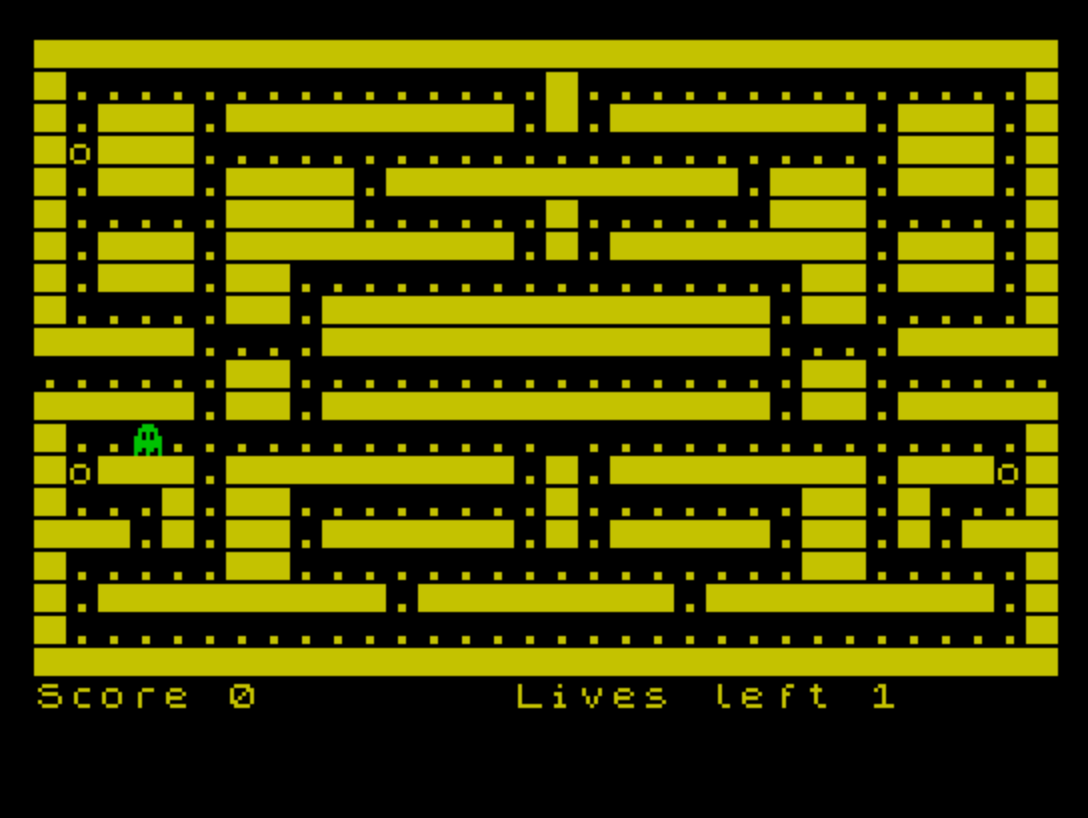
Munchie Man is a Pac-Man-style maze game that uses joystick input via the STICK function to move a player character through a maze, eating dots and special pellets. Nine custom UDG characters (labeled \a through \i) are defined at startup using POKEd DATA values, providing directional mouth animations for the player sprite and a ghost enemy sprite. The maze is drawn entirely through two long PRINT statements containing ASCII characters, where underscores represent walls, periods represent dots, and “o” represents power pellets. A single ghost enemy moves randomly through the maze, triggering a life-loss sequence with descending BEEP tones when it catches the player. The game tracks score, a session high score, remaining lives, and a dot count to detect level completion.
Program Analysis
Program Structure
The program is organized into a main game loop and several subroutines, with line numbers used as semantic separators:
10–250: Main game loop — initialization calls, player and ghost movement, collision detection2000–2050: Game Over screen with high-score tracking and restart prompt5000–5140: Death sequence — animated player collapse with descending BEEPs, life decrement6000–6010: Power pellet subroutine — bonus score (200–299 points) and sound effect7000–7100: Maze drawing subroutine — sets colors, CLSes, and PRINTs two long layout strings8000–8990: Game variable initialization (player position, score, lives, dot count)9000–9990: UDG definition loop with DATA, plus REMarks labeling each UDG
UDG Sprite Definitions
Nine UDGs (\a through \i) are defined at lines 9030–9110 by POKEing 8 bytes each into memory starting at USR "a". The loop at line 9000 iterates from USR "a" to USR "i"+7, consuming DATA values one per POKE. The REMark at line 9980–9990 documents the mapping:
| UDG | Description | Usage |
|---|---|---|
\a | Full circle (closed mouth) | Player idle / death start |
\b | Mouth open left | Moving left |
\c | Mouth open right | Moving right / initial sprite |
\d | Mouth open down | Moving down |
\e | Mouth open up | Moving up |
\f | Partial collapse frame 1 | Death animation |
\g | Partial collapse frame 2 | Death animation |
\h | Partial collapse frame 3 | Death animation |
\i | Ghost sprite | Enemy character |
Maze Representation
The maze is stored as two long string literals in PRINT statements at lines 7010–7020. Walls are encoded as _ (underscore), collectible dots as . (period), power pellets as o, and open corridors as spaces. Collision detection throughout the main loop uses SCREEN$ to read these characters back from the display, making the screen itself serve as the game state map — a common technique in Sinclair BASIC games that avoids maintaining a separate map array.
Joystick Input via STICK
Input is handled using the STICK (1,1) function (TS2068 extended keyword). The directional values used are: 1=up, 2=down, 4=left, 8=right. The sprite selection at line 70 uses a string-arithmetic idiom: each direction string is ANDed with the Boolean result of the corresponding STICK comparison, so exactly one non-empty string is concatenated into m$. Movement deltas at lines 100–110 use the same Boolean-as-integer trick ((condition) evaluating to 1 or 0) to compute row and column offsets in a single expression each.
Ghost AI
The ghost (stored at position z, x) uses a simple random walk. At line 170, movement deltas are computed from direction variable m1 (values 5–8 mapping to up/down/left/right). When the ghost hits a wall (SCREEN$ (z,x)="_"), a new random direction is chosen via INT(RND*4)+5 and the ghost reverts to its previous position. Lines 190–195 restore any dot or pellet that the ghost had moved over, preventing the ghost from permanently erasing collectibles.
Collision Detection
All game entity interactions are resolved by reading SCREEN$ at the player’s or ghost’s new position before rendering:
SCREEN$="_ "→ wall, revert positionSCREEN$="."→ dot eaten, +10 score, increment dot counterSCREEN$="o"→ power pellet, go to bonus score subroutine at line6000SCREEN$=""(empty string / space) → player–ghost collision, go to death sequence at line5000
Note that the ghost-catch condition at line 140 and line 200 checks for SCREEN$="", meaning an empty cell. This relies on the ghost sprite being printed at that cell first (line 210), but in some frame orderings the ghost sprite character \i would be there instead — this is a minor logic fragility in the collision system.
Screen Wrap-Around
Lines 85–86 implement horizontal screen wrap: if h (column) falls below 1 it wraps to 30, and above 30 it wraps to 0. There is no equivalent vertical wrap, so the player can be stopped by walls at the top and bottom of the maze. This asymmetry is typical for simple maze layouts where corridors don’t cross the vertical edge.
Death Animation
The death sequence at lines 5000–5140 steps through UDGs \a, \b, \f, \g, \h, then a space, each paired with a BEEP call at a descending pitch (15, 11, 7, 3, 0, −5 semitones). After the animation, the dot count is reset, player position is reset to v=12, h=16, and lives are decremented. Level completion is checked at line 240 by comparing count against tot=286, which matches the total number of dot characters embedded in the two maze PRINT strings.
Notable Techniques and Anomalies
- Using the display as a game map (via
SCREEN$) avoids a separate DATA array, saving significant memory. - The string-AND idiom at line
70for sprite selection is idiomatic Sinclair BASIC, exploiting the fact that"str" AND 0returns""while"str" AND 1returns"str". - The ghost restores dots/pellets it passes over (lines
190–195), but only at the previous positionz1, x1— this correctly handles one step of memory but could misfire if the ghost backtracks across a pellet it already consumed. - Line
140usesSCREEN$ (v,h)=""to detect the player walking into the ghost; this works because the ghost was just printed atz,xusing UDG\i, and the player moves into empty space — the condition is fragile but functional given the fixed draw order. - The session high score (
hi) is initialized to 0 at line20and persists across replays sinceGO TO 30(notGO TO 20) is used at line2050.
Image Gallery
Source Code
   10 REM Munchie Man
   20 LET hi=0: GO SUB 9000
   30 GO SUB 8000
   40 LET v=12: LET h=16: GO SUB 7000: INVERSE 1: PRINT AT 20,15;"Lives left ";lives
   45 PRINT AT v,h; INVERSE 1;m$
   50 IF STICK (1,1)=0 THEN GO TO 80
   70 LET m$=("\b" AND STICK (1,1)=1)+("\c" AND STICK (1,1)=8)+("\d" AND STICK (1,1)=2)+("\e" AND STICK (1,1)=4)
   80 PRINT AT v,h;" "
   85 IF h<1 THEN LET h=30
   86 IF h>30 THEN LET h=0
   90 LET v1=v: LET h1=h
  100 LET v=v+( STICK (1,1)=2)-( STICK (1,1)=1)
  110 LET h=h+( STICK (1,1)=8)-( STICK (1,1)=4)
  120 IF SCREEN$ (v,h)="_" THEN LET v=v1: LET h=h1: PRINT AT v,h;m$: GO TO 150
  130 IF SCREEN$ (v,h)="." THEN LET sc=sc+10: BEEP .008,10: LET count=count+1
  135 IF SCREEN$ (v,h)="o" THEN GO SUB 6000
  140 IF SCREEN$ (v,h)="" THEN GO TO 5000
  145 PRINT AT v,h;"\a";AT 20,0;"Score ";sc
  150 PRINT AT z,x;" "
  160 LET z1=z: LET x1=x
  170 LET z=z+(m1=6)-(m1=7): LET x=x+(m1=8)-(m1=5)
  180 IF SCREEN$ (z,x)="_" THEN LET m1=INT (RND*4)+5: LET z=z1: LET x=x1: GO TO 160
  185 PRINT AT v,h;m$
  190 IF SCREEN$ (z,x)="." THEN PRINT AT z1,x1;"."
  195 IF SCREEN$ (z,x)="o" THEN PRINT AT z1,x1;"o"
  200 IF SCREEN$ (z,x)="" THEN GO TO 5000
  210 PRINT AT z,x; PAPER 4;"\i"
  230 IF lives<1 THEN GO TO 2000
  240 IF count=tot THEN LET count=0: GO TO 40
  250 GO TO 50
  990 STOP
 2000 CLS
 2010 INVERSE 0: PRINT ''TAB 5;"GAME OVER"
 2020 PRINT ''"          You scored ";sc
 2030 IF sc>hi THEN LET hi=sc
 2040 PRINT ''"   Highest score today ";hi
 2050 INPUT "Press enter to play again "; LINE a$: GO TO 30
 5000 INVERSE 1
 5005 PRINT AT z,x;"."
 5010 PRINT AT v,h;"\a"
 5020 BEEP .3,15
 5030 PRINT AT v,h;"\b"
 5040 BEEP .3,11
 5050 PRINT AT v,h;"\f"
 5060 BEEP .3,7
 5070 PRINT AT v,h;"\g"
 5080 BEEP .3,3
 5090 PRINT AT v,h;"\h"
 5100 BEEP .3,0
 5110 PRINT AT v,h;" "
 5120 BEEP .5,-5
 5130 LET count=0: LET v=12: LET h=16: LET lives=lives-1
 5140 INVERSE 0: GO TO 40
 6000 BEEP .008,15: BEEP .005,-15: LET sc=sc+INT (RND*100)+200
 6010 RETURN
 7000 PAPER 0: CLS : INK 0: PAPER 6: BORDER 0
 7010 PRINT "_________________________________............... ..............__.___._________._.________.___.__o___......................___.__.___.____.___________.___.___.__.....____......_......___.....__.___._________._.________.___.__.___.__................__.___.__.....__.______________.__.....______....______________...._____"
 7020 PRINT "......__................__......_____.__.______________.__.______..............................__o___._________._.________.___o__..._.__........_.......__._...____._.__.______._._____.__._.____.....__................__.....__._________.________._________.__.............................._________________________________"
 7030 INK 0
 7040 PAPER 6
 7100 RETURN
 8000 LET m$="\c"
 8020 LET c1=8: LET m1=8
 8030 LET sc=0
 8040 LET z=7: LET x=15
 8050 LET lives=3
 8060 LET count=0
 8070 LET tot=286
 8990 RETURN
 8998 REM
 8999 REM
 9000 FOR a=USR "a" TO USR "i"+7
 9010 READ user: POKE a,user
 9020 NEXT a: RETURN
 9030 DATA 60,126,255,255,255,255,126,60
 9040 DATA 0,66,195,231,255,255,126,60
 9050 DATA 60,126,248,240,240,248,126,60
 9060 DATA 60,126,255,255,231,195,66,0
 9070 DATA 60,126,31,15,15,31,126,60
 9080 DATA 0,0,126,255,255,255,126,60
 9090 DATA 0,0,0,0,16,24,60,60
 9100 DATA 129,66,36,0,0,36,66,129
 9110 DATA 28,62,42,107,127,127,109,73
 9980 REM a b c d e f g h i
 9990 REM \a \b \c \d \e \f \g \h \i
Note: Type-in program listings on this website use ZMAKEBAS notation for graphics characters.