
This program prints a Playboy bunny logo as ASCII/block-graphic art on a ZX printer using LPRINT statements. After prompting the user to confirm the printer is on, it enters FAST mode before sending the image to suppress slow screen rendering during output. The bunny silhouette is constructed entirely from ZX81 block graphic characters — particularly the half-block and quarter-block elements (▌, ▖, ▗, ▘, ▝, ▞, ▟, ▙, ▀, ▄, █) — giving diagonal and curved edges despite the low-resolution character grid. The percent signs (%) serve as filled space characters to create a solid background, while the right-hand edge uses the ▌ character as a consistent border. The GOTO 350 branch on a non-“Y” answer skips directly to STOP, safely bypassing all LPRINT output.
Program Analysis
Program Structure
The program is straightforward and linear, divided into three phases:
- Introduction (lines 10–40): Displays a title and prompts the user to confirm the printer is ready, accepting a Y/N response into
I$. - Output (lines 90–340): Enters
FASTmode, then sends 23 lines of block-graphic art plus two blank lines to the printer viaLPRINT. - Termination (line 350):
STOPhalts execution regardless of the path taken.
Lines 360–370 (SAVE and RUN) are present after the STOP and are never reached during normal execution; they exist as a convenience loader.
Printer Gating
Line 50 tests I$<>"Y" and jumps to GOTO 350 (the STOP line) if the user does not enter exactly “Y”. This means any input other than an uppercase Y — including lowercase “y” — will skip printing entirely. There is no case-normalisation, which could surprise users who type “y”.
FAST Mode Usage
Line 90 invokes FAST before any LPRINT call. On the ZX81/TS1000, FAST disables the display refresh interrupt, allowing the CPU to run at full speed. This significantly accelerates the printing loop since the machine is not sharing CPU time with screen rendering, and avoids the characteristic flicker that would otherwise occur during a lengthy series of LPRINT statements.
Block Graphic Construction
The image is built using ZX81 block graphic characters occupying the standard 2×2 pixel-per-character positions. The escape sequences used and their visual meanings are:
| Escape | Glyph | Role in image |
|---|---|---|
\: | ▌ | Right-hand border column |
\.' | ▞ | Diagonal rising edge |
\:. | ▙ | Filled lower-left curves |
\'. | ▚ | Diagonal falling edge |
\'.. | (▘▄ pair) | Top and bottom fill transitions |
\'' | ▀ | Upper half fill |
\.. | ▄ | Lower half fill |
\ ' | ▝ | Upper-right quarter |
\ . | ▗ | Lower-right quarter |
\:' | ▛ | Three-quarter fill (upper-left) |
\:: | █ | Full block (solid fill) |
The percent character % is used as the background fill — this is simply the literal percent sign character, which on the ZX81 thermal printer renders as a dense stipple approximating a solid dark region, forming the filled silhouette of the bunny against the paper.
Image Layout
The image spans lines 100–320 (21 LPRINT statements carrying graphics, plus two blank lines at 330–340). A consistent \: (▌) character terminates every printed row, acting as a right-margin sentinel. The ears of the bunny are suggested in lines 130–170 by the asymmetric block-graphic curves, while the bow-tie detail appears around lines 200–210 using \..\..\.. sequences.
Notable Techniques
- Use of
FASTbefore printer output to maximise throughput and eliminate screen flicker during a longLPRINTsequence. - Consistent right-border character (
\:= ▌) on every LPRINT line ensures the printed image has a clean right edge regardless of line length variation. - The guard condition at line 50 uses a strict string inequality, meaning only exact uppercase “Y” proceeds — a minimal but functional input validation.
- The
%background fill exploits the density of the percent glyph on thermal paper rather than using a true block graphic, a pragmatic approach to solid-area fill.
Bugs and Anomalies
- The program does not return to
SLOWmode after printing. If the user somehow continued execution past line 350, the display would remain inFASTmode. In practice this is harmless sinceSTOPterminates cleanly. - Case sensitivity on the Y/N prompt (line 50) means lowercase “y” skips printing — a minor usability issue.
- The
PRINT ATcoordinates in lines 20–30 place text at rows 12 and 18 respectively, which may overlap on a 24-line display but is not harmful.
Image Gallery
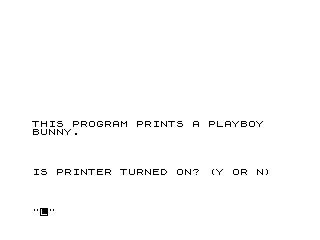
Source Code
  10 REM BUNNY
  20 PRINT AT 12,0;"THIS PROGRAM PRINTS A PLAYBOY   BUNNY."
  30 PRINT AT 18,0;"IS PRINTER TURNED ON? (Y OR N)"
  40 INPUT I$
  50 IF I$<>"Y" THEN GOTO 350
  90 FAST
 100 LPRINT "% % % % % % % % % % % % % % % % % % % % % % % % \: "
 110 LPRINT "% % % % % % % % % % % % % % % % % % % % % % % % \: "
 120 LPRINT "% % % % % % % % % % % % % % % % % % % % % % % % \: "
 130 LPRINT "% % % \ '% % % % % % % % % % % % % % % % \:'\' % % \: "
 140 LPRINT "% % \:   \''% % % % % % % % % % % \:'\''   % % \: "
 150 LPRINT "% % \:    \ '\':% % % % % % % % \'     \ .% % \: "
 160 LPRINT "% % \:     \ '% % % % % % \'       \.:% % \: "
 170 LPRINT "% % \:.     \':% % % \:'      \ .\.:% % % \: "
 180 LPRINT "% % % \.     \ :% % \''      \ .% % % % % \: "
 190 LPRINT "% % % \:.    \ :% \'      \ .\.:% % % % % % \: "
 200 LPRINT "% % % % \.    \ :\'   \..\..\..% % % % % % % % % \: "
 210 LPRINT "% % % % % \..        \''\''% % % % % % % % \: "
 220 LPRINT "% % % % % \'         \..\.  \''% % % % % % \: "
 230 LPRINT "% % % % \:         \ '% \:'  \ '% % % % % \: "
 240 LPRINT "% % % % \:               \ :% % % % \: "
 250 LPRINT "% % % % \:.              % % % % % \: "
 260 LPRINT "% % % % % \:.           \..% % % % % % \: "
 270 LPRINT "% % % % % % \:.   \ .   \ .\.:% % % % % % % % \: "
 280 LPRINT "% % % % % % % % % \:'\':\: %  % \''\':% % % % % % % \: "
 290 LPRINT "% % % % % % \:.\.. \''\':\:  \ '  \':% % % % % % % \: "
 300 LPRINT "% % % % % % % % % % % \:.\..\.:% \..% % % % % % % % \: "
 310 LPRINT "% % % % % % % % % % % % % % % % % % % % % % % % \: "
 320 LPRINT "% % % % % % % % % % % % % % % % % % % % % % % % \: "
 330 LPRINT
 340 LPRINT
 350 STOP
 360 SAVE "1019%1"
 370 RUN
Note: Type-in program listings on this website use ZMAKEBAS notation for graphics characters.