
POLYNOMIAL fits a polynomial curve of up to degree 9 (up to 10 coefficients) to as many as 20 data points using the method of least squares. The program builds the normal equations by accumulating power sums of the x-values into arrays, then solves the resulting symmetric matrix system using Cramer’s rule combined with a Gaussian elimination subroutine to compute determinants. It reports each coefficient C(N), the reduced chi-squared statistic CHIR (sum of squared residuals divided by the degrees of freedom P−NT), and allows the user to evaluate the fitted polynomial at arbitrary x-values. The determinant subroutine at line 1050 includes partial column pivoting to handle zero diagonal elements and flips the sign of DET when columns are swapped.
Program Structure
The program divides into four logical phases:
- Data entry (lines 20–250): Prompts for the number of data points
P(up to 20), then collects x/y pairs into arraysU()andV(). - Normal-equation assembly (lines 260–540): For a chosen number of coefficients
NT, accumulates power sumsX(N)= Σxⁿ and cross-sumsY(N)= Σyxⁿ, then fills the symmetric Gram matrixA(J,K). - Cramer’s rule solution (lines 550–830): Calls the determinant subroutine for the system determinant
D, then iterates over each column, replacing it withY()and re-computing the determinant to obtain each coefficientC(L) = DET/D. - Evaluation and iteration (lines 860–1040): Lets the user query the polynomial at arbitrary x-values, or restart with a different
NT, or return to initial data entry.
Determinant Subroutine (lines 1050–1240)
The subroutine beginning at line 1050 computes the determinant of A() by upper-triangular (Gaussian) reduction, accumulating the diagonal product into DET. Partial pivoting is implemented by scanning for a nonzero element in row K of column K: if A(K,K)=0, it searches columns K through NT for a nonzero entry and swaps the entire row, negating DET for the column swap. If no nonzero pivot is found the matrix is singular and DET=0 is returned.
There is a structural anomaly: the inner elimination loops at lines 1210–1230 are followed by three NEXT clauses on line 1240 (NEXT J:NEXT I:NEXT K:RETURN). This means the outer FOR K loop begun at line 1060 is closed inside the elimination block rather than after it, so the RETURN is only ever reached from within that path. The separate GO TO 1260 at line 1200 targets a non-existent line — in practice, when K=NT the condition is true and execution falls through to line 1240’s NEXT K:RETURN, which correctly terminates. This is a deliberate (if fragile) short-circuit.
Array Dimensioning
| Array | Size | Purpose |
|---|---|---|
X(19) | 19 | Power sums Σxⁿ for n=1…2NT−1 |
Y(10) | 10 | Cross-sums Σyxⁿ |
A(10,10) | 10×10 | Gram/normal-equation matrix |
C(10) | 10 | Fitted polynomial coefficients |
U(20) | 20 | Input x-values |
V(20) | 20 | Input y-values |
Note that X() is dimensioned to 19, which is exactly 2×10⁻¹, matching the maximum NT=10 case. Similarly U() and V() hold up to 20 points as advertised.
Reduced Chi-Squared Calculation
The program computes the residual sum of squares analytically rather than by re-evaluating the polynomial at each data point. Starting from CHI = Σy² (line 470), it applies the identity:
CHI = Σy² − 2·Σ C(J)·Y(J) + Σ C(J)·C(K)·X(J+K−1)
using the already-accumulated power sums, then divides by P−NT to give the reduced chi-squared CHIR. This avoids a separate evaluation loop and reuses the stored sums efficiently.
User Interaction Flow
The navigation uses a flag variable T (initialized 0 at line 860) to distinguish between two re-entry paths. After evaluating y-values, entering 999 as x sets T=1 and jumps to the “try another N?” prompt. If the user answers Y, execution goes to line 260 (re-fit only, no re-entry of data). If the user answers N and T=1, line 910 sends execution back to line 20 for a completely fresh run. This double-use of line 870 as a shared branch target for two different exit conditions is a compact but somewhat opaque control structure.
Key BASIC Idioms
PAUSE 0followed by a keyboard prompt (line 250) is used to halt output until the user verifies entered data.PAUSE 400(line 80) provides approximately a 5-second delay as noted in the on-screen message.- Polynomial evaluation at lines 960–1000 uses the Horner-like accumulation of
XT = XX^(L−1)rather than full Horner’s method, which is slightly less efficient but straightforward. - The
SAVE "POLYNOMIAL" LINE 10at line 1280 stores the program with an auto-run entry point.
Limitations and Potential Issues
- Cramer’s rule requires recomputing the full determinant
NTtimes, so forNT=10this involves 11 calls to an O(NT³) subroutine — slow but functional for small NT. - The matrix
A()is overwritten during each determinant call (Gaussian elimination is destructive), so it must be rebuilt fromX()andY()at lines 640–700 before each Cramer substitution — the code does this correctly. - No input validation guards against
P > 20orNT > 10, which would cause array out-of-bounds errors. - Line 15 contains a note (“install your printer driver LOAD LINE here”) suggesting the listing was designed to optionally include a printer driver loaded between lines 15 and 20.
Image Gallery
Source Code
   10 REM POLYFIT
   15 REM install your printer driverLOAD  LINE here
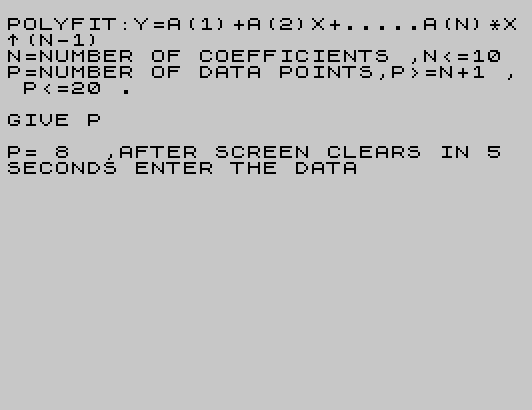
   20 CLS :PRINT "POLYFIT:Y=A(1)+A(2)X+.....A(N)*X^(N-1)"
   30 PRINT "N=NUMBER OF COEFFICIENTS ,N <=10 "
   40 PRINT "P=NUMBER OF DATA POINTS,P >=N+1 , P <=20 ."
   50 PRINT '"GIVE P"
   60 INPUT P
   70 PRINT '"P= ";P;"  ,AFTER SCREEN CLEARS IN 5 SECONDS ENTER THE DATA "
   80 PAUSE 400
   90 CLS
  100 DIM X(19)
  110 DIM Y(10)
  120 DIM A(10,10)
  130 DIM C(10)
  140 DIM U(20)
  150 DIM V(20)
  160 PRINT "N   X         Y"
  170 FOR I=1 TO P
  180 PRINT I;
  190 INPUT U(I)
  200 PRINT TAB 4;U(I);
  210 INPUT V(I)
  220 PRINT TAB 14;V(I)
  230 NEXT I
  240 PRINT "TOUCH KEYBOARD WHEN DATA VERIFIED"
  250 PAUSE 0
  260 CLS
  270 PRINT "GIVE NUMBER OF COEFFICIENTS DESIRED"
  280 INPUT NT
  290 FOR N=1 TO (2*NT-1)
  300 LET X(N)=0
  310 NEXT N
  320 FOR N=1 TO NT
  330 LET Y(N)=0
  340 NEXT N
  350 LET CHI=0
  360 FOR I=1 TO P
  370 LET XT=1
  380 FOR N=1 TO (2*NT-1)
  390 LET X(N)=X(N)+XT
  400 LET XT=XT*U(I)
  410 NEXT N
  420 LET YT=V(I)
  430 FOR N=1 TO NT
  440 LET Y(N)=Y(N)+YT
  450 LET YT=YT*U(I)
  460 NEXT N
  470 LET CHI=CHI+V(I)^2
  480 NEXT I
  490 FOR J=1 TO NT
  500 FOR K=1 TO NT
  510 LET N=J+K-1
  520 LET A(J,K)=X(N)
  530 NEXT K
  540 NEXT J
  550 GO SUB 1050
  560 LET D=DET
  570 IF D <>0 THEN GO TO 630
  580 LET CHIR=0
  590 FOR J=1 TO NT
  600 LET C(J)=0
  610 NEXT J
  620 GO TO 740
  630 FOR L=1 TO NT
  640 FOR J=1 TO NT
  650 FOR K=1 TO NT
  660 LET N=J+K-1
  670 LET A(J,K)=X(N)
  680 NEXT K
  690 LET A(J,L)=Y(J)
  700 NEXT J
  710 GO SUB 1050
  720 LET C(L)=DET/D
  730 NEXT L
  740 PRINT "N   C(N)"
  750 FOR J=1 TO NT
  760 PRINT J;"   ";C(J)
  770 LET CHI=CHI-2*C(J)*Y(J)
  780 FOR K=1 TO NT
  790 LET N=J+K-1
  800 LET CHI=CHI+C(J)*C(K)*X(N)
  810 NEXT K
  820 NEXT J
  830 LET CHIR=CHI/(P-NT)
  840 PRINT '"CHIR= ";CHIR
  850 PRINT
  860 LET T=0
  870 PRINT "DO YOU WANT TO TRY ANOTHER N ?  ENTER Y OR N."
  880 INPUT A$
  890 IF A$="Y" THEN GO TO 260
  900 CLS
  910 IF T=1 THEN GO TO 20
  920 PRINT "GIVE X FOR WHICH Y IS DESIRED"
  930 INPUT XX
  940 IF XX=999 THEN GO TO 1030
  950 LET YY=C(1)
  960 LET XT=XX
  970 FOR L=2 TO NT
  980 LET YY=YY+C(L)*XT
  990 LET XT=XT*XX
 1000 NEXT L
 1010 PRINT "X= ";XX; TAB 15;"Y= ";YY
 1020 GO TO 920
 1030 LET T=1
 1040 GO TO 870
 1050 LET DET=1
 1060 FOR K=1 TO NT
 1070 IF A(K,K) <>0 THEN GO TO 1190
 1080 FOR J=K TO NT
 1090 IF A(K,J) <>0 THEN GO TO 1130
 1100 NEXT J
 1110 LET DET=0
 1120 RETURN
 1130 FOR I=K TO NT
 1140 LET SAVE=A(I,J)
 1150 LET A(I,J)=A(I,K)
 1160 LET A(I,K)=SAVE
 1170 NEXT I
 1180 LET DET=-DET
 1190 LET DET=DET*A(K,K)
 1200 IF (K-NT) >=0 THEN GO TO 1260
 1210 FOR I=(K+1) TO NT
 1220 FOR J=(K+1) TO NT
 1230 LET A(I,J)=A(I,J)-A(I,K)*A(K,J)/A(K,K)
 1240 NEXT J:NEXT I:NEXT K:RETURN
 1280 SAVE "POLYNOMIAL" LINE 10
Note: Type-in program listings on this website use ZMAKEBAS notation for graphics characters.