
This program plays Chopin’s Prelude using the TS2068’s three-channel AY-3-8912 sound chip via the SOUND statement, reading note and envelope data from an extensive DATA block starting at line 3000. Each group of eight values read at line 80 specifies tone registers for channels A, B, and C (frequency and coarse values), plus a note pitch and volume; a sentinel value of -1 for the first frequency field triggers the ON ERR / RESET mechanism to reset the sound chip and loop. The special pitch value 99 is used to indicate a rest or sustain, handled by PAUSE instead of BEEP at line 110. The program offers three playback modes: continuous loop, user-adjustable tempo (via the TT variable), and a single-play stop option. Two SAVE commands appear in the listing (lines 380 and 9998), suggesting the program was edited or combined from separate versions.
Program Analysis
Program Structure
The program is organized into three functional regions:
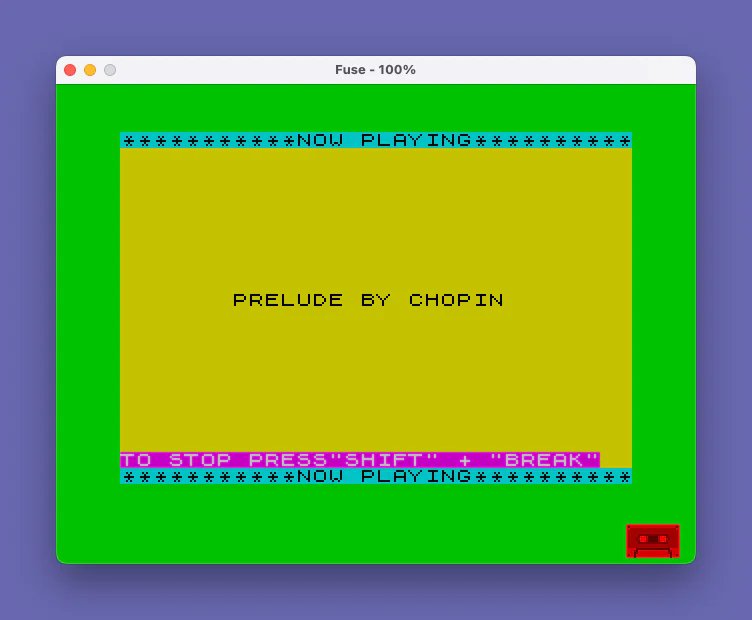
- Initialization and display (lines 10–70): Sets screen colors, reads the piece title and base tempo ratio from the first DATA record, and displays the “NOW PLAYING” banner.
- Playback loop (lines 80–130): The core music engine. Reads eight values per iteration, programs the AY sound chip registers via
SOUND, then either issues aPAUSE(for rests, F=99) or aBEEP(for melodic notes).ON ERR GO TO 130catches the end-of-data condition. - Post-play menu (lines 140–290): After the piece ends, the user can choose to replay continuously, replay at a different tempo, or stop.
Sound Chip Register Mapping
Each pass through the loop at line 80 reads eight DATA values: AF, AC, BF, BC, CF, CC, F, and V. These map directly to AY-3-8912 registers as follows:
| Variable | SOUND register | Meaning |
|---|---|---|
AF | 0 | Channel A tone (fine) |
AC | 1 | Channel A tone (coarse) |
BF | 2 | Channel B tone (fine) |
BC | 3 | Channel B tone (coarse) |
CF | 4 | Channel C tone (fine) |
CC | 5 | Channel C tone (coarse) |
F | — | BEEP pitch (semitones) or 99 for rest/sustain |
V | — | Note duration divisor |
A sentinel value of AF = -1 is used as a record separator. When encountered, execution falls through to line 100; since F will be a valid pitch value (not 99) after a sentinel group, the BEEP at line 120 handles it — but the real separator logic relies on the ON ERR trap when DATA is exhausted.
ON ERR / RESET Usage
Line 80 sets ON ERR GO TO 130 before attempting READ, so when the DATA pointer runs off the end of the data, the resulting error is caught and execution jumps to line 130. There, ON ERR RESET clears the error handler and SOUND 7,63 silences all AY channels (register 7 is the mixer control; value 63 = %00111111, disabling all tone and noise outputs). This is a clean and idiomatic TS2068 technique for detecting end-of-data without explicitly counting records.
Noise/Envelope Initialization
Line 70 issues SOUND 7,56;8,15;9,15;10,15 before the playback loop. Register 7 value 56 (%00111000) enables tone on all three channels while disabling noise. Registers 8–10 set the amplitude for channels A, B, and C to 15 (maximum fixed level). This initialization is repeated each time the piece restarts (via GO TO 70 at line 140 when Z$="1").
Tempo Control
The variable TT is initialized to 10 at lines 15 and 20 (line 20 is a redundant duplicate of line 15). The base tempo ratio R is read from the first DATA record (value 0.2). The computed duration is T = R * TT, giving a baseline of 2.0 seconds per unit. Individual note durations are T/V, where V is read from DATA, providing rhythmic variety. At line 290, the user can input a new TT; larger values slow the piece, smaller values speed it up, as explained on screen.
Rest Handling
When F = 99, line 100 branches to line 110, which executes PAUSE T/V*60 instead of a BEEP. The factor of 60 converts the duration (in seconds) to the 1/60th-second units expected by PAUSE on the TS2068. This allows silent beats to maintain the rhythmic structure of the piece while the AY chip’s sustained chords continue to sound.
Display Layout
The “NOW PLAYING” banner is printed twice: at line 30 (top of screen) and line 50 (bottom row 21), framing the piece title. The title is centered on row 10 using the expression (31-LEN N$)/2 as the column argument to PRINT AT. The key combination hint at line 60 uses PAPER 3; INK 7 (magenta background, white text) for visual distinction.
Post-Play Menu and State Tracking
After the piece ends, Z$ is used as a state flag. At line 140, IF Z$="1" causes an immediate restart without showing the menu, implementing seamless continuous loop when the user has previously chosen option 1. The PAUSE 0: LET Z$=INKEY$ idiom at line 180 waits for a keypress and captures it in a single step.
Data Organization
The DATA is split across two logical sections. Line 3000 holds the piece title and tempo ratio. Lines 3010–3100 hold the note records, with RESTORE 3010 at line 140 resetting the pointer to the beginning of the music data only (skipping the title/tempo record, which has already been consumed). Each note group is 8 values; sentinel groups (beginning with -1) act as chord-change markers where only the BEEP pitch and duration matter.
Anomalies and Observations
- Lines 15 and 20 are identical (
LET TT=10: LET Z$=""). Line 15 appears to be a later addition or edit artifact; line 20 is the original initialization. Only line 20 executes during normal flow since line 10 reads DATA and then falls through to line 20 directly via line 15. - Two
SAVEcommands appear: line 380 saves as"PRELUDE"and line 9998 saves as"CHOPIN". This suggests the listing is a merged or revised version of two separate files. - Line 9997 (
STOP) provides a natural program end before the secondSAVEcommand, preventing the SAVE from executing during normal play. - The
IF AF<0 THEN GO TO 100check at line 80 skips theSOUND 0…5register write for sentinel records, but the subsequentBEEPorPAUSEat lines 120/110 still executes using theFandVvalues from that sentinel record. This is intentional and allows chord sustain across structural boundaries.
Image Gallery
Source Code
    1 REM program 31 p. 109 of "30 Music Programs for Timex Sinclair 2068" by Jefimenko
    2 REM Example of Sound function
   10 BORDER 4: PAPER 6: CLS : READ N$,R
   15 LET TT=10: LET Z$=""
   20 LET TT=10: LET Z$=""
   30 PRINT PAPER 5;"***********NOW PLAYING**********"
   40 PRINT AT 10,(31-LEN N$)/2;N$
   50 PRINT PAPER 5;AT 21,0;"***********NOW PLAYING**********"
   60 PRINT PAPER 3; INK 7;AT 20,0;"TO STOP PRESS""SHIFT"" + ""BREAK"""
   70 LET T=R*TT: SOUND 7,56;8,15;9,15;10,15
   80 READ AF,AC,BF,BC,CF,CC,F,V: ON ERR GO TO 130: IF AF<0 THEN GO TO 100
   90 SOUND 0,AF;1,AC;2,BF;3,BC;4,CF;5,CC
  100 IF F<>99 THEN GO TO 120
  110 PAUSE T/V*60: GO TO 80
  120 BEEP T/V,F: GO TO 80
  130 ON ERR RESET : SOUND 7,63
  140 RESTORE 3010: IF Z$="1" THEN GO TO 70
  150 CLS : PRINT AT 7,0;"PRESS ""1"" TO PLAY CONTINUOUSLY."
  160 PRINT '"PRESS ""2""TO PLAY DIFFERENTLY"
  170 PRINT '"PRESS ""S""TO STOP"
  180 PAUSE 0: LET Z$=INKEY$
  190 IF Z$="1" THEN CLS : GO TO 30
  200 IF Z$="2" THEN GO TO 220
  210 STOP
  220 CLS : PRINT AT 4,0;"YOU CAN PLAY THIS COMPOSITION"
  230 PRINT "AT A DIFFERENT TEMPO. THE"
  240 PRINT "ORIGINAL TEMPO IS 10.  INPUT 10"
  250 PRINT "TO RETAIN THE ORIGINAL TEMPO."
  260 PRINT "INPUT A LARGER NUMBER FOR A"
  270 PRINT "SLOWER TEMPO. INPUT A SMALLER"
  280 PRINT "NUMBER FOR A FASTER TEMPO."
  290 INPUT TT: CLS : GO TO 30
  380 SAVE "PRELUDE" LINE 10
 3000 DATA "PRELUDE BY CHOPIN",.2
 3010 DATA 0,0,0,0,0,0,4,4,47,5,47,5,47,5,13,5.33,-1,0,0,0,0,0,14,16,7,1,116,1,151,2,11,4,7,1,116,1,151,2,11,4,7,1,116,1,151,2,11,4,7,1,116,1,115,2,11,1,0,0,0,0,0,0,18,4,209,0,226,3,226,3,15,5.22,-1,0,0,0,0,0,16,16,197,0,75,1,241,1,21,4
 3020 DATA 197,1,75,1,241,1,21,4,197,0,75,1,241,1,21,2,0,0,0,0,0,0,13,4,138,1,47,5,47,5,10,5.33,-1,0,0,0,0,0,11,16,39,1,186,1,151,2,14,4,39,1,186,1,151,2,14,4,39,1,186,1,151,2,14,2,116,1,0,0,0,0,8,4,116,1,196,7,196,7,8,5.33
 3030 DATA -1,0,0,0,0,0,9,16,138,1,241,1,151,2,13,4,138,1,241,1,151,2,13,4,138,1,241,1,151,2,13,2,0,0,0,0,0,0,4,4,47,5,47,5,47,5,13,5.33,-1,0,0,0,0,0,14,16,7,1,116,1,151,2,11,4,7,1,116,1,151,2,11,4,7,1,116,1,151,2,11,2
 3040 DATA 0,0,0,0,0,0,18,4,209,0,226,3,226,3,15,5.33,-1,0,0,0,0,0,16,16,124,0,75,1,241,1,25,4,124,0,75,1,241,1,25,4,117,0,138,1,79,2,25,2,248,0,0,0,0,0,13,4,234,0,235,6,235,6,13,5.33,-1,0,0,0,0,0,14,16,221,0,116,1,79,2,18,4
 3050 DATA 248,0,186,1,79,2,18,4,7,1,186,1,151,2,18,2,116,1,0,0,0,0,8,4,116,1,196,7,196,7,11,5.33,-1,0,0,0,0,0,9,16,197,0,241,1,151,2,21,4,197,0,75,1,241,1,21,4,197,0,75,1,241,1,21,2,0,0,0,0,0,0,99,4,0,0,0,0,0,0,4,4
 3060 DATA 47,5,47,5,47,5,13,5.33,-1,0,0,0,0,0,14,16,7,1,116,1,151,2,11,4,7,1,116,1,151,2,11,4,7,1,116,1,151,2,11,2,0,0,0,0,0,0,18,4,209,0,226,3,226,3,15,5.33,-1,0,0,0,0,0,16,16,197,0,75,1,241,1,21,4,197,0,75,1,241,1,21,4
 3070 DATA 197,0,75,1,241,1,21,2,0,0,0,0,0,0,13,4,138,1,47,5,47,5,10,5.33,-1,0,0,0,0,0,11,16,39,1,186,1,151,2,14,4,39,1,186,1,151,2,14,4,39,1,186,1,151,2,14,2,116,1,0,0,0,0,8,4,116,1,196,7,196,7,8,5.33,-1,0,0,0,0,0,9,16
 3080 DATA 138,1,124,1,151,2,13,4,138,1,241,1,151,2,13,4,138,1,241,1,151,2,13,2,0,0,0,0,0,0,4,4,47,5,47,5,47,5,13,5.33,-1,0,0,0,0,0,14,16,7,1,116,1,151,2,11,4,7,1,116,1,151,2,11,4,7,1,116,1,151,2,11,2,0,0,0,0,0,0,18,4
 3090 DATA 209,0,226,3,226,3,15,5.33,-1,0,0,0,0,0,16,16,124,0,75,1,241,1,25,4,124,0,75,1,241,1,25,4,117,0,138,1,79,2,25,2,248,0,0,0,0,0,13,4,234,0,235,6,235,6,13,5.33,-1,0,0,0,0,0,14,16,221,0,116,1,79,2,18,4,248,0,186,1,79,2,18,4
 3100 DATA 7,1,186,1,151,2,18,2,116,1,0,0,0,0,8,4,116,1,196,7,196,7,11,5.33,-1,0,0,0,0,0,9,16,197,0,241,1,151,2,21,4,197,0,75,1,241,1,21,2,0,0,0,0,0,0,99,4
 9997 STOP
 9998 SAVE "CHOPIN" LINE 10
Note: Type-in program listings on this website use ZMAKEBAS notation for graphics characters.