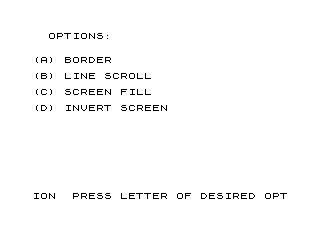
This program is a demonstration of four screen-manipulation effects on a ZX81/TS1000, driven by machine code routines embedded in a REM statement at line 1. The four effects are: a border-drawing routine (using a user-supplied character), a line-scroll routine that repeatedly scrolls a typed message up the screen, a screen-fill routine, and a screen-invert routine. Machine code is stored starting at the address of the REM statement’s data bytes (around address 16514–16598) and called via RAND USR to invoke each effect. A POKE at address 16515 or 16546 is used to pass parameters—such as the fill character code or the screen row—directly into the machine code before execution.
Program Analysis
Program Structure
The program is organized as a menu-driven demo with five logical sections:
- Line 1 (REM): Holds the raw machine code bytes for all routines.
- Lines 10–120: Main menu — displays four options and polls INKEY$ after calling a wait/scan routine via
RAND USR 16545. - Lines 1000–1070: Option A — Border effect using a user-chosen character.
- Lines 2000–2070: Option B — Line-scroll effect for a user-typed message.
- Lines 3000–3030: Option C — Screen-fill effect.
- Lines 4000–4030: Option D — Screen-invert effect, then returns to the menu.
- Line 5000–5010: SAVE block, then restarts via
GOTO 1.
Machine Code Routines in the REM Statement
All machine code is packed into the data portion of the REM at line 1. On the ZX81/TS1000, a REM statement’s text bytes are stored directly in memory beginning two bytes after the line’s start, making them executable as Z80 code. The system variable E_LINE (address 16404/0x400C) holds the address of the edit line, but the REM data itself starts at the fixed address 16514 (the program loads at 16509, with the REM token at offset 4 and its length bytes occupying two more, placing data at 16514).
The identified entry points and their approximate roles are:
| USR Address | Role |
|---|---|
16514 | Border draw — fills screen border region with character from POKE at 16515 |
16545 | Keyboard scan / wait routine (called from main menu loop) |
16580 | Screen fill routine (Option C) |
16598 | Screen invert routine (Option D) |
Key BASIC Idioms and Techniques
- RAND USR as a subroutine call:
RAND USR nnnnnis the standard ZX81 idiom for invoking machine code; the return value of USR is passed to RANDOMIZE and discarded. - POKE for parameter passing: Option A uses
POKE 16515, CODE A$(1)to write the desired character code directly into the machine code (one byte past the entry point), effectively setting a parameter before callingRAND USR 16514. Similarly,POKE 16546, 21andPOKE 16546, 10set a row parameter used by the scroll routine. - INKEY$ polling loop: Lines 80–120 form a tight polling loop —
RAND USR 16545is called to perform a scan, then each INKEY$ is tested. This avoids a slow FOR/NEXT delay and instead uses machine code for timing. - Wait-for-keypress idiom: Line 1060 uses
IF INKEY$="" THEN GOTO 1060to spin until any key is held, then returns to the main menu viaRUN. - RUN to restart: Each option ends with
RUNrather thanGOTO 10, which fully reinitialises BASIC variables — a common ZX81 pattern to avoid variable accumulation.
Machine Code Disassembly Notes
Examining the hex bytes in the REM:
3E 26—LD A, 0x26(load character/value)2A 0C 40—LD HL, (0x400C)— loads the D_FILE pointer (display file address) from system variable at 0x400C06 20—LD B, 32— sets column count (32 characters wide)23 77—INC HL / LD (HL), A— writes character to display, repeated in loops10 FC—DJNZloop back — tight inner loop for filling rowsC9—RET— return to BASIC at routine endED B0—LDIR— block copy instruction, used in the scroll/copy routine76—HALT— used as the ZX81 display newline sentinel (0x76 = HALT opcode = ZX81 newline character)
Notable Techniques
- The screen invert loop (Option D) calls
RAND USR 16598ten times inside a FOR loop, creating a flicker/animation effect rather than a single inversion. - The scroll demo (Option B) calls
RAND USR 1654564 times in a FOR loop — using the machine code routine as a per-step delay/scroll engine. - The SAVE at line 5000 followed by
GOTO 1means the program can save itself and immediately continue running.
Potential Anomalies
- Line 1060 waits for a key to be pressed before returning to menu, but the check is
INKEY$=""(wait while no key), then falls through toCLSandRUN— this is correct but means any key press exits immediately without identifying which key was pressed. - The POKE targets (16515, 16546) are hardcoded absolute addresses; if the program is loaded at a different address (e.g., with a different REM length), these will be incorrect. The program is therefore position-dependent.
Content
Source Code
1 REM E
Skip to content
Screen Routines
This file is part of Timex Sinclair Public Domain Library Tape 1002
. Download the collection to get this file.
This program is a demonstration of four screen-manipulation effects on a ZX81/TS1000, driven by machine code routines embedded in a REM statement at line 1. The four effects are: a border-drawing routine (using a user-supplied character), a line-scroll routine that repeatedly scrolls a typed message up the screen, a screen-fill routine, and a screen-invert routine. Machine code is stored starting at the address of the REM statement’s data bytes (around address 16514–16598) and called via RAND USR to invoke each effect. A POKE at address 16515 or 16546 is used to pass parameters—such as the fill character code or the screen row—directly into the machine code before execution.
Program Analysis
Program Structure
The program is organized as a menu-driven demo with five logical sections:
- Line 1 (REM): Holds the raw machine code bytes for all routines.
- Lines 10–120: Main menu — displays four options and polls INKEY$ after calling a wait/scan routine via
RAND USR 16545.
- Lines 1000–1070: Option A — Border effect using a user-chosen character.
- Lines 2000–2070: Option B — Line-scroll effect for a user-typed message.
- Lines 3000–3030: Option C — Screen-fill effect.
- Lines 4000–4030: Option D — Screen-invert effect, then returns to the menu.
- Line 5000–5010: SAVE block, then restarts via
GOTO 1.
Machine Code Routines in the REM Statement
All machine code is packed into the data portion of the REM at line 1. On the ZX81/TS1000, a REM statement’s text bytes are stored directly in memory beginning two bytes after the line’s start, making them executable as Z80 code. The system variable E_LINE (address 16404/0x400C) holds the address of the edit line, but the REM data itself starts at the fixed address 16514 (the program loads at 16509, with the REM token at offset 4 and its length bytes occupying two more, placing data at 16514).
The identified entry points and their approximate roles are:
USR Address Role 16514Border draw — fills screen border region with character from POKE at 16515 16545Keyboard scan / wait routine (called from main menu loop) 16580Screen fill routine (Option C) 16598Screen invert routine (Option D)
Key BASIC Idioms and Techniques
- RAND USR as a subroutine call:
RAND USR nnnnn is the standard ZX81 idiom for invoking machine code; the return value of USR is passed to RANDOMIZE and discarded.
- POKE for parameter passing: Option A uses
POKE 16515, CODE A$(1) to write the desired character code directly into the machine code (one byte past the entry point), effectively setting a parameter before calling RAND USR 16514. Similarly, POKE 16546, 21 and POKE 16546, 10 set a row parameter used by the scroll routine.
- INKEY$ polling loop: Lines 80–120 form a tight polling loop —
RAND USR 16545 is called to perform a scan, then each INKEY$ is tested. This avoids a slow FOR/NEXT delay and instead uses machine code for timing.
- Wait-for-keypress idiom: Line 1060 uses
IF INKEY$="" THEN GOTO 1060 to spin until any key is held, then returns to the main menu via RUN.
- RUN to restart: Each option ends with
RUN rather than GOTO 10, which fully reinitialises BASIC variables — a common ZX81 pattern to avoid variable accumulation.
Machine Code Disassembly Notes
Examining the hex bytes in the REM:
3E 26 — LD A, 0x26 (load character/value)
2A 0C 40 — LD HL, (0x400C) — loads the D_FILE pointer (display file address) from system variable at 0x400C
06 20 — LD B, 32 — sets column count (32 characters wide)
23 77 — INC HL / LD (HL), A — writes character to display, repeated in loops
10 FC — DJNZ loop back — tight inner loop for filling rows
C9 — RET — return to BASIC at routine end
ED B0 — LDIR — block copy instruction, used in the scroll/copy routine
76 — HALT — used as the ZX81 display newline sentinel (0x76 = HALT opcode = ZX81 newline character)
Notable Techniques
- The screen invert loop (Option D) calls
RAND USR 16598 ten times inside a FOR loop, creating a flicker/animation effect rather than a single inversion.
- The scroll demo (Option B) calls
RAND USR 16545 64 times in a FOR loop — using the machine code routine as a per-step delay/scroll engine.
- The SAVE at line 5000 followed by
GOTO 1 means the program can save itself and immediately continue running.
Potential Anomalies
- Line 1060 waits for a key to be pressed before returning to menu, but the check is
INKEY$="" (wait while no key), then falls through to CLS and RUN — this is correct but means any key press exits immediately without identifying which key was pressed.
- The POKE targets (16515, 16546) are hardcoded absolute addresses; if the program is loaded at a different address (e.g., with a different REM length), these will be incorrect. The program is therefore position-dependent.
Content
Source Code
1 REM \3E\26\2A\0C\40\06\20\23\77\10\FC\06\14\23\23\77\11\1F\00\19\77\10\F6\23\06\20\23\77\10\FC\C9\3E\15\CD\1D\15\3E\21\CD\1D\15\EF\04\34\CD\A7\0E\2A\0C\40\09\23\54\5D\7E\23\01\1F\00\ED\B0\2B\77\C9\76\76\06\16\2A\0C\40\23\7E\FE\76\28\04\36\80\18\F6\10\F4\C9\2A\0C\40\ED\5B\10\40\44\4D\A7\ED\52\C8\60\69\7E\FE\76\28\03\C6\80\77\23\18\ED
10 PRINT ,," OPTIONS:"
20 PRINT ,,,,"(A) BORDER"
30 PRINT ,,"(B) LINE SCROLL"
40 PRINT ,,"(C) SCREEN FILL"
50 PRINT ,,"(D) INVERT SCREEN"
55 POKE 16546,21
60 PRINT AT 21,0;"PRESS LETTER OF DESIRED OPTION"
70 RAND USR 16545
80 IF INKEY$="A" THEN GOTO 1000
90 IF INKEY$="B" THEN GOTO 2000
100 IF INKEY$="C" THEN GOTO 3000
110 IF INKEY$="D" THEN GOTO 4000
120 GOTO 70
1000 CLS
1010 PRINT AT 21,0;"INPUT DESIRED CHARACTER."
1020 INPUT A$
1030 CLS
1040 POKE 16515,CODE A$(1)
1050 RAND USR 16514
1060 IF INKEY$="" THEN GOTO 1060
1065 CLS
1070 RUN
2000 CLS
2010 PRINT AT 21,0;"INPUT STATEMENT."
2020 INPUT A$
2025 POKE 16546,10
2030 PRINT AT 10,0;A$
2040 FOR A=1 TO 64
2050 RAND USR 16545
2055 NEXT A
2060 CLS
2070 RUN
3000 RAND USR 16580
3010 FOR A=1 TO 20
3020 NEXT A
3025 CLS
3030 RUN
4000 FOR A=1 TO 10
4010 RAND USR 16598
4020 NEXT A
4030 GOTO 70
5000 SAVE "1009%3"
5010 GOTO 1
Note: Type-in program listings on this website use ZMAKEBAS notation for graphics characters.
People
No people associated with this content.
A
Skip to content
Screen Routines
This file is part of Timex Sinclair Public Domain Library Tape 1002
. Download the collection to get this file.
This program is a demonstration of four screen-manipulation effects on a ZX81/TS1000, driven by machine code routines embedded in a REM statement at line 1. The four effects are: a border-drawing routine (using a user-supplied character), a line-scroll routine that repeatedly scrolls a typed message up the screen, a screen-fill routine, and a screen-invert routine. Machine code is stored starting at the address of the REM statement’s data bytes (around address 16514–16598) and called via RAND USR to invoke each effect. A POKE at address 16515 or 16546 is used to pass parameters—such as the fill character code or the screen row—directly into the machine code before execution.
Program Analysis
Program Structure
The program is organized as a menu-driven demo with five logical sections:
- Line 1 (REM): Holds the raw machine code bytes for all routines.
- Lines 10–120: Main menu — displays four options and polls INKEY$ after calling a wait/scan routine via
RAND USR 16545.
- Lines 1000–1070: Option A — Border effect using a user-chosen character.
- Lines 2000–2070: Option B — Line-scroll effect for a user-typed message.
- Lines 3000–3030: Option C — Screen-fill effect.
- Lines 4000–4030: Option D — Screen-invert effect, then returns to the menu.
- Line 5000–5010: SAVE block, then restarts via
GOTO 1.
Machine Code Routines in the REM Statement
All machine code is packed into the data portion of the REM at line 1. On the ZX81/TS1000, a REM statement’s text bytes are stored directly in memory beginning two bytes after the line’s start, making them executable as Z80 code. The system variable E_LINE (address 16404/0x400C) holds the address of the edit line, but the REM data itself starts at the fixed address 16514 (the program loads at 16509, with the REM token at offset 4 and its length bytes occupying two more, placing data at 16514).
The identified entry points and their approximate roles are:
USR Address Role 16514Border draw — fills screen border region with character from POKE at 16515 16545Keyboard scan / wait routine (called from main menu loop) 16580Screen fill routine (Option C) 16598Screen invert routine (Option D)
Key BASIC Idioms and Techniques
- RAND USR as a subroutine call:
RAND USR nnnnn is the standard ZX81 idiom for invoking machine code; the return value of USR is passed to RANDOMIZE and discarded.
- POKE for parameter passing: Option A uses
POKE 16515, CODE A$(1) to write the desired character code directly into the machine code (one byte past the entry point), effectively setting a parameter before calling RAND USR 16514. Similarly, POKE 16546, 21 and POKE 16546, 10 set a row parameter used by the scroll routine.
- INKEY$ polling loop: Lines 80–120 form a tight polling loop —
RAND USR 16545 is called to perform a scan, then each INKEY$ is tested. This avoids a slow FOR/NEXT delay and instead uses machine code for timing.
- Wait-for-keypress idiom: Line 1060 uses
IF INKEY$="" THEN GOTO 1060 to spin until any key is held, then returns to the main menu via RUN.
- RUN to restart: Each option ends with
RUN rather than GOTO 10, which fully reinitialises BASIC variables — a common ZX81 pattern to avoid variable accumulation.
Machine Code Disassembly Notes
Examining the hex bytes in the REM:
3E 26 — LD A, 0x26 (load character/value)
2A 0C 40 — LD HL, (0x400C) — loads the D_FILE pointer (display file address) from system variable at 0x400C
06 20 — LD B, 32 — sets column count (32 characters wide)
23 77 — INC HL / LD (HL), A — writes character to display, repeated in loops
10 FC — DJNZ loop back — tight inner loop for filling rows
C9 — RET — return to BASIC at routine end
ED B0 — LDIR — block copy instruction, used in the scroll/copy routine
76 — HALT — used as the ZX81 display newline sentinel (0x76 = HALT opcode = ZX81 newline character)
Notable Techniques
- The screen invert loop (Option D) calls
RAND USR 16598 ten times inside a FOR loop, creating a flicker/animation effect rather than a single inversion.
- The scroll demo (Option B) calls
RAND USR 16545 64 times in a FOR loop — using the machine code routine as a per-step delay/scroll engine.
- The SAVE at line 5000 followed by
GOTO 1 means the program can save itself and immediately continue running.
Potential Anomalies
- Line 1060 waits for a key to be pressed before returning to menu, but the check is
INKEY$="" (wait while no key), then falls through to CLS and RUN — this is correct but means any key press exits immediately without identifying which key was pressed.
- The POKE targets (16515, 16546) are hardcoded absolute addresses; if the program is loaded at a different address (e.g., with a different REM length), these will be incorrect. The program is therefore position-dependent.
Content
Source Code
1 REM \3E\26\2A\0C\40\06\20\23\77\10\FC\06\14\23\23\77\11\1F\00\19\77\10\F6\23\06\20\23\77\10\FC\C9\3E\15\CD\1D\15\3E\21\CD\1D\15\EF\04\34\CD\A7\0E\2A\0C\40\09\23\54\5D\7E\23\01\1F\00\ED\B0\2B\77\C9\76\76\06\16\2A\0C\40\23\7E\FE\76\28\04\36\80\18\F6\10\F4\C9\2A\0C\40\ED\5B\10\40\44\4D\A7\ED\52\C8\60\69\7E\FE\76\28\03\C6\80\77\23\18\ED
10 PRINT ,," OPTIONS:"
20 PRINT ,,,,"(A) BORDER"
30 PRINT ,,"(B) LINE SCROLL"
40 PRINT ,,"(C) SCREEN FILL"
50 PRINT ,,"(D) INVERT SCREEN"
55 POKE 16546,21
60 PRINT AT 21,0;"PRESS LETTER OF DESIRED OPTION"
70 RAND USR 16545
80 IF INKEY$="A" THEN GOTO 1000
90 IF INKEY$="B" THEN GOTO 2000
100 IF INKEY$="C" THEN GOTO 3000
110 IF INKEY$="D" THEN GOTO 4000
120 GOTO 70
1000 CLS
1010 PRINT AT 21,0;"INPUT DESIRED CHARACTER."
1020 INPUT A$
1030 CLS
1040 POKE 16515,CODE A$(1)
1050 RAND USR 16514
1060 IF INKEY$="" THEN GOTO 1060
1065 CLS
1070 RUN
2000 CLS
2010 PRINT AT 21,0;"INPUT STATEMENT."
2020 INPUT A$
2025 POKE 16546,10
2030 PRINT AT 10,0;A$
2040 FOR A=1 TO 64
2050 RAND USR 16545
2055 NEXT A
2060 CLS
2070 RUN
3000 RAND USR 16580
3010 FOR A=1 TO 20
3020 NEXT A
3025 CLS
3030 RUN
4000 FOR A=1 TO 10
4010 RAND USR 16598
4020 NEXT A
4030 GOTO 70
5000 SAVE "1009%3"
5010 GOTO 1
Note: Type-in program listings on this website use ZMAKEBAS notation for graphics characters.
People
No people associated with this content.
C\FC itemtype='https://schema.org/Blog' itemscope='itemscope' class="wp-singular computer_media-template-default single single-computer_media postid-57144 wp-custom-logo wp-embed-responsive wp-theme-astra wp-child-theme-astra-child ast-desktop ast-separate-container ast-left-sidebar astra-4.12.5 group-blog ast-blog-single-style-1 ast-custom-post-type ast-single-post ast-inherit-site-logo-transparent ast-hfb-header ast-full-width-primary-header ast-box-layout ast-normal-title-enabled astra-addon-4.12.4"F
Skip to content
Screen Routines
This file is part of Timex Sinclair Public Domain Library Tape 1002
. Download the collection to get this file.
This program is a demonstration of four screen-manipulation effects on a ZX81/TS1000, driven by machine code routines embedded in a REM statement at line 1. The four effects are: a border-drawing routine (using a user-supplied character), a line-scroll routine that repeatedly scrolls a typed message up the screen, a screen-fill routine, and a screen-invert routine. Machine code is stored starting at the address of the REM statement’s data bytes (around address 16514–16598) and called via RAND USR to invoke each effect. A POKE at address 16515 or 16546 is used to pass parameters—such as the fill character code or the screen row—directly into the machine code before execution.
Program Analysis
Program Structure
The program is organized as a menu-driven demo with five logical sections:
- Line 1 (REM): Holds the raw machine code bytes for all routines.
- Lines 10–120: Main menu — displays four options and polls INKEY$ after calling a wait/scan routine via
RAND USR 16545.
- Lines 1000–1070: Option A — Border effect using a user-chosen character.
- Lines 2000–2070: Option B — Line-scroll effect for a user-typed message.
- Lines 3000–3030: Option C — Screen-fill effect.
- Lines 4000–4030: Option D — Screen-invert effect, then returns to the menu.
- Line 5000–5010: SAVE block, then restarts via
GOTO 1.
Machine Code Routines in the REM Statement
All machine code is packed into the data portion of the REM at line 1. On the ZX81/TS1000, a REM statement’s text bytes are stored directly in memory beginning two bytes after the line’s start, making them executable as Z80 code. The system variable E_LINE (address 16404/0x400C) holds the address of the edit line, but the REM data itself starts at the fixed address 16514 (the program loads at 16509, with the REM token at offset 4 and its length bytes occupying two more, placing data at 16514).
The identified entry points and their approximate roles are:
USR Address Role 16514Border draw — fills screen border region with character from POKE at 16515 16545Keyboard scan / wait routine (called from main menu loop) 16580Screen fill routine (Option C) 16598Screen invert routine (Option D)
Key BASIC Idioms and Techniques
- RAND USR as a subroutine call:
RAND USR nnnnn is the standard ZX81 idiom for invoking machine code; the return value of USR is passed to RANDOMIZE and discarded.
- POKE for parameter passing: Option A uses
POKE 16515, CODE A$(1) to write the desired character code directly into the machine code (one byte past the entry point), effectively setting a parameter before calling RAND USR 16514. Similarly, POKE 16546, 21 and POKE 16546, 10 set a row parameter used by the scroll routine.
- INKEY$ polling loop: Lines 80–120 form a tight polling loop —
RAND USR 16545 is called to perform a scan, then each INKEY$ is tested. This avoids a slow FOR/NEXT delay and instead uses machine code for timing.
- Wait-for-keypress idiom: Line 1060 uses
IF INKEY$="" THEN GOTO 1060 to spin until any key is held, then returns to the main menu via RUN.
- RUN to restart: Each option ends with
RUN rather than GOTO 10, which fully reinitialises BASIC variables — a common ZX81 pattern to avoid variable accumulation.
Machine Code Disassembly Notes
Examining the hex bytes in the REM:
3E 26 — LD A, 0x26 (load character/value)
2A 0C 40 — LD HL, (0x400C) — loads the D_FILE pointer (display file address) from system variable at 0x400C
06 20 — LD B, 32 — sets column count (32 characters wide)
23 77 — INC HL / LD (HL), A — writes character to display, repeated in loops
10 FC — DJNZ loop back — tight inner loop for filling rows
C9 — RET — return to BASIC at routine end
ED B0 — LDIR — block copy instruction, used in the scroll/copy routine
76 — HALT — used as the ZX81 display newline sentinel (0x76 = HALT opcode = ZX81 newline character)
Notable Techniques
- The screen invert loop (Option D) calls
RAND USR 16598 ten times inside a FOR loop, creating a flicker/animation effect rather than a single inversion.
- The scroll demo (Option B) calls
RAND USR 16545 64 times in a FOR loop — using the machine code routine as a per-step delay/scroll engine.
- The SAVE at line 5000 followed by
GOTO 1 means the program can save itself and immediately continue running.
Potential Anomalies
- Line 1060 waits for a key to be pressed before returning to menu, but the check is
INKEY$="" (wait while no key), then falls through to CLS and RUN — this is correct but means any key press exits immediately without identifying which key was pressed.
- The POKE targets (16515, 16546) are hardcoded absolute addresses; if the program is loaded at a different address (e.g., with a different REM length), these will be incorrect. The program is therefore position-dependent.
Content
Source Code
1 REM \3E\26\2A\0C\40\06\20\23\77\10\FC\06\14\23\23\77\11\1F\00\19\77\10\F6\23\06\20\23\77\10\FC\C9\3E\15\CD\1D\15\3E\21\CD\1D\15\EF\04\34\CD\A7\0E\2A\0C\40\09\23\54\5D\7E\23\01\1F\00\ED\B0\2B\77\C9\76\76\06\16\2A\0C\40\23\7E\FE\76\28\04\36\80\18\F6\10\F4\C9\2A\0C\40\ED\5B\10\40\44\4D\A7\ED\52\C8\60\69\7E\FE\76\28\03\C6\80\77\23\18\ED
10 PRINT ,," OPTIONS:"
20 PRINT ,,,,"(A) BORDER"
30 PRINT ,,"(B) LINE SCROLL"
40 PRINT ,,"(C) SCREEN FILL"
50 PRINT ,,"(D) INVERT SCREEN"
55 POKE 16546,21
60 PRINT AT 21,0;"PRESS LETTER OF DESIRED OPTION"
70 RAND USR 16545
80 IF INKEY$="A" THEN GOTO 1000
90 IF INKEY$="B" THEN GOTO 2000
100 IF INKEY$="C" THEN GOTO 3000
110 IF INKEY$="D" THEN GOTO 4000
120 GOTO 70
1000 CLS
1010 PRINT AT 21,0;"INPUT DESIRED CHARACTER."
1020 INPUT A$
1030 CLS
1040 POKE 16515,CODE A$(1)
1050 RAND USR 16514
1060 IF INKEY$="" THEN GOTO 1060
1065 CLS
1070 RUN
2000 CLS
2010 PRINT AT 21,0;"INPUT STATEMENT."
2020 INPUT A$
2025 POKE 16546,10
2030 PRINT AT 10,0;A$
2040 FOR A=1 TO 64
2050 RAND USR 16545
2055 NEXT A
2060 CLS
2070 RUN
3000 RAND USR 16580
3010 FOR A=1 TO 20
3020 NEXT A
3025 CLS
3030 RUN
4000 FOR A=1 TO 10
4010 RAND USR 16598
4020 NEXT A
4030 GOTO 70
5000 SAVE "1009%3"
5010 GOTO 1
Note: Type-in program listings on this website use ZMAKEBAS notation for graphics characters.
People
No people associated with this content.
\F6\FC\C9E\CD itemtype='https://schema.org/Blog' itemscope='itemscope' class="wp-singular computer_media-template-default single single-computer_media postid-57144 wp-custom-logo wp-embed-responsive wp-theme-astra wp-child-theme-astra-child ast-desktop ast-separate-container ast-left-sidebar astra-4.12.5 group-blog ast-blog-single-style-1 ast-custom-post-type ast-single-post ast-inherit-site-logo-transparent ast-hfb-header ast-full-width-primary-header ast-box-layout ast-normal-title-enabled astra-addon-4.12.4"DE\CD itemtype='https://schema.org/Blog' itemscope='itemscope' class="wp-singular computer_media-template-default single single-computer_media postid-57144 wp-custom-logo wp-embed-responsive wp-theme-astra wp-child-theme-astra-child ast-desktop ast-separate-container ast-left-sidebar astra-4.12.5 group-blog ast-blog-single-style-1 ast-custom-post-type ast-single-post ast-inherit-site-logo-transparent ast-hfb-header ast-full-width-primary-header ast-box-layout ast-normal-title-enabled astra-addon-4.12.4"D\EF\CD\A7
Skip to content
Screen Routines
This file is part of Timex Sinclair Public Domain Library Tape 1002
. Download the collection to get this file.
This program is a demonstration of four screen-manipulation effects on a ZX81/TS1000, driven by machine code routines embedded in a REM statement at line 1. The four effects are: a border-drawing routine (using a user-supplied character), a line-scroll routine that repeatedly scrolls a typed message up the screen, a screen-fill routine, and a screen-invert routine. Machine code is stored starting at the address of the REM statement’s data bytes (around address 16514–16598) and called via RAND USR to invoke each effect. A POKE at address 16515 or 16546 is used to pass parameters—such as the fill character code or the screen row—directly into the machine code before execution.
Program Analysis
Program Structure
The program is organized as a menu-driven demo with five logical sections:
- Line 1 (REM): Holds the raw machine code bytes for all routines.
- Lines 10–120: Main menu — displays four options and polls INKEY$ after calling a wait/scan routine via
RAND USR 16545.
- Lines 1000–1070: Option A — Border effect using a user-chosen character.
- Lines 2000–2070: Option B — Line-scroll effect for a user-typed message.
- Lines 3000–3030: Option C — Screen-fill effect.
- Lines 4000–4030: Option D — Screen-invert effect, then returns to the menu.
- Line 5000–5010: SAVE block, then restarts via
GOTO 1.
Machine Code Routines in the REM Statement
All machine code is packed into the data portion of the REM at line 1. On the ZX81/TS1000, a REM statement’s text bytes are stored directly in memory beginning two bytes after the line’s start, making them executable as Z80 code. The system variable E_LINE (address 16404/0x400C) holds the address of the edit line, but the REM data itself starts at the fixed address 16514 (the program loads at 16509, with the REM token at offset 4 and its length bytes occupying two more, placing data at 16514).
The identified entry points and their approximate roles are:
USR Address Role 16514Border draw — fills screen border region with character from POKE at 16515 16545Keyboard scan / wait routine (called from main menu loop) 16580Screen fill routine (Option C) 16598Screen invert routine (Option D)
Key BASIC Idioms and Techniques
- RAND USR as a subroutine call:
RAND USR nnnnn is the standard ZX81 idiom for invoking machine code; the return value of USR is passed to RANDOMIZE and discarded.
- POKE for parameter passing: Option A uses
POKE 16515, CODE A$(1) to write the desired character code directly into the machine code (one byte past the entry point), effectively setting a parameter before calling RAND USR 16514. Similarly, POKE 16546, 21 and POKE 16546, 10 set a row parameter used by the scroll routine.
- INKEY$ polling loop: Lines 80–120 form a tight polling loop —
RAND USR 16545 is called to perform a scan, then each INKEY$ is tested. This avoids a slow FOR/NEXT delay and instead uses machine code for timing.
- Wait-for-keypress idiom: Line 1060 uses
IF INKEY$="" THEN GOTO 1060 to spin until any key is held, then returns to the main menu via RUN.
- RUN to restart: Each option ends with
RUN rather than GOTO 10, which fully reinitialises BASIC variables — a common ZX81 pattern to avoid variable accumulation.
Machine Code Disassembly Notes
Examining the hex bytes in the REM:
3E 26 — LD A, 0x26 (load character/value)
2A 0C 40 — LD HL, (0x400C) — loads the D_FILE pointer (display file address) from system variable at 0x400C
06 20 — LD B, 32 — sets column count (32 characters wide)
23 77 — INC HL / LD (HL), A — writes character to display, repeated in loops
10 FC — DJNZ loop back — tight inner loop for filling rows
C9 — RET — return to BASIC at routine end
ED B0 — LDIR — block copy instruction, used in the scroll/copy routine
76 — HALT — used as the ZX81 display newline sentinel (0x76 = HALT opcode = ZX81 newline character)
Notable Techniques
- The screen invert loop (Option D) calls
RAND USR 16598 ten times inside a FOR loop, creating a flicker/animation effect rather than a single inversion.
- The scroll demo (Option B) calls
RAND USR 16545 64 times in a FOR loop — using the machine code routine as a per-step delay/scroll engine.
- The SAVE at line 5000 followed by
GOTO 1 means the program can save itself and immediately continue running.
Potential Anomalies
- Line 1060 waits for a key to be pressed before returning to menu, but the check is
INKEY$="" (wait while no key), then falls through to CLS and RUN — this is correct but means any key press exits immediately without identifying which key was pressed.
- The POKE targets (16515, 16546) are hardcoded absolute addresses; if the program is loaded at a different address (e.g., with a different REM length), these will be incorrect. The program is therefore position-dependent.
Content
Source Code
1 REM \3E\26\2A\0C\40\06\20\23\77\10\FC\06\14\23\23\77\11\1F\00\19\77\10\F6\23\06\20\23\77\10\FC\C9\3E\15\CD\1D\15\3E\21\CD\1D\15\EF\04\34\CD\A7\0E\2A\0C\40\09\23\54\5D\7E\23\01\1F\00\ED\B0\2B\77\C9\76\76\06\16\2A\0C\40\23\7E\FE\76\28\04\36\80\18\F6\10\F4\C9\2A\0C\40\ED\5B\10\40\44\4D\A7\ED\52\C8\60\69\7E\FE\76\28\03\C6\80\77\23\18\ED
10 PRINT ,," OPTIONS:"
20 PRINT ,,,,"(A) BORDER"
30 PRINT ,,"(B) LINE SCROLL"
40 PRINT ,,"(C) SCREEN FILL"
50 PRINT ,,"(D) INVERT SCREEN"
55 POKE 16546,21
60 PRINT AT 21,0;"PRESS LETTER OF DESIRED OPTION"
70 RAND USR 16545
80 IF INKEY$="A" THEN GOTO 1000
90 IF INKEY$="B" THEN GOTO 2000
100 IF INKEY$="C" THEN GOTO 3000
110 IF INKEY$="D" THEN GOTO 4000
120 GOTO 70
1000 CLS
1010 PRINT AT 21,0;"INPUT DESIRED CHARACTER."
1020 INPUT A$
1030 CLS
1040 POKE 16515,CODE A$(1)
1050 RAND USR 16514
1060 IF INKEY$="" THEN GOTO 1060
1065 CLS
1070 RUN
2000 CLS
2010 PRINT AT 21,0;"INPUT STATEMENT."
2020 INPUT A$
2025 POKE 16546,10
2030 PRINT AT 10,0;A$
2040 FOR A=1 TO 64
2050 RAND USR 16545
2055 NEXT A
2060 CLS
2070 RUN
3000 RAND USR 16580
3010 FOR A=1 TO 20
3020 NEXT A
3025 CLS
3030 RUN
4000 FOR A=1 TO 10
4010 RAND USR 16598
4020 NEXT A
4030 GOTO 70
5000 SAVE "1009%3"
5010 GOTO 1
Note: Type-in program listings on this website use ZMAKEBAS notation for graphics characters.
People
No people associated with this content.
E
Skip to content
Screen Routines
This file is part of Timex Sinclair Public Domain Library Tape 1002
. Download the collection to get this file.
This program is a demonstration of four screen-manipulation effects on a ZX81/TS1000, driven by machine code routines embedded in a REM statement at line 1. The four effects are: a border-drawing routine (using a user-supplied character), a line-scroll routine that repeatedly scrolls a typed message up the screen, a screen-fill routine, and a screen-invert routine. Machine code is stored starting at the address of the REM statement’s data bytes (around address 16514–16598) and called via RAND USR to invoke each effect. A POKE at address 16515 or 16546 is used to pass parameters—such as the fill character code or the screen row—directly into the machine code before execution.
Program Analysis
Program Structure
The program is organized as a menu-driven demo with five logical sections:
- Line 1 (REM): Holds the raw machine code bytes for all routines.
- Lines 10–120: Main menu — displays four options and polls INKEY$ after calling a wait/scan routine via
RAND USR 16545.
- Lines 1000–1070: Option A — Border effect using a user-chosen character.
- Lines 2000–2070: Option B — Line-scroll effect for a user-typed message.
- Lines 3000–3030: Option C — Screen-fill effect.
- Lines 4000–4030: Option D — Screen-invert effect, then returns to the menu.
- Line 5000–5010: SAVE block, then restarts via
GOTO 1.
Machine Code Routines in the REM Statement
All machine code is packed into the data portion of the REM at line 1. On the ZX81/TS1000, a REM statement’s text bytes are stored directly in memory beginning two bytes after the line’s start, making them executable as Z80 code. The system variable E_LINE (address 16404/0x400C) holds the address of the edit line, but the REM data itself starts at the fixed address 16514 (the program loads at 16509, with the REM token at offset 4 and its length bytes occupying two more, placing data at 16514).
The identified entry points and their approximate roles are:
USR Address Role 16514Border draw — fills screen border region with character from POKE at 16515 16545Keyboard scan / wait routine (called from main menu loop) 16580Screen fill routine (Option C) 16598Screen invert routine (Option D)
Key BASIC Idioms and Techniques
- RAND USR as a subroutine call:
RAND USR nnnnn is the standard ZX81 idiom for invoking machine code; the return value of USR is passed to RANDOMIZE and discarded.
- POKE for parameter passing: Option A uses
POKE 16515, CODE A$(1) to write the desired character code directly into the machine code (one byte past the entry point), effectively setting a parameter before calling RAND USR 16514. Similarly, POKE 16546, 21 and POKE 16546, 10 set a row parameter used by the scroll routine.
- INKEY$ polling loop: Lines 80–120 form a tight polling loop —
RAND USR 16545 is called to perform a scan, then each INKEY$ is tested. This avoids a slow FOR/NEXT delay and instead uses machine code for timing.
- Wait-for-keypress idiom: Line 1060 uses
IF INKEY$="" THEN GOTO 1060 to spin until any key is held, then returns to the main menu via RUN.
- RUN to restart: Each option ends with
RUN rather than GOTO 10, which fully reinitialises BASIC variables — a common ZX81 pattern to avoid variable accumulation.
Machine Code Disassembly Notes
Examining the hex bytes in the REM:
3E 26 — LD A, 0x26 (load character/value)
2A 0C 40 — LD HL, (0x400C) — loads the D_FILE pointer (display file address) from system variable at 0x400C
06 20 — LD B, 32 — sets column count (32 characters wide)
23 77 — INC HL / LD (HL), A — writes character to display, repeated in loops
10 FC — DJNZ loop back — tight inner loop for filling rows
C9 — RET — return to BASIC at routine end
ED B0 — LDIR — block copy instruction, used in the scroll/copy routine
76 — HALT — used as the ZX81 display newline sentinel (0x76 = HALT opcode = ZX81 newline character)
Notable Techniques
- The screen invert loop (Option D) calls
RAND USR 16598 ten times inside a FOR loop, creating a flicker/animation effect rather than a single inversion.
- The scroll demo (Option B) calls
RAND USR 16545 64 times in a FOR loop — using the machine code routine as a per-step delay/scroll engine.
- The SAVE at line 5000 followed by
GOTO 1 means the program can save itself and immediately continue running.
Potential Anomalies
- Line 1060 waits for a key to be pressed before returning to menu, but the check is
INKEY$="" (wait while no key), then falls through to CLS and RUN — this is correct but means any key press exits immediately without identifying which key was pressed.
- The POKE targets (16515, 16546) are hardcoded absolute addresses; if the program is loaded at a different address (e.g., with a different REM length), these will be incorrect. The program is therefore position-dependent.
Content
Source Code
1 REM \3E\26\2A\0C\40\06\20\23\77\10\FC\06\14\23\23\77\11\1F\00\19\77\10\F6\23\06\20\23\77\10\FC\C9\3E\15\CD\1D\15\3E\21\CD\1D\15\EF\04\34\CD\A7\0E\2A\0C\40\09\23\54\5D\7E\23\01\1F\00\ED\B0\2B\77\C9\76\76\06\16\2A\0C\40\23\7E\FE\76\28\04\36\80\18\F6\10\F4\C9\2A\0C\40\ED\5B\10\40\44\4D\A7\ED\52\C8\60\69\7E\FE\76\28\03\C6\80\77\23\18\ED
10 PRINT ,," OPTIONS:"
20 PRINT ,,,,"(A) BORDER"
30 PRINT ,,"(B) LINE SCROLL"
40 PRINT ,,"(C) SCREEN FILL"
50 PRINT ,,"(D) INVERT SCREEN"
55 POKE 16546,21
60 PRINT AT 21,0;"PRESS LETTER OF DESIRED OPTION"
70 RAND USR 16545
80 IF INKEY$="A" THEN GOTO 1000
90 IF INKEY$="B" THEN GOTO 2000
100 IF INKEY$="C" THEN GOTO 3000
110 IF INKEY$="D" THEN GOTO 4000
120 GOTO 70
1000 CLS
1010 PRINT AT 21,0;"INPUT DESIRED CHARACTER."
1020 INPUT A$
1030 CLS
1040 POKE 16515,CODE A$(1)
1050 RAND USR 16514
1060 IF INKEY$="" THEN GOTO 1060
1065 CLS
1070 RUN
2000 CLS
2010 PRINT AT 21,0;"INPUT STATEMENT."
2020 INPUT A$
2025 POKE 16546,10
2030 PRINT AT 10,0;A$
2040 FOR A=1 TO 64
2050 RAND USR 16545
2055 NEXT A
2060 CLS
2070 RUN
3000 RAND USR 16580
3010 FOR A=1 TO 20
3020 NEXT A
3025 CLS
3030 RUN
4000 FOR A=1 TO 10
4010 RAND USR 16598
4020 NEXT A
4030 GOTO 70
5000 SAVE "1009%3"
5010 GOTO 1
Note: Type-in program listings on this website use ZMAKEBAS notation for graphics characters.
People
No people associated with this content.
A
Skip to content
Screen Routines
This file is part of Timex Sinclair Public Domain Library Tape 1002
. Download the collection to get this file.
This program is a demonstration of four screen-manipulation effects on a ZX81/TS1000, driven by machine code routines embedded in a REM statement at line 1. The four effects are: a border-drawing routine (using a user-supplied character), a line-scroll routine that repeatedly scrolls a typed message up the screen, a screen-fill routine, and a screen-invert routine. Machine code is stored starting at the address of the REM statement’s data bytes (around address 16514–16598) and called via RAND USR to invoke each effect. A POKE at address 16515 or 16546 is used to pass parameters—such as the fill character code or the screen row—directly into the machine code before execution.
Program Analysis
Program Structure
The program is organized as a menu-driven demo with five logical sections:
- Line 1 (REM): Holds the raw machine code bytes for all routines.
- Lines 10–120: Main menu — displays four options and polls INKEY$ after calling a wait/scan routine via
RAND USR 16545.
- Lines 1000–1070: Option A — Border effect using a user-chosen character.
- Lines 2000–2070: Option B — Line-scroll effect for a user-typed message.
- Lines 3000–3030: Option C — Screen-fill effect.
- Lines 4000–4030: Option D — Screen-invert effect, then returns to the menu.
- Line 5000–5010: SAVE block, then restarts via
GOTO 1.
Machine Code Routines in the REM Statement
All machine code is packed into the data portion of the REM at line 1. On the ZX81/TS1000, a REM statement’s text bytes are stored directly in memory beginning two bytes after the line’s start, making them executable as Z80 code. The system variable E_LINE (address 16404/0x400C) holds the address of the edit line, but the REM data itself starts at the fixed address 16514 (the program loads at 16509, with the REM token at offset 4 and its length bytes occupying two more, placing data at 16514).
The identified entry points and their approximate roles are:
USR Address Role 16514Border draw — fills screen border region with character from POKE at 16515 16545Keyboard scan / wait routine (called from main menu loop) 16580Screen fill routine (Option C) 16598Screen invert routine (Option D)
Key BASIC Idioms and Techniques
- RAND USR as a subroutine call:
RAND USR nnnnn is the standard ZX81 idiom for invoking machine code; the return value of USR is passed to RANDOMIZE and discarded.
- POKE for parameter passing: Option A uses
POKE 16515, CODE A$(1) to write the desired character code directly into the machine code (one byte past the entry point), effectively setting a parameter before calling RAND USR 16514. Similarly, POKE 16546, 21 and POKE 16546, 10 set a row parameter used by the scroll routine.
- INKEY$ polling loop: Lines 80–120 form a tight polling loop —
RAND USR 16545 is called to perform a scan, then each INKEY$ is tested. This avoids a slow FOR/NEXT delay and instead uses machine code for timing.
- Wait-for-keypress idiom: Line 1060 uses
IF INKEY$="" THEN GOTO 1060 to spin until any key is held, then returns to the main menu via RUN.
- RUN to restart: Each option ends with
RUN rather than GOTO 10, which fully reinitialises BASIC variables — a common ZX81 pattern to avoid variable accumulation.
Machine Code Disassembly Notes
Examining the hex bytes in the REM:
3E 26 — LD A, 0x26 (load character/value)
2A 0C 40 — LD HL, (0x400C) — loads the D_FILE pointer (display file address) from system variable at 0x400C
06 20 — LD B, 32 — sets column count (32 characters wide)
23 77 — INC HL / LD (HL), A — writes character to display, repeated in loops
10 FC — DJNZ loop back — tight inner loop for filling rows
C9 — RET — return to BASIC at routine end
ED B0 — LDIR — block copy instruction, used in the scroll/copy routine
76 — HALT — used as the ZX81 display newline sentinel (0x76 = HALT opcode = ZX81 newline character)
Notable Techniques
- The screen invert loop (Option D) calls
RAND USR 16598 ten times inside a FOR loop, creating a flicker/animation effect rather than a single inversion.
- The scroll demo (Option B) calls
RAND USR 16545 64 times in a FOR loop — using the machine code routine as a per-step delay/scroll engine.
- The SAVE at line 5000 followed by
GOTO 1 means the program can save itself and immediately continue running.
Potential Anomalies
- Line 1060 waits for a key to be pressed before returning to menu, but the check is
INKEY$="" (wait while no key), then falls through to CLS and RUN — this is correct but means any key press exits immediately without identifying which key was pressed.
- The POKE targets (16515, 16546) are hardcoded absolute addresses; if the program is loaded at a different address (e.g., with a different REM length), these will be incorrect. The program is therefore position-dependent.
Content
Source Code
1 REM \3E\26\2A\0C\40\06\20\23\77\10\FC\06\14\23\23\77\11\1F\00\19\77\10\F6\23\06\20\23\77\10\FC\C9\3E\15\CD\1D\15\3E\21\CD\1D\15\EF\04\34\CD\A7\0E\2A\0C\40\09\23\54\5D\7E\23\01\1F\00\ED\B0\2B\77\C9\76\76\06\16\2A\0C\40\23\7E\FE\76\28\04\36\80\18\F6\10\F4\C9\2A\0C\40\ED\5B\10\40\44\4D\A7\ED\52\C8\60\69\7E\FE\76\28\03\C6\80\77\23\18\ED
10 PRINT ,," OPTIONS:"
20 PRINT ,,,,"(A) BORDER"
30 PRINT ,,"(B) LINE SCROLL"
40 PRINT ,,"(C) SCREEN FILL"
50 PRINT ,,"(D) INVERT SCREEN"
55 POKE 16546,21
60 PRINT AT 21,0;"PRESS LETTER OF DESIRED OPTION"
70 RAND USR 16545
80 IF INKEY$="A" THEN GOTO 1000
90 IF INKEY$="B" THEN GOTO 2000
100 IF INKEY$="C" THEN GOTO 3000
110 IF INKEY$="D" THEN GOTO 4000
120 GOTO 70
1000 CLS
1010 PRINT AT 21,0;"INPUT DESIRED CHARACTER."
1020 INPUT A$
1030 CLS
1040 POKE 16515,CODE A$(1)
1050 RAND USR 16514
1060 IF INKEY$="" THEN GOTO 1060
1065 CLS
1070 RUN
2000 CLS
2010 PRINT AT 21,0;"INPUT STATEMENT."
2020 INPUT A$
2025 POKE 16546,10
2030 PRINT AT 10,0;A$
2040 FOR A=1 TO 64
2050 RAND USR 16545
2055 NEXT A
2060 CLS
2070 RUN
3000 RAND USR 16580
3010 FOR A=1 TO 20
3020 NEXT A
3025 CLS
3030 RUN
4000 FOR A=1 TO 10
4010 RAND USR 16598
4020 NEXT A
4030 GOTO 70
5000 SAVE "1009%3"
5010 GOTO 1
Note: Type-in program listings on this website use ZMAKEBAS notation for graphics characters.
People
No people associated with this content.
CDE itemtype='https://schema.org/Blog' itemscope='itemscope' class="wp-singular computer_media-template-default single single-computer_media postid-57144 wp-custom-logo wp-embed-responsive wp-theme-astra wp-child-theme-astra-child ast-desktop ast-separate-container ast-left-sidebar astra-4.12.5 group-blog ast-blog-single-style-1 ast-custom-post-type ast-single-post ast-inherit-site-logo-transparent ast-hfb-header ast-full-width-primary-header ast-box-layout ast-normal-title-enabled astra-addon-4.12.4" itemtype='https://schema.org/Blog' itemscope='itemscope' class="wp-singular computer_media-template-default single single-computer_media postid-57144 wp-custom-logo wp-embed-responsive wp-theme-astra wp-child-theme-astra-child ast-desktop ast-separate-container ast-left-sidebar astra-4.12.5 group-blog ast-blog-single-style-1 ast-custom-post-type ast-single-post ast-inherit-site-logo-transparent ast-hfb-header ast-full-width-primary-header ast-box-layout ast-normal-title-enabled astra-addon-4.12.4"F
Skip to content
Screen Routines
This file is part of Timex Sinclair Public Domain Library Tape 1002
. Download the collection to get this file.
This program is a demonstration of four screen-manipulation effects on a ZX81/TS1000, driven by machine code routines embedded in a REM statement at line 1. The four effects are: a border-drawing routine (using a user-supplied character), a line-scroll routine that repeatedly scrolls a typed message up the screen, a screen-fill routine, and a screen-invert routine. Machine code is stored starting at the address of the REM statement’s data bytes (around address 16514–16598) and called via RAND USR to invoke each effect. A POKE at address 16515 or 16546 is used to pass parameters—such as the fill character code or the screen row—directly into the machine code before execution.
Program Analysis
Program Structure
The program is organized as a menu-driven demo with five logical sections:
- Line 1 (REM): Holds the raw machine code bytes for all routines.
- Lines 10–120: Main menu — displays four options and polls INKEY$ after calling a wait/scan routine via
RAND USR 16545.
- Lines 1000–1070: Option A — Border effect using a user-chosen character.
- Lines 2000–2070: Option B — Line-scroll effect for a user-typed message.
- Lines 3000–3030: Option C — Screen-fill effect.
- Lines 4000–4030: Option D — Screen-invert effect, then returns to the menu.
- Line 5000–5010: SAVE block, then restarts via
GOTO 1.
Machine Code Routines in the REM Statement
All machine code is packed into the data portion of the REM at line 1. On the ZX81/TS1000, a REM statement’s text bytes are stored directly in memory beginning two bytes after the line’s start, making them executable as Z80 code. The system variable E_LINE (address 16404/0x400C) holds the address of the edit line, but the REM data itself starts at the fixed address 16514 (the program loads at 16509, with the REM token at offset 4 and its length bytes occupying two more, placing data at 16514).
The identified entry points and their approximate roles are:
USR Address Role 16514Border draw — fills screen border region with character from POKE at 16515 16545Keyboard scan / wait routine (called from main menu loop) 16580Screen fill routine (Option C) 16598Screen invert routine (Option D)
Key BASIC Idioms and Techniques
- RAND USR as a subroutine call:
RAND USR nnnnn is the standard ZX81 idiom for invoking machine code; the return value of USR is passed to RANDOMIZE and discarded.
- POKE for parameter passing: Option A uses
POKE 16515, CODE A$(1) to write the desired character code directly into the machine code (one byte past the entry point), effectively setting a parameter before calling RAND USR 16514. Similarly, POKE 16546, 21 and POKE 16546, 10 set a row parameter used by the scroll routine.
- INKEY$ polling loop: Lines 80–120 form a tight polling loop —
RAND USR 16545 is called to perform a scan, then each INKEY$ is tested. This avoids a slow FOR/NEXT delay and instead uses machine code for timing.
- Wait-for-keypress idiom: Line 1060 uses
IF INKEY$="" THEN GOTO 1060 to spin until any key is held, then returns to the main menu via RUN.
- RUN to restart: Each option ends with
RUN rather than GOTO 10, which fully reinitialises BASIC variables — a common ZX81 pattern to avoid variable accumulation.
Machine Code Disassembly Notes
Examining the hex bytes in the REM:
3E 26 — LD A, 0x26 (load character/value)
2A 0C 40 — LD HL, (0x400C) — loads the D_FILE pointer (display file address) from system variable at 0x400C
06 20 — LD B, 32 — sets column count (32 characters wide)
23 77 — INC HL / LD (HL), A — writes character to display, repeated in loops
10 FC — DJNZ loop back — tight inner loop for filling rows
C9 — RET — return to BASIC at routine end
ED B0 — LDIR — block copy instruction, used in the scroll/copy routine
76 — HALT — used as the ZX81 display newline sentinel (0x76 = HALT opcode = ZX81 newline character)
Notable Techniques
- The screen invert loop (Option D) calls
RAND USR 16598 ten times inside a FOR loop, creating a flicker/animation effect rather than a single inversion.
- The scroll demo (Option B) calls
RAND USR 16545 64 times in a FOR loop — using the machine code routine as a per-step delay/scroll engine.
- The SAVE at line 5000 followed by
GOTO 1 means the program can save itself and immediately continue running.
Potential Anomalies
- Line 1060 waits for a key to be pressed before returning to menu, but the check is
INKEY$="" (wait while no key), then falls through to CLS and RUN — this is correct but means any key press exits immediately without identifying which key was pressed.
- The POKE targets (16515, 16546) are hardcoded absolute addresses; if the program is loaded at a different address (e.g., with a different REM length), these will be incorrect. The program is therefore position-dependent.
Content
Source Code
1 REM \3E\26\2A\0C\40\06\20\23\77\10\FC\06\14\23\23\77\11\1F\00\19\77\10\F6\23\06\20\23\77\10\FC\C9\3E\15\CD\1D\15\3E\21\CD\1D\15\EF\04\34\CD\A7\0E\2A\0C\40\09\23\54\5D\7E\23\01\1F\00\ED\B0\2B\77\C9\76\76\06\16\2A\0C\40\23\7E\FE\76\28\04\36\80\18\F6\10\F4\C9\2A\0C\40\ED\5B\10\40\44\4D\A7\ED\52\C8\60\69\7E\FE\76\28\03\C6\80\77\23\18\ED
10 PRINT ,," OPTIONS:"
20 PRINT ,,,,"(A) BORDER"
30 PRINT ,,"(B) LINE SCROLL"
40 PRINT ,,"(C) SCREEN FILL"
50 PRINT ,,"(D) INVERT SCREEN"
55 POKE 16546,21
60 PRINT AT 21,0;"PRESS LETTER OF DESIRED OPTION"
70 RAND USR 16545
80 IF INKEY$="A" THEN GOTO 1000
90 IF INKEY$="B" THEN GOTO 2000
100 IF INKEY$="C" THEN GOTO 3000
110 IF INKEY$="D" THEN GOTO 4000
120 GOTO 70
1000 CLS
1010 PRINT AT 21,0;"INPUT DESIRED CHARACTER."
1020 INPUT A$
1030 CLS
1040 POKE 16515,CODE A$(1)
1050 RAND USR 16514
1060 IF INKEY$="" THEN GOTO 1060
1065 CLS
1070 RUN
2000 CLS
2010 PRINT AT 21,0;"INPUT STATEMENT."
2020 INPUT A$
2025 POKE 16546,10
2030 PRINT AT 10,0;A$
2040 FOR A=1 TO 64
2050 RAND USR 16545
2055 NEXT A
2060 CLS
2070 RUN
3000 RAND USR 16580
3010 FOR A=1 TO 20
3020 NEXT A
3025 CLS
3030 RUN
4000 FOR A=1 TO 10
4010 RAND USR 16598
4020 NEXT A
4030 GOTO 70
5000 SAVE "1009%3"
5010 GOTO 1
Note: Type-in program listings on this website use ZMAKEBAS notation for graphics characters.
People
No people associated with this content.
\ED\B0
Skip to content
Screen Routines
This file is part of Timex Sinclair Public Domain Library Tape 1002
. Download the collection to get this file.
This program is a demonstration of four screen-manipulation effects on a ZX81/TS1000, driven by machine code routines embedded in a REM statement at line 1. The four effects are: a border-drawing routine (using a user-supplied character), a line-scroll routine that repeatedly scrolls a typed message up the screen, a screen-fill routine, and a screen-invert routine. Machine code is stored starting at the address of the REM statement’s data bytes (around address 16514–16598) and called via RAND USR to invoke each effect. A POKE at address 16515 or 16546 is used to pass parameters—such as the fill character code or the screen row—directly into the machine code before execution.
Program Analysis
Program Structure
The program is organized as a menu-driven demo with five logical sections:
- Line 1 (REM): Holds the raw machine code bytes for all routines.
- Lines 10–120: Main menu — displays four options and polls INKEY$ after calling a wait/scan routine via
RAND USR 16545.
- Lines 1000–1070: Option A — Border effect using a user-chosen character.
- Lines 2000–2070: Option B — Line-scroll effect for a user-typed message.
- Lines 3000–3030: Option C — Screen-fill effect.
- Lines 4000–4030: Option D — Screen-invert effect, then returns to the menu.
- Line 5000–5010: SAVE block, then restarts via
GOTO 1.
Machine Code Routines in the REM Statement
All machine code is packed into the data portion of the REM at line 1. On the ZX81/TS1000, a REM statement’s text bytes are stored directly in memory beginning two bytes after the line’s start, making them executable as Z80 code. The system variable E_LINE (address 16404/0x400C) holds the address of the edit line, but the REM data itself starts at the fixed address 16514 (the program loads at 16509, with the REM token at offset 4 and its length bytes occupying two more, placing data at 16514).
The identified entry points and their approximate roles are:
USR Address Role 16514Border draw — fills screen border region with character from POKE at 16515 16545Keyboard scan / wait routine (called from main menu loop) 16580Screen fill routine (Option C) 16598Screen invert routine (Option D)
Key BASIC Idioms and Techniques
- RAND USR as a subroutine call:
RAND USR nnnnn is the standard ZX81 idiom for invoking machine code; the return value of USR is passed to RANDOMIZE and discarded.
- POKE for parameter passing: Option A uses
POKE 16515, CODE A$(1) to write the desired character code directly into the machine code (one byte past the entry point), effectively setting a parameter before calling RAND USR 16514. Similarly, POKE 16546, 21 and POKE 16546, 10 set a row parameter used by the scroll routine.
- INKEY$ polling loop: Lines 80–120 form a tight polling loop —
RAND USR 16545 is called to perform a scan, then each INKEY$ is tested. This avoids a slow FOR/NEXT delay and instead uses machine code for timing.
- Wait-for-keypress idiom: Line 1060 uses
IF INKEY$="" THEN GOTO 1060 to spin until any key is held, then returns to the main menu via RUN.
- RUN to restart: Each option ends with
RUN rather than GOTO 10, which fully reinitialises BASIC variables — a common ZX81 pattern to avoid variable accumulation.
Machine Code Disassembly Notes
Examining the hex bytes in the REM:
3E 26 — LD A, 0x26 (load character/value)
2A 0C 40 — LD HL, (0x400C) — loads the D_FILE pointer (display file address) from system variable at 0x400C
06 20 — LD B, 32 — sets column count (32 characters wide)
23 77 — INC HL / LD (HL), A — writes character to display, repeated in loops
10 FC — DJNZ loop back — tight inner loop for filling rows
C9 — RET — return to BASIC at routine end
ED B0 — LDIR — block copy instruction, used in the scroll/copy routine
76 — HALT — used as the ZX81 display newline sentinel (0x76 = HALT opcode = ZX81 newline character)
Notable Techniques
- The screen invert loop (Option D) calls
RAND USR 16598 ten times inside a FOR loop, creating a flicker/animation effect rather than a single inversion.
- The scroll demo (Option B) calls
RAND USR 16545 64 times in a FOR loop — using the machine code routine as a per-step delay/scroll engine.
- The SAVE at line 5000 followed by
GOTO 1 means the program can save itself and immediately continue running.
Potential Anomalies
- Line 1060 waits for a key to be pressed before returning to menu, but the check is
INKEY$="" (wait while no key), then falls through to CLS and RUN — this is correct but means any key press exits immediately without identifying which key was pressed.
- The POKE targets (16515, 16546) are hardcoded absolute addresses; if the program is loaded at a different address (e.g., with a different REM length), these will be incorrect. The program is therefore position-dependent.
Content
Source Code
1 REM \3E\26\2A\0C\40\06\20\23\77\10\FC\06\14\23\23\77\11\1F\00\19\77\10\F6\23\06\20\23\77\10\FC\C9\3E\15\CD\1D\15\3E\21\CD\1D\15\EF\04\34\CD\A7\0E\2A\0C\40\09\23\54\5D\7E\23\01\1F\00\ED\B0\2B\77\C9\76\76\06\16\2A\0C\40\23\7E\FE\76\28\04\36\80\18\F6\10\F4\C9\2A\0C\40\ED\5B\10\40\44\4D\A7\ED\52\C8\60\69\7E\FE\76\28\03\C6\80\77\23\18\ED
10 PRINT ,," OPTIONS:"
20 PRINT ,,,,"(A) BORDER"
30 PRINT ,,"(B) LINE SCROLL"
40 PRINT ,,"(C) SCREEN FILL"
50 PRINT ,,"(D) INVERT SCREEN"
55 POKE 16546,21
60 PRINT AT 21,0;"PRESS LETTER OF DESIRED OPTION"
70 RAND USR 16545
80 IF INKEY$="A" THEN GOTO 1000
90 IF INKEY$="B" THEN GOTO 2000
100 IF INKEY$="C" THEN GOTO 3000
110 IF INKEY$="D" THEN GOTO 4000
120 GOTO 70
1000 CLS
1010 PRINT AT 21,0;"INPUT DESIRED CHARACTER."
1020 INPUT A$
1030 CLS
1040 POKE 16515,CODE A$(1)
1050 RAND USR 16514
1060 IF INKEY$="" THEN GOTO 1060
1065 CLS
1070 RUN
2000 CLS
2010 PRINT AT 21,0;"INPUT STATEMENT."
2020 INPUT A$
2025 POKE 16546,10
2030 PRINT AT 10,0;A$
2040 FOR A=1 TO 64
2050 RAND USR 16545
2055 NEXT A
2060 CLS
2070 RUN
3000 RAND USR 16580
3010 FOR A=1 TO 20
3020 NEXT A
3025 CLS
3030 RUN
4000 FOR A=1 TO 10
4010 RAND USR 16598
4020 NEXT A
4030 GOTO 70
5000 SAVE "1009%3"
5010 GOTO 1
Note: Type-in program listings on this website use ZMAKEBAS notation for graphics characters.
People
No people associated with this content.
B\C9
Skip to content
Screen Routines
This file is part of Timex Sinclair Public Domain Library Tape 1002
. Download the collection to get this file.
This program is a demonstration of four screen-manipulation effects on a ZX81/TS1000, driven by machine code routines embedded in a REM statement at line 1. The four effects are: a border-drawing routine (using a user-supplied character), a line-scroll routine that repeatedly scrolls a typed message up the screen, a screen-fill routine, and a screen-invert routine. Machine code is stored starting at the address of the REM statement’s data bytes (around address 16514–16598) and called via RAND USR to invoke each effect. A POKE at address 16515 or 16546 is used to pass parameters—such as the fill character code or the screen row—directly into the machine code before execution.
Program Analysis
Program Structure
The program is organized as a menu-driven demo with five logical sections:
- Line 1 (REM): Holds the raw machine code bytes for all routines.
- Lines 10–120: Main menu — displays four options and polls INKEY$ after calling a wait/scan routine via
RAND USR 16545.
- Lines 1000–1070: Option A — Border effect using a user-chosen character.
- Lines 2000–2070: Option B — Line-scroll effect for a user-typed message.
- Lines 3000–3030: Option C — Screen-fill effect.
- Lines 4000–4030: Option D — Screen-invert effect, then returns to the menu.
- Line 5000–5010: SAVE block, then restarts via
GOTO 1.
Machine Code Routines in the REM Statement
All machine code is packed into the data portion of the REM at line 1. On the ZX81/TS1000, a REM statement’s text bytes are stored directly in memory beginning two bytes after the line’s start, making them executable as Z80 code. The system variable E_LINE (address 16404/0x400C) holds the address of the edit line, but the REM data itself starts at the fixed address 16514 (the program loads at 16509, with the REM token at offset 4 and its length bytes occupying two more, placing data at 16514).
The identified entry points and their approximate roles are:
USR Address Role 16514Border draw — fills screen border region with character from POKE at 16515 16545Keyboard scan / wait routine (called from main menu loop) 16580Screen fill routine (Option C) 16598Screen invert routine (Option D)
Key BASIC Idioms and Techniques
- RAND USR as a subroutine call:
RAND USR nnnnn is the standard ZX81 idiom for invoking machine code; the return value of USR is passed to RANDOMIZE and discarded.
- POKE for parameter passing: Option A uses
POKE 16515, CODE A$(1) to write the desired character code directly into the machine code (one byte past the entry point), effectively setting a parameter before calling RAND USR 16514. Similarly, POKE 16546, 21 and POKE 16546, 10 set a row parameter used by the scroll routine.
- INKEY$ polling loop: Lines 80–120 form a tight polling loop —
RAND USR 16545 is called to perform a scan, then each INKEY$ is tested. This avoids a slow FOR/NEXT delay and instead uses machine code for timing.
- Wait-for-keypress idiom: Line 1060 uses
IF INKEY$="" THEN GOTO 1060 to spin until any key is held, then returns to the main menu via RUN.
- RUN to restart: Each option ends with
RUN rather than GOTO 10, which fully reinitialises BASIC variables — a common ZX81 pattern to avoid variable accumulation.
Machine Code Disassembly Notes
Examining the hex bytes in the REM:
3E 26 — LD A, 0x26 (load character/value)
2A 0C 40 — LD HL, (0x400C) — loads the D_FILE pointer (display file address) from system variable at 0x400C
06 20 — LD B, 32 — sets column count (32 characters wide)
23 77 — INC HL / LD (HL), A — writes character to display, repeated in loops
10 FC — DJNZ loop back — tight inner loop for filling rows
C9 — RET — return to BASIC at routine end
ED B0 — LDIR — block copy instruction, used in the scroll/copy routine
76 — HALT — used as the ZX81 display newline sentinel (0x76 = HALT opcode = ZX81 newline character)
Notable Techniques
- The screen invert loop (Option D) calls
RAND USR 16598 ten times inside a FOR loop, creating a flicker/animation effect rather than a single inversion.
- The scroll demo (Option B) calls
RAND USR 16545 64 times in a FOR loop — using the machine code routine as a per-step delay/scroll engine.
- The SAVE at line 5000 followed by
GOTO 1 means the program can save itself and immediately continue running.
Potential Anomalies
- Line 1060 waits for a key to be pressed before returning to menu, but the check is
INKEY$="" (wait while no key), then falls through to CLS and RUN — this is correct but means any key press exits immediately without identifying which key was pressed.
- The POKE targets (16515, 16546) are hardcoded absolute addresses; if the program is loaded at a different address (e.g., with a different REM length), these will be incorrect. The program is therefore position-dependent.
Content
Source Code
1 REM \3E\26\2A\0C\40\06\20\23\77\10\FC\06\14\23\23\77\11\1F\00\19\77\10\F6\23\06\20\23\77\10\FC\C9\3E\15\CD\1D\15\3E\21\CD\1D\15\EF\04\34\CD\A7\0E\2A\0C\40\09\23\54\5D\7E\23\01\1F\00\ED\B0\2B\77\C9\76\76\06\16\2A\0C\40\23\7E\FE\76\28\04\36\80\18\F6\10\F4\C9\2A\0C\40\ED\5B\10\40\44\4D\A7\ED\52\C8\60\69\7E\FE\76\28\03\C6\80\77\23\18\ED
10 PRINT ,," OPTIONS:"
20 PRINT ,,,,"(A) BORDER"
30 PRINT ,,"(B) LINE SCROLL"
40 PRINT ,,"(C) SCREEN FILL"
50 PRINT ,,"(D) INVERT SCREEN"
55 POKE 16546,21
60 PRINT AT 21,0;"PRESS LETTER OF DESIRED OPTION"
70 RAND USR 16545
80 IF INKEY$="A" THEN GOTO 1000
90 IF INKEY$="B" THEN GOTO 2000
100 IF INKEY$="C" THEN GOTO 3000
110 IF INKEY$="D" THEN GOTO 4000
120 GOTO 70
1000 CLS
1010 PRINT AT 21,0;"INPUT DESIRED CHARACTER."
1020 INPUT A$
1030 CLS
1040 POKE 16515,CODE A$(1)
1050 RAND USR 16514
1060 IF INKEY$="" THEN GOTO 1060
1065 CLS
1070 RUN
2000 CLS
2010 PRINT AT 21,0;"INPUT STATEMENT."
2020 INPUT A$
2025 POKE 16546,10
2030 PRINT AT 10,0;A$
2040 FOR A=1 TO 64
2050 RAND USR 16545
2055 NEXT A
2060 CLS
2070 RUN
3000 RAND USR 16580
3010 FOR A=1 TO 20
3020 NEXT A
3025 CLS
3030 RUN
4000 FOR A=1 TO 10
4010 RAND USR 16598
4020 NEXT A
4030 GOTO 70
5000 SAVE "1009%3"
5010 GOTO 1
Note: Type-in program listings on this website use ZMAKEBAS notation for graphics characters.
People
No people associated with this content.
A
Skip to content
Screen Routines
This file is part of Timex Sinclair Public Domain Library Tape 1002
. Download the collection to get this file.
This program is a demonstration of four screen-manipulation effects on a ZX81/TS1000, driven by machine code routines embedded in a REM statement at line 1. The four effects are: a border-drawing routine (using a user-supplied character), a line-scroll routine that repeatedly scrolls a typed message up the screen, a screen-fill routine, and a screen-invert routine. Machine code is stored starting at the address of the REM statement’s data bytes (around address 16514–16598) and called via RAND USR to invoke each effect. A POKE at address 16515 or 16546 is used to pass parameters—such as the fill character code or the screen row—directly into the machine code before execution.
Program Analysis
Program Structure
The program is organized as a menu-driven demo with five logical sections:
- Line 1 (REM): Holds the raw machine code bytes for all routines.
- Lines 10–120: Main menu — displays four options and polls INKEY$ after calling a wait/scan routine via
RAND USR 16545.
- Lines 1000–1070: Option A — Border effect using a user-chosen character.
- Lines 2000–2070: Option B — Line-scroll effect for a user-typed message.
- Lines 3000–3030: Option C — Screen-fill effect.
- Lines 4000–4030: Option D — Screen-invert effect, then returns to the menu.
- Line 5000–5010: SAVE block, then restarts via
GOTO 1.
Machine Code Routines in the REM Statement
All machine code is packed into the data portion of the REM at line 1. On the ZX81/TS1000, a REM statement’s text bytes are stored directly in memory beginning two bytes after the line’s start, making them executable as Z80 code. The system variable E_LINE (address 16404/0x400C) holds the address of the edit line, but the REM data itself starts at the fixed address 16514 (the program loads at 16509, with the REM token at offset 4 and its length bytes occupying two more, placing data at 16514).
The identified entry points and their approximate roles are:
USR Address Role 16514Border draw — fills screen border region with character from POKE at 16515 16545Keyboard scan / wait routine (called from main menu loop) 16580Screen fill routine (Option C) 16598Screen invert routine (Option D)
Key BASIC Idioms and Techniques
- RAND USR as a subroutine call:
RAND USR nnnnn is the standard ZX81 idiom for invoking machine code; the return value of USR is passed to RANDOMIZE and discarded.
- POKE for parameter passing: Option A uses
POKE 16515, CODE A$(1) to write the desired character code directly into the machine code (one byte past the entry point), effectively setting a parameter before calling RAND USR 16514. Similarly, POKE 16546, 21 and POKE 16546, 10 set a row parameter used by the scroll routine.
- INKEY$ polling loop: Lines 80–120 form a tight polling loop —
RAND USR 16545 is called to perform a scan, then each INKEY$ is tested. This avoids a slow FOR/NEXT delay and instead uses machine code for timing.
- Wait-for-keypress idiom: Line 1060 uses
IF INKEY$="" THEN GOTO 1060 to spin until any key is held, then returns to the main menu via RUN.
- RUN to restart: Each option ends with
RUN rather than GOTO 10, which fully reinitialises BASIC variables — a common ZX81 pattern to avoid variable accumulation.
Machine Code Disassembly Notes
Examining the hex bytes in the REM:
3E 26 — LD A, 0x26 (load character/value)
2A 0C 40 — LD HL, (0x400C) — loads the D_FILE pointer (display file address) from system variable at 0x400C
06 20 — LD B, 32 — sets column count (32 characters wide)
23 77 — INC HL / LD (HL), A — writes character to display, repeated in loops
10 FC — DJNZ loop back — tight inner loop for filling rows
C9 — RET — return to BASIC at routine end
ED B0 — LDIR — block copy instruction, used in the scroll/copy routine
76 — HALT — used as the ZX81 display newline sentinel (0x76 = HALT opcode = ZX81 newline character)
Notable Techniques
- The screen invert loop (Option D) calls
RAND USR 16598 ten times inside a FOR loop, creating a flicker/animation effect rather than a single inversion.
- The scroll demo (Option B) calls
RAND USR 16545 64 times in a FOR loop — using the machine code routine as a per-step delay/scroll engine.
- The SAVE at line 5000 followed by
GOTO 1 means the program can save itself and immediately continue running.
Potential Anomalies
- Line 1060 waits for a key to be pressed before returning to menu, but the check is
INKEY$="" (wait while no key), then falls through to CLS and RUN — this is correct but means any key press exits immediately without identifying which key was pressed.
- The POKE targets (16515, 16546) are hardcoded absolute addresses; if the program is loaded at a different address (e.g., with a different REM length), these will be incorrect. The program is therefore position-dependent.
Content
Source Code
1 REM \3E\26\2A\0C\40\06\20\23\77\10\FC\06\14\23\23\77\11\1F\00\19\77\10\F6\23\06\20\23\77\10\FC\C9\3E\15\CD\1D\15\3E\21\CD\1D\15\EF\04\34\CD\A7\0E\2A\0C\40\09\23\54\5D\7E\23\01\1F\00\ED\B0\2B\77\C9\76\76\06\16\2A\0C\40\23\7E\FE\76\28\04\36\80\18\F6\10\F4\C9\2A\0C\40\ED\5B\10\40\44\4D\A7\ED\52\C8\60\69\7E\FE\76\28\03\C6\80\77\23\18\ED
10 PRINT ,," OPTIONS:"
20 PRINT ,,,,"(A) BORDER"
30 PRINT ,,"(B) LINE SCROLL"
40 PRINT ,,"(C) SCREEN FILL"
50 PRINT ,,"(D) INVERT SCREEN"
55 POKE 16546,21
60 PRINT AT 21,0;"PRESS LETTER OF DESIRED OPTION"
70 RAND USR 16545
80 IF INKEY$="A" THEN GOTO 1000
90 IF INKEY$="B" THEN GOTO 2000
100 IF INKEY$="C" THEN GOTO 3000
110 IF INKEY$="D" THEN GOTO 4000
120 GOTO 70
1000 CLS
1010 PRINT AT 21,0;"INPUT DESIRED CHARACTER."
1020 INPUT A$
1030 CLS
1040 POKE 16515,CODE A$(1)
1050 RAND USR 16514
1060 IF INKEY$="" THEN GOTO 1060
1065 CLS
1070 RUN
2000 CLS
2010 PRINT AT 21,0;"INPUT STATEMENT."
2020 INPUT A$
2025 POKE 16546,10
2030 PRINT AT 10,0;A$
2040 FOR A=1 TO 64
2050 RAND USR 16545
2055 NEXT A
2060 CLS
2070 RUN
3000 RAND USR 16580
3010 FOR A=1 TO 20
3020 NEXT A
3025 CLS
3030 RUN
4000 FOR A=1 TO 10
4010 RAND USR 16598
4020 NEXT A
4030 GOTO 70
5000 SAVE "1009%3"
5010 GOTO 1
Note: Type-in program listings on this website use ZMAKEBAS notation for graphics characters.
People
No people associated with this content.
CE\FE\F6\F4\C9
Skip to content
Screen Routines
This file is part of Timex Sinclair Public Domain Library Tape 1002
. Download the collection to get this file.
This program is a demonstration of four screen-manipulation effects on a ZX81/TS1000, driven by machine code routines embedded in a REM statement at line 1. The four effects are: a border-drawing routine (using a user-supplied character), a line-scroll routine that repeatedly scrolls a typed message up the screen, a screen-fill routine, and a screen-invert routine. Machine code is stored starting at the address of the REM statement’s data bytes (around address 16514–16598) and called via RAND USR to invoke each effect. A POKE at address 16515 or 16546 is used to pass parameters—such as the fill character code or the screen row—directly into the machine code before execution.
Program Analysis
Program Structure
The program is organized as a menu-driven demo with five logical sections:
- Line 1 (REM): Holds the raw machine code bytes for all routines.
- Lines 10–120: Main menu — displays four options and polls INKEY$ after calling a wait/scan routine via
RAND USR 16545.
- Lines 1000–1070: Option A — Border effect using a user-chosen character.
- Lines 2000–2070: Option B — Line-scroll effect for a user-typed message.
- Lines 3000–3030: Option C — Screen-fill effect.
- Lines 4000–4030: Option D — Screen-invert effect, then returns to the menu.
- Line 5000–5010: SAVE block, then restarts via
GOTO 1.
Machine Code Routines in the REM Statement
All machine code is packed into the data portion of the REM at line 1. On the ZX81/TS1000, a REM statement’s text bytes are stored directly in memory beginning two bytes after the line’s start, making them executable as Z80 code. The system variable E_LINE (address 16404/0x400C) holds the address of the edit line, but the REM data itself starts at the fixed address 16514 (the program loads at 16509, with the REM token at offset 4 and its length bytes occupying two more, placing data at 16514).
The identified entry points and their approximate roles are:
USR Address Role 16514Border draw — fills screen border region with character from POKE at 16515 16545Keyboard scan / wait routine (called from main menu loop) 16580Screen fill routine (Option C) 16598Screen invert routine (Option D)
Key BASIC Idioms and Techniques
- RAND USR as a subroutine call:
RAND USR nnnnn is the standard ZX81 idiom for invoking machine code; the return value of USR is passed to RANDOMIZE and discarded.
- POKE for parameter passing: Option A uses
POKE 16515, CODE A$(1) to write the desired character code directly into the machine code (one byte past the entry point), effectively setting a parameter before calling RAND USR 16514. Similarly, POKE 16546, 21 and POKE 16546, 10 set a row parameter used by the scroll routine.
- INKEY$ polling loop: Lines 80–120 form a tight polling loop —
RAND USR 16545 is called to perform a scan, then each INKEY$ is tested. This avoids a slow FOR/NEXT delay and instead uses machine code for timing.
- Wait-for-keypress idiom: Line 1060 uses
IF INKEY$="" THEN GOTO 1060 to spin until any key is held, then returns to the main menu via RUN.
- RUN to restart: Each option ends with
RUN rather than GOTO 10, which fully reinitialises BASIC variables — a common ZX81 pattern to avoid variable accumulation.
Machine Code Disassembly Notes
Examining the hex bytes in the REM:
3E 26 — LD A, 0x26 (load character/value)
2A 0C 40 — LD HL, (0x400C) — loads the D_FILE pointer (display file address) from system variable at 0x400C
06 20 — LD B, 32 — sets column count (32 characters wide)
23 77 — INC HL / LD (HL), A — writes character to display, repeated in loops
10 FC — DJNZ loop back — tight inner loop for filling rows
C9 — RET — return to BASIC at routine end
ED B0 — LDIR — block copy instruction, used in the scroll/copy routine
76 — HALT — used as the ZX81 display newline sentinel (0x76 = HALT opcode = ZX81 newline character)
Notable Techniques
- The screen invert loop (Option D) calls
RAND USR 16598 ten times inside a FOR loop, creating a flicker/animation effect rather than a single inversion.
- The scroll demo (Option B) calls
RAND USR 16545 64 times in a FOR loop — using the machine code routine as a per-step delay/scroll engine.
- The SAVE at line 5000 followed by
GOTO 1 means the program can save itself and immediately continue running.
Potential Anomalies
- Line 1060 waits for a key to be pressed before returning to menu, but the check is
INKEY$="" (wait while no key), then falls through to CLS and RUN — this is correct but means any key press exits immediately without identifying which key was pressed.
- The POKE targets (16515, 16546) are hardcoded absolute addresses; if the program is loaded at a different address (e.g., with a different REM length), these will be incorrect. The program is therefore position-dependent.
Content
Source Code
1 REM \3E\26\2A\0C\40\06\20\23\77\10\FC\06\14\23\23\77\11\1F\00\19\77\10\F6\23\06\20\23\77\10\FC\C9\3E\15\CD\1D\15\3E\21\CD\1D\15\EF\04\34\CD\A7\0E\2A\0C\40\09\23\54\5D\7E\23\01\1F\00\ED\B0\2B\77\C9\76\76\06\16\2A\0C\40\23\7E\FE\76\28\04\36\80\18\F6\10\F4\C9\2A\0C\40\ED\5B\10\40\44\4D\A7\ED\52\C8\60\69\7E\FE\76\28\03\C6\80\77\23\18\ED
10 PRINT ,," OPTIONS:"
20 PRINT ,,,,"(A) BORDER"
30 PRINT ,,"(B) LINE SCROLL"
40 PRINT ,,"(C) SCREEN FILL"
50 PRINT ,,"(D) INVERT SCREEN"
55 POKE 16546,21
60 PRINT AT 21,0;"PRESS LETTER OF DESIRED OPTION"
70 RAND USR 16545
80 IF INKEY$="A" THEN GOTO 1000
90 IF INKEY$="B" THEN GOTO 2000
100 IF INKEY$="C" THEN GOTO 3000
110 IF INKEY$="D" THEN GOTO 4000
120 GOTO 70
1000 CLS
1010 PRINT AT 21,0;"INPUT DESIRED CHARACTER."
1020 INPUT A$
1030 CLS
1040 POKE 16515,CODE A$(1)
1050 RAND USR 16514
1060 IF INKEY$="" THEN GOTO 1060
1065 CLS
1070 RUN
2000 CLS
2010 PRINT AT 21,0;"INPUT STATEMENT."
2020 INPUT A$
2025 POKE 16546,10
2030 PRINT AT 10,0;A$
2040 FOR A=1 TO 64
2050 RAND USR 16545
2055 NEXT A
2060 CLS
2070 RUN
3000 RAND USR 16580
3010 FOR A=1 TO 20
3020 NEXT A
3025 CLS
3030 RUN
4000 FOR A=1 TO 10
4010 RAND USR 16598
4020 NEXT A
4030 GOTO 70
5000 SAVE "1009%3"
5010 GOTO 1
Note: Type-in program listings on this website use ZMAKEBAS notation for graphics characters.
People
No people associated with this content.
A
Skip to content
Screen Routines
This file is part of Timex Sinclair Public Domain Library Tape 1002
. Download the collection to get this file.
This program is a demonstration of four screen-manipulation effects on a ZX81/TS1000, driven by machine code routines embedded in a REM statement at line 1. The four effects are: a border-drawing routine (using a user-supplied character), a line-scroll routine that repeatedly scrolls a typed message up the screen, a screen-fill routine, and a screen-invert routine. Machine code is stored starting at the address of the REM statement’s data bytes (around address 16514–16598) and called via RAND USR to invoke each effect. A POKE at address 16515 or 16546 is used to pass parameters—such as the fill character code or the screen row—directly into the machine code before execution.
Program Analysis
Program Structure
The program is organized as a menu-driven demo with five logical sections:
- Line 1 (REM): Holds the raw machine code bytes for all routines.
- Lines 10–120: Main menu — displays four options and polls INKEY$ after calling a wait/scan routine via
RAND USR 16545.
- Lines 1000–1070: Option A — Border effect using a user-chosen character.
- Lines 2000–2070: Option B — Line-scroll effect for a user-typed message.
- Lines 3000–3030: Option C — Screen-fill effect.
- Lines 4000–4030: Option D — Screen-invert effect, then returns to the menu.
- Line 5000–5010: SAVE block, then restarts via
GOTO 1.
Machine Code Routines in the REM Statement
All machine code is packed into the data portion of the REM at line 1. On the ZX81/TS1000, a REM statement’s text bytes are stored directly in memory beginning two bytes after the line’s start, making them executable as Z80 code. The system variable E_LINE (address 16404/0x400C) holds the address of the edit line, but the REM data itself starts at the fixed address 16514 (the program loads at 16509, with the REM token at offset 4 and its length bytes occupying two more, placing data at 16514).
The identified entry points and their approximate roles are:
USR Address Role 16514Border draw — fills screen border region with character from POKE at 16515 16545Keyboard scan / wait routine (called from main menu loop) 16580Screen fill routine (Option C) 16598Screen invert routine (Option D)
Key BASIC Idioms and Techniques
- RAND USR as a subroutine call:
RAND USR nnnnn is the standard ZX81 idiom for invoking machine code; the return value of USR is passed to RANDOMIZE and discarded.
- POKE for parameter passing: Option A uses
POKE 16515, CODE A$(1) to write the desired character code directly into the machine code (one byte past the entry point), effectively setting a parameter before calling RAND USR 16514. Similarly, POKE 16546, 21 and POKE 16546, 10 set a row parameter used by the scroll routine.
- INKEY$ polling loop: Lines 80–120 form a tight polling loop —
RAND USR 16545 is called to perform a scan, then each INKEY$ is tested. This avoids a slow FOR/NEXT delay and instead uses machine code for timing.
- Wait-for-keypress idiom: Line 1060 uses
IF INKEY$="" THEN GOTO 1060 to spin until any key is held, then returns to the main menu via RUN.
- RUN to restart: Each option ends with
RUN rather than GOTO 10, which fully reinitialises BASIC variables — a common ZX81 pattern to avoid variable accumulation.
Machine Code Disassembly Notes
Examining the hex bytes in the REM:
3E 26 — LD A, 0x26 (load character/value)
2A 0C 40 — LD HL, (0x400C) — loads the D_FILE pointer (display file address) from system variable at 0x400C
06 20 — LD B, 32 — sets column count (32 characters wide)
23 77 — INC HL / LD (HL), A — writes character to display, repeated in loops
10 FC — DJNZ loop back — tight inner loop for filling rows
C9 — RET — return to BASIC at routine end
ED B0 — LDIR — block copy instruction, used in the scroll/copy routine
76 — HALT — used as the ZX81 display newline sentinel (0x76 = HALT opcode = ZX81 newline character)
Notable Techniques
- The screen invert loop (Option D) calls
RAND USR 16598 ten times inside a FOR loop, creating a flicker/animation effect rather than a single inversion.
- The scroll demo (Option B) calls
RAND USR 16545 64 times in a FOR loop — using the machine code routine as a per-step delay/scroll engine.
- The SAVE at line 5000 followed by
GOTO 1 means the program can save itself and immediately continue running.
Potential Anomalies
- Line 1060 waits for a key to be pressed before returning to menu, but the check is
INKEY$="" (wait while no key), then falls through to CLS and RUN — this is correct but means any key press exits immediately without identifying which key was pressed.
- The POKE targets (16515, 16546) are hardcoded absolute addresses; if the program is loaded at a different address (e.g., with a different REM length), these will be incorrect. The program is therefore position-dependent.
Content
Source Code
1 REM \3E\26\2A\0C\40\06\20\23\77\10\FC\06\14\23\23\77\11\1F\00\19\77\10\F6\23\06\20\23\77\10\FC\C9\3E\15\CD\1D\15\3E\21\CD\1D\15\EF\04\34\CD\A7\0E\2A\0C\40\09\23\54\5D\7E\23\01\1F\00\ED\B0\2B\77\C9\76\76\06\16\2A\0C\40\23\7E\FE\76\28\04\36\80\18\F6\10\F4\C9\2A\0C\40\ED\5B\10\40\44\4D\A7\ED\52\C8\60\69\7E\FE\76\28\03\C6\80\77\23\18\ED
10 PRINT ,," OPTIONS:"
20 PRINT ,,,,"(A) BORDER"
30 PRINT ,,"(B) LINE SCROLL"
40 PRINT ,,"(C) SCREEN FILL"
50 PRINT ,,"(D) INVERT SCREEN"
55 POKE 16546,21
60 PRINT AT 21,0;"PRESS LETTER OF DESIRED OPTION"
70 RAND USR 16545
80 IF INKEY$="A" THEN GOTO 1000
90 IF INKEY$="B" THEN GOTO 2000
100 IF INKEY$="C" THEN GOTO 3000
110 IF INKEY$="D" THEN GOTO 4000
120 GOTO 70
1000 CLS
1010 PRINT AT 21,0;"INPUT DESIRED CHARACTER."
1020 INPUT A$
1030 CLS
1040 POKE 16515,CODE A$(1)
1050 RAND USR 16514
1060 IF INKEY$="" THEN GOTO 1060
1065 CLS
1070 RUN
2000 CLS
2010 PRINT AT 21,0;"INPUT STATEMENT."
2020 INPUT A$
2025 POKE 16546,10
2030 PRINT AT 10,0;A$
2040 FOR A=1 TO 64
2050 RAND USR 16545
2055 NEXT A
2060 CLS
2070 RUN
3000 RAND USR 16580
3010 FOR A=1 TO 20
3020 NEXT A
3025 CLS
3030 RUN
4000 FOR A=1 TO 10
4010 RAND USR 16598
4020 NEXT A
4030 GOTO 70
5000 SAVE "1009%3"
5010 GOTO 1
Note: Type-in program listings on this website use ZMAKEBAS notation for graphics characters.
People
No people associated with this content.
C\EDBD\A7\ED\C8E\FE\C6\ED
10 PRINT ,," OPTIONS:"
20 PRINT ,,,,"(A) BORDER"
30 PRINT ,,"(B) LINE SCROLL"
40 PRINT ,,"(C) SCREEN FILL"
50 PRINT ,,"(D) INVERT SCREEN"
55 POKE 16546,21
60 PRINT AT 21,0;"PRESS LETTER OF DESIRED OPTION"
70 RAND USR 16545
80 IF INKEY$="A" THEN GOTO 1000
90 IF INKEY$="B" THEN GOTO 2000
100 IF INKEY$="C" THEN GOTO 3000
110 IF INKEY$="D" THEN GOTO 4000
120 GOTO 70
\n1000 CLS
\n1010 PRINT AT 21,0;"INPUT DESIRED CHARACTER."
\n1020 INPUT A$
\n1030 CLS
\n1040 POKE 16515,CODE A$(1)
\n1050 RAND USR 16514
\n1060 IF INKEY$="" THEN GOTO 1060
\n1065 CLS
\n1070 RUN
\n2000 CLS
\n2010 PRINT AT 21,0;"INPUT STATEMENT."
\n2020 INPUT A$
\n2025 POKE 16546,10
\n2030 PRINT AT 10,0;A$
\n2040 FOR A=1 TO 64
\n2050 RAND USR 16545
\n2055 NEXT A
\n2060 CLS
\n2070 RUN
\n3000 RAND USR 16580
\n3010 FOR A=1 TO 20
\n3020 NEXT A
\n3025 CLS
\n3030 RUN
\n4000 FOR A=1 TO 10
\n4010 RAND USR 16598
\n4020 NEXT A
\n4030 GOTO 70
\n5000 SAVE "1009%3"
\n5010 GOTO 1
Note: Type-in program listings on this website use ZMAKEBAS notation for graphics characters.