
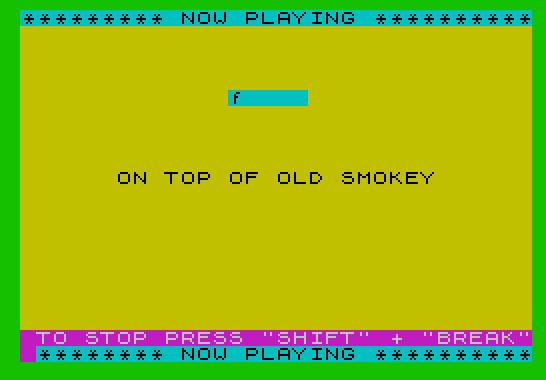
Smokey plays the melody “On Top of Old Smokey” using BEEP statements driven entirely by a DATA list encoding notes as frequency-offset and duration-value pairs. The program uses a two-byte protocol in the DATA stream: a value of 99 signals a rest (implemented via PAUSE), and a value of 100 triggers a lyric-segment display by indexing into a pre-dimensioned string array. The tempo is user-adjustable, with a base rate variable (tt) that scales all note and rest durations multiplicatively. ON ERR is used to detect the end of the DATA stream and branch to the post-playback menu, where the user can loop continuously, choose a custom tempo, or stop.
Program Analysis
Program Structure
The program divides into four logical phases:
- Initialization (lines 20–30): Sets screen colors, dimensions the lyric array
a$(17,5), reads the song title and base rate, and sets default tempo. - Display (lines 40–70): Prints a “NOW PLAYING” banner, centered song title, and a key hint.
- Playback loop (lines 80–130): Continuously reads pairs
f,vfrom DATA and either plays a note, inserts a rest, or updates the lyric display. ON ERR at end-of-data redirects to cleanup. - Post-play menu (lines 140–290): Offers looping, tempo change, or stop options.
Data Format
All musical content lives in the DATA statement at line 320 (after the song title/rate at line 310). Each note or event is encoded as a pair f, v:
| f value | Meaning | Action |
|---|---|---|
| normal number | BEEP semitone offset | BEEP t/v, f — plays note at pitch f, duration scaled by tempo |
| 99 | Rest sentinel | PAUSE t/v*60 — silent pause, duration scaled |
| 100 | Lyric sentinel | Prints a$(v) at screen position AT 5,13 with PAPER 5 |
The base duration unit t is calculated as r * tt, where r is read from DATA (0.08) and tt is the adjustable tempo multiplier (default 10), giving t = 0.8 seconds per whole note equivalent.
Tempo System
All durations are expressed as fractions: a quarter note is t/4, a dotted quarter is t/3 (approximately), and so on. The user-adjustable tt variable at line 290 allows slowing down (larger values) or speeding up (smaller values) by rescaling t before each playback pass. The original tempo of 10 yields t = 0.8.
ON ERR End-of-Data Detection
Rather than counting notes or using a sentinel that terminates the READ loop explicitly, the program uses ON ERR GO TO 130 at line 90 to catch the “Out of DATA” error that naturally occurs when the DATA is exhausted. Line 130 then resets the error trap with ON ERR RESET. This is a compact idiom for infinite DATA traversal without needing to know the data length in advance.
Lyric Array
The array a$(17,5) is declared but only three elements are populated at line 30: a$(2)="c", a$(4)="f", and a$(16)="g7". These are chord or lyric fragment labels displayed on screen mid-song when the DATA stream emits a 100, v pair. The sparse population means most of the array slots are empty strings, which would display as blanks if triggered.
Playback Loop and RESTORE
After playback ends, line 140 calls RESTORE 320 to rewind the DATA pointer to the note data (skipping the title/rate at line 310). If the loop flag z$="1" is set from a previous menu choice, the program jumps directly back to GO TO 90, restarting playback without re-entering the menu. This allows seamless continuous looping.
Screen Layout
The display uses PAPER 5 (cyan) for the banner rows at lines 0 and 21, PAPER PI (which evaluates to 3, magenta) with INK 7 (white) for the key hint at line 20, and an uncolored centered title at row 10. The song title is centered using the expression (31-LEN n$)/2 as the column argument to AT.
Notable Idioms and Techniques
PAPER PIuses the constant π ≈ 3.14159, which truncates to 3 (magenta) — an unusual but valid way to specify a paper color.PAUSE 0: LET z$=INKEY$at line 180 is the standard efficient keypress-wait idiom.SAVE "SMOKEY" LINE 20at line 300 saves the program with an auto-run start line, skipping the REM at line 10.- The rest duration formula
t/v*60converts the fractional note value into PAUSE units (50ths of a second), since PAUSE counts are in 1/50s and BEEP durations are in seconds. The factor of 60 compensates:t/vseconds × 50 frames/second ≈ × 60 (approximate, slightly over).
Image Gallery
Source Code
   10 REM by Mark Miller,                 Baldwin Park, CA
   20 BORDER 4: PAPER 6: CLS : DIM a$(17,5): READ n$,r
   30 LET tt=10: LET z$="": LET a$(2)="c": LET a$(4)="f": LET a$(16)="g7"
   40 PRINT PAPER 5;"********* NOW PLAYING **********"
   50 PRINT AT 10,(31-LEN n$)/2;n$
   60 PRINT PAPER 5;AT 21,0;"********* NOW PLAYING **********"
   70 PRINT PAPER PI; INK 7;AT 20,0;" TO STOP PRESS ""SHIFT"" + ""BREAK"" "
   80 LET t=r*tt
   90 READ f,v: ON ERR GO TO 130: IF f=100 THEN PRINT AT 5,13; PAPER 5;a$(v): GO TO 90
  100 IF f<>99 THEN GO TO 120
  110 PAUSE t/v*60: GO TO 90
  120 BEEP t/v,f: GO TO 90
  130 ON ERR RESET
  140 RESTORE 320: IF z$="1" THEN GO TO 90
  150 CLS : PRINT AT 7,0;"PRESS ""1"" TO PLAY CONTINUOUSLY"
  160 PRINT '"PRESS ""2"" TO PLAY DIFFERENTLY"
  170 PRINT '"PRESS ""s"" TO STOP"
  180 PAUSE 0: LET z$=INKEY$
  190 IF z$="1" THEN CLS : GO TO 40
  200 IF z$="2" THEN GO TO 220
  210 STOP
  220 CLS : PRINT AT 4,0;"YOU CAN PLAY THIS COMPOSITION"
  230 PRINT "AT A DIFFERENT TEMPO. THE"
  240 PRINT "ORIGINAL TEMPO IS 10. INPUT 10"
  250 PRINT "TO RETAIN THE ORIGINAL TEMPO."
  260 PRINT "INPUT A LARGER NUMBER FOR A"
  270 PRINT "SLOWER TEMPO.  INPUT A SMALLER"
  280 PRINT "NUMBER FOR A FASTER TEMPO."
  290 INPUT tt: CLS : GO TO 40
  300 SAVE "SMOKEY" LINE 20
  310 DATA "ON TOP OF OLD SMOKEY",.08
  320 DATA 0,4,100,2,0,4,4,4,7,4,100,4,12,1.33,9,.8,9,4,5,4,7,4,9,4,100,2,7,.5,0,4,0,4,4,4,7,4,100,16,7,1.33,2,.8,2,8,4,8,5,4,4,4,2,4,100,2,0,.5
Note: Type-in program listings on this website use ZMAKEBAS notation for graphics characters.