
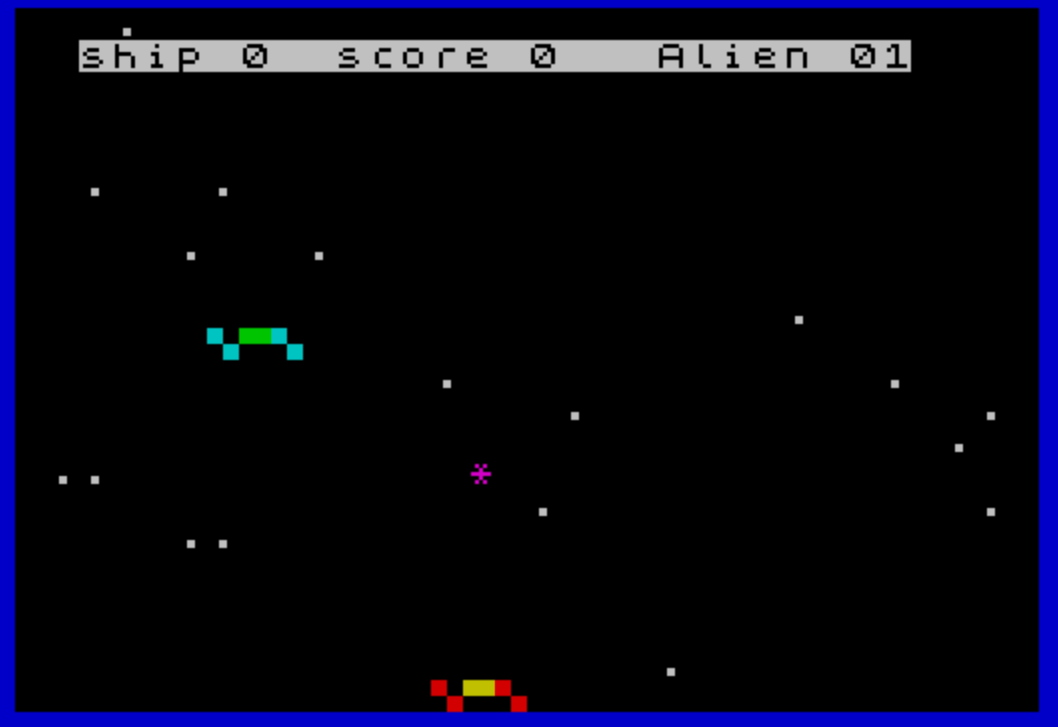
Space Game is a two-dimensional shooter in which the player maneuvers a ship along the bottom of the screen to destroy descending aliens while avoiding being hit. The player moves left and right using keys 5 and 8, and collision detection is performed by comparing the ship’s column position against the alien’s position at specific row thresholds (lines 200 and 210). Block graphics characters are used to render the ship, aliens, and a missile trail, and SOUND commands provide engine noise and explosion effects. The score, ship count, and alien (lives-lost) counter are displayed in an inverse-video status bar at the top of the screen, updated in real time during play.
Program Structure
The program is organized into a small number of functional blocks:
- Initialization (lines 20–60): Sets colors, clears the screen, seeds variables for lives (
c), score (s), and alien-hit counter (a), and populates the starfield with 20 randomly placed dots. - Main outer loop (lines 70–260): Iterates up to 100 waves (
FOR i=0 TO 100). Each wave picks a new alien trajectory and drives the inner movement loop. - Inner scroll loop (lines 110–240): Steps the alien down the screen two rows at a time (
FOR h=4 TO 21 STEP 2), reads player input, draws sprites, checks collisions, and clears old sprite positions. - Alien-destroyed handler (lines 270–370): Awards 10 points, runs a multi-frame explosion animation with random ink colors, then resumes the outer loop.
- Ship-destroyed handler (lines 380–500): Increments the alien counter, plays a descending tone burst, flashes an expanding explosion, checks for game over, resets the screen, and jumps back into the wave loop.
Sprite Rendering and Movement
All sprites are drawn entirely with block graphic characters inside PRINT AT statements. The player ship appears at row 21 and the alien at row h; a “missile” (asterisk) is printed at row 24-h, creating a symmetric counter-moving tracer. Old sprite positions are erased by printing spaces over them (line 230) before advancing h.
The alien’s horizontal position is governed by a string expression built at line 100: p$ is assigned "p" concatenated with "+1" or "-1" depending on the random direction r, then evaluated each frame with VAL p$ at line 130. This is a compact idiom for choosing between three movement modes (drift left, stay, drift right) without an IF/GOTO chain.
Collision Detection
Collision is tested at two specific rows. Line 200 checks h=12 (mid-screen) and triggers the alien-destroyed branch if the ship column m is within ±2 of the alien column p. Line 210 performs the same test at h=20 (near the bottom) for the ship-destroyed branch. Using fixed row thresholds rather than a general per-frame test keeps the logic simple but means collisions are only registered at those two rows.
SOUND Usage
SOUND statements appear in several roles:
- Lines 180–190: continuous engine tone during alien approach (channels 7 and 8 set to a fixed pitch, channel 0 modulated).
- Line 220: silences the engine after the inner loop body.
- Line 290: multi-channel explosion chord on alien destruction (channels 6, 7, 8, 10, 12, 13).
- Lines 350, 380: channel cleanup and ship-hit alarm.
- Lines 420–440: descending sweep (
FOR j=0 TO 30: SOUND 0,j) on ship destruction, producing a rising-pitch effect.
Key BASIC Idioms
Several idiomatic ZX BASIC / TS2068 techniques appear throughout:
- Boolean arithmetic: Line 90 uses
12 AND r=0and12 AND r=2— since Boolean expressions evaluate to 1 (true) or 0 (false), multiplying by 12 either adds or subtracts 12 from the base column, biasing the alien’s starting position left or right. - String concatenation for computed expressions:
p$at line 100 constructs a self-modifying expression string evaluated byVAL, avoiding multiple conditional branches. - Inline color attribute changes: A single
PRINTstatement at line 160 setsINKmultiple times and mixesATandTABto draw all three sprites in one pass. - Color cycling:
ccycles 1–6 at line 390–460 and is applied viaBORDER c, giving the screen a color flash on each ship loss.
Notable Variables
| Variable | Role |
|---|---|
c | Border color cycle counter (1–6) |
s | Score (incremented by 10 per alien kill) |
a | Number of times the player’s ship has been hit |
m | Player ship column (range ~2–28, step 2) |
p | Alien column, updated each frame via VAL p$ |
p$ | Expression string ("p+1", "p", or "p-1") for alien drift |
h | Current alien row in the inner scroll loop |
r | Random direction selector (0, 1, or 2) |
i | Wave counter (outer loop) |
Bugs and Anomalies
- Line 360 contains a stray comma in
PRINT AT 21,m-1,;— the comma after the column argument is syntactically unusual and may cause an error on some interpreter versions, though some accept the redundant separator before the semicolon. - Line 470 contains an embedded color-control token (
\\{17}\\{0}) before thePRINTkeyword, which appears inside theFOR…NEXTloop. This is likely a stray attribute byte in the original listing rather than intentional code. - The game over condition at line 450 (
a >= 4) branches toGO TO 260, which isSTOP, ending execution silently rather than displaying a “Game Over” message. - The score variable
sis reset to 0 at line 60 at the start of each wave iteration inside the outer loop, meaning the score displayed (line 280) accumulates within a wave but is zeroed at the start of the next — the displayed score never carries across waves except via the status-bar print at line 490.
Image Gallery
Source Code
  10 REM \{6}\{6} Charlie Day\{6}\{6} 3101 Imperial Woods\{6} Gastonia, NC 28054\{6}\{6}
  20 PAPER 0:BORDER 1:INK 7:CLS
  30 LET c=1:LET s=0:LET a=s
  40 FOR i=1 TO 20:PRINT INK 7; AT (RND*20),(RND*31);".":NEXT i
  50 PRINT AT 1,2;"\{20}\{1}ship 0  score 0   Alien 0\{20}\{0} "
  60 LET s=0:LET m=14
  70 FOR i=0 TO 100
  80 LET r= INT (RND*3)
  90 LET p=13-(12 AND r=0)+(12 AND r=2)+ INT (RND*5)
 100 LET p$="p"+("+1" AND r=0)+("-1" AND r=2)
 110 FOR h=4 TO 21 STEP 2
 120 RANDOMIZE
 130 LET p= VAL p$
 140 IF (INKEY$="8" AND m<28) THEN LET m=m+2
 150 IF (INKEY$="5" AND m>2) THEN LET m=m-2
 160 PRINT INK 2; AT 21,m-1;"\'."; INK 6;"\{18}\{1}\''\{18}\{0}"; INK 2;"\'."; AT h,p-1; INK 5;"\{18}\{1}\'.\{18}\{0}"; INK 4;"\''"; INK 5;"\{18}\{1}\'.\{18}\{0}"; AT 24-h,m; INK PI;"*"
 170 PRINT INVERSE 1; AT 1,27;i
 180 SOUND 7,62;8,15
 190 SOUND 0,210
 200 IF h=12 AND m>p-2 AND m<p+2 THEN GO TO 270
 210 IF h=20 AND m>p-2 AND m<p+2 THEN GO TO 380
 220 SOUND 7,0;8,0
 230 PRINT AT 21,m-1;"    "; AT h,p-1;"   "; AT 24-h,m;"  "
 240 NEXT h
 250 NEXT i
 260 STOP
 270 LET s=s+10
 280 PRINT INVERSE 1; AT 1,17;s
 290 SOUND 6,6;7,7;8,16;10,16;12,56;13,8
 300 FOR j=1 TO 8
 310 PRINT INK (RND*6)+1; AT h-1,p;"*"; TAB p-1;"***"; TAB p;"*"
 320 PRINT INK (RND*6)+1; AT h-1,p;"\{20}\{1}*\{20}\{0}"; TAB p-1;"\{20}\{1}***\{20}\{0}"; TAB p;"\{20}\{1}*\{20}\{0}"
 330 PRINT INK (RND*6)+1; AT h-1,p;"\{20}\{1}\{20}\{1}\{20}\{0} "; TAB p-1;"\{20}\{1}\{20}\{0} \{20}\{0}  "; TAB p;"\{20}\{1}\{20}\{0} \{20}\{0}"
 340 NEXT j
 350 SOUND 8,0;9,0;10,0
 360 PRINT AT 21,m-1,;"\{20}\{1}\{20}\{1}\{20}\{0} "; AT h,p-1;"\{20}\{1}\{20}\{0} \{20}\{0}  "; AT 24-h,m;"\{20}\{1}\{20}\{0} \{20}\{0}"
 370 GO TO 250
 380 SOUND 7,62;8,15
 390 LET c=c+1:IF c >=7 THEN LET c=1
 400 LET a=a+1:PRINT INVERSE 1; AT 1,7;a
 410 FOR j=0 TO 30
 420 SOUND 0,j
 430 PRINT FLASH 1; INK (RND*6)+1; AT 21,m-2;"\{20}\{1} \{20}\{0} \{20}\{1} \{20}\{0} "; AT 20,m-3;"\{20}\{1} \{20}\{0} \{20}\{1} \{20}\{0} \{20}\{1} \{20}\{0} "; AT 19,m-4;"\{20}\{1} \{20}\{0} \{20}\{1} \{20}\{0} \{20}\{1} \{20}\{0} \{20}\{1} \{20}\{0} "
 440 NEXT j
 450 IF a >=4 THEN GO TO 260
 460 BORDER c:PAPER 0:CLS
 470 FOR j=1 TO 20:\{17}\{0} PRINT INK 7; AT (RND*20),(RND*31);".\{20}\{0}":NEXT j
 480 PRINT AT 1,2;"\{20}\{1}Ship    \{20}\{0} \{20}\{1}Score    \{20}\{0} \{20}\{1}alien     \{20}\{0}"
 490 PRINT INVERSE 1; AT 1,7;a; AT 1,17;s; AT 1,27;i
 500 GO TO 250
 510 SAVE "SpaceGame" LINE 2
Note: Type-in program listings on this website use ZMAKEBAS notation for graphics characters.