
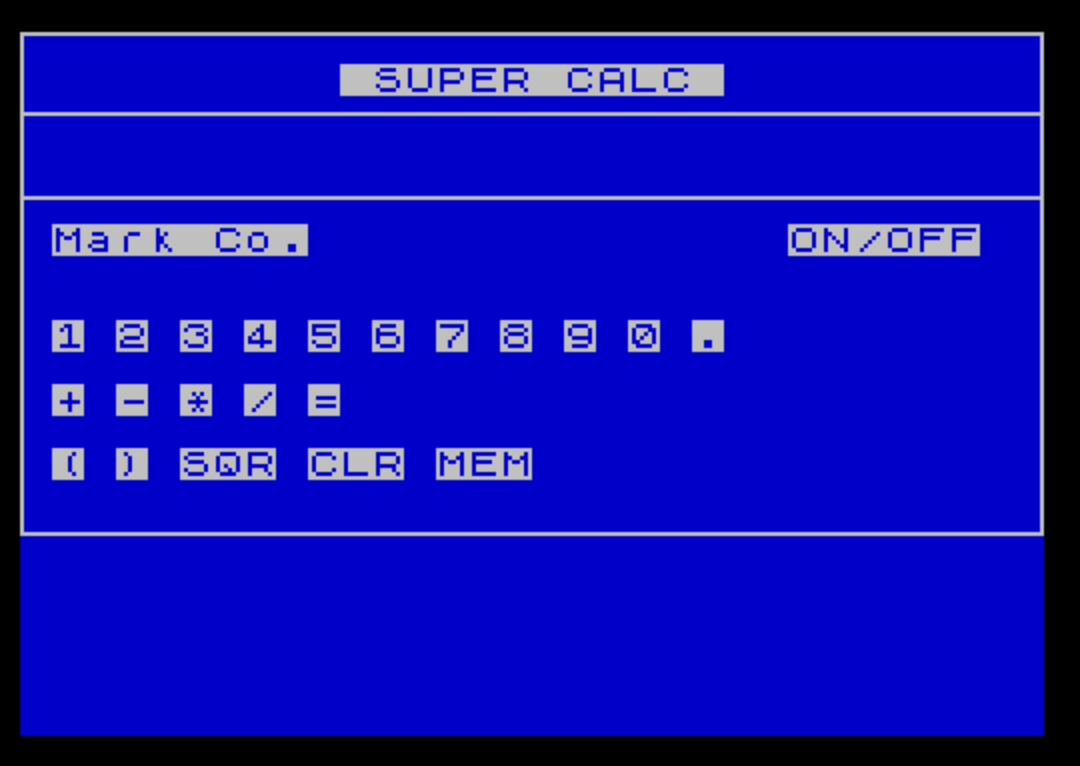
SuperCalc is a joystick-controlled on-screen calculator that displays a graphical keypad layout and allows the user to navigate it using a joystick, selecting digits, operators, parentheses, and a square root function. The program uses PLOT and DRAW commands to draw a bordered calculator frame, then prints labeled buttons at fixed screen positions. Button selection is handled by reading STICK input to move a cursor (displayed as an arrow character) around the keypad grid, with the fire button (STICK second parameter) triggering the selected key. Expressions are accumulated in a string variable B$ and evaluated using VAL, with STR$ used to clear trailing display characters after the result is printed. A simple memory function (MEM) stores a previously computed result in variable V for later recall.
Program Structure
The program divides into four logical phases: initialization and screen drawing (lines 1–68), cursor control loop (lines 70–135), button dispatch subroutine (lines 140–390), and result/memory handling (lines 400–510). The main loop at line 80 redraws the cursor arrow, pauses briefly, erases it, reads the joystick, clamps the cursor position, then checks for a fire button press before looping back.
Screen Layout and Drawing
The calculator border is drawn using PLOT and DRAW commands to form a rectangle, with two additional horizontal rules drawn at lines 20 and 22 (pixel rows 155 and 134) to separate the display area from the keypad rows. Button labels are printed at fixed AT row/column positions: digits on row 9, operators on row 11, and function keys on row 13. The display area occupies row 4.
Joystick Navigation
Cursor position is tracked by two variables: A (row, ranging 8–14 in steps of 2) and B (column, ranging 1–27 in steps of 2). Lines 100–110 update these using STICK direction codes: direction 2 moves down, 1 moves up, 8 moves right, 4 moves left. Each STICK call reads the joystick twice per axis within a single line, which is slightly redundant but functions correctly. Lines 120–126 clamp both coordinates to valid bounds.
| STICK value | Direction | Effect |
|---|---|---|
| 1 | Up | A decreases by 2 |
| 2 | Down | A increases by 2 |
| 4 | Left | B decreases by 2 |
| 8 | Right | B increases by 2 |
Button Dispatch
When the fire button is detected (STICK (2,1)=1 at line 128), control transfers to the dispatch block starting at line 140. Each button is identified by a unique (A, B) coordinate pair. Digit and operator buttons append their character to the accumulator string B$ and jump to line 400, which beeps, prints the current expression at row 4, and returns to the main loop. The equals button (A=12, B=9) branches to line 430 for evaluation.
Expression Evaluation
Evaluation at lines 430–490 uses VAL B$ to parse and compute the accumulated string expression, storing the numeric result in X. This allows full arithmetic expressions including operator precedence and nested parentheses, since VAL evaluates arbitrary numeric expressions. The square root button appends the string "SQR " to B$, so it integrates naturally into expression building rather than requiring special numeric handling.
After printing the result, STR$ X is used to determine the length of the result string, and a FOR loop at line 475 prints spaces from that length to column 30 to erase any leftover characters from a longer previous expression — a practical display-cleanup technique.
Memory Function
The MEM button (A=14, B=13, line 380) branches to line 500. If variable V is non-zero, it prints the stored value and resets V to 0 (recall mode). If V is zero, it stores the current result X into V (store mode). This single-register memory toggle is simple but functional, though it cannot store zero as a meaningful value.
Notable Techniques and Idioms
- The cursor blink is achieved by printing
"↑", pausing withPAUSE 3, then overprinting with a space — a common sprite-erasure idiom. - Boolean arithmetic in lines 100–110 uses the fact that logical comparisons evaluate to 1 (true) or 0 (false), multiplying by 2 to get the step size — avoiding conditional branches for movement.
- The CLR button (
A=14, B=9) at line 140 clears the display line and falls through to line 480, which resetsB$andZ$— a clean reuse of the post-evaluation reset code. - The ON/OFF label at screen position
AT 6,24corresponds to the cursor positionA=8, B=27(the top-right area), where line 180 issues aSTOPcommand to end the program.
Bugs and Anomalies
- Variable
Cis set to 1 at line 75 and used inPRINT AT 4,C;at line 410, butCis never changed, making it functionally equivalent to the literal 1. It appears to be a vestigial variable, possibly intended for a scrollable display column. - If the equals button has never been pressed,
XandZ$are uninitialized, so pressing MEM or CLR before any evaluation could cause an error depending on interpreter behavior. - Line 500’s memory recall prints
Vbut does not clear the rest of the display row, which could leave stale characters if the previous display was longer than the recalled value. - The
STICKcalls within a single line read the joystick multiple times; diagonal inputs could cause unexpected behavior since each direction check is independent.
Image Gallery
Source Code
     1 LET V=0
    2 REM MARK BIERY, 741 DUNBAR          BEECHER, IL 60401               312/946-6892
    3 LET B$=""
    5 BORDER 0:PAPER 1:INK 7
    7 CLS
   10 PRINT AT 1,10;" SUPER CALC "
   12 PLOT 255,50:DRAW -255,0
   14 DRAW 0,125
   16 DRAW 255,0
   18 DRAW 0,-125
   20 PLOT 0,155:DRAW 255,0
   22 PLOT 0,134:DRAW 255,0
   24 PRINT AT 6,1;"Mark Co."
   26 PRINT AT 6,24;"ON/OFF"
   28 PRINT AT 9,1;"1"
   30 PRINT AT 9,3;"2"
   32 PRINT AT 9,5;"3"
   34 PRINT AT 9,7;"4"
   36 PRINT AT 9,9;"5"
   38 PRINT AT 9,11;"6"
   40 PRINT AT 9,13;"7"
   42 PRINT AT 9,15;"8"
   44 PRINT AT 9,17;"9"
   46 PRINT AT 9,19;"0"
   48 PRINT AT 9,21;"."
   50 PRINT AT 11,1;"+"
   52 PRINT AT 11,3;"-"
   54 PRINT AT 11,5;"*"
   56 PRINT AT 11,7;"/"
   58 PRINT AT 11,9;"="
   60 PRINT AT 13,1;"("
   62 PRINT AT 13,3;")"
   64 PRINT AT 13,5;"SQR"
   66 PRINT AT 13,9;"CLR"
   68 PRINT AT 13,13;"MEM"
   70 LET A=8:LET B=27
   75 LET C=1
   80 PRINT AT A,B;"↑":PAUSE 3
   90 PRINT AT A,B;" "
  100 LET A=A+((STICK (1,1)=2)*2)-((STICK (1,1)=1)*2)
  110 LET B=B+(2*(STICK (1,1)=8))-(2*(STICK (1,1)=4))
  120 IF A <=8 THEN LET A=8
  122 IF A >=14 THEN LET A=14
  124 IF B <=1 THEN LET B=1
  126 IF B >=27 THEN LET B=27
  128 IF STICK (2,1)=1 THEN GO SUB 140
  135 GO TO 80
  140 IF A=14 AND B=9 THEN PRINT AT 4,1;"                              ":GO TO 480
  180 IF A=8 AND B=27 THEN STOP
  190 IF A=10 AND B=1 THEN LET B$=B$+"1":GO TO 400
  200 IF A=10 AND B=3 THEN LET B$=B$+"2":GO TO 400
  210 IF A=10 AND B=5 THEN LET B$=B$+"3":GO TO 400
  220 IF A=10 AND B=7 THEN LET B$=B$+"4":GO TO 400
  230 IF A=10 AND B=9 THEN LET B$=B$+"5":GO TO 400
  240 IF A=10 AND B=11 THEN LET B$=B$+"6":GO TO 400
  250 IF A=10 AND B=13 THEN LET B$=B$+"7":GO TO 400
  260 IF A=10 AND B=15 THEN LET B$=B$+"8":GO TO 400
  270 IF A=10 AND B=17 THEN LET B$=B$+"9":GO TO 400
  280 IF A=10 AND B=19 THEN LET B$=B$+"0":GO TO 400
  290 IF A=10 AND B=21 THEN LET B$=B$+".":GO TO 400
  300 IF A=12 AND B=1 THEN LET B$=B$+"+":GO TO 400
  310 IF A=12 AND B=3 THEN LET B$=B$+"-":GO TO 400
  320 IF A=12 AND B=5 THEN LET B$=B$+"*":GO TO 400
  330 IF A=12 AND B=7 THEN LET B$=B$+"/":GO TO 400
  340 IF A=12 AND B=9 THEN GO TO 430
  350 IF A=14 AND B=1 THEN LET B$=B$+"(":GO TO 400
  360 IF A=14 AND B=3 THEN LET B$=B$+")":GO TO 400
  370 IF A=14 AND B=5 THEN LET B$=B$+"SQR ":GO TO 400
  380 IF A=14 AND B=13 THEN GO TO 500
  390 GO TO 80
  400 BEEP .05,21
  410 PRINT AT 4,C;B$
  420 GO TO 80
  430 PRINT AT 4,C;B$
  440 LET X= VAL B$
  450 LET Z$= STR$ X
  470 PRINT AT 4,1;X;
  475 FOR Q= LEN Z$+1 TO 30:PRINT AT 4,Q;" ":NEXT Q
  480 LET B$="":LET Z$=""
  490 GO TO 80
  500 IF V <>0 THEN PRINT AT 4,1;V:LET V=0:BEEP .05,21:GO TO 80
  510 LET V=X:BEEP .05,21:GO TO 80
 9999 SAVE "super calc"
Note: Type-in program listings on this website use ZMAKEBAS notation for graphics characters.