
TAX84 is a Canadian federal and Ontario individual income tax return calculator (T1 General form) that guides users through entering income, deductions, and credits, then computes tax payable or refund. The program uses variable names that mirror actual CRA line numbers (e.g., A101 for total earnings, A260 for taxable income, A406 for federal tax payable), making the code self-documenting for anyone familiar with the T1 form. A right-justification subroutine at line 130 formats all dollar amounts to two decimal places and aligns them to column 31 using TAB arithmetic. Tax brackets are implemented as a series of conditional statements in the Schedule 1 subroutine (lines 2390–2600), covering income bands up to $59,424 with marginal rates from 19% to 30%. The program includes save and verify routines, a data-change menu allowing selective amendment of specific line values, and separate schedule routines for interest deductions (Schedule 4) and eligible deductions transferred from a spouse (Schedule 2).
Program Structure
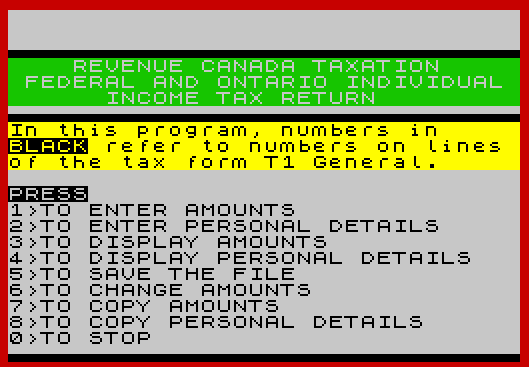
The program is organized into clearly delineated sections, each introduced by a REM statement. The entry point is line 610 (the main menu), reached immediately via GO TO 610 at line 120. Menu dispatch uses a chain of IF INKEY$= tests at lines 770–860. The major functional blocks are:
- Lines 130–240: Right-justification and formatting subroutine
- Lines 250–270: Printer open subroutine
- Lines 280–300: BEEP subroutine
- Lines 310–590: Personal details entry
- Lines 600–860: Main menu
- Lines 870–1050: Personal details display
- Lines 1060–2380: Calculations and display of tax return
- Lines 2390–2600: Schedule 1 (federal/Ontario tax computation)
- Lines 2610–2710: Schedule 4 (interest deduction)
- Lines 2720–2850: Schedule 2 (spouse deductions transfer)
- Lines 2860–3380: Amount entry section
- Lines 3390–3510: Data change menu
- Lines 9997–9999: Save and verify routine
Variable Naming Convention
A notable design choice is using variable names that directly correspond to CRA T1 form line numbers. For example, A101 holds total employment earnings (line 101), A228 holds net income (line 228), and A406 holds federal tax payable (line 406). This makes the tax logic transparent to anyone with a copy of the T1 General form. Auxiliary variables such as BPE (basic personal exemption), SNI (spouse’s net income), SFTR (unused portion of Schedule 1 federal tax reduction), and TAXO (Ontario tax before reduction) supplement the line-number scheme.
Right-Justification Subroutine
The subroutine at lines 130–240 is called repeatedly throughout the display section. It receives a value in R, rounds it to two decimal places (with a special case to avoid banker’s rounding at exactly 0.005), converts it to a string, ensures a leading zero before a decimal point, appends trailing zeros to reach two decimal places, and prints right-aligned to column 31 using TAB 31-LEN R$. This is an efficient pure-BASIC formatting technique that avoids any machine code.
Tax Calculation Logic
Schedule 1 (lines 2390–2600) implements the 1984 federal tax brackets as a set of non-overlapping IF conditions covering five income bands up to $59,424. The Ontario tax is calculated as 48% of federal tax plus the Ontario Surtax Surcharge (OSS), with a reduction applied for low-income filers. The married exemption at line 1180 is conditional on marital status code “1” and is reduced by spouse’s net income. The Schedule 4 interest deduction (lines 2610–2710) caps the net interest deduction at $1,000. Schedule 2 (lines 2720–2850) computes eligible deductions transferable from a spouse.
Notable Techniques
- Concurrent PRINT/INPUT prompts: Several
INPUTstatements use a string expression in parentheses to build dynamic prompts incorporating the tax year variableY$, e.g.,INPUT ("Enter Province of residence on Dec 31 19";Y$)'G$. - AND operator for string selection: Line 3440 uses the Spectrum BASIC idiom
("115" AND Q=1)+("121" AND Q=2)+...to select a string based on the menu choice, printing whichever line number is relevant without a multi-branch IF chain. - POKE 23658,8: Line 620 sets the system flags to enable CAPS LOCK, ensuring consistent uppercase input for string fields.
- CLOSE #2 / OPEN #2,”p”: The printer stream is opened only when needed (copy functions) and closed on return to the main menu, preventing stray printer output during normal screen operations.
- Data-change menu: Lines 3400–3500 provide a selective update facility for six commonly revised lines without re-entering the full return, using a numeric code mapped to specific variables via sequential
IF Q=tests. - Refund/balance due display: Lines 2320–2360 compute and conditionally display either a refund (in INK 4, green) or balance due (in INK 2, red, with FLASH) depending on the comparison of tax withheld against tax payable, with a payment deadline reminder built into the FLASH message.
Bugs and Anomalies
- Line 2440 — typo in variable name: The tax bracket calculation for income between $7,428 and $12,380 references
A62instead ofA260. SinceA62is undeclared it evaluates to zero, producing an incorrectTAX1for filers in this bracket. - Line 2480 — missing line: The sequence jumps from line 2470 to 2490, skipping line 2480. A bracket for income at or below $7,428 (but greater than zero) appears to be missing entirely, meaning filers in the lowest bracket get no
TAX1assignment from the bracket logic (though line 2450 handles the zero case). - Line 1150 — birth date parsing: The age-under-19 check uses
VAL F$(5 TO )to extract the two-digit birth year from a DDMMYY string and compares it to 19. This logic is fragile: it works only for the specific year range intended and does not account for century boundaries. - Line 2350 — VAL Y$+1: The expression
VAL Y$+1adds 1 to the numeric value of the two-digit year string for the payment deadline year. This works correctly as long asY$is a valid two-digit numeric string. - Lines 1160–1190 — ME used uninitialized: The variable
ME(married exemption) is assigned only ifSNIis between 490 and 3960. IfSNIexceeds 3960 andH$="1",A230is set from an uninitializedME, which will be zero on first run, producing a silent incorrect result. - Line 2530 — OSSMT constant: The Ontario Surtax calculation uses the fixed constant 110.8 rather than computing it from the tax tables, which may not be accurate for all income levels.
Image Gallery
Source Code
    1 REM RECEIVED FROM TORONTO           TIMEX USER'S CLUB.              DECEMBER 19, 1986
    2 REM COPIED AND MODIFIED BY          ALGIS E. GEDRIS
  100 REM TAX84 Tax Return T1
  110 REM © ROBERT MITCHELL 1985
  120 GO TO 610
  130 REM RIGHT JUSTIFICATION
  140 IF R=.005 THEN LET R=.006
  150 LET R= INT (100*R+.5)/100
  160 LET R$= STR$ R
  170 IF R$(1)="." THEN LET R$="0"+R$
  180 FOR K=1 TO LEN R$
  190 IF R$(K)="." THEN GO TO 220
  200 NEXT K
  210 LET R$=R$+".0"
  220 IF R$(LEN R$-1)="." THEN LET R$=R$+"0"
  230 PRINT TAB 31- LEN R$;R$
  240 RETURN
  250 REM LPRINT ROUTINE
  260 OPEN #2,"p"
  270 RETURN
  280 REM BEEP ROUTINES
  290 BEEP .1,1:BEEP .1,-1
  300 RETURN
  310 CLS :REM INPUT PERSONAL                  DETAILS
  320 INPUT "Enter tax year (YY)"'Y$
  330 PRINT "IDENTIFICATION DETAILS for 19";Y$
  340 GO SUB 290
  350 INPUT "Enter SIN"'B$
  360 PRINT B$
  370 INPUT "Enter Name"'C$
  380 PRINT C$
  390 INPUT "Enter Street Address"'D$
  400 PRINT D$
  410 INPUT "Enter City, Prov. & Postal Code"'E$
  420 PRINT E$
  430 INPUT "Enter your Birth Date (DDMMYY)"'F$
  440 PRINT F$
  450 INPUT ("Enter Marital Status (code)     (Married=1) on Dec 31 19";Y$)'H$:IF H$<"1" OR H$>"5" THEN GO TO 450
  460 PRINT H$
  470 INPUT "Enter Name of Spouse"'I$
  480 PRINT I$
  490 INPUT "Enter SIN of Spouse"'K$
  500 PRINT K$
  510 INPUT "Address of spouse: Press ENTER  if same as mine. If not, enter  address."'J$
  520 IF J$="" THEN LET J$="Same as mine"
  530 PRINT J$
  540 INPUT ("Enter Province of residence     on Dec 31 19";Y$)'G$
  550 PRINT G$
  560 INPUT ("Enter type of work or occupationin 19";Y$)'L$
  570 PRINT L$
  580 INPUT "Enter Name of present employer"'M$
  590 PRINT M$
  600 REM MAIN MENU
  610 PAPER 7:INK 0:BORDER 2:CLS
  620 POKE 23658,8
  630 CLOSE #2
  640 LET U$="▄▄▄▄▄▄▄▄▄▄▄▄▄▄▄▄▄▄▄▄▄▄▄▄▄▄▄▄▄▄▄▄"
  650 PRINT AT 2,0;U$
  660 PAPER 4:INK 7
  670 PRINT "    REVENUE CANADA TAXATION     "
  680 PRINT " FEDERAL AND ONTARIO INDIVIDUAL       INCOME TAX RETURN         "
  690 PAPER 7:INK 0
  700 PRINT U$
  710 PRINT PAPER 6; BRIGHT 1;"In this program, numbers in     BLACK refer to numbers on lines of the tax form T1 General.     "
  720 PRINT '"PRESS"'"1>TO ENTER AMOUNTS","2>TO ENTER PERSONAL DETAILS","3>TO DISPLAY AMOUNTS"
  730 PRINT "4>TO DISPLAY PERSONAL DETAILS","5>TO SAVE THE FILE","6>TO CHANGE AMOUNTS","7>TO COPY AMOUNTS","8>TO COPY PERSONAL DETAILS","0>TO STOP"
  740 PRINT U$
  750 GO SUB 290
  760 IF INKEY$="" THEN PAUSE 0
  770 IF INKEY$="0" THEN STOP
  780 IF INKEY$="7" THEN GO SUB 250:GO TO 1060
  790 IF INKEY$="8" THEN GO SUB 250:GO TO 870
  800 IF INKEY$="4" THEN GO TO 870
  810 IF INKEY$="1" THEN GO TO 2860
  820 IF INKEY$="2" THEN GO TO 310
  830 IF INKEY$="5" THEN GO TO 3520
  840 IF INKEY$="3" THEN GO TO 1060
  850 IF INKEY$="6" THEN GO TO 3400
  860 GO TO 760
  870 REM PERSONAL DETAILS
  880 CLS :PRINT "19";Y$;" IDENTIFICATION DETAILS"
  885 PRINT U$
  890 PRINT "SIN: ";B$
  900 PRINT "NAME: ";C$
  910 PRINT "ADDRESS: ";D$
  920 PRINT E$
  930 PRINT "DATE OF BIRTH: ";F$
  940 PRINT "PROV. OF RESIDENCE IN 19";Y$;": ",G$
  950 PRINT "MARITAL STATUS CODE: ";H$
  960 PRINT "NAME OF SPOUSE: ",I$
  970 PRINT "ADDRESS OF SPOUSE: ";J$
  980 PRINT "SIN OF SPOUSE: ";K$
  990 PRINT "TYPE OF WORK OR OCCUPATION"'"IN 19";Y$;": ";L$
 1000 PRINT "NAME OF PRESENT EMPLOYER: ",M$
 1010 GO SUB 290
 1020 PRINT #0;"press enter to go to menu"
 1030 IF INKEY$="" THEN PAUSE 0
 1040 CLOSE #2
 1050 GO TO 610
 1060 REM CALCULATIONS
 1070 IF A101 >=2500 THEN LET A108=500
 1080 IF A101<2500 THEN LET A108=A101/5
 1090 LET A111=A101-A108
 1100 LET A150=A111+A113+A114+A115+A119+A120+A121+A130
 1110 LET A223=A202+A204+A207+A208+A222
 1120 LET A228=A150-A223
 1130 LET BPE=3960
 1140 LET AE=0
 1150 IF VAL F$(5 TO ) <=19 THEN LET AE=2480
 1160 IF SNI <=490 THEN LET A230=3470
 1170 IF SNI>490 AND SNI <=3960 THEN LET ME=3960
 1180 IF H$="1" THEN LET A230=ME-SNI
 1190 IF H$ <>"1" THEN LET A230=0
 1200 LET A235=BPE+A230
 1210 LET A236=A228-A235
 1220 IF A236<0 THEN LET A236=0
 1230 LET A242=A241-(A228*.03)
 1240 IF A242<0 THEN LET A242=0
 1250 LET A255=A238+A240+A242+A243+A251
 1260 LET A260=A236-A255
 1270 IF A260<0 THEN LET A260=0
 1280 GO SUB 2390
 1290 REM DISPLAY RETURN
 1300 CLS
 1310 PRINT TAB 11;"TAX RETURN 19";Y$
 1320 PRINT U$
 1330 LET R=A101
 1340 PRINT "TOTAL Earnings"; TAB 20;"101";
 1350 GO SUB 130
 1360 LET R=A108
 1370 PRINT "Employ. Exp."; TAB 20;"108";
 1380 GO SUB 130
 1390 LET R=A111
 1400 PRINT "Net Employ. Earnings"; TAB 20;"111";
 1410 GO SUB 130
 1420 LET R=A113
 1430 PRINT "OAS Pension Inc."; TAB 20;"113";
 1440 GO SUB 130
 1450 LET R=A114
 1460 PRINT "CPP Benefits"; TAB 20;"114";
 1470 GO SUB 130
 1480 LET R=A115
 1490 PRINT "Other Pens. Inc."; TAB 20;"115";
 1500 GO SUB 130
 1510 LET R=A119
 1520 PRINT "UIC Benefits"; TAB 20;"119";
 1530 GO SUB 130
 1540 LET R=A120
 1550 PRINT "Can.Div.Tax Amt"; TAB 20;"120";
 1560 GO SUB 130
 1570 LET R=A121
 1580 PRINT "Interest Income"; TAB 20;"121";
 1590 GO SUB 130
 1600 LET R=A130
 1610 PRINT "Other Inc. (Specify)"; TAB 20;"130";
 1620 GO SUB 130
 1630 LET R=A150
 1640 PRINT "TOTAL Income"; TAB 20;"150";
 1650 GO SUB 130
 1660 LET R=A202
 1670 PRINT "CPP Premiums"; TAB 20;"202";
 1680 GO SUB 130
 1690 LET R=A204
 1700 PRINT "UIC Premiums"; TAB 20;"204";
 1710 GO SUB 130
 1720 LET R=A207
 1730 PRINT "Reg.Pens.Plan"; TAB 20;"207";
 1740 GO SUB 130
 1750 LET R=A208
 1760 PRINT "RSP Premiums"; TAB 20;"208";
 1770 GO SUB 130
 1780 LET R=A222
 1790 PRINT "Other Deductions"; TAB 20;"222";
 1800 GO SUB 130
 1810 LET R=A223
 1820 PRINT "TOTAL Deductions"; TAB 20;"223";
 1830 GO SUB 130
 1840 LET R=A228
 1850 PRINT "NET Income"; TAB 20;"228";
 1860 GO SUB 130
 1870 LET R=A230
 1880 PRINT "Married Exempt."; TAB 20;"230";
 1890 GO SUB 130
 1900 LET R=A235
 1910 PRINT "TOTAL Pers. Exempt."; TAB 20;"235";
 1920 GO SUB 130
 1930 LET R=A236
 1940 PRINT "TOT.Inc. less P.E."; TAB 20;"236";
 1950 GO SUB 130
 1960 LET R=A241
 1970 PRINT "Medical Exp."; TAB 20;"241";
 1980 GO SUB 130
 1990 LET R=A243
 2000 PRINT "Charitable Ded."; TAB 20;"243";
 2010 GO SUB 130
 2020 LET R=A238
 2030 PRINT "Interest Ded."; TAB 20;"238";
 2040 GO SUB 130
 2050 LET R=A240
 2060 PRINT "Pension Inc.Ded."; TAB 20;"240";
 2070 GO SUB 130
 2080 LET R=A251
 2090 PRINT "Elig.Ded.fm.Spouse"; TAB 20;"251";
 2100 GO SUB 130
 2110 LET R=A255
 2120 PRINT "TOTAL"; TAB 20;"255";
 2130 GO SUB 130
 2140 LET R=A260
 2150 PRINT "Taxable Income"; TAB 20;"260";
 2160 GO SUB 130
 2162 LET R=SFTR
 2164 PRINT "Unused Portion SFTR"; TAB 20;"403";
 2166 GO SUB 130
 2170 LET R=A406
 2180 PRINT "Federal Tax Payable"; TAB 20;"406";
 2190 GO SUB 130
 2200 LET R=A423
 2210 PRINT "Ontario Tax Payable"; TAB 20;"423";
 2220 GO SUB 130
 2230 LET R=A435
 2240 PRINT "TOTAL Tax Payable"; TAB 20;"435";
 2250 GO SUB 130
 2260 LET R=A440
 2270 PRINT "Tax Ded. at Source"; TAB 20;"440";
 2280 GO SUB 130
 2290 LET R=A448
 2300 PRINT "Ont. Tax Credits"; TAB 20;"448";
 2310 GO SUB 130
 2320 LET R=(A440+A448)-A435
 2330 IF (A440+A448)>A435 THEN PRINT '' TAB 7; INK 4;"REFUND="; TAB 20;:GO SUB 130
 2340 LET R=A435-(A440+A448)
 2350 IF A435>(A440+A448) THEN PRINT '' INK 2; TAB 7;"BALANCE DUE="; TAB 20;:GO SUB 130:PRINT FLASH 1; INK 2;" Payment to Receiver-General     Not later  than  April 30, 19"; VAL Y$+1
 2360 IF A260=0 THEN PRINT FLASH 1;"Your taxable income is zero;    therefore, you do not have to   file an income tax return.      "
 2370 GO SUB 290
 2380 GO TO 1020
 2390 REM SCHEDULE 1
 2400 IF A260 <=59424 AND A260>34664 THEN LET TAX1=7304+30*(A260-34664)/100
 2410 IF A260 <=34664 AND A260>22284 THEN LET TAX1=4209+25*(A260-22284)/100
 2420 IF A260 <=22284 AND A260>17332 THEN LET TAX1=3070+23*(A260-17332)/100
 2430 IF A260 <=17332 AND A260>12380 THEN LET TAX1=2080+20*(A260-12380)/100
 2440 IF A260 <=12380 AND A260>7428 THEN LET TAX1=1139+19*(A62-7428)/100
 2450 IF A260 <=0 THEN LET TAX1=0
 2460 IF TAX1<200 THEN LET TAXR=TAX1
 2470 IF TAX1>200 THEN LET TAXR=200
 2490 LET TAXR=TAXR+SFTR
 2500 IF TAXR>400 THEN LET TAXR=200
 2510 LET A406=TAX1-TAXR
 2520 LET TAXO=48/100*(A406+TAXR)
 2530 LET OSSMT=5/100*(TAXO-110.8)
 2540 LET TAXO=TAXO+OSSMT
 2550 IF A260 <=2026 THEN LET TAXRO=TAXO
 2560 IF A260>2026 AND A260<2218 THEN LET TAXRO=(2218-A260)/2
 2570 IF A260 >=2218 THEN LET TAXRO=0
 2580 LET A423=TAXO-TAXRO
 2590 LET A435=A406+A423
 2600 RETURN
 2610 REM SCHEDULE 4
 2615 PRINT "SCHEDULE 4 DATA"
 2620 INPUT "Enter interest eligible for     interest deduction"'A121
 2630 PRINT "Interest Income"; TAB 20;"121  ";A121
 2640 INPUT "Enter interest on money         borrowed, eligible for interest deduction"'INTC
 2650 PRINT "Interest Deduction"; TAB 20;"  ";INTC
 2660 INPUT "Enter safety deposit charges"'SDC
 2670 PRINT "Safety Dep. Chge"; TAB 20;"  ";SDC
 2680 LET A222=INTC+SDC
 2690 LET A238=A121-A222
 2700 IF A238>1000 THEN LET A238=1000
 2710 RETURN
 2720 REM SCHEDULE 2
 2730 REM **ELIGIBLE DEDUCTIONS             TRANSFERRED FROM                SPOUSE**
 2735 PRINT "SCHEDULE 2 DATA"
 2740 INPUT "Enter spouse's interest income";SII
 2750 INPUT "Enter spouse's other income";SOI
 2760 LET SNI=SII+SOI
 2770 PRINT "Spouse's Net Income = ";SNI
 2780 IF SII<1000 THEN LET SID=SII
 2790 IF SII >=1000 THEN LET SID=1000
 2800 LET EXC18=3470-A230
 2810 IF EXC18>SII THEN LET STD=SII
 2820 LET EXC23=SNI-3960
 2830 IF EXC23<0 THEN LET EXC23=0
 2840 LET A251=STD-EXC23
 2850 RETURN
 2860 REM ENTRY OF AMOUNTS
 2870 CLS :PRINT "ENTER TAX RETURN AMOUNTS":PRINT U$:PRINT "Note: Multiple entries for any  tax line number should be       entered together, e.g.            12000+16000+4000            ":PRINT U$
 2880 PRINT '"TOTAL Earnings"; TAB 20;"101";
 2890 INPUT A101
 2900 PRINT A101
 2910 PRINT "OAS Pension"; TAB 20;"113";
 2920 INPUT A113
 2930 PRINT A113
 2940 PRINT "CPP Benefits"; TAB 20;"114";
 2950 INPUT A114
 2960 PRINT A114
 2970 PRINT "Other pension inc."; TAB 20;"115";
 2980 INPUT A115
 2990 PRINT A115
 3000 PRINT "UIC Benefits"; TAB 20;"119";
 3010 INPUT A119
 3020 PRINT A119
 3030 PRINT "Can.Div.Tax Amt."; TAB 20;"120";
 3040 INPUT A120
 3050 PRINT A120
 3060 GO SUB 2610
 3070 PRINT "Other income (specify)"; TAB 20;"130";
 3080 INPUT A130
 3090 PRINT A130
 3100 PRINT "CPP Contributions"; TAB 20;"202";
 3110 INPUT A202
 3120 PRINT A202
 3130 PRINT "UIC Premiums"; TAB 20;"204";
 3140 INPUT A204
 3150 PRINT A204
 3160 PRINT "Pens.Plan.Ded."; TAB 20;"207";
 3170 INPUT A207
 3180 PRINT A207
 3190 PRINT "RSP Premiums"; TAB 20;"208";
 3200 INPUT A208
 3210 PRINT A208
 3220 PRINT "Medical Expenses"; TAB 20;"241";
 3230 INPUT A241
 3240 PRINT A241
 3250 PRINT "Charitable Donations"; TAB 20;"243";
 3260 INPUT A243
 3270 PRINT A243
 3280 PRINT "Pens.Inc.Ded."; TAB 20;"240";
 3290 INPUT A240
 3300 PRINT A240
 3310 GO SUB 2720
 3312 PRINT "Unused SFTR"; TAB 20;"403";
 3314 INPUT SFTR
 3316 PRINT SFTR
 3320 PRINT "Tax Ded. at Source"; TAB 20;"440";
 3330 INPUT A440
 3340 PRINT A440
 3350 PRINT "Ont. Tax Credit"; TAB 20;"448";
 3360 INPUT A448
 3370 PRINT A448
 3380 GO TO 610
 3390 REM CHANGE DATA ROUTINE
 3400 CLS :PRINT AT 1,7; INVERSE 1;"DATA CHANGE MENU"
 3402 PRINT U$
 3410 PRINT '"PRESS  TO CHANGE LINE"
 3412 PRINT '"  1    115 Other pens income"'"  2    121 Interest income"'"  3    130 Other income"'"  4    208 RSP Premiums"'"  5    222 Other deductions"'"  6    403 Unused part SFTR"
 3414 PRINT ''"  0    Other data or main menu"
 3416 PRINT ''U$
 3420 PAUSE 0
 3422 LET Q= CODE INKEY$-48
 3424 IF Q<0 OR Q>6 THEN GO TO 3400
 3430 IF Q=0 THEN CLS :PRINT PAPER 5; AT 3,0;"To return to MAIN MENU, press   ENTER then C and ENTER.         "'' PAPER 6;"To enter NEW value for a line,  press ENTER then change data by direct mode:                    "'" e.g. LET A243=100.[Line #       preceded by A]. Press ENTER    "'"Then press C and ENTER          ":PAUSE 0:STOP :GO TO 610
 3440 PRINT "Enter the NEW amount for        Line #: "; INVERSE 1;("115" AND Q=1)+("121" AND Q=2)+("130" AND Q=3)+("208" AND Q=4)+("222" AND Q=5)+("403" AND Q=6)
 3450 IF Q=1 THEN INPUT A115
 3460 IF Q=2 THEN INPUT A121
 3470 IF Q=3 THEN INPUT A130
 3480 IF Q=4 THEN INPUT A208
 3490 IF Q=5 THEN INPUT A222
 3495 IF Q=6 THEN INPUT SFTR
 3500 GO TO 610
 3510 STOP
 9997 REM SAVE ROUTINE
 9998 CLS :SAVE "TAX84" LINE 610:GO SUB 290:PRINT "REWIND FOR VERIFY":VERIFY "":GO SUB 290
 9999 PRINT "TAX84 SAVED & VERIFIED OK!":PAUSE 120:GO TO 610
Note: Type-in program listings on this website use ZMAKEBAS notation for graphics characters.