
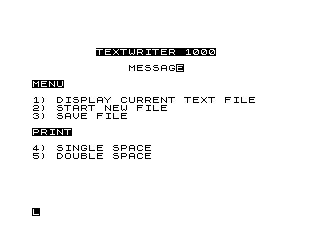
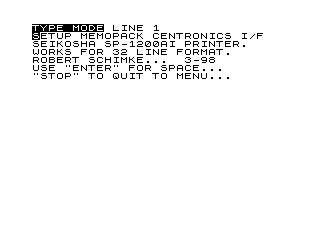
TEXTWRITER 1000 is a full-screen word processor that stores text in a two-dimensional string array B$(Z,32), where Z is the user-defined number of lines and each row holds up to 32 characters. The editor supports cursor movement, word-wrap at the right margin, a cut/copy/paste buffer using a second array M$, and tab stops stored in array E(5). Printing is handled via LPRINT with selectable single or double spacing, paginating automatically every 74 lines. An edit-command interpreter at line 1500 accepts two-letter codes (AL for insert lines, DL for delete lines, AC for append-compress, MP for paste, C for compact/reflow) entered at a prompt.
Program Analysis
Program Structure
The program is divided into clearly functional regions, navigated entirely by GOTO and GOSUB:
- Lines 10–113 — Initialisation and main menu (display, new file, save, print)
- Lines 115–140 — File dimension setup; allocates
B$(Z,32)andE(5) - Lines 145–660 — Main editing loop: keystroke dispatch, character entry, cursor movement, word-wrap, screen scrolling
- Lines 700–760 — Page-down (forward scroll by 21 lines)
- Lines 800–960 — Subroutines: restore character (800), header print (920), space/erase (940)
- Lines 1000–1050 — Page-up (backward scroll by 10 lines)
- Lines 1500–2930 — Edit-command interpreter and its operations (insert lines, delete lines, copy block, paste, compact/reflow)
- Lines 3000–3030 — Save routine
- Lines 4000–5010 — Tab-stop set and jump
- Lines 5500–5630 — LPRINT with single/double spacing and pagination
Data Structures
B$(Z,32)— Main text buffer; a 2-D string array with Z rows of 32 characters. Dimensioned at runtime after the user specifies the required number of lines.M$(C,32)— Cut/copy buffer; dimensioned on demand when a block-mark command is issued, holdingLL+1lines.E(5)— Numeric array storing up to 5 tab-stop column positions, set interactively.T$— File title, displayed centred in the menu header.Z$— Overflow accumulator for characters typed past column 32 (used during word-wrap).
Keystroke Dispatch
The editor reads keystrokes via PAUSE 50000 followed by INKEY$ at line 170. Character codes are checked numerically to distinguish printable from control characters. The dispatch table is:
| Code | Action |
|---|---|
| <64 | Printable character — stored in B$, cursor advances |
| 112 (p) | Move cursor up one line (with page-back if needed) |
| 114 (r) | Cursor left / delete (via subroutine 800 + 940) |
| 115 (s) | Re-print current cell (used as no-op / refresh) |
| 117 (u) | Enter edit-command mode (line 1500) |
| 118 (v) | Newline / ENTER — erase current cell and advance |
| 119 (w) | Delete character at cursor (space it out) |
| 121 (y) | Tab jump (if tab stops set) or newline |
| 224 | Set tab stop (line 4000) |
| 227 | Return to main menu (line 42) |
| 229 | Page down (line 700) |
Screen Editing and Cursor Representation
The current cursor position is shown by printing the character at (X, Y-1) in inverse video using CHR$ (CODE B$(W+X,Y)+128) at line 145. W is the window offset (which logical row is at the top of the screen), X is the screen row (1–21), and Y is the column (1–32). Restoring a cell to normal video is handled by subroutine 920/800 which re-prints B$(W+X,Y) without the +128 offset.
Word-Wrap at Column 33
When Y reaches 33 (line 175/500), the program switches to overflow-accumulation mode. Subsequent normal characters are appended to Z$. On a control keystroke, the current line is scanned right-to-left for the last space (line 550–560), the text from that point plus Z$ is moved to the next line (line 575), and the current line is truncated (line 580). This provides a basic word-wrap without requiring the user to manage line breaks manually.
Edit Command Language
Pressing the key with code 117 opens a two-letter command prompt. Commands are parsed at lines 1540–1590:
AL[n]— Insertnblank lines at cursor (default fromLL)DL[n]— Deletenlines at cursorAC— Append and compact: reflow text by joining short linesA[n]— Insertnspaces at cursor positionMP— Paste (mark-paste) the clipboard at cursorC— Compact: remove leading spaces and join continuation lines- Numeric string only — defines a block mark of that many lines into
M$
Cut/Copy Buffer
Marking a block (entering a number at the edit prompt) stores lines in M$(1..LL+1), dimensioned dynamically at line 2820. The variable LL holds the block size minus one; D and F record the first and last line numbers of the marked region, displayed in the header by subroutine 920 (line 925) when LL <> -1. LL is initialised to -1 at line 10 to signal “no buffer”.
Printing (LPRINT)
Lines 5500–5630 iterate from line LB to LE, calling LPRINT B$(I). Double-spacing adds a blank LPRINT after each line. A line counter LC triggers a form feed (five blank lines, line 5610) every 74 printed lines regardless of spacing mode. The page length of 74 is hardcoded.
Notable Techniques
- Dynamic DIM: Both
B$andM$are dimensioned at runtime with user-supplied or computed sizes, a practical approach to managing limited RAM. - Inverse cursor via +128: Adding 128 to a character code produces its inverse-video counterpart — a well-known ZX81/TS1000 display trick that avoids any machine code.
- Window scrolling with W offset: Logical line number is always
W+X; changingWby ±10 or ±21 and re-printing lines 1–21 provides smooth paging without moving data. - SLOW/FAST switching: The editor uses
SLOWfor display-intensive sections (printing the screen) andFASTduring computation-heavy operations like block moves, reducing flicker and improving speed respectively. - Tab stops in a numeric array: Storing up to 5 tab column positions in
E(5)and scanning them at line 4080 is a compact alternative to a string-based tab ruler.
Bugs and Anomalies
- Line 100 sets
W=LB-1unconditionally, but for the display option (menu choice 1) this is immediately overridden byGOTO 112beforeWis used, so the assignment is harmless but redundant. - At line 251, the check
IF W+X=Z THEN GOTO 145prevents moving past the last allocated line but does not display a warning to the user. - Line 4065 loops
J=1 TO 6butE(5)only has indices 1–5; accessingE(6)would cause an error, but the branch at line 4070 (IF J=6 THEN GOTO 230) fires before the subscript is evaluated, so it is safe in practice. - The compact/reflow routine at lines 2000–2190 uses
Yas both the starting column and a loop variable, which may leaveYin an unexpected state; line 2210 restores it from saved valueQ. - Line 595 checks
IF X=21 THEN GOTO 1020after a word-wrap to scroll down, but this scroll shiftsWby +10 and setsX=12rather than +1/X=21, which could misplace the cursor relative to the wrapped text.
Image Gallery

Source Code
  10 LET LL=-1
  20 DIM M$(1)
  30 LET Z$=""
  35 LET Y=1
  40 LET W=0
  42 SLOW
  45 CLS
  47 LET X=1
  50 PRINT AT 3,8;"%T%E%X%T%W%R%I%T%E%R% %1%0%0%0";AT 5,15-LEN T$/2;T$
  55 PRINT ,,"%M%E%N%U",,,,"1) DISPLAY CURRENT TEXT FILE","2) START NEW FILE","3) SAVE FILE",,,,"%P%R%I%N%T",,,,"4) SINGLE SPACE",,"5) DOUBLE SPACE"
  60 INPUT LN
  70 CLS
  80 IF LN=2 THEN GOTO 115
  85 IF LN=3 THEN GOTO 3000
  95 PRINT AT 18,0;"ENTER START LINE","LAST TEXT ON ";M;"(";Z;")"
  97 INPUT LB
 100 LET W=LB-1
 102 IF LN=1 THEN GOTO 112
 104 PRINT AT 18,6;"FINAL"
 106 INPUT LE
 110 GOTO 5500
 112 FAST
 113 CLS
 114 GOTO 610
 115 PAUSE 120
 117 LET M=0
 118 PRINT AT 20,0;"ENTER LINES REQUIRED"
 119 INPUT Z
 120 DIM B$(Z,32)
 122 CLS
 125 FAST
 130 GOSUB 920
 135 DIM E(5)
 137 LET ST=0
 140 FAST
 145 PRINT AT X,Y-1;CHR$ (CODE B$(W+X,Y)+128)
 160 PAUSE 50000
 170 LET A$=INKEY$
 175 IF Y=33 THEN GOTO 500
 180 IF CODE A$>63 THEN GOTO 310
 185 IF W+X>M THEN LET M=W+X
 190 LET B$(W+X,Y)=A$
 200 PRINT AT X,Y-1;B$(W+X,Y)
 210 LET Y=Y+1
 211 IF Y=33 THEN GOTO 970
 215 GOTO 145
 230 IF CODE A$=121 THEN GOSUB 800
 240 LET Y=1
 250 IF CODE A$=112 THEN LET X=X-2
 251 IF W+X=Z THEN GOTO 145
 252 LET X=X+1
 270 IF X>21 THEN GOTO 1020
 280 IF X<1 AND W>0 THEN GOTO 1000
 285 IF X>21 THEN LET X=21
 287 IF X<1 THEN LET X=1
 290 GOTO 145
 310 LET A=CODE A$
 315 IF A=117 THEN GOTO 1500
 320 IF A<114 THEN GOTO 900
 330 IF A=118 THEN GOTO 420
 340 IF A=115 THEN GOTO 200
 345 IF A=229 THEN GOTO 700
 350 IF A=227 THEN GOTO 42
 355 IF A=121 AND E(1)>1 THEN GOTO 4062
 360 IF A=121 THEN GOTO 230
 365 IF A=224 THEN GOTO 4000
 370 GOSUB 800
 375 IF A=119 THEN GOSUB 940
 380 LET Y=Y-1
 390 IF Y<1 THEN LET X=X-1
 400 IF Y<1 THEN LET Y=32
 410 GOTO 280
 420 GOSUB 940
 440 GOTO 210
 500 IF CODE A$>63 THEN GOTO 525
 510 LET Z$=Z$+A$
 515 IF X<21 THEN PRINT AT X+1,0;Z$
 520 GOTO 160
 525 IF Z$="" THEN GOTO 240
 528 LET T=W+X
 530 LET D$=B$(T)
 540 LET Y=Y-1
 550 IF D$(Y)=" " THEN GOTO 565
 560 GOTO 540
 565 LET YY=LEN (D$(Y+1 TO )+Z$)+2
 570 IF T=Z THEN GOTO 610
 575 LET B$(T+1, TO YY)=D$(Y+1 TO )+Z$
 580 LET B$(T,Y TO )=""
 590 LET Y=YY
 592 LET Z$=""
 593 PRINT AT X,0;B$(T)
 595 IF X=21 THEN GOTO 1020
 600 PRINT B$(T+1)
 605 GOTO 252
 610 LET O=21
 613 IF W+O>Z THEN GOSUB 760
 617 LET R=1
 618 IF A=117 AND W+O<>Z THEN LET R=X
 619 GOSUB 920
 620 PRINT AT R,0;
 621 IF A<>118 AND A<>121 THEN SLOW
 622 FOR J=R TO O
 625 PRINT B$(W+J)
 630 NEXT J
 660 GOTO 140
 700 IF W+22>Z THEN GOTO 160
 710 LET W=W+21
 720 LET X=1
 730 GOTO 610
 760 CLS
 770 LET O=Z-W
 780 RETURN
 800 PRINT AT X,Y-1;B$(W+X,Y)
 810 RETURN
 900 GOSUB 800
 910 GOTO 250
 920 PRINT AT 0,29;"   "
 922 PRINT AT 0,0;"%T%Y%P%E% %M%O%D%E LINE ";W+1;"             "
 925 IF LL<>-1 THEN PRINT AT 0,19;"M:";D;"-";F
 930 RETURN
 940 PRINT AT X,Y-1;" "
 950 LET B$(W+X,Y)=" "
 960 RETURN
 970 IF CODE A$=118 OR CODE A$=115 THEN GOTO 230
 980 GOTO 160
 1000 LET W=W-10
 1006 IF W<0 THEN LET W=0
 1008 LET X=10
 1010 GOTO 610
 1020 IF W>Z-21 THEN GOTO 140
 1025 LET W=W+10
 1030 LET X=12
 1050 GOTO 610
 1500 PRINT AT 0,0;"%E%D%I%T%:%E%N%T%E%R% %A%C%*%/%A%L%*%/%D%L%*%/%C%/%M%M%*%/%M%P% "
 1520 LET Q=Y
 1525 LET T=W+X
 1530 INPUT C$
 1540 IF C$="" THEN GOTO 610
 1545 IF C$="MP" THEN GOTO 2890
 1550 IF C$="C" THEN GOTO 2000
 1555 LET C=1
 1560 IF LEN C$>2 THEN LET C=VAL C$(3 TO )
 1570 IF C$( TO 2)="AL" THEN GOTO 2300
 1575 IF C$(1)="A" THEN GOTO 2520
 1580 IF C$(1)="D" THEN GOTO 2450
 1590 GOTO 2800
 2000 FOR L=Y TO 32
 2010 IF CODE B$(T,L)>0 THEN GOTO 2030
 2020 NEXT L
 2030 LET B$(T,Y TO )=B$(T,L TO )
 2040 FOR N=L-Y TO 31
 2050 IF CODE B$(T,32-N)>0 THEN GOTO 2070
 2060 NEXT N
 2065 GOTO 2080
 2070 IF B$(T,32-N)="-" THEN LET N=N+2
 2080 LET T=T+1
 2085 IF T>Z THEN GOTO 2210
 2090 IF B$(T,1)=" " THEN GOTO 2210
 2100 FOR Y=N TO 1 STEP -1
 2110 IF CODE B$(T,Y)=0 THEN GOTO 2150
 2120 NEXT Y
 2130 GOTO 2210
 2150 IF N=32 THEN LET N=33
 2160 LET B$(T-1,34-N TO )=B$(T, TO Y-1)
 2170 LET L=Y+1
 2180 LET Y=1
 2190 GOTO 2030
 2210 LET Y=Q
 2220 IF C$(1)="A" THEN GOTO 2580
 2230 GOTO 610
 2250 LET C=LL+1
 2300 IF Z-M<C THEN GOTO 1500
 2305 FOR J=M TO T STEP -1
 2310 LET B$(J+C)=B$(J)
 2320 NEXT J
 2330 FOR J=T TO T+C-1
 2340 LET B$(J)=""
 2345 NEXT J
 2350 LET M=M+C
 2355 IF C$(2)="L" THEN GOSUB 2400
 2360 IF C$="MP" THEN GOTO 2898
 2370 IF C$(2)<>"L" THEN GOTO 2610
 2380 GOTO 610
 2400 LET B$(T, TO Y-1)=B$(T+C, TO Y-1)
 2410 LET B$(T+C, TO Y-1)=""
 2420 RETURN
 2450 IF T+C>M+1 THEN LET C=M+1-T
 2455 FOR K=T TO M-C
 2480 LET B$(K)=B$(K+C)
 2490 NEXT K
 2495 FOR K=K TO M
 2500 LET B$(K)=""
 2505 NEXT K
 2508 LET M=M-C
 2510 GOTO 610
 2520 LET P=C
 2525 LET B=0
 2540 IF P>33-Y THEN LET P=33-Y
 2550 FOR J=33-P TO 32
 2560 IF B$(T,J)<>" " THEN GOTO 2700
 2570 NEXT J
 2580 LET T=W+X
 2583 IF B>0 THEN LET B$(T,Y+P TO )=B$(T,Y TO B-1)
 2584 IF B>0 THEN GOTO 2590
 2585 LET B$(T,Y+P TO )=B$(T,Y TO 32-P)
 2590 LET B$(T,Y TO Y+P-1)=""
 2600 GOTO 610
 2610 FOR B=33-P TO Y STEP -1
 2620 IF B$(T-1,B)=" " THEN GOTO 2640
 2630 NEXT B
 2640 LET B$(T)=B$(T-1,B+1 TO )
 2645 LET L=Y
 2650 GOTO 2040
 2700 LET T=T+1
 2710 LET C=1
 2720 GOTO 2305
 2800 LET LL=C-1
 2820 DIM M$(C,32)
 2825 LET D=T
 2827 IF LL<50 THEN SLOW
 2828 IF T+LL>Z THEN LET LL=Z-T
 2830 FOR J=0 TO LL
 2840 LET M$(J+1)=B$(T+J)
 2850 IF T+J-W<22 THEN PRINT AT T+J-W,0;CHR$ (CODE B$(T+J,1)+128)
 2870 NEXT J
 2872 LET F=T+LL
 2875 FAST
 2878 PRINT AT R,0;
 2880 GOTO 610
 2890 IF T+LL>Z THEN LET LL=Z-T
 2895 IF T<=M THEN GOTO 2250
 2898 FOR J=0 TO LL
 2900 LET B$(T+J)=M$(J+1)
 2920 NEXT J
 2925 IF T+LL>M THEN LET M=T+LL
 2930 GOTO 610
 3000 CLS
 3010 PRINT AT 10,5;"ENTER TITLE TO RECORD"
 3015 INPUT T$
 3018 CLS
 3020 SAVE T$
 3030 GOTO 30
 4000 IF Y=1 THEN GOTO 135
 4005 LET ST=ST+1
 4010 IF ST>5 THEN GOTO 4040
 4020 LET E(ST)=Y
 4030 GOTO 145
 4040 PRINT AT 0,19;"%5% %T%A%B%S% %M%A%X"
 4045 PAUSE 60
 4050 GOSUB 920
 4055 GOTO 160
 4062 GOSUB 800
 4065 FOR J=1 TO 6
 4070 IF J=6 THEN GOTO 230
 4080 IF Y<E(J) THEN GOTO 5000
 4090 NEXT J
 5000 LET Y=E(J)
 5010 GOTO 145
 5500 FAST
 5510 LET LF=1
 5520 IF LN=5 THEN LET LF=2
 5530 LET LC=0
 5540 FOR I=LB TO LE
 5550 LPRINT B$(I)
 5560 IF LN=5 THEN LPRINT
 5570 LET LC=LC+LF
 5580 IF LC=74 THEN GOSUB 5610
 5590 NEXT I
 5600 GOTO 42
 5610 LPRINT ,,,,
 5620 LET LC=0
 5630 RETURN
Note: Type-in program listings on this website use ZMAKEBAS notation for graphics characters.