
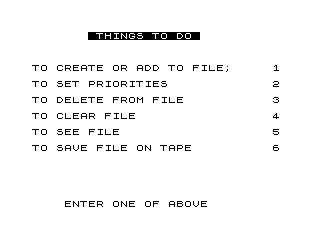
This program implements a simple to-do list manager, storing up to 22 items of up to 30 characters each in a two-dimensional string array. It presents a menu-driven interface with six options: adding items, setting priorities (reordering), deleting items, clearing the file (via RUN), viewing the file, and saving to tape. Priority setting works by prompting the user to re-enter items in desired order into a second array B$, then copying back to A$. The program uses POKE 16418 to control the system’s display mode flag and exploits INKEY$ key codes (29–34, corresponding to digits 1–6) for menu navigation, dispatching via GOTO VAL Y$*1000.
Program Structure
The program is organised around a central menu loop at line 100–380 that dispatches to one of six routines based on the user’s keypress. Each routine ends with GOTO 100 (or GOTO VAL "1"*1000 etc.) to return to the menu. The overall flow is:
- Initialisation (10–40): Sets FAST mode, dimensions both string arrays, initialises record counter
R1=0. - Menu (100–380): Displays six options, waits for a keypress in range 1–6, dispatches via computed
GOTO. - Routines at ×1000: Lines 1000, 2000, 3000, 4000, 5000, 6000 implement each menu option.
- Display subroutine (2500–2540): Shared CLS + list-print used by options 2, 3, and 5.
Data Storage
Two DIMed arrays are used:
| Variable | Size | Purpose |
|---|---|---|
A$(22,30) | 22 rows × 30 chars | Primary to-do list storage |
B$(22,30) | 22 rows × 30 chars | Temporary buffer during priority reordering |
The variable R1 tracks how many items have been entered. Items are 1-indexed; the maximum list length is 22 entries.
Menu Dispatch Technique
The menu waits for a keypress at line 330 with LET Y$=INKEY$ inside a loop. Line 340 validates that CODE Y$ is between 29 and 34, which correspond to the ZX81 character codes for digits 1 through 6. Line 380 then uses GOTO VAL Y$*1000, converting the digit character to an integer and multiplying by 1000 to reach the correct routine — a compact dispatch idiom that avoids a chain of IF statements.
POKE 16418 Usage
Address 16418 (CDFLAG / the “slow/fast” flag in ZX81 RAM) is manipulated directly:
POKE 16418,0at line300— switches the display mode before entering the SLOW input loop.POKE 16418,2at line370— restores the flag after menu selection, before dispatching.
This is used alongside the FAST/SLOW keywords to control display flickering and input responsiveness.
Priority Reordering (Option 2)
The reorder routine (lines 2000–2130) works as follows:
- Display current list via subroutine at
2500. - For each position
Ifrom 1 toR1, ask user to input a source indexA. - Copy
A$(A)intoB$(I)and blank outA$(A). - After all selections, copy
B$back toA$and clearB$.
This approach has a notable bug: if the user enters the same source index twice, the second pick will copy a blank string (since A$(A) was cleared at line 2040 on the first pick). There is also no bounds checking on the entered index A.
Delete Routine (Option 3)
Deletion at lines 3000–3070 shifts all elements from position A+1 downward by one, then decrements R1. This is a correct in-place array compaction. After deletion, it falls through to the view routine at 5000 rather than going directly back to the menu.
Clear and Save
Option 4 (4000) simply executes RUN, which reinitialises all variables and restarts the program — an efficient way to clear all data without explicit array-zeroing code. Option 6 (6000) uses INPUT F$ to obtain a filename, then SAVE F$ to write the program and all current variable data (including the list arrays) to tape.
Copy / Print Option
Lines 2120 and 5040 both implement the same pattern: PAUSE 40000 followed by IF INKEY$="Z" THEN COPY. This gives the user approximately 40 seconds to press Z to trigger a printer copy of the displayed list before returning to the menu.
Image Gallery
Source Code
  10 FAST
  20 DIM A$(22,30)
  30 DIM B$(22,30)
  40 LET R1=0
 100 FAST
 110 CLS
 120 PRINT AT 1,7;"% %T%H%I%N%G%S% %T%O% %D%O% "
 130 PRINT AT 5,0;"TO CREATE OR ADD TO FILE;";TAB 30;1
 140 PRINT AT 7,0;"TO SET PRIORITIES";TAB 30;2
 150 PRINT AT 9,0;"TO DELETE FROM FILE";TAB 30;3
 160 PRINT AT 11,0;"TO CLEAR FILE";TAB 30;4
 170 PRINT AT 13,0;"TO SEE FILE";TAB 30;5
 180 PRINT AT 15,0;"TO SAVE FILE ON TAPE";TAB 30;6
 300 POKE 16418,0
 310 SLOW
 320 PRINT AT 22,3;"% %E%N%T%E%R% %O%N%E% %O%F% %A%B%O%V%E% ";AT 22,3;" ENTER ONE OF ABOVE "
 330 LET Y$=INKEY$
 340 IF CODE Y$<29 OR CODE Y$>34 THEN GOTO 320
 350 FAST
 360 CLS
 370 POKE 16418,2
 380 GOTO VAL Y$*1000
 1000 PRINT AT 18,0;"ENTER ITEMS ONE BY ONE (30 CHAR.MAX. IF YOU  HAVE NO MORE TO    ENTER, JUST PRESS ENTER :::"
 1005 SLOW
 1010 FOR N=R1+1 TO 22
 1020 SCROLL
 1030 PRINT N;" ";
 1040 INPUT A$(N)
 1050 IF A$(N,1)=" " THEN GOTO 1100
 1060 PRINT A$(N)
 1070 NEXT N
 1100 LET R1=N-1
 1110 GOTO 100
 2000 FOR I=1 TO R1
 2010 GOSUB 2500
 2015 SLOW
 2020 INPUT A
 2025 FAST
 2030 LET B$(I)=A$(A)
 2040 LET A$(A)=""
 2050 NEXT I
 2060 FOR N=1 TO R1
 2070 LET A$(N)=B$(N)
 2080 LET B$(N)=""
 2090 NEXT N
 2100 GOSUB 2500
 2110 PAUSE 40000
 2120 IF INKEY$="Z" THEN COPY
 2130 GOTO 100
 2500 CLS
 2510 FOR N=1 TO R1
 2520 PRINT N;" ";A$(N)
 2530 NEXT N
 2540 RETURN
 3000 FAST
 3003 GOSUB 2500
 3005 SLOW
 3010 INPUT A
 3015 FAST
 3020 FOR N=A TO R1-1
 3030 LET A$(N)=A$(N+1)
 3040 NEXT N
 3050 LET R1=R1-1
 3060 CLS
 3070 GOTO 5000
 4000 RUN
 5000 GOSUB 2500
 5030 PAUSE 40000
 5040 IF INKEY$="Z" THEN COPY
 5050 GOTO 100
 6000 PRINT AT 10,0;"ENTER NAME OF FILE, PREPARE     RECORDER AND PRESS ENTER :::"
 6010 INPUT F$
 6020 SAVE F$
 6030 GOTO 100
 9998 SAVE "TT%D"
 9999 RUN
Note: Type-in program listings on this website use ZMAKEBAS notation for graphics characters.