
This collection consists of four interrelated BASIC programs forming a multi-part educational series called “Learning the 2068 Keyboard,” plus a turtle-graphics interpreter and a personal budget application. The keyboard tutorial (parts 1–4, saved as “ttype,” “keys2,” “keys3,” and “keys4”) teaches cursor modes, control keys, shifted number keys, and includes an interactive practice session that uses PEEK 23560 to read keypress codes and a 38-entry DATA array to validate user responses. Two User Defined Graphics characters are defined in each tutorial part by POKEing bitmaps into USR “a” and USR “b” memory locations. The turtle-graphics program implements a text-command interpreter supporting commands like “fd,” “rt,” “lf,” “mv,” and “dr,” storing up to 61 commands in a string array for playback with “go” and “do,” and uses ON ERR with PEEKs at system variables 23677–23678 to handle DRAW clipping at screen edges. The budget application uses a three-window menu system driven by a command dispatch table stored in array L, supports up to 40 named accounts each with monthly budget and actual figures across 12 months, and renders a bar graph using PLOT/DRAW with dynamic scaling.
Program Analysis
Overview and Program Structure
The listing contains six distinct BASIC programs. Four of them (“ttype,” “keys2,” “keys3,” “keys4”) form a serial keyboard tutorial that chains via tape LOAD. The fifth is a turtle-graphics command interpreter with its own edit/playback engine. The sixth is a multi-window personal budget application. Each program ends with a structured error-trap block at line 9900 and a SAVE at line 9999.
Keyboard Tutorial Series (ttype / keys2 / keys3 / keys4)
Parts 1–3 share the same skeleton: UDG setup at lines 20–101, a title screen at 1005, shared subroutine library at 2001–4570, and topic content in the 5000s or 6000s. The final topic section ends with a prompt offering either a review (GO TO the section start) or a tape LOAD of the next part.
Key shared subroutines across the tutorial parts:
2001– Draws a 16×16 square using four DRAW calls with alternating BEEP pitches controlled bypp2004/2007– “Press to continue” prompts that pick a random lowercase letter (r=INT(RND*25)+97) and loop at2008–2010until the correct key or “z” (triggers COPY) is pressed2012/2014– Flash CAPS SHIFT and SYMBOL SHIFT key indicators on the keyboard diagram2016– Screen clear with blue border/paper (INK 7: PAPER 1: BORDER 1: CLS)4001–4570– Draws a full keyboard diagram using PLOT/DRAW for the outline and a DATA-driven loop to label each key, iterating rows viaGO SUB 4555
UDG Definitions
Parts 1–3 define two UDGs. Part 3 adds three more (UDGs “c,” “d,” “e”). Each is defined by a RESTORE/READ/POKE loop targeting USR "x"+n. The bitmaps are:
| UDG | Description | Data |
|---|---|---|
| “a” | Diamond/rhombus shape | 0,0,60,255,126,60,24,0 |
| “b” | Solid rectangle with corner marks | 255,143,143,143,241,241,241,255 |
| “c” (part 3) | Upward-pointing arrow | 0,24,60,126,255,60,0,0 |
| “d” (part 3) | Left-pointing arrow | 8,24,60,124,124,60,24,8 |
| “e” (part 3) | Right-pointing arrow | 16,24,60,62,62,60,24,16 |
In the second listing (keys2), the POKE for UDG “a” is combined onto the READ line (25 READ a: POKE USR "a"+n,a) rather than split across lines 25 and 30, saving one line. Similarly, lines 82–83 and 3020–3050 are consolidated.
Practice Session (keys4)
The practice session at line 5000 is the most algorithmically complex part. It reads 38 entries into a two-dimensional array z(38,3) from DATA at line 9000, where each triplet represents the expected keycode(s) for a given item. A parallel string array s$(38,10) holds display names. The session uses POKE 23560,0 and PEEK 23560 to detect keypresses without INKEY$ polling lag — system variable 23560 (LAST K) is zeroed and then monitored.
Items with z(c,1)=14 require the user to enter extended mode first (keycode 14 is SYMBOL SHIFT + CAPS SHIFT). The branching logic:
- If
c>=34, branch to5500for keyword-mode items accepting either of two keycodes - If
z(c,1)=14and the pressed key is not 14, show “TRY EXTENDED MODE” message - If keycode matches
z(c,1)orz(c,2)/z(c,3)after entering extended mode, branch to8000(correct) - Otherwise branch to
8500(incorrect, with BEEP and flash)
A correct answer triggers the “starburst” animation subroutine at line 4000, which draws a multi-segment pattern eight times using GO SUB 4500 for random INK color changes.
Turtle Graphics Interpreter
This standalone program implements a Logo-like turtle system. The user types two-character commands at an INPUT LINE prompt; the program dispatches on the first two characters using FN l$(a$,2) (a DEF FN left-substring). Supported commands include:
| Command | Effect |
|---|---|
fdNNN | Draw forward by NNN pixels in current direction |
rtNNN / lfNNN | Turn right/left by NNN degrees |
mvNNN | Move without drawing, wrapping coordinates with modulo arithmetic |
drNNN | Set absolute angle |
icN / pcN / bcN | Set INK / PAPER / BORDER color |
nxNNN / nyNNN | Set home position X/Y |
inNNN | Set incremental step increment |
goN | Replay stored commands N times |
or | Return to home position |
sv / ns | Toggle saving of commands to the replay buffer |
ed | Open the command editor |
cp | COPY screen |
cl | Clear screen and reset position |
er | Erase all stored commands |
en | Exit (ON ERR RESET: STOP) |
The in command implements an incremental growth feature: each successive FD step adds in to the previous distance, enabling spiral drawing without re-entering commands. The go/do normalization at line 31 appends “1” if the bare word is entered, preventing a VAL error on an empty suffix.
Angle is maintained as a degree value, normalized by the loop at lines 300 and 2300 (IF ang+360>=360 THEN LET ang=ang-360: GO TO 300), and converted to radians via rang=ang/(180/PI) before each DRAW. DRAW uses a*(SIN rang), a*(COS rang) — note that Y maps to COS and X to SIN, giving a compass-bearing convention (0° = north).
The ON ERR handler at line 9000 catches DRAW clipping errors, reads the actual endpoint from system variables 23677–23678 (COORDS), computes the Euclidean error bb=SQR(tx*tx+ty*ty) relative to the intended draw start, subtracts it from a, and resumes with ON ERR CONTINUE, allowing drawing to wrap around the screen edge.
The command editor (line 3000) displays up to 21 stored commands per page, uses a filled-block cursor (\:: = █), and supports paging (“p”), top (“t”), change (“c”), and append (“a”) operations. The “en” command within the editor recalculates c by scanning for non-blank entries.
Line 5000 (PRINT CODE INKEY$;" ";: GO TO 5000) is an unreachable keycode display utility left in the listing — it can only be reached by a direct GO TO 5000 from the command line.
Budget Application
The budget program supports up to 40 named accounts (MAX=40), each storing budget and actual figures for 12 months in the three-dimensional array D(MAX+1,2,12). A synthetic “total” record occupies slot MAX+1 and is computed by GO SUB TOTAL (line 9700), which sums all non-empty accounts.
The menu system uses three “windows” rendered by subroutines at lines 1250, 1500, and 1750. The active window AW is highlighted with PAPER color AC=7; inactive windows use SC=5. Mode switching is encoded in array S(7) (return-to-parent modes) and command dispatch in array L(18) (target line numbers), both populated from DATA. Menu items are stored as single characters in M$(7,6) whose CODE values index into the C$ and L arrays — an indirect dispatch mechanism.
Navigation uses keys “5” (left/up) and “8” (right/down) — the cursor-key positions above those digit keys — plus ENTER (CHR$ 13) to select. The selected item is highlighted with FLASH and INVERSE at line 5110 before dispatch.
The bar graph subroutine (line 6400) draws budget bars in INK 1 (blue) and actual bars in INK 6 (yellow), auto-scales to the data range, and labels months with single characters from “JFMAMJJASOND”. Month axis labels are printed at row 21; Y-axis labels are computed at three points (0%, 50%, 100% of range).
The error handler at line 9000 uses a DATA table at line 9050 listing INPUT statement line numbers; if the error line matches one of these, ON ERR CONTINUE is executed, allowing the user to press ENTER to skip optional input fields. Lines 9080–9100 handle specific re-entry cases (e.g., invalid VAL input at 5780/5810 loops back to the prompt).
Line 3365 contains a stray NEXT I with no matching FOR — this is a structural anomaly that would cause a NEXT without FOR error if execution reaches it. In practice, GO SUB 3500 at line 3220 returns before 3365, so it is dead code, but its presence is a bug.
The subroutine at line 8800 writes a centered string into the display file at pixel row 20704 by directly POKEing character bitmap data — a manual blit that bypasses PRINT AT, used for the “COPY?” prompt overlay on the graph screen.
VAL “number” Optimization
The second keyboard tutorial listing (keys2) makes heavy use of VAL "number" in AT coordinates and DRAW arguments (e.g., PRINT AT VAL "17",VAL "0", DRAW VAL "16",VAL "0"). This is a standard memory optimization technique: storing a number as a string literal inside VAL occupies less memory than storing the tokenized floating-point number directly in the BASIC line.
ON ERR Usage
All programs make structured use of ON ERR. The tutorial parts use a three-line error recovery sequence: ON ERR RESET (line 9900), a PAUSE 100 (line 9910), ON ERR GO TO 9900 (line 9920), and ON ERR CONTINUE (line 9930) — forming a self-resetting trap that absorbs any error and attempts to continue execution. The turtle program uses ON ERR to implement DRAW boundary clipping recovery. The budget program uses ON ERR both for boundary clipping and to handle ENTER-to-skip INPUT behavior at specific known line numbers.
Image Gallery
Source Code
    1 RANDOMIZE 0: RESTORE
    2 ON ERR GO TO 9900
    9 GO SUB 2015: PRINT AT 11,10; FLASH 1;"STOP THE TAPE": PAUSE 200
   10 LET pp=20
   20 FOR n=0 TO 7
   25 READ a
   30 POKE USR "a"+n,a
   35 DATA 0,0,60,255,126,60,24,0
   75 NEXT n
   80 RESTORE 84
   81 FOR n=0 TO 7
   82 READ b
   83 POKE USR "b"+n,b
   84 DATA 255,143,143,143,241,241,241,255
  101 NEXT n
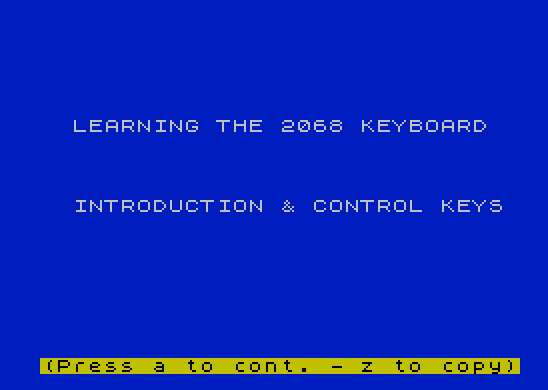
 1005 GO SUB 2015: PRINT AT 6,0;"   LEARNING THE 2068 KEYBOARD";AT 11,3;"INTRODUCTION & CONTROL KEYS": GO SUB 2003: GO TO 6000
 2001 DRAW 16,0: DRAW 0,-16: DRAW -16,0: DRAW 0,16: BEEP .01,pp: LET pp=ABS (pp-20): RETURN
 2004 LET r=INT (RND*25)+97: PRINT AT 21,1; PAPER 6; INK 0;"(Press   to cont. - z to copy)";AT 21,8;CHR$ r: GO TO 2008
 2007 LET r=INT (RND*25)+97: PRINT AT 0,1; PAPER 0; INK 5;"(Press   to cont. - z to copy)";AT 0,8;CHR$ r: GO TO 2008
 2008 IF INKEY$=CHR$ r THEN BEEP .05,2: BEEP .05,9: BEEP .06,20: RETURN
 2009 IF INKEY$="z" THEN COPY
 2010 GO TO 2008
 2012 FLASH 1: PRINT AT 17,0;"C ": PRINT AT 18,0;" S": PRINT AT 17,30;"C ": PRINT AT 18,30;" S": FLASH 0: RETURN
 2014 FLASH 1: PRINT AT 17,24;"S ": PRINT AT 18,24;" S": FLASH 0: RETURN
 2016 INK 7: PAPER 1: BORDER 1: CLS : RETURN
 2018 PAPER 1: INK 7: RETURN
 3020 PAPER 7: INK 0: PRINT AT y+1,x;"         ";AT y,x;"  RND    ";AT y+2,x;" T       "
 3050 PRINT AT y+3,x;"         ";AT y+4,x;"   RAND  ";AT y+5,x;"    >    ": PRINT AT y+7,x;"  MERGE  ";AT y+6,x;"         "
 3100 LET x1=x*8+7: LET y1=(21-y)*8-8: INK 0: PLOT x1,y1: DRAW 57,0: DRAW 0,-32: DRAW -57,0: DRAW 0,32: RETURN
 3520 GO SUB 2015: PRINT AT y-1,x; PAPER 0; INK 6;"  YELLOW "
 3525 PAPER 7: INK 0: PRINT AT y+1,x;"         ";AT y,x;"    a    ";AT y+2,x;" 6       ";AT y+4,x;"         "
 3560 PRINT AT y+3,x;"    b    ";AT y+5,x;"    &    ";AT y+7,x;"  MOVE   ";AT y+6,x;"         "
 3600 LET x1=x*8+7: LET y1=(21-y)*8-8: INK 0: PLOT x1,y1: DRAW 57,0: DRAW 0,-32: DRAW -57,0: DRAW 0,32: RETURN
 4001 PAPER 7: INK 0: BORDER 7: CLS : PRINT AT 13,29;"ENT";AT 14,29;"   ";AT 17,0;"C ";AT 18,0;" S";AT 17,24;"S ";AT 18,24;" S";AT 17,27;"B ";AT 18,27;" K";AT 17,30;"C ";AT 18,30;" S"
 4007 INK 0: PLOT 32,12: DRAW 192,0: DRAW 0,-8: DRAW -192,0: DRAW 0,8
 4008 PLOT 0,0: DRAW 255,0: DRAW 0,175: DRAW -255,0: DRAW 0,-175
 4009 PLOT 0,147: DRAW 255,0: PLOT 0,150: DRAW 255,0: PRINT AT 2,1;"TS 2068"
 4010 PLOT 1,136: GO SUB 2000: PRINT AT 5,0; OVER 1;"1"
 4012 LET p=9: LET q1=3: LET q2=5: LET y6=136: LET x6=23: RESTORE 4015: GO SUB 4555: GO TO 4020
 4015 DATA "2","3","4","5","6","7","8","9","0"
 4020 LET p=10: LET q1=1: LET q2=9: LET y6=104: LET x6=7: RESTORE 4025: GO SUB 4555: GO TO 4030
 4025 DATA "Q","W","E","R","T","Y","U","I","O","P"
 4030 LET p=9: LET q1=2: LET q2=13: LET y6=72: LET x6=15: RESTORE 4035: GO SUB 4555: GO TO 4040
 4035 DATA "A","S","D","F","G","H","J","K","L"
 4040 LET p=7: LET q1=3: LET q2=17: LET y6=40: LET x6=23: RESTORE 4045: GO SUB 4555: GO TO 4050
 4045 DATA "Z","X","C","V","B","N","M"
 4444 RETURN
 4555 FOR n=1 TO p
 4560 PLOT x6,y6: GO SUB 2000: READ k$: PRINT AT q2,q1;k$: LET q1=q1+3: LET x6=x6+24
 4565 NEXT n
 4570 RETURN
 6005 GO SUB 4000: LET a$="                               A quick glance at the TS 2068... and you will notice that the keyboard layout is like a typewriter...HOWEVER......  "
 6010 LET p=LEN a$
 6020 FOR i=1 TO p
 6025 LET z=i+29: IF z>=p THEN LET z=p
 6030 BEEP .005,22: PRINT AT 1,0; PAPER 0; INK 5;" ";a$(i TO z);" "
 6035 PAUSE 10
 6040 NEXT i
 6065 GO SUB 2015: PRINT ;" HOWEVER on closer examination. ..You'll notice how special the TS 2068 keys really are..."
 6070 PAUSE 200: LET x=11: LET y=5: GO SUB 3000: GO SUB 2017: PRINT AT 15,0;" Keys 0-9 and A-Z each have 6   possible tokens or symbols.     These tokens and symbols are    accessed through different      cursor modes and special shift  keys."
 6085 PAUSE 150: GO SUB 2003: GO SUB 2015: PRINT ;" Each cursor mode is representedby a flashing letter appearing  where the next keyboard entry   will be located. The TS 2068 hasfive cursor modes. They are:"
 6091 PRINT AT 6,8; FLASH 1;"K"; FLASH 0;"  Keyword mode"
 6092 PRINT AT 8,8; FLASH 1;"L"; FLASH 0;"  Letter mode"
 6093 PRINT AT 10,8; FLASH 1;"C"; FLASH 0;"  Capital mode"
 6094 PRINT AT 12,8; FLASH 1;"E"; FLASH 0;"  Extended mode"
 6095 PRINT AT 14,8; FLASH 1;"G"; FLASH 0;"  Graphics mode"
 6096 PRINT AT 16,1;"There are also two shift keys  used to access key functions.   They are the CAPS SHIFT key and the SYMBOL SHIFT key."
 6100 GO SUB 2003: PAPER 7: CLS : PRINT AT 11,8; INK 1;"THE CONTROL KEYS": PAUSE 200
 6115 GO SUB 2015: PRINT AT 11,9; INK 5; BRIGHT 1;"THE       KEY": PRINT AT 11,13; BRIGHT 1;"ENTER": PAUSE 200
 6120 GO SUB 4000: FLASH 1: PRINT AT 13,29;"ENT": PRINT AT 14,29;"   ": FLASH 0: GO SUB 2007
 6125 GO SUB 2015: PRINT AT 0,1;"The ENTER key when pressed,    signals the computer to either  enter in a program line or      execute a one line command."
 6130 PRINT AT 5,1;"Single line commands are       executable statements without   line numbers, they are executed immediatly upon pressing ENTER  such as:";,,; INK 6; BRIGHT 0;"         LET x=2+2:PRINT x"
 6135 PRINT AT 12,1;"...After pressing ENTER the     number 4 would be displayed."
 6140 PRINT AT 15,1;"Program lines (any line        beginning with a number) will   be entered in sequence upon     pressing ENTER."
 6145 GO SUB 2003: GO SUB 2015: PRINT AT 11,7; INK 5; BRIGHT 1;"THE            KEY": PRINT AT 11,11; BRIGHT 1;"CAPS SHIFT": PAUSE 200
 6150 GO SUB 4000: GO SUB 2011: GO SUB 2007
 6155 GO SUB 2015: PRINT AT 5,1;"Pressing CAPS SHIFT with a     letter will give you that       letter's capital.";,,,;" Pressing CAPS SHIFT and a digitwill give you the function      printed above that key.";,,,;" The CAPS SHIFT key is also usedto change cursor modes and to   generate inverse graphics       characters."
 6165 GO SUB 2003: GO SUB 2015: PRINT AT 11,6; INK 5; BRIGHT 1;"THE              KEY": PRINT AT 11,10; BRIGHT 1;"SYMBOL SHIFT": PAUSE 200: GO SUB 4000: GO SUB 2013: GO SUB 2007
 6170 GO SUB 2015: LET x=9: LET y=8: GO SUB 3000: PLOT 136,68: DRAW 9,0: INK 7: DRAW 20,0: GO SUB 2017
 6175 PRINT AT 13,20;"SYMBOL SHIFT"
 6180 PRINT AT 0,1;"The SYMBOL SHIFT key is used toaccess the tokens and symbols inthe inversed area on each key.  Pressing the SYMBOL SHIFT key   with the the sample key below   would display: >"
 6185 PRINT AT 17,1;"The SYMBOL SHIFT key is also   used in extended mode...            (see cursor mode section)": GO SUB 2003
 6190 GO SUB 2015: PRINT AT 11,9; BRIGHT 1; INK 5;"THE       KEY": PRINT AT 11,13; BRIGHT 1;"BREAK": PAUSE 200: GO SUB 4000
 6195 PRINT AT 17,27; FLASH 1;"B ": PRINT AT 18,27; FLASH 1;" K": GO SUB 2007
 6200 GO SUB 2015: PRINT AT 8,1;"To stop a BASIC program you    press the CAPS SHIFT key with   the BREAK key. This will stop   the program from executing its  next instruction."
 6205 PRINT AT 14,1;"To continue the program you    just press CONT on the C key.": GO SUB 2003
 6210 GO SUB 2015: PRINT AT 9,0;"THIS CONCLUDES THE INTRODUCTION AND FUNCTION KEYS REVIEW";AT 12,0;"PRESS r TO REVIEW THIS SECTION";AT 14,0;"PRESS 2 TO LOAD PART 2"
 6215 IF INKEY$="r" THEN GO TO 6000
 6220 IF INKEY$="2" THEN GO SUB 2015: PRINT AT 11,2;"START THE TAPE TO LOAD PART 2": LOAD "keys2"
 6225 GO TO 6215
 6999 STOP
 9900 ON ERR RESET
 9910 PAUSE 100
 9920 ON ERR GO TO 9900
 9930 ON ERR CONTINUE
 9999 SAVE "ttype" LINE 1


    1 RANDOMIZE 0: RESTORE
    2 ON ERR GO TO 9900
    9 GO SUB 2015: PRINT AT 11,10; FLASH 1;"STOP THE TAPE": PAUSE 200
   10 LET pp=20
   20 FOR n=0 TO 7
   25 READ a: POKE USR "a"+n,a
   35 DATA 0,0,60,255,126,60,24,0
   75 NEXT n
   80 RESTORE 84
   81 FOR n=0 TO 7
   83 READ b: POKE USR "b"+n,b
   84 DATA 255,143,143,143,241,241,241,255
  101 NEXT n
 1005 GO SUB 2015: PRINT AT VAL "5",VAL "0";"   LEARNING THE 2068 KEYBOARD";AT VAL "11",VAL "8";" CURSOR MODES": GO SUB 2003: GO TO 5000
 2001 DRAW VAL "16",VAL "0": DRAW VAL "0",VAL "-16": DRAW VAL "-16",VAL "0": DRAW VAL "0",VAL "16": BEEP .01,pp: LET pp=ABS (pp-20): RETURN
 2004 LET r=INT (RND*25)+97: PRINT AT VAL "21",VAL "1"; PAPER 6; INK 0;"(Press   to cont. - z to copy)";AT 21,8;CHR$ r: GO TO 2008
 2007 LET r=INT (RND*25)+97: PRINT AT VAL "0",VAL "1"; PAPER 0; INK 5;"(Press   to cont. - z to copy)";AT 0,8;CHR$ r: GO TO 2008
 2008 IF INKEY$=CHR$ r THEN BEEP .05,2: BEEP .05,9: BEEP .06,20: RETURN
 2009 IF INKEY$="z" THEN COPY
 2010 GO TO 2008
 2012 FLASH 1: PRINT AT VAL "17",VAL "0";"C ";AT VAL "18",VAL "0";" S";AT VAL "17",VAL "30";"C ";AT VAL "18",VAL "30";" S": FLASH 0: RETURN
 2014 FLASH 1: PRINT AT VAL "17",VAL "24";"S ";AT VAL "18",VAL "24";" S": FLASH 0: RETURN
 2016 INK 7: PAPER 1: BORDER 1: CLS : RETURN
 2018 PAPER 1: INK 7: RETURN
 3020 PAPER 7: INK 0: PRINT AT y+1,x;"         ";AT y,x;"  RND    ";AT y+2,x;" T       ";AT y+3,x;"         ";AT y+4,x;"   RAND  ";AT y+5,x;"    >    ";AT y+7,x;"  MERGE  ";AT y+6,x;"         "
 3100 LET x1=x*8+7: LET y1=(21-y)*8-8: INK 0: PLOT x1,y1: DRAW 57,0: DRAW 0,-32: DRAW -57,0: DRAW 0,32: RETURN
 3525 GO SUB 2015: PRINT AT y-1,x; PAPER 0; INK 6;"  YELLOW ": PAPER 7: INK 0: PRINT AT y+1,x;"         ";AT y,x;"    a    ";AT y+2,x;" 6       ";AT y+4,x;"         ";AT y+3,x;"    b    ";AT y+5,x;"    &    ";AT y+7,x;"  MOVE   ";AT y+6,x;"         "
 3600 LET x1=x*8+7: LET y1=(21-y)*8-8: INK 0: PLOT x1,y1: DRAW 57,0: DRAW 0,-32: DRAW -57,0: DRAW 0,32: RETURN
 4001 PAPER 7: INK 0: BORDER 7: CLS
 4002 PRINT AT VAL "13",VAL "29";"ENT";AT VAL "14",VAL "29";"::::::"
 4003 PRINT AT VAL "17",VAL "0";"C::";AT VAL "18",VAL "0";" S"
 4004 PRINT AT VAL "17",VAL "24";"S ";AT VAL "18",VAL "24";"::S"
 4005 PRINT AT VAL "17",VAL "27";"B::";AT VAL "18",VAL "27";"::K"
 4006 PRINT AT VAL "17",VAL "30";"C ";AT VAL "18",VAL "30";" S"
 4007 INK 0: PLOT VAL "32",VAL "12": DRAW VAL "192",VAL "0": DRAW VAL "0",VAL "-8": DRAW VAL "-192",VAL "0": DRAW VAL "0",VAL "8"
 4008 PLOT 0,0: DRAW 255,0: DRAW 0,175: DRAW -255,0: DRAW 0,-175
 4009 PLOT 0,147: DRAW 255,0: PLOT 0,150: DRAW 255,0: PRINT AT 2,1;"TS 2068"
 4010 PLOT 1,136: GO SUB 2000: PRINT AT 5,0; OVER 1;"1"
 4012 LET p=9: LET q1=3: LET q2=5: LET y6=136: LET x6=23: RESTORE 4015: GO SUB 4555: GO TO 4020
 4015 DATA "2","3","4","5","6","7","8","9","0"
 4020 LET p=10: LET q1=1: LET q2=9: LET y6=104: LET x6=7: RESTORE 4025: GO SUB 4555: GO TO 4030
 4025 DATA "Q","W","E","R","T","Y","U","I","O","P"
 4030 LET p=9: LET q1=2: LET q2=13: LET y6=72: LET x6=15: RESTORE 4035: GO SUB 4555: GO TO 4040
 4035 DATA "A","S","D","F","G","H","J","K","L"
 4040 LET p=7: LET q1=3: LET q2=17: LET y6=40: LET x6=23: RESTORE 4045: GO SUB 4555: GO TO 4050
 4045 DATA "Z","X","C","V","B","N","M"
 4050 RETURN
 4555 FOR n=1 TO p
 4560 PLOT x6,y6: GO SUB 2000: READ k$: PRINT AT q2,q1;k$: LET q1=q1+3: LET x6=x6+24
 4565 NEXT n
 4570 RETURN
 5010 GO SUB 2015: PRINT AT 7,1;"When you first turn on your    TS 2068 you will be in Keyword  mode. The cursor will look like  this: "; FLASH 1;"K": GO SUB 2003
 5015 GO SUB 2015: PRINT ;" Keyword mode allows you to     enter either numbers on keys 0-9or the keyword commands on keys A-Z. On the sample key you will notice the keyword for the      letter T is RAND."
 5023 LET y=8: LET x=11: GO SUB 3000: PRINT AT 12,14; FLASH 1;"RAND": PLOT 144,72: DRAW 16,8: INK 7: DRAW 16,8: PRINT AT 10,22; PAPER 1; INK 7;"KEYWORD"
 5025 GO SUB 2017: PRINT AT 17,1;"Whenever the cursor is in      keyword mode pressing letters   A-Z will produce that key's     keyword.": GO SUB 2003
 5035 GO SUB 2015: PRINT AT 0,1;"After inserting a keyword the  TS 2068 will change into letter mode, with a flashing "; FLASH 1;"L"; FLASH 0;" cursor."
 5046 LET y=7: LET x=11: GO SUB 3000: GO SUB 2017: PRINT AT 7,0;"Lower case": PRINT AT 8,0;"Letter"
 5050 PLOT 92,100: INK 0: DRAW -5,4: INK 7: DRAW -14,3: GO SUB 2017: PRINT AT 17,1;"Pressing the sample key would  display t.": GO SUB 2003
 5060 GO SUB 2015: PRINT AT 5,1;"Although capital letters are   marked on the keys, to display  them you have to hold down the  CAPS SHIFT key and press the    desired key."
 5061 PRINT AT 11,1; "There are two CAPS SHIFT keys  on your keyboard, just like a   typewriter."
 5063 GO SUB 2003: GO SUB 4000: GO SUB 2011: GO SUB 2007: GO SUB 2015
 5065 PRINT AT 5,1;"All letter keys can be used    with the CAPS SHIFT key. To     display only capitals there is  a CAPS LOCK key that changes    letter mode into capital mode."
 5070 PRINT AT 11,1;"Capital mode is entered by     pressing the CAPS SHIFT key     with the CAPS LOCK key.         (CAPS LOCK is above the #2 key)"
 5071 GO SUB 2003: GO SUB 4000: GO SUB 2011: FLASH 1: PRINT AT 5,3;"2 ": PRINT AT 6,3;"  ": FLASH 0: PRINT AT 4,2;"CAPS LOCK": GO SUB 2007
 5075 GO SUB 2015: PRINT AT 7,1;"In capital mode the cursor     looks like this "; FLASH 1;"C"; FLASH 0;".";,,,;" To return to letter mode press CAPS SHIFT and the CAPS LOCK    key again."
 5085 GO SUB 2003: GO SUB 2015: PRINT AT 4,1;"Extended mode allows you to    access two different symbols    or words on keys A-Z. Extended  mode is displayed with a        flashing "; FLASH 1;"E"; FLASH 0;" cursor."
 5086 REM PRINT AT 7,1;"Although they both show the    flashing E cursor exteded mode  works like upper and lower case,having two possible displays."
 5090 PRINT AT 10,1;"To enter extended mode you use both the SYMBOL and CAPS SHIFT  keys. Hold down the CAPS SHIFT  key and press the SYMBOL SHIFT  key. The cursor will be changed to a flashing "; FLASH 1;"E"; FLASH 0;" to signify      extended mode."
 5095 GO SUB 2003: GO SUB 4000: GO SUB 2011: GO SUB 2013: GO SUB 2007
 5105 GO SUB 2015: LET x=11: LET y=7: GO SUB 3000: GO SUB 2017: PRINT AT 1,0;" On the sample key below, the   two flashing tokens can be      accessed through extended mode."
 5110 PAUSE 60: FLASH 1: PRINT AT y,x+2;"RND": PRINT AT y+7,x+2;"MERGE": FLASH 0: PRINT AT 16,0;" The token RND is accessed in   unshifted extended mode.        The token MERGE is accessed in  shifted extended mode.": GO SUB 2003
 5115 GO SUB 2015: LET y=5: GO SUB 3000: GO SUB 2017: PRINT AT 1,1; "Pressing a CAPS SHIFT key with the SYMBOL SHIFT key will changethe cursor to extended mode.": PRINT AT 14,1;"Once in extended mode pressing any key A-Z will display the    token located above the key.    In unshifted extended mode the  sample key would display the    token RND."
 5125 PRINT AT y,x+2; FLASH 1;"RND": GO SUB 2004: GO SUB 2015: LET y=7: GO SUB 3000: GO SUB 2018: PRINT AT 14,13; FLASH 1;"MERGE": GO SUB 2017: PRINT AT 0,1;"Once in extended mode to       display the shifted tokens or   symbols located below the keys, you would depress either shift  key (SYMBOL or CAPS) with the   desired key."
 5130 PRINT AT 16,1;"To display the token MERGE     at the flashing E cursor you    would depress either key with   the letter T."
 5140 GO SUB 2003: GO SUB 2015: LET y=8: GO SUB 3500: GO SUB 2018: PRINT AT 0,1;"Graphics mode is entered by    holding down a CAPS SHIFT key   and pressing GRAPHICS.          (GRAPHICS is above the #9 key)   Upon entering graphics mode    the cursor will change to a     flashing "; FLASH 1;"G"; FLASH 0
 5145 PRINT AT 17,1;"Graphics mode allows you to    access the graphics characters  on keys 1-8."
 5150 GO SUB 2003: GO SUB 4000: GO SUB 2011: PRINT AT 4,21;"GRAPHICS": FLASH 1: PRINT AT 5,24;"9 ": PRINT AT 6,24;"  ": FLASH 0
 5155 GO SUB 2007: LET y=7: GO SUB 3500: GO SUB 2017: PRINT AT 0,1;"After entering graphics mode,  pressing keys 1-8 will display  the graphics character on that  key.",,"  (light areas are the ink)"
 5156 PRINT AT 17,1;"The sample key above will      display '. in unshifted graphics mode."
 5160 GO SUB 2003: GO SUB 2015: LET y=8: GO SUB 3500: GO SUB 2017: PRINT AT 0,1;"To get inversed graphics       characters while in graphics    mode, press a CAPS SHIFT key    with the graphics character.    In shifted graphics mode the    sample key would display: .'"
 5165 PRINT AT 17,1;"Graphics mode is also used for user defined graphics... please see your manual.": GO SUB 2003
 5170 GO SUB 2015: PRINT AT 9,2;"THIS CONCLUDES THE SECTION ON   CURSOR MODES...";AT 13,0;"PRESS r TO REVIEW THIS SECTION";AT 15,0;"PRESS 3 TO LOAD PART 3"
 5175 IF INKEY$="r" THEN GO TO 5000
 5180 IF INKEY$="3" THEN GO SUB 2015: PRINT AT 11,1;"START THE TAPE TO LOAD PART 3": LOAD "keys3"
 5185 GO TO 5175
 9900 ON ERR RESET
 9910 PAUSE 100
 9920 ON ERR GO TO 9900
 9930 ON ERR CONTINUE
 9999 SAVE "keys2" LINE 1


    1 RANDOMIZE 0: RESTORE
    2 ON ERR GO TO 9900
    8 RESTORE
    9 GO SUB 2015: PRINT AT 11,10; FLASH 1;"STOP THE TAPE": PAUSE 200
   10 LET pp=20
   20 FOR n=0 TO 7
   25 READ a
   30 POKE USR "a"+n,a
   35 DATA 0,0,60,255,126,60,24,0
   75 NEXT n
   80 RESTORE 84
   81 FOR n=0 TO 7
   82 READ b
   83 POKE USR "b"+n,b
   84 DATA 255,143,143,143,241,241,241,255
  101 NEXT n
  102 RESTORE 105
  103 FOR n=0 TO 7
  104 READ c: POKE USR "c"+n,c
  105 DATA 0,24,60,126,255,60,0,0
  106 NEXT n
  107 RESTORE 110
  108 FOR n=0 TO 7
  109 READ d: POKE USR "d"+n,d
  110 DATA 8,24,60,124,124,60,24,8
  111 NEXT n
  112 RESTORE 115
  113 FOR n=0 TO 7
  114 READ e: POKE USR "e"+n,e
  115 DATA 16,24,60,62,62,60,24,16
  116 NEXT n
 1005 GO SUB 2015: PRINT AT 6,0;"   LEARNING THE 2068 KEYBOARD";AT 12,6;"SHIFTED NUMBER KEYS": GO SUB 2003: GO TO 6000
 2001 DRAW 16,0: DRAW 0,-16: DRAW -16,0: DRAW 0,16: BEEP .01,pp: LET pp=ABS (pp-20): RETURN
 2004 LET r=INT (RND*25)+97: PRINT AT 21,1; PAPER 6; INK 0;"(Press   to cont. - z to copy)";AT 21,8;CHR$ r: GO TO 2008
 2007 LET r=INT (RND*25)+97: PRINT AT 0,1; PAPER 0; INK 5;"(Press   to cont. - z to copy)";AT 0,8;CHR$ r: GO TO 2008
 2008 IF INKEY$=CHR$ r THEN BEEP .05,2: BEEP .05,9: BEEP .06,20: RETURN
 2009 IF INKEY$="z" THEN COPY
 2010 GO TO 2008
 2012 FLASH 1: PRINT AT 17,0;"C ": PRINT AT 18,0;" S": PRINT AT 17,30;"C ": PRINT AT 18,30;" S": FLASH 0: RETURN
 2016 INK 7: PAPER 1: BORDER 1: CLS : RETURN
 2018 PAPER 1: INK 7: RETURN
 4001 PAPER 7: INK 0: BORDER 7: CLS : PRINT AT 13,29;"ENT";AT 14,29;"   ";AT 17,0;"C ";AT 18,0;" S";AT 17,24;"S ";AT 18,24;" S";AT 17,27;"B ";AT 18,27;" K";AT 17,30;"C ";AT 18,30;" S"
 4007 INK 0: PLOT 32,12: DRAW 192,0: DRAW 0,-8: DRAW -192,0: DRAW 0,8
 4008 PLOT 0,0: DRAW 255,0: DRAW 0,175: DRAW -255,0: DRAW 0,-175
 4009 PLOT 0,147: DRAW 255,0: PLOT 0,150: DRAW 255,0: PRINT AT 2,1;"TS 2068"
 4010 PLOT 1,136: GO SUB 2000: PRINT AT 5,0; OVER 1;"1"
 4012 LET p=9: LET q1=3: LET q2=5: LET y6=136: LET x6=23: RESTORE 4015: GO SUB 4555: GO TO 4020
 4015 DATA "2","3","4","5","6","7","8","9","0"
 4020 LET p=10: LET q1=1: LET q2=9: LET y6=104: LET x6=7: RESTORE 4025: GO SUB 4555: GO TO 4030
 4025 DATA "Q","W","E","R","T","Y","U","I","O","P"
 4030 LET p=9: LET q1=2: LET q2=13: LET y6=72: LET x6=15: RESTORE 4035: GO SUB 4555: GO TO 4040
 4035 DATA "A","S","D","F","G","H","J","K","L"
 4040 LET p=7: LET q1=3: LET q2=17: LET y6=40: LET x6=23: RESTORE 4045: GO SUB 4555: GO TO 4050
 4045 DATA "Z","X","C","V","B","N","M"
 4444 RETURN
 4555 FOR n=1 TO p
 4560 PLOT x6,y6: GO SUB 2000: READ k$: PRINT AT q2,q1;k$: LET q1=q1+3: LET x6=x6+24
 4565 NEXT n
 4570 RETURN
 6206 PAPER 7: INK 1: CLS : PRINT AT 11,3;"CAPS SHIFTED NUMBER KEYS": PAUSE 200
 6210 GO SUB 2015: PRINT AT 11,0; INK 5; BRIGHT 1;"THE "; INK 7;"TRUE VIDEO "; INK 5;"& "; INK 7;"INV. VIDEO"; INK 5;" KEYS": PAUSE 200
 6215 GO SUB 4000: PRINT AT 4,6; FLASH 1;"TV"; FLASH 0;" "; FLASH 1;"IV": GO SUB 2011: GO SUB 2007
 6220 GO SUB 2015: PRINT AT 1,1;"The TRUE VIDEO and INVERSE     VIDEO keys can be thought of as on/off switches for the inverse video function."
 6225 PRINT AT 6,1;"Pressing CAPS SHIFT with the   INV. VIDEO key (above #4) will  display all entries in inverse. To stop the inverse display     press CAPS SHIFT with the TRUE  VIDEO key (above #3)."
 6230 PRINT AT 14,0;"inverse on  =  CAPS SHIFT": PRINT AT 18,0;"inverse off =  CAPS SHIFT"
 6235 PRINT AT 15,15;"INV. VIDEO (#4)";AT 19,15;"TRUE VIDEO (#3)": GO SUB 2003
 6240 GO SUB 2015: PRINT AT 11,10; INK 5; BRIGHT 1;"THE      KEY": PRINT AT 11,14; INK 7; BRIGHT 1;"EDIT": PAUSE 200: GO SUB 4000
 6245 GO SUB 2011: PRINT AT 4,0; OVER 1; FLASH 1;"EDIT": GO SUB 2007
 6250 GO SUB 2015: PRINT AT 6,1;"If any changes are needed to anexisting program line the EDIT  key is used to access that line.";AT 10,0;" Pressing the CAPS SHIFT key    with the EDIT key will bring    the cursor line to the bottom   of the screen. After the line   has been modified pressing ENTERwill return the line."
 6260 GO SUB 2003: GO SUB 2015: PRINT AT 11,8; INK 5; BRIGHT 1;"THE "; INK 7;"ARROW "; INK 5;"KEYS": PAUSE 200: GO SUB 4000
 6265 GO SUB 2011: PRINT AT 4,13; FLASH 1;"d";AT 4,16;"a";AT 4,19;"c";AT 4,22;"e": GO SUB 2007:
 6270 GO SUB 2015: PRINT AT 6,1;"The arrow keys located above   keys 5,6,7, and 8 are cursor    control keys.";AT 10,1;"The up and down ( keys 6 & 7 ) arrow keys are used to locate a program line. The left and rightarrow keys (keys 5 & 8 ) are    used to move the cursor while   editing a line.": GO SUB 2003
 6275 GO SUB 2015: PRINT AT 11,8; INK 5; BRIGHT 1;"THE "; INK 7;"DELETE "; INK 5;"KEY": PAUSE 200: GO SUB 4000: GO SUB 2011: PRINT AT 4,26; FLASH 1;"DELETE": GO SUB 2007: GO SUB 2015
 6280 PRINT AT 7,1;"The DELETE key has two         functions. In K mode, it is usedto delete a series of lines,    otherwise, it deletes the token to the left of the cursor.",,," To delete a sequence of tokens,hold down the DELETE key."
 6299 GO SUB 2003
 6300 GO SUB 2015: PRINT AT 9,1;"THIS CONCLUDES THE SECTION ON     THE SHIFTED NUMBER KEYS": PAUSE 170
 6305 GO SUB 2015: PRINT AT 7,1;"FOR FURTHER INFORMATION ON THE  TS 2068 KEYBOARD PLEASE SEE     YOUR MANUAL.";AT 11,0;"PRESS r TO REVIEW THE SHIFTED           NUMBER KEYS";AT 14,0;"PRESS p TO START THE PRACTICE           SESSION"
 6310 IF INKEY$="r" THEN GO TO 6000
 6315 IF INKEY$="p" THEN GO SUB 2015: PRINT AT 11,1;"START THE TAPE TO LOAD THE";AT 12,7;"PRACTICE SESSION": LOAD "keys4"
 6320 GO TO 6310
 9900 ON ERR RESET
 9910 PAUSE 100
 9920 ON ERR GO TO 9900
 9930 ON ERR CONTINUE
 9999 SAVE "keys3" LINE 1


    1 RANDOMIZE 0: RESTORE 0: ON ERR GO TO 9900
    2 GO SUB 2015: PRINT AT 11,10; FLASH 1;"STOP THE TAPE": PAUSE 200
  200 GO SUB 7000
 1005 GO SUB 2015: PRINT AT 6,0;"   LEARNING THE 2068 KEYBOARD";AT 12,6;"THE PRACTICE SESSION": GO SUB 2003
 1010 PAPER 7: BORDER 1: INK 1: CLS : PRINT AT 11,2;"TO STOP THE PRACTICE SESSION              PRESS x": PAUSE 200: GO TO 5000
 2004 PRINT AT 21,7; PAPER 6; INK 0;"(Press c to cont.)": GO TO 2008
 2008 IF INKEY$="c" THEN BEEP .05,2: BEEP .05,9: BEEP .06,20: RETURN
 2010 GO TO 2008
 2016 INK 7: PAPER 1: BORDER 1: CLS : RETURN
 3999 STOP
 4000 REM
 4005 FOR x=1 TO 8
 4006 PRINT AT 9,12;"CORRECT"
 4010 GO SUB 4500: PLOT 126,165: DRAW 17,-50: GO SUB 4500: DRAW 52,0: GO SUB 4500: DRAW -43,-31: GO SUB 4500
 4015 DRAW 16,-50: GO SUB 4500: DRAW -43,30: GO SUB 4500: DRAW -43,-31: GO SUB 4500: DRAW 16,52: GO SUB 4500: DRAW -43,30: GO SUB 4500: DRAW 52,0: GO SUB 4500: DRAW 18,50
 4020 NEXT x
 4444 RETURN
 4500 LET oo=INT (RND*6)+2: INK oo: RETURN
 4999 STOP
 5000 REM do practice session
 5002 GO SUB 7400
 5005 GO SUB 6000: PRINT AT 3,5; INK 6; BRIGHT 0;"CURRENT CURSOR MODE"
 5007 IF c<=33 THEN PRINT AT 3,25; FLASH 1;"L"
 5008 IF c>=34 THEN PRINT AT 3,25; FLASH 1;"K"
 5010 PRINT AT 11,10;" PRESS   ";s$(c): POKE 23560,0
 5015 LET r=PEEK 23560: POKE 23560,0: IF r=0 THEN GO TO 5015
 5016 IF r=CODE "x" THEN GO TO 5900
 5019 IF c>=34 THEN GO TO 5500
 5020 IF NOT (z(c,1)=14 AND r<>14) THEN GO TO 5023
 5021 PRINT AT 11,10; INK 7; PAPER 2;" TRY EXTENDED MODE ": FOR x=0 TO 300: NEXT x
 5022 PRINT AT 11,10;"                   ": GO TO 5010
 5023 IF r=14 AND z(c,1)=14 THEN GO TO 5100
 5025 IF z(c,1)=r THEN GO TO 8000
 5030 GO TO 8500
 5100 PRINT AT 3,25; FLASH 1;"E": LET r=PEEK 23560: IF r=0 THEN GO TO 5100
 5102 IF r=z(c,2) THEN GO TO 8000
 5103 IF r=z(c,3) THEN GO TO 8000
 5105 GO TO 5030
 5500 IF r=z(c,1) OR r=z(c,2) THEN GO TO 8000
 5505 GO TO 5030
 5990 GO SUB 2015: PRINT AT 7,1;"FOR FUTHER INFORMATION ON THE  TS 2068 KEYBOARD PLEASE SEE YOURMANUAL.";AT 12,0;"PRESS r TO REVIEW THE PRACTICE          SESSION";AT 15,0;"PRESS s TO STOP"
 5991 IF INKEY$="r" THEN GO TO 5000
 5993 IF INKEY$="s" THEN ON ERR RESET : STOP
 5998 GO TO 5991
 6000 BORDER 1: PAPER 1: INK 7: CLS : REM PAPER 1: INK 7: BORDER 7: CLS : PLOT 0,0: DRAW 0,175: DRAW 255,0: DRAW 0,-175: DRAW -255,0
 6001 BRIGHT 0
 6005 LET y=1: PRINT AT 0,0;":'' ' ' ' ' ' ' ' ' ' ' ' ' ' ' ' ' ' ' ' ' ' ' ' ' ' ' ' ' ' ':"
 6010 FOR n=1 TO 20
 6016 PRINT AT y,0;"' ";AT y,31;" '"
 6017 LET y=y+1
 6020 NEXT n
 6025 PRINT AT 21,0;":. . . . . . . . . . . . . . . . . . . . . . . . . . . . . . ..:": INK 7
 6066 RETURN
 7004 RESTORE 9000
 7005 DIM z(38,3)
 7010 FOR b=1 TO 38
 7015 READ d: LET z(b,1)=d
 7020 READ d: LET z(b,2)=d
 7021 READ d: LET z(b,3)=d
 7025 NEXT b
 7030 RESTORE 9010
 7035 DIM s$(38,10)
 7040 FOR b=1 TO 38
 7045 READ d$: LET s$(b)=d$
 7050 NEXT b
 7055 RETURN
 7405 LET c=INT (RND*38)+1
 7415 RETURN
 8000 CLS : GO SUB 4000: GO TO 5000
 8505 GO SUB 2015: PRINT AT 11,11; PAPER 2; FLASH 1;"INCORRECT";AT 13,10;" TRY AGAIN ": BEEP .50,-10: BEEP 1,-20: PAUSE 60: PRINT AT 13,10;"              ";AT 11,8;"            ": GO TO 5005
 9000 DATA 7,0,0,6,0,0,4,0,0,5,0,0,15,0,0,90,0,0,74,0,0,82,0,0,83,0,0,86,0,0,97,0,0,98,0,0,107,0,0,105,0,0,113,0,0,50,0,0,53,0,0,56,0,0,59,0,0,35,0,0,46,0,0,199,0,0,43,0,0,14,42,66,14,94,72,14,96,88,14,60,82,14,59,79,14,111,0,14,97,0,14,99,0,14,116,0,14,106,0,111,79,0,102,70,0,115,83,0,112,80,0,106,74,0
 9010 DATA "EDIT","CAPS LOCK","TRUE VIDEO","INV. VIDEO","GRAPHICS","Z","J","R","S","V","a","b","k","i","q","2","5","8",";","#",".","<=","+","BRIGHT","CIRCLE","INK","VERIFY","OUT","PEEK","READ","LPRINT","RND","VAL","POKE","FOR","SAVE","PRINT","LOAD"
 9900 ON ERR RESET
 9910 PAUSE 100
 9920 ON ERR GO TO 9900
 9930 ON ERR CONTINUE
 9999 SAVE "keys4" LINE 1


    1 BORDER 1: PAPER 0: INK 7: CLS : PRINT AT 10,8;" STOP THE TAPE ": PRINT AT 21,4;"PRESS ANY KEY TO CONTINUE": PAUSE 0
    2 DEF FN l$(b$,n)=b$( TO n)
    3 DEF FN r$(b$,n)=b$(n TO )
    4 DEF FN t$(b$)=b$(3 TO )
    5 ON ERR GO TO 9000
    6 DIM c$(61,7)
    7 LET iaa=0: LET sv=1
    8 LET nx=127: LET ny=87
    9 LET c=0
   10 CLS : LET x=nx: LET y=ny
   11 DEF FN m$(b$,n,m)=b$(n TO m)
   12 LET ang=0: LET rang=ang/(180/PI)
   13 LET ia=0: LET in=0
   15 PLOT x,y
   30 ON ERR GO TO 9000: INPUT LINE a$: IF LEN a$<=1 THEN GO TO 30
   31 IF a$="do" OR a$="go" THEN LET a$=a$+"1"
   32 IF FN l$(a$,2)="go" OR FN l$(a$,2)="do" THEN GO TO 1000
   33 IF a$="sv" THEN LET c=c-1: LET sv=1: GO TO 30
   34 IF a$="ns" THEN LET c=c+1: LET sv=0: GO TO 30
   36 IF a$="or" THEN PLOT OVER 1;x,y: LET x=nx: LET y=ny: GO SUB 300: GO TO 15
   37 IF a$="cp" THEN COPY : GO TO 30
   38 IF a$="ed" THEN GO SUB 3000
   39 IF a$="pg" THEN FOR j=1 TO c: LPRINT c$(j): NEXT j: GO TO 30
   40 IF a$="cl" THEN CLS : GO TO 10
   41 IF a$="er" THEN LET c=0: DIM c$(61,7): GO TO 30
   42 IF a$="en" THEN ON ERR RESET : STOP
   43 IF LEN a$<=2 THEN BEEP .15,30: GO TO 30
   44 GO SUB 45: GO TO 30
   45 IF FN m$(a$,3,3)>"9" AND FN m$(a$,3,3)<>"RND" THEN BEEP .15,30: RETURN
   50 LET a=VAL (FN t$(a$))
   60 IF FN l$(a$,2)="rt" THEN LET ang=ang+a: GO TO 300
   70 IF FN l$(a$,2)="lf" THEN LET ang=ang-a: GO TO 300
   75 IF FN l$(a$,2)="nx" THEN LET nx=a: RETURN
   76 IF FN l$(a$,2)="ny" THEN LET ny=a: RETURN
   77 IF FN l$(a$,2)="ic" THEN INK a: GO TO 300
   78 IF FN l$(a$,2)="pc" THEN PAPER a: CLS : PLOT x,y: GO TO 300
   79 IF FN l$(a$,2)="bc" THEN BORDER a: GO TO 300
   80 IF FN l$(a$,2)="fd" THEN GO TO 500
   82 IF FN l$(a$,2)="mv" THEN GO SUB 300: PLOT OVER 1;x,y: LET x=x+(a+ia)*SIN (rang): LET y=y+(a+ia)*COS (rang): LET x=(x/256-INT (x/256))*256: LET y=(y/176-INT (y/176))*176: PLOT x,y: RETURN
   85 REM IF FN l$(a$,2)="ia" THEN LET iaa=a: GO TO 300
   87 IF FN l$(a$,2)="in" THEN LET in=a: GO TO 300
   90 IF FN l$(a$,2)="dr" THEN LET ang=a: GO TO 300
  100 BEEP .15,30: RETURN
  300 IF ang+360>=360 THEN LET ang=ang-360: GO TO 300
  301 LET c=c+sv
  305 IF sv=0 THEN GO TO 315
  310 LET c$(c)=a$
  315 LET rang=ang/(180/PI)
  320 RETURN
  500 LET rang=ang/(180/PI)
  501 LET c=c+sv
  503 IF sv=0 THEN GO TO 507
  505 LET c$(c)=a$
  507 LET ia=ia+in: LET a=a+ia
  508 IF a>255 THEN LET a=255
  509 LET tx=PEEK 23677: LET ty=PEEK 23678
  510 DRAW a*(SIN rang),a*(COS rang)
  530 RETURN
 1000 LET r=VAL (FN t$(a$))
 1002 FOR j=1 TO r
 1004 FOR n=1 TO c
 1005 LET a$=c$(n)
 1010 GO SUB 2000
 1020 NEXT n
 1025 NEXT j
 1030 GO TO 30
 2000 IF a$="" OR a$="       " THEN RETURN
 2003 IF FN m$(a$,3,3)>"9" AND FN m$(a$,3,3)<>"RND" THEN BEEP .15,30: RETURN
 2005 IF FN l$(a$,2)="or" THEN LET x=nx: LET y=ny: PLOT x,y: RETURN
 2006 IF FN l$(a$,2)="cl" THEN CLS : PLOT nx,ny: RETURN
 2010 LET a=VAL (FN t$(a$))
 2020 IF FN l$(a$,2)="rt" THEN LET ang=ang+a: GO TO 2300
 2030 IF FN l$(a$,2)="lf" THEN LET ang=ang-a: GO TO 2300
 2040 IF FN l$(a$,2)="fd" THEN GO TO 2500
 2042 IF FN l$(a$,2)="in" THEN LET in=a: RETURN
 2045 REM IF FN l$(a$,2)="ia" THEN LET iaa=iaa+a: RETURN
 2050 IF FN l$(a$,2)="dr" THEN LET ang=a: RETURN
 2052 IF FN l$(a$,2)="nx" THEN LET nx=a: RETURN
 2053 IF FN l$(a$,2)="ny" THEN LET ny=a: RETURN
 2055 IF FN l$(a$,2)="mv" THEN PLOT OVER 1;x,y: LET x=x+(a+ia)*SIN (rang): LET y=y+(a+ia)*COS (rang): LET x=(x/256-INT (x/256))*256: LET y=(y/176-INT (y/176))*176: PLOT x,y: RETURN
 2056 IF FN l$(a$,2)="ic" THEN INK a: RETURN
 2057 IF FN l$(a$,2)="pc" THEN PAPER a: RETURN
 2058 IF FN l$(a$,2)="bc" THEN BORDER a: RETURN
 2060 BEEP .15,30: RETURN
 2300 IF ang+360>=360 THEN LET ang=ang-360: GO TO 2300
 2320 RETURN
 2500 LET rang=ang/(180/PI)
 2505 LET ia=ia+in: LET a=a+ia
 2508 LET tx=PEEK 23677: LET ty=PEEK 23678
 2509 IF a>255 THEN LET a=255
 2510 DRAW a*(SIN rang),a*(COS rang)
 2520 IF CODE INKEY$=7 THEN GO TO 30
 2530 RETURN
 3000 INK 9: LET l=0: LET d=INT (c/20)+1: LET p=0
 3010 CLS : FOR t=p*20+1 TO p*20+21
 3020 PRINT " ";c$(t): NEXT t
 3025 PRINT AT l,0;"::"
 3030 INPUT a$
 3038 IF LEN a$=0 AND l=20 THEN PRINT AT l,0;" ": LET l=0: PRINT AT l,0;"::": GO TO 3041
 3040 IF LEN a$=0 THEN PRINT AT l,0;" ": LET l=l+1: PRINT AT l,0;"::"
 3049 IF a$<>"en" THEN GO TO 3060
 3050 FOR j=1 TO 60: IF c$(j)<>"       " THEN LET c=j
 3052 NEXT j: LET a$="cl": RETURN
 3060 IF a$="p" THEN LET p=p+1
 3063 IF a$="t" THEN LET l=0: GO TO 3010
 3065 IF p>=3 THEN LET p=0
 3067 IF a$="p" THEN LET l=0: CLS : GO TO 3010
 3070 IF a$="c" THEN INPUT c$(p*20+1+l): CLS : GO TO 3010
 3080 IF a$<>"a" THEN GO TO 3200
 3090 LET c=c+1: INPUT c$(c)
 3095 IF c$(c)="       " THEN LET c=c-1: GO TO 3000
 3100 CLS : FOR t=p*20+1 TO p*20+21
 3110 PRINT " ";c$(t): NEXT t
 3120 GO TO 3090
 4000 GO TO 3030
 5000 PRINT CODE INKEY$;" ";: GO TO 5000
 9000 ON ERR RESET
 9005 LET ex=PEEK 23677: LET ey=PEEK 23678
 9020 IF ey=176 THEN POKE 23678,1
 9030 IF ey=255 THEN LET ey=0: POKE 23678,174
 9040 IF ex=255 THEN POKE 23677,1
 9050 IF ex=0 THEN POKE 23677,254
 9055 LET tx=ABS (tx-ex): LET ty=ABS (ty-ey): LET bb=SQR (tx*tx+ty*ty)
 9060 LET a=a-bb
 9065 LET tx=PEEK 23677: LET ty=PEEK 23678
 9090 ON ERR GO TO 9000
 9095 ON ERR CONTINUE


   10 ON ERR GO TO 9000
   20 LET INITED=0
  100 REM  BUDGET PROGRAM
  110 GO SUB 3000
  120 LET init=1
  130 LET INITED=1
  500 REM  MAIN LOOP
  502 ON ERR GO TO 9000
  510 GO SUB 1000
  520 GO SUB 1100
  550 GO SUB 5000
  599 GO TO 550
 1000 REM  TEMPLATE
 1005 LET BC=0: BORDER BC
 1010 PAPER BC
 1015 IF init THEN CLS : LET init=0
 1020 GO SUB 9998
 1030 PRINT AT 2,0;Z$
 1040 PRINT AT 8,0;Z$
 1050 LET SC=5: LET AC=7
 1055 LET WI=9
 1060 RETURN
 1070 REM  WAKE WINDOW (W)
 1072 LET CURW=AW: LET AW=W
 1075 IF CURW<>W THEN INK WI: PAPER SC: GO SUB 1250+(250*(CURW-1))
 1080 LET AW=W: PAPER AC: GO SUB 1250+(250*(W-1))
 1090 RETURN
 1100 REM  WINDOWS
 1110 FOR W=1 TO 3
 1115 PAPER SC
 1117 INK WI
 1120 IF AW=W THEN PAPER AC
 1130 GO SUB 1250+(250*(W-1))
 1140 NEXT W
 1150 RETURN
 1250 REM  WINDOW ONE
 1270 GO SUB 9998
 1282 PRINT AT 0,0;
 1285 LET Z$=M$(MODE)
 1290 FOR I=1 TO M(MODE): LET QQ=(AW=1 AND CC=I): PRINT INVERSE QQ; FLASH CC=I AND FL;C$(CODE Z$(I))( TO C(CODE Z$(I)));: PRINT " ";: NEXT I
 1292 IF 24-PEEK 23689=0 THEN PRINT TAB 31;" "
 1294 PRINT TAB 31;" "
 1300 RETURN
 1500 REM  WINDOW TWO
 1505 GO SUB 9998
 1510 FOR I=0 TO 4: PRINT AT 3+I,0;" ";" c"(1+(NOT I AND AW=2));" ";N$(I+CREC);TAB 31;" ": NEXT I
 1520 RETURN
 1750 REM  WINDOW THREE
 1760 GO SUB 9998
 1770 PRINT PAPER BC; INK 9;AT 9,0;"MONTH BUDGET   ACTUAL   DIFF";TAB 31;" ";
 1780 FOR I=1 TO 12
 1790 PRINT AT 9+I,0;L$(I);TAB 6;D(CREC,1,I);TAB 15;D(CREC,2,I);TAB 24;D(CREC,1,I)-D(CREC,2,I);TAB 31;" ";
 1800 NEXT I
 1810 RETURN
 3000 REM  INIT
 3010 DATA "FILES","NAMES","VALUES","REVIEW","GRAPH","DONE","CHANGE","BLANK","SCROLL","7b","NEWACCT","SPEND","ALL","INDIVIDUAL","SAVE","LOAD","VERIFY","EDIT"
 3020 DATA 3,15,16,6,4,7,8,9,6,4,11,7,9,6,3,13,9,6,4,13,14,9,6,6,1,2,3,4,5,6
 3021 DATA 3,7,9,6
 3050 LET CONT=500
 3100 DIM M$(7,6)
 3105 DIM M(7)
 3110 RESTORE 3020: FOR I=1 TO 7: READ Z: LET M(I)=Z: FOR J=1 TO Z: READ X: LET M$(I,J)=CHR$ X: NEXT J: NEXT I
 3120 RESTORE 3010
 3130 DIM C$(18,10): DIM C(18)
 3140 FOR I=1 TO 18: READ Z$: LET C$(I)=Z$: LET C(I)=LEN Z$: NEXT I
 3150 LET Z$="JANFEBMARAPRMAYJUNJULAUGSEPOCTNOVDEC"
 3160 DIM L$(12,3): FOR I=1 TO 12: LET L$(I)=Z$( TO 3): LET Z$=Z$(4 TO ): NEXT I
 3165 LET NLEN=10
 3170 LET MAX=40: DIM N$(MAX+5,NLEN)
 3175 FOR T=1 TO MAX: LET N$(T)="...............................": NEXT T
 3180 DIM D(MAX+1,2,12)
 3190 LET AW=3: LET FL=0
 3200 LET MODE=6
 3210 LET CREC=1
 3220 GO SUB 3500
 3230 LET CC=1
 3300 LET U=9900
 3310 DATA 5300,5350,5400,5450,5500,5200,5600,6100,6000,U,6700,U,6200,6300,8000,8200,8400,U,U
 3320 DIM L(18)
 3330 RESTORE 3310: FOR I=1 TO 18: READ L(I): NEXT I
 3340 DATA 6,6,6,6,6,0,3
 3350 RESTORE 3340: DIM S(7): FOR I=1 TO 7: READ S(I): NEXT I
 3365 NEXT I
 3370 LET TOTAL=9700
 3380 LET GRAPH=6400
 3499 RETURN
 3500 REM  INIT USERS
 3510 DATA 0,16,16,16,BIN 10010010,BIN 01010100,BIN 00111000,0,0,BIN 00111000,BIN 01010100,BIN 10010010,16,16,16,0
 3511 DATA 8,4,2,254,2,4,8,0
 3515 RESTORE 3511
 3520 FOR E=16 TO 23: READ Z: POKE USR "A"+E,Z: NEXT E
 3530 RETURN
 4970 RETURN
 5000 REM  GET COMMAND
 5002 LET CC=1
 5005 LET W=1: GO SUB 1070
 5020 LET MC=M(MODE)
 5025 LET PF=0
 5030 IF PF THEN GO SUB 1250
 5032 LET PF=1
 5035 FOR I=1 TO 40: IF INKEY$<>"" THEN GO TO 5040
 5036 NEXT I
 5037 GO TO 5035
 5040 IF INKEY$="5" THEN LET CC=CC-(CC>1)
 5050 IF INKEY$="8" THEN LET CC=CC+(CC<MC)
 5060 IF INKEY$=CHR$ 13 THEN GO TO 5100
 5070 GO TO 5030
 5100 REM  COMMAND REQUESTED
 5110 LET FL=1: GO SUB 1250
 5120 LET Z$=M$(MODE)
 5130 LET CMD=CODE Z$(CC)
 5140 GO SUB L(CMD)
 5145 LET FL=0
 5150 RETURN
 5200 REM  DONE
 5205 IF MODE=6 THEN LET CC=0: CLS : STOP
 5210 LET MODE=S(MODE)
 5220 RETURN
 5300 LET MODE=1: RETURN
 5350 LET MODE=2: RETURN
 5400 LET MODE=3: RETURN
 5450 REM  REVIEW ALL NUMBERS
 5455 GO SUB TOTAL
 5460 LET TEMP=CREC
 5470 LET CREC=MAX+1
 5480 LET W=3: GO SUB 1070
 5490 INPUT "PRESS ENTER TO CONTINUE: "; LINE Z$
 5495 LET CREC=TEMP: GO SUB 1100: RETURN
 5500 LET MODE=5: RETURN
 5600 REM  CHANGE
 5610 IF MODE=3 THEN GO TO 5650
 5615 LET w=2: GO SUB 1070
 5620 INPUT " NEW NAME :"; LINE z$
 5630 LET n$(crec)=z$
 5640 RETURN
 5650 REM  EDIT DATA
 5655 LET W=3: GO SUB 1070
 5660 LET MN=1
 5670 GO SUB 5900
 5700 LET K$=INKEY$: IF K$<>CHR$ 7 AND K$<>"1" AND K$<>CHR$ 13 AND K$<>"6" AND K$<>"7" THEN GO TO 5700
 5710 IF K$=CHR$ 13 THEN GO SUB 5940: RETURN
 5720 IF K$="6" THEN LET MN=MN+(MN<12)
 5730 IF K$="7" THEN LET MN=MN-(MN>1)
 5735 IF K$="6" OR K$="7" THEN GO SUB 5940: GO SUB 5900
 5740 IF K$<>"1" AND K$<>CHR$ 7 THEN GO TO 5700
 5750 REM  EDIT THIS DATA
 5760 LET BUD=D(CREC,1,MN): LET ACT=D(CREC,2,MN)
 5770 INPUT "BUDGET (";(BUD);"): "; LINE Z$
 5780 IF Z$<>"" THEN LET BUD=VAL Z$
 5790 INPUT "ACTUAL (";(ACT);"): "; LINE Z$
 5810 IF Z$<>"" THEN LET ACT=VAL Z$
 5820 LET D(CREC,1,MN)=BUD: LET D(CREC,2,MN)=ACT
 5825 PRINT AT 9+MN,0; PAPER 1; INK 7;L$(MN);: PRINT TAB 6;D(CREC,1,MN);TAB 15;D(CREC,2,MN);TAB 24;D(CREC,1,MN)-D(CREC,2,MN);TAB 31;" ";
 5830 GO TO 5700
 5899 STOP
 5900 REM  BLACK LINE EDIT DATA
 5910 LET L=22528+32*(MN+9)
 5915 DIM H(3)
 5920 FOR A=0 TO 2: LET H(A+1)=PEEK (L+A): POKE L+A,7+8*1: NEXT A
 5925 LET EDITLINE=MN
 5930 RETURN
 5940 REM  RESTORE EDIT LINE
 5950 LET L=22528+32*(EDITLINE+9)
 5960 FOR A=0 TO 2: POKE L+A,H(A+1): NEXT A
 5970 RETURN
 6000 REM  SCROLL
 6010 LET W=2: GO SUB 1070
 6020 FOR I=-10 TO 30: IF INKEY$<>"" THEN GO TO 6040
 6030 NEXT I: GO TO 6020
 6040 IF INKEY$="6" THEN LET CREC=CREC+(CREC<MAX): GO SUB 1500
 6050 IF INKEY$="7" THEN LET CREC=CREC-(CREC>1): GO SUB 1500
 6060 IF INKEY$=CHR$ 13 THEN LET W=3: GO SUB 1070: RETURN
 6070 GO TO 6020
 6100 REM  BLANK
 6105 FOR M=1 TO 12: FOR A=1 TO 2: LET D(CREC,A,M)=0: NEXT A: NEXT M
 6110 LET N$(CREC)=".....................": LET w=3: GO SUB 1070: LET w=2: GO SUB 1070: RETURN
 6200 REM  ALL - GRAPH
 6210 GO SUB TOTAL
 6220 LET GREC=MAX+1
 6230 GO SUB GRAPH
 6240 GO SUB 1100
 6250 RETURN
 6300 REM  INDIVIDUAL - GRAPH
 6310 LET GREC=CREC: GO SUB GRAPH
 6320 GO SUB 1100
 6330 RETURN
 6400 REM  GRAPH
 6405 LET W=3: GO SUB 1070: GO SUB 9998: FOR I=10 TO 21: PRINT AT I,0;Z$: NEXT I
 6410 DIM B(2,12)
 6415 FLASH 1: PRINT AT 9,6; INVERSE 1; PAPER 1; INK 7;"BUDGET": PRINT AT 9,15; PAPER 6; INK 0;"ACTUAL"
 6416 FLASH 0
 6420 LET GMAX=-1E30: LET MIN=1E30
 6430 FOR I=1 TO 2: FOR J=1 TO 12: LET B(I,J)=D(GREC,I,J): IF B(I,J)>GMAX THEN LET GMAX=B(I,J)
 6440 IF B(I,J)<MIN THEN LET MIN=B(I,J)
 6450 NEXT J: NEXT I
 6460 LET LOC=65
 6470 LET SCA=0: IF (GMAX-MIN)<>0 THEN LET SCA=(80-12)/(GMAX-MIN)
 6475 FOR I=1 TO 12: PRINT INK WI;AT 21,I*2+6;"JFMAMJJASOND"(I);: NEXT I
 6477 FOR L=0 TO 8 STEP 4: LET ZZ=INT (.5+MIN+((GMAX-MIN)/8)*(8-L)): PRINT AT 11+L,7-LEN STR$ ZZ;ZZ: NEXT L
 6478 FOR I=8 TO 8+8*10 STEP 4: PLOT INK 0;64,I: DRAW INK 0;255-64,0: NEXT I
 6480 FOR I=1 TO 12
 6490 FOR J=1 TO 2
 6500 FOR T=0 TO 4
 6505 INK (1 AND J=1)+(6 AND J=2)
 6510 IF NOT B(J,I) THEN LET LOC=LOC+1: GO TO 6530
 6512 PLOT LOC,8: DRAW 0,12
 6515 LET LOC=LOC+1
 6520 DRAW 0,(B(J,I)-MIN)*SCA
 6530 NEXT T
 6535 LET LOC=LOC+3
 6540 NEXT J
 6550 NEXT I
 6555 GO SUB 8900
 6560 INPUT "PRESS ENTER TO CONTINUE: "; LINE Z$
 6570 GO SUB 1100: RETURN
 6700 REM  NEW ACCOUNT
 6710 FOR J=1 TO MAX
 6720 IF N$(J,1)="." THEN LET CREC=J: GO TO 6800
 6730 NEXT J
 6735 LET W=2: GO SUB 1070
 6740 FOR J=3 TO 7: PRINT AT J,0;"                                ";: NEXT J
 6750 PRINT AT 5,3;"THERE ARE NO MORE RECORDS."
 6760 PRINT AT 6,3;"PRESS ANY KEY TO CONTINUE"
 6770 PAUSE 0: PAUSE 0
 6780 RETURN
 6800 REM  ADD HERE
 6805 LET W=2: GO SUB 1070
 6810 INPUT "ACCOUNT NAME: "; LINE N$(CREC)
 6820 LET W=2: GO SUB 1070
 6830 LET W=3: GO SUB 1070
 6840 FOR M=1 TO 12: FOR A=1 TO 2: LET Z$=("BUDGET" AND A=1)+("ACTUAL" AND A=2)+" FOR "+L$(M)+": "
 6850 INPUT (Z$);VAL: LET VAL=INT VAL
 6855 LET D(CREC,A,M)=VAL
 6860 LET I=M: PRINT AT 9+I,0;L$(I);: PRINT TAB 6;D(CREC,1,I);TAB 15;D(CREC,2,I);TAB 24;D(CREC,1,I)-D(CREC,2,I);TAB 31;" ";
 6870 NEXT A: NEXT M: RETURN
 8000 REM  SAVE
 8010 GO SUB 8500: SAVE Z$ LINE 500: RETURN
 8200 REM  LOAD
 8210 GO SUB 8500: LOAD Z$: GO SUB 8600: RETURN
 8400 REM  VERIFY
 8410 GO SUB 8500: VERIFY Z$: GO SUB 8600: RETURN
 8500 REM  GET FILE NAME
 8510 INPUT " FILE NAME: "; LINE Z$: PRINT AT 0,30;: RETURN
 8600 REM  RESTORE WINDOWS
 8610 LET W=3: GO SUB 1070: LET W=2: GO SUB 1070: LET W=1: GO SUB 1070: RETURN
 8800 REM  print AT 23,0;
 8810 FOR J=1 TO LEN Z$: LET CH=8*(CODE Z$(J)-32)+15616: LET ZZ=20704+J-1+15-(LEN Z$/2): FOR O=0 TO 7: POKE ZZ+O*256,PEEK (CH+O): NEXT O: NEXT J: RETURN
 8900 REM  COPY?
 8910 LET z$="COPY?"
 8920 GO SUB 8800
 8930 LET k$=INKEY$
 8940 IF k$="" THEN GO TO 8930
 8950 INPUT ""
 8960 IF k$="y" OR k$="Y" THEN COPY
 8970 RETURN
 9000 REM  ERRORTRAPPING
 9020 LET ERR=PEEK 23739: LET ERL=PEEK 23736+PEEK 23737*256
 9025 IF ERL<50 THEN RUN
 9030 IF INITED AND (ERR=21 OR ERR=13) THEN GO SUB 8900: GO TO 500
 9040 IF NOT INITED AND (ERR=21 OR ERR=13) THEN RUN
 9050 DATA 7,5490,5620,5770,5790,6560,6810,8510
 9060 RESTORE 9050: FOR V=1 TO 7: READ LN: IF ERL=LN THEN ON ERR CONTINUE
 9070 NEXT V
 9080 IF ERL=5810 THEN GO TO 5790
 9090 IF ERL=5780 THEN GO TO 5770
 9100 IF ERL=6850 THEN GO TO 6850
 9110 IF ERL=8010 THEN GO TO 8010
 9699 ON ERR RESET : STOP
 9700 REM  TOTAL
 9701 LET TEMPW=AW
 9702 LET W=2: GO SUB 1070
 9705 GO SUB 9750
 9710 FOR I=1 TO 12: LET D(MAX+1,1,I)=0: LET D(MAX+1,2,I)=0: NEXT I
 9720 FOR I=1 TO MAX: IF N$(I)<>"...................................."( TO NLEN) THEN FOR J=1 TO 12: FOR K=1 TO 2: LET D(MAX+1,K,J)=D(MAX+1,K,J)+D(I,K,J): NEXT K: NEXT J
 9730 NEXT I
 9735 LET W=2: GO SUB 1070: LET W=TEMPW: GO SUB 1070
 9740 RETURN
 9750 GO SUB 9998
 9760 INK WI: FOR J=3 TO 3+4: PRINT AT J,0; PAPER AC;Z$: NEXT J: PRINT AT 5,10; INVERSE 1; FLASH 1;" TOTALING ": RETURN
 9998 LET Z$="                                ": RETURN
 9999 BORDER 7: PAPER 7: INK 0: CLS
Note: Type-in program listings on this website use ZMAKEBAS notation for graphics characters.