
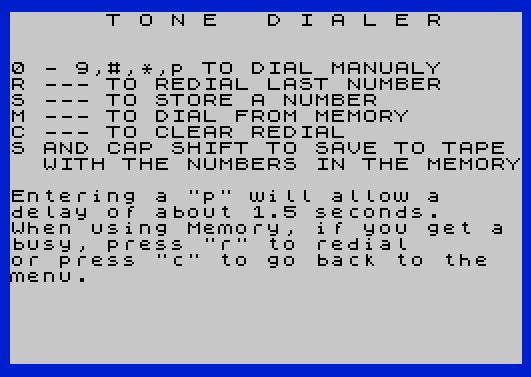
Tone Dialer generates DTMF-style dual-tone multi-frequency signals through the SOUND command to dial telephone numbers from the keyboard or from stored memory. The program stores up to 20 phone numbers with 10-character names in two DIM arrays, `a$` (numbers, 30 chars each) and `b$` (names, 10 chars each). Digits 0–9, `#`, and `*` each map to a pair of low (`l`) and high (`h`) frequency values at lines 1000–1011, which are fed into the SOUND command with specific register settings for tone generation. A “p” character can be inserted into a number to introduce a roughly 1.5-second pause, useful for PBX access codes. The program supports manual dialing, redial of the last number, memory storage and recall, and saving the program with stored numbers to tape via `SAVE x$ LINE 12`.
Program Structure
The program is organized into a menu-driven main loop and several subroutine blocks:
- Lines 5–19: Initialization — arrays, border/paper/ink, splash screen, instruction display, variable setup.
- Lines 20–40: Main input loop — reads a keypress and dispatches to manual dialing, memory dial, store, redial, or clear.
- Lines 100–140: SOUND output subroutine — plays a dual-tone and returns or loops.
- Lines 1000–1011: Frequency lookup table — each line sets
l(low frequency register value) andh(high frequency register value) then falls through to line 100. - Lines 2000–2050: Memory list display subroutine and dial-from-memory entry point.
- Lines 3000–3080: Phone number storage routine.
- Lines 4000–4030: Redial routine — iterates over
r$character by character. - Lines 5000–5030: Save-to-tape routine.
- Line 9999:
CLEARthen save the program shell without data.
Array Storage
Two fixed-dimension string arrays hold the phone book:
| Array | Dimensions | Purpose |
|---|---|---|
a$(20,30) | 20 entries × 30 chars | Phone number strings |
b$(20,10) | 20 entries × 10 chars | Name/label strings |
Because these are fixed-length string arrays, all entries are always exactly padded to their declared length with spaces. This is why the vacancy check at line 2035 compares a$(j) against a 30-space string literal, and the check at line 2120 compares against an 11-space string — the latter is a bug: the comparison string is only 11 characters long rather than the correct 30, so the “NO # AT” branch will never trigger correctly for truly empty slots.
Tone Generation
DTMF tones are produced via the SOUND command using the AY-3-8912 sound chip registers. Line 100 writes to registers 0, 1, 2, 3, 7, 8, and 9, setting two tone channels with separate period values (l for the low tone on channel A, h for the high tone on channel B) along with volume and mixer settings. Line 130 silences both channels. The 12 DTMF tones map as follows:
| Key | l (reg 0/1) | h (reg 2/3) |
|---|---|---|
| 0 | 117 | 82 |
| 1 | 158 | 91 |
| 2 | 158 | 82 |
| 3 | 158 | 75 |
| 4 | 143 | 91 |
| 5 | 143 | 82 |
| 6 | 143 | 75 |
| 7 | 129 | 91 |
| 8 | 129 | 82 |
| 9 | 129 | 75 |
| # | 117 | 75 |
| * | 117 | 91 |
Dispatch Technique
For digit keys, line 40 uses GO TO VAL n$+1000 to compute the target line number arithmetically — VAL "0" through VAL "9" yield 0–9, which are added to 1000 to land directly on the correct frequency-setup line. Similarly, the redial loop at line 4015 uses GO SUB 1000+VAL r$(i). This is a clean and efficient dispatch idiom that avoids a chain of IF statements for each digit.
Redial Buffer
Every dialed character (digit, #, *, or p) is appended to r$ at line 35. Pressing r replays the entire string character by character through the redial loop at lines 4005–4020. Pressing c goes back to line 12 (the CLS/menu display), but notably does not reset r$ — the clear only refreshes the display. The actual r$="" initialization is at line 18, executed only once at startup. When dialing from memory, r$ is loaded with the stored number at line 2140, so redial also works after a memory dial.
Key BASIC Idioms
PAUSE 5at line 120 controls the inter-tone gap duration (approximately 100 ms).IF INKEY$ <>"" THEN GO TO 110at line 110 waits for any held key to be released before timing the tone, preventing runaway dialing.POKE 23609,10at line 19 sets the keyboard repeat delay system variable.INPUT ... LINE b$(Q)at line 3040 captures the full input line including spaces into the fixed array slot.SAVE x$ LINE 12at line 5020 saves the entire program (with the populateda$andb$arrays) and arranges for it to auto-run at line 12 on load, preserving the stored phone book.
Bugs and Anomalies
- Case mismatch at line 28: The main loop reads into
n$(lowercase), but line 28 testsN$(uppercase). On the Spectrum,N$andn$are the same variable — BASIC is case-insensitive for variable names — so this works correctly, but the inconsistency is confusing. - Empty-slot check at line 2120: The comparison string
" "is 11 spaces, not 30, so it will never match the 30-space padded empty slot ina$(Q), making the “NO # AT” guard ineffective. - Vacancy counter at line 2035: The 30-space comparison string appears correct for detecting empty
a$slots, but the countvis used at line 2100 to detect “no numbers stored yet” only whenv=20. If even one slot has been filled, the all-empty check is bypassed correctly. - Line 105 dead code:
IF n$="r" OR n$="m" THEN PRINT r$(i);— when dialing manually,n$will be a digit,#, or*, so this branch is never taken from the manual path. From the redial/memory paths, the subroutine is called viaGO SUBand the condition may apply, butiis only defined inside theFORloop at line 4005, making this potentially unreliable outside that context. - Memory dial busy-redial flow: Line 2150 jumps to
4005(inside the redial FOR loop) withr$set to the stored number, bypassing the “REDIAL” print at line 4003. The instruction text on line 15 mentions pressingrafter a busy signal during memory dial, which then triggers the standard redial ofr$.
Image Gallery
Source Code
    5 DIM a$(20,30):DIM b$(20,10)
   10 REM TONE DIALER  by JGD     10/25/84
   11 BORDER 1:PAPER 7:INK 0
   12 CLS :PRINT FLASH 1;"      T O N E   D I A L E R     "
   14 PRINT ''"0 - 9,#,*,p TO DIAL MANUALY"'"R --- TO REDIAL LAST NUMBER"'"S --- TO STORE A NUMBER"'"M --- TO DIAL FROM MEMORY"'"C --- TO CLEAR REDIAL"'"S AND CAP SHIFT TO SAVE  TO TAPE"'"  WITH THE NUMBERS IN THE MEMORY"'
   15 PRINT '"Entering a ""p"" will allow a"'"delay of about 1.5 seconds."'"When using Memory, if you get a busy, press ""r"" to redial"'"or press ""c"" to go back to the"'"menu."
   18 LET r$=""
   19 POKE 23609,10
   20 LET n$= INKEY$:IF n$="" THEN GO TO 20
   22 IF n$="m" THEN GO TO 2000
   24 IF n$="s" THEN GO TO 3000
   25 IF n$="p" THEN GO TO 32
   26 IF n$="r" THEN GO TO 4000
   27 IF n$="c" THEN GO TO 12
   28 IF N$="S" THEN GO TO 5000
   29 IF n$="*" OR n$="#" THEN GO TO 32
   30 IF n$>"9" OR n$<"0" THEN GO TO 20
   32 PRINT n$;"-";
   35 LET r$=r$+n$
   36 IF n$="#" THEN GO TO 1010
   37 IF n$="*" THEN GO TO 1011
   38 IF n$="p" THEN PAUSE 100:GO TO 20
   40 GO TO VAL n$+1000
  100 SOUND 0,l;1,0;2,h;3,0;7,60;8,15;9,15
  105 IF n$="r" OR n$="m" THEN PRINT r$(i);"-";
  110 IF INKEY$ <>"" THEN GO TO 110
  120 PAUSE 5
  130 SOUND 8,0;9,0;7,63
  134 IF n$="r" OR n$="m" THEN RETURN
  140 GO TO 20
 1000 LET l=117:LET h=82:GO TO 100
 1001 LET l=158:LET h=91:GO TO 100
 1002 LET l=158:LET h=82:GO TO 100
 1003 LET l=158:LET h=75:GO TO 100
 1004 LET l=143:LET h=91:GO TO 100
 1005 LET l=143:LET h=82:GO TO 100
 1006 LET l=143:LET h=75:GO TO 100
 1007 LET l=129:LET h=91:GO TO 100
 1008 LET l=129:LET h=82:GO TO 100
 1009 LET l=129:LET h=75:GO TO 100
 1010 LET l=117:LET h=75:GO TO 100
 1011 LET l=117:LET h=91:GO TO 100
 2000 REM MEMORY DIAL
 2005 GO SUB 2010:GO TO 2100
 2010 CLS :PRINT FLASH 1;"     M E M O R Y  L I S T",
 2015 LET v=0
 2020 FOR j=1 TO 20
 2030 PRINT AT j,0;j;"- ";b$(j);" - ";a$(j)
 2035 IF a$(j)="                              " THEN LET v=v+1
 2040 NEXT J
 2050 RETURN
 2100 IF v=20 THEN PRINT "NO NUMBERS STORED YET.":PAUSE 120:GO TO 12
 2110 INPUT "WHICH # TO DIAL? :";Q:IF Q>20 OR Q<1 THEN GO TO 2110
 2120 IF A$(Q)="           " THEN PRINT "NO # AT ";Q:PAUSE 100:GO TO 12
 2130 PRINT B$(Q);" - ";
 2140 LET R$=A$(Q)
 2150 GO TO 4005
 3000 REM MEMORY # STORE
 3010 GO SUB 2010
 3020 INPUT "WHICH # TO STORE? ";Q:IF Q>20 OR Q<1 THEN GO TO 3020
 3030 PRINT Q;
 3040 INPUT "NAME? :"; LINE B$(Q):IF b$(q)="          " THEN GO TO 3040
 3045 PRINT " - ";B$(Q);" - ";
 3050 INPUT "PHONE #? :"; LINE Z$:IF LEN Z$>30 OR LEN z$<1 THEN GO TO 3050
 3055 LET A$(Q)=Z$
 3060 PRINT A$(Q)
 3070 INPUT "C-CORRECT, ENT-CONT.";X$:IF X$="c" THEN GO TO 3030
 3075 GO SUB 2010:INPUT "ENT-MENU, S- TO STORE A #  :";x$:IF x$="s" THEN GO TO 3020
 3080 GO TO 12
 4000 REM REDIAL
 4002 IF INKEY$ <>"" THEN GO TO 4002
 4003 PRINT "REDIAL ";
 4005 FOR i=1 TO LEN r$
 4008 IF r$(i)=" " THEN GO TO 4020
 4010 IF r$(i)="#" THEN GO SUB 1010:GO TO 4020
 4012 IF r$(i)="*" THEN GO SUB 1011:GO TO 4020
 4013 IF r$(i)="p" THEN PAUSE 100:GO TO 4020
 4015 GO SUB 1000+ VAL r$(i)
 4020 NEXT i
 4025 PRINT
 4030 GO TO 20
 5000 REM SAVE  TO TAPE
 5005 CLS :PRINT FLASH 1;"ENTER PROGRAM NAME.","YOU CAN ONLY ENTER UP TO 10","CHARACTERS."
 5010 INPUT x$:IF LEN x$>10 OR LEN x$<1 THEN GO TO 5010
 5015 CLS :PRINT AT 10,12; FLASH 1;"SAVING"
 5020 SAVE x$ LINE 12
 5030 GO TO 12
 9999 CLEAR :SAVE "DIALER" LINE 1
Note: Type-in program listings on this website use ZMAKEBAS notation for graphics characters.