
This program is a User Defined Graphics (UDG) editor that allows the user to design and install custom characters on the TS2068. It supports three modes: a single 8×8 UDG cell, a 16×16 sprite composed of four UDG tiles, and a large 23×24 pixel sprite using nine UDG tiles. Pixel editing uses a cursor moved by keys 5/6/7/8 (the standard Sinclair cursor keys), with key “1” to set a pixel (placing UDG \u), “0” to clear, “Z” to wipe a character, and “K” to commit the design to RAM via POKE to USR addresses. The UDG data is stored above RAMTOP starting at address 65368 and can be saved as a CODE block of 168 bytes.
Program Structure
The program is divided into clearly labelled sections:
- Lines 1–7: Initialisation — sets default cursor character
g$, enables caps lock viaPOKE 23658,8, installsON ERR GO TO 9900, then jumps to line 80. - Lines 10–29: Cursor subroutine — blink-waits for a keypress using an OVER 1 flash loop, then processes movement and pixel-set/clear keys.
- Lines 30–56: Display subroutines — line 30 prints the UDG key map; line 40 prints control key instructions; line 50 prints a 3×3 sprite preview panel.
- Lines 80–115: Setup — POKEs the entire area from
USR "U"to 65535 with 255 (all pixels on), then corrects address 65532 to 247, prints a title, and routes to mode 1, 2, or 3. - Lines 1000–1550: Mode 1 — single 8×8 UDG editor (keys A–U).
- Lines 2000–4140: Mode 2 — 16×16 sprite editor using pairs of UDG tiles.
- Lines 5000–5930: Mode 3 — 23×24 pixel sprite editor using a 3×3 block of UDGs.
- Lines 9000–9070: Save prompt — offers to
SAVE … CODE 65368,168. - Lines 9900–9902: Error handler — resets
CAPS SHIFTlock and stops. - Lines 9950–9970: Bootstrap lines — save program and UDG data, then auto-
LOAD ""CODEandRUN.
Cursor / Input Subroutine (Lines 10–29)
The cursor blink is implemented without PAUSE: lines 10–11 print the cursor glyph with OVER 1 and spin until INKEY$ is empty; lines 12–13 spin again until a key is pressed. This creates a visible flicker effect. The key is captured in k$ at line 14, the cursor is erased with OVER 0 at line 17, and movement/pixel operations follow at lines 20–27. Boundary clamping is handled by the caller after the GO SUB 10 returns.
Pixel Read-Back Technique
Rather than maintaining a separate pixel array, all three modes re-read pixel state directly from the screen using CODE SCREEN$(r,c). A result of 0 means the cell contains a space (empty), and any non-zero code means it contains UDG \u (set). This is used both to initialise the cursor glyph (g$) when it moves onto a new cell and to encode bytes during the “Keep” operation:
LET BYTE=BYTE*2+(CODE SCREEN$(r,c)=0)— shifts the accumulator left and ORs in the new bit; the Boolean expression(…=0)evaluates to 1 (set) or 0 (clear).
This is a compact and idiomatic Sinclair BASIC technique that avoids any separate data array.
UDG Memory Layout
The program stores UDG data above RAMTOP. The initialisation block (lines 80–86) fills from USR "U" upward with 255, ensuring all UDGs are solid blocks, then patches address 65532 to 247 so UDG “U” has a specific pattern (as warned in the REM at line 2). The save block is always 168 bytes from address 65368, covering 21 UDGs (21 × 8 = 168).
| Mode | UDG tiles used | Grid | Pixel area |
|---|---|---|---|
| 1 – Single | 1 | 1×1 | 8×8 |
| 2 – Sprite | 4 (2×2 halves, 4 pokes each) | 2×2 | 16×16 |
| 3 – Sprite | 9 (3×3) | 3×3 | 24×24 (displayed as 23×24) |
Mode 2 — 16×16 Sprite Encoding Anomaly
In the install routine (lines 4000–4090), the horizontal split between left and right halves uses LET c=13 and iterates FOR i=7 TO 0 STEP -1 reading SCREEN$(r,c-i) (columns 6–13), then sets c=21 for the right half (columns 14–21). However, during the display phase (lines 2090–2270) the row loop variable r runs 0–15 and the offset o only changes at r=8 by adding 8. This means the second bank of 8 UDG rows is stored at USR l$ + r + 8 + o with o jumping from 0 to 8 at mid-point — effectively interleaving left-column and right-column bytes. The scheme works as long as the starting UDG letter is ≤ “R” (enforced at line 2008), since four consecutive UDG slots are required.
Mode 3 — 23×24 Sprite Encoding
The 23×24 sprite uses a 3-column × 24-row layout. The offset variable o increments by 16 at rows 8 and 16 (lines 5722–5724), effectively mapping each block of 8 rows to a separate group of UDG bytes. Each column of 8 pixels is packed into one byte and POKEd at offsets USR l$+(o+r), USR l$+(o+r+8), and USR l$+(o+r+16), requiring 9 UDGs. Valid starting letters are A–M (line 5026).
Notable Techniques and Idioms
POKE 23658,8— enables CAPS LOCK at startup so letter input arrives in upper case.ON ERR GO TO 9900— TS2068 extended error trapping; the handler restoresPOKE 23659,2(resets CAPS LOCK state) and callsON ERR RESETbefore stopping.LET l$=l$(1)(lines 1018, 2009, 5027) — trims any INPUT string to its first character, guarding against multi-character entries.- Line 26:
IF k$="1" THEN LET g$="\u": PRINT AT r,c;"\u"— setting the pixel immediately updates both the screen and the cursor-state variable in one key handler line. - The
PAUSE 0: IF INKEY$=…pattern at lines 1530, 4120, 5920, 9030 is the standard efficient keypress-wait idiom. - Lines 9950–9970 form a self-contained bootstrap: the program saves itself with
LINE 9960so that on reload it auto-runsLOAD ""CODE(to pull in the UDG data block) beforeRUNning.
Image Gallery
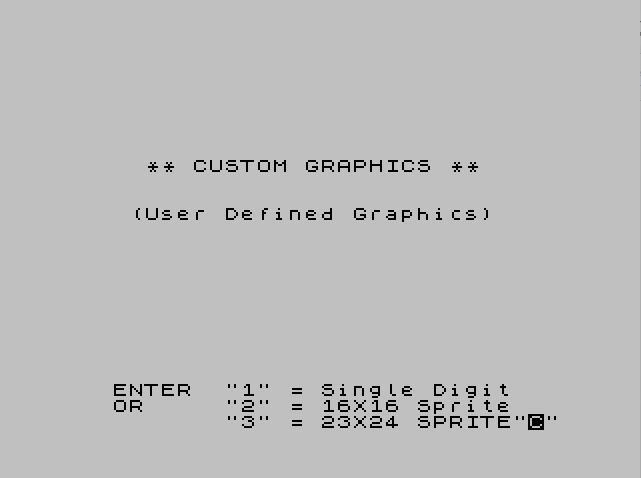
Source Code
    1 REM  "UDG"  CUSTOM GRAPHICSG.E.WHITE              FEB 1986
    2 REM Graphic on "U" Key mustnot be a standard Character..    If necessary POKE USR "U",247
    3 LET g$="+": LET k$="": POKE 23658,8
    4 LET m$="INSTALL GRAPHIC ON WHICH KEY?"
    5 ON ERR GO TO 9900
    7 GO TO 80
   10 PRINT OVER 1;AT r,c;g$
   11 IF INKEY$<>"" THEN GO TO 10
   12 PRINT OVER 1;AT r,c;g$
   13 IF INKEY$="" THEN GO TO 12
   14 LET k$=INKEY$
   17 PRINT OVER 0;AT r,c;g$
   20 IF k$="5" THEN LET c=c-1
   21 IF k$="8" THEN LET c=c+1
   23 IF k$="6" THEN LET r=r+1
   24 IF k$="7" THEN LET r=r-1
   26 IF k$="1" THEN LET g$="\u": PRINT AT r,c;"\u"
   27 IF k$="0" THEN LET g$="+": PRINT AT r,c;"+"
   29 RETURN
   30 PRINT AT 20,3;"KEY-   AbcdEfghIjklMnopQrstU": PRINT "GRAPHIC   \a\b\c\d\e\f\g\h\i\j\k\l\m\n\o\p\q\r\s\t\u"
   35 RETURN
   40 PRINT "   -Arrow keys control cursor-","TOUCH ""1"" to blacken pixel","      ""0"" to clear pixel","      ""Z"" to clear character","      ""K"" to keep character"
   42 RETURN
   50 PRINT : PRINT "   ""A""";TAB 26;"""J"""
   52 REM  * DRAW 23X24 SPRITES *
   54 PRINT : PRINT "   \a\b\c";TAB 26;"\j\k\l": PRINT "   \d\e\f";TAB 26;"\m\n\o": PRINT "   \g\h\i";TAB 26;"\p\q\r"
   56 RETURN
   80 FOR i=USR "U" TO 65535
   82 POKE i,255
   84 NEXT i
   86 POKE 65532,247
   90 PRINT AT 7,5;"** CUSTOM GRAPHICS **";AT 10,4;"(User Defined Graphics)"
  100 INPUT "   ENTER  ""1"" = Single Digit       OR     ""2"" = 16X16 Sprite              ""3"" = 23X24 SPRITE";w$
  105 LET w$=w$(1)
  110 IF (w$<"1" OR w$>"3") THEN GO TO 100
  115 CLS
  120 IF w$="2" THEN GO TO 2000
  130 IF w$="3" THEN GO TO 5000
 1000 REM  -Single Digit-
 1005 GO SUB 40
 1008 GO SUB 30
 1010 PRINT AT 8,1;m$
 1011 INPUT l$
 1015 IF (l$<"A" OR l$>"U") THEN GO TO 1011
 1018 LET l$=l$(1)
 1020 PRINT AT 8,1;"       ";l$;"          ";CHR$ ((CODE l$)+79);"          "
 1050 FOR r=9 TO 16
 1055 FOR c=10 TO 17
 1060 PRINT AT r,c;"+"
 1065 NEXT c
 1068 NEXT r
 1070 IF k$="Z" THEN GO TO 1200
 1099 REM -Write old GRAPHIC-
 1100 FOR R=0 TO 7
 1110 LET L=PEEK (USR l$+R)
 1120 FOR C=7 TO 0 STEP -1
 1130 IF L/2<>INT (L/2) THEN PRINT AT 9+R,10+C;"\u"
 1150 LET L=INT (L/2)
 1160 NEXT C
 1190 NEXT R
 1200 BEEP .08,30
 1300 LET r=9: LET c=10
 1310 LET g$="+"
 1312 IF CODE SCREEN$ (r,c)=0 THEN LET g$="\u"
 1315 PRINT AT r,c;g$
 1320 GO SUB 10
 1330 IF r=8 THEN LET r=9
 1332 IF r=17 THEN LET r=16
 1334 IF c=9 THEN LET c=10
 1336 IF c=18 THEN LET c=17
 1340 IF k$="Z" THEN PRINT AT 8,19;" ": GO TO 1050
 1350 IF k$<>"K" THEN GO TO 1310
 1400 REM -Install new Graphic-
 1402 BEEP .08,17
 1403 PRINT AT 20,2;"  ""K"" PRESSED FOR KEEPER!","       Installed at ";USR l$;"      "
 1410 FOR r=9 TO 16
 1420 LET BYTE=0
 1430 FOR c=10 TO 17
 1440 LET BYTE=BYTE*2+(CODE SCREEN$ (r,c)=0)
 1460 NEXT c
 1480 PRINT AT r,20;BYTE: POKE (USR l$+(r-9)),BYTE
 1490 NEXT R
 1500 PAUSE 300
 1510 CLS : GO SUB 30
 1520 PRINT AT 10,10;"ANOTHER? Y/N"
 1530 PAUSE 0: IF INKEY$="Y" THEN CLS : GO TO 1000
 1540 IF INKEY$<>"N" THEN GO TO 1510
 1550 GO TO 9000
 2000 REM  -16X16 Sprite-
 2001 CLS : PRINT "Use ARROW keys to move cursor."
 2002 PRINT "   ""K"" To KEEP Graphic"
 2003 PRINT AT 8,7;"REMEMBER!";TAB 7;"""1""=\u Pixel";TAB 7;"""0""=Clear Pixel";TAB 7;"""Z""=Clear CHR$": PRINT : PRINT TAB 8;"16 X 16"
 2004 PRINT AT 3,2;m$: GO SUB 30
 2005 INPUT l$
 2008 IF l$<"A" OR l$>"R" THEN GO TO 2004
 2009 LET l$=l$(1)
 2010 PRINT AT 3,2;"  ";l$+CHR$ (CODE l$+1);"                ";CHR$ (CODE l$+79)+CHR$ (CODE l$+80);"             "
 2011 PRINT AT 4,4;CHR$ (CODE l$+2)+CHR$ (CODE l$+3);TAB 22;CHR$ (CODE l$+81)+CHR$ (CODE l$+82);"       "
 2030 FOR i=3 TO 18
 2050 PRINT AT i,6;"++++++++++++++++"
 2070 NEXT i
 2080 IF k$="Z" THEN GO TO 2300
 2085 REM  -OLD CHR$-
 2090 LET o=0
 2100 FOR r=0 TO 15
 2115 IF r=8 THEN LET o=8
 2120 LET l=PEEK (USR l$+r+o)
 2130 FOR c=7 TO 0 STEP -1
 2140 IF l/2<>INT (l/2) THEN PRINT AT 3+r,6+c;"\u"
 2150 LET l=INT (l/2)
 2160 NEXT c
 2200 LET l=PEEK (USR l$+r+8+o)
 2230 FOR c=7 TO 0 STEP -1
 2240 IF l/2<>INT (l/2) THEN PRINT AT 3+r,14+c;"\u"
 2250 LET l=INT (l/2)
 2260 NEXT c
 2270 NEXT r
 2300 BEEP .08,30
 3010 LET r=3: LET c=6
 3020 LET g$="+"
 3025 IF CODE SCREEN$ (r,c)=0 THEN LET g$="\u"
 3030 PRINT AT r,c;g$
 3040 GO SUB 10
 3070 IF k$="Z" THEN PRINT AT 3,22;"  ";AT 4,22;"  ": GO TO 2030
 3075 IF k$="K" THEN GO TO 4000
 3080 IF r=2 THEN LET r=3
 3082 IF r=19 THEN LET r=18
 3084 IF c=5 THEN LET c=6
 3086 IF c=22 THEN LET c=21
 3900 GO TO 3020
 3999 REM -INSTALL NEW CHR$-
 4000 PRINT AT 20,2;"  ""K"" PRESSED FOR KEEPER!","       Installed at ";USR l$;"      "
 4003 BEEP .08,17
 4005 LET o=0
 4010 FOR r=3 TO 18
 4015 LET c=13
 4020 LET BYTE=0
 4025 IF r=11 THEN LET o=8
 4030 FOR i=7 TO 0 STEP -1
 4040 LET BYTE=BYTE*2+(CODE SCREEN$ (r,c-i)=0)
 4060 NEXT i
 4065 PRINT AT r,0;BYTE: POKE (USR l$+(o+r-3)),BYTE
 4067 LET c=21
 4068 LET BYTE=0
 4070 FOR i=7 TO 0 STEP -1
 4072 LET BYTE=BYTE*2+(CODE SCREEN$ (r,c-i)=0)
 4074 NEXT i
 4080 PRINT AT r,28;BYTE: POKE (USR l$+(o+r+5)),BYTE
 4090 NEXT r
 4095 PAUSE 300
 4100 CLS : GO SUB 30
 4110 PRINT AT 10,10;"ANOTHER? Y/N"
 4120 PAUSE 0: IF INKEY$="Y" THEN GO TO 2000
 4130 IF INKEY$<>"N" THEN GO TO 4100
 4140 GO TO 9000
 5000 REM -23X24 PIXEL SPRITE-
 5005 CLS : PRINT "      Screen will be full.          Remember these commands!",,,
 5010 GO SUB 40
 5012 PRINT : PRINT
 5015 GO SUB 50
 5020 PRINT AT 20,2;m$
 5025 INPUT "* ""A"" or ""J"" (recommended)";l$
 5026 IF l$<"A" OR l$>"M" THEN GO TO 5020
 5027 LET l$=l$(1)
 5028 LET h=CODE l$
 5030 CLS : PRINT AT 3,0;l$;CHR$ (h+1);CHR$ (h+2)
 5032 PRINT AT 4,0;CHR$ (h+3);CHR$ (h+4);CHR$ (h+5)
 5034 PRINT AT 5,0;CHR$ (h+6);CHR$ (h+7);CHR$ (h+8)
 5040 PRINT AT 10,0;CHR$ (h+79);CHR$ (h+80);CHR$ (h+81),,CHR$ (h+82);CHR$ (h+83);CHR$ (h+84),,CHR$ (h+85);CHR$ (h+86);CHR$ (h+87)
 5100 PRINT AT 5,30;"1";AT 6,30;"0";AT 8,30;"A";AT 9,30;"R";AT 10,30;"R";AT 11,30;"O";AT 12,30;"W";AT 13,30;"S";AT 16,30;"K";AT 17,30;"Z"
 5200 POKE 23659,0
 5210 FOR r=0 TO 22
 5220 PRINT AT r,4;"++++++++++++++++++++++++"
 5230 NEXT r
 5240 IF k$="Z" THEN GO TO 5590
 5245 REM  -WRITE OLD SPRITE-
 5250 LET o=0
 5260 FOR r=0 TO 22
 5262 IF r=8 THEN LET o=16
 5264 IF r=16 THEN LET o=32
 5270 LET l=PEEK (USR l$+r+o)
 5280 FOR c=7 TO 0 STEP -1
 5290 IF l/2<>INT (l/2) THEN PRINT AT r,4+c;"\u"
 5300 LET l=INT (l/2)
 5310 NEXT c
 5320 LET l=PEEK (USR l$+r+8+o)
 5330 FOR c=7 TO 0 STEP -1
 5340 IF l/2<>INT (l/2) THEN PRINT AT r,12+c;"\u"
 5350 LET l=INT (l/2)
 5360 NEXT c
 5370 LET l=PEEK (USR l$+r+16+o)
 5380 FOR c=7 TO 0 STEP -1
 5390 IF l/2<>INT (l/2) THEN PRINT AT r,20+c;"\u"
 5400 LET l=INT (l/2)
 5410 NEXT c
 5570 NEXT r
 5590 BEEP .08,30
 5600 LET r=0: LET c=4
 5610 LET g$="+"
 5612 IF CODE SCREEN$ (r,c)=0 THEN LET g$="\u"
 5618 PRINT AT r,c;g$
 5620 GO SUB 10
 5630 IF r<0 THEN LET r=0
 5632 IF r=23 THEN LET r=22
 5634 IF c=3 THEN LET c=4
 5636 IF c=28 THEN LET c=27
 5650 IF k$="K" THEN GO TO 5700
 5660 IF k$="Z" THEN PRINT AT 10,0;"   ": PRINT "   ": PRINT "   ": GO TO 5210
 5670 GO TO 5610
 5699 REM -INSTALL NEW GRAPHIC-
 5700 PRINT AT 19,0; FLASH 1;"WAIT"
 5703 BEEP .08,17
 5705 LET o=0
 5710 FOR r=0 TO 22
 5720 LET BYTE=0
 5722 IF r=8 THEN LET o=16
 5724 IF r=16 THEN LET o=32
 5730 FOR c=4 TO 11
 5740 LET BYTE=BYTE*2+(CODE SCREEN$ (r,c)=0)
 5760 NEXT c
 5765 POKE (USR l$+(o+r)),BYTE
 5768 LET BYTE=0
 5770 FOR c=12 TO 19
 5772 LET BYTE=BYTE*2+(CODE SCREEN$ (r,c)=0)
 5774 NEXT c
 5780 POKE (USR l$+(o+r+8)),BYTE
 5788 LET BYTE=0
 5790 FOR c=20 TO 27
 5792 LET BYTE=BYTE*2+(CODE SCREEN$ (r,c)=0)
 5794 NEXT c
 5800 POKE (USR l$+(o+r+16)),BYTE
 5890 NEXT r
 5900 POKE 23659,2: CLS
 5905 GO SUB 50
 5910 PRINT AT 10,10;"ANOTHER? Y/N"
 5912 BEEP .08,22
 5915 GO SUB 30
 5920 PAUSE 0: IF INKEY$="Y" THEN GO TO 5000
 5930 IF INKEY$<>"N" THEN GO TO 5910
 9000 BEEP .08,9
 9010 PRINT AT 10,2;"** SAVE GRAPHIC FILE? Y/N **"
 9020 PRINT : PRINT " (File resides above RAMTOP and     must be saved separately)"
 9030 PAUSE 0: IF INKEY$="N" THEN STOP
 9040 IF INKEY$<>"Y" THEN GO TO 9030
 9050 CLS : INPUT "SAVE (name)CODE 65368,168        -ENTER name-";N$
 9060 SAVE N$CODE 65368,168
 9070 STOP
 9900 POKE 23659,2
 9901 ON ERR RESET
 9902 STOP
 9950 SAVE "UDG" LINE 9960: SAVE "udg"CODE 65368,168
 9955 STOP
 9960 LOAD ""CODE
 9970 RUN
Note: Type-in program listings on this website use ZMAKEBAS notation for graphics characters.