
Judging by all the mail, it appears that a good many 2068 users have been interested in alternatives to Sinclair’s original font for quite some time! And that’s exactly what we will be discussing this time. Stay tuned!
Now, in all those letters no one mentioned a little bug I ran across in the BASIC program of Part I. That’s too bad–I usually send such computer pest controllers a tape of utilities or at least a thank-you card!
The bug is a small one in line 61. This line is supposed to print an equal sign–I say supposed to. If one examines the new characters in Figure 3 in the same article he won’t find an equal sign. Line 61 has “DRAW 0,2” twice. Change these to “DRAW 2,0” and the program will perform as intended. Soon we’ll be looking at some slick code that will make worrying about such inherent hoohaa of BASIC a thing of the past.
So now that the bug is out of the way, most of my mail is answered and my new son’s sleeping through the night, I will dive headlong into this next level of CLASSY FRONT END. We will try to progress slowly enough so as not to lose anyone. So even those less familiar with programming are invited to follow along.
In designing a Machine Code utility one faces the inevitable quandry of too many desires and not enough space. I wrote a wish list of features and then settled from that on a “short list” of must-haves. These fell into three catagories (being BASIC compatible, being flexible and easy to use). When we finally finish the program it will include the following features:
A. BASIC COMPATIBLE 1. reads coordinates/text from BASIC
                    2. is callable from BASIC
                    3. allows use of 2068 symbols, too
B. FLEXIBLE         4. able to reside anywhere in memory
                    5. all symbols changible by the user
C. EASY TO USE      6. short enough to load quickly
                    7. provides complete set of symbols
                    8. runs much faster than BASIC
                    9. keeps track of screen coordinates
One of the most constraining to achieve as it turns out is #4. Without fixed addresses for each byte the program has used two unused bytes at 23728 and 23729 (5CB0 and 5CB1 hex) to store it’s location as a reference. But more on that later.
Some who wrote me asked about “printer compatability”. As you will notice this does not appear on the “short list”. Now CLASSY FRONT END is really a screen print environment, not another printer font. It is true that CLASSY is compatable with the 2040 printer–several letters I received were in NEW 2068 MEDIUM printed on thermal paper which thrilled me (thanks, guys!).
But opening the old can of printer-compatability-worms is not what I want to do. Lest some would feel hung out to dry, take heart that CLASSY keeps track of text in its own font as well as the Sinclair font. Because of this, any printer should be able to print in its own font style by using standard ASCII codes. And I’m sure you can, too. Just consult your interface and printer manuals.
Foremost in the design of the machine code program is how we will store as well as display the graphic data for our new font. Our 2068 we know has a character table in ROM starting at 15616 (3D00 hex). Here the 2068’s 95 symbols are stored. The PRINT routine starting at 8537 (2159 hex) looks up the codes stored in this table for each symbol it prints.
It works something like this: first the routine finds exactly where the code for the actual symbol begins in the table. Next it reads the first of eight bytes of code. This is always a number between 0 and 255. Remember reading someplace that all bytes contain eight bits? It is true–by using this code the 2068 figures out which bits are set or not set and then the PRINT routine darkens in the corresponding eight pixels on the screen. By doing this with each of the succeeding of the eight bytes, the PRINT routine assembles a pixel pattern a line at a time on the screen. By this method the 2068 can store the graphic information for the 64 pixels of each symbol in only eight bytes! Clever these British…
To know just which code number represents which pixel pattern is fairly easy to figure out. The program in Listing #1 entitled “Z80 bit patterns” will let our 2068 do it for us. Be sure to have enough printer paper on hand as the 2040 printout is almost three feet long. (You will certainly need this if you do any alterations or customizing of the font as listed.)
Listing 1
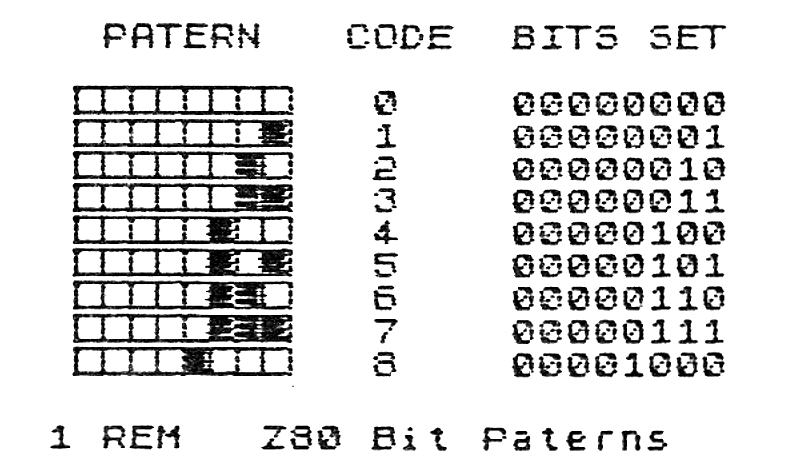
   1 REM   Z80 Bit Paterns

  10 FOR t=65368 TO 65391: READ
o: POKE t,o: NEXT t: DATA 255,12
8,128,128,128,128,255,0.,255,254
,254,254,254,254,255,0.,128,128,
128,128,128,128,128,0
  20 DIM b(8): LPRINT AT 0,5;"PA
TERN   CODE  BITS SET"''
  30 FOR f=0 TO 255: POKE 16384,
f: LPRINT "    ";: FOR i=1 TO 8
  40 LET b(i)=POINT (i-1,175)
  50 IF b(i)=0 THEN LPRINT CHR$
144;: GO TO 70
  60 LPRINT CHR$ 145;
  70 NEXT i: LPRINT CHR$ 146;"
";f;AT 0,20;b(1);b(2);b(3);b(4);
b(5);b(6);b(7);b(8): NEXT f
But, you might ask, the 2068 uses eight by eight sized symbols. One of CLASSY’s functions is to get away from that! Indeed some of CLASSY’s symbols are only three pixels wide. However, all of CLASSY’s symbols are eight pixels HIGH. By doing a little extra code manipulation using the instructions (covered nicely by Syd Wyncoop in his past articles), we can produce our patterns up instead pf across. This is similar to the method some side-ways printer dump utilities one sees on the market are using.
Examine the complete NEW 2068 MEDIUM font in Figure 1. Note the sequence of bytes for each symbol. The font is nearly identical with the one in Part I with only changes being to characters 126, 199, 200 and 201. The actual data for the font is to be found in Listing 2. Character 32 (a space) is missing as it is only zeros and a simple increment of the printing coordinate will take care of it.
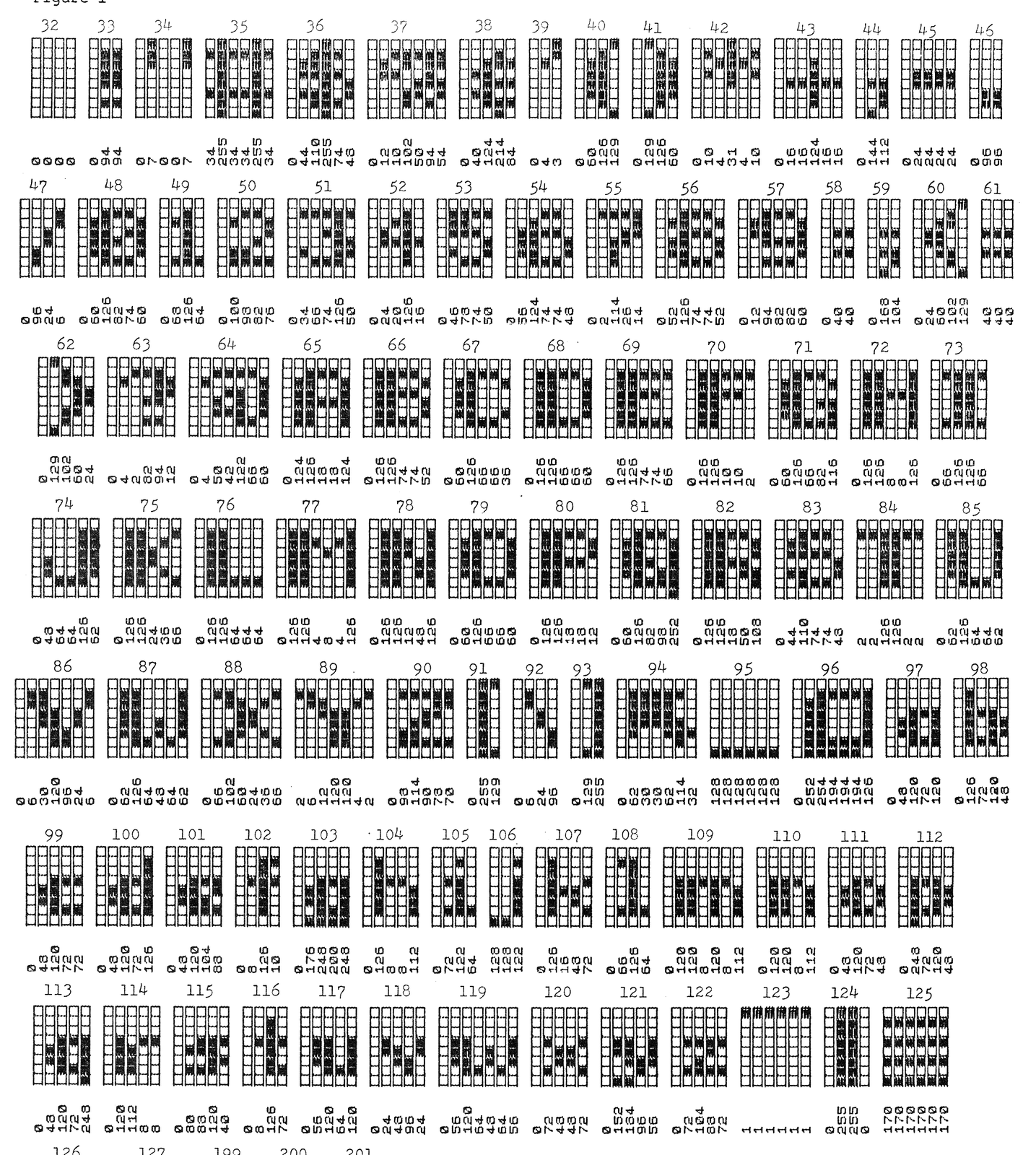
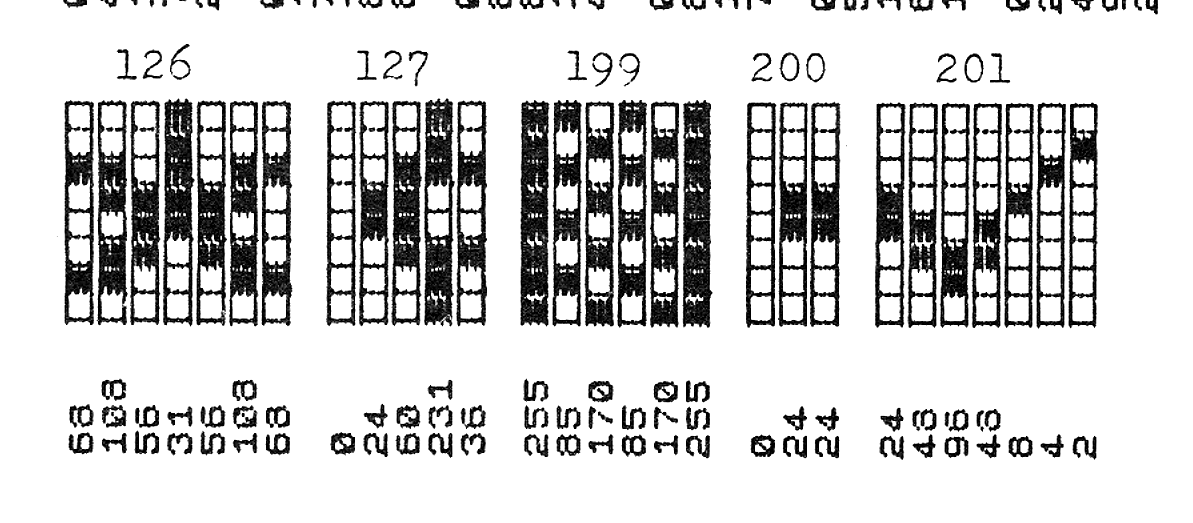
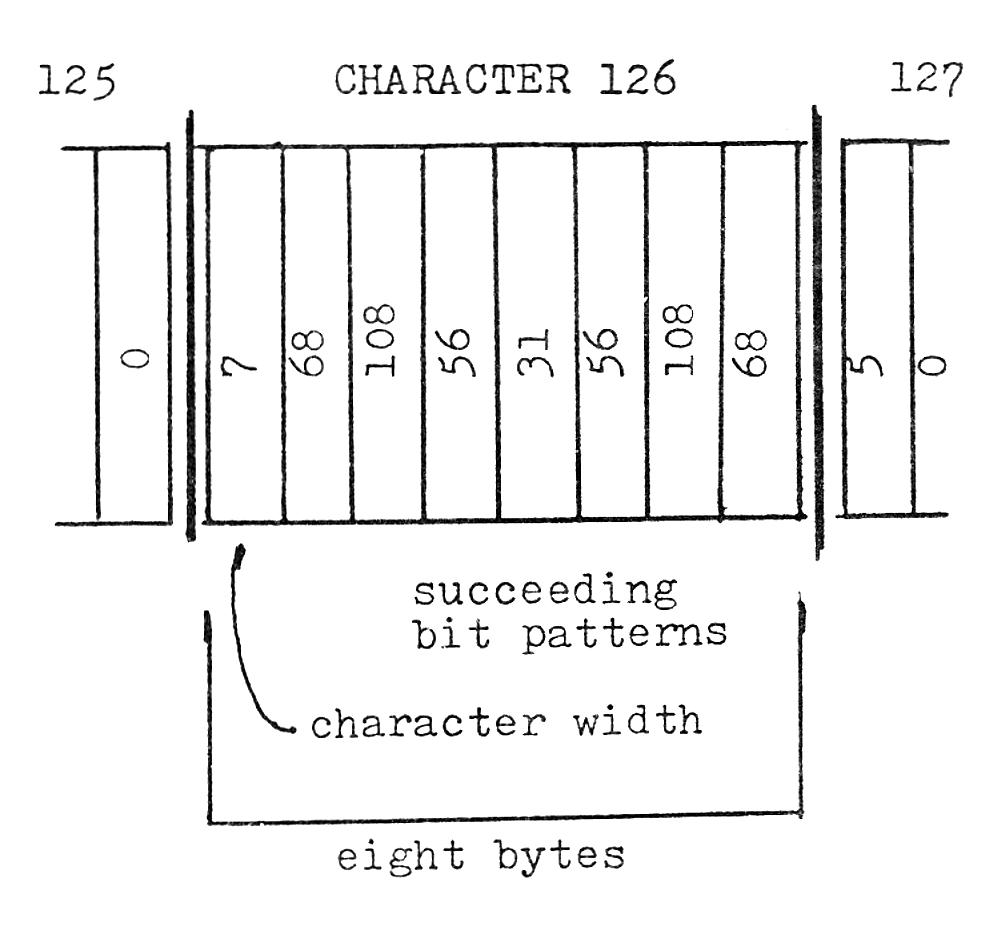
The symbols are each stored, as in the 2068 itself, in eight byte chunks (refer to Figure 2). The first byte tells how wide the character is to be. What follows are the bytes (up to seven as in the case of #126) that make up each symbol. If the character were only three pixels wide it would have a 3 in the first byte, then three codes for the pattern and the rest zeros. This may seem like a waste of space, but if we want to change a symbol later and it was say 5 wide instead of the original 3, we’d be in real trouble. What we end up with is a new, alterable character table with 98 symbols just about the same length as Sinclair’s original ROM table. Only this time with a little more pizzaz!
Due to the length of the actual code for CLASSY (it comes in at just over 1.5K), we will be discussing it for the next two installments. Then we will probably get into “windowing”, etc. If you can’t wait until next time, I would be happy to send you an advanced copy of the dissassembled listing. Just send one dollar ($1) to: Paul Bingham, P.O. Box 2034, Mesa, AZ 85204. For the program on tape send $5 (for all those who sent for CLASSY from Part I, you need only send $3 for the tape). See you next time!
Listing 2
   1 REM  CLASSY FRONT END FONT

1000 DATA 3,0,94,94,0,0,0,0.,5,0
,7,0,0,7,0,0.,6,34,255,34,34,255
,34,0.,6,0,44,110,255,74,48,0
1010 DATA 7,0,12,10,102,50,94,54
.,5,0,40,124,214,84,0,0.,3,0,4,3
,0,0,0,0.,4,0,60,126,129,0,0,0.,
4,0,129,126,60,0,0,0
1020 DATA 6,0,10,4,31,4,10,0.,6,
0,16,16,124,16,16,0.,3,0,144,112
,0,0,0,0.,5,0,24,24,24,24,0,0.,3
,0,96,96,0,0,0,0
1030 DATA 4,0,96,24,6,0,0,0.,6,0
,60,126,82,74,60,0.,4,0,68,126,6
4,0,0,0.,5,0,100,98,82,76,0,0.,6
,0,34,66,74,126,50,0
1040 DATA 5,0,24,20,126,16,0,0.,
5,0,46,78,74,50,0,0.,6,0,56,124,
74,74,48,0.,5,0,2,114,26,14,0,0.
,6,0,52,126,74,74,52,0
1050 DATA 6,0,12,94,82,82,60,0.,
3,0,40,40,0,0,0,0.,3,0,168,104,0
,0,0,0.,5,0,24,60,102,129,0,0.,3
,40,40,40,0,0,0,0
1060 DATA 5,0,129,102,60,24,0,0.
,6,0,4,2,82,94,12,0.,7,0,4,50,42
,122,66,60.,6,0,124,126,18,18,12
4,0.,6,0,126,126,74,74,52,0
1070 DATA 6,0,60,126,66,66,36,0.
,6,0,126,126,66,66,60,0.,6,0,126
,126,74,74,66,0.,6,0,126,126,10,
10,2,0.,6,0,60,126,66,82,116,0
1080 DATA 6,0,126,126,8,8,126,0.
,5,0,66,126,126,66,0,0.,6,0,48,6
4,64,126,62,0.,6,0,126,126,24,36
,66,0.,6,0,126,126,64,64,64,0
1090 DATA 7,0,126,126,4,8,4,126.
,6,0,126,126,12,48,126,0.,6,0,60
,126,66,66,60,0.,6,0,126,126,18,
18,12,0.,6,0,60,126,82,98,252,0
1100 DATA 6,0,126,126,18,50,108,
0.,6,0,44,110,74,74,48,0.,6,2,2,
126,126,2,2,0.,6,0,62,126,64,64,
62,0.,7,0,6,30,120,96,24,6
1110 DATA 7,0,62,126,64,48,64,62
.,7,0,66,102,60,24,36,66.,7,2,6,
12,120,120,4,2.,6,0,98,114,90,78
,70,0.,3,0,255,129,0,0,0,0
1120 DATA 4,0,6,24,96,0,0,0.,3,0
,129,255,0,0,0,0.,7,0,62,30,30,6
2,114,32.,6,128,128,128,128,128,
128,0.,7,0,252,254,194,194,194,1
26
1130 DATA 5,0,48,120,72,120,0,0.
,5,0,126,72,120,48,0,0.,5,0,48,1
20,72,72,0,0.,5,0,48,120,72,126,
0,0.,5,0,48,120,104,88,0,0
1140 DATA 4,0,8,126,10,0,0,0.,5,
0,176,248,200,248,0,0.,5,0,126,8
,8,112,0,0.,4,0,72,122,64,0,0,0.
,3,128,128,122,0,0,0,0
1150 DATA 5,0,126,16,48,72,0,0.,
4,0,66,126,64,0,0,0.,7,0,120,120
,8,120,8,112.,5,0,120,120,8,112,
0,0.,5,0,48,120,72,48,0,0
1160 DATA 5,0,248,72,120,48,0,0.
,5,0,48,120,72,248,0,0.,5,0,120,
112,8,8,0,0.,5,0,80,88,120,40,0,
0.,4,0,8,126,72,0,0,0
1170 DATA 5,0,56,120,64,120,0,0.
,5,0,24,48,96,24,0,0.,7,0,56,120
,64,48,64,56.,5,0,72,48,48,72,0,
0.,5,0,152,184,96,56,0,0
1180 DATA 5,0,72,104,88,72,0,0.,
6,1,1,1,1,1,1,0.,4,0,255,255,0,0
,0,0.,6,170,170,170,170,170,170,
0.,7,68,108,56,31,56,108,68
1190 DATA 5,0,24,60,231,36,0,0.,
6,255,85,170,85,170,255,0.,3,0,2
4,24,0,0,0,0.,7,24,48,96,48,8,4,
2
Products
Note: Type-in program listings on this website use ZMAKEBAS notation for graphics characters.