Welcome to another installment of CLASSY FRONT END. And “thank you!” to all who have written and who have sent in sample listings, tapes and comments on past CFE articles. It is certainly a thrill to see how much interest this segment has spawned. It makes all those late nights worth it! Speaking of which: I mistakenly said in the last article that my new son was sleeping through the night…seems now I’m spending more time at the crib than at the keyboard!
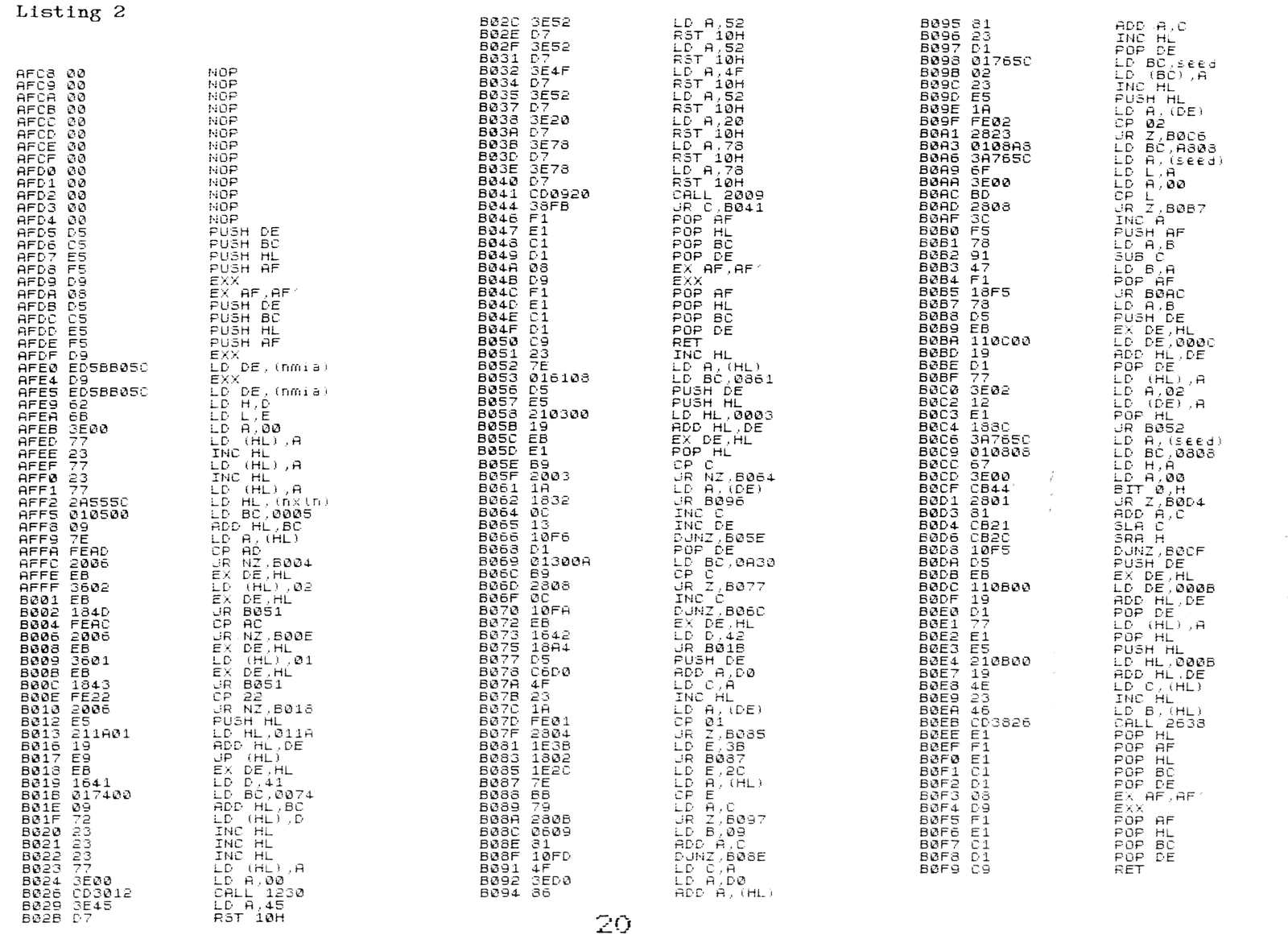
Listing 1 is a complete BASIC listing for the first 283 bytes of the total CFE machine code program, plus 23 bytes of code and necessary BASIC lines to allow testing and running of this portion. Listing 2 is a dissassembly of the 283 + 23 bytes of code which for this example resides at address AFC8 (45000 decimal). Please note that the 23 bytes contained in lines 100 and 110 in Listing 1 and those 23 bytes starting at address B0E3 (45283 decimal) in Listing 2 will be dropped when we put the total program together next issue.
For those who saw it, remember the movie “2001”, and how puzzled you were when you walked out? Think of next issue as “2010”.
Listing 1 very simply reads the print coordinates from BASIC lines and converts them to PLOT coordinates. “Is that all?”, you might ask. Well, almost. There are also some error traps and a facility to read values from eight variables we can set up. Now I’ll admit I don’t have the machine language prowess some readers undoubtedly possess. But the program does function well. If anyone has some ideas for shortening or enhancing the code, by all means send it to me! In this program, DE is set equal to the values we POKE into the spare RAM addressses at 5CB0 and 5CB1 (23728 and 23729 decimal). These values tell the program where it is in memory. (By using relative jumps CFE can reside in any free area of memory.) HL acts as the BASIC pointer and BC and A are used for computation. CFE saves and restores all registers, so should not interfere with other code you may wish to run with it.
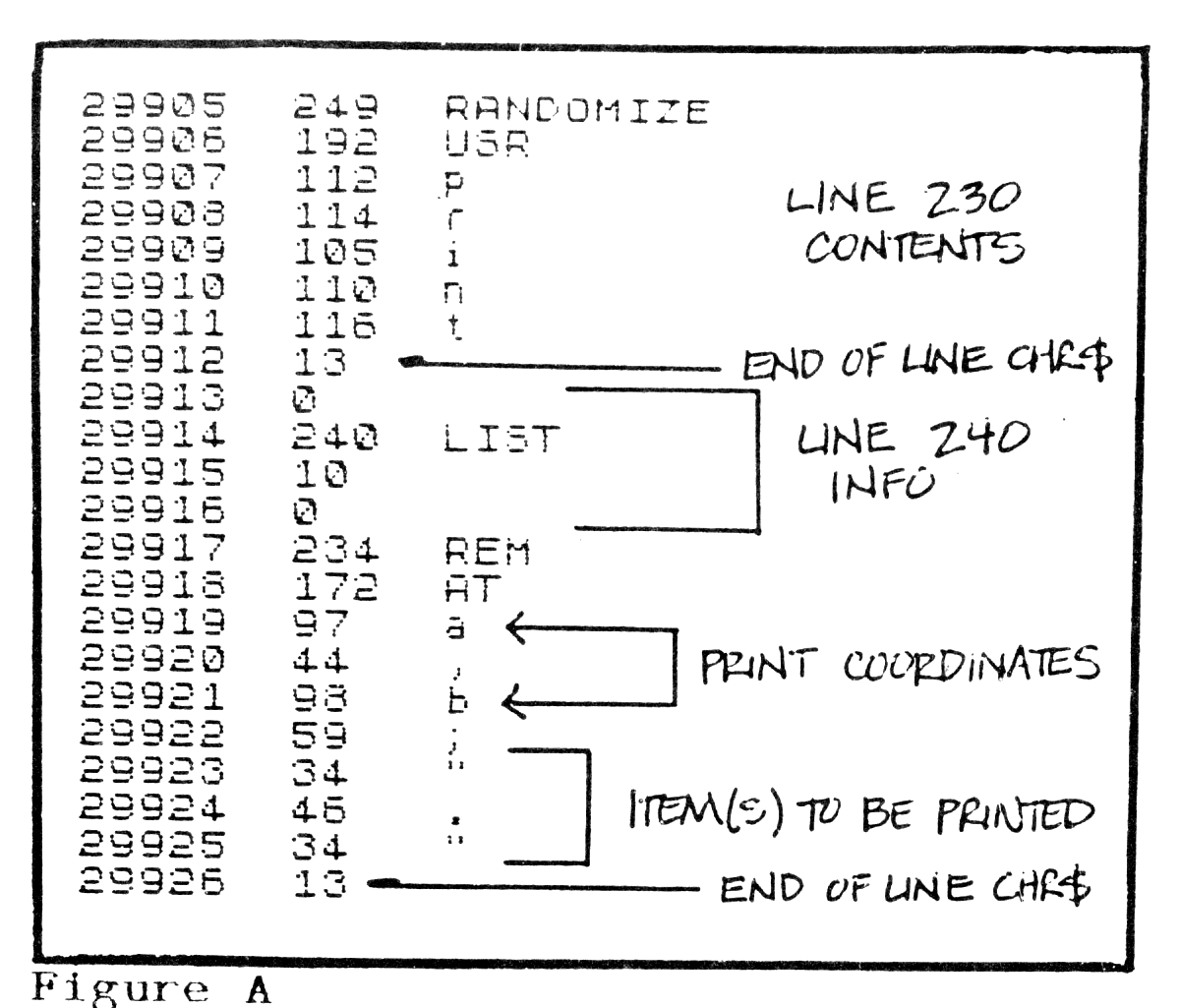
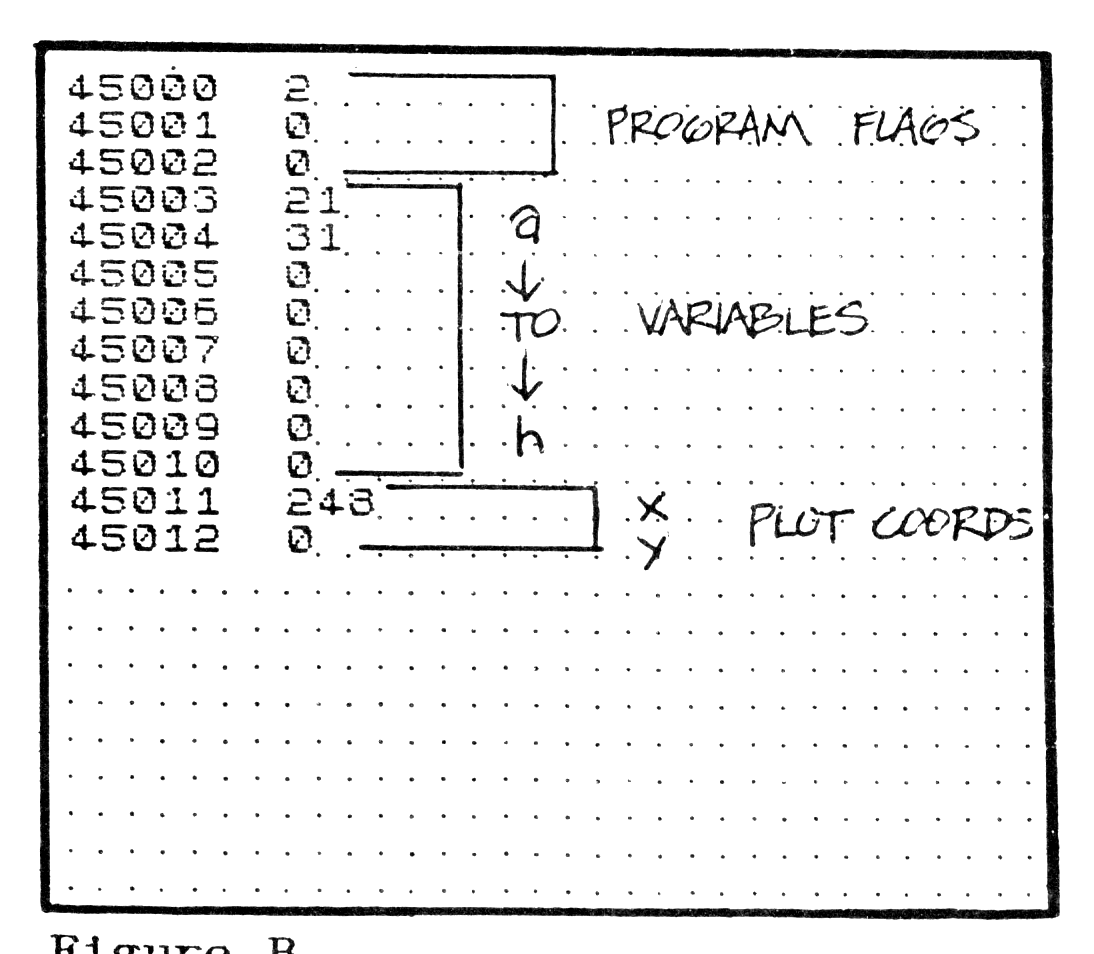
We can’t possibly discuss all the code here, but I will shed some light on the things you need to know. Looking at Figure A you will see a light by address of lines 230 and 240 of Listing 1. The USR call starts the code to reading the contents of the next line which must always be a REM statement. If the program doesn’t find ” (quotation), AT, or TAB, then the program will halt with “ERROR A” (plus the offending CHR$) printed at the bottom of the screen. You can then escape by hitting BREAK. If no error is found, the program will read the coordinates. In this example, both are variables (a and b). As shown in Figure B, the first thirteen bytes of code are storage. The first three are flags, the next eight are variables (a through h) and the last two are the PLOT coordinates x and y. In this example, the program finds the values 21 and 31 in a and b, and converts them to PLOT coordinates, which are 248 and 0.
This may all sound pretty simple, but it isn’t. The program handles variables, single digits and double digits in any configuration and converts them. If the program runs across improper syntax here it will halt with “ERROR B” plus the offending CHR$ as before. With TAB the value read and converted is the x value, the y value remains whatever it was previously (as in BASIC). A BASIC line like REM “.” will print at the location x and y were set to previously. For PLOTing to a location on the screen which is different than the 0 to 21 by 0 to 31 PRINT coordinates conform to, we can POKE PLOT values in the x and y slots directly then execute a REM “whatever” to print “whatever” starting exactly where we want it.
Now let me just detail a couple of nifty little routines this program uses that can be incorporated in any program. In line 100 of Listing 1 is the code which accesses the PLOT routine in the TS2068 ROM. By letting BC hold the coordinates we want and then calling 2638 (9784 decimal), the TS2068 will PLOT our point. Coordinates too big for the screen will return with an error message as in BASIC.
Another likeable routine is a B041 in Listing 2. By calling 2009 (8201 decimal) we access the TS2068’s routine to read the keyboard for BREAK. A simple six byte program will access it: CD0920,38FB,C9 (205, 9, 32,56,251,201 in decimal) will do it!
Now Listing 1 run as-is will produce a grid of dots on the screen corresponding to the PRINT coordinates available (see Figure B). These dots indicate the bottom left-hand corner of the first CFE letter to be printed. By testing other BASIC lines you can get a feel for what the program needs as coordinates. As in BASIC, the error traps will not tell you if your values are too big, but covers most syntax problems.
Next time we will look at the business end of CFE: the printing routines! If you just can’t wait until next time, I would be happy to send you an advanced copy of the dissassembled listing. Just send ($1) to : Paul Bingham, P.O. Box 2034, Mesa, AZ 85214. For the full program on tape send $5. Ses you next time!
Listing 1
“` 1 REM cfe.3 4 LET code=45000 5 LET print=code+13 6 POKE 23728,(code-256*INT (code/256)): POKE 23729,INT (code/256) 7 FOR t=code TO code+305: READ o: POKE t,o: NEXT t 10 DATA 0,0,0,0,0,0,0,0,0,0,0,0,0,213,197,229,245,217,8,213,197,229,245,217,237,91,176,92,217,237,91,176,92 20 DATA 98,107,62,0,119,35,119,35,119,42,85,92,1,5,0,9,126,254,173,32,6,235,54,2,235,24,77,254,172,32,6,235,54,1,235,24,67 30 DATA 254,34,32,6,229,33,26,1,25,233,235,22,65,1,116,0,9,114,35,35,35,119,62,0,205,48,18,62,69,215,62,82,215,62,82,215,62,79,215,62,82,215,62,32,215,62,120,215,62,120,215 40 DATA 205,9,32,56,251,241,225,193,209,8,217,241,225,193,209,201 50 DATA 35,126,1,97,8,213,229,33,3,0,25,235,225,185,32,3,26,24,50,12,19,16,246,209,1,48,10,185,40,8,12,16,250 60 DATA 235,22,66,24,164 70 DATA 213,198,208,79,35,26,254,1,40,4,30,59,24,2,30,44,126,187,121,40,11,6,9,129,16,253,79,62,208,134,129,35,209,1,118,92,2 80 DATA 35,229,26,254,2,40,35,1,8,168,58,118,92,111,62,0,189,40,8,60,245,120,145,71,241,24,245,120,213,235,17,12,0,25,209,119,62,2,18,225,24,140 90 DATA 58,118,92,1,8,8,103,62,0,203,68,40,1,129,203,33,203,44,16,245,213,235,17,11,0,25,209,119,225 100 DATA 229,33,11,0,25,78,35,70,205,56,38,225 110 DATA 241,225,193,209,8,217,241,225,193,209,201 200 FOR y=0 TO 21 210 FOR x=0 TO 31 220 POKE code+3,y: POKE code+4,x 230 RANDOMIZE USR print 240 REM AT a,b;”.” 250 NEXT x 260 NEXT y 300 STOP 500 FOR t=code TO code+12: PRINT t;” “;PEEK t: NEXT t “`
Listing 2