
It is time to begin the next phase of CLASSY FRONT END: Windowing. Now I have cooked up two kinds fo windows for CLASSY. One is the rectangular kind with shadows down two sides, and the other is a small set of round windows for quick footnotes, status reports, and the like. These round versions of post-it-notes I call PORTHOLES.
Now as usual the total program is much too long to finish up in one issue of TDM, in fact we’ll be real lucky to finish it all next time. I also like to leave readers with something they can run and use each issue. So CLASSY windows has been divided up into some useful, stand-alone routines, some of which we will explore this time. If you type in the listings, try to follow the line numbering as they appear. Later, when we “put it all together” merging these smaller programs to form a big one will be a breeze. The “Windows & Portholes” program we will end up with, will be a complete machine code windowing program which can work by itself or with the CLASSY FRONT END fonts (parts 2 thru 5) we finished up last time.
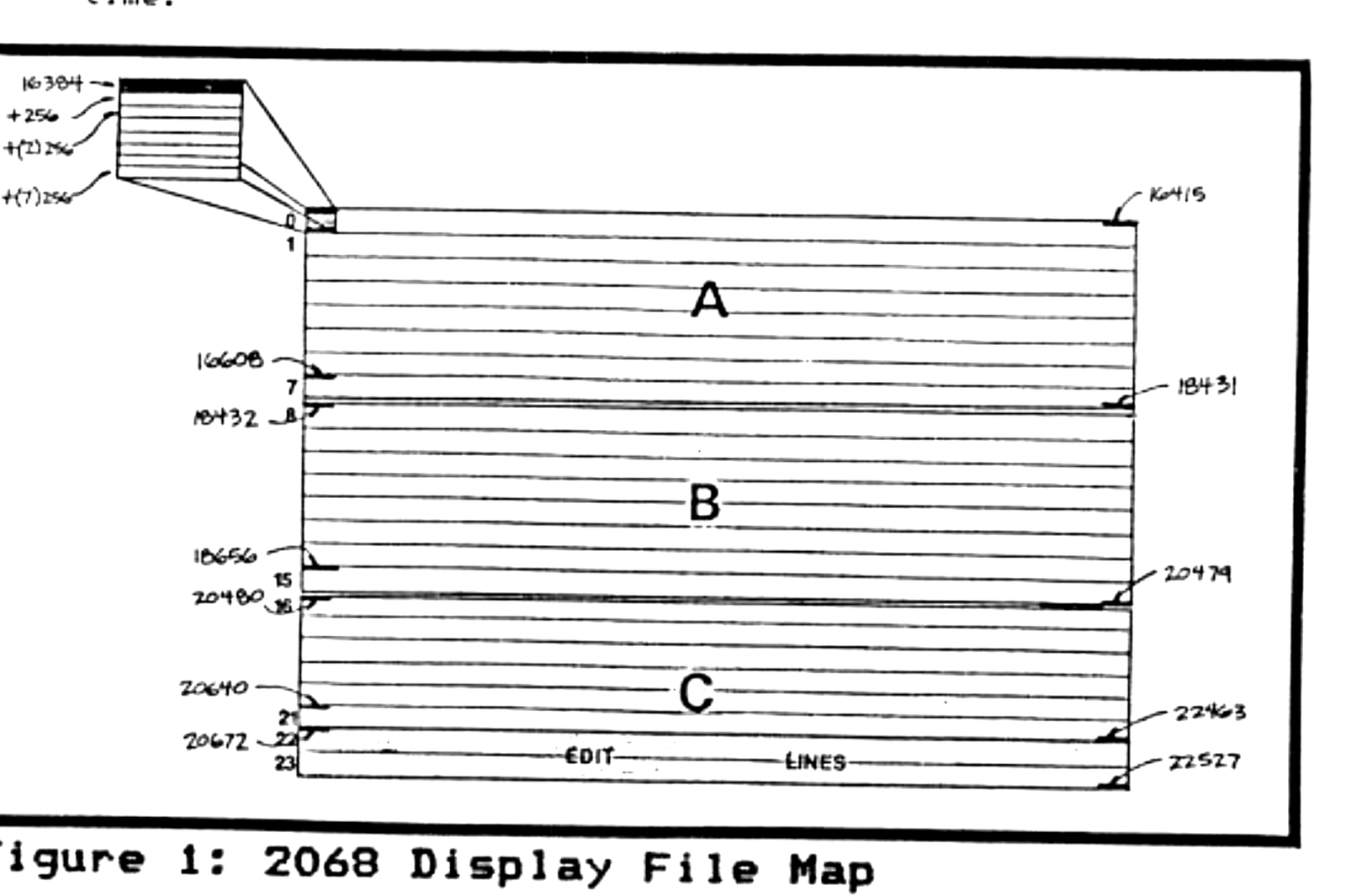
Lets start our discussion on 2068 windows by discovering that the 2068 treats the standard screen as three windows already! What? That’s right, Uncle Clive’s little wonder addresses the screen in the display file as three separate sections. I’ve mapped these in Figure 1 as A,B,C (the last two lines of C being the edit lines). Now if your having trouble visualizing this, let’s experiment for a moment. Type in a line like: 10 FOR t = 16384 TO 22527 : POKE t, 255 : NEXT t. Now RUN it and watch the display carefully. The program is directly pokeing the code for eight black pixels (255) into each consecutive address of the display file. Notice that it fills all of the window A before starting window B and so on. In the old ZX81, the display file was much simpler. With the 2068 we will have to work around these set windows to produce our own custom sizes.
Fortunately the 2068 display file does have a system which a little code can work with to produce whatever we might want. Each byte holds the information of eight bits, each of which produces a pixel. If all of the bits are sent (i.e., equal 1), like our code 255, then all the pixels are blackened in. Each of the screen bytes along one row are also consecutive in memory. Notice on our map that the first byte is address 16384 and as we progress along the 32 COLUMNS across the last in the row is 16415 (or 16384 plus 32). At the beginning of the next ROW (at address 16416) the next byte appears eight pixel elements below the previous row. This is because each screen character is eight pixels high as well as eight pixels wide. Looking at the exploded view of a screen character with our map you will see this. Each row of pixels in a character is stored at an address 256 bytes greater than the last.
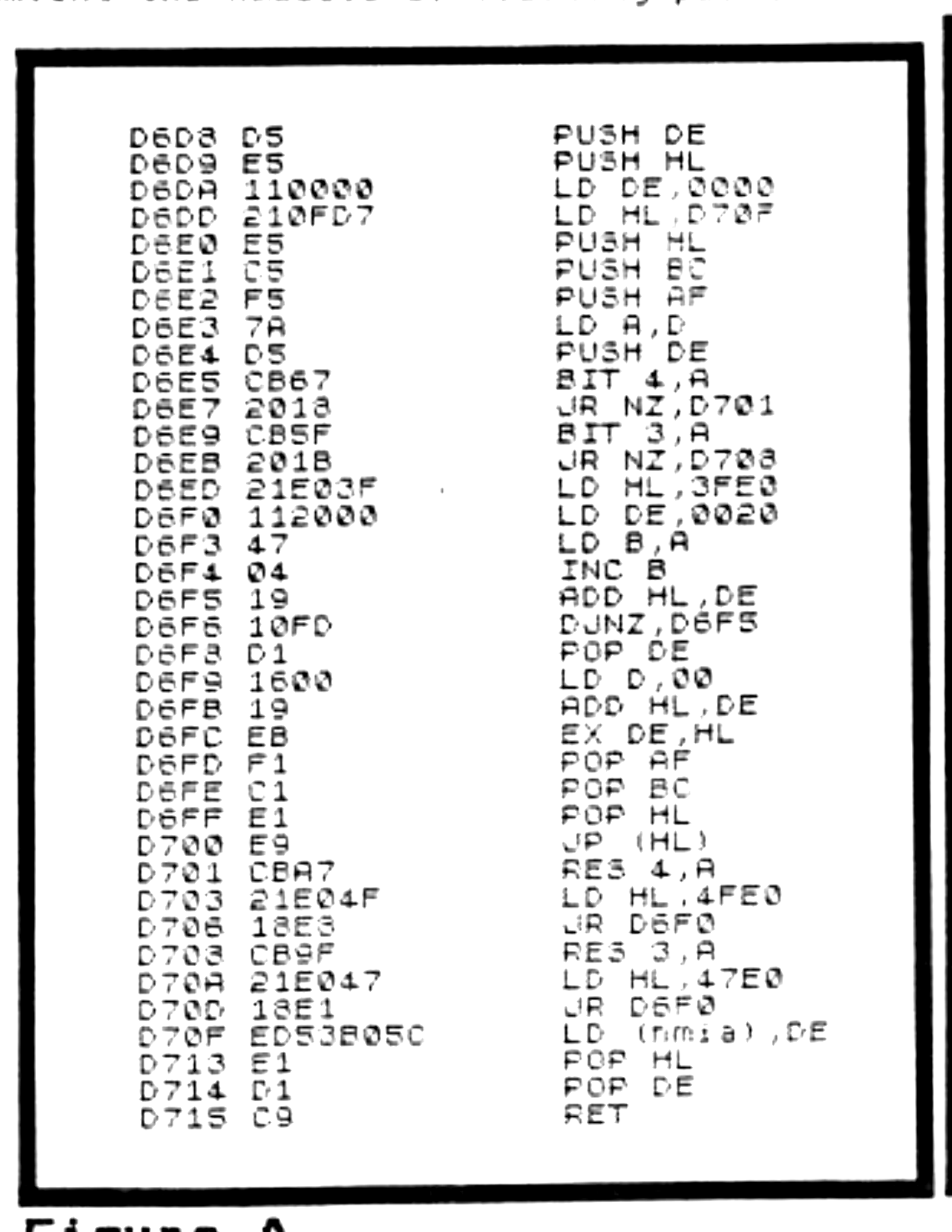
Now to make sense of all of this type in Listing 1 entitled “screen address finder”. The code in DATA lines 1600 t0 1630 and disassembled in Figure A takes the two coordinates of a character location like we use in a PRINT AT statement and figures out the address of the top byte of that position in the display file. This is very important to us because we will need such information if we want to draw windows and also hope to restore any original stuff to the screen when we erase the window. Listing 1 randomly chooses some PRINT coordinates in the BASIC found in lines 1710 through 1770 and then calls the code to get an address. Line 1740 pulls this info out of a little spare RAM address the code uses as a safe place to tuck such things. Line 1750 then “draws” a box around the periphery of this character square. By rewriting lines 1710 through 1770, one could exploit this facility in many ways.
Listing 1
   1 REM   screen address finder
   5 CLEAR 55000
  10 FOR t=55000 TO 55061
1600 READ o: POKE t,o: DATA 213,
229,17,0,0,33,15,215,229
1610 DATA 197,245,122,213,203,10
3,32,24,203,95,32,27,33,224,63,1
7,32,0,71,4,25,16,253,209,22,0,2
5,235,241,193,225,233,203,167,33
,224,79,24,232
1620 DATA 203,159,33,224,71,24,2
25
1630 DATA 237,83,176,92,225,209,
201
1700 NEXT t
1710 LET x=RND*31: LET y=RND*21
1720 POKE 55003,x: POKE 55004,y
1730 LET k=USR 55000
1740 LET a=256*PEEK 23729+PEEK 2
3728
1750 POKE a,255: POKE a+7*256,25
5: FOR t=1 TO 6: POKE a+t*256,12
9: NEXT t
1760 PRINT OVER 1;AT y,x;CHR$ (x
+y+33)
1770 GO TO 1710
screen addr CK TYPE report: 1 : 30 : 3947 5 : 13 : 1555 10 : 27 : 3008 1600 : 92 : 5613 1610 : 368 : 16429 1620 : 68 : 3835 1630 : 69 : 3963 1700 : 3 : 628 1710 : 28 : 2447 1720 : 30 : 3459 1730 : 16 : 1975 1740 : 39 : 3300 1750 : 91 : 6796 1760 : 31 : 2663 1770 : 12 : 1157
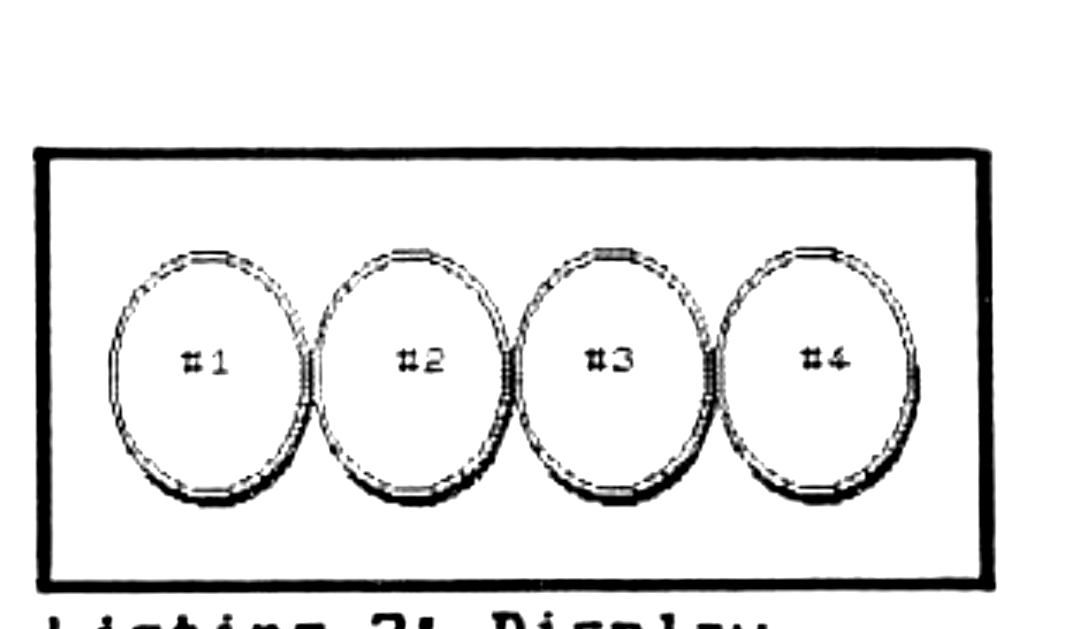
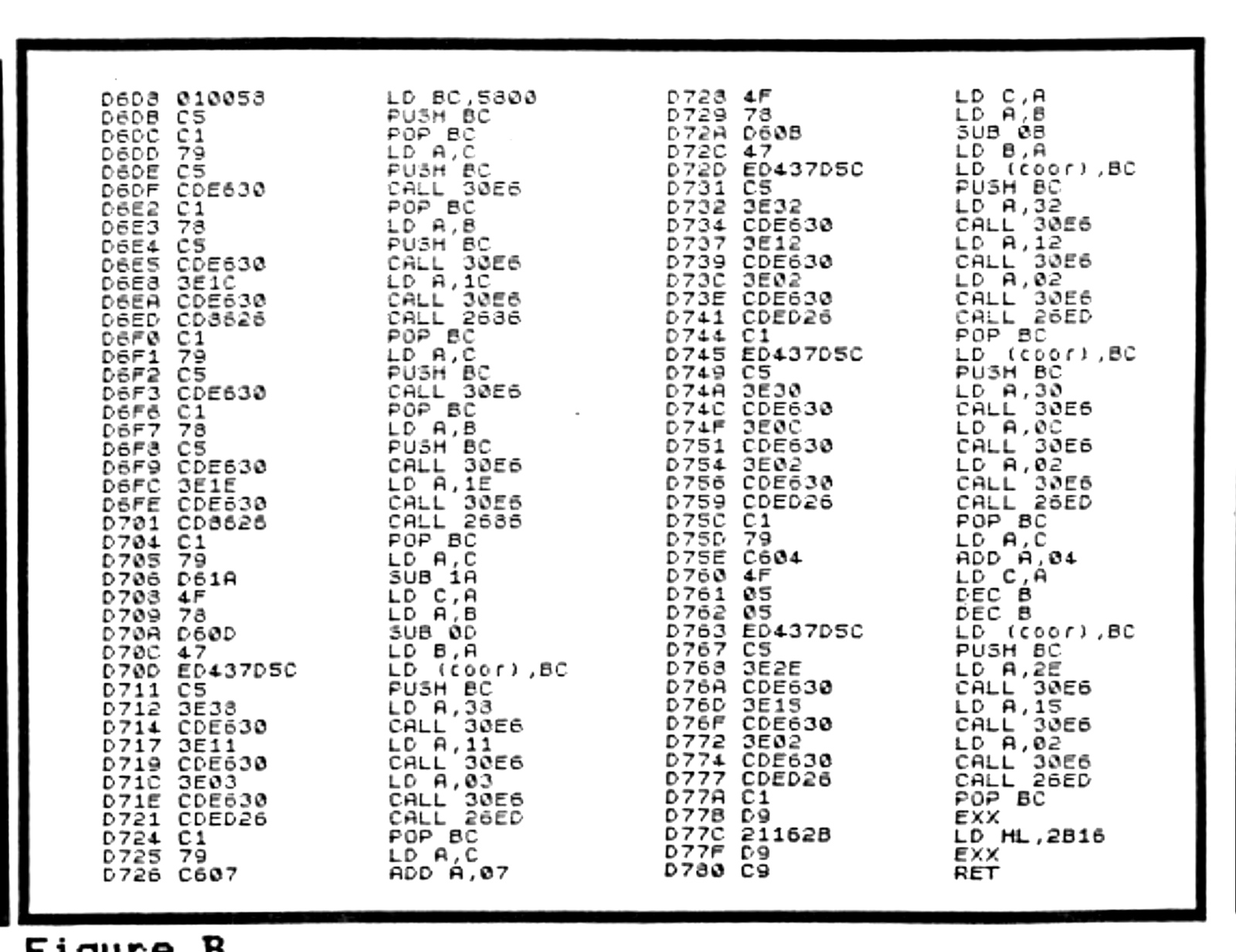
Listing 2 is the real performer this time. It will use the code of DATA lines 1400 through 1450 to draw four portholes as shown. Again the BASIC lines 1510 through 1560 could be written to draw the porthole(s) anywhere on the screen. If you study this code’s disassembly in Figure B, you will find it uses the ROM’s CIRCLE and DRAW routines found at 9862 (2686 h) and 9965 (26ED h). By setting register A equal to the parameters we want and calling the ROM’s integer stacking routine at 12518 (306E6 H) we circumvent the hassels of floating point.
Listing 2
   1 REM     porthole demo
   5 CLEAR 55000: PRINT AT 9,9;"
poking code"
  10 FOR t=55000 TO 55168
  20 READ o: POKE t,o
1400 DATA 1,0,88,197
1410 DATA 193,121,197,205,230,48
,193,120,197,205,230,48,62,28,20
5,230,48,205,134,38,193,121,197,
205,230,48,193,120,197,205,230,4
8,62,30,205,230,48,205,134,38
1420 DATA 193,121,214,26,79,120,
214,13,71,237,67,125,92,197,62,5
6,205,230,48,62,17,205,230,48,62
,3,205,230,48,205,237,38,193,121
,198,7,79,120,214,11,71
1430 DATA 237,67,125,92,197,62,5
0,205,230,48,62,18,205,230,48,62
,2,205,230,48,205,237,38,193,237
,67,125,92,197,62,48,205,230,48,
62,12,205,230,48
1440 DATA 62,2,205,230,48,205,23
7,38,193,121,198,4,79,5,5,237,67
,125,92,197,62,46,205,230,48,62,
21,205,230,48,62,2,205,230,48,20
5,237,38
1450 DATA 193,217,33,22,43,217,2
01
1500 NEXT t
1510 CLS
1520 FOR x=1 TO 4
1530 POKE 55001,32+60*(x-1)
1540 RANDOMIZE USR 55000
1550 PRINT AT 10,3+7.5*(x-1);"#"
;x
1560 NEXT x
porthole demo CK TYPE report: 1 : 37 : 3528 5 : 45 : 4386 10 : 27 : 3123 20 : 8 : 1436 1400 : 36 : 1874 1410 : 389 : 20944 1420 : 389 : 18625 1430 : 370 : 18794 1440 : 356 : 17461 1450 : 68 : 3804 1500 : 3 : 628 1510 : 2 : 515 1520 : 19 : 1308 1530 : 43 : 2707 1540 : 14 : 1762 1550 : 47 : 2769 1560 : 3 : 632
Next time we will examine rectangular windows and restoring things back to the screen. In the mean time, if you feel like getting a head start on code entry, type in listing 3. We’ll be adding to it next time, so you’ll need it eventually. If typing is too big a chore, I will send you a complete version of Windows & Portholes as advertised elsewhere in this magazine. (Windows & Portholes comes with BINGHAM’s BEST for $12.95, or in a collection I call JAZZOFIRE (thats “jazzifier” in a drawl) for $9.95. For BINGHAM’s Best owners I will send you Windows & Portholes on cassette for $3. Please write if you have any questions or comments to: Paul Bingham, PO Box 2034, Mesa, AZ 85214.
Listing 3
1200 DATA 0,0,0,0,0,0,0,0,0,0,0,
0,0,0,0,0,0,0,0,0,0,0,0,0,0,0,0,
0,0,0,0,0,0,0,0,0,0,0,0,0,0,0,0,
0,0,0,0,0,0,0,0
1210 DATA 213,197,229,245,217,8,
213,197,229,245,237,91,176,92,33
,222,5,25,235,42,93,92,1,2,0,9
1220 DATA 62,0,18,126,254,67,40,
4,254,99,32,6,62,1,18,35,24,241,
254,87,40,4,254,119,32,34,35,126
,214,49,203,95,32,92,71,198,4,16
,252
1230 DATA 213,229,213,33,8,0,25,
22,0,95,25,235,225,35,115,35,114
,225,209,24,33,254,80,40,4,254,1
12,32,54,35,126,214,49,203,87,32
,50,235,203,206,235
1240 DATA 71,198,2,16,252,213,22
9,213,33,42,0,24,203,35,126,254,
13,32,15,229,26,203,71,40,101,21
3,235,237,91,24,1,25,209,233,254
,61,40,78
1250 DATA 6,70,24,23,6,68,24,19,
6,69,24,15,6,71,24,10,6,72,24,6,
6,73,24,2,6,74,225
1260 DATA 78,62,0,205,48,18,62,6
9,215,62,82,215,62,82,215,62,79,
215,62,82,215,62,32,215,120,215,
62,4,215,121,203,111,40,1,215,20
5,9,32,56,251
1270 DATA 241,225,193,209,8,217,
241,225,193,209,201
1280 DATA 235,203,254,24,240,235
,203,246,24,235,235,203,238,24,2
30
1st 273 bytes CK TYPE report: 1200 : 409 : 8758 1210 : 242 : 11281 1220 : 358 : 15167 1230 : 385 : 18180 1240 : 357 : 16693 1250 : 236 : 8008 1260 : 373 : 16585 1270 : 109 : 5932 1280 : 148 : 8937
Products
Note: Type-in program listings on this website use ZMAKEBAS notation for graphics characters.