Bryan Lepkowski of Mechanicville, New York wrote in and wanted to know what changes would be required to adapt the VIC-20 EPROM programmer (The Computer Journal Vol.II, No.4) to operate with the Sinclair TS2068 color computer. As I attempted to answer his question, I realized two things. One, the question cannot be answered in a single statement and two, a large number of the Sinclair machines (which include the TS1000. TS1500, Spectrum, and the TS2068) have been sold to people like yourselves who would like to use them in an interface application. These two realizations have prompted me to address the subject of Sinclair computer interfacing in the next two installments of “Interfacing Tips and Troubles.” This month we will look at the hardware and list the idiosyncrasies involved in interfacing the Sinclair computers. Next month we will explore the software necessary to complete the interface.
Every computer manufacturer’s design creates “uniquenesses” in the way their particular machine operates. On the “user” level the uniquenesses remain transparent because of industry standards like the RS-232-C serial standard. Centronics parallel standard, IBM disk format, CP/M disk operating system, etc. But on the “hacker/designer” level the uniquenesses become painfully obvious.
The Sinclair designs are abundant with uniquenesses, and until they are all identified, interfacing them can be a real headache. Fortunately, I have paid my Sinclair interfacing initiation fees (about 100 hours of hair pulling investigation). and I have successfully connected the Sinclair machines to several circuits. In this two-part article I will explain the idiosyncrasies involved in interfacing the Sinclair machines and demonstrate general interfacing practices using the Sinclair computers. As far as interfacing the Sinclair family is concerned, we will assume that there are no hardware differences between the TS1000, TS1500, SPECTRUM, and TS2068. For the software, however, we will split the machines into two categories. The SPECTRUM and the TS2068 are color computers and constitute the first category. The TS1000 and the TS1500 are black and white models which constitute the second category. The actual software differences between these two categories of Sinclair computers will be discussed later.
Listing The Sinclair Computers’ Uniquenesses
To begin with, data can be moved into or out of a computer via two methods; memory mapped input output (MMI/O) and accumulator input/output (Al/O). The type of input/output supported by a computer depends primarily upon the type of central processing unit (CPU) that it uses. In general, the 6800 & 6500 CPU families support only MMI/O and the 8080, Z80, and 8086 CPU families support both MMI/O and Al/O. The Sinclair family of computers uses the Z80 CPU, so technically these machines should support both MMI/O and Al/O. Prepare to start your list of uniquenesses – the Sinclair machines do not support MMI/O. Normally the Z80 CPU does, but because of the way that the address bus is decoded by the Sinclair computers, MMI/O is not possible. This leaves Al/0 as the only means of transferring data, which leads us to the second uniqueness. The Sinclair hardware will support Al/O, but no commands have been included in the Sinclair BASIC instruction set to accomplish an Al/O. This means that the input/output routines must be written in Z80 CPU machine language, placed in RAM memory, and called as subroutines by the BASIC language programs. Fortunately Sinclair did provide this capability with the BASIC “USR” command, which I will discuss later.
Before we look at the software details involved in interfacing the Sinclair computers, let me add two hardware details to your list of system uniquenesses. First, if data is input using even device codes (e.g., IN 00H, IN 02H, IN 04H. etc.) the two highest order bits of the data bus (D6 & D7) will automatically be masked to zeroes. Note that the “H” after the above numbers refers to hexadecimal format. Using a “D” after a number means decimal format. This means that if you use even device codes, only six bits of the eight bit data bus are valid. Secondly, if data is output using odd device codes (e.g.. OUT 01H, OUT 03H, OUT 05H, etc.) the computer will crash! The solution to these hardware problems is to always use odd input device codes and even output device codes. This still leaves 128 input and 128 output device codes to work with. The important thing is to keep these details in mind so that you can design around these limitations as you create interfaces for the Sinclair machines.
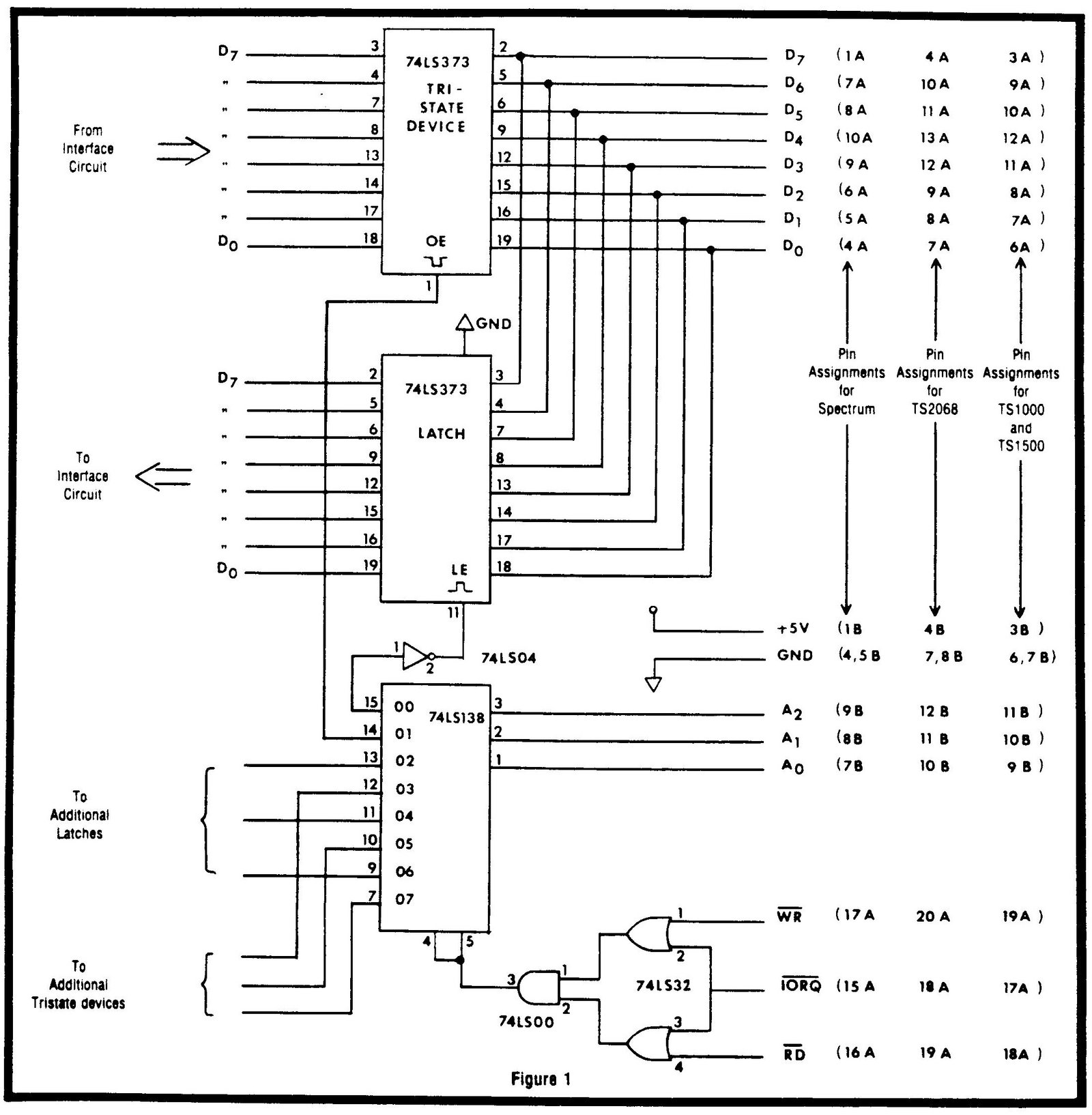
Armed with the above details, we are ready to look at the hardware and write the programs required to accomplish an interface using the Sinclair machines. Figure 1 shows a general hardware configuration which will allow data transfers between the Sinclair and the interface circuit. The two “OR” gates, the “AND” gate, and the 74LS138 form an address decoder which is capable of generating eight device codes (from 00H to 07H). Using the above decoder configuration, four even device codes are generated (00H, 02H, 04H, 06H) which can be used for outputting data, and four odd device codes are generated (01H, 03H, 05H, 07H) which can be used for inputting data. As shown in Figure 1, the even decoder outputs are connected to latches which transfer data out of the computer, and the odd lines are connected to tristate devices which transfer information into the computer. As you can see, the hardware required to accomplish interface is relatively straightforward. Unfortunately, there are software oddities which make the programming somewhat more involved.
Writing Programs For the Interface
The first task of writing software for the interface is to reserve “safe” space in the Sinclair’s RAM memory to store the machine language routines. This is required because the Sinclair moves data around in its RAM memory as it executes & BASIC program, and if your machine language routines are not protected they could be overwritten. The task of reserving space for the machine language routines will be different, depending upon which computer you are using. For the TS1000 and the TS1500, reserving space can be accomplished in the first line of the BASIC program with the use of a REMARK statement. The REMARK statement takes the following form:
1 REM 1234567890In the above statement, the space reserved for machine instructions is filled with the characters 1 through following the REM statement. The TS1000 and the TS1500 begins storing BASIC instructions at memory location 16509 (D). Two bytes are used for the line number, two bytes for the line length, and one byte is used for the REM command code. This places the character “1” at memory location 16514 (D). The reserved space ends with the character “0”, which resides in memory location 16523. If you need more space for machine instructions, you simply place more characters after the REM statement. If you want to know how much space you have reserved, count the characters after the REM statement. If you want to know the ending address of the reserved space, just add the number of characters after the REM statement to 16513. The reason for reserving space via the REM statement when using the TS1000 and TS1500 is because it is the only way to save machine language routines on a cassette tape. For the color computers (SPECTRUM and TS2068) however. memory space can be reserved above the BASIC command area and still be saved on cassette tape. Reserving space on the color computers is accomplished with the (” EAR command. The CLEAR command takes the following form:
1 CLEAR 32129The above command reserves memory from location 31130 (D) to the top of RAM memory. As mentioned before, this space is protected when BASIC executes, and it can be saved on cassette tape. Once you have reserved sufficient space for the machine language routines, you can then place the desired machine language instructions into the reserved space. This is accomplished by sequentially POKE-ing each machine instruction into the reserved area. Of course, if your machine language routines become large, this POKE-ing process can be tedious and error prone. In next month’s “Interfacing Tips and Troubles,” we will present a short BASIC routine which automatically POKES the machine language instructions for you. In addition to the automatic POKE-ing routine, we will explore the BASIC and machine language routines necessary to complete an interface using the Sinclair computers.
Image Gallery