What’s new in the world of Sinclair Computers?
Some time ago, one could at least get a hold of a magazine of some sorts to find out. Sure one would have to look for it, or perhaps order it from abroad, but at least there was something. I have not seen anything written about the Sinclair Computers in a long time. Is there still someone out there publishing anything for the computer I bought?
After Timex gave up to compete in the computer market, at least there still was Sinclair in Britain to fall back on, now that Amstrad has taken over, all seems to have died. A dead computer? Of course not! This thing can do a few things some others are not capable of, even to this date. I am of course talking about the 2068 Timex Sinclair Computer. Sure there is the Sinclair QL, another Timex deal, just marketed and then abandoned, nothing to fall back on.
But getting back to the 2068, have you modified your 2068 already to accept Spectrum Software, and I don’t mean just emulating the Spectrum, but replacing the 2068 Rom with a Spectrum Rom for true compatibility with all software! Oh.. you like to be able to use both, the Sinclair and the 2068 at all times, and don’t like to replace the Rom whenever you wish to switch from one system to the other?
Ever heard of the Rom Switch? Don’t like to spend the money? Well, this looks like you’r a cheap !&%*#. Ever thought what you would have to spend to buy a knob for an IBM if Sinclair would not have build their computers?
But fortunately there is another way. I have made this modification some years ago, that was before the Rom Switch was marketed. Sure I have a Spectrum Computer, but only the ones that ever had one of those would understand why I have gone out of my way to get back to the 2068 keyboard. So I modified my 2068 to be selectable between the systems.
This is not for the feeble minded, nor is this modification intended to be made by fumble fingers. But if you have done some delicate soldering before, and also are not timid when it comes to do some reworking of a plastic keyboard cover, this is for you. The result will be a fully compatible Spectrum and 2068 dual System Computer, switchable between either system in a second.
For good measures I also tell you how to add a reset switch to the 2068. Some parts for both modification can be bought at most Radio Shack Stores.
The part numbers are:
- 275-1566 Soft feel momentary switch
- 275-613 SPDT Submini togle switch
The most difficult item to get, will probably be a Spectrum Rom. Check with one of the vendors catering to the Timex-Sinclair.
Yes, Eproms may work as well, but then you would need a Spectrum Rom as a source for the code. More about this later.
Now the real job: The first thing is to take your computer appart, remove the srews on the bottom of the 2068, carefully lift the keybord off the base and tilt it towards the back. As you look into the computer, you will see the Ribbon connected to the keybord, carefully pull the ribbon out of the socket on the circuit board, don’t bend it, straight up will do fine. The next thing is to remove the circuit board from the base. Remove the srews holding the board down, and put the board at a save place for the time being. Next you will have to drill two holes into the base, get your drill ready!
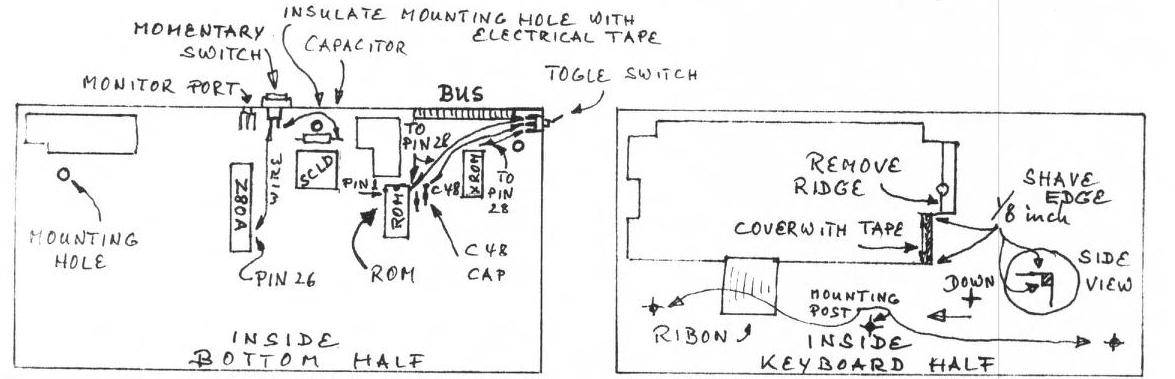
Mark a point on the rear skirt of the bottom shell of your computer, about 3/8 of an inch from the top edge, and 1/2 of an inch to the left (looking at the shell from the rear) from the outer edge of the monitor socket hole. Now find the rear right corner of the bottom shell (seen from the front) next to the extension bus, and mark a point on the side of the bottom shell, about 3/8 of an inch from the rear corner, and about 1/4 of an inch from the top edge.
Using a 3/16 drill bit, drill a hole for the toggle switch at the mark you made on the right rear corner. Next drill a hole at the point you have marked on the rear skirt next to the monitor socket, using a 3/8 inch drill bit (if you don’t have one that big, use the largest size you have, and enlarge the hole using a round file).
Insert the momentary switch into the rear hole, and fasten it with the hardware that came along with it. Next insert the toggle switch into the hole at the rear corner, and fasten that one as well. It is practical to have the toggle move from front to back, and insert the momentary switch the long way following the contour of the bottom shell otherwise the switch may protrude above the edge of the case preventing the top from closing.
The next item takes some guts. If you have a Dremel tool this will be a lot easier, if you don’t, heat up your soldering iron. What needs to be done is to shave some of the plastic off of the inner edge on the keyboard inside the keyboard cover. Lay the keyboard cover upside down on a table with the keyboard portion facing towards the back, now look at the cutout on the right side of the keyboard protusion (see drawing), mark the edge with a pencil not more than 1/8 of an inch to either side of the edge (to the left and down). Use the Dremel tool to shave the corner 1/8 inch deep and wide, do it carefully, take your time. If you are using the soldering iron, melt the plastic moving the soldering iron along the edge very carefully. Use a knife to shave the melted plastic from the case from time to time. There is also a ridge (see drawing), which needs to be removed, again use the Dremel tool or the soldering iron.
Re-mount the circuit board into the bottom shell of the computer. Find six #6 flat washers, using cyanoacrylate adhesive (super glue), glue two washers to each to the rear mounting posts of the keyboard half of the 2068. (see drawing). At the center hole of the circuit board, where the washers would touch the circuit traces, insulate the board with a piece of electrical tape.
Remove the Rom chip from its socket, and bend pin 28 out. Do the same to the Spectrum Rom chip, using your soldering iron and put some solder on the outside of each leg on the Timex Rom chip. Do the same to each leg on the inside, this time on the Spectrum Rom chip. Now piggy back both chips, matching the pins of each (pin 1 over pin 1 etc.), making sure that all pins from the Spectrum Rom touch the ones from the Timex Rom. Using your soldering iron again melt each pin from the Spectrum Rom to the corresponding pin of the Timex Rom leaving pin 28 on each Rom bend outwards, and separated.
Re-insert the piggybacked Roms into the Rom socket. Next solder a wire between the center post of the toggle switch and the rear leg of C48 on the circuit board. Now solder a piece of wire from pin 28 of each Rom to opposite sides of the toggle switch. This completes the Rom Switch modification.
Make sure the keyboard half of the 2068 will fit onto the bottom half now. Also make sure the gray coating on the inside of the keyboard half does not touch the pins on the Roms, if you’r not sure, cover the area cut out of the keyboard half of the 2068 with a piece of electrical tape.
Now to the Reset feature: solder a wire from pin 26 of the Z80A CPU to one of the posts on the momentary switch you have mounted to the rear of the 2068, solder another wire from the other post to the capacitor (see drawing) that is near the SCLD chip. If you now touch the switch a reset will occur. Use a 25W soldering iron to do all soldering to the pins, don’t overheat.
Next month I will talk about installing EPROMs instead of ROMs for the above modifications, have fun, now you can run any software.
Image Gallery