
The TS-Pico, a Raspberry Pi Pico board that gives the 2068 an SD card, comes with its own ROM, and that ROM gives the 2068 two new kinds of channel: f: reads and writes files on the SD card, and d: reads folder listings. A BASIC program connects one to a stream number with OPEN #. After OPEN #4,"f:log.txt","a", PRINT #4, INPUT #4, LIST #4 and INKEY$ #4 work on that file the way PRINT #2 works on the screen and PRINT #3 on the printer. The program picks the number: any stream from 4 to 15 will do, and several can have files or listings open at once. The next section explains what a stream and a channel each are.
The 2068 was built for this. Timex wrote much of the code for channels whose software lives in expansion banks, then left it unconnected, and the 2068 Technical Manual says plainly that OPEN # on anything but the keyboard, screen and printer is an error. Users added channels anyway. In 1986 John Pazmino walked LISTing readers through a channel for the ZTALKER voice box, and Thomas Woods showed Computer Updates readers one for an IBM keyboard. Both did it by poking the right bytes into memory.
What I couldn’t find was the whole picture in one place: how channels work on the 2068, what Timex left unfinished, and what can go wrong. This article puts that together, with a channel you can type in and run this afternoon, and what it took to build f: and d: into the TS-Pico’s ROM.
Streams and channels
BASIC talks to the outside world through streams, numbered −3 to 15. Every PRINT goes to a stream: plain PRINT uses stream 2, the upper screen, and PRINT #3 uses stream 3, the printer. A stream doesn’t know anything about devices. It points at a channel, and the channel does the work. Streams −3 to −1 belong to the ROM. At power-on and after NEW, streams 0 and 1 go to the keyboard channel, 2 to the screen and 3 to the printer, and 4 to 15 are closed.
Think of a stream as an extension on an office phone system and a channel as the person who answers it. Dial extension 3 and the printer picks up. OPEN # changes who answers an extension. The person at the other end doesn’t need to know which extension you dialed.
On the 2068 the two halves live in two places:
- STRMS, at 23568 (5C10h), is the stream table: two bytes for each stream from −3 to 15. Stream n‘s entry is at 23568 + 2 × (n + 3), so stream 4’s is at 23582. A 0 means the stream is closed. Anything else is an offset into the channel area, plus one.
- CHANS, whose address is in the system variable at 23631 (5C4Fh), is the channel area: one record per channel, ending with an 80h byte. On a fresh 2068 it starts at 26688 (6840h), well above where the Spectrum keeps it: the 2068 keeps its machine stack and its bank-switching code below it.
A channel record starts with five bytes:
| Bytes | What |
|---|---|
| 0–1 | the address of the output routine |
| 2–3 | the address of the input routine |
| 4 | the channel’s letter |
Anything after those five bytes belongs to the channel. The ROM never looks there.
The 2068 starts with four records, copied from HOME 11AAh at power-on: K (the keyboard and the lower screen), S (the upper screen), R (the ROM’s own workspace) and P (the printer). K, S and P share one output routine, PRINT-OUT at 0500h. Only K has a real input routine. The input address in S, R and P stops with J Invalid I/O device, because you can’t read from the screen.
When BASIC selects a stream, the ROM’s SELECT routine (HOME 1230h) looks the offset up in STRMS, adds it to CHANS, and stores the result in CURCHL (23633, 5C51h), the current channel. Then it reads the record’s letter and, for K, S or P, runs a short setup routine: the lower screen for K, the upper screen for S, the printer for P. Any other letter skips the setup. The setup is why a 1980s CATS library program, Streams and Channels, could send every PRINT to the printer with POKE 26697,80: that byte is the S record’s letter, and changing it to P (80) makes SELECT set up the printer while the output routine stays the same.
From then on every character goes through CURCHL:
- Output.
RST 10hwith the character in A calls the output routine. That’s allPRINTis, one character at a time, including the control codes forAT,TAB,INKand the rest. - Input.
INPUTandINKEY$call the input routine. It returns one of three answers:
| Carry | Zero | Means |
|---|---|---|
| set | — | A holds the next character |
| clear | set | nothing yet: the ROM calls again |
| clear | clear | no more: the ROM stops with 8 End of file |
That third answer is how a file channel ends. You don’t write any error handling for it. The ROM’s WAIT-KEY routine (HOME 11CFh) turns “no more” into Report 8 by itself.
What Timex left unfinished
The stock ROM gives us streams, records and CURCHL, and a channel needs nothing more to work. It gives us no way to name a new one:
OPEN #knows three channels. InOPEN #4,"p", the string names the channel. The stock code accepts a one-character"k","s"or"p", in either case. Anything else,"x"or"printer", is J Invalid I/O device.OPEN #won’t replace a channel it doesn’t know. If stream 4 already points at a record whose letter isn’t K, S or P,OPEN #4,"p"stops with O Invalid stream.CLOSE #crashes on a channel it doesn’t know.CLOSE #4takes only the stream number. The ROM follows stream 4’s offset to its record and reads the letter in the record’s fifth byte, then looks that letter up in a table of K, S and P to find out how to close the channel. The table has no end marker (HOME 1407h), so if the record holds any other letter, the search runs on into the code that follows the table, and where it ends up is anyone’s guess.
Timex had a plan for other channels, and you can see it in the ROM. The 2068 pages memory in banks, and a bank number is one byte: the DOCK cartridge is bank 0, HOME is 255 and the EXROM is 254. The machine that shipped had those three. Expansion banks were to be numbered from 1 up. David Ornstein’s functional specification for Timex’s Bank Switching Controller Chip describes a chip for each expansion bank, which the system software gives its bank number at start-up by walking a daisy chain of banks one at a time. More banks were to come with the TS2060, the bus expansion unit Timex never released. Its preliminary product specification (January 1984) lists microdrives, a network, an RS-232 port, a Centronics printer port and a 16K ROM of BASIC extensions, and it names their channels: C and G for the printer, T and B for RS-232, N for the network. T, B and N are the letters the Spectrum’s Interface 1 uses.
A device like that would bring its software in its own bank, and the 2068’s ROM was written to let it bring its channels too. Lon Hildreth’s notebook from the expansion unit’s ROM work shows the design. Timex’s notes call a device in an expansion bank an intelligent device. At start-up, the ROM was to find each one and build tables of the channel letters the device handles and the bank and address of its routines for selecting, opening and closing a stream. OPEN # would look the letter up among K, S and P first, then in those tables. On a match it would call the device’s open routine in the device’s bank and store the stream’s entry with its top bit set: “indicates intelligent device,” the notebook’s comment says. The letter is still one character.
Most of that reached the shipped ROM. A stream whose STRMS entry has its top bit set doesn’t point into CHANS at all. It points into the area SYSCON describes, the table the 2068 builds from the banks it finds, and that kind of record starts with a bank number. SELECT and CLOSE # both handle it: they call the channel’s routines in its own bank, through the ROM’s CALL_BANK, with the bank number kept in the system variable CRCBN (23743), and every character in or out goes the same way. What’s missing is the way in. HOME 1488h holds the OPEN # path that asks a bank to open a channel and builds that kind of STRMS entry from the answer, but no instruction in either ROM jumps to it. The Technical Manual’s advice for new devices was to catch the error from OPEN # with ON ERR and handle the statement yourself.
So on a stock 2068 we attach a channel ourselves: put a record in CHANS and write its offset into STRMS. That’s the same thing OPEN # does for K, S and P, done by hand.
Try it: a memory channel
This channel keeps everything we PRINT #4 in a 1K buffer, and INPUT #4 reads it back, line by line, until it says 8 End of file. It’s a file with no disk.
The machine code lives at 50000, above RAMTOP. It has three parts: an installer, the five-byte record it copies into CHANS, and the two routines.
MAKE_ROOM EQU 12BBh     ; HOME: make BC bytes of room after HL
STRMS     EQU 5C10h     ; the stream table, streams -3 to 15
CHANS     EQU 5C4Fh     ; the channel area
PROG      EQU 5C53h     ; the BASIC program, right after the channel area
BUF       EQU 50176     ; 1K of text
BUFEND    EQU BUF+1024

        ORG 50000

; RANDOMIZE USR 50000: a new record at the end of CHANS, and stream 4 on it.
INSTALL: LD HL,(PROG)
        DEC HL
        LD A,(HL)
        CP 80h          ; the end marker, at PROG-1 or PROG-2
        JR Z,FOUND
        DEC HL
FOUND:  PUSH HL         ; the record goes where the 80h is now
        DEC HL
        LD BC,5
        CALL MAKE_ROOM  ; the 80h moves up five bytes, and so does PROG
        POP DE
        PUSH DE
        LD HL,RECORD
        LD BC,5
        LDIR
        POP HL          ; the stream's offset: record - CHANS + 1
        LD DE,(CHANS)
        AND A
        SBC HL,DE
        INC HL
        LD (STRMS+2*(4+3)),HL
        LD HL,BUF
        LD (WPTR),HL
        LD (RPTR),HL
        RET

RECORD: DEFW XOUT       ; the output routine
        DEFW XIN        ; the input routine
        DEFB 'X'        ; the channel's letter

WPTR:   DEFW BUF        ; where the next character goes
RPTR:   DEFW BUF        ; the next character to hand out

; Output: the character is in A.
XOUT:   LD HL,(WPTR)
        LD B,A
        LD A,H
        CP BUFEND/256   ; full: drop the character
        RET Z
        LD (HL),B
        INC HL
        LD (WPTR),HL
        RET

; Input: carry set and A = the character, or carry and zero clear at the end.
XIN:    LD HL,(RPTR)
        LD DE,(WPTR)
        AND A
        SBC HL,DE
        JR Z,ATEND      ; everything written has been read
        ADD HL,DE
        LD A,(HL)
        INC HL
        LD (RPTR),HL
        SCF
        RET
ATEND:  LD A,1
        AND A           ; NC NZ: the ROM gives "8 End of file"
        RET
You don’t need an assembler. This BASIC program pokes the same 97 bytes in, checks them, installs the channel and tries it:
10 CLEAR 49999
20 LET t=0
30 FOR a=50000 TO 50096
40 READ b: POKE a,b: LET t=t+b
50 NEXT a
60 IF t<>11200 THEN PRINT "Check the DATA lines": STOP
70 RANDOMIZE USR 50000
100 PRINT #4;"HELLO"
110 PRINT #4;"FROM CHANNEL X ";2+2
120 INPUT #4;a$: PRINT a$
130 GO TO 120
1000 DATA 42,83,92,43,126,254,128,40,1,43
1010 DATA 229,43,1,5,0,205,187,18,209,213
1020 DATA 33,130,195,1,5,0,237,176,225,237
1030 DATA 91,79,92,167,237,82,35,34,30,92
1040 DATA 33,0,196,34,135,195,34,137,195,201
1050 DATA 139,195,153,195,88,0,196,0,196,42
1060 DATA 135,195,71,124,254,200,200,112,35,34
1070 DATA 135,195,201,42,137,195,237,91,135,195
1080 DATA 167,237,82,40,8,25,126,35,34,137
1090 DATA 195,55,201,62,1,167,201
Type RUN and press ENTER. Lines 100 and 110 write two lines into the buffer. Line 120 reads them back and prints them on the screen, and the third time round there’s nothing left:
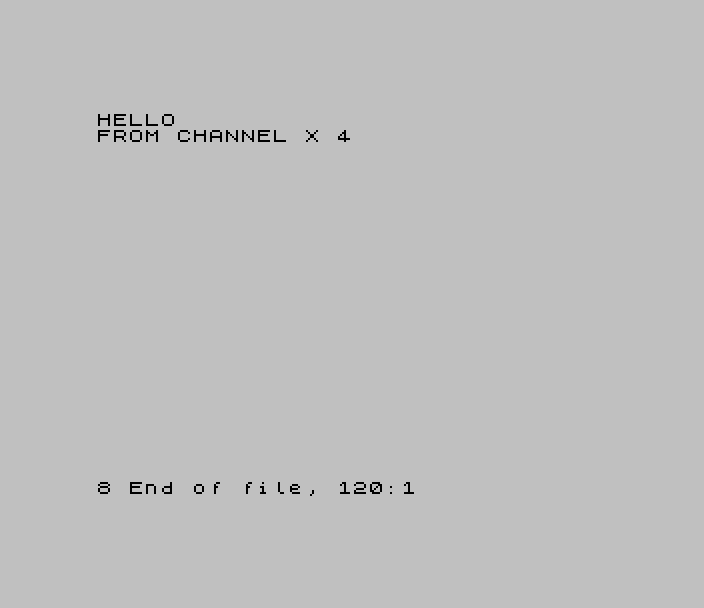
Notice that 2+2 arrived as 4. The ROM turns a number into digits before it calls our output routine. Keywords are another matter. Try LIST #4 and then INPUT #4;LINE a$: the listing goes into the buffer with each keyword as a single byte, so PRINT arrives as F5h. PRINT-OUT spells keywords out on the way to the screen, and our channel never calls PRINT-OUT. The TS-Pico spells them out on the way to the card, so an f: file reads as text on a PC.
A few things to know before you build on it:
- Don’t
CLOSE #4. Our record’s letter is X, which the stockCLOSE #can’t find in its table (see above). The TS-Pico ROM crashes too: it closes records with its own letter, F, and hands every other record to the stock code. To let go of the stream,POKE 23582,0: POKE 23583,0. The five bytes stay in CHANS, where they do no harm. Do the same before youOPEN #4to anything else: while stream 4 points at the X record,OPEN #4stops with O Invalid stream. NEWtakes it away.NEWrebuilds CHANS and STRMS. The code above RAMTOP survives, soRANDOMIZE USR 50000puts the channel back (and empties the buffer).INPUT #4prints too.INPUT #4;"Name? ";a$sendsName?to the output routine before it reads. In this channel the prompt goes into the buffer. The TS-Pico’sf:channel drops output to a file opened for reading for the same reason.- The state is in fixed memory. WPTR and RPTR belong to the code, so this channel can serve one stream. A channel that serves several streams at once keeps its state in its records, after the five-byte header, and finds the record through CURCHL. That’s what
f:does.
Where the record goes
My first version of this example was shorter. It kept the record at 50000 with the code and pointed stream 4 straight at it. STRMS holds an offset, and nothing says the offset has to land inside CHANS. Pazmino’s 1986 article gives the same advice: put your channel records in a free area of protected memory, next to the machine code. PRINT #4 worked. INPUT #4 reset the 2068.
The reason is in MAKE-ROOM. When the editor reads a line, it makes room for each character in the workspace, and MAKE-ROOM calls POINTERS, which moves every system variable that points past the new room: VARS, PROG, the workspace pointers and fourteen in all. CURCHL is one of them. Our record sat above the workspace, so every character INPUT read moved CURCHL up one byte, and on the next character the ROM took its input address from the middle of the wrong bytes.
INKEY$ #4 worked from the record at 50000, because INKEY$ makes no room. PRINT #4 worked too. Only INPUT broke, which makes this one easy to miss in testing. An output-only channel never meets the problem. (ZTALKER itself put its record in CHANS, right after the P record, which Pazmino called fine “if you’re careful.”)
Woods put his record somewhere else: in a REM in line 1 of the program. That’s below the workspace, so the editor’s room-making doesn’t move it, and his keyboard channel could take input. It has a weakness of its own, though. STRMS measures the offset from CHANS, and anything that adds a record to CHANS later, a TS-Pico OPEN #4,"f:…" for one, moves the whole program up without moving CHANS, and the stream then points at the wrong bytes.
Inside CHANS, MAKE-ROOM and POINTERS move the record and CURCHL together, and a later record goes in above ours. Our installer puts the record where the 80h end marker is, so the records already there keep their offsets.
A rule only the 2068 has
Timex’s banked channels leave one trap behind. SELECT tells the two kinds of STRMS entry apart by ORing the entry’s two bytes together: 80h or more, and the stream is taken for a banked channel and looked up through SYSCON. The design meant only the high byte. CLOSE # tests the high byte alone, and so does the SELECT draft in Hildreth’s notebook, whose comment reads “D already in A”. In the shipped SELECT, A holds D OR E, so the low byte trips the test too.
So an offset of 0095h, 0280h or 8000h doesn’t mean what it says. Both bytes of a channel’s offset must be below 80h. On a stock 2068 our record lands at offset 15h, and the rule never comes up. The TS-Pico can’t know what else has been added to CHANS before an OPEN #, so it pads each of its records, moving it far enough in that both bytes of its offset stay low.
If anything else has added records to CHANS before you install the memory channel, check PEEK 23582 and PEEK 23583 afterward. Both should be under 128.
Putting a channel in ROM
The memory channel shows the whole contract a channel has with BASIC: a record, its offset in STRMS, an output routine and an input routine. A channel in ROM, with its own name and a real CLOSE #, needs more, and most of it is about the 2068’s banked memory. Here’s what the f: channel needed, in the order we found out.
Three hooks
OPEN # and CLOSE # each needed one CALL redirected. HOME 145Eh, the run-time OPEN #, calls our code instead of the stock K/S/P code at 1465h. If the name starts with f: or d:, the channel is ours; anything else goes on to 1465h, as before. HOME 13A5h does the same for CLOSE #.
The third hook was a surprise. OPEN #4,"f:data.dat","u",30 takes a record length, and the stock syntax check skips everything after the comma in OPEN #. Skipping it also skipped storing the hidden five-byte form of each number, which the ROM adds during the syntax check and reads at run time. So the record length gave Report C when the line ran. HOME 1438h now calls our own syntax check for ,"mode"[,length].
The space for the hooks’ landing points came from the ROM itself: the 55 bytes at HOME 1488h that held Timex’s unconnected OPEN # for banked channels. Nothing reached that code, so the TS-Pico could rewrite it.
Addresses that never move
Our channel code lives in the EXROM, the 2068’s second ROM bank, and a record can only hold HOME addresses: RST 10h calls the output routine with HOME paged in. So each f: record holds 14A0h and 14A9h, two short stubs in HOME:
14A0h   DI
        LD HL,3009h     ; the module's output vector
        CALL 03FCh      ; into the EXROM and back
        EI
        RET
The stubs call a vector table at the start of the module (EXROM 3000h), never a routine. When we rebuild the module, the routines move and the vectors don’t, so no record ever holds an address that goes stale.
The bank switch and interrupts
That DI was learned the hard way. The 2068 switches banks by writing port FFh and then port F4h, and if an interrupt arrives between the two writes, RST 38h runs with the empty DOCK bank paged in where the interrupt routine should be. The stock ROM switches banks a few times per command, so the window almost never comes up. A channel switches banks twice for every character, and our first f: channel crashed within a few hundred characters in the emulator. Every entry from HOME into the module now runs with interrupts off.
Errors and the bank stack
The returning thunk at 03FCh keeps a frame on a small stack of its own, at the address in 65CEh, and pops it on the way back. A report raised inside the module, a refusal from the card or 4 Out of memory from MAKE-ROOM, unwinds the Z80 stack to ERR_SP as usual but never touches that second stack. Each error left it 4 to 8 bytes lower. After about 16 errors it grew down over the bank-switch code beneath it, and the next switch crashed.
The fix is an error frame around every entry into the module: ERR_SP points at a trap in HOME (14B2h) that puts the bank stack’s pointer back and then carries on to BASIC’s own error handling. It has to be in HOME, because RST 8 ends with HOME paged in. Our emulator test raises 32 errors in a row and checks that the bank stack hasn’t moved.
Keeping CURCHL
A channel routine runs in the middle of somebody else’s PRINT #. If it prints anything itself, even a message, the ROM selects the screen to print it, and the PRINT # that called us carries on to the screen. So the TS-Pico answers every channel command with a bare status byte, never a message, and the module saves CURCHL before it reads that status and puts it back afterward.
The bank switch also uses IY, and the ROM expects IY to hold 23610 (5C3Ah) everywhere. Every module entry loads IY again before it calls anything in HOME.
Records that come and go
An f: record is 512 bytes: the five-byte header, the stream number, two buffers and their counts, and the pad. OPEN # makes room for it at the end of CHANS, the same way the memory channel does. CLOSE # has to take it out again, and that has three consequences:
- Other streams move. Every stream whose record sits above the one being closed now points 512 bytes too high.
CLOSE #walks STRMS and moves each of those offsets down. Because 512 is a multiple of 256, only the high byte changes, so the pads still work. - CURCHL may point at nothing. If the stream being closed is the current channel, CURCHL would be left pointing into somebody else’s record.
CLOSE #selects stream 2, the screen, when that happens. - The buffer goes first. Anything still waiting in the output buffer is sent before the record goes. The flush clears the buffer’s count before it sends, so if the card refuses the bytes, the stream can still be closed.
Buffering
Every exchange with the TS-Pico is a command, and a command per character would be slow. So the f: channel collects output in a 64-byte buffer and sends it when the buffer is full, at CLOSE #, before an INPUT # on the same stream, and, on a file of fixed-length records, at the end of each record. Input comes in 255 bytes at a time. A short PRINT # costs nothing until something sends it.
The details
- The key click.
INPUT #reads through the line editor, and the editor clicks once for every character it takes, as if you’d typed it. Reading a file sounded like a typewriter until the module learned to skip the click when the current channel is anf:record. TABfor free.PRINT #4;TAB 30;sends the control code 23 and two bytes of position through the output routine like any other characters. Thef:channel takes that sequence as a seek, so on a file of fixed-length records,PRINT #4;TAB n;andINPUT #4;TAB n;go straight to record n. BASIC needed no new keyword.NEWforgets one end.NEWand a reset clear the 2068’s records, but the TS-Pico still remembers the streams. The nextOPEN #of the same stream number replaces the stale entry, so nothing needs cleaning up.
Testing
Almost every bug above crashed the 2068 rather than giving an error, and several needed hundreds of characters to show up. We found them in ZEsarUX running the TS-Pico ROM with the real firmware behind it, and the memory channel in this article ran there too, on the stock ROM and on ROM 2.3. Scripted tests covered PRINT #, INPUT #, LIST # and INKEY$ #, reading past the end, buffers that fill, two streams open at once with the offset fix-up, and the bank stack across 32 errors. If your channel crashes once in a while, write a loop that pushes a few thousand characters through it before you go looking for the bug by hand.
Summary
- A stream is an entry in STRMS. A channel is a record in CHANS: output address, input address, letter, then anything the channel wants to keep.
- The output routine gets one character in A. The input routine returns carry set with a character, carry and zero clear at the end of the file, or carry clear and zero set for “nothing yet.”
- On a stock 2068, attach a channel by hand: make room at the end of CHANS, copy in the record, and write record − CHANS + 1 into the stream’s entry in STRMS.
- Keep the record inside CHANS. MAKE-ROOM moves CURCHL, so a record above the workspace breaks
INPUT #, and a record in the program loses its offset when CHANS grows. - Keep both bytes of the offset below 80h, or the 2068 takes the stream for a banked channel.
- Don’t
CLOSE #a hand-made channel, and don’tOPEN #its stream to anything else. Zero its STRMS entry instead. - In ROM: hook
OPEN #, its syntax check, andCLOSE #; give records fixed HOME addresses; switch banks with interrupts off; guard every entry against errors; keep CURCHL and IY; clean up other streams and CURCHL when a record goes.
Further reading
- Jim Hayes, Streaming Along, CATS Newsletter, July 1984:
OPEN #for redirectingPRINT. - Doug Gangi, 2068 Tutorial: Open# Close#, T-S Horizons No. 12, February/March 1985: redirecting streams to K, S and P, with the note that the commands were meant for the microdrives.
- Thomas B. Woods, Introduction to Channels on the 2068, Computer Updates, Summer 1986: STRMS offsets and a channel record in a
REM. - John Pazmino, Streams and Channels, LISTing, October 1986: building a channel record by hand, with the ZTALKER.
- Bob Mitchell, OPEN #, CLOSE #, Channels & Streams: A Tutorial, Update, October 1988: the default tables and a program that lists them.
- Timex Computer Corporation, TS2060 Interface Product Specification (Preliminary), January 1984: the expansion unit and its C, G, T, B and N channels.
- Streams and Channels, CATS Library Tape 8: a program that shows STRMS and the channel records on screen.