
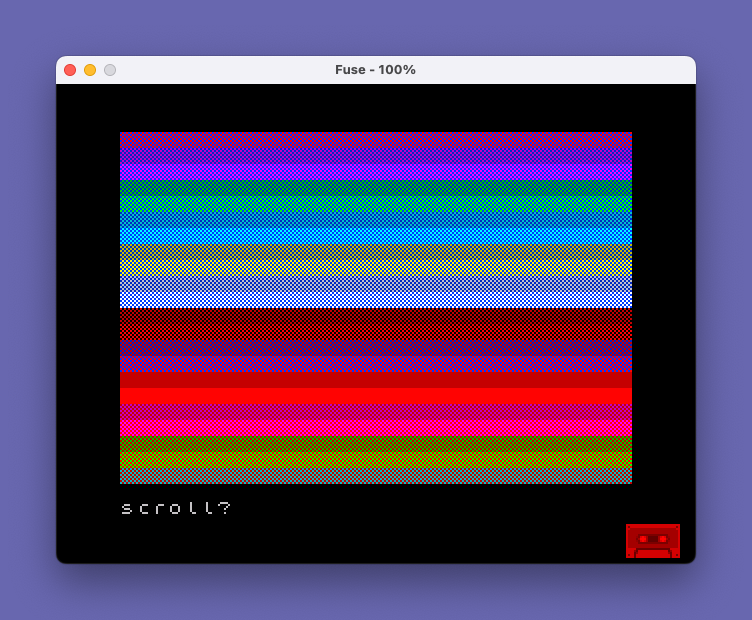
This program demonstrates all 128 color combinations available through the PAPER, INK, and BRIGHT attributes by cycling through every permutation of 8 paper colors, 8 ink colors, and 2 brightness levels. It first displays a color-bar calibration screen so the user can adjust their television’s color controls before the test begins. A custom UDG character (“\p”) is defined using alternating bit patterns (85 = 01010101 and 170 = 10101010) to create a checkerboard fill, which blends foreground and background colors visually. The program runs the color cycle twice: first in a scrolling view and then as a full-screen display using POKE 23692,100 to suppress the scroll prompt. Line 9995 saves the program with an auto-run directive.
Program Analysis
Program Structure
The program is organized into two main executable lines and a save line:
Line 10: Calibration screen — displays solid-color bars for each of the 8 paper colors and waits for a keypress.Line 20: Main demonstration — defines the UDG, then runs two passes through all 128 color combinations (scrolling view, then full-screen view).Line 9995: Saves the program withLINE 1auto-run.
UDG Definition Technique
The program defines UDG character \p (character 144, the first UDG slot) with a checkerboard pattern using a loop:
FOR x=0 TO 6 STEP 2: POKE USR "\p"+x,85: POKE USR "\p"+x+1,170: NEXT xThe values 85 (binary 01010101) and 170 (binary 10101010) produce alternating rows of ink and paper pixels, creating a 50% dither. When printed at small sizes or viewed on a standard TV, this blends the two colors perceptually, making it possible to suggest intermediate hues. The loop only fills rows 0–7 (all 8 bytes of the 8×8 UDG cell) via the STEP 2 pairing.
Iterating All 128 Color Combinations
The three nested loops FOR p=0 TO 7 (PAPER), FOR i=0 TO 7 (INK), and FOR b=0 TO 1 (BRIGHT) enumerate all 8 × 8 × 2 = 128 attribute combinations. Each iteration prints a full 32-character row of the checkerboard UDG repeated 32 times, followed by a blank line, producing a two-row band per combination in the scrolling pass.
Suppressing the Scroll Prompt
The full-screen pass uses POKE 23692,100 to write a large value into the system variable SCRCT (scroll counter at address 23692). This tells the ROM that 100 lines may be printed before the “scroll?” prompt appears, effectively suppressing it. The POKE is repeated inside the loop after each BRIGHT cycle to continually reset the counter, preventing any pause during the full-screen display.
Key BASIC Idioms
- Inline attribute keywords (
PAPER p; INK i; BRIGHT b;) within a singlePRINTstatement set temporary attributes for that output only. PAUSE 0at the end of line 10 waits for any keypress before continuing, a standard input-wait idiom.PAUSE 200(approximately 4 seconds at 50 Hz) provides timed pauses between the two display phases.- The calibration screen uses
PRINT PAPER i;" "'— 32 spaces — to flood each row with a solid color band for TV adjustment.
Notable Details and Observations
| Feature | Detail |
|---|---|
| UDG bytes 85 / 170 | Complementary checkerboard rows; together they produce a 50% dither across the full 8×8 cell |
| SCRCT POKE address | 23692 — standard system variable for scroll-line countdown |
| Full-screen inner loop | FOR k=0 TO 31 prints 32 rows per color combination, filling the screen |
| BORDER 0 / PAPER 0 / INK 9 | Sets black border and background; INK 9 selects “contrast” (transparent) ink for the title text |
| Total color combinations | 128 (BRIGHT × PAPER × INK = 2 × 8 × 8) |
Potential Anomalies
The UDG definition loop uses POKE USR "\p"+x with x going 0, 2, 4, 6 and x+1 going 1, 3, 5, 7 — this correctly addresses all 8 bytes of the UDG. However, byte index 7 is written as POKE USR "\p"+7,170, which is correct but slightly unobvious due to the loop stride. The program ends with STOP rather than falling through, which is clean practice given the long compound line 20.
Image Gallery
Source Code
   10 PAPER 0: INK 9: BORDER 0: CLS : PRINT '"ADJUST COLOR CONTROLS PLEASE"'': FOR i=0 TO 7: PRINT PAPER i;"                                "'': NEXT i: PRINT ''"HIT ANY KEY WHEN READY.": PAUSE 0
   20 CLS : FOR x=0 TO 6 STEP 2: POKE USR "\p"+x,85: POKE USR "\p"+x+1,170: NEXT x: PRINT "128 COLORS": FOR p=0 TO 7: FOR i=0 TO 7: FOR b=0 TO 1: PRINT PAPER p; INK i; BRIGHT b;"\p\p\p\p\p\p\p\p\p\p\p\p\p\p\p\p\p\p\p\p\p\p\p\p\p\p\p\p\p\p\p\p": PRINT : NEXT b: NEXT i: NEXT p: PAUSE 200: CLS : PRINT "AND NOW FULL SCREEN.....": PAUSE 200: CLS : POKE 23692,100: FOR p=0 TO 7: FOR i=0 TO 7: FOR b=0 TO 1: FOR k=0 TO 31: PRINT PAPER p; INK i; BRIGHT b;"\p\p\p\p\p\p\p\p\p\p\p\p\p\p\p\p\p\p\p\p\p\p\p\p\p\p\p\p\p\p\p\p": NEXT k: POKE 23692,100: NEXT b: NEXT i: NEXT p: STOP
 9995 SAVE "128 colors" LINE 1
Note: Type-in program listings on this website use ZMAKEBAS notation for graphics characters.