
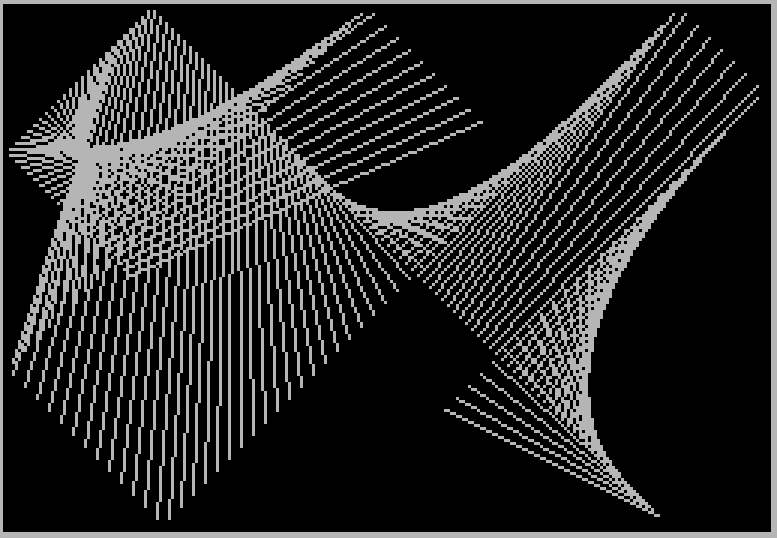
This program generates an animated line-drawing art display by repeatedly plotting and drawing lines between two bouncing points on the screen. Two pairs of coordinates (A,B) and (X,Y) each move independently across the 255×175 pixel display area, bouncing off the edges by negating their respective velocity increments when boundary conditions are met. Each frame draws 200 lines in a loop before pausing and clearing the screen to start a new pattern. The program is sourced from SW News, Mar–Apr 1985, page 17.
Program Analysis
Program Structure
The program is organized into three logical sections: an initialization block, a drawing loop, and a setup routine branched to via GO TO 200 at line 1.
- Lines 1: Entry point; jumps to initialization at line 200.
- Lines 200–240: Initialization — sets colors, clears screen, randomizes starting coordinates, assigns fixed velocity values, then falls into the drawing loop.
- Lines 60–140: Main drawing and animation loop — iterates 200 times drawing lines, bounces coordinates off screen edges, then pauses, clears, and repeats indefinitely.
Coordinate and Velocity Variables
The program maintains two independent points with their own velocity components:
| Point | X coord | Y coord | X velocity | Y velocity |
|---|---|---|---|---|
| Start | A | B | A1 | B1 |
| End | X | Y | X1 | Y1 |
The start point moves at velocity 2 in both axes (A1=2, B1=2), while the end point moves faster at velocity 4 (X1=4, Y1=4). The difference in speeds causes the drawn lines to rotate and vary in length over successive iterations, creating a constantly evolving pattern.
Boundary Bouncing Logic
Lines 100–130 implement edge bouncing by checking whether each coordinate has reached or exceeded the screen limits (0–255 horizontal, 0–175 vertical). When a boundary is hit, the velocity is negated and immediately applied to the coordinate to prevent the point from going out of range. This is a standard bounce idiom:
- Negate the step:
LET A1=-A1 - Apply the corrected step immediately:
LET A=A+A1
The boundary check uses >=255 rather than >255, meaning the coordinate is bounced before it can reach pixel 255, staying within the valid plotting area.
Drawing Technique
Line 62 uses PLOT A,B: DRAW X-A,Y-B to draw a line from point (A,B) to point (X,Y). The DRAW command takes relative offsets, so X-A and Y-B express the displacement from the plotted start point to the desired endpoint. This is a common and efficient idiom for drawing absolute-coordinate lines using the relative DRAW statement.
Animation Loop and Restart
The FOR z=1 TO 200 loop at line 60 draws 200 lines per cycle. After the loop, PAUSE 300 (approximately 6 seconds at 50 Hz) holds the final pattern on screen before CLS clears it. GO TO 60 at line 140 then restarts the drawing loop with the coordinates and velocities left over from the previous cycle, so each successive animation differs from the last.
Notable Techniques and Observations
- Starting coordinates are randomized (lines 210–220) but velocities are always fixed constants, so the variety comes entirely from the random starting positions.
- Because
GO TO 60does not re-initialize coordinates or velocities, patterns evolve continuously from one cycle to the next rather than restarting from a fresh random state each time. - The program uses
PAPER 0: INK 7(black background, white ink) to maximize contrast for the line art. - There is a potential minor anomaly: with velocity values of 2 and 4 and boundary checks using
>=255and<=0, a coordinate could theoretically step past 0 to a negative value before the bounce check corrects it, depending on the exact coordinate at the time of the check. In practice the correction (LET A=A+A1after negation) handles this gracefully.
Image Gallery
Source Code
    1 GO TO 200
   60 FOR z=1 TO 200
   62 PLOT A,B: DRAW X-A,Y-B
   70 LET A=A+A1: LET B=B+B1
   80 LET X=X+X1: LET Y=Y+Y1
  100 IF A>=255 OR A<=0 THEN LET A1=-A1: LET A=A+A1
  110 IF X>=255 OR X<=0 THEN LET X1=-X1: LET X=X+X1
  120 IF B>=175 OR B<=0 THEN LET B1=-B1: LET B=B+B1
  130 IF Y>=175 OR Y<=0 THEN LET Y1=-Y1: LET Y=Y+Y1
  135 NEXT Z
  136 PAUSE 300
  137 CLS
  140 GO TO 60
  190 REM ART
  191 REM SW NEWS,MAR-APR 85,P.17
  200 PAPER 0: INK 7: CLS
  210 LET A=INT (RND*255): LET B=INT (RND*175)
  220 LET X=INT (RND*255): LET Y=INT (RND*175)
  230 LET A1=2: LET B1=2: LET X1=4: LET Y1=4
  240 GO TO 60
 9998 SAVE "ART" LINE 1
Note: Type-in program listings on this website use ZMAKEBAS notation for graphics characters.