
This program draws a 3D wireframe cube using a full 4×4 homogeneous transformation matrix pipeline. It defines the cube’s eight vertices and twelve edges via READ/DATA statements, computes the centroid of the shape, builds a combined rotation/scaling/translation matrix, transforms each vertex, and then plots each edge pixel-by-pixel using a manual line-drawing loop with direction cosines rather than the built-in DRAW command. The rotation angles are set in degrees and converted to radians (40°, 20°, 50° for X, Y, Z axes respectively), with scaling factors of 0.3 on all axes. A notable anomaly exists at line 900: the subroutine body (lines 910–960) draws a border rectangle, but the REM line 900 is missing from the listing, and line 70 calls GO SUB 900 before variable initialisation. Originally printed in Nick Hampshire’s Color Graphics.
Program Structure
The program is divided into clearly labelled subroutines, each beginning at a round-numbered line and ending with RETURN. Execution flows as follows:
- Lines 1–4: Introduction text, wait for keypress, clear screen.
- Line 70:
GO SUB 900— draw a border rectangle. - Lines 100–200: Declare arrays and set transformation parameters.
- Lines 410–450: Call four subroutines in sequence (shape init, centroid, matrix build, transform, draw), then
STOP. - Lines 900–960: Border-drawing subroutine using
PLOT/DRAW. - Lines 1000–1900: Shape initialisation — reads vertex coordinates and edge connectivity from
DATA. - Lines 2000–2900: Draw subroutine — plots each edge pixel by pixel.
- Lines 3000–3900: Builds the 4×4 rotation matrix
a()and the combined scaling/translation matrixb(). - Lines 4000–4900: Applies the transformation matrix to each vertex, storing results in
m(). - Lines 5000–5900: Computes the centroid (
xc,yc,zc) of the shape.
Shape Definition
The cube is defined by np=8 vertices and ne=12 edges stored in arrays s(3,np) and e(ne,2). Vertices are unit-cube coordinates scaled to 200 units, read from DATA at lines 1210–1220. Edge connectivity pairs are read at lines 1310–1330 and describe the 12 edges of the cube.
| Array | Dimensions | Contents |
|---|---|---|
s(3,np) | 3×8 | Original vertex coordinates (x,y,z) |
e(ne,2) | 12×2 | Edge endpoint index pairs |
m(3,np) | 3×8 | Transformed vertex coordinates |
a(4,4) | 4×4 | Rotation matrix |
b(4,4) | 4×4 | Combined scale + translation matrix |
Transformation Pipeline
The program implements a classical homogeneous coordinate transformation pipeline. The rotation matrix a() is constructed at lines 3010–3160 from Euler angles rx, ry, rz (40°, 20°, 50° converted to radians). It is a combined Rx·Ry·Rz rotation. The b() matrix (lines 3210–3350) folds in per-axis scaling (sx, sy, sz = 0.3) by multiplying rows 1–3 of a(), and sets the translation row (b(4,1..3)) to tx,ty,tz = 1,1,1.
The actual transform at lines 4020–4070 centres each point around the centroid before applying b(), then re-adds the centroid offset — a correct centre-of-shape rotation technique.
Edge Drawing Technique
Rather than using the built-in DRAW command, the draw subroutine (lines 2000–2900) manually interpolates along each edge. For each edge it computes the Euclidean length r and direction cosines lx = p/r, ly = q/r, then steps from 0 to r in increments of ds=1, plotting each pixel. Bounds checking at lines 2180–2210 clips points outside the 0–255 (x) and 0–175 (y) screen range.
Notable Techniques and Idioms
- Degrees-to-radians conversion is done inline:
40*PI/180etc. (lines 180–200). - The centroid subroutine (5000) reuses variable names
p,q,rwhich are also used in the draw subroutine — this is safe only because the centroid is computed before drawing, but it is a potential confusion point. - The loop variable
eat line 1150 shadows the array namee(); BASIC allows this because the array is distinguished by its parentheses, but it is unusual style. - Line 2045 checks
IF v1=0 THEN GO TO 2240, skipping to the outerNEXT e— this acts as a guard for uninitialised or null edge entries, though all 12 edges are populated by the data.
Image Gallery
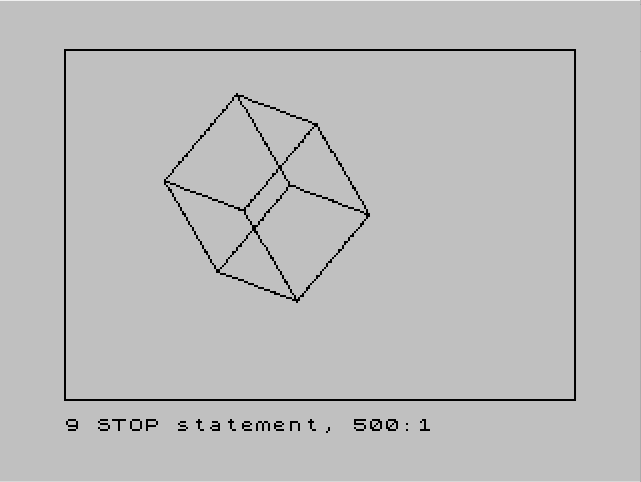
Source Code
    1 REM 3D drawing
    2 PRINT "This program is an example of   how this computer can be pro-   grammed to draw a 3-D shape.    Press any key to see demo and   then study the program.Origin-  ally printed in Nick Hampshire's""Color Graphics""."
    3 IF INKEY$="" THEN GO TO 3
    4 CLS
   70 GO SUB 900
   90 REM set up constant variables and arrays
  100 DIM a(4,4)
  110 DIM b(4,4)
  120 LET sx=.3
  130 LET sy=.3
  140 LET sz=.3
  150 LET tx=1
  160 LET ty=1
  170 LET tz=1
  180 LET rx=40*PI/180
  190 LET ry=20*PI/180
  200 LET rz=50*PI/180
  400 REM main loop
  410 GO SUB 1000
  420 GO SUB 5000
  430 GO SUB 3000
  440 GO SUB 4000
  450 GO SUB 2000
  500 STOP
  910 PLOT 0,0
  920 DRAW 255,0
  930 DRAW 0,175
  940 DRAW -255,0
  950 DRAW 0,-175
  960 RETURN
 1000 REM initialize shape
 1010 LET np=8
 1020 LET ne=12
 1040 DIM s(3,np)
 1050 DIM e(ne,2)
 1060 DIM m(3,np)
 1110 FOR n=1 TO np
 1120 READ s(1,n),s(2,n),s(3,n)
 1130 NEXT n
 1150 FOR e=1 TO ne
 1160 READ e(e,1),e(e,2)
 1170 NEXT e
 1200 REM x,y,z point coor
 1210 DATA 0,0,200,200,0,200,200,0,0,0,0,0
 1220 DATA 0,200,200,200,200,200,200,200,0,0,200,0
 1300 REM connection data
 1310 DATA 1,2,2,3,3,4,4,1
 1320 DATA 5,1,2,6,4,8,7,3
 1330 DATA 6,5,5,8,8,7,7,6
 1900 RETURN
 2000 REM draw
 2020 FOR e=1 TO ne
 2030 LET v1=e(e,1)
 2040 LET v2=e(e,2)
 2045 IF v1=0 THEN GO TO 2240
 2050 LET xb=m(1,v1)
 2060 LET yb=m(2,v1)
 2070 LET xe=m(1,v2)
 2080 LET ye=m(2,v2)
 2090 LET ds=1
 2100 LET p=xe-xb
 2110 LET q=ye-yb
 2120 LET r=SQR (p*p+q*q)
 2130 LET lx=p/r
 2140 LET ly=q/r
 2150 FOR i=0 TO r STEP ds
 2160 LET x=xb+i*lx
 2170 LET y=yb+i*ly
 2180 IF x>255 THEN GO TO 2230
 2190 IF y>175 THEN GO TO 2230
 2200 IF x<0 THEN GO TO 2230
 2210 IF y<0 THEN GO TO 2230
 2220 PLOT x,y
 2230 NEXT i
 2240 NEXT e
 2900 RETURN
 3000 REM transformational matrix
 3010 LET a(1,1)=COS (ry)*COS (rz)
 3020 LET a(1,2)=COS (ry)*SIN (rz)
 3030 LET a(1,3)=-SIN (ry)
 3040 LET a(1,4)=0
 3050 LET a(2,1)=COS (rx)*(-SIN (rz))+SIN (rx)*SIN (ry)*COS (rz)
 3060 LET a(2,2)=COS (rx)*COS (rz)+SIN (ry)*SIN (rz)
 3070 LET a(2,3)=SIN (rx)*COS (ry)
 3080 LET a(2,4)=0
 3090 LET a(3,1)=(-SIN (rx))*(-SIN (rz))+COS (rx)*SIN (ry)*COS (rz)
 3100 LET a(3,2)=-SIN (rx)*COS (rz)+COS (rz)*SIN (ry)*SIN (rz)
 3110 LET a(3,3)=COS (rx)*COS (ry)
 3120 LET a(3,4)=0
 3130 LET a(4,1)=0
 3140 LET a(4,2)=0
 3150 LET a(4,3)=0
 3160 LET a(4,4)=1
 3200 REM scaling and transtation matrix
 3210 LET b(1,1)=sx*a(1,1)
 3220 LET b(1,2)=sx*a(1,2)
 3230 LET b(1,3)=sx*a(1,3)
 3250 LET b(2,1)=sy*a(2,1)
 3260 LET b(2,2)=sy*a(2,2)
 3270 LET b(2,3)=sy*a(2,3)
 3290 LET b(3,1)=sz*a(3,1)
 3300 LET b(3,2)=sz*a(3,2)
 3310 LET b(3,3)=sz*a(3,3)
 3330 LET b(4,1)=tx
 3340 LET b(4,2)=ty
 3350 LET b(4,3)=tz
 3900 RETURN
 4000 REM perform translation
 4010 FOR q=1 TO np
 4020 LET xt=s(1,q)-xc
 4030 LET yt=s(2,q)-yc
 4040 LET zt=s(3,q)-zc
 4050 LET m(1,q)=xc+(xt*b(1,1)+yt*b(2,1)+zt*b(3,1)+b(4,1))
 4060 LET m(2,q)=yc+(xt*b(1,2)+yt*b(2,2)+zt*b(3,2)+b(4,2))
 4070 LET m(3,q)=zc+(xt*b(1,3)+yt*b(2,3)+zt*b(3,3)+b(4,3))
 4080 NEXT q
 4900 RETURN
 5000 REM find centroid
 5010 LET p=0: LET q=0: LET r=0
 5020 FOR i=1 TO np
 5030 LET p=p+s(1,i)
 5040 LET q=q+s(2,i)
 5050 LET r=r+s(3,i)
 5060 NEXT i
 5070 LET xc=p/np
 5080 LET yc=q/np
 5090 LET zc=r/np
 5900 RETURN
Note: Type-in program listings on this website use ZMAKEBAS notation for graphics characters.