
This program implements a simple addition accumulator that prompts the user to enter numbers one at a time and displays a running total when the user enters zero. A subroutine starting at line 5000 formats each number as a currency-style string with two decimal places by manipulating an 8-character string representation produced by STR$. The formatting routine right-justifies the number in an 8-character field, locates the decimal point, and attempts to ensure it falls at position 6 (i.e., two digits after a fixed-width integer portion). The author’s own REM note at line 1 flags the program as not operating correctly, likely due to edge cases in the string-padding and decimal-alignment logic in the subroutine.
Program Analysis
Program Structure
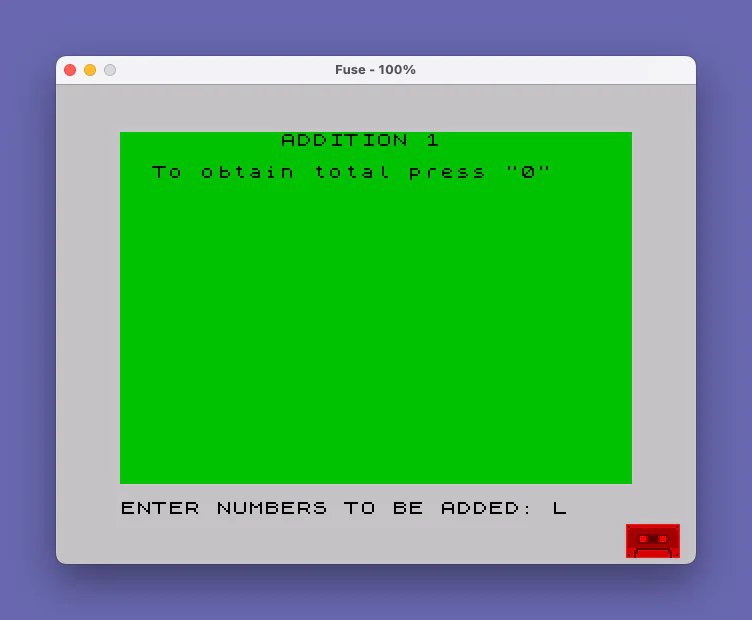
The program is divided into two logical sections: a main input loop (lines 10–80) and a number-formatting subroutine (lines 5000–5080). Execution begins at line 10 with a title display, initializes an accumulator M at line 30, then loops at line 40 accepting numeric input. When the user enters 0, line 70 prints a decorative underline and the total, then halts. Otherwise the formatted value is added to M and the loop repeats.
The Formatting Subroutine (lines 5000–5080)
The subroutine at line 5000 attempts to format a number p into a fixed 8-character currency string stored in m$, with the decimal point always at position 6 (leaving two decimal places). The steps are:
- Convert
pto a string withSTR$ pand store in an 8-character DIM arraym$. - Lines 5010: Right-justify by repeatedly shifting trailing spaces to the front.
- Lines 5020–5040: Scan left-to-right for the decimal point, leaving
jat its position (or 9 if none found). - Line 5050: If no decimal found (
j=9), append".00"and trim to 8 chars from position 4. - Line 5060: If decimal is at position 7, append
"0"and trim from position 2 (shift left by one). - Line 5070: If the decimal is still not at position 6 after adjustments, set error flag
x=1.
Key BASIC Idioms
DIM m$(8)allocates a fixed 8-character string, initialized to spaces — relied upon by the right-justify loop at line 5010.STR$ pconverts the numeric input to its string representation before manipulation.LET M=M+VAL m$at line 50 converts the formatted string back to a number for accumulation, which works correctly only whenm$contains a valid numeric substring.- The double-quote idiom
""0""in the PRINT at line 20 embeds a literal quote character in the output string.
Bugs and Anomalies
The author’s own REM at line 1 acknowledges the program does not operate properly. Several issues are apparent:
- Line 45 conditional display: Line 45 prints
m$only whenx=0, but the accumulation at line 50 (LET M=M+VAL m$) runs unconditionally regardless of the error flag, meaning malformed values still affect the total. - Incomplete decimal normalization: The subroutine only handles the cases where
j=9(no decimal) orj=7. Numbers with the decimal at positions 1–5 or 8 are not corrected; they simply setx=1and return with a misaligned string. - String truncation on append: Lines 5050 and 5060 use slice notation to trim
m$after appending characters, but sincem$is a fixed DIM of 8, appending".00"or"0"via concatenation produces a longer intermediate string that is then re-sliced — this logic is fragile and implementation-dependent. - Loop variable
jafter FOR/NEXT: If the FOR loop at lines 5020–5040 completes without a GO TO,jexits as 9 (one past the limit of 8), which is the intended sentinel for “no decimal found.” This is a valid idiom but relies on the post-loop value of the control variable. - Line 9997 STOP: This line is unreachable dead code — execution never falls through to it from the subroutine or the main loop.
Variable Summary
| Variable | Purpose |
|---|---|
M | Running numeric total |
p | Raw numeric input from user |
m$ | 8-character formatted string of current number |
x | Error flag: 0 = formatted OK, 1 = formatting failed |
j | Position of decimal point in m$ (9 = not found) |
Image Gallery
Source Code
    1 REM TO BE MODIFIED. NOT OPERATING PROPERLY. ALGIS E. GEDRIS
   10 PRINT TAB 10;"ADDITION 1"''
   20 PRINT TAB 2;"To obtain total press ""0"""''
   30 LET M=0
   40 INPUT "ENTER NUMBERS TO BE ADDED: ";p: GO SUB 5000
   45 IF x=0 THEN PRINT TAB 10;m$
   50 LET M=M+VAL m$
   70 IF p=0 THEN PRINT TAB 12;"______"'"Total=";TAB 13;M: STOP
   80 GO TO 40
 5000 LET x=0: DIM m$(8): LET m$=STR$ p
 5010 IF m$(8)=CHR$ 32 THEN LET m$=CHR$ 32+m$( TO 7): GO TO 5010
 5020 FOR j=1 TO 8
 5030 IF m$(j)="." THEN GO TO 5050
 5040 NEXT j
 5050 IF j=9 THEN LET m$=m$(4 TO )+".00"
 5060 IF j=7 THEN LET m$=m$(2 TO )+"0"
 5070 IF m$(6)<>"." THEN LET x=1
 5080 RETURN
 9997 STOP
 9998 SAVE "ADDITION" LINE 1
Note: Type-in program listings on this website use ZMAKEBAS notation for graphics characters.