
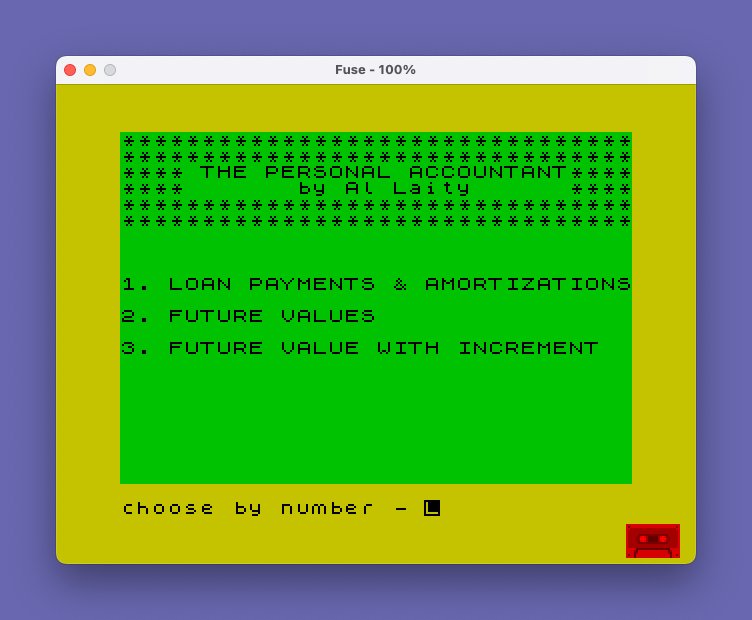
This program is a personal finance calculator offering three modes: loan payment and amortization schedules, future value compounding, and future value with annual increment. It formats all currency values through a dedicated subroutine (line 1200) that multiplies by 100, truncates with INT, converts via STR$, then reinserts a decimal point to produce two-decimal-place dollar strings. Month names are stored as DATA strings and accessed via RESTORE/READ loops keyed to a numeric month variable, allowing the growth tables to print labeled monthly rows. Output can be directed to either the screen or a printer, and the program uses a 6-element string array C$(6,32) to hold and display summary data padded to 32 characters by the subroutine at line 9900.
Program Analysis
Program Structure
The program is organized into distinct functional blocks accessed via a main menu at line 1000. A GO TO 1000 at line 99 bypasses the subroutines and data at the top. The three main modules are:
- Loan Payments & Amortization — lines 2000–2850
- Future Values — lines 3000–3200
- Future Value with Increment — lines 4000–4260
The menu dispatch at line 1090 uses the idiom GO TO (a+1)*1000, jumping to line 2000, 3000, or 4000 depending on the user’s choice of 1, 2, or 3.
Shared Subroutines
| Line(s) | Purpose |
|---|---|
| 100–140 | Title banner (screen) |
| 300–397 | Future value calculation loop (no increment) |
| 400–650 | Future value with annual increment calculation loop |
| 1200–1240 | Currency formatter: number → 2-decimal string |
| 1300–1360 | Display summary data array to screen |
| 1400–1495 | Send summary data array to printer |
| 1900–1930 | Boxed title to screen |
| 1950–1980 | Boxed title to printer |
| 2800–2850 | Single loan payment calculation step |
| 9700–9730 | Input beginning month/year (mm/yy format) |
| 9800–9820 | Return-to-menu handler |
| 9900–9995 | Pad/decorate C$() summary entries with asterisks |
Currency Formatting Subroutine (Line 1200)
This is the most technically interesting routine in the program. Rather than using PRINT USING (unavailable in standard Sinclair BASIC), it manually constructs a two-decimal-place string:
- Compute
b = a * 100 + 0.1(the 0.1 prevents floating-point truncation errors) - Take
INT(b)to get an integer count of cents - Convert to string with
STR$ - Left-pad with
"0"until at least 3 characters long - Insert a
"."before the last two digits
The result is stored in A$ and the caller frequently does LET variable = VAL A$ immediately after to re-normalize the numeric value, ensuring consistent rounding throughout calculations.
Month Name Lookup via DATA/RESTORE
Month abbreviations (“JAN” through “DEC”) are stored in a DATA statement at line 10, terminated with the sentinel string "end". To look up a month name, the code does a RESTORE 10 followed by a FOR loop reading VAL D$ items. The sentinel guard (IF F$="end" THEN RESTORE 10: READ F$) handles wrap-around from December to January. The month counter D$ is stored as a string throughout, with numeric arithmetic done by converting via VAL and back via STR$.
Summary Data Array C$()
Each of the three main modules allocates DIM C$(6,32), a 6-element array of 32-character strings, to hold labeled results (opening balance, payment, rate, etc.). The subroutine at line 9900 trims trailing spaces, then re-pads each entry with "*** " prefix and trailing asterisks to fill exactly 32 characters for display. Line 1325 and 1460 skip entries that are still blank (all spaces).
Dual Screen/Printer Output
Throughout the growth table sections, parallel code paths exist for screen (PRINT) and printer (LPRINT) output. A state variable st (0 = summary only, 1 = screen growth table, 2 = printer growth table) controls which path executes inside the shared calculation subroutines 300 and 400. This avoids duplicating the arithmetic while still allowing completely separate formatting for each output device.
Loan Amortization Logic
The standard amortization formula is applied at line 2065: pay = am * (i / (1 - (1+i)^(-nu))) where i is the monthly rate (annual rate / 1200) and nu is total payments. The per-payment breakdown subroutine at line 2800 computes interest as am * i, principal as pay - interest, then adjusts the balance. A final-payment correction at line 2815 ensures the balance reaches exactly zero when n = nu.
Notable Techniques and Idioms
RUN(with no line number) used as a “quit to menu” mechanism from INPUT prompts when the user types “Q”INVERSE 1used to highlight year-boundary rows in growth tables, providing visual separation without graphics- String-stored numerics (
D$,E$,N$) used to preserve formatted values across theSTR$/VALround-trip - The
+.001adjustments at lines 2810 and 328/450 are compensating nudges against floating-point underflow when computing principal reduction - The program saves itself at line 9998 with
SAVE "amortize" LINE 1000for auto-start
Bugs and Anomalies
- Line 3155 is referenced by a
GO TO 3155at line 3149 but does not exist as a standalone line; execution falls through from line 3150/3158 into line 3160, which works correctly due to the way Spectrum BASIC locates the next line, but is fragile. - Line 3147 reads month data with
FOR F=1 TO VAL D$: READ F$: NEXT Fwithout a precedingRESTORE 10, unlike the symmetric printer path at line 3157. If DATA has been partially consumed earlier, this will read the wrong month name. - Line 1970 prints
"*********:*********************"(contains a colon) instead of the expected 32 asterisks — appears to be a typo in the printer border line. - Line 3148 prints “OPENNING BALANCE” (double-n typo); the printer path at line 3158 correctly prints “OPENING BALANCE”.
- At line 2276,
d$is set toSTR$ Mwithout zero-padding when M < 10, but then line 2276 adds padding only conditionally — this logic is correct but the two assignments on the same line number are handled sequentially as a multi-statement line.
Image Gallery
Source Code
    5 REM  by Al Laity
   10 DATA "JAN","FEB","MAR","APR","MAY","JUN","JUL","AUG","SEP","OCT","NOV","DEC","end"
   99 GO TO 1000
  100 CLS
  110 FOR X=1 TO 2: PRINT "********************************": NEXT X
  120 PRINT "**** THE PERSONAL ACCOUNTANT****"
  125 PRINT "****       by Al Laity      ****"
  130 FOR X=1 TO 2: PRINT "********************************": NEXT X
  140 RETURN
  300 REM  FUTURE VALUE CALCULATION
  301 LET FL=0
  310 REM C1=ONGOING BAl
  311 LET c1=be
  320 FOR C=1 TO NY
  323 FOR j=1 TO nc
  325 LET IN=I*C1: LET A=IN: GO SUB 1200: LET IN=VAL A$: LET y$=a$
  328 LET c1=c1+in+.001: LET a=c1: GO SUB 1200: LET x$=a$: LET c1=VAL a$
  330 IF st=0 THEN GO TO 385
  331 RESTORE 10
  332 LET d=VAL d$: LET d=d+12/nc: IF d>12 THEN LET d=d-12: LET FL=1
  333 LET D$=STR$ D
  334 FOR f=1 TO VAL d$: READ f$: IF f$="end" THEN RESTORE 10: READ f$
  335 NEXT F
  340 IF st=2 THEN GO TO 375
  341 IF FL=1 THEN LET E=VAL E$+1: LET E$=STR$ E: PRINT INVERSE 1;"**  YEAR  ";E$;"  **": LET FL=0
  345 PRINT f$;TAB 17-LEN y$;y$;TAB 32-LEN x$;x$
  374 GO TO 385
  375 IF FL=1 THEN LET E=VAL E$+1: LET E$=STR$ E: LPRINT INVERSE 1;"**  YEAR  ";E$;"  **": LET FL=0
  380 LPRINT f$;TAB 17-LEN y$;y$;TAB 32-LEN x$;x$
  385 NEXT j
  393 NEXT C
  395 LET A$=STR$ C1
  397 LET C$(5)="FUTURE VALUE    $"+A$: RETURN
  400 REM FU WI INC CALC
  401 LET FL=0
  410 LET C1=BE
  420 FOR c=1 TO ny
  430 FOR J=1 TO NC
  440 LET INT=R*C1: LET A=INT: GO SUB 1200: LET INT=VAL A$: LET X$=A$
  442 LET INC=0
  445 IF J=NC THEN LET INC=IN
  450 LET C1=C1+INT+INC: LET A=C1: GO SUB 1200: LET C1=VAL A$: LET Y$=A$
  455 LET a=inc: GO SUB 1200: LET z$=a$
  456 IF st=0 THEN GO TO 600
  460 RESTORE 10
  470 LET D=VAL D$+12/NC: IF D>12 THEN LET D=D-12: LET FL=1
  475 LET D$=STR$ D
  480 FOR F=1 TO VAL D$: READ F$
  485 IF F$="end" THEN RESTORE 10: READ f$
  490 NEXT f
  500 IF st=0 THEN GO TO 600
  510 IF st=2 THEN GO TO 550
  515 IF FL=1 THEN LET FL=0: LET E=VAL E$+1: LET E$=STR$ E: PRINT INVERSE 1;"**  YEAR  ";E$;"  **"
  520 PRINT f$;TAB (12-LEN z$);z$;TAB (22-LEN X$);X$;TAB (32-LEN Y$);Y$
  530 GO TO 600
  550 IF FL=1 THEN LET FL=0: LET E=VAL E$+1: LET E$=STR$ E: LPRINT INVERSE 1;"**  YEAR  ";E$;"  **"
  560 LPRINT f$;TAB (12-LEN z$);z$;TAB (22-LEN X$);X$;TAB (32-LEN Y$);Y$
  600 NEXT j
  610 NEXT c
  620 LET a=c1: GO SUB 1200: LET c$(6)="FUTURE VALUE    $"+A$
  650 RETURN
 1000 BORDER 6: PAPER 4: BRIGHT 0: INK 0
 1010 GO SUB 100
 1040 PRINT : PRINT : PRINT : PRINT "1. LOAN PAYMENTS & AMORTIZATIONS"
 1050 PRINT : PRINT "2. FUTURE VALUES"
 1060 PRINT : PRINT "3. FUTURE VALUE WITH INCREMENT"
 1070 INPUT "choose by number - ";a
 1080 IF a<1 OR a>3 THEN GO TO 1070
 1090 GO TO (a+1)*1000
 1200 REM makes a TO a$ with ending zeros
 1201 LET b=a*100+.1
 1205 LET tem=INT (b)
 1210 LET a$=STR$ tem
 1220 LET b=LEN (a$)
 1221 IF b<3 THEN LET a$="0"+a$: GO TO 1220
 1230 LET a$=a$( TO (b-2))+"."+a$((b-1) TO b)
 1240 RETURN
 1300 REM data to screen
 1301 CLS
 1305 GO SUB 9900
 1310 FOR x=1 TO 2: PRINT "********************************": NEXT x
 1320 FOR y=1 TO 6
 1325 IF c$(y)="                                " THEN GO TO 1340
 1330 PRINT c$(y)
 1340 NEXT y
 1350 FOR x=1 TO 2: PRINT "********************************": NEXT x
 1360 RETURN
 1400 REM datato printer
 1410 PRINT : PRINT : FOR X=1 TO 3: PRINT "         DATA  TO  PRINTER      ": NEXT X
 1450 FOR x=1 TO 2: LPRINT "********************************": NEXT x
 1460 FOR y=1 TO 6: IF C$(Y)="                                " THEN GO TO 1480
 1470 LPRINT C$(Y)
 1480 NEXT Y
 1490 FOR x=1 TO 2: LPRINT "********************************": NEXT x
 1495 RETURN
 1900 CLS : FOR X=1 TO 2: PRINT "********************************": NEXT X
 1910 PRINT A$
 1920 FOR X=1 TO 2: PRINT "********************************": NEXT X
 1930 RETURN
 1950 FOR X=1 TO 2: LPRINT "********************************": NEXT X
 1960 LPRINT A$
 1970 FOR X=1 TO 2: LPRINT "*********:*********************": NEXT X
 1980 RETURN
 2000 REM loan
 2001 DIM c$(6,32)
 2010 BORDER 5: PAPER 5: CLS
 2020 LET a$="********* LOAN PAYMENTS ********": GO SUB 1900
 2030 PRINT : PRINT : PRINT
 2035 INPUT "AMOUNT OF LOAN ";A$: IF A$="Q" THEN RUN
 2040 LET AM=VAL A$
 2041 IF AM>999999.99 THEN GO TO 2040
 2042 IF AM<0 THEN GO TO 2040
 2045 LET a=am: GO SUB 1200: LET c$(1)="amount of loan $"+a$: PRINT c$(1)
 2050 INPUT "number of monthly payments? ";n$: IF N$="Q" THEN RUN
 2051 LET NU=VAL N$
 2052 LET c$(2)="number of payments "+STR$ (nu)
 2055 PRINT c$(2)
 2060 INPUT "interest rate? ";i$: IF I$="Q" THEN RUN
 2061 LET I=VAL I$
 2062 LET c$(3)="interest rate   "+STR$ (i)+"%": PRINT c$(3)
 2064 LET I=I/1200
 2065 LET pay=am*(i/(1-(1+i)^(-nu))): LET a=pay: GO SUB 1200
 2066 LET pay=VAL a$
 2067 LET c$(4)="payment amount $"+STR$ pay
 2070 INPUT "data to printer (y OR n)? ";z$
 2075 GO SUB 1300
 2080 IF z$="y" OR Z$="Y" THEN GO SUB 1400
 2100 INPUT "shall I prepare a growth table";z$
 2110 IF z$<>"y" AND z$<>"Y" THEN GO TO 9800
 2130 LET N=0
 2140 LET FL=0
 2150 REM  growth table
 2160 GO SUB 9700
 2162 INPUT "data to printer (y OR n)? ";z$
 2165 IF Z$="Y" OR z$="y" THEN GO TO 2500
 2170 PRINT
 2180 PRINT "DATE   INT.     PRIN.  NEW BAL."
 2185 PRINT INVERSE 1;"** year -  ";e$;" **": LET a=am: GO SUB 1200: PRINT "**opening balance**";TAB 32-LEN a$;a$
 2190 FOR y=1 TO 1000
 2200 GO SUB 2800
 2210 IF FL=1 THEN GO TO 2290
 2213 LET F$=""
 2214 RESTORE 10
 2215 FOR F=1 TO VAL D$: READ F$: NEXT F
 2220 PRINT F$;TAB (12-LEN x$);x$;TAB (22-LEN y$);y$;TAB (32-LEN z$);z$
 2275 LET M=VAL d$: LET M=M+1: IF M=13 THEN LET M=1
 2276 LET d$=STR$ M: IF M<10 THEN LET d$="0"+d$
 2279 IF m=1 THEN LET e=VAL e$: LET e=e+1: LET e$=STR$ e: PRINT INVERSE 1;"** year -  ";e$;" **"; INVERSE 0
 2280 NEXT y
 2290 GO TO 9800
 2500 LPRINT : REM  GROWTH TABLE TO PRINTER
 2510 LPRINT "DATE   INT.     PRIN.  NEW BAL."
 2585 LPRINT INVERSE 1;"** year -  ";e$;" **": LET a=am: GO SUB 1200: LPRINT "**opening balance**";TAB 32-LEN a$;a$
 2590 FOR y=1 TO 1000
 2600 GO SUB 2800
 2610 IF FL=1 THEN GO TO 2690
 2612 RESTORE 10
 2615 FOR F=1 TO VAL D$: READ F$: NEXT F
 2620 LPRINT F$;TAB (12-LEN x$);x$;TAB (22-LEN y$);y$;TAB (32-LEN z$);z$
 2675 LET M=VAL d$: LET M=M+1: IF M=13 THEN LET M=1
 2676 LET d$=STR$ M: IF M<10 THEN LET d$="0"+d$
 2679 IF m=1 THEN LET e=VAL e$+1: LET e$=STR$ e: LPRINT INVERSE 1;"** year -  ";e$;" **"
 2680 NEXT y
 2700 GO TO 9800
 2800 REM calculate
 2801 LET N=N+1: IF N>NU THEN LET FL=1: RETURN
 2802 LET in=am*i: LET a=in: GO SUB 1200: LET in=VAL a$
 2810 LET p=pay-in+.001: LET am=am-p+.001
 2815 IF nu=n AND am<>0 THEN LET p=p+am: LET in=in-am: LET am=0:
 2825 LET A=AM: GO SUB 1200: LET z$=A$: LET am=VAL a$
 2830 LET A=IN: GO SUB 1200: LET x$=A$: LET in=VAL a$
 2840 LET A=P: GO SUB 1200: LET y$=A$: LET p=VAL a$
 2845 LET FL=0
 2850 RETURN
 3000 BORDER 4: PAPER 6: INK 0: CLS
 3001 DIM C$(6,32)
 3005 LET A$="******** FUTURE  VALUES ********"
 3006 GO SUB 1900
 3007 PRINT : PRINT : PRINT
 3009 INPUT "OPENING BALANCE";B$: IF B$="Q" THEN RUN
 3010 LET BE=VAL B$
 3015 LET A=BE: GO SUB 1200: LET C$(1)="OPENING BALANCE $"+A$: PRINT C$(1)
 3020 IF BE<=0 OR BE>999999.99 THEN GO TO 3000
 3021 INPUT "NUMBER OF YEARS ";N$: IF N$="Q" THEN RUN
 3025 LET NY=VAL N$
 3028 LET C$(2)="NUMBER OF YEARS  "+N$: PRINT C$(2)
 3030 INPUT " # OF COMPOUNDINGS PER YEAR      CHOOSE ONE OF - (1,2,3,4,6,12)  ";N$: IF N$="Q" THEN RUN
 3040 LET NC=VAL N$
 3041 IF NC<=0 OR (NC<>1 AND NC<>2 AND NC<>3 AND NC<>4 AND NC<>6 AND NC<>12) THEN GO TO 3030
 3045 LET C$(3)="COMPOUNDINGS/YR. "+N$: PRINT C$(3)
 3050 INPUT "ANNUAL INTEREST RATE ";I$: IF I$="Q" THEN RUN
 3060 LET I=VAL I$: IF I<0 THEN GO TO 3050
 3065 LET C$(4)="ANNUAL INT. RATE "+I$+" %": PRINT C$(4)
 3066 LET i=i/100
 3067 LET st=0
 3068 LET i=i/nc
 3070 GO SUB 300
 3090 INPUT "DATA TO PRINTER ";Z$
 3100 GO SUB 1300: IF Z$="Y" OR Z$="y" THEN GO SUB 1400
 3110 INPUT "SHALL I PREPARE A GROWTH TABLE";Z$
 3120 IF Z$<>"Y" AND Z$<>"y" THEN GO TO 9800
 3125 GO SUB 9700
 3130 INPUT "DATA TO PRINTER (Y OR N)?";Z$
 3140 IF Z$="Y" OR Z$="y" THEN LET st=2: GO TO 3150
 3141 LET ST=1
 3145 PRINT "DATE      INTEREST   NEW BALANCE"
 3146 PRINT INVERSE 1;"**  YEAR  ";E$;"  **"
 3147 LET A=BE: GO SUB 1200: FOR F=1 TO VAL D$: READ F$: NEXT F
 3148 PRINT F$;" OPENNING BALANCE";TAB 32-LEN A$;A$
 3149 GO TO 3155
 3150 LPRINT "DATE      INTEREST   NEW BALANCE"
 3156 LPRINT INVERSE 1;"**  YEAR  ";E$;"  **"
 3157 LET A=BE: GO SUB 1200: RESTORE 10: FOR F=1 TO VAL D$: READ F$: NEXT F
 3158 LPRINT F$;" OPENING BALANCE";TAB 32-LEN A$;A$
 3160 GO SUB 300
 3200 GO TO 9800
 4000 REM future with inc
 4010 LET A$="* FUTURE VALUE WITH INCREMENT **": GO SUB 1900
 4020 DIM C$(6,32)
 4030 PRINT : PRINT : PRINT
 4040 INPUT "OPENING BALANCE ";B$: IF B$="Q" THEN RUN
 4045 LET BE=VAL B$: IF BE<0 OR BE>999999.99 THEN GO TO 4040
 4050 LET A=BE: GO SUB 1200: LET C$(1)="OPENING BALANCE $"+A$: PRINT C$(1)
 4060 INPUT "INCREMENT ?";I$: IF I$="Q" THEN RUN
 4070 LET IN=VAL I$: IF IN<0 OR IN>999999.99 THEN GO TO 4060
 4075 LET A=IN: GO SUB 1200: LET C$(2)="ANNUAL INCREMENT $"+A$
 4076 PRINT C$(2)
 4080 INPUT "INTEREST RATE ?";R$: IF R$="Q" THEN RUN
 4085 LET R=(VAL R$)/100: IF R<0 THEN GO TO 4080
 4090 LET C$(3)="INTEREST RATE     "+R$+"%": PRINT C$(3)
 4100 INPUT "NUMBER OF YEARS ?";N$: IF N$="Q" THEN RUN
 4110 LET NY=VAL N$: LET C$(4)="NUMBER OF YEARS   "+N$
 4120 PRINT C$(4)
 4130 INPUT "NUMBER OF COMPOUNDINGS PER YEAR CHOOSE ONE OF (1,2,3,4,6, OR 12)";N$: IF N$="Q" THEN RUN
 4135 IF N$<>"1" AND N$<>"2" AND N$<>"3" AND N$<>"4" AND N$<>"6" AND N$<>"12" THEN GO TO 4130
 4140 LET NC=VAL N$: IF INT (NC)<>NC THEN GO TO 4130
 4145 LET C$(5)="COMPOUNDINGS/YR.  "+N$: PRINT C$(5)
 4146 LET r=r/nc
 4150 LET ST=0: GO SUB 400
 4160 INPUT "DATA TO PRINTER ?(Y OR N)";Z$
 4170 GO SUB 1300: IF Z$="Y" OR Z$="y" THEN GO SUB 1400
 4175 INPUT "SHALL I PREPARE A GROWTH TABLE  ";Z$: IF Z$<>"Y" AND Z$<>"y" THEN GO TO 9800
 4176 GO SUB 9700
 4177 RESTORE 10: FOR F=1 TO VAL D$: READ F$: NEXT F
 4180 INPUT "data to printer (y OR n)?";z$
 4190 IF z$="y" OR z$="Y" THEN LET ST=2: GO TO 4250
 4200 PRINT INVERSE 1;"**  YEAR  ";E$;"  **"
 4204 LET A=BE: GO SUB 1200
 4205 PRINT F$;TAB 32-LEN A$;A$
 4210 LET ST=1: GO SUB 400: GO TO 9800
 4250 LPRINT : LPRINT : LPRINT INVERSE 1;"**  YEAR  ";E$;"  **"
 4254 LET A=BE: GO SUB 1200
 4255 LPRINT F$;TAB 32-LEN A$;A$
 4260 LET ST=2: GO SUB 400: GO TO 9800
 5000 STOP
 9700 INPUT "beginning month and year?(mm/yy)";m$
 9710 IF VAL m$( TO 2)>12 OR VAL m$( TO 2)<0 THEN GO TO 9700
 9720 LET d$=m$( TO 2): LET e$="19"+m$(4 TO )
 9730 RETURN
 9800 PRINT : PRINT "press any key for menu"
 9810 IF INKEY$="" THEN GO TO 9810
 9820 RUN
 9900 REM  pad c$
 9910 FOR Y=1 TO 6
 9915 IF c$(y)="                                " THEN GO TO 9990
 9916 LET a$=c$(y): LET b=32
 9917 FOR j=32 TO 1 STEP -1: IF a$(j)<>" " THEN LET a$=a$( TO j): GO TO 9919
 9918 NEXT j
 9919 LET a$="*** "+a$+" "
 9920 LET b=32-LEN a$
 9930 FOR j=1 TO b: LET a$=a$+"*": NEXT j
 9940 LET c$(y)=a$
 9990 NEXT y
 9995 RETURN
 9998 SAVE "amortize" LINE 1000
 9999 VERIFY ""
Note: Type-in program listings on this website use ZMAKEBAS notation for graphics characters.