
This program calculates the area of seven geometric shapes: circle, sphere (surface area), parabola, triangle, square, rectangle, and ellipse. After prompting the user to enter a shape name, it branches to the appropriate input routine using a series of conditional GOTOs, then computes and displays the result before looping back for another calculation. The sphere surface area (4πr²) and circle area (πr²) share a single code path, distinguished by checking the first character of the input string with X$(1). The ellipse area uses the approximation 0.7854×J×N, where 0.7854 ≈ π/4, effectively computing π×(J/2)×(N/2) treating J and N as full axes rather than semi-axes.
Program Analysis
Program Structure
The program is organized as a menu-driven loop. Lines 5–15 display a title, lines 100–180 handle shape selection and dispatch, lines 200–560 contain per-shape input and calculation routines, and line 600 is a shared output section that prints the result and loops back to the menu.
| Lines | Purpose |
|---|---|
| 5–15 | Title display |
| 100–180 | Shape input, branching dispatcher, fallback loop |
| 200–250 | Circle / Sphere handler |
| 300–380 | Parabola / Triangle handler |
| 400–470 | Square / Rectangle handler |
| 500–560 | Ellipse handler |
| 600–620 | Shared output and loop-back |
Branching and Shape Dispatch
Shape pairs are routed to a single shared subroutine using compound OR conditions on lines 140–160. Within each shared routine, the first character of X$ is tested with X$(1) to select the appropriate formula — for example, IF X$(1)="S" to distinguish Sphere from Circle, and IF X$(1)="P" vs IF X$(1)="T" for Parabola and Triangle. This avoids duplicating input prompts for shape pairs that require the same inputs (radius, or base and height).
Mathematical Formulas Used
- Circle:
A = PI * (R**2)— standard πr² - Sphere (surface area):
A = 4 * PI * (R**2)— computed by multiplying the circle result by 4 - Parabola (segment area):
A = B * H * 2/3— correct formula for a parabolic segment - Triangle:
A = B * H * .5— standard ½ × base × height - Square / Rectangle:
A = L * W— for a square, the user is expected to enter equal width and length - Ellipse:
A = .7854 * J * N— uses the constant 0.7854 ≈ π/4
Notable Techniques
The use of PI as a built-in keyword provides full floating-point precision for circular calculations. The exponentiation operator ** is used for squaring the radius. The ellipse approximation constant 0.7854 (= π/4) is a classic shortcut — when J and N represent the full major and minor axes, the formula π/4 × J × N equals π × (J/2) × (N/2), which is the correct ellipse area formula using semi-axes. This is mathematically correct provided the user supplies full-axis values.
Bugs and Anomalies
The Square handler on lines 400–470 does not distinguish between squares and rectangles — it simply computes L * W for both. A square requires only one dimension, but the program still prompts for both width and length; a user entering a square must input the same value twice. Additionally, line 460 (LET A=L*W) unconditionally sets A regardless of which shape was selected, unlike the Parabola/Triangle branch which uses conditional assignments on lines 360–370 — this means no first-character check is needed or performed for the square/rectangle pair, which works correctly here since the formula is identical for both.
If the user enters an unrecognised shape name, line 180 loops back to line 100, but there is no error message to inform the user their input was invalid — the program silently re-displays the prompt.
Image Gallery
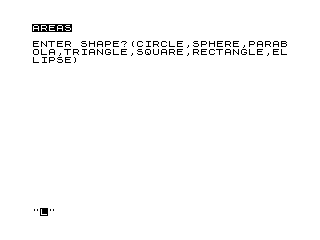
Source Code
   5 PRINT "%A%R%E%A%S"
  10 REM AREAS
  15 PRINT
 100 PRINT "ENTER SHAPE?(CIRCLE,SPHERE,PARABOLA,TRIANGLE,SQUARE,RECTANGLE,ELLIPSE)"
 110 INPUT X$
 120 CLS
 130 PRINT X$
 140 IF X$="CIRCLE" OR X$="SPHERE" THEN GOTO 200
 150 IF X$="PARABOLA" OR X$="TRIANGLE" THEN GOTO 300
 160 IF X$="SQUARE" OR X$="RECTANGLE" THEN GOTO 400
 170 IF X$="ELLIPSE" THEN GOTO 500
 180 GOTO 100
 200 PRINT "RADIUS ";
 210 INPUT R
 220 PRINT R
 230 LET A=PI*(R**2)
 240 IF X$(1)="S" THEN LET A=4*A
 250 GOTO 600
 300 PRINT "BASE ";
 310 INPUT B
 320 PRINT B
 330 PRINT "HEIGHT ";
 340 INPUT H
 350 PRINT H
 360 IF X$(1)="P" THEN LET A=B*H*2/3
 370 IF X$(1)="T" THEN LET A=B*H*.5
 380 GOTO 600
 400 PRINT "WIDTH ";
 410 INPUT W
 420 PRINT W
 430 PRINT "LENGTH ";
 440 INPUT L
 450 PRINT L
 460 LET A=L*W
 470 GOTO 600
 500 PRINT "MAJOR AXIS ";
 510 INPUT J
 520 PRINT J
 530 PRINT "MINOR AXIS ";
 540 INPUT N
 550 PRINT N
 560 LET A=.7854*J*N
 600 PRINT "AREA ";A
 620 GOTO 100
 700 SAVE "1005%5"
 800 RUN
Note: Type-in program listings on this website use ZMAKEBAS notation for graphics characters.