
Banner3 is a banner-printing utility that reads text typed by the user, renders it invisibly on screen using the built-in character generator, then samples the pixel grid with POINT to reproduce each character as a pattern of block-graphic characters sent to a printer via LPRINT. The program supports two size modes — small (every pixel column) and large (every other pixel column, using a step of 0.5 which effectively doubles the output width) — as well as normal and inverse video rendering. It works by printing the input string at screen coordinates row 0 and then scanning the pixel rows from Y=166 to Y=175 (the bottom two character rows) and X from 0 to L*8-1, mapping lit pixels to the filled block graphic █ (escaped as \::). The program was published in the S.L.U.G. Newsletter, Louisville, Kentucky, November 1985.
Program Analysis
Program Structure
The program is a short interactive loop occupying lines 1–16, with a SAVE statement at line 9999. Execution begins at line 1 (via the LINE 1 auto-run directive) and cycles back to line 2 after each banner is printed, allowing repeated use without restarting.
- Lines 2–3: Accept and validate the message string (maximum 32 characters).
- Lines 4–6: Accept size selection; set step variable
Tto1(small) or0.5(large). - Lines 7–8: Accept normal/inverse selection, validated by character code range.
- Lines 9–11: Initialize print-position counters
A(row) andB(column); render the input string on screen at row 0 using either normal or inverse video. - Lines 12–15: Nested
FORloops scan the pixel grid and output block graphics to the printer. - Line 16: Clear screen and loop back to line
2.
Screen-as-Font Technique
The core technique exploits the display itself as a font renderer. The input string A$ is PRINTed at screen row 0 (the top of the display), where the built-in character set draws each character as an 8×8 pixel matrix. The outer FOR X loop (line 12) steps through pixel columns 0 to L*8-1, and the inner FOR Y loop (line 13) steps through pixel rows 166 to 175. The POINT function at line 14 tests each pixel; if set, the solid block graphic █ (\::) is sent to the printer with LPRINT AT A,B.
The Y range 166–175 corresponds to the bottom two character rows of the 176-row pixel display (rows 0–175 in the Spectrum’s coordinate system, where Y=0 is the bottom). This means the program actually scans the bottom two character rows of the screen, not row 0 where the text is printed. This is a significant bug: the text is displayed at row 0 (the topmost text row), which occupies pixel rows Y=168–175 for the first character row and Y=160–167 for the second. The Y range 166–175 straddles both rows, capturing only part of the rendered characters and producing garbled output.
Size Mode Implementation
The two size modes are implemented by varying the STEP value T in both FOR loops. For small mode (S$="1"), T=1 samples every pixel column and every pixel row. For large mode (S$="2"), T=0.5 halves the step, causing each pixel to be visited twice and doubling the printed output dimensions. Using a fractional STEP with FOR/NEXT is a valid BASIC technique but doubles the number of loop iterations and significantly slows printing.
Input Validation
User inputs are validated by testing CODE of the first character of the input string against ASCII ranges. Size input accepts codes 49–50 (‘1’ or ‘2’); inverse input accepts codes 48–49 (‘0’ or ‘1’). Invalid entries simply GO TO the relevant INPUT line. The message length is checked with LEN and a PAUSE 120 error pause is given before re-prompting.
Variable Summary
| Variable | Purpose |
|---|---|
A$ | Input message string |
L | Length of A$ |
S$ | Size selection (‘1’ or ‘2’) |
T | Loop step (1 or 0.5) |
I$ | Inverse selection (‘0’ or ‘1’) |
A | Current LPRINT row counter |
B | Current LPRINT column counter |
X | Pixel column loop variable |
Y | Pixel row loop variable |
Bugs and Anomalies
- Wrong Y scan range: The text is printed at text row 0, which in Spectrum pixel coordinates occupies Y=168–175 (first character row). The scan range Y=166–175 misses the top two pixel rows of the characters (Y=175 is the topmost pixel row in screen coordinates) and includes two rows of the blank area below, likely producing incomplete or misaligned character output.
- Variable
Ainitialized to 2: Line9setsA=2rather than 0, so the printer output starts at row 2 rather than row 0, leaving a two-row gap at the top of each banner. - Axes transposed in loop:
Xiterates over pixel columns (horizontal position, 0 toL*8-1) andYiterates over pixel rows (vertical position, 166–175), butXis the outer loop andYis the inner loop. This means the printer output is rotated 90 degrees: each printed row corresponds to one pixel column of the original text, not one pixel row, producing a sideways banner rather than upright text.
Image Gallery
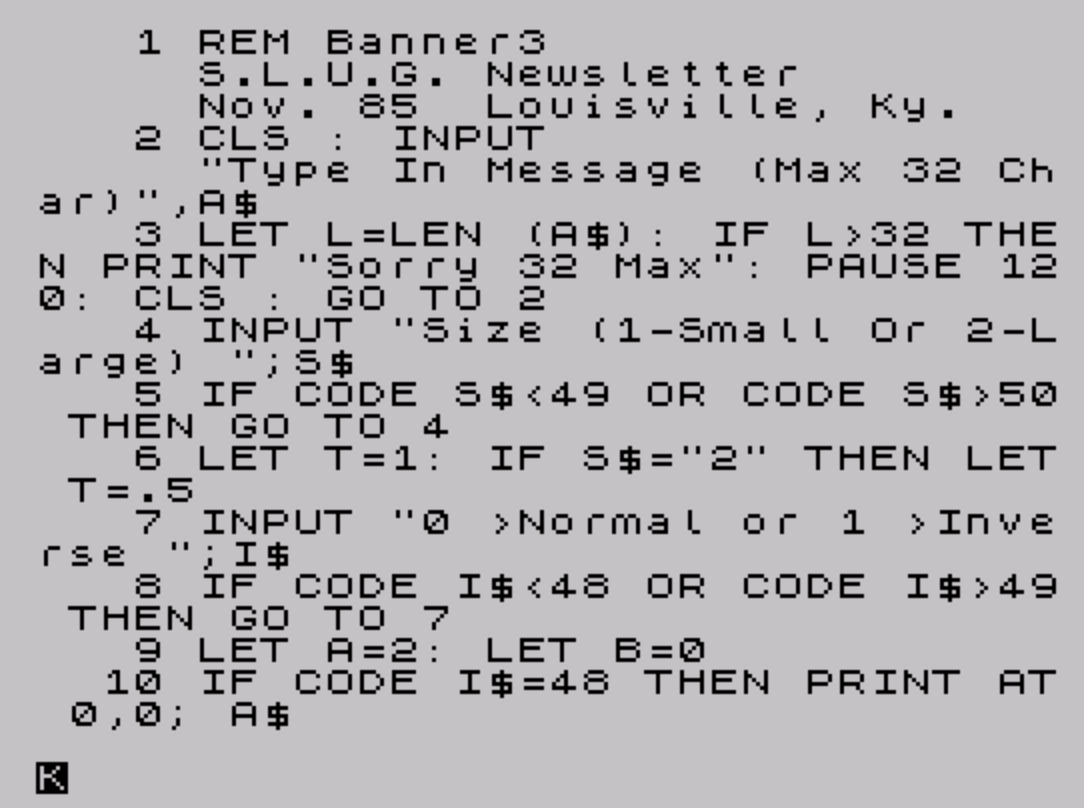
Source Code
    1 REM Banner3                     S.L.U.G. Newsletter             Nov. 85  Louisville, Ky.
    2 CLS : INPUT                     "Type In Message (Max 32 Char)",A$
    3 LET L=LEN (A$): IF L>32 THEN PRINT "Sorry 32 Max": PAUSE 120: CLS : GO TO 2
    4 INPUT "Size (1-Small Or 2-Large) ";S$
    5 IF CODE S$<49 OR CODE S$>50 THEN GO TO 4
    6 LET T=1: IF S$="2" THEN LET T=.5
    7 INPUT "0 >Normal or 1 >Inverse ";I$
    8 IF CODE I$<48 OR CODE I$>49 THEN GO TO 7
    9 LET A=2: LET B=0
   10 IF CODE I$=48 THEN PRINT AT 0,0; A$
   11 IF CODE I$=49 THEN PRINT AT 0,0; INVERSE 1;A$
   12 FOR X=0 TO (L*8)-1 STEP T
   13 FOR Y=166 TO 175 STEP T
   14 IF POINT (X,Y)=1 THEN LPRINT AT A,B;"\::";
   15 LET B=B+1: NEXT Y: LET B=0: LPRINT : LET A=A+1: NEXT X
   16 CLS : GO TO 2
 9999 SAVE "banner3" LINE 1
Note: Type-in program listings on this website use ZMAKEBAS notation for graphics characters.