
BINGO-2068 is a two-mode BINGO utility that either acts as a random ball caller or generates printable BINGO cards. The caller mode (option 1) uses a 75-element string array `y$` to track which numbers have been drawn, marking each with an asterisk to prevent repeats, and displays the called number prefixed with its BINGO column letter derived from integer arithmetic on the ball value. Card generation mode (option 2) produces up to any number of unique 5×5 BINGO cards with a FREE center square, drawing grid lines using PLOT/DRAW commands before sending each card to the printer via COPY. A decorative border subroutine at line 40 draws a rectangle using PLOT and DRAW, shared between both the title screen and the caller display. The program saves itself with an automatic LINE 1 start.
Program Analysis
Program Structure
The program is organized into four functional regions dispatched from a menu at lines 1–7:
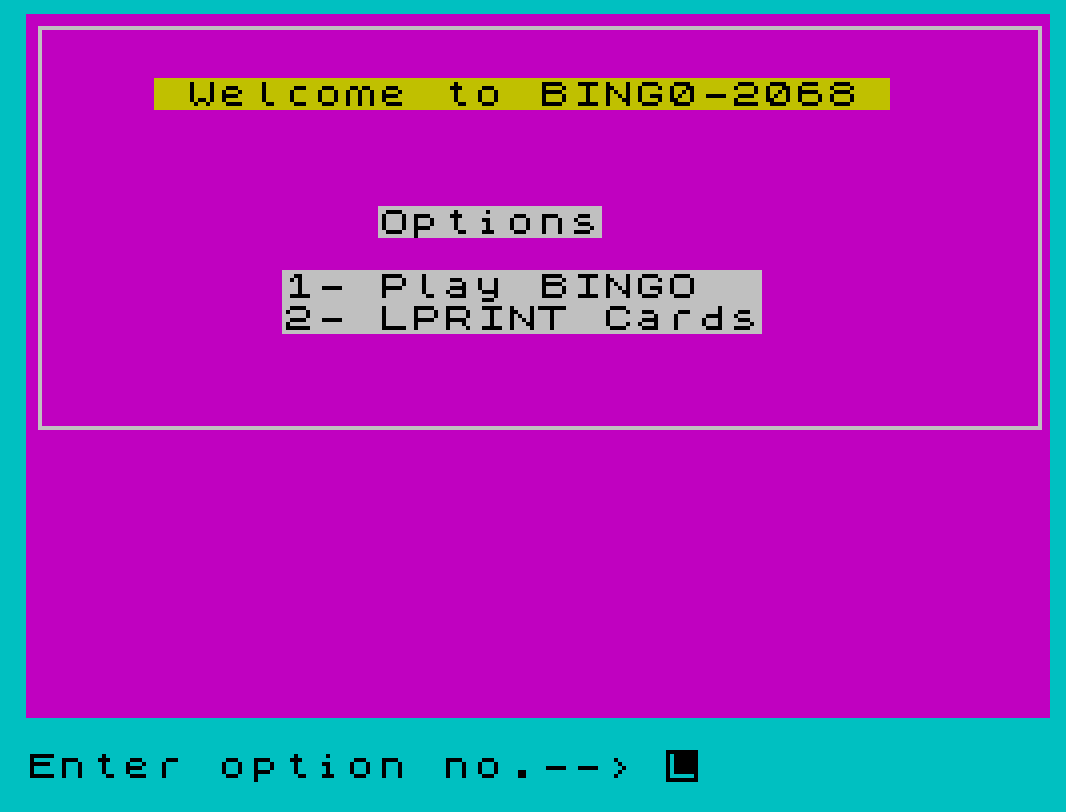
- Menu / title screen — lines 1–7: draws the welcome screen, collects option 1 or 2, and branches via the arithmetic expression
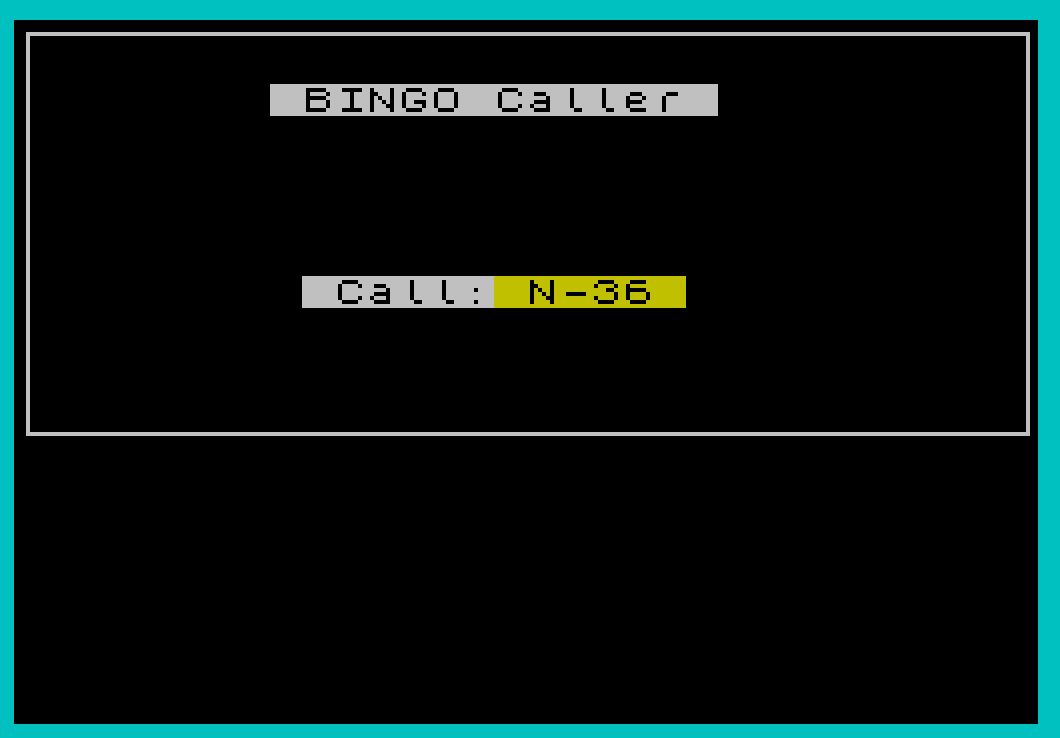
GO TO 10*(z=1)+50*(z=2). - Caller mode — lines 10–35: randomly selects balls 1–75 without repeats and displays each with its column letter.
- Border subroutine — line 40: shared PLOT/DRAW rectangle, called from both the title screen and the caller display.
- Card-printing mode — lines 50–78: generates and LPRINTs any number of unique BINGO cards.
Menu Dispatch Technique
Line 7 uses a well-known BASIC idiom: GO TO 10*(z=1)+50*(z=2). Boolean expressions evaluate to 1 (true) or 0 (false), so only one term is non-zero, producing either 10 or 50 as the destination line number. This avoids an IF … THEN … ELSE chain and is more compact.
Ball-Tracking and Column Letter Logic
A 75-character string y$ is dimensioned at line 10. Each position corresponds to a ball number; when a ball is drawn its position is set to "*". Line 20 picks a random index and retries if already marked — a simple rejection-sampling loop. The column letter is extracted at line 25 using:
l$(INT(r/15+0.95))
where l$="BINGO". The expression INT(r/15+0.95) maps ball numbers 1–15 → B, 16–30 → I, 31–45 → N, 46–60 → G, 61–75 → O by rounding to the nearest integer index (1-based substring). This avoids a lookup table or repeated IF tests.
Keypress Handling in Caller Mode
Lines 30–32 implement a three-stage keypress gate common in BASIC programs:
- Line 30: spin while a key is already held (debounce any lingering press).
- Line 31: wait until a key is pressed.
- Line 32: if that key is
"q", branch to line 99 (which does not exist — the program simply terminates with an error, a well-known exit technique).
Card Generation and Grid Drawing
Card generation (lines 55–78) re-uses y$ per card to ensure no number appears twice on a single card. For each of the five columns, a number is picked from the correct range: column z draws from (z-1)*15+1 to z*15, enforced by line 62. The FREE square is handled conditionally at lines 72–74 by testing y=3 (the middle row).
Line 77 draws the card grid using PLOT/DRAW in a loop over six vertical and six horizontal lines, then an extra horizontal line at the top of the header. Line 78 sends the screen to the printer with COPY, followed by five LPRINT calls to add spacing between cards.
Border Subroutine
The subroutine at line 40 draws a 250×100 pixel rectangle starting at (3,72) using four chained DRAW commands, sets INK to black, and returns. It is called from both the title screen (line 2) and the caller setup (line 15), making it the only reused subroutine in the program.
Notable Anomalies and Observations
- Line 35 contains
STOP : STOP— the secondSTOPis redundant but harmless. - After printing all 75 balls the program hits
STOPat line 35; there is no congratulatory message or return to menu. - The
q-key exit at line 32 targets line 99, which does not exist. This causes a “2 Variable not found” or “D BREAK” style error rather than a clean exit, but is a functional termination technique. - In card mode,
DIM y$(75)is inside the outerFOR xloop (line 55), so the tracking array is correctly reset for every new card. - The
PAPER 0: CLSat line 10 sets a black background for caller mode, while card mode usesPAPER 7: CLSfor a white background — appropriate for printing.
Variable Summary
| Variable | Purpose |
|---|---|
z | Menu option; loop counter (columns, grid lines) |
y$ | 75-character ball/number tracking string |
l$ | Column letter lookup string "BINGO" |
r | Randomly selected ball number |
c | Number of cards to print |
x | Card loop counter |
y | Row counter within a card (1–5) |
a(5) | Array holding one row’s five numbers |
Image Gallery
Source Code
    1 BORDER 5: PAPER 3: CLS
    2 PRINT PAPER 6;AT 2,4;" Welcome to BING0-2068 "; PAPER 7;AT 6,11;"Options";AT 8,8;"1- Play BINGO  ";AT 9,8;"2- LPRINT Cards": GO SUB 40: BEEP 0.05,15
    4 INPUT "Enter option no.--> ";z: IF (z<1)+(z>2) THEN GO TO 4
    6 BEEP 0.1,22: PRINT PAPER 5;AT 7+INT z,5;">>": PAUSE 90
    7 GO TO 10*(z=1)+50*(z=2)
   10 RANDOMIZE : DIM y$(75): LET l$="BINGO": PAPER 0: CLS
   12 PRINT PAPER 7;AT 2,8;" BINGO Caller ";AT 8,9;" Call: "
   15 GO SUB 40: FOR z=1 TO 75
   20 LET r=INT (RND*75)+1: IF y$(r)="*" THEN GO TO 20
   25 BEEP 0.05,25: PRINT PAPER 6;AT 8,15;" ";l$(INT (r/15+0.95));"-";r;" ": LET y$(r)="*"
   30 IF INKEY$<>"" THEN GO TO 30
   31 IF INKEY$="" THEN GO TO 31
   32 IF INKEY$="q" THEN GO TO 99
   35 NEXT z: STOP : STOP
   40 INK 7: PLOT 3,72: DRAW 250,0: DRAW 0,100: DRAW -250,0: DRAW 0,-100: INK 0: RETURN
   50 RANDOMIZE : PAPER 7: CLS
   52 INPUT "How many cards? ";c
   55 FOR x=1 TO c: DIM y$(75)
   56 CLS : PRINT TAB 5;"B";TAB 10;"I";TAB 15;"N";TAB 20;"G";TAB 25;"O": DIM a(5): PRINT
   58 FOR y=1 TO 5: PRINT
   60 FOR z=1 TO 5
   62 LET a(z)=INT (RND*15)+(z-1)*15+1
   64 IF y$(a(z))="*" THEN GO TO 62
   66 LET y$(a(z))="*": NEXT z
   70 PRINT TAB 5;a(1);TAB 10;a(2);
   72 IF y=3 THEN  PRINT TAB 14;"FREE";
   74 IF y<>3 THEN  PRINT TAB 15;a(3);
   76 PRINT TAB 20;a(4);TAB 25;a(5): PRINT : PRINT : NEXT y
   77 FOR z=1 TO 6: PLOT 28+(z-1)*40,4: DRAW 0,171: PLOT 28,4+(z-1)*32: DRAW 199,0: NEXT z: PLOT 28,165: DRAW 199,0
   78 COPY : FOR z=1 TO 5: LPRINT : NEXT z: NEXT x: GO TO 1
   90 SAVE "bingo" LINE 1
Note: Type-in program listings on this website use ZMAKEBAS notation for graphics characters.