
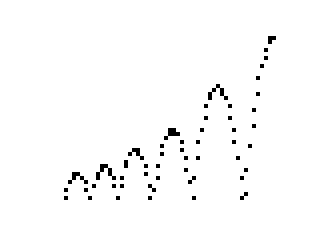
This program simulates a bouncing ball using the ZX81’s PLOT command, animating a ball that travels horizontally across the screen while following parabolic vertical motion under simulated gravity. The ball starts from a random side of the screen, with horizontal direction determined by a random test at line 90 and step size randomised at line 60. Gravity is applied each iteration by incrementing velocity V by 0.5, and bounces are modelled at line 170 by negating and damping the velocity with a divisor of 1.3. A short delay loop at lines 220–230 paces the animation before the screen is cleared and the cycle repeats indefinitely.
Program Analysis
Program Structure
The program is a continuous animation loop with no user interaction. Each iteration initialises a new ball trajectory, plots its arc frame by frame, pauses briefly, then restarts. The main sections are:
- Initialisation (lines 10–30): Seeds the random number generator, sets display mode to SLOW, and clears the screen.
- Trajectory setup (lines 40–120): Sets initial vertical position
Y, velocityV, and computes a random horizontal stepZ; randomly assigns left-to-right or right-to-left motion. - Animation loop (lines 130–210): Iterates
Xfrom start to end of screen, updating vertical position with gravity and bounce physics, then plotting each point. - Delay and repeat (lines 220–240): Runs a short busy-wait loop before jumping back to
CLSat line 30.
Physics Model
The simulation uses a simple Euler integration approach. Each horizontal step, the vertical position Y is decremented by the current upward velocity V, and then gravity is added to V by incrementing it by 0.5 (line 190). This means increasing V pulls the ball downward (since Y is reduced by V, a growing positive V moves the ball down). On bounce (line 150 detects Y<=0), Y is clamped to zero and V is negated and divided by 1.3, providing energy loss on each bounce — a classic coefficient-of-restitution approach.
Randomisation
Two sources of randomness control each trajectory:
- Horizontal step size: Line 60 computes
Z = 0.6 * (INT(RND*2)+1), giving either 0.6 or 1.2, controlling how quickly the ball traverses the screen. - Direction: Line 90 tests
RND > 0.5; if true the ball travels left-to-right (A=0, B=60); otherwise lines 100–120 setA=60, B=0and negateZfor right-to-left travel.
Coordinate System
The ZX81 PLOT command uses a 64×44 pixel grid. The horizontal range 0–60 is used (leaving a small margin), while the vertical position starts at Y=40, near the top of the 44-pixel height, so the ball falls downward over time. Initial vertical velocity V=0 means the ball starts in free-fall immediately.
Notable Techniques and Idioms
- The
SLOWcommand at line 20 ensures the ZX81 runs in its slower display-contended mode, which is required for PLOT to be visible at all on the ZX81’s memory-mapped display. - The delay loop (lines 220–230) is a standard ZX81 busy-wait; no PAUSE command is used, likely because the frame-by-frame PLOT already provides some pacing.
- Using a non-integer step value in the FOR loop (0.6 or 1.2) is an effective way to smooth horizontal motion while staying within the integer pixel grid on PLOT (the ZX81 truncates or rounds the coordinate).
RANDat line 10 without an argument seeds the RNG from the system’s internal state, ensuring varied trajectories across runs.
Variable Summary
| Variable | Role |
|---|---|
Y | Current vertical pixel position of the ball |
V | Current vertical velocity (positive = downward in this model) |
Z | Horizontal step size and direction (±0.6 or ±1.2) |
A | FOR loop start (horizontal) |
B | FOR loop end (horizontal) |
X | Current horizontal pixel position |
D | Delay loop counter |
Potential Issues
- The screen is cleared with
CLSat line 30 on every cycle, so only one ball’s path is visible at a time — there is no persistence or trail effect. - Because
Ystarts at 40 withV=0, the first bounce height depends entirely on the step count to reachY=0, which is fixed. Subsequent bounces reduce in height due to the 1.3 damping factor until the ball effectively rolls along the ground. - With a step of 1.2 and range 0–60, the FOR loop terminates at or just past 60, which may cause a slight overshoot past the screen edge; PLOT silently ignores out-of-range coordinates on the ZX81, so no crash occurs.
Image Gallery
Source Code
  10 RAND
  20 SLOW
  30 CLS
  40 LET Y=40
  50 LET V=0
  60 LET Z=0.6*(INT (RND*2)+1)
  70 LET A=0
  80 LET B=60
  90 IF RND>0.5 THEN GOTO 130
 100 LET A=60
 110 LET B=0
 120 LET Z=-Z
 130 FOR X=A TO B STEP Z
 140 LET Y=Y-V
 150 IF Y>0 THEN GOTO 190
 160 LET Y=0
 170 LET V=-V/1.3
 180 GOTO 200
 190 LET V=V+0.5
 200 PLOT X,Y
 210 NEXT X
 220 FOR D=1 TO 50
 230 NEXT D
 240 GOTO 30
 250 SAVE "1018%2"
 260 RUN
Note: Type-in program listings on this website use ZMAKEBAS notation for graphics characters.