
Bridge Builder is an action game in which the player drops sections onto a growing bridge by pressing the spacebar at the right moment, with a falling figure animation when a section is missed and a rescue helicopter sequence for second chances. The program uses custom UDG (User-Defined Graphics) characters throughout — stored separately as a CODE file and reloaded at startup — for the bridge pieces, figure, and helicopter sprites. A high-score table with up to ten entries uses joystick input to scroll through an on-screen character set for name entry. Skill level inverts the delay loop counter so that level 10 yields the smallest delay, making the car move fastest. A built-in demo mode (variable dm) auto-plays the game using RND-based spacebar simulation until the player presses space to take over.
Program Analysis
Program Structure
The program is organized into several functional regions:
- Lines 1–7: Initialization — dimension arrays, set border/paper, initialize names to “nobody”, then jump to the high-score/title screen at line 4000.
- Lines 9–14: Game setup — prompt for skill level, play a startup tune, configure demo mode.
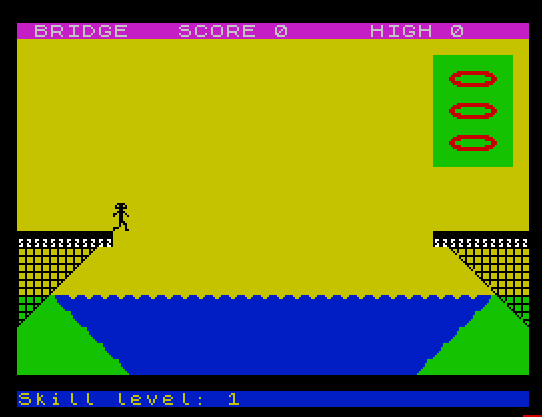
- Lines 40–85: Draw the game screen — bridge base, river, towers, and set initial game variables.
- Lines 100–140: Main game loop — animate a moving car/person across the screen, poll for spacebar.
- Lines 200–280: Drop routine — handle bridge section placement logic, determine scoring zones.
- Lines 300–399: Miss/fall sequence — animate falling figure, life-belt deduction, helicopter rescue (via GO SUB 900).
- Lines 900–999: Helicopter subroutine — animates a helicopter flying in, rescuing the figure, and flying away.
- Lines 1000–1100: Bridge-complete celebration — animate final run, add 50 bonus points one at a time, restart.
- Lines 3000–3050: Drowning/game-over sequence with “GLUG!!” text and sound.
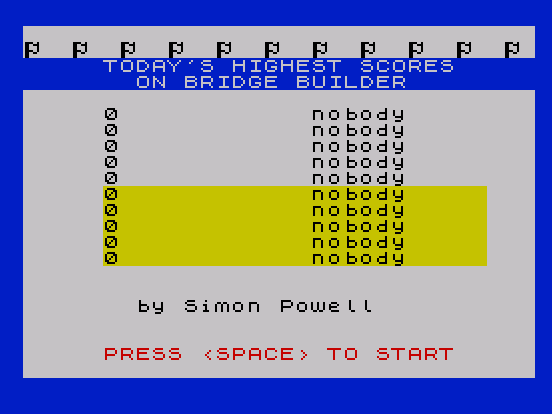
- Lines 3100–3240: High-score entry and bubble-sort.
- Lines 4000–4070: Title/high-score display with color-cycling and demo mode launch.
- Lines 9998–9999: SAVE/LOAD for program and UDG data.
UDG Usage
The game makes extensive use of User-Defined Graphics. UDG data is saved as a separate CODE block (SAVE "udg" CODE USR "a",21*8) and reloaded at startup (LOAD "udg" CODE), which is a common technique to preserve graphics across resets. The escapes \a through \u appear throughout PRINT statements and represent bridge sections, the walking figure, helicopter parts, water, and other sprites. At least 21 UDGs (168 bytes) are defined.
Skill Level and Delay Loop
After reading the skill level k (1–10), line 14 converts it with LET k=11-k. This means a skill level of 10 becomes k=1 (one inner loop iteration, fastest) and skill level 1 becomes k=10 (ten iterations, slowest). The inner delay loop at lines 119–121 iterates k times per animation frame, neatly inverting the difficulty scale without any conditional branching.
Demo Mode
The flag variable dm enables a fully automatic demo. In demo mode, line 12 forces k=0 (no delay) and displays a “DEMO” banner. Line 122 uses RND>.1 to trigger the drop subroutine with 90% probability when the car reaches position n, simulating a mostly-successful player. Demo mode runs until the player presses space on the title screen (line 4040 polls INKEY$ inside a color-cycling loop). Game over in demo mode returns directly to the title screen (line 3080).
Joystick-Based Name Entry
The high-score name entry (lines 3135–3190) is a custom scrolling character picker. A 34-character string z$ is doubled to allow circular scrolling. STICK (1,1) returns 8 for right and 4 for left, used to increment or decrement the cursor position c. STICK (2,1)=1 fires to select a character, appending it to h$(10). CHR$ 13 (Enter) also terminates entry via line 3173. Bounds-checking at lines 3171–3172 wraps c within 1–34.
High-Score Bubble Sort
Lines 3200–3240 implement a standard bubble sort over the parallel arrays h() (scores) and h$() (names). A flag f is reset to 0 before each pass; any swap sets f=1, triggering another pass via IF f=1 THEN GO TO 3200. Both the numeric and string arrays are swapped in tandem using temporary variables t and a$.
Screen Drawing Techniques
The game uses AT, TAB, PAPER, INK, OVER, INVERSE, and FLASH inline within PRINT statements extensively to build a multi-colored game screen without clearing it between updates. The river (lines 50–70) is drawn with block graphics and UDGs using color attributes to create the illusion of depth. The bridge towers at lines 60 use TAB z and AT 15+z, 31-z to draw diagonal supports.
Score Display and Bonus Points
The score s is updated in line 137 with the formula INT((11-k)/2)+(k+10), giving higher reward for harder skill levels. The bridge-completion bonus at line 1030 adds 50 points one at a time in a loop, printing each updated score with FLASH 1 for visual effect.
Notable Techniques
POKE 23693,56sets the screen scroll delay counter to prevent automatic scrolling during printing.POKE 23624,141sets the system variable controlling the INPUT line position.- String slicing on a literal:
"50 points for completing bridge"(z+1)at line 1010 scrolls the message across the screen one character at a time by advancing the slice start index. PAPER 8andINK 9are used in several places to preserve existing color attributes (transparent ink/paper), a useful technique for overlaying sprites without disturbing background colors.- The
"S" AND lv<>1idiom at line 390 appends an “S” to “LIFE-BELT” only when the count is not 1, providing grammatically correct pluralization. - Line 122 calls
GO SUB 2(demo auto-drop) andGO SUB 200(the drop action) —GO SUB 200without a RETURN causes execution to fall through to line 130 via theGO TO 130at line 280, which is intentional flow control.
Anomalies and Notes
- Line 300 is referenced by
GO TO 300at line 140 but does not exist; execution falls through to line 320. This is the standard “fall to next line” technique. - Variable
lvis used in line 386 as lowercase but referenced asLV(uppercase) in the PRINT at line 390 ("S" AND LV<>1). In Sinclair BASIC, variable names are case-insensitive in execution, so this is not a bug. - Line 82 uses
FOR z=1 TO n-1to print bridge sections, but after a miss at line 399 execution returns to line 82 directly, redrawing only sections already placed — correctly restoring the board without re-entering the full setup. - The
GO SUB 2call in demo mode (line 122) targets line 2, which simply checksINKEY$=" "and returns — effectively a lightweight “did the player press space?” check usable as a subroutine.
Image Gallery
Source Code
    1 GO TO 4
    2 IF INKEY$=" " THEN GO TO 9
    3 RETURN
    4 DIM h(10): DIM h$(10,10): BORDER 1: POKE 23693,56: CLS
    5 FOR z=1 TO 10: LET h$(z)="nobody": NEXT z
    7 GO TO 4000
    9 LET dm=0: POKE 23624,141: BEEP .3,-10: BEEP .1,-3: INPUT AT 0,0;"Skill level? (1-10) 10=Hard"'"?";k: BORDER 1
   10 IF NOT dm THEN PAPER 5: CLS : PRINT AT 10,0; INK 0;"<SPACE>=Drop section of bridge"
   11 FOR x=1 TO 10: FOR z=x TO x+50 STEP 10: BEEP .01,z: NEXT z: NEXT x: BORDER 0: PAPER 6: INK 0: CLS
   12 IF dm THEN LET k=0: PRINT #0; INK 5;"DEMO - "; INK 4;"Press space to start"
   14 IF NOT dm THEN PRINT #0; PAPER 1; INK 6;"Skill level: ";k,,: LET k=11-k
   40 PRINT AT 0,0; PAPER 3; INK 7;" BRIDGE   SCORE 0     HIGH ";H(1),
   50 FOR z=21 TO 18 STEP -1: PRINT AT z,0; PAPER 1,,: NEXT z: PRINT AT 17,0; INK 1;"\l\l"; PAPER 1;"\::"; PAPER 6;"\l\l\l\l\l\l\l\l\l\l\l\l\l\l\l\l\l\l\l\l\l\l\l\l\l\l"; PAPER 1;" "; PAPER 6;"\l\l"
   60 FOR z=6 TO 2 STEP -1: PRINT AT 15+z,0; PAPER 4;TAB z; INVERSE 0; PAPER 8; INK 4;"\s";AT 15+z,31-z;"\t"; PAPER 4,: NEXT z
   70 FOR z=0 TO 4: PRINT PAPER 8;AT 18-z,0;"\e\e\e\e\e\e\e"( TO z);"\d";AT 18-z,31-z;"\u";"\e\e\e\e\e\e\e"( TO z): NEXT z
   75 PRINT PAPER 7; BRIGHT 1; INK 0;AT 13,0;"\f\f\f\f\f\f";AT 13,26;"\f\f\f\f\f\f"
   76 FOR z=3 TO 7 STEP 2: PRINT AT z,27; INK 2;"\m\n\o": NEXT z
   78 FOR z=2 TO 8: PRINT OVER 1;AT z,26; INK 2; PAPER 4;"     ": NEXT z
   80 LET n=5: LET s=0
   81 LET lv=3
   82 FOR z=1 TO n-1: PRINT AT 11,z;" \i";AT 12,z;" \h";: NEXT z
   83 IF n=25 THEN GO TO 1000
   84 LET d=1: LET h=0
   85 INK 0
  100 FOR a=29 TO 0 STEP -1
  110 PRINT AT 10,a;"\a\b "
  119 FOR j=1 TO k
  120 IF d=1 THEN IF INKEY$=" " THEN GO TO 200
  121 NEXT j
  122 IF dm THEN GO SUB 2: IF a=n THEN IF RND>.1 THEN GO SUB 200
  130 NEXT a
  135 PRINT AT 10,0;"  "
  137 IF h=n THEN PRINT AT 11,n;" \i";AT 12,n;" \h": LET n=n+1: LET s=s+INT ((11-k)/2)+(k+10): PRINT AT 0,16; PAPER 3; INK 7;s: GO TO 83
  140 GO TO 300
  190 STOP
  200 LET d=0: IF a<>n THEN LET l=16
  210 IF a=n THEN LET l=13
  220 IF a<n OR a>24 THEN LET l=12
  250 FOR z=12 TO l
  260 PRINT AT z,a+1;"\f";AT z-1,a+1;" "
  270 NEXT z: PRINT AT l,a+1; PAPER 7;"\f"
  275 IF a<>n AND (a>n AND a<25) THEN PRINT AT z-1,a+1;" "
  276 LET h=a
  280 GO TO 130
  320 PRINT AT 11,n;" ";AT 12,n;" ";AT 11,n+1;"\i";AT 12,n+1;"\h"
  340 FOR z=1 TO 5
  355 BEEP .1,50: PRINT AT 11,n+1;"\i";AT 12,n+1;"\h"
  357 BEEP .1,0: PRINT AT 11,n+1;"\k";AT 12,n+1;"\j"
  360 NEXT z
  370 FOR z=10 TO 15: PRINT AT z,n+1;"\k";AT z+1,n+1;"\j";AT z-1,n+1;" "
  375 NEXT z
  378 PRINT AT 15,n+1;" ";AT 16,n+1;"\k"
  380 PRINT AT 15,n+2;"HELP!": FOR z=1 TO 5: PRINT AT 16,n+1;"\i": BEEP .1,0: PRINT AT 16,n+1;"\k": BEEP .1,10: NEXT z
  385 LET lv=lv-1
  386 IF lv=-1 THEN GO TO 2000
  387 GO SUB 900
  390 PRINT INK 2; PAPER 6; FLASH 1;AT 10,8;lv;" LIFE-BELT";"S" AND LV<>1;" LEFT"
  395 FOR X=1 TO 10: FOR Z=X TO X+50 STEP 10: BEEP .01,Z: NEXT z: NEXT x
  397 PRINT AT 10,8,,AT 15,n+2;"     ";AT 16,n+1;" "
  398 FOR z=0 TO 4: PRINT PAPER 8;AT 18-z,31-z;"\u";"\e\e\e\e\e\e\e"( TO z): NEXT z: PRINT PAPER 7; BRIGHT 1; INK 0;AT 13,26;"\f\f\f\f\f\f"
  399 GO TO 82
  900 INK 2: LET d=3+(lv*2)
  905 PRINT AT 15,n+1;"      "
  910 FOR z=27 TO n+1 STEP -1
  920 PRINT PAPER 8;AT d,z; INK 2;"\m\n\o "
  925 BEEP .01,z
  930 NEXT z
  935 FOR z=d TO 1 STEP -1: PRINT AT z,n+1;" \p": NEXT z
  940 FOR z=d TO 16
  950 PRINT AT z,n+1;"\m\n\o";AT z-1,n+1;" \p "
  955 BEEP .01,z
  960 NEXT z
  965 FOR z=15 TO 1 STEP -1
  967 PRINT AT z,n+1;"\m\q\o";AT z+1,n+1;"   "
  968 BEEP .01,z
  969 NEXT z: FOR z=n+1 TO 0 STEP -1: PRINT AT 1,z;"\m\q\o ": NEXT z:
  970 FOR z=2 TO 12: PRINT AT z,0;"\m\q\o";AT z-1,0;" \p ": BEEP .01,z: NEXT z
  980 PRINT AT 11,0; INK 0;" \i "'" \h ": FOR z=9 TO 1 STEP -1: PRINT AT z,0;"\m\n\o"'"   ": NEXT z
  985 PRINT AT 1,0;"    "
  999 INK 0: RETURN
 1000 FOR z=25 TO 30: PRINT AT 11,z;" \i";AT 12,z;" \h": BEEP .01,z: NEXT z
 1001 INK 1: PRINT AT 11,31;" ";AT 12,31;" "
 1010 FOR z=0 TO 29: BEEP .001,33: PRINT INK 1;AT 12,z;"50 points for completing bridge"(z+1);"\o\g";"\c\g": NEXT z
 1020 PRINT AT 12,29;"ge "
 1030 PRINT FLASH 1;AT 12,0; OVER 1; INK 8,,: FOR z=1 TO 50: LET s=s+1: PRINT FLASH 1; PAPER 1; INK 7;AT 0,16;s: BEEP .01,z: NEXT z: PRINT PAPER 3; INK 7;AT 0,16;s
 1040 PRINT AT 12,0,,: PRINT AT 13,6,TAB 26;
 1100 LET n=5: GO TO 82
 3000 LET n=n+1: FOR z=17 TO 20
 3010 PRINT AT z-2,n+1; PAPER z-16; INK 7;"GLUG!!"; PAPER 8;AT Z-1,N;" ";AT Z,N;"\i";AT z+1,n;"\j": BEEP .1,22-z
 3020 NEXT z
 3030 BEEP .1,48: BEEP .1,36: BEEP .1,24: BEEP 1,12: BEEP .2,0
 3040 PRINT AT 20,n; PAPER 1; INK 7;"\i"
 3050 PRINT AT 10,11; INK 1;"GAME OVER";AT 10,11;"DEMO" AND dm
 3060 FOR z=1 TO 300: NEXT z
 3070 CLS
 3080 IF dm THEN GO TO 4000
 3100 FOR z=1 TO 10
 3110 IF s<=h(z) THEN NEXT z: GO TO 4000
 3120 PRINT "YOU HAVE GOTTEN ONE OF TODAY'S"''"HIGHEST SCORES. PLEASE ENTER"''"   YOUR NAME."
 3135 LET C=21: LET z$=" ?ABCDEFGHIJKLMNOPQRSTUVWXYZ!,-+*#"
 3137 LET H$(10)="": LET Z$=Z$+Z$: PRINT AT 11,16;"^";AT 10,16; PAPER 4;" "; PAPER 7;AT 15,10;"""          """
 3140 FOR Z=1 TO 10
 3142 PRINT AT 15,10+Z; PAPER 7; INK 5; FLASH 1;" "
 3160 PRINT AT 10,0; PAPER 8;z$(c TO c+31)
 3170 LET c=c+( STICK (1,1)=8)-( STICK (1,1)=4): IF c>34 THEN LET c=1
 3172 IF c<1 THEN LET c=34
 3173 IF INKEY$=CHR$ 13 THEN GO TO 3190
 3175 IF STICK (2,1)=1 THEN LET h$(10,z)=z$(c+16): PRINT PAPER 7;AT 15,11; FLASH 1; INK 2; PAPER 6;h$(10): FOR x=1 TO 50 STEP 10: BEEP .01,x: NEXT x: NEXT z: GO TO 3190
 3180 GO TO 3160
 3190 LET h(10)=s: PRINT AT 15,11; FLASH 1; INK 2; PAPER 6;h$(10)
 3200 LET f=0
 3210 FOR z=1 TO 9
 3215 BEEP .005,z
 3220 IF h(z)<h(z+1) THEN LET t=h(z+1): LET h(z+1)=h(z): LET h(z)=t: LET a$=h$(z+1): LET h$(z+1)=h$(z): LET h$(z)=a$: LET f=1
 3230 NEXT z
 3240 IF f=1 THEN GO TO 3200
 4000 CLS : PRINT INK 0'"\r  \r  \r  \r  \r  \r  \r  \r  \r  \r  \r "; PAPER 1; INK 7;"     TODAY'S HIGHEST SCORES","       ON BRIDGE BUILDER",
 4010 FOR Z=1 TO 10: PRINT AT Z+4,5;H(Z);TAB 18;H$(Z): NEXT Z
 4020 PRINT AT 17,7;"by Simon Powell";AT 20,5; FLASH 1; INK 2;"PRESS <SPACE> TO START"
 4030 FOR o=1 TO 5: FOR z=1 TO 7
 4040 FOR x=1 TO 10: PRINT AT x+4,5; PAPER z; INK 9; OVER 1;TAB 29;: IF INKEY$=" " THEN GO TO 9
 4050 NEXT x: NEXT z: NEXT o
 4070 LET dm=1: GO TO 10
 9998 SAVE "bridge" LINE 9999: SAVE "udg"CODE USR "a",21*8
 9999 LOAD "udg"CODE : RUN
Note: Type-in program listings on this website use ZMAKEBAS notation for graphics characters.