
This program implements a general-purpose columnar calculator that lets users define named variables with per-column values, write algebraic formulas referencing those variables, and then evaluate and display results in a tabular format. Up to 20 lines (rows) and 10 columns are supported, with the data stored in two-dimensional string arrays (A$, B$, C$, E$) and numeric arrays (B, D). A key technical feature is the formula parser in subroutines 1490–1680, which scans formula strings character by character, identifies variable names and LINE references, and dynamically constructs evaluable BASIC expressions by substituting array references like B(J,N) or D(I,J) before using VAL to compute results. The program supports saving and verifying its state to tape under the filename “CALCULATOR.”
Program Analysis
Program Structure
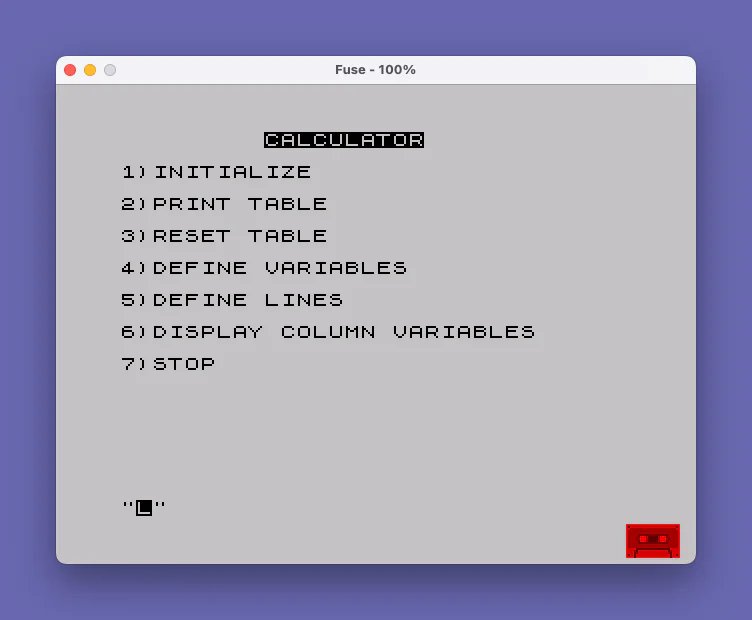
The program is organized as a menu-driven shell at lines 1000–1210, with self-contained subroutines for each function. The REMs at lines 90–200 serve as developer notes describing the intended workflow. The main loop at line 1030 displays a menu, reads a single-character input in Z$, dispatches via a series of IF … THEN GO SUB statements, and loops back at line 1190.
| Line Range | Section |
|---|---|
| 90–200 | Developer instruction comments |
| 1000–1210 | Main menu loop and STOP/SAVE handler |
| 1220–1290 | Initialize — allocates all arrays |
| 1300–1390 | Print table — displays rows for a chosen column |
| 1400–1480 | Reset table — re-evaluates all formulas into D() |
| 1490–1620 | Identify variables — formula string parser |
| 1630–1680 | Evaluate — substitutes variable/LINE tokens with array refs |
| 1690–1800 | Define variables — name and per-column values |
| 1810–1910 | Define lines — row titles and formulas |
| 1920–1990 | Display column variables — view/edit B() values by column |
Data Model
The program maintains a grid of up to 20 rows (“lines”) and 10 columns. Two distinct kinds of row exist: named variables (indexed by VARIABLES) holding numeric per-column values in B(20,10) with names in B$(20,10), and formula lines (indexed by LINES) holding title strings in A$(20,10), source formula strings in C$(20,50), compiled expression strings in E$(20,50), and computed results in D(20,10).
Formula Parser (Lines 1490–1680)
The most technically sophisticated part of the program is the two-pass formula compiler implemented in subroutines 1490 and 1630. Subroutine 1490 scans the formula string F$ character by character, accumulating alphabetic characters into token buffer V$. When a non-alphabetic (or non-digit continuation for LINE tokens) character is encountered, it calls subroutine 1630 to resolve the token.
Subroutine 1630 determines whether the token starts with LINE followed by digits, translating it to a reference of the form D(n,J) (where J is the current column loop variable). Otherwise it searches the named-variable list and substitutes B(j,J). The resulting compiled string G$ is stored in E$(K) and later evaluated at runtime using VAL E$(I) inside the column loop at line 1460. This means the compiled expression must be valid BASIC numeric syntax at evaluation time, with J as a live variable providing the column index.
Key BASIC Idioms
- Alternating row colors: Line 1350 uses
PAPER (5+2*(I/2=INT(I/2)))to alternate between PAPER 5 (cyan) and PAPER 7 (white) on odd/even rows — a compact parity trick using the boolean result of the equality test as 0 or 1. - String truncation for display: Line 1360 checks
LEN M$>10and prints only the first 10 characters with a sliceM$(TO 10)to prevent overflow in the narrow display column. - Self-referential LET to suppress optimizer warnings: Lines 1550–1570 use
LET I=Ias a no-op before compoundIFconditions — a workaround allowing multiple conditions chained after a singleIFby exploiting the colon separator. - Sentinel strings for UI exit:
"ZZZ"and"DDD"are used as exit/delete sentinels in input prompts at lines 1770 and 1980, avoiding numeric input parsing for control flow.
Initialization and Array Sizing
Line 1250 allocates A$(20,10), B$(20,10), C$(20,50), and E$(20,50). Notably, B$(20,10) is used to store variable names of up to 10 characters, and the lookup at line 1670 compares V$ against B$(J, 1 TO LEN V$), enabling prefix matching regardless of trailing padding spaces. This is necessary because Sinclair BASIC pads fixed-length string array elements with spaces.
Save and Verify
The exit handler at line 1200 offers to save the entire program (including the populated arrays in its variables area) with SAVE "CALCULATOR" followed by VERIFY "CALCULATOR", with a PAUSE 0 pause between them to allow tape rewinding. This is a standard tape-based persistence pattern.
Bugs and Anomalies
- Reset table loop bug (lines 1450–1470): The inner loop iterates
Jfrom 1 toCOLUMNS, andVAL E$(I)is evaluated each iteration withJas a live variable — this is intentional and correct. However,D(I,J)is written inside theJloop, so each column gets a fresh evaluation. The outerKloop at line 1440 pre-compiles formulas withJreferenced symbolically. This is architecturally sound but requires the user to call “Reset Table” after any variable change. - LINE reference digit handling (line 1550): The parser only appends a digit to a
LINEtoken if the current character is 0–9, but does not handle multi-digit line numbers gracefully — it stops at the first non-digit. This limits line references to the numeric suffix only, which works as long as the suffix uniquely identifies a row index. - Variable not found (line 1670): When a variable is not found, the subroutine sets
IND=0butINDis never checked by the caller, so formula compilation silently produces a malformedG$that will likely cause an error atVALevaluation time. - Line 1560 — unreachable RETURN: The
RETURNat the end of line 1560 would exit subroutine 1490 entirely upon detecting an undefined LINE reference, but execution only reaches it if the specific compound condition is met. This is a partial error-handling mechanism.
Image Gallery
Source Code
   90 REM "CALCULATOR"
  100 REM INSTRUCTIONS:
  110 REM 1)DEFINE VARIABLES
  120 REM 2)DEFINE LINES
  130 REM 3)GOTO RESET TABLE
  140 REM 4)MAKE SURE 10 COLUMNS            ARE RESET!
  150 REM 5)NOW PRINT TABLE!
  160 REM 6)CHANGE FORMULAE OR              SAVE PROGRAM
  170 REM 7)CUSS AT AUTHOR!!!!!
  180 REM
  190 REM
  200 REM
 1000 REM ***********************
 1010 REM MENU
 1020 REM ***********************
 1030 CLS : INK 0: PAPER 7: PRINT "         CALCULATOR"
 1040 PRINT '"1)INITIALIZE"
 1050 PRINT '"2)PRINT TABLE"
 1060 PRINT '"3)RESET TABLE"
 1070 PRINT '"4)DEFINE VARIABLES"
 1080 PRINT '"5)DEFINE LINES"
 1090 PRINT '"6)DISPLAY COLUMN VARIABLES"
 1100 PRINT '"7)STOP"
 1110 INPUT Z$: CLS
 1120 IF Z$="1" THEN GO SUB 1220
 1130 IF Z$="2" THEN GO SUB 1300
 1140 IF Z$="3" THEN GO SUB 1400
 1150 IF Z$="4" THEN GO SUB 1690
 1160 IF Z$="5" THEN GO SUB 1810
 1170 IF Z$="6" THEN GO SUB 1920
 1180 IF Z$="7" THEN GO TO 1200
 1190 CLS : GO TO 1030
 1200 PRINT AT 10,10;"CALCULATOR": INPUT "HAVE YOU ENTERED NEW DATA YOU   WISH TO SAVE? (Y/N) ";Q$: IF Q$="Y" THEN SAVE "CALCULATOR": BEEP 1,40: PRINT "REWIND THEN ANY KEY TO VERIFY.": PAUSE 0: VERIFY "CALCULATOR": PRINT "VERIFIED"
 1210 STOP
 1220 REM ***********************
 1230 REM INITIALIZE
 1240 REM ***********************
 1250 DIM A$(20,10): DIM B$(20,10): DIM C$(20,50): DIM E$(20,50)
 1260 DIM B(20,10): DIM D(20,10)
 1270 LET LINES=0: LET VARIABLES=0
 1290 RETURN
 1300 REM ***********************
 1310 REM PRINT TABLE
 1320 REM ***********************
 1330 INPUT "COLUMN FOR DISPLAY? (0=QUIT)";COLUMN: PAPER 7: IF COLUMN=0 THEN PAPER 7: RETURN
 1340 CLS : PRINT "LINES      FIGURES"
 1350 FOR I=1 TO LINES: PAPER (5+2*(I/2=INT (I/2))): PRINT A$(I);" ";
 1360 LET M$=STR$ D(I,COLUMN): IF LEN M$>10 THEN PRINT M$( TO 10): GO TO 1380
 1370 PRINT M$
 1380 NEXT I
 1390 GO TO 1330
 1400 REM ***********************
 1410 REM RESET TABLE
 1420 REM ***********************
 1430 INPUT "HOW MANY COLUMNS? ";COLUMNS
 1440 FOR K=1 TO LINES: LET F$=C$(K): GO SUB 1490: LET E$(K)=G$: NEXT K
 1450 FOR I=1 TO LINES: FOR J=1 TO COLUMNS
 1460 LET D(I,J)=VAL E$(I)
 1470 NEXT J: NEXT I
 1480 RETURN
 1490 REM ***********************
 1500 REM IDENTIFY VARIABLES
 1510 REM ***********************
 1520 LET G$="": LET V$=""
 1530 FOR I=1 TO LEN F$: IF F$(I)=" " THEN GO TO 1610
 1540 IF F$(I)>="A" AND F$(I)<="Z" THEN LET V$=V$+F$(I): GO TO 1600
 1550 IF LEN V$>=4 THEN LET I=I: IF V$(1 TO 4)="LINE" AND (F$(I)>="0" AND F$(I)<="9") THEN LET V$=V$+F$(I): GO TO 1600
 1560 IF LEN V$>=4 THEN LET I=I: IF V$(1 TO 4)="LINE" AND LEN V$=4 AND ((F$(I)<"0" OR F$(I)>"Z") OR (F$(I)<"A" AND F$(I)>"9")) THEN PRINT "LINE UNDEFINED": PAUSE 200: RETURN
 1570 IF LEN V$>=4 THEN LET I=I: IF V$(1 TO 4)="LINE" AND (F$(I)<"A" OR F$(I)>"Z") THEN GO SUB 1630: LET V$="": LET G$=G$+F$(I): GO TO 1600
 1580 IF V$<>"" AND (F$(I)<"A" OR F$(I)>"Z") THEN GO SUB 1630: LET G$=G$+F$(I): LET V$="": GO TO 1600
 1590 LET G$=G$+F$(I)
 1600 NEXT I
 1610 IF LEN V$>0 THEN GO SUB 1630
 1620 RETURN
 1630 REM ***********************
 1640 REM EVALUATE
 1650 REM ***********************
 1660 IF LEN V$>=4 THEN LET I=I: IF V$(1 TO 4)="LINE" THEN LET G$=G$+"D("+V$(5 TO )+",J)": RETURN
 1670 FOR J=1 TO VARIABLES: IF V$<>B$(J,1 TO LEN V$) THEN NEXT J: PRINT "VARIABLE ";V$;" NOT FOUND.": PAUSE 200: LET IND=0: RETURN
 1680 LET G$=G$+"B("+STR$ J+",J)": RETURN
 1690 REM ***********************
 1700 REM DEFINE VARIABLES
 1710 REM ***********************
 1720 CLS : FOR I=1 TO VARIABLES: PRINT I;") ";B$(I): NEXT I
 1730 INPUT "1)EXISTING   2)NEW   3)QUIT ";Q$: IF Q$="3" THEN RETURN
 1740 IF Q$="1" THEN INPUT "NUMBER? ";N: GO TO 1760
 1750 IF Q$="2" THEN INPUT "VARIABLE NAME? ";N$: LET VARIABLES=VARIABLES+1: LET N=VARIABLES: LET B$(VARIABLES)=N$
 1760 CLS : PRINT B$(N): FOR I=1 TO 10: PRINT I;") ";B(N,I): NEXT I
 1770 INPUT "NUMBER ""ZZZ"" QUIT ""DDD"" DELETE  ";Q$: IF Q$="ZZZ" THEN GO TO 1720
 1780 IF Q$="DDD" THEN FOR I=N TO VARIABLES-1: LET B$(I)=B$(I+1): FOR J=1 TO 10: LET B(I,J)=B(I+1,J): NEXT J: NEXT I: LET B$(VARIABLES)="": FOR I=1 TO 10: LET B(VARIABLES,I)=0: NEXT I: LET VARIABLES=VARIABLES-1: RETURN
 1790 INPUT "VALUE? (""X"" EQUAL TO COLUMN ONE) ";N$: IF N$="X" THEN LET B(N,VAL Q$)=B(N,1): GO TO 1760
 1800 LET B(N,VAL Q$)=VAL N$: GO TO 1760
 1810 REM ***********************
 1820 REM DEFINE LINES
 1830 REM ***********************
 1840 CLS : PRINT "            LINES"
 1850 FOR I=1 TO LINES: PRINT I;")";""+A$(I)+"";C$(I): NEXT I
 1860 INPUT "1)EXISTING   2)NEW   3)DELETE   4)QUIT";Q$: IF Q$="4" THEN RETURN
 1870 IF Q$="2" THEN INPUT "LINE TITLE? ";N$: LET LINES=LINES+1: LET N=LINES: LET A$(LINES)=N$: INPUT "FORMULA? ";F$: LET C$(LINES)=F$: GO SUB 1490: LET E$(N)=G$: GO TO 1840
 1880 IF Q$="1" THEN INPUT "NUMBER? ";N: INPUT "NEW TITLE? (Y/N) ";T$: IF T$="Y" THEN INPUT "SPECIFY NEW TITLE: ";T$: LET A$(N)=T$
 1890 IF Q$="1" THEN INPUT "NEW FORMULA? (Y/N) ";T$: IF T$="Y" THEN INPUT "SPECIFY NEW FORMULA: ";F$: LET C$(N)=F$: GO SUB 1490: LET E$(N)=G$: GO TO 1840
 1900 IF Q$="3" THEN INPUT "NUMBER? ";N: FOR I=N TO LINES-1: LET A$(I)=A$(I+1): LET C$(I)=C$(I+1): NEXT I: LET A$(LINES)="": LET C$(LINES)="": LET LINES=LINES-1
 1910 RETURN
 1920 REM ***********************
 1930 REM DISPLAY COLUMN
 1940 REM ***********************
 1950 CLS : INPUT "WHICH COLUMN? (0 TO QUIT) ";N: IF N=0 THEN RETURN
 1960 CLS : PRINT "COLUMN ";N
 1970 FOR I=1 TO VARIABLES: PRINT I;") ";B$(I);" ";B(I,N): NEXT I
 1980 INPUT "NUMBER FOR AMENDMENT ""ZZZ"" QUIT ";Q$: IF Q$="ZZZ" THEN GO TO 1950
 1990 INPUT "NEW VALUE FOR VARIABLE? ";R: LET B(VAL Q$,N)=R: GO TO 1960
Note: Type-in program listings on this website use ZMAKEBAS notation for graphics characters.